Introduction
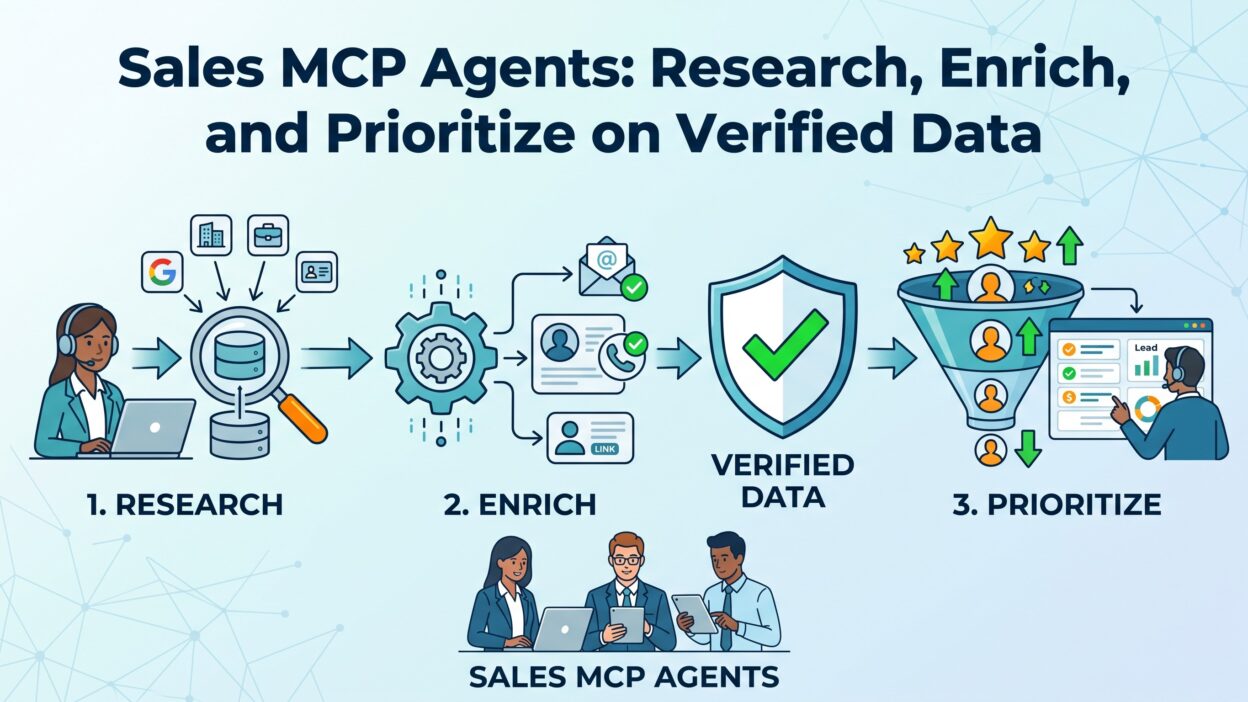
TL;DR A rep opens a new lead with almost nothing to go on. A name, a company, maybe an email. Sales MCP Agents close that gap fast. They pull verified data from multiple sources, enrich the record automatically, and rank the lead against every other account in the pipeline. This guide explains what Sales MCP Agents are, how they research and enrich accounts, and why verified data matters more than raw volume in 2026.
Model Context Protocol changed how AI agents connect to outside tools. Instead of building a custom integration for every CRM, database, or enrichment provider, an agent now speaks one standard language across all of them. Sales MCP Agents sit on top of that standard, turning a messy stack of point tools into one connected research and prioritization engine. The rest of this article breaks down exactly how that works.
Sales teams have spent years stitching together CRMs, enrichment tools, and intent platforms through brittle, custom-built connections. Every new tool meant another integration project, another maintenance headache, and another point of failure when an API changed without warning. MCP removes that friction by giving every tool one shared language to speak. Sales MCP Agents are simply the sales-focused product of that shift, built to research, enrich, and prioritize through a stack that finally talks to itself.
Table of Contents
What Are Sales MCP Agents
Defining Model Context Protocol in Plain Terms
Model Context Protocol, known as MCP, works as an open standard that lets an AI agent call external tools through one consistent interface. A developer no longer builds a separate connection for every data source a sales team wants to use. Instead, each tool exposes an MCP server, and any compatible agent can call it. Sales MCP Agents rely on this exact structure to reach CRM records, enrichment databases, and intent signals without custom code holding everything together.
How This Differs From a Regular Sales Bot
A basic sales bot follows a fixed script and pulls from one connected system at a time. These agents work differently. They pull from several verified sources in a single research pass, then combine everything into one clean output. A bot answers a question. An agent researches, enriches, and prioritizes in sequence, without a human stitching the steps together manually.
Why Verified Data Matters for Sales MCP Agents
The Cost of Bad Data in a Sales Pipeline
A wrong job title or a stale phone number wastes a rep’s time fast. Bad data compounds too, since one incorrect field often feeds into a scoring model and skews prioritization for an entire list. This category of tool, built around verified sources, avoids this trap by pulling from providers that confirm accuracy before data ever reaches a rep’s screen.
What Counts as Verified Data
Verified data comes from sources that confirm a fact through more than one signal. A firmographic provider cross-checking a company’s headcount against public filings counts as verified. A single scraped LinkedIn field with no confirmation does not carry the same weight. Agents built on strong data partners lean on this distinction constantly, weighting confirmed facts higher than unconfirmed guesses.
How Sales MCP Agents Research Accounts
Pulling From Multiple Connected Sources
A research pass starts the moment a rep enters a company name or a domain. The agent queries several connected MCP servers at once, covering firmographics, technographics, funding history, and recent news. Each source contributes a piece of the picture, and the agent stitches those pieces into a single account view within minutes.
Reading Signals Beyond Basic Firmographics
Company size and industry only tell part of the story. These agents also read intent signals like recent hiring surges, technology adoption changes, and funding events. A company that just raised a Series B round and posted five new engineering roles looks very different from one sitting flat for a year. This context shapes how a rep should approach the very first conversation.
Turning Raw Research Into a Usable Summary
Raw data alone overwhelms a busy rep fast. The system condenses everything into a short, readable summary highlighting what actually matters for that specific deal. A rep scans the summary in under two minutes and walks into a call already informed, without digging through five separate dashboards first.
How Sales MCP Agents Enrich Records
Filling Gaps in Existing CRM Data
Most CRM records carry missing fields somewhere. A contact might be missing a direct phone number or a verified email. The agent fills these gaps automatically by querying enrichment providers connected through MCP servers, then writing the confirmed data straight back into the CRM record.
Keeping Records Fresh Over Time
Contact and company data goes stale fast. A person changes jobs. A company moves offices. The agent re-checks records on a schedule rather than relying on a one-time enrichment pass. This ongoing refresh keeps a CRM closer to reality months after the original record was first created.
Avoiding Duplicate Enrichment Costs
Enrichment providers often charge per lookup, and duplicate calls waste budget fast. The agent checks whether a record already carries confirmed data before triggering a new lookup. This small check saves real money across a large contact database, especially for teams enriching thousands of records every month.
How Sales MCP Agents Prioritize Leads and Accounts
Scoring Based on Real Signals Instead of Guesswork
Traditional lead scoring often relies on static rules built years ago and never revisited. This kind of agent scores dynamically, pulling live signals like recent website visits, technology changes, and engagement history into the ranking model. A lead showing three strong signals this week outranks one that scored well six months ago but has gone quiet since.
Ranking Accounts Against a Defined ICP
An ideal customer profile only helps if a team can measure every account against it consistently. The agent compares live firmographic and technographic data against a defined ICP, then ranks accounts by fit automatically. A rep spends time on the accounts most likely to close instead of working a flat, unranked list top to bottom.
Flagging Time-Sensitive Opportunities
Some signals carry a short shelf life. A funding announcement or a leadership change matters most in the first few weeks after it happens. The agent flags these time-sensitive signals separately, so a rep knows which accounts need outreach today rather than sometime next month.
Key Components of a Sales MCP Agent Stack
The MCP Server Layer
Every connected tool in this stack exposes its capabilities through an MCP server. A CRM, an enrichment provider, and a call intelligence platform each run their own server, and the agent calls whichever one a task requires. This layered structure keeps the whole system modular, so a team can swap one provider without rebuilding the entire stack.
The Orchestration Layer
Sitting above the individual servers, an orchestration layer decides which tools to call and in what order. A research task might call an enrichment server first, then a news server, then a scoring model last. This layer is what makes the whole setup feel like one coherent system instead of a pile of disconnected tools.
The CRM Write-Back Layer
Research and enrichment mean little if the results stay trapped inside the agent. A solid write-back layer pushes confirmed data, summaries, and scores directly into standard CRM fields. A sales manager reviewing a deal sees this activity right on the account record, without opening a separate dashboard to find it.
Security and Permission Boundaries
Every layer in this stack needs clear boundaries around who can trigger a call and who can see the result. A well-built agent checks role-based permissions before pulling sensitive enrichment data, so a contractor or a junior rep never sees fields meant for account leadership only. This boundary sits quietly in the background, but skipping it turns a helpful research tool into a genuine compliance risk down the line.
Use Cases for Sales MCP Agents
Pre-Call Research for Account Executives
An AE preparing for a demo benefits directly from a fast, verified research pass. The agent pulls company news, funding history, and technographic details before the call even starts. The AE walks in already speaking the buyer’s language, instead of guessing at pain points from a generic script.
Territory Planning for Sales Managers
A manager building out a new territory needs a ranked list of accounts, not a raw export from a data provider. The agent ranks an entire territory against a defined ICP, surfacing the strongest accounts first. This saves a manager days of manual spreadsheet work every planning cycle.
Lead Routing for Inbound Teams
An inbound lead arriving through a form fill needs fast, accurate routing to the right rep. The agent enriches the lead immediately, checks for existing account relationships, and routes based on real fit rather than a simple round-robin queue. This routing logic prevents a high-value lead from landing on a rep with no relevant experience.
Renewal Risk Detection for Customer Success
A CS team watching for churn risk needs current usage and engagement data, not a snapshot from last quarter. The agent pulls live product usage signals and flags accounts showing early warning signs. A CS manager gets enough runway to intervene before a renewal conversation turns into a save attempt.
Choosing the Right Sales MCP Agent
Checking Data Provider Quality
Not every enrichment provider verifies data the same way. A team evaluating Sales MCP Agents should ask which specific providers sit behind the research and enrichment layer. A tool built on weak, unverified sources produces confident-sounding output built on shaky facts.
Evaluating Integration Depth
Some tools only read data from a CRM. Others write data back into standard fields, supporting a true two-way relationship. Strong Sales MCP Agents write summaries, scores, and enriched fields directly into the CRM, keeping the whole team working from one consistent record instead of a side tool nobody checks.
Testing Prioritization Logic Against Real Accounts
A demo environment rarely reveals how well a scoring model performs on a real, messy account list. Running a short pilot against an actual territory shows whether the prioritization logic in a given tool actually matches how a specific team defines a good-fit account.
Comparing Vendor Pricing Models
Pricing across this category varies widely. Some vendors charge per seat, others charge per record enriched, and a few blend both models together. A team processing a large contact database should model out cost per enriched record before committing, since a per-seat plan can look cheap upfront but grow expensive once enrichment volume climbs past a certain threshold.
Common Challenges With Sales MCP Agents
Data Privacy and Access Control
Connecting multiple data sources through one agent raises real questions about who can see what. A strong deployment limits which MCP servers an agent can call based on role, so a junior rep doesn’t suddenly see enrichment data meant only for leadership. Sales MCP Agents deployed without this control create unnecessary risk fast.
Over-Trusting Automated Scores
A prioritization score helps a rep decide where to spend time, but it shouldn’t replace judgment entirely. Sales MCP Agents surface strong signals, yet a rep still needs to read the room on an actual call. Treating a score as gospel, without ever questioning it, leads to missed opportunities the model simply didn’t catch.
Managing Tool Sprawl Behind the Scenes
Adding more MCP servers doesn’t automatically make an agent smarter. A stack with too many overlapping data sources creates confusion and slows down research instead of speeding it up. Teams get better results from a focused set of high-quality connections than from connecting every available tool just because the option exists.
Handling Conflicting Data Across Sources
Two connected providers occasionally disagree on a single fact, like a company’s exact headcount or its primary industry code. A mature setup needs a clear rule for resolving these conflicts, usually favoring whichever source verifies data most rigorously. Skipping this step leaves an agent guessing between two answers with no consistent way to pick the right one.
Secondary Signals Worth Connecting
Intent Data From Website Behavior
A visitor returning to a pricing page three times in a week signals real buying interest, even before that visitor ever fills out a form. Connecting a website intent tool through MCP lets an agent factor this behavior into prioritization alongside firmographic and technographic data. A quiet account suddenly showing repeated pricing page visits deserves a faster follow-up than one sitting completely dark.
Call and Conversation Intelligence
Platforms that record and analyze sales calls carry a goldmine of context most CRMs never capture directly. Connecting a call intelligence provider lets an agent pull objections, agreed next steps, and deal risks straight from recent conversations. This context sharpens a follow-up message far more than a generic template ever could, since it references something a buyer actually said out loud.
Firmographic and Technographic Enrichment Together
Firmographic data alone tells a rep how big a company is and what industry it sits in. Technographic data adds a second layer, showing which tools and platforms a company already runs. Combining both through connected MCP servers gives a fuller picture of fit, since a company running a competitor’s product looks very different from one with an obvious gap in its stack.
How Sales MCP Agents Compare to Traditional Sales Enablement Tools
Static Playbooks Versus Dynamic Research
A traditional sales enablement platform hands a rep a static playbook built months earlier and rarely updated. That playbook doesn’t know anything specific about the account sitting in front of a rep today. A dynamic research layer pulls current, account-specific facts instead, adapting the message to what’s actually true about that company right now rather than a generic template written for an entire market segment.
One Connected Layer Versus Many Disconnected Logins
Reps working across five separate tools waste real time just switching tabs and re-entering the same search each time. A connected agent layer removes that friction entirely, pulling from every source in one pass instead of forcing a rep to check each tool by hand. This consolidation alone often justifies the investment before any scoring or personalization benefit even enters the conversation.
Common Setup Issues and Fixes
Incomplete MCP Server Permissions
A connection sometimes fails silently because an MCP server was never granted full read or write access during setup. Reviewing permission scopes for every connected server before launch avoids a frustrating troubleshooting session later, once a team already expects the system to work end to end.
Slow Research Passes on Large Accounts
A very large enterprise account with dozens of subsidiaries can slow down a research pass noticeably. Narrowing the initial query to a specific business unit or region, rather than the entire parent company, usually restores normal speed without sacrificing the depth of the final summary.
Start With One Clear Workflow
Rolling out research, enrichment, and prioritization all at once overwhelms a team fast. Picking one workflow first, like pre-call research for AEs, proves value quickly and builds internal trust before expanding further.
Audit Data Sources Regularly
A connected data provider that quietly degrades in quality can drag down an entire scoring model without anyone noticing right away. Reviewing source accuracy every quarter keeps Sales MCP Agents working from data the team can actually trust.
Train Reps to Read Agent Output Critically
Reps should treat a research summary as a strong starting point, not a script to read word for word. A short training session on how to skim a brief and spot anything that looks off keeps the human judgment layer intact alongside the automation.
Track Outcomes, Not Just Activity
Measuring success by how many records got enriched or how many briefs got generated misses the real point. Tracking reply rates, meeting rates, and win rates on prioritized accounts against the rest of the pipeline shows whether the ranking model actually earns its place in the stack. A team that skips this measurement often keeps paying for a tool long after it stopped delivering real lift.
The Future of Sales MCP Agents
MCP adoption keeps expanding across major CRM platforms and data providers, and that growth pulls more verified sources into reach for every connected agent. Expect Sales MCP Agents to move beyond static research toward continuous account monitoring, flagging changes the moment they happen rather than waiting for a rep to ask. Voice-based research requests during live calls will likely follow soon, letting a rep ask a question mid-conversation and get a verified answer back instantly.
Frequently Asked Questions
What are Sales MCP Agents? They are AI agents built on Model Context Protocol that research accounts, enrich CRM records, and prioritize leads using verified data pulled from multiple connected sources.
How is MCP different from a regular API integration? MCP gives an agent one standard way to call many different tools, instead of requiring a custom-built integration for every single data source a team wants to connect.
Do Sales MCP Agents replace manual research completely? No, they handle the bulk of data gathering and scoring. A rep still brings judgment, listening skills, and relationship context that no automated system can fully replicate.
What makes data count as verified inside these systems? Verified data comes from sources that confirm a fact through more than one signal, such as cross-checking headcount against public filings rather than relying on a single scraped field.
Can Sales MCP Agents write data back into a CRM? Yes, strong implementations push enriched fields, research summaries, and scores directly into standard CRM records rather than storing results in a separate dashboard.
How do teams avoid over-relying on automated scores? Training reps to treat a score as a strong signal rather than a final answer keeps human judgment in the loop alongside the automation.
What is the biggest risk when deploying this technology? Weak data providers and loose access controls create the most risk. Choosing verified sources and setting clear permissions solves most of that risk upfront.
Read More:-Acuity Scheduling Features: A Complete Breakdown in 2026
Conclusion

Sales MCP Agents turn scattered, unverified data into a research, enrichment, and prioritization engine a whole team can trust. They pull confirmed facts from multiple sources, fill gaps in existing CRM records, and rank accounts against real signals instead of static rules. Reps walk into calls prepared, managers plan territories faster, and CS teams catch churn risk before it becomes a lost renewal. Any team serious about scaling outbound or protecting pipeline quality should evaluate this technology now, while MCP adoption across data providers keeps accelerating through 2026.