Introduction
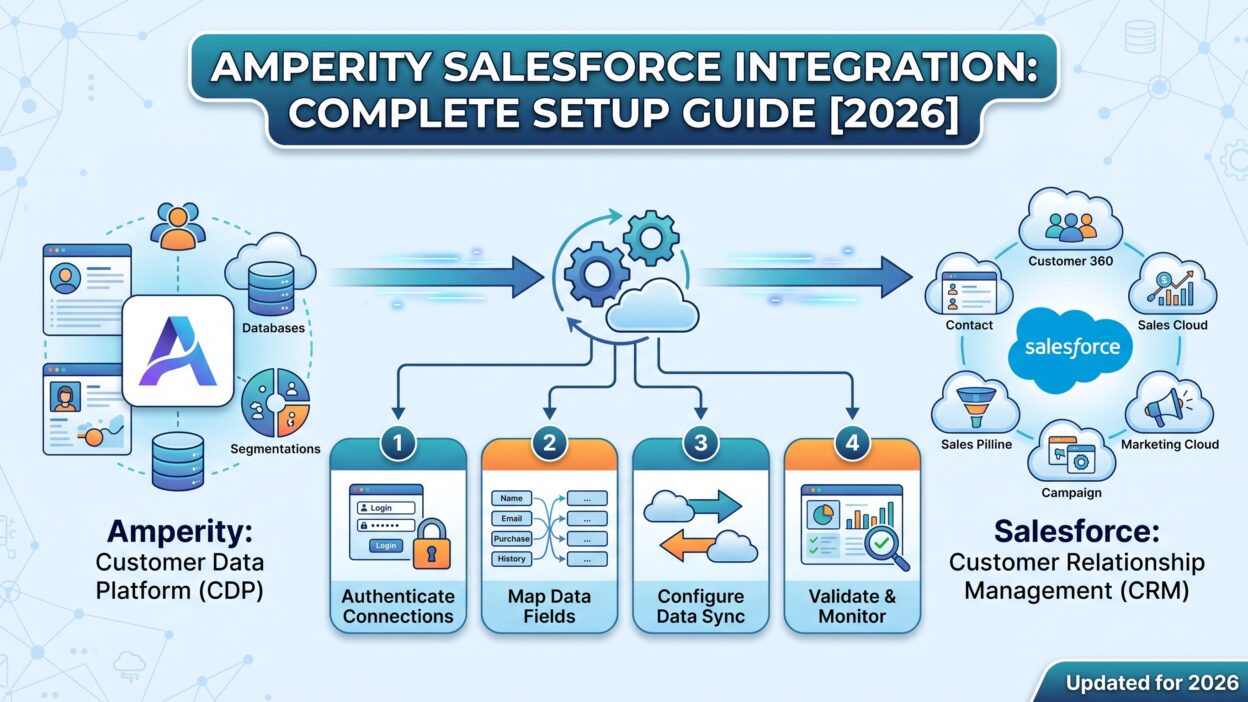
TL;DR Amperity holds unified customer profiles built from every data source across your business. Salesforce runs your sales pipeline and your marketing campaigns. Without a working connection, these two systems operate as separate worlds. This guide covers the Amperity Salesforce integration in full, including setup steps for every Salesforce product Amperity supports.
A properly configured Amperity Salesforce integration pushes clean, unified customer profiles directly into your CRM and marketing tools. Sales reps see a complete picture instead of fragmented records. Marketing campaigns target accurate audiences instead of duplicate or outdated contacts. This guide walks through exactly how to build that connection in 2026.
Table of Contents
What Is Amperity
Amperity works as a customer data platform built for identity resolution at scale. It pulls in data from every touchpoint your business has with a customer, then stitches those fragments into a single, unified profile. A customer who bought online, called support, and signed up for a loyalty program often exists as three separate records across three separate systems before Amperity gets involved.
The platform’s identity resolution engine matches these fragmented records using patented matching logic. Once unified, a business gets one accurate view per customer instead of scattered, conflicting data. This unified profile becomes the foundation for everything Amperity sends out to connected destinations, including Salesforce.
What Does the Amperity Salesforce Integration Actually Connect
Salesforce is not one single product. It covers Sales Cloud for pipeline management, Marketing Cloud for campaign automation, and Commerce Cloud for online retail. The Amperity Salesforce integration is not a single toggle switch. It is a set of separate connectors, each built for a specific Salesforce product with its own protocol and setup process.
This distinction matters early in your planning. A team assuming one connector covers every Salesforce product will run into confusion fast. Each connector inside the Amperity Salesforce integration moves data differently and requires its own configuration steps, covered in detail below.
Amperity Salesforce Sales Cloud Integration
Sales Cloud connects to Amperity through a dedicated destination built on the Salesforce SOAP API. This connector pushes unified customer profiles and audience segments directly into Sales Cloud records, giving reps a complete view of every account and contact without manual lookups across multiple systems.
Setting Up the Sales Cloud Destination
Start inside Amperity by opening the Destinations tab and adding Salesforce Sales Cloud as a new destination. You need a Salesforce account with API access enabled before this step works correctly. Create a dedicated integration user with the appropriate profile permissions rather than reusing a personal login, since a dedicated user keeps access auditable and easy to manage over time.
Credentials for this part of the Amperity Salesforce integration include a username, password, and security token from Salesforce. Share these details securely rather than sending them over plain email or chat. A tool built for temporary secret sharing works well here, since credentials should never sit permanently in a message thread.
Using a Sandbox Before Going Live
Test your Sales Cloud connection inside a Salesforce sandbox before touching production data. Send a small sample audience from Amperity into the sandbox first, then verify the records land correctly with accurate field mapping. Only promote your configuration to production once this test confirms everything works as expected.
Skipping this step creates real risk. A misconfigured field mapping pushed straight into production can overwrite existing Sales Cloud data or create duplicate records across your entire customer base. The sandbox step costs a small amount of setup time and saves significant cleanup work later.
Amperity Salesforce Marketing Cloud Integration
Marketing Cloud connects differently than Sales Cloud. Instead of a direct API connection, this part of the Amperity Salesforce integration moves data through CSV files delivered over SFTP. Amperity generates these files and uploads them to a designated location inside your Marketing Cloud environment.
Setting Up the SFTP Connection
Configure your Marketing Cloud credentials inside Amperity before adding this destination. You need to confirm the import directory on the Marketing Cloud side matches exactly what Amperity expects, since a mismatched path is one of the most common reasons this connector fails during setup.
Inside Marketing Cloud, locate your file storage settings and confirm the import location uses the correct site import directory type. This detail sounds small, but a wrong configuration here silently blocks every file Amperity tries to send, without an obvious error pointing directly at the cause.
Managing SFTP Password Expiration
Marketing Cloud SFTP passwords expire on a schedule by default, typically every three months. If your Amperity Salesforce integration suddenly stops delivering files, an expired password is often the reason. Check your security settings inside Marketing Cloud and confirm whether your integration user’s FTP access still falls within an active password window.
Teams running this connection long-term should either rotate the password proactively on a calendar reminder or configure Marketing Cloud to exclude the integration’s FTP user from automatic expiration. Either approach prevents a silent failure catching your team off guard weeks after the last successful sync.
Amperity Salesforce Commerce Cloud Integration
Commerce Cloud rounds out the third major connector inside the Amperity Salesforce integration. Like Marketing Cloud, this connection runs over SFTP rather than a direct API call. Amperity delivers unified customer and purchase data into Commerce Cloud, supporting personalized shopping experiences based on a customer’s full history across channels.
This connector matters most for retail and ecommerce brands running Commerce Cloud as their online storefront. Purchase history, browsing behavior, and loyalty status can all flow into Commerce Cloud through this connection, letting the storefront personalize recommendations using a genuinely unified customer profile rather than fragmented session data alone.
Pulling Data From Salesforce Into Amperity
The Amperity Salesforce integration works in both directions for certain products. Beyond sending unified profiles out, Amperity can also ingest data from Salesforce Sales Cloud and Salesforce Marketing Cloud as sources. This means account data, opportunity records, and campaign engagement history can all feed back into Amperity’s identity resolution process.
Bringing Salesforce data into Amperity strengthens your unified profiles further. A customer’s sales interactions and marketing engagement history become part of the same stitched-together record used everywhere else. This closes the loop, turning the integration into a genuine two-way relationship rather than a one-directional data push.
What Data Flows Through the Amperity Salesforce Integration
Identity-resolved customer profiles form the core data type moving through this integration. These profiles combine information from every connected source Amperity ingests, not just Salesforce itself. Audience segments, built using Amperity’s segmentation tools, also flow directly into Salesforce as targetable lists for campaigns or sales outreach.
Contact records move both directions depending on which connector you configure. Sales Cloud can receive updated contact and account information, while also sending existing records back into Amperity for further enrichment. The exact fields available depend on your specific configuration and the custom field mapping set up during initial setup.
Step by Step Setup Process
Begin by confirming which Salesforce products your organization actually uses. There is little value configuring a Commerce Cloud connector if your business runs purely on Sales Cloud. Narrow your setup to the specific connectors your team needs before touching any configuration screens.
Next, gather the required credentials for each connector. Sales Cloud needs an API-enabled account with a dedicated integration user. Marketing Cloud and Commerce Cloud both need SFTP credentials and a confirmed import directory path. Collect all of this information before starting configuration inside Amperity, since gathering credentials mid-setup slows the process down significantly.
Configure each destination inside Amperity’s Destinations tab one at a time. Test each connector individually rather than configuring everything at once, since isolating each connection makes troubleshooting far easier if something goes wrong. Use a sandbox environment wherever Salesforce supports one, particularly for Sales Cloud.
Once testing confirms accurate data flow, promote your configuration to production. Monitor the first several live syncs closely. Early monitoring catches subtle issues, like an unexpected field mismatch or a slower than expected sync time, before they become larger problems affecting real business data.
Common Setup Errors and How to Fix Them
Mismatched import directories cause the most frequent failures on the Marketing Cloud and Commerce Cloud side of the Amperity Salesforce integration. If files stop appearing inside Salesforce, verify the exact path configured in Amperity matches the exact path configured on the Salesforce side. Even a small discrepancy blocks every file transfer silently.
Expired credentials cause the second most common issue. SFTP passwords expiring on schedule, or a Salesforce security token resetting after a password change, both break the connection without an obvious warning inside Amperity itself. Build a regular credential check into your maintenance routine rather than waiting for a sync failure to discover the problem.
Incorrect field mapping creates quieter, more dangerous errors. Data still flows, but it lands in the wrong fields or overwrites information incorrectly. This is exactly why sandbox testing matters so much before any Sales Cloud configuration goes live. Catching a mapping error in a sandbox costs minutes. Catching the same error in production can cost days of cleanup work.
Best Practices for a Reliable Amperity Salesforce Integration
Use a dedicated integration user for every connector rather than tying access to any single employee’s personal account. This keeps the connection stable even if that employee changes roles or leaves the company, and it keeps your audit trail clean when reviewing what the integration actually accesses.
Document your field mappings clearly outside of Amperity itself, in a shared document your team can reference. A new team member troubleshooting an issue months later should not need to reverse-engineer the mapping logic from scratch. Clear documentation saves real time during any future audit or troubleshooting session.
Set a recurring calendar reminder to check credential expiration dates, especially for the SFTP-based connectors. This single habit prevents the majority of unexpected sync failures teams run into with the Amperity Salesforce integration over time.
Review your audience segments periodically to confirm they still reflect your current marketing and sales strategy. A segment built a year ago may no longer match how your team wants to target customers today. Treat your Salesforce destinations as a living configuration, not a one-time setup you never revisit.
Use Cases for Connecting Amperity and Salesforce
Retail brands running loyalty programs use this integration to give sales and support teams a complete view of a customer’s purchase history, loyalty tier, and engagement across channels. A support rep looking at a Salesforce record sees the same unified profile marketing uses to plan campaigns, eliminating the disconnect between departments.
Marketing teams use the Marketing Cloud connector to build highly targeted campaigns based on Amperity’s identity-resolved segments. Instead of targeting based on a single channel’s fragmented data, campaigns reach customers based on their complete, cross-channel behavior and purchase history.
Ecommerce brands use the Commerce Cloud connector to personalize the actual shopping experience. A returning customer sees recommendations based on their full purchase history across every channel, not just their browsing session on the current visit.
Sales teams at B2C and hybrid B2B companies use the Sales Cloud connector to prioritize outreach. Reps see which accounts show strong engagement across marketing and support channels, helping them focus energy on the relationships most likely to convert or expand.
Pricing and Implementation Considerations
Amperity operates as an enterprise-grade platform, and pricing reflects that positioning. Implementation typically requires real budget and a meaningful project timeline, since identity resolution at scale is not a lightweight technical lift. Smaller teams evaluating this integration should weigh the investment against their actual data complexity and customer volume before committing.
Implementation timelines run longer than a simple point-to-point integration. Setting up multiple Salesforce connectors, testing thoroughly in a sandbox, and validating identity resolution accuracy all take real project time. Plan your rollout with this reality in mind rather than expecting a same-week turnaround.
Budget for ongoing maintenance alongside initial setup costs. Credential rotation, field mapping updates, and periodic audience review all require continued attention after the initial Amperity Salesforce integration goes live. Treating this as a one-time project rather than an ongoing operational commitment leads to the silent failures covered earlier in this guide.
Frequently Asked Questions
Does Amperity offer one single Salesforce connector? No. The Amperity Salesforce integration covers separate connectors for Sales Cloud, Marketing Cloud, and Commerce Cloud. Each uses a different protocol and requires its own setup process.
What protocol does the Sales Cloud connector use? Sales Cloud connects through the Salesforce SOAP API. This allows Amperity to push unified customer profiles and audience segments directly into Sales Cloud records.
How does Amperity connect to Marketing Cloud? Marketing Cloud connects through CSV files delivered over SFTP rather than a direct API call. Amperity generates these files and uploads them to a configured import location inside Marketing Cloud.
Can Amperity pull data out of Salesforce, not just send data in? Yes. Amperity can ingest data from Salesforce Sales Cloud and Salesforce Marketing Cloud as sources, feeding that data back into its identity resolution process alongside every other connected system.
Why did my Marketing Cloud sync suddenly stop working? This usually traces back to an expired SFTP password. Marketing Cloud passwords expire every three months by default unless configured otherwise. Check your security settings if a sync that worked before suddenly fails.
Should I test the Sales Cloud connector before going live? Yes. Use a Salesforce sandbox to send a sample audience first and confirm the field mapping lands correctly before promoting your configuration to a live production environment.
Is the Amperity Salesforce integration a good fit for a small business? Amperity targets enterprise-grade use cases with significant data complexity and implementation budget. Smaller businesses with simpler data needs may find lighter-weight tools a better fit for their scale.
Read More:-Sales MCP Agents: Research, Enrich, and Prioritize on Verified Data
Conclusion

The Amperity Salesforce integration turns fragmented customer data into a genuine competitive advantage once properly configured. Sales Cloud, Marketing Cloud, and Commerce Cloud each connect through their own dedicated method, and understanding these differences upfront saves real setup time and confusion.
Test every connector in a sandbox before going live, document your field mappings clearly, and build a habit of checking credential expiration regularly. Done correctly, this integration gives every team, from sales to marketing to ecommerce, the same accurate, unified view of every customer, replacing fragmented records with one reliable source of truth across your entire Salesforce environment.