Introduction
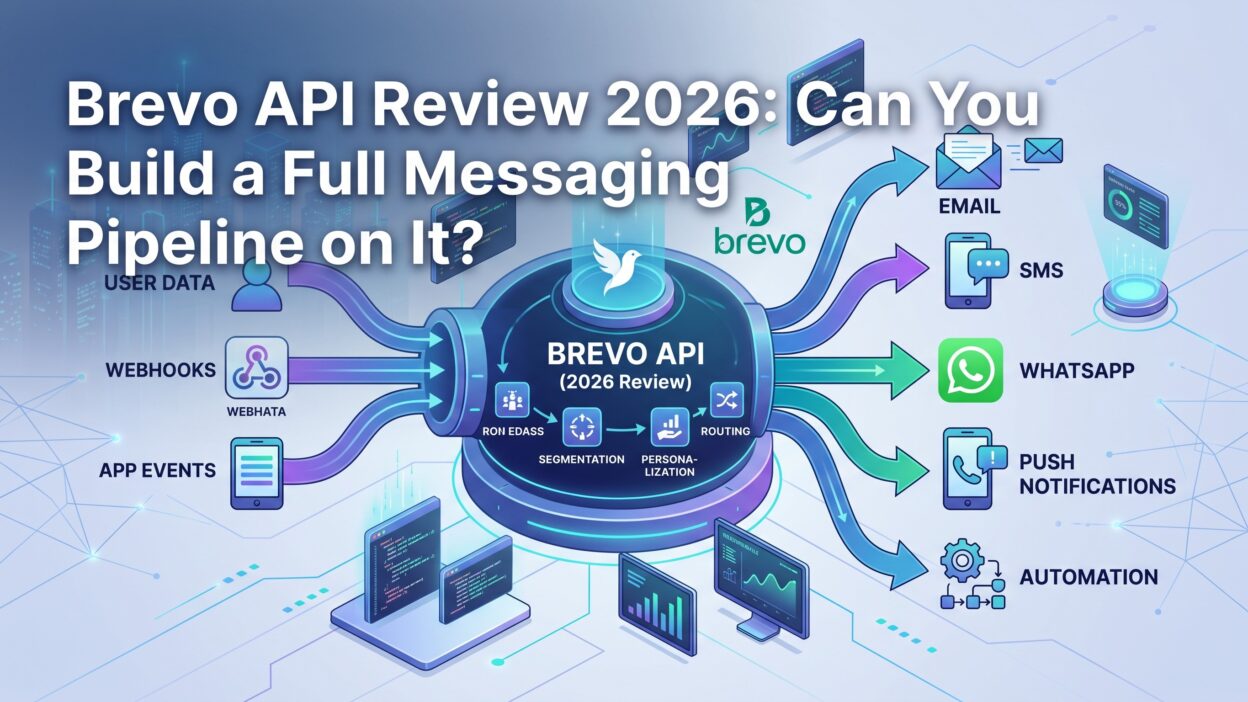
TL;DR A team picking a messaging provider usually juggles three separate vendors. One handles transactional email. Another handles SMS. A third handles WhatsApp. This Brevo API Review looks at whether one platform can actually replace all three. Brevo built its API around a single REST surface covering email, SMS, WhatsApp, contacts, and eCommerce data. The question worth answering is simple. Can a real messaging pipeline run on this one API without duct-taping extra tools around it?
This review walks through the actual endpoints, the documented rate limits, the SDK quality, and the gaps a developer hits once traffic scales past a small side project. Every claim in this Brevo API Review comes from Brevo’s own developer documentation, not marketing copy. By the end, you should know exactly where this API earns its place and where it still needs help.
Table of Contents
What This Brevo API Review Covers
Who Should Read This Review
A developer evaluating a new messaging vendor benefits most from this review. A technical founder deciding between three point tools and one consolidated platform benefits too. This piece assumes basic REST API familiarity and skips the beginner explanations you’d find in a getting-started tutorial.
What “Full Messaging Pipeline” Means Here
A full messaging pipeline sends transactional messages across multiple channels, tracks delivery status through webhooks, syncs contact data both ways, and scales without hitting constant rate limit walls. This Brevo API Review judges the platform against that exact bar, not against a simple “can it send one email” test.
Brevo API Overview
Core API Surface
The Brevo API lives at a single base URL, and every endpoint sits under that same REST structure. Coverage spans transactional email, transactional SMS, WhatsApp messaging, contact management, eCommerce data sync, custom event tracking, conversations, loyalty programs, and account administration. For a platform that started as an email marketing tool aimed at small businesses, this surface runs wider than most developers expect walking in.
Authentication Methods
API key authentication handles the vast majority of server-to-server use cases. A developer generates a key from account settings inside the Brevo dashboard, and that key appears exactly once before disappearing from view. Every request passes this key through a dedicated header. An optional IP allowlist restricts key usage to specific addresses, which matters for any team running strict security policies. OAuth 2.0 exists too, but it targets partner integrations acting on behalf of a user’s account rather than direct backend calls.
Developer Portal and Documentation Quality
The developer portal sits in the open, with no login wall blocking access to the reference docs. An OpenAPI specification backs the whole thing, which means the documentation stays consistent with the actual API behavior instead of drifting out of sync over time. A built-in API playground lets a developer fire real test calls straight from the docs page, before writing a single line of production code.
Transactional Email API
Sending a Transactional Email
A single POST request handles the core send operation, accepting sender details, recipient data, and message content in one payload. The sender address needs prior verification inside the account before any message goes out, which is a standard deliverability safeguard most serious providers enforce.
Batch Sending and Personalization Limits
Batch sending supports up to a thousand personalized message versions inside one API call, which covers most bulk transactional needs without looping through individual requests. A single request tops out around two thousand total recipients, and each personalized version inside a batch caps at ninety-nine recipients. The parameters object carries a size limit too, so extremely large personalization payloads need trimming before they hit the wire.
Delivery Tracking Through Webhooks
Webhooks report a full range of message events back to a URL a developer controls. Sent, delivered, opened, clicked, both bounce types, deferred, complaint, unsubscribed, blocked, and error events all fire through this same mechanism. This webhook coverage matters a lot for a serious messaging pipeline, since real monitoring depends entirely on knowing what happened after a send, not just whether the initial API call succeeded.
SMS and WhatsApp API
Sending Transactional SMS
The SMS endpoint follows the same pattern as email, accepting a recipient number and message body through one POST call. The response confirms message ID, credit usage, and remaining balance, giving a developer immediate visibility into cost per send without checking a separate dashboard.
WhatsApp Messaging Support
WhatsApp messaging sits inside the same API family, letting a developer trigger template-based messages through the same authentication and request pattern used across every other channel. This consistency saves real engineering time, since a team doesn’t need to learn a completely different request shape just because the channel changed.
Combining Channels in One Pipeline
Running email, SMS, and WhatsApp through one vendor removes a real integration burden. A developer manages one API key, one rate limit structure, and one webhook system instead of three separate vendor relationships each with its own quirks. This consolidation is arguably the strongest single argument in favor of Brevo for a team building a genuine multi-channel pipeline.
Contact and Segmentation API
Syncing Contacts Programmatically
Contact records sync through dedicated endpoints supporting create, update, and list management operations. A pipeline can push new contacts in as they sign up, update fields as behavior changes, and segment lists based on whatever criteria a campaign needs, all without touching the Brevo dashboard manually.
Custom Events and Behavior Tracking
Custom event tracking lets a pipeline log specific user actions, like a completed purchase or an abandoned cart, directly into a contact’s history. This event data then feeds into segmentation and automation logic elsewhere in the platform, closing the loop between raw behavior and targeted messaging.
eCommerce Data Sync
Dedicated endpoints handle product, category, and order data specifically for eCommerce use cases. This data ties directly into revenue attribution for campaigns, letting a team see which messages actually drove a purchase rather than guessing based on open rates alone.
Rate Limits and Throughput
Default Rate Limits by Plan
Brevo documents its rate limits down to the per-second and per-hour level for every endpoint category, which is more transparency than many comparable providers offer. The baseline sits at a solid request-per-second allowance across all plans, with higher tiers unlocking significantly more throughput for teams sending at real scale.
Endpoint-Specific Limits
Not every endpoint shares the same ceiling. Statistics and reporting endpoints carry tighter limits than the core send endpoints, since polling for stats too aggressively adds unnecessary load without adding real value. Batch sending through personalized message versions carries its own separate throughput ceiling, calling for a slightly different pacing strategy than single-message sends.
Handling 429 Errors
Exceeding a rate limit returns a standard 429 status code, and Brevo’s documentation recommends spreading requests evenly across a time window rather than bursting traffic all at once. A pipeline built without this pacing logic will hit throttling fast under real load, so building retry and backoff logic early saves a painful debugging session later.
SDKs and Developer Experience
Official SDK Coverage
Official SDKs cover several major languages, giving most teams a native client instead of hand-rolled HTTP calls against raw JSON. This matters for this Brevo API Review specifically, since a solid SDK cuts real development time compared to wrapping every endpoint manually.
Recent SDK Improvements
The PHP SDK received a major rewrite recently, adding a type-safe client, strongly typed request and response objects, compatibility with common HTTP client libraries, automatic retries with exponential backoff, and structured exception handling. This kind of investment signals active maintenance rather than an SDK left untouched for years after its initial release.
API Playground and Testing Tools
The built-in playground supports quick testing directly inside the documentation, though it falls short for complex payloads carrying rich nested parameters. A developer testing anything beyond a simple call still needs to drop into actual code, using the documented examples as a starting template.
Building a Full Messaging Pipeline on Brevo API
What Works Well Together
Email, SMS, and WhatsApp sending share a consistent authentication and request pattern, which makes multi-channel logic genuinely straightforward to build. Webhook events feed cleanly into a pipeline’s monitoring layer, and contact sync keeps segmentation data current without a separate CRM sync job running on the side.
Where You Still Need Extra Tools
Advanced marketing automation logic, like complex multi-step drip sequences with conditional branching, leans more heavily on Brevo’s dashboard-based workflow builder than on pure API calls. A team wanting everything scripted through code alone may find themselves configuring some automation logic through the UI instead, which breaks a fully code-driven deployment model some engineering teams prefer.
A Sample Pipeline Architecture
A typical setup pushes new users into Brevo through the contact API immediately after signup. Transactional emails and SMS confirmations fire through the send endpoints at key lifecycle moments. Webhooks report status back into an internal event log, and custom events feed behavior data back into Brevo for segmentation. This architecture covers most of what a growing product needs without requiring a second messaging vendor anywhere in the stack.
Brevo API Pricing for Developers
Free Plan Limits
The free plan allows a capped number of emails per day sent through the API, alongside full access to the REST endpoints, SMTP relay, outbound webhooks, and unlimited log retention. This makes the free tier genuinely useful for early testing and small-scale production use, not just a crippled demo environment.
Paid Plan Considerations
Paid plans remove the daily sending cap and unlock higher rate limits, which matters once a pipeline moves past early testing into real production traffic. Teams should model expected send volume against the documented rate limits before committing to a specific tier, since undersizing early leads to a painful mid-year upgrade under pressure.
Brevo API Review: Strengths
The documentation quality stands out clearly in this Brevo API Review. Rate limits, request shapes, and webhook payloads all sit in one consistent, well-organized reference. Multi-channel support inside one API genuinely reduces integration overhead for any team messaging across email, SMS, and WhatsApp together. The free plan’s generous feature access, rather than a stripped-down trial, gives a real evaluation path before any money changes hands.
Brevo API Review: Limitations
Complex automation logic still leans on the dashboard more than pure API calls, which frustrates teams wanting a fully code-driven deployment. Rate limits on lower tiers can feel tight for a pipeline scaling fast, pushing teams toward a paid upgrade sooner than expected. The API playground’s limits around rich JSON payloads mean real testing still happens in actual code rather than purely inside the docs.
Brevo API vs Other Messaging APIs
Compared to SendGrid
SendGrid focuses tightly on email deliverability and email-specific tooling, without native SMS or WhatsApp support baked into the same API surface. A team needing multi-channel messaging typically bolts on a separate provider alongside SendGrid, which is exactly the integration burden this Brevo API Review found the consolidated approach avoids.
Compared to Twilio
Twilio dominates programmable SMS and voice, with a developer experience built specifically around telecom use cases. Brevo covers similar SMS ground but adds email and WhatsApp under the same roof, trading some of Twilio’s telecom-specific depth for broader channel coverage inside one simpler vendor relationship.
Security Considerations
Protecting API Keys in Production
A leaked API key can rack up real cost fast if a bad actor sends unauthorized messages through a compromised account. This Brevo API Review found the IP allowlist feature genuinely useful here, since restricting a key to known server addresses closes off most casual misuse. Storing keys in a secrets manager, rather than hardcoding them into a repository, remains the baseline every team should follow regardless of vendor.
Webhook Payload Verification
A pipeline receiving webhook events should verify that incoming requests actually originate from Brevo rather than blindly trusting any POST hitting the endpoint. Checking the source IP range against Brevo’s published list, or validating a signature where supported, prevents a spoofed request from injecting fake delivery events into internal reporting.
Migrating to Brevo From Another Provider
Common Migration Pain Points
Switching a live transactional email system carries real risk if sender reputation doesn’t transfer cleanly. A phased migration, sending a small percentage of traffic through Brevo before a full cutover, catches deliverability issues early without risking an entire user base at once. This Brevo API Review recommends this approach specifically for teams with an established sending history on another platform.
Mapping Existing Templates and Events
Most migrations spend more time mapping existing email templates and event names than writing new integration code. Brevo’s template system and custom event structure differ enough from competitors that a straight copy-paste rarely works cleanly, so budgeting real time for this translation step avoids an underestimated project timeline.
Real-World Use Cases for This API
SaaS Onboarding Sequences
A SaaS product commonly triggers a welcome email immediately after signup, followed by a handful of onboarding tips over the first week. Brevo’s transactional send endpoint combined with custom events handles this pattern cleanly, logging each step and triggering the next message based on actual user behavior instead of a rigid fixed schedule.
Order Confirmation and Shipping Updates
An eCommerce store sends order confirmations, shipping updates, and delivery notifications through the same transactional infrastructure used for account emails. The eCommerce data sync endpoints tie these messages directly to order records, so a support team can trace exactly which message a customer received and when.
Two-Factor Authentication Codes
Sending a one-time SMS code during login represents one of the highest-stakes transactional use cases, since a delayed message frustrates a user trying to log in right now. Brevo’s SMS endpoint handles this pattern well, though teams running very high login volume should stress-test throughput against documented limits before relying on it exclusively.
Common Mistakes When Building on Brevo API
Ignoring Sender Verification Requirements
A surprising number of failed sends trace back to a sender address that was never verified inside the account settings. Checking this configuration before writing a single line of integration code saves a confusing debugging session later.
Skipping Webhook Setup Until Launch Day
Waiting until launch day to configure webhooks means a team flies blind during the most critical testing period. Setting up webhook tracking early, even during initial development, surfaces delivery problems while they’re still cheap to fix.
Underestimating Batch Payload Limits
A pipeline built without checking the recipient and payload size limits ahead of time often hits an unexpected rejection during a real bulk send. Reviewing these limits during initial architecture planning, rather than discovering them through a failed production call, keeps a launch on schedule.
Who Should Actually Use Brevo’s API
Startups Consolidating Their Stack
An early-stage startup rarely has budget for three separate messaging vendors and three separate engineering integrations. This Brevo API Review found the consolidated channel coverage especially valuable here, since one integration effort covers email, SMS, and WhatsApp instead of three separate projects spread across a sprint calendar.
Teams With Existing PHP, Node, or Python Stacks
A team already working in one of Brevo’s officially supported SDK languages gets a smoother onboarding experience than a team working in a less common stack. This Brevo API Review recommends checking SDK language support early, before committing engineering time to a full integration plan.
Verdict From This Brevo API Review
Weighing documentation quality against the automation gaps, this Brevo API Review lands closer to a recommendation than a warning. The core sending, tracking, and contact management endpoints handle real production load reliably, based on the documented limits and consistent request patterns across channels. Teams chasing pure no-dashboard, fully scripted deployments should budget extra time for the automation workarounds this review flagged earlier.
Separate Transactional and Marketing Traffic
Using distinct subdomains, and separate IP addresses where possible, keeps transactional sender reputation protected from the effects of a poorly received marketing campaign. Mailbox providers treat these two traffic types differently, and mixing them under one identity risks dragging critical transactional deliverability down.
Monitor Deliverability Metrics
Tracking delivery rate, soft bounce rate, and deferred email counts through the statistics endpoints catches problems before they turn into hard failures. A rising deferred count often signals a receiving server starting to throttle a sender, and acting early prevents that situation from compounding into real deliverability damage.
Plan for Rate Limits Early
Building retry logic and request pacing into a pipeline from day one avoids a painful rewrite once traffic grows past initial testing volume. Reviewing documented limits for every endpoint a pipeline touches, before writing the integration code, saves real debugging time down the line.
Frequently Asked Questions
What does the Brevo API actually cover? It covers transactional email, SMS, WhatsApp, contact management, eCommerce data sync, custom event tracking, conversations, and account administration, all under one REST surface.
Can I build a full messaging pipeline using only the Brevo API? Mostly yes, for sending and tracking across channels. Complex automation logic sometimes still needs dashboard configuration alongside the API calls.
Does the free plan support real API testing? Yes, the free plan includes full REST access, webhooks, and SMTP relay, with a capped daily email volume through the API.
What happens if my pipeline exceeds the rate limit? The API returns a 429 status code, and Brevo’s own documentation recommends pacing requests evenly rather than bursting all traffic at once.
Are official SDKs actively maintained? Yes, recent updates including a major PHP SDK rewrite show ongoing investment rather than a codebase left untouched after its first release.
How does Brevo compare to using separate email, SMS, and WhatsApp vendors? One consolidated API reduces integration overhead significantly, though a single-channel specialist tool sometimes offers deeper features within that one specific channel.
Is the API documentation reliable for production planning? Yes, the OpenAPI specification backs the published docs, keeping rate limits and request shapes consistent with actual production behavior.
Does this Brevo API Review recommend it for high-volume senders? Yes, with the caveat that high-volume teams should confirm Enterprise-tier rate limits match their expected send volume before committing to a migration.
Read More:-Similarweb Features: A Complete Breakdown in 2026
Conclusion

This Brevo API Review lands on a clear answer. You can build a genuine full messaging pipeline on this API, covering email, SMS, and WhatsApp under one authentication scheme and one webhook system. The documentation quality and generous free tier make evaluation painless, and the consolidated channel coverage removes real integration overhead most teams accept as unavoidable. The one honest caveat sits around complex automation logic, which still leans on dashboard configuration more than pure code. For a team wanting one API instead of three vendor relationships, this Brevo API Review earns a strong recommendation heading into the rest of 2026.