Introduction
TL;DR A HubSpot instance holds years of contact history, deal notes, and engagement data. Most of that data sits idle once a lead goes cold. AiSDR HubSpot Integration changes that. It pulls your existing HubSpot data into active outreach, then writes results straight back into the same contact record. This guide covers the full setup process, the exact data flow between both systems, real use cases, and the questions teams ask most before turning it on.
Sales teams in 2026 run leaner than ever. Reps manage bigger territories. Marketing hands off more leads than a small SDR team can chase manually. A tool that treats HubSpot as the source of truth, instead of a separate silo, solves a real operational gap. This article walks through exactly how this connection works, step by step, without the marketing fluff.
Most HubSpot users already own more usable data than they realize. Years of form fills, email opens, and deal notes sit quietly inside the portal, rarely touched after a deal closes or a lead goes cold. AiSDR HubSpot Integration turns that stored history into an active asset instead of a static archive. The rest of this guide breaks down the mechanics behind that shift, one section at a time.
Table of Contents
What Is AiSDR HubSpot Integration
How AiSDR Connects to HubSpot
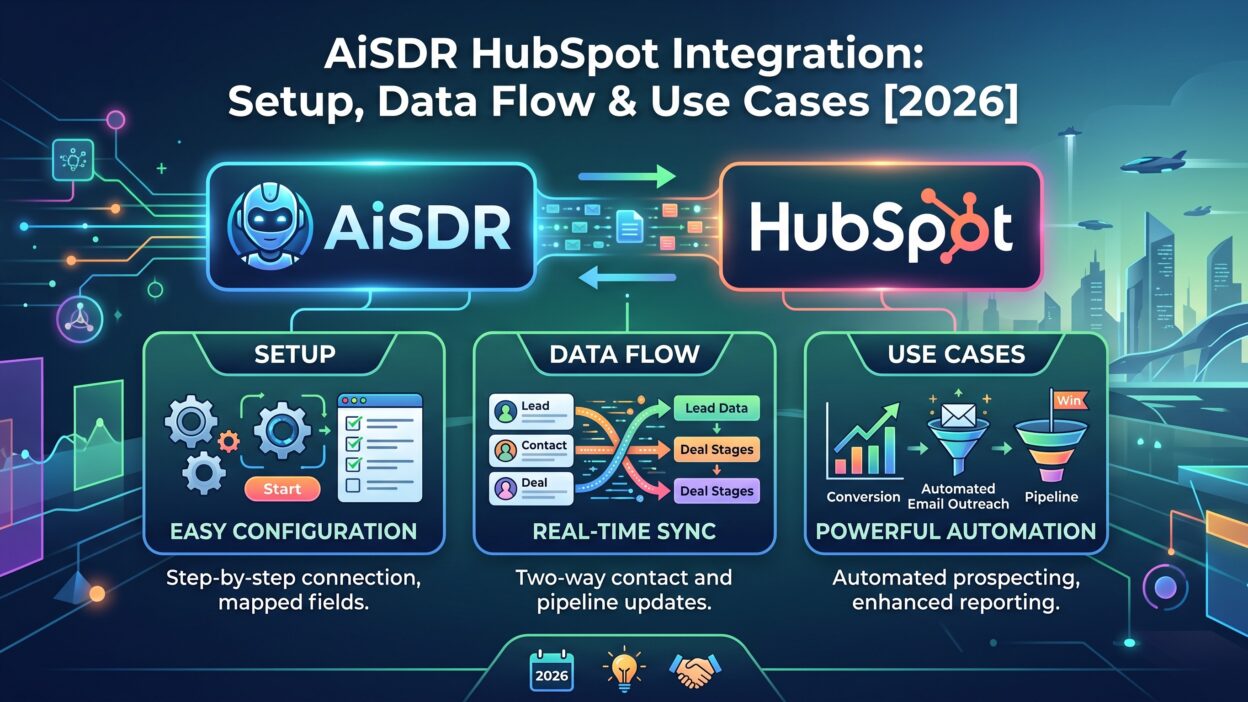
AiSDR HubSpot Integration links your HubSpot portal directly to AiSDR’s outreach engine. Once connected, AiSDR can read contact records, deal stages, and engagement history straight from HubSpot. It uses that data to write personalized outreach and book meetings automatically. The connection runs both ways. AiSDR pulls data in, and it pushes activity, replies, and call tasks back out.
This setup avoids a common trap with sales tools. Many point solutions log activity into a side dashboard nobody checks. This connection writes everything back into standard HubSpot fields instead. A sales manager pulls a normal HubSpot report and sees AiSDR’s outreach activity sitting right next to everything else.
What Makes This Integration Different
Most integrations just sync contact names and email addresses. This connection goes further. It syncs full lists from HubSpot into active campaigns. It enriches records that arrive with missing fields. It also reads HubSpot custom properties and uses them inside the actual outreach message. A lead’s industry, deal stage, or last contacted date can shape the exact wording AiSDR sends.
The result feels less like a bolted-on tool and more like a natural extension of HubSpot itself. Reps keep working inside HubSpot the way they already do. AiSDR handles the outreach layer quietly in the background.
Why Teams Choose AiSDR HubSpot Integration in 2026
The Problem With Disconnected Sales Tools
A typical sales stack carries five or six separate tools. Each one holds its own slice of data. A rep checks one tool for intent signals, another for email sequences, and HubSpot for everything else. Data drifts out of sync fast, and reps stop trusting any single source. Pipeline forecasts suffer because nobody agrees on which numbers are current.
This setup removes a layer from that stack instead of adding one. It treats HubSpot as the single home for contact and deal data. Outreach activity flows straight back into that same home, so the whole team looks at one clean picture.
Where AiSDR Fits Into a HubSpot Stack
A lean HubSpot stack needs only a handful of integrations that actually move pipeline forward. This connection fills the outbound and reactivation gap specifically. It picks up cold leads sitting untouched in a list. It picks up inbound leads marketing already qualified. It runs the outreach motion HubSpot alone cannot run on its own, then reports the results back cleanly.
AiSDR HubSpot Integration Setup
Prerequisites Before You Start
A working HubSpot account comes first, and any tier qualifies. There is no minimum HubSpot plan requirement for this integration to work. An AiSDR account comes next, along with admin access on both platforms to approve the connection. Teams should also clean up duplicate contacts in HubSpot before syncing, since messy source data creates messy outreach later.
Step-by-Step Connection Process
A user starts inside the AiSDR dashboard and selects HubSpot as the CRM connection. AiSDR then requests standard OAuth permissions to read and write contact data. Once approved, the connection goes live within minutes. A user picks which HubSpot lists to bring into AiSDR next. This entire process usually finishes in under fifteen minutes for a standard HubSpot portal.
Choosing HubSpot Lists to Sync
Not every HubSpot list belongs in an active campaign. A team might sync a list of contacts who went cold after ninety days. A team might sync a list of demo requests marketing already flagged. This setup lets a user pick specific lists rather than syncing an entire portal at once, which keeps campaigns targeted and relevant.
How Data Flows Between AiSDR and HubSpot
Two-Way Sync Explained
The sync between both platforms moves in both directions constantly. A change made inside HubSpot reflects inside AiSDR quickly, usually within minutes. A change made inside AiSDR, like a reply or a booked meeting, writes straight back into the HubSpot contact record. Neither platform becomes the stale copy of the other.
What Data Moves From HubSpot to AiSDR
AiSDR pulls contact details, deal stage, lifecycle stage, and custom property values from HubSpot. It also pulls prior engagement history, including past email opens and website visits already tracked inside HubSpot. This data becomes the raw material AiSDR uses to research each lead before writing a single outreach message.
What Data Moves Back Into HubSpot
Every email AiSDR sends logs back into the contact’s activity timeline. Every reply gets logged the same way. Booked meetings write directly into the deal record, and call tasks with suggested scripts appear right on the contact page. A sales manager reviewing a deal sees the full activity trail from this connection without opening a second tool.
Enrichment During Sync
Records that arrive with missing details get filled in automatically during the sync. A contact missing a job title or company size gets enriched before outreach starts. Once a full list finishes syncing and enriching, AiSDR sends an automatic notification confirming the list is ready for a campaign.
Personalization Using HubSpot Data
Custom Properties in Outreach
A HubSpot portal often carries dozens of custom properties built over years. This connection can pull any of these into a message. A campaign builder lets a user choose up to three properties per campaign for personalization. This limit keeps messages focused instead of stuffing every available data point into one paragraph.
Buyer Intent Signals
Intent signals already tracked in HubSpot, like repeated pricing page visits or a recent demo request, feed directly into AiSDR’s messaging logic. A lead showing strong intent gets a different opening line than one that just entered the funnel cold. This context comes straight from existing HubSpot data, with no extra tracking setup required.
Segmenting by Lifecycle Stage
HubSpot already sorts contacts into lifecycle stages like subscriber, lead, and opportunity. This connection reads this stage before writing a single message. A subscriber gets a softer, educational opening. An opportunity already deep in a deal gets a direct, specific message tied to next steps. This segmentation happens automatically, without a rep manually tagging every contact by hand.
Security and Data Handling
What Happens to Synced Data
Contact data pulled from HubSpot stays tied to that specific account and does not mix with other customers’ data. AiSDR uses standard OAuth permissions during setup, the same connection method HubSpot supports across most of its approved integrations. Admins can revoke this access at any point directly from HubSpot’s own connected apps settings.
Who Should Manage the Connection
A revenue operations lead or a HubSpot admin usually owns this setup, not an individual rep. Centralizing this control avoids accidental permission changes and keeps the sync stable across the whole team. Larger teams sometimes assign a single point of contact for any future changes to the connection settings.
Use Cases for AiSDR HubSpot Integration
Reactivating Cold Leads
Every HubSpot portal carries a graveyard of leads nobody followed up with. This connection syncs these cold lists and runs a fresh outreach sequence against them. A lead that went quiet eight months ago gets a new, researched message referencing anything relevant that changed since then.
Supporting Inbound Marketing Leads
Marketing teams generate more leads than a small SDR team can chase by hand some months. This setup picks up the overflow automatically. It reaches out to inbound leads within minutes of a form fill, using the same lead data HubSpot already captured on submission.
Event Follow-Up Campaigns
Event contacts synced into HubSpot get a dedicated follow-up motion through AiSDR. Messages reference the actual session a contact attended, pulled straight from HubSpot event data. A generic “great meeting you” email turns into something a prospect actually remembers attending.
Call Tasks and Scripts
Once a lead responds with genuine interest, AiSDR creates a call task directly inside HubSpot. The task includes a suggested script built from everything AiSDR already knows about that specific contact. A rep opens the task, sees the context, and makes the call without digging through five other tabs first.
Pipeline Coverage for Small Teams
A small sales team often can’t hit pipeline targets through manual outbound alone. This connection extends a small team’s reach without adding a single new hire. A three-person SDR team can run outreach volume closer to what a ten-person team would manage by hand, since the research and writing work happens automatically in the background.
AiSDR HubSpot Integration vs Other Sales Tools
Compared to Native HubSpot Workflows
Native HubSpot workflows handle simple automation well, like sending a follow-up email after a form fill. They struggle with genuine personalization at scale, since a workflow can’t research a lead or write a unique message on its own. This connection adds that missing research and writing layer on top of workflows already built inside HubSpot.
Compared to Other AI SDR Tools
Some AI SDR tools treat HubSpot as a basic logging destination only. This connection goes deeper, syncing full lists, enriching records, and reading custom properties for personalization. Teams comparing options should check whether a tool writes activity back into standard fields or buries it inside a separate dashboard few people ever open.
Who Should Use AiSDR HubSpot Integration
Startups Running Lean
Early-stage startups rarely have a dedicated SDR team in place yet. A founder or a single sales hire ends up handling outbound alone, often between a dozen other responsibilities. This setup lets that lean team run outbound at a pace that would otherwise need three or four extra hires. HubSpot already holds the contact data, so the setup work stays minimal.
Marketing-Led Organizations
Companies with a strong inbound motion generate leads faster than sales can always respond. A form fill sitting untouched for two days loses most of its buying intent. This connection closes that gap by reaching out within minutes, using the exact form data HubSpot already captured. Marketing keeps generating leads, and sales stops apologizing for slow follow-up.
Agencies and Multi-Client Teams
Agencies managing outbound for multiple clients need a system that stays organized across separate HubSpot portals. This setup connects to each portal independently, keeping campaigns and data cleanly separated per client account. This structure avoids the mess of running everything through one shared workspace.
Measuring ROI From AiSDR HubSpot Integration
Metrics Worth Tracking
Reply rate and meetings booked matter most in the first month after setup. Pipeline generated from reactivated cold leads tells a longer-term story worth tracking separately from new outbound. Time saved per rep, measured against the old manual process, gives leadership a clean number to justify the tool’s cost.
A Simple Way to Benchmark Results
Comparing pipeline generated in the ninety days before setup against the ninety days after setup gives a fair baseline. Teams should isolate reactivated leads specifically, since that segment often shows the sharpest improvement. A cold list that produced nothing for six months suddenly generating booked meetings makes the case for this integration on its own.
Pricing Considerations
How AiSDR Pricing Works Alongside HubSpot Costs
AiSDR pricing runs separately from any HubSpot subscription cost, and the two bills never merge into one invoice. Plans typically scale with email sending volume rather than seat count, which suits teams that want unlimited HubSpot contacts synced without paying per user. A small team testing this connection can start on a lower tier and scale sending volume up once results justify the spend.
Calculating Cost Per Booked Meeting
A useful way to judge value looks past the monthly subscription fee alone. Dividing total spend by meetings booked in a given month gives a real cost-per-meeting figure. Teams running this math after ninety days often find the number drops sharply once reactivated cold leads start converting, since that pipeline previously cost nothing to sit idle and generate zero return.
Team Training After Setup
Getting Reps Comfortable With the New Workflow
Reps don’t need deep technical training to work alongside this system. A thirty-minute walkthrough covering where call tasks appear and how to read AiSDR’s activity notes usually covers everything needed. Reps keep working inside HubSpot exactly as before, just with fresher context sitting on every contact record.
Setting Expectations With Sales Leadership
Leadership should expect a short ramp period before results peak, usually two to three weeks. Lists need time to fully sync and enrich, and early campaigns often need small adjustments to personalization fields. Setting this expectation upfront avoids frustration during the first few weeks of a rollout.
Common Setup Issues and Fixes
Sync Delays
A sync occasionally takes a few extra minutes during heavy usage periods. This delay rarely stretches beyond a short window, and most syncs complete quickly under normal conditions. Checking the AiSDR dashboard confirms sync status if a list seems slow to appear.
Duplicate Records
Duplicate contacts inside HubSpot create duplicate outreach if left uncleaned before a sync. Running a deduplication pass inside HubSpot first avoids this problem entirely. Clean source data produces clean campaigns every time.
Missing Custom Properties
A personalization field sometimes shows blank if the underlying HubSpot property is empty for that contact. Filling gaps through AiSDR’s enrichment step before launching a campaign fixes most of these gaps automatically.
Permission Errors During Connection
An OAuth permission error during setup usually points to insufficient admin rights on the HubSpot account attempting the connection. Logging in with a full HubSpot admin account resolves this in almost every case. Teams switching HubSpot admins later should reconnect the integration under the new admin to avoid access gaps down the line.
Best Practices for AiSDR HubSpot Integration
Keep Your HubSpot Properties Clean
Messy or outdated custom properties produce weak personalization no matter how good the outreach engine is. A quick property audit before syncing a list saves headaches later and improves message quality immediately.
Limit Personalization Fields
Choosing three sharp, relevant properties beats stuffing a message with every available data point. This connection works best when personalization stays focused on what actually matters to that specific lead.
Monitor Sync Notifications
Watching for the automatic sync-complete notification confirms a list finished enriching before a campaign launches. Skipping this check sometimes means launching outreach against a list still missing key details.
The Future of AiSDR HubSpot Integration in 2026
AiSDR recently expanded beyond HubSpot to support Salesforce, and HubSpot connectivity keeps improving alongside that expansion. LinkedIn engagement events now sync directly into HubSpot through AiSDR, giving reps a fuller picture of each contact’s activity across channels. Expect deeper call-recording integration and sharper intent signals as AiSDR HubSpot Integration matures further through the rest of 2026.
Frequently Asked Questions
What is AiSDR HubSpot Integration? It connects AiSDR’s outreach engine directly to a HubSpot portal, syncing contact data both ways and writing outreach activity straight back into HubSpot records.
Does AiSDR HubSpot Integration require a specific HubSpot plan? No, there is no tier requirement. Any HubSpot plan works with AiSDR HubSpot Integration, and the only real limit is monthly email sending volume.
How long does the initial setup take? Most teams finish the core connection in under fifteen minutes, though syncing and enriching a large list can take a few extra minutes afterward.
Does AiSDR HubSpot Integration create duplicate contacts? It should not, as long as HubSpot data stays clean before a sync. Running deduplication first avoids most duplicate issues entirely.
How many HubSpot properties can I use for personalization? A campaign supports up to three custom properties for personalization at once, keeping messages focused rather than cluttered.
Does data sync happen in real time? Sync happens quickly in both directions, usually within minutes of a change, though it is not instant in every single case.
Can AiSDR HubSpot Integration handle event follow-up? Yes, event contacts synced into HubSpot get personalized follow-up messages referencing the specific session they attended.
Can agencies use this integration across multiple client portals? Yes, each HubSpot portal connects independently, keeping client data and campaigns separate rather than mixed together in one workspace.
What happens if I disconnect the integration later? HubSpot data already synced stays intact on both platforms. Disconnecting simply stops future syncing until an admin reconnects it again.
Does AiSDR support other CRMs besides HubSpot? Yes, AiSDR also connects to Salesforce, though HubSpot remains one of its deepest and most established connections.
Read More:-Reply.io Features: A Complete Breakdown in 2026
Conclusion

AiSDR HubSpot Integration turns a HubSpot portal into an active outreach engine instead of a passive database. It pulls real contact and deal data into personalized campaigns, then writes every result straight back into the same records your team already trusts. Cold leads get reactivated. Inbound overflow gets handled fast. Reps walk into calls with real context instead of a blank slate. Any team already running HubSpot and looking to scale outbound without adding headcount should test this integration in 2026 and watch pipeline coverage improve within a single quarter.