Introduction
TL;DR Treasure Data powers thousands of companies today. Marketing teams use it to unify customer data. Sales teams use it to close deals faster. But raw data sits idle without the right connections. Treasure Data integrations turn scattered data into real business value.
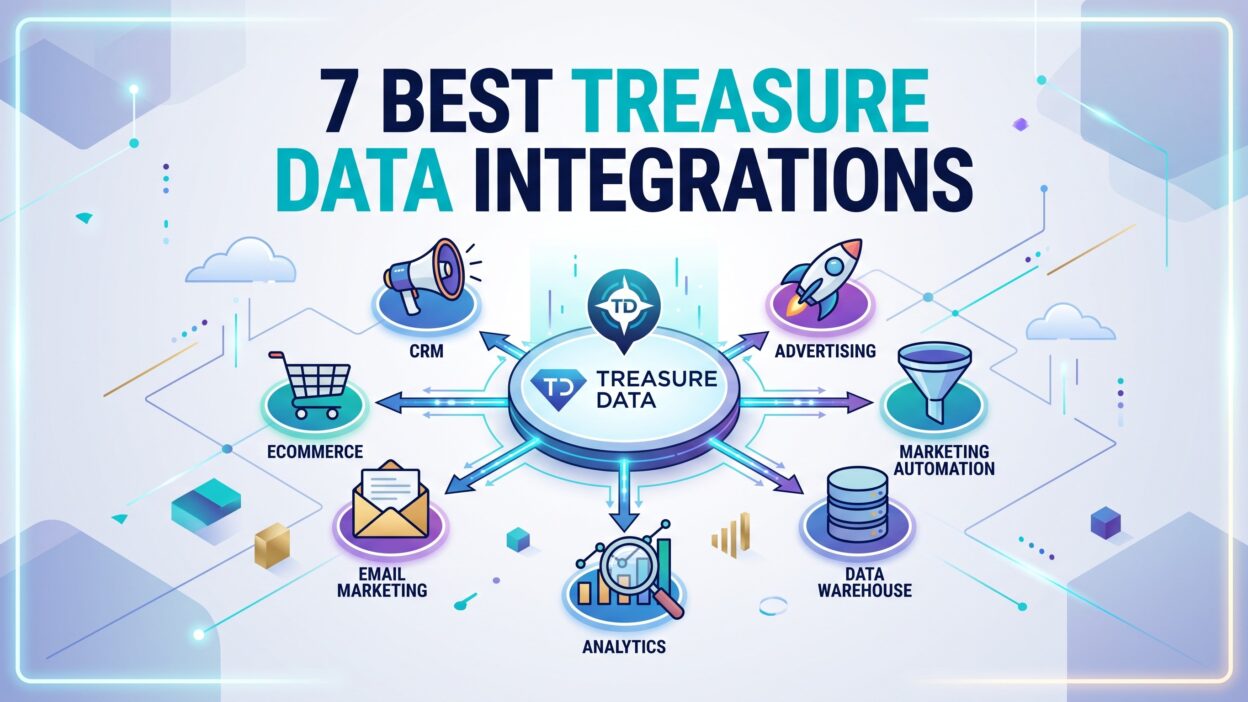
This guide covers the 7 best Treasure Data integrations. You’ll learn what each tool does. You’ll see why teams pick specific integrations. You’ll also find answers to common questions about Treasure Data integrations at the end.
What Are Treasure Data Integrations?
Treasure Data integrations connect the Treasure Data CDP with other business tools. A CDP alone stores data. Integrations move that data where teams actually work.
Sales reps live in Salesforce. Marketers live in Braze or Marketo. Analysts live in Snowflake or BigQuery. Treasure Data integrations bridge these gaps. They sync customer profiles across every platform your team touches.
Good Treasure Data integrations reduce manual work. Teams stop exporting CSV files by hand. They stop copying data between systems. Instead, pipelines run on schedule. Data flows automatically.
Treasure Data integrations also improve data accuracy. Manual transfers create errors. Automated syncs remove that risk. Customer records stay consistent across every connected system.
This matters for personalization too. A unified customer view helps brands send the right message. Treasure Data integrations make that unified view possible. Without them, customer data stays locked in silos.
Why Businesses Need Multiple Integrations
No single tool handles everything. Marketing needs one set of tools. Sales needs another. Data science needs a third. Treasure Data integrations connect all three groups to one source of truth.
A retail brand might connect Google Ads for campaigns. The same brand might connect Snowflake for deep analysis. Both connections pull from the same customer profiles. This consistency drives better decisions.
Multiple integrations also support growth. New tools get added often. Treasure Data supports hundreds of connectors. Teams can add new integrations without rebuilding their entire data stack.
1. Salesforce Integration
Salesforce remains the top CRM for enterprise sales teams. The Treasure Data Salesforce integration pulls customer records directly into Treasure Data. It also pushes enriched profiles back into Salesforce.
Sales reps get more context with this setup. A lead’s website visits show up next to their contact record. Purchase history appears alongside deal notes. Reps close deals faster with this full picture.
Marketing teams benefit too. Lead scores calculated in Treasure Data flow into Salesforce fields. Sales gets prioritized leads without extra manual work. This integration removes the guesswork from lead qualification.
Setup happens through Treasure Data’s connector library. Admins map fields between systems. Sync frequency gets configured based on business needs. Some teams sync hourly. Others sync in near real time.
Common Use Cases for Salesforce Sync
Account-based marketing teams use this integration heavily. They build target account lists in Treasure Data. Those lists sync straight into Salesforce campaigns. Sales and marketing stay aligned on the same accounts.
Customer success teams also rely on this connection. Product usage data flows from Treasure Data into Salesforce. Success managers spot at-risk accounts before renewal conversations happen.
This integration works well for churn prediction models too. Treasure Data calculates a churn score using behavioral signals. That score lands in Salesforce automatically. Account teams act on the score without switching tools.
Setup Tips and Common Pitfalls
Field mapping causes most setup issues. Salesforce fields don’t always match Treasure Data schemas. Take time to map fields carefully before launch.
API limits matter too. Salesforce caps API calls per day. Large syncs can hit that cap fast. Plan sync frequency around your Salesforce edition limits.
Test with a small data sample first. Confirm the mapping works correctly. Then scale up to full production data. This approach catches errors early and saves cleanup time later.
2. Google Ads Integration
Advertisers waste budget without good targeting data. The Treasure Data Google Ads integration solves this problem directly. It sends first-party customer segments into Google Ads for targeting.
Marketers build audiences in Treasure Data first. Those audiences reflect real purchase behavior and engagement history. The segments push into Google Ads as custom match audiences. Ad spend targets real customers instead of broad demographics.
This integration also supports offline conversion tracking. A customer might browse online, then buy in-store. Treasure Data captures that offline purchase. The data feeds back into Google Ads to measure true campaign impact.
Audience Building for Better Ad Targeting
Strong audiences start with clean data. Treasure Data consolidates web visits, purchase history, and loyalty program activity. Marketers segment this data using simple rules or advanced models.
High-value customer segments get excluded from acquisition campaigns. This saves budget for finding new customers instead. Lookalike audiences build from your best existing customers. Google Ads then finds similar prospects at scale.
Seasonal campaigns benefit from this setup too. A holiday shopper segment builds once. The same segment reactivates each year with fresh data. Marketing teams save setup time every campaign cycle.
Measuring ROI Through This Integration
Attribution gets clearer with this connection. Treasure Data tracks the full customer journey across channels. Google Ads spend gets matched against actual revenue, not just clicks.
Marketers see which campaigns drive real purchases. Vanity metrics like impressions matter less here. Revenue-based reporting replaces guesswork. Budget shifts toward campaigns that actually convert customers.
3. Braze Integration
Braze handles customer messaging across email, push, and SMS. The Treasure Data Braze integration feeds customer profiles directly into these messaging channels.
This connection lets marketers send messages based on real-time behavior. A customer abandons a cart. Treasure Data flags this event. Braze triggers a message within minutes. Speed matters for cart recovery campaigns.
Segments built in Treasure Data sync continuously to Braze. Marketers don’t rebuild lists manually. Fresh customer data always reaches the messaging platform.
Personalization at Scale
Generic messages get ignored today. Customers expect relevant content. The Treasure Data Braze connection enables this relevance through shared customer attributes.
A customer’s favorite product category appears in every message. Purchase frequency determines message timing. Loyalty tier changes trigger custom offers automatically. None of this personalization needs manual setup for each customer.
Marketing teams build these rules once in Treasure Data. Braze executes the messaging logic across millions of customers simultaneously. This scale would be impossible through manual processes.
Real-Time Event Triggers
Event-based triggers separate strong messaging programs from average ones. Treasure Data captures events as they happen. Website clicks, app opens, and purchases all count as triggers.
Braze receives these events fast through the integration. A welcome series starts the moment someone signs up. A win-back campaign starts after 30 days of inactivity. Timing improves message relevance significantly.
4. Snowflake Integration
Data warehouses store massive amounts of structured data. Snowflake ranks among the most popular choices for enterprise teams. The Treasure Data Snowflake integration connects these two platforms directly.
Analysts query customer data without moving it manually. Treasure Data pushes processed customer profiles into Snowflake tables. Data teams then run complex SQL queries against this data.
This setup avoids duplicate data pipelines. Many companies already invest heavily in Snowflake infrastructure. Treasure Data integrations extend that investment instead of replacing it.
Combining CDP Data With Warehouse Analytics
Business intelligence teams need combined datasets often. Sales data lives in one place. Customer behavior data lives in Treasure Data. This integration merges both into a single Snowflake environment.
Analysts build dashboards using this combined data. Executive reports show customer lifetime value alongside acquisition costs. Data scientists train machine learning models using the same unified dataset.
This approach removes data silos between teams. Marketing, finance, and product teams query the same source. Reports match across departments because the underlying data matches too.
Data Governance Considerations
Governance matters more as data volume grows. Snowflake offers strong access controls at the table level. Treasure Data integrations respect these permissions during sync.
Sensitive fields like payment details get masked before transfer. Compliance teams review data flows between both platforms. This reduces risk while still enabling broad data access for analytics teams
5. Marketo Integration
B2B marketing teams rely heavily on Marketo for lead nurturing. The Treasure Data Marketo integration strengthens this nurturing process with richer customer data.
Lead scores improve significantly through this connection. Treasure Data analyzes website behavior, content downloads, and email engagement. These signals feed into Marketo scoring models automatically.
Nurture streams become smarter too. A prospect viewing pricing pages triggers a different email sequence than one reading blog content. This behavioral targeting increases conversion rates across the funnel.
Lead Scoring Enhancements
Traditional lead scoring uses basic form fills and email opens. This Treasure Data integration adds deeper behavioral signals to the mix. Product usage data, support ticket history, and website session data all contribute.
Sales teams receive better qualified leads as a result. Marketing qualified leads convert to sales qualified leads more often. This improvement comes directly from richer scoring inputs, not from changing the sales process itself.
Campaign Performance Tracking
Marketing teams need clear attribution for every campaign. This integration tracks a lead’s full journey from first touch to closed deal. Marketo campaigns get credit based on actual revenue influence.
Budget decisions improve with this visibility. Underperforming campaigns get identified quickly. High-performing campaigns receive more investment for the next quarter.
6. Amazon S3 Integration
Amazon S3 stores raw data at massive scale. Many companies already use S3 as their primary data lake. The Treasure Data S3 integration moves data between both platforms smoothly.
Teams often use this connection for batch processing. Large historical datasets sit in S3 buckets. Treasure Data imports this data for enrichment and segmentation work.
Export flows work in the other direction too. Processed customer segments export back to S3. Other tools within the company data stack then access these segments.
Data Lake Strategy With Treasure Data
Companies build data lake strategies around flexibility. S3 stores data in its rawest form. Treasure Data adds structure and business logic on top of that raw data.
This combination supports both technical and business teams. Data engineers keep raw data accessible in S3. Marketing and analytics teams work with clean, structured data through Treasure Data instead.
Cost and Performance Benefits
Storage costs drop with this hybrid approach. Raw data stays cheap in S3. Only processed, valuable data moves into more expensive compute environments.
Performance improves too. Queries run against smaller, cleaner datasets in Treasure Data. Teams avoid scanning massive raw files for every single analysis request.
7. Google BigQuery Integration
BigQuery serves as Google’s flagship data warehouse product. The Treasure Data BigQuery integration connects customer profiles with this powerful analytics engine.
Data teams run large-scale queries against combined datasets here. Website analytics from Google Analytics merges with Treasure Data customer profiles inside BigQuery. This merge creates a complete picture of customer behavior.
Machine learning teams benefit from this setup as well. BigQuery ML trains models directly on this combined dataset. Predictions feed back into Treasure Data for activation across marketing channels.
Advanced Analytics and Reporting
Executive teams want clear, fast reporting. BigQuery handles massive query volumes without slowing down. Treasure Data integrations feed this warehouse with clean, ready-to-use customer data.
Custom dashboards pull from this combined source. Revenue trends, cohort analysis, and retention curves all become easier to build. Data teams spend less time on data preparation and more time on actual analysis.
Predictive Modeling Applications
Predictive models need large, clean datasets. This integration provides exactly that foundation. Churn prediction, lifetime value forecasting, and next-purchase models all run more accurately with combined data.
Model outputs sync back into Treasure Data easily. Marketing teams then activate these predictions through email, ads, or in-app messages without extra engineering work.
How to Choose the Right Treasure Data Integrations for Your Business
Not every business needs all seven integrations. Start with your biggest data gap first. A sales-heavy organization should prioritize Salesforce. A performance marketing team should prioritize Google Ads instead.
Consider your existing tech stack too. Companies already using Snowflake gain more value from that specific connection. Companies without a warehouse might start with Braze or Marketo for messaging needs.
Budget plays a role in this decision as well. Some integrations require more setup time and internal resources. Simple integrations like S3 often launch within days. Complex integrations like Salesforce sometimes take several weeks to configure properly.
Team skills matter too. Technical teams handle warehouse integrations comfortably. Marketing teams often prefer integrations with simpler visual interfaces, like Braze or Marketo connectors.
Treasure Data integrations work best when they solve a specific business problem. Avoid adding integrations just because they exist. Each connection should support a clear use case, whether that’s better targeting, faster messaging, or deeper analytics.
Review your integration list regularly too. Business needs change over time. An integration that made sense last year might not fit current priorities. Regular audits keep your data stack lean and effective.
Best Practices for Managing Treasure Data Integrations
Documentation prevents confusion later. Write down field mappings for every integration. New team members need this reference when troubleshooting sync issues.
Monitor sync health regularly. Failed syncs create data gaps quickly. Set up alerts for any integration that stops running on schedule.
Data quality checks matter just as much. Bad data entering one system spreads to every connected system. Clean data at the source before it reaches Treasure Data integrations.
Security reviews deserve regular attention too. Customer data flows through multiple systems with these integrations. Each connection point needs proper access controls and encryption.
Test changes before deploying them broadly. A small configuration change can break an entire sync pipeline. Test environments catch these issues before they affect live customer data.
Train your team on integration basics. Marketing, sales, and data teams all touch these systems. Basic training reduces errors and speeds up troubleshooting when problems arise.
Frequently Asked Questions About Treasure Data Integrations
What is the easiest Treasure Data integration to set up?
Amazon S3 integration usually launches fastest. It requires basic credential setup and bucket configuration. Most teams complete this integration within a single day.
Do Treasure Data integrations work in real time?
Many integrations support real-time or near real-time sync. Braze and Salesforce both offer fast sync options. Batch integrations like S3 typically run on scheduled intervals instead.
How many integrations can a business run at once?
Treasure Data supports hundreds of connectors simultaneously. Most businesses run between five and fifteen active integrations at a given time, depending on team size and data needs.
Are Treasure Data integrations secure?
Yes, these integrations include encryption during data transfer. Access controls limit who can view or modify synced data. Compliance teams should still review each specific integration before launch.
Can small businesses benefit from Treasure Data integrations?
Small businesses benefit from focused integrations. A single CRM connection often delivers strong value without needing the full integration suite that larger enterprises use.
What happens if an integration sync fails?
Most failures trigger automatic alerts. Teams can review error logs and rerun the sync manually. Regular monitoring catches these failures before they cause major data gaps.
Read More:-The Marketer’s Guide to Email List Segmentation
Conclusion

Treasure Data integrations turn a customer data platform into a true growth engine. Salesforce strengthens sales workflows. Google Ads sharpens ad targeting. Braze and Marketo improve messaging relevance. Snowflake, S3, and BigQuery support deep analytics work.
Every business has different needs. Pick integrations that solve real problems first. Avoid adding tools without a clear purpose behind them.
Strong Treasure Data integrations remove data silos completely. Teams work faster with accurate, unified customer data. Better integrations lead directly to better business outcomes across sales, marketing, and analytics.
Start small if you’re new to this process. Choose one or two integrations that match your biggest current gap. Expand your integration list as your team gains confidence and your data needs grow.