Introduction
TL;DR Your Salesforce CRM is only as good as the data inside it. A rep opens a lead record and finds a missing phone number. The company size field reads zero. The industry is blank. That rep now spends 20 minutes researching instead of selling. Multiply that across your entire sales team and you have a serious pipeline problem. Salesforce data enrichment solves that problem at the root. It fills gaps, corrects inaccuracies, and keeps records current without requiring manual effort from your team. B2B revenue teams that invest in Salesforce data enrichment close deals faster, route leads more accurately, and build forecasts on data they can actually trust. This guide walks through every dimension of the topic — what enrichment means, why it matters, how to implement it, and which tools deliver real results.
Table of Contents
What Is Salesforce Data Enrichment?
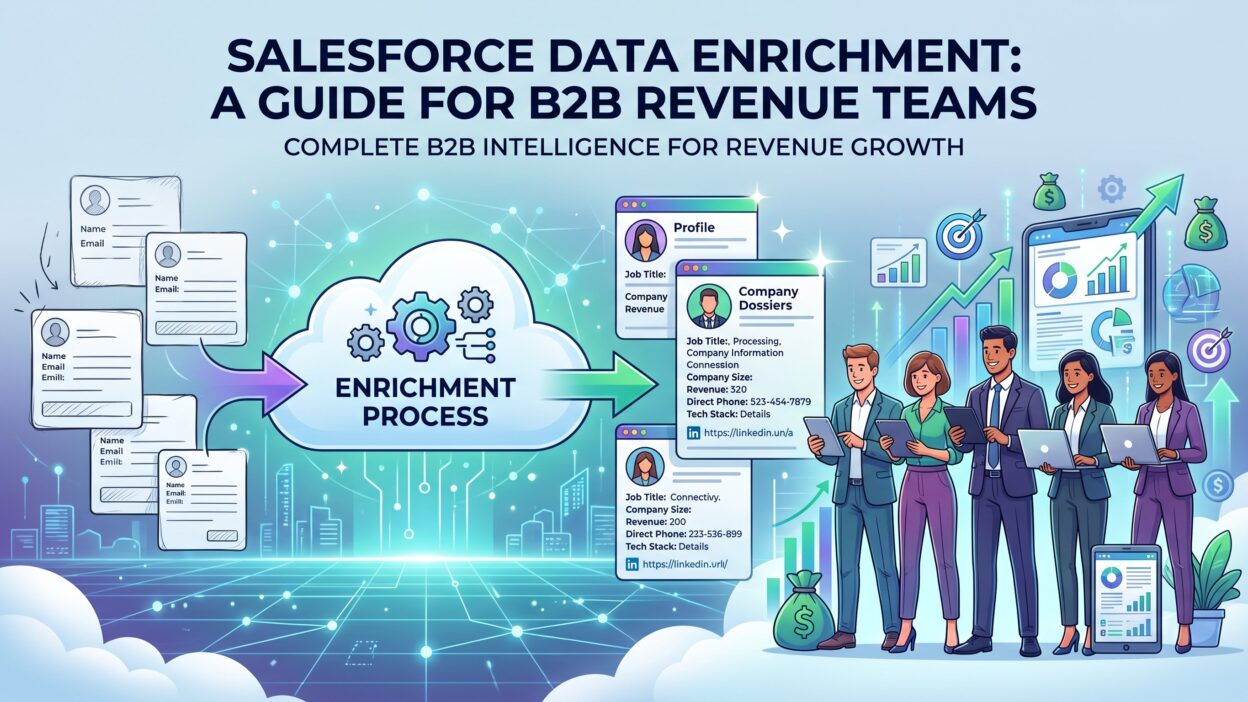
Salesforce data enrichment is the process of appending, correcting, and updating records inside Salesforce with verified third-party data. It works on both lead and contact records as well as account records. A record enters your CRM with partial information. Enrichment fills the missing fields automatically. The result is a complete, accurate record that your revenue teams can act on immediately.
The Difference Between Data Enrichment and Data Cleansing
Data cleansing removes duplicate records, corrects formatting errors, and standardizes field values. Salesforce data enrichment adds new information to existing records. Both processes matter. They serve different purposes. A clean record with missing fields still hurts your team. A complete record with formatting errors also creates problems. The strongest data programs run cleansing and enrichment together as part of a unified data quality strategy.
What Fields Does Enrichment Typically Cover?
Enrichment adds fields across several categories. Firmographic fields include company size, annual revenue, industry vertical, headquarters location, and founding year. Technographic fields identify what software tools a company uses. Contact fields include direct dial phone numbers, email addresses, job titles, and seniority levels. Intent fields indicate whether a company is actively researching a solution like yours. Each category serves a different function in your revenue motion.
Why Salesforce Data Enrichment Matters for B2B Revenue Teams
Data quality is not a back-office concern. It sits at the center of every revenue decision a B2B team makes. Salesforce data enrichment directly improves sales productivity, marketing effectiveness, and revenue predictability.
Sales Reps Sell More When Data Is Complete
A sales rep with complete records spends more time on outreach and less time on research. Studies consistently show that reps spend over 20 percent of their week on administrative tasks. A large portion of that time goes toward finding information that should already exist in the CRM. Salesforce data enrichment gives reps that time back. They open a record and find everything they need. They call the right number. They reference the right industry. They personalize the pitch without extra effort.
Marketing Campaigns Perform Better With Clean Segments
Marketing teams build audience segments using CRM data. A segment built on incomplete or inaccurate data delivers poor results. An email campaign targeting enterprise accounts accidentally includes SMB companies because the employee count field is empty. Salesforce data enrichment ensures every field marketing teams rely on reflects reality. Accurate segments produce higher open rates, better conversion rates, and lower unsubscribe rates.
Revenue Forecasting Becomes More Reliable
Forecast accuracy depends on data accuracy. A deal stuck in negotiation with an account marked as a startup is harder to assess than one with verified revenue range and employee count data. Sales leaders who rely on enriched account data build more confident forecasts. They understand the deal context. They know the account profile. Salesforce data enrichment gives leadership the visibility they need to make strategic decisions.
Lead Routing Becomes Smarter
Lead routing rules use CRM field values to assign leads to the right reps. If the company size field is blank, routing logic fails. The lead goes to the wrong rep or sits in a queue. Salesforce data enrichment fills those routing fields at the moment of lead creation. The right rep gets the right lead immediately. Speed to lead improves. Response rates improve. Pipeline grows.
Common Data Quality Problems That Enrichment Solves
B2B revenue teams face recurring data quality challenges. Salesforce data enrichment addresses each one directly.
Incomplete Records From Form Submissions
Buyers do not fill out long forms. They provide a name, email, and maybe a company name. Everything else is missing. That sparse record enters Salesforce and sits there until a rep manually researches it. Salesforce data enrichment triggers automatically on record creation. Within seconds, the record has a complete company profile, a verified email domain, industry classification, and firmographic context. The rep opens a ready record, not a skeleton.
Data Decay Over Time
Business data changes constantly. People change jobs every two to three years. Companies rebrand, merge, get acquired, or shut down. An enriched record from two years ago may be completely wrong today. Salesforce data enrichment programs that run continuously catch these changes. Scheduled enrichment jobs refresh records on a regular cadence. Reps always see current data, not outdated snapshots.
Inconsistent Field Values Across Records
One record says “Financial Services.” Another says “Finance.” A third says “FinServ.” Your segmentation logic cannot group them. Salesforce data enrichment standardizes these values. Providers map their taxonomy to your field definitions. Every record uses the same controlled vocabulary. Filters work. Segments align. Reports make sense.
Duplicate Records Diluting Enrichment Value
Duplicates waste enrichment credits and corrupt reports. Before running a large enrichment job, deduplicate your database. Merge records that represent the same company or contact. Then run enrichment on the clean, deduplicated set. This sequencing saves money and produces cleaner results.
How Salesforce Data Enrichment Works Technically
Understanding the mechanics helps RevOps and data engineering teams build integrations that perform reliably at scale.
Native Enrichment vs. Third-Party Integration
Salesforce offers some native data enrichment capabilities through its Data.com product line, though this offering has evolved significantly over the years. Most enterprise teams use third-party providers that integrate with Salesforce via API. The provider’s system receives a record identifier — a company domain, an email address, or a LinkedIn URL — and returns enriched field values. Those values write back to the Salesforce record through the provider’s managed package or a custom integration.
Trigger-Based Enrichment on Record Creation
The most impactful enrichment pattern triggers immediately when a new record enters Salesforce. A lead form submission creates a new lead record. A workflow rule or Salesforce Flow fires. The enrichment service receives the record data. The provider API returns enriched fields. The values populate the record. This entire cycle completes in under three seconds in well-architected implementations. The sales rep sees a complete record from the first moment they open it.
Scheduled Batch Enrichment for Existing Records
Batch enrichment handles the existing database. A scheduled job pulls records that need refreshing — those not enriched in the past 90 days, those with empty key fields, or those flagged by data quality scores. The job sends those records to the enrichment provider in bulk. The provider returns updated values. The job writes them back to Salesforce. Batch jobs typically run nightly or weekly depending on database size and provider rate limits.
Field-Level Mapping and Override Logic
Enrichment logic must handle field conflicts carefully. A sales rep who manually entered a direct phone number knows something the enrichment provider may not. Blindly overwriting that field destroys valuable data. Well-built Salesforce data enrichment configurations use override logic. They fill empty fields first. They only overwrite existing data when the incoming value carries a higher confidence score. Defining this logic before building the integration saves significant cleanup time later.
Choosing the Right Salesforce Data Enrichment Provider
The provider you choose determines data quality, coverage, and the total cost of ownership for your enrichment program. Evaluate carefully.
Data Accuracy and Match Rates
Accuracy is the most important factor. Ask every provider for match rate data on a sample of your Salesforce records. A 70 percent match rate on a 100,000-record database means 30,000 records stay empty. Test multiple providers with the same sample set. Compare results independently. Never rely solely on vendor-published benchmarks.
Refresh Cadence and Data Freshness
How often does the provider refresh its underlying data? Monthly refreshes produce stale records for teams with high lead velocity. Weekly or continuous crawling produces much fresher data. For teams with high churn markets or fast-moving accounts, data freshness is a competitive differentiator. Ask the provider specifically how often each data category refreshes.
Salesforce Integration Quality
Some providers offer a native Salesforce managed package. Others connect through middleware or custom API integrations. A managed package simplifies setup and ongoing maintenance. It also means the provider controls the integration architecture. Evaluate the managed package by reading user reviews on G2 or Salesforce AppExchange. Look for complaints about sync failures, field conflicts, or data overwrites.
Pricing Model and Credit Structure
Enrichment pricing models vary widely. Some providers charge per record enriched. Others charge a flat subscription with usage caps. Some charge per field rather than per record. Map your expected monthly enrichment volume — new leads per month plus batch refresh volume — to each pricing model. The cheapest per-record rate does not always produce the lowest total cost at your actual usage levels.
GDPR and CCPA Compliance
Contact data enrichment carries regulatory obligations. Any provider delivering email addresses or phone numbers must document their compliance posture under GDPR, CCPA, and applicable local regulations. Request a Data Processing Agreement before using any contact enrichment feature. Involve your legal team early. Compliance failures are significantly more expensive than compliance investments.
Top Salesforce Data Enrichment Tools in 2025
Several providers have built strong reputations for Salesforce integration quality and data coverage. Each serves slightly different use cases.
Clearbit (Breeze Intelligence by HubSpot)
Clearbit built one of the earliest and most widely adopted enrichment APIs in the B2B market. Its Salesforce integration appends firmographic and contact data to leads and accounts in real time. The managed package is mature and well-documented. HubSpot acquired Clearbit and rebranded it as Breeze Intelligence. Teams already on HubSpot benefit most from this solution. Salesforce-first teams should evaluate the integration carefully given the HubSpot acquisition context.
ZoomInfo for Salesforce
ZoomInfo offers a deep Salesforce integration with extensive firmographic, technographic, and intent data coverage. It leads the market in North American data depth. Enterprise revenue teams with complex data needs frequently choose ZoomInfo for Salesforce data enrichment despite its premium pricing. The intent data layer adds significant value for teams with high-velocity outbound motions.
Apollo.io
Apollo.io combines a large contact and company database with a built-in Salesforce sync. Teams that want enrichment and sales engagement in one platform often choose Apollo. The Salesforce integration syncs contact and account data bidirectionally. Pricing is competitive for mid-market teams. Data coverage is strong across technology sectors.
Cognism
Cognism has built a strong reputation for European data and GDPR-compliant contact enrichment. Its phone-verified mobile numbers drive higher connection rates for calling teams. B2B revenue teams selling into EMEA markets should evaluate Cognism seriously. Its Salesforce integration is straightforward and well-supported.
D&B Hoovers (Dun and Bradstreet)
D&B Hoovers integrates directly with Salesforce through Salesforce’s partnership with Dun and Bradstreet. It delivers deep company hierarchies, credit risk data, and global coverage. Teams with complex enterprise account structures benefit from D&B’s parent-subsidiary mapping. The data is particularly strong for manufacturing, financial services, and government-adjacent sectors.
How to Build a Salesforce Data Enrichment Strategy
Buying a tool is the easy part. Building a sustainable enrichment strategy that delivers long-term data quality requires deliberate planning.
Start With an Audit of Your Current Data Quality
Before enriching anything, understand your baseline. Pull a report on field completeness across your lead, contact, and account objects. Identify which fields are most often empty. Measure how many records have missing industry, company size, or revenue data. This audit tells you where enrichment will deliver the most impact. It also gives you a baseline to measure improvement against after enrichment runs.
Define Your Ideal Customer Profile Fields
Your ICP defines which accounts and contacts deserve sales attention. Salesforce data enrichment should fill the fields your ICP scoring model depends on. Map those fields first. Prioritize enrichment coverage for the fields that drive the biggest revenue decisions. Employee count, industry, revenue range, and technology usage are common starting points. Less critical fields can wait for a later phase.
Build Enrichment Into Your Lead Flow From Day One
The best time to enrich a record is the moment it enters Salesforce. Build Salesforce data enrichment into your lead creation workflow. Use Salesforce Flow or a middleware tool to trigger enrichment on every new lead. Set field-level override logic before going live. Test with a small batch of real leads before enabling for full volume. A few hours of testing prevents weeks of data cleanup.
Create a Data Governance Policy
Enrichment without governance creates chaos. Define who owns each Salesforce field. Specify which fields the enrichment system writes to. Define which fields sales reps own and which the system owns. Document refresh frequency and override logic. Share this policy with your sales team so they understand why certain fields change automatically. Transparency prevents confusion and builds trust in the data.
Monitor Enrichment Performance Continuously
Set up a Salesforce dashboard that tracks enrichment coverage over time. Measure match rates by record type. Track field completeness before and after enrichment runs. Alert your RevOps team when match rates drop below a defined threshold. Low match rates often signal a provider data quality issue or a change in your lead source mix. Catching these issues early prevents them from compounding into larger problems.
Frequently Asked Questions About Salesforce Data Enrichment
What is Salesforce data enrichment? Salesforce data enrichment is the process of appending verified third-party data to lead, contact, and account records inside Salesforce. It fills missing fields, corrects inaccurate values, and keeps records current without requiring manual effort from sales or operations teams.
How does Salesforce data enrichment work? It works through integrations between Salesforce and third-party data providers. When a new record enters Salesforce, an automated trigger sends identifying information to the enrichment provider. The provider returns verified field values. Those values populate the Salesforce record automatically. Batch enrichment handles existing records on a scheduled basis.
Which Salesforce data enrichment tool is best? The best tool depends on your market, use case, and budget. ZoomInfo leads for enterprise North American coverage. Cognism leads for European contact data. Apollo.io suits mid-market teams seeking enrichment plus engagement. Clearbit suits teams embedded in the HubSpot ecosystem. Test each provider with your actual data before committing.
How much does Salesforce data enrichment cost? Pricing varies by provider and volume. Entry-level plans from Apollo start under $100 per month. ZoomInfo and Cognism enterprise contracts typically run from $15,000 to over $50,000 annually depending on usage and features. Calculate your expected monthly enrichment volume before evaluating pricing models.
Will Salesforce data enrichment overwrite data my reps entered manually? It depends on how you configure the override logic. A well-built integration fills empty fields first. It only overwrites existing values when the incoming data carries a higher confidence score. Defining this logic before deployment protects manually entered data while still improving record completeness.
How often should I refresh enrichment data in Salesforce? High-velocity sales teams should refresh key account and contact fields every 30 to 90 days. Slower-moving enterprise teams can refresh quarterly. Contact data decays faster than firmographic data. Prioritize contact refresh cadence for teams with active outbound motions.
Is Salesforce data enrichment GDPR compliant? Compliance depends on the provider and how you configure the integration. Use only providers that document their GDPR compliance posture and offer a Data Processing Agreement. Limit data retention to what your use case requires. Consult your legal team before processing personal contact data at scale.
Read More:-Xactly Review 2026: Complete Platform Breakdown
Conclusion

Salesforce data enrichment is one of the highest-leverage investments a B2B revenue team can make. Incomplete CRM data costs your team hours every week. It misdirects leads, breaks scoring models, and corrupts the reports your leadership relies on. A disciplined Salesforce data enrichment program fixes all of that. Reps open records that are ready to act on. Marketing segments reflect reality. Revenue forecasts build on accurate data. The implementation decisions you make early matter enormously. Choose a provider whose coverage matches your market. Build enrichment into your lead flow from day one. Set clear override logic to protect data your team entered manually. Monitor match rates and field completeness on a dashboard your whole team can see. Revenue teams that treat data quality as a strategic priority do not just run cleaner CRMs. They close more deals, waste less time, and grow faster than competitors who treat data as an afterthought. Start your Salesforce data enrichment program with a clear scope, a measurable baseline, and a commitment to continuous improvement.