Introduction
TL;DR Hiring teams face more open roles than ever, and fewer hours to fill them. Budgets stay flat while hiring targets keep climbing. Manual screening, scheduling, and follow-up eat up entire workdays. This is where recruiting automation changes the game. It lets recruiters focus on people instead of paperwork. This guide breaks down how automation scales your hiring process without losing the human touch. You’ll find practical steps for each stage of the funnel, from sourcing to onboarding. Every section gives you something you can apply right away.
Recruiting automation isn’t about replacing recruiters. It’s about removing repetitive tasks that drain their time. A recruiter who spends less time on data entry spends more time on real conversations. That shift changes hiring speed and candidate quality at the same time.
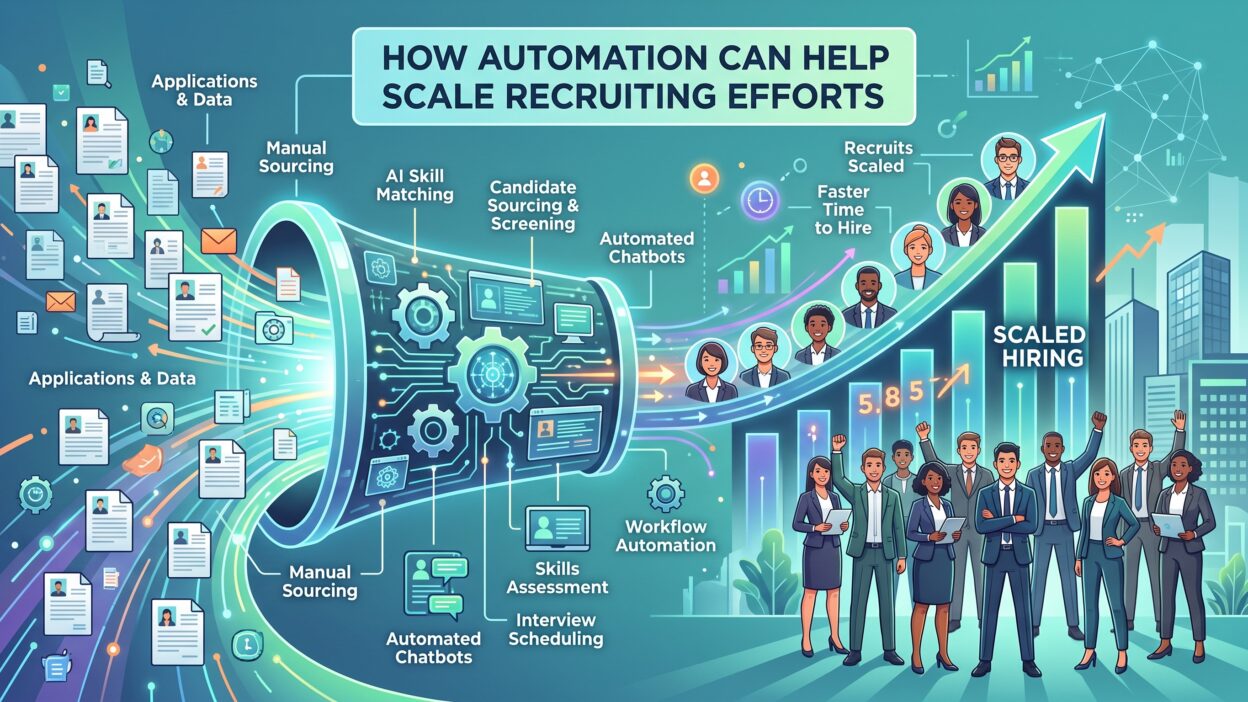
Companies scaling their hiring efforts face a simple math problem. More open roles need more recruiter hours, but headcount budgets rarely grow at the same pace. Automation solves this by giving each recruiter more reach without adding more people to the team. Let’s walk through where automation fits best and how to use it well.
Table of Contents
1. Understand What Recruiting Automation Actually Means
Automation covers a wide range of tools and workflows. Some handle resume screening. Others manage interview scheduling or candidate communication. Understanding the full scope helps you pick the right tools for your team’s specific gaps. Trying to buy one tool that solves everything usually leads to disappointment, since most platforms specialize in a narrow part of the hiring funnel.
Automation vs Full AI Decision-Making
Automation handles repetitive steps like sending emails or updating statuses. It doesn’t replace human judgment on final hiring decisions. Keep this distinction clear when you explain new tools to your team. Recruiters stay in control of every hire.
Common Areas Where Teams Start
Most teams begin with resume screening and interview scheduling. These tasks eat the most time and offer clear, measurable wins. Starting small builds trust in the system before you expand to other stages.
Why Timing Matters for Adoption
Introduce automated hiring tools gradually. A sudden overhaul confuses your team and frustrates candidates. Roll out one tool at a time, and measure results before adding the next one. Give your team a few weeks with each tool before judging whether it earns a permanent spot in your workflow.
2. Use Automation to Speed Up Candidate Sourcing
Sourcing takes hours every week without the right tools. Automation pulls qualified candidates from job boards, social platforms, and your own database. This frees recruiters to focus on outreach instead of searching.
Manual sourcing means scrolling through hundreds of profiles by hand. Automated sourcing tools scan thousands of profiles in minutes and rank them by fit. A recruiter who used to spend an entire afternoon building a candidate list can now review a ranked shortlist in under an hour.
Set Clear Search Criteria First
Automation only works well with clear inputs. Define the skills, experience level, and location you need before you turn on any tool. Vague criteria produce vague results, no matter how advanced the software is.
Let Software Rank and Filter Candidates
Modern platforms score candidates against your job requirements automatically. This cuts your review list from hundreds down to a manageable number. Recruiters review the top matches instead of every single application.
Combine Automated Sourcing With Manual Review
Never skip the human check. Automation narrows the pool, but recruiters still confirm the final fit. This balance keeps quality high while saving hours of manual searching.
3. Automate Resume Screening Without Losing Quality
Resume screening is often the biggest bottleneck in hiring. Automated screening tools scan resumes for keywords, experience, and qualifications in seconds. This step alone can cut screening time dramatically.
A single job posting can bring in hundreds of applications. Reading each one by hand simply isn’t realistic for most teams. Even a fast reader loses an entire day to a stack of resumes that software clears in minutes.
Build Screening Criteria Around Real Job Needs
Set clear must-have and nice-to-have qualifications before you screen anything. This keeps automated results accurate and relevant. Loose criteria let unqualified candidates slip through the filter.
Avoid Over-Filtering Strong Candidates
Automation can accidentally reject good candidates over minor keyword mismatches. Review your filters regularly. Adjust them when qualified people keep landing in the rejected pile.
Track Screening Accuracy Over Time
Compare automated screening results against actual hiring outcomes. This tells you if your filters need adjustment. Regular checks keep your recruiting automation system accurate and fair.
4. Streamline Interview Scheduling With Automated Tools
Back-and-forth emails to schedule interviews waste days of productive time. Automated scheduling tools sync calendars and let candidates pick open slots directly. This single change often gets the biggest praise from busy hiring teams. A task that once took ten emails now takes two clicks.
Sync Calendars Across Your Hiring Team
Connect every interviewer’s calendar to your scheduling tool. This avoids double bookings and last-minute rescheduling. Candidates see real-time availability instead of waiting on manual replies.
Send Automatic Reminders
No-shows waste everyone’s time. Automated reminders sent a day before and an hour before cut no-show rates significantly. This small feature saves hours of wasted interview slots every month.
Allow Candidates to Reschedule Easily
Life happens, and candidates sometimes need to change their interview time. A self-service reschedule link avoids another round of emails. This keeps the process smooth for everyone involved.
5. Improve Candidate Communication Through Automation
Silence during a hiring process frustrates candidates and damages your employer brand. Automated communication keeps candidates updated at every stage without manual follow-up from your team. A candidate who hears nothing for two weeks often assumes the worst and moves on to another offer.
Send Status Updates Automatically
Set up triggers that notify candidates when their application moves to a new stage. This removes the guesswork candidates feel during a long process. A quick update, even automated, beats total silence.
Personalize Templates for Different Stages
Generic messages feel cold and robotic. Build templates with the candidate’s name, role, and next steps included. Automation handles the sending, but the message still feels personal.
Use Chatbots for Common Questions
Chatbots answer simple questions like application status or interview location instantly. This frees recruiters from repetitive emails. Candidates get quick answers any time of day.
6. Automate Reference and Background Checks
Reference checks and background screening often stall the hiring process for days. Automated platforms send requests, collect responses, and flag issues without manual chasing from your team. This stage moves from a week of phone tag to a couple of days on autopilot.
Send Requests the Moment an Offer Goes Out
Speed matters here. Automated systems trigger reference requests as soon as a candidate accepts a conditional offer. This shaves days off your typical hiring timeline.
Flag Issues for Human Review
Automation should flag concerns, not make final judgment calls. Set up alerts for anything unusual in a background check. A recruiter reviews flagged cases personally before any decision.
Keep Candidates Informed During the Wait
Background checks can take time, and silence makes candidates nervous. Automated updates let candidates know their check is in progress. This small step keeps candidates engaged instead of accepting another offer elsewhere.
7. Use Data and Analytics to Guide Automation Decisions
Automation generates data at every stage of the funnel. That data shows exactly where your process slows down or breaks. Automated tools without regular data review turn into guesswork with extra software attached.
Track Time Saved at Each Stage
Measure how much time automation saves in sourcing, screening, and scheduling. This shows real return on your investment. Numbers convince leadership faster than opinions do.
Monitor Candidate Drop-Off Points
Data reveals exactly where candidates abandon your process. A high drop-off during scheduling points to a clunky booking tool. Fix the specific stage instead of guessing at the whole funnel.
Review Automation Performance Monthly
Set a recurring review of your automation metrics. Tools that worked well last quarter might need adjustment now. Regular reviews keep your system sharp instead of stale.
8. Balance Automation With the Human Side of Hiring
Automation handles repetitive tasks well, but people still make hiring decisions. Losing the human touch during automation rollout damages candidate experience and employer reputation. Recruiting automation should support recruiters, not replace their judgment.
Keep Final Interviews Human-Led
Automated screening narrows the pool, but real conversations still close the deal. Never let a chatbot conduct a final interview. Candidates want to talk to a real person before accepting an offer.
Train Your Team on New Tools
New software fails without proper training. Walk your team through each tool before full rollout. Confident recruiters use automation better and explain it clearly to candidates.
Ask Candidates for Feedback on the Process
Survey candidates about their experience with your automated steps. This feedback shows where the process feels too robotic. Adjust based on real responses instead of assumptions.
9. Scale Onboarding Through Automated Workflows
Hiring doesn’t end when a candidate accepts an offer. Onboarding automation keeps new hires engaged and prepared before their first day. This stage often gets overlooked in broader hiring-tech discussions, but it matters just as much. A rocky first week undoes weeks of good recruiting work.
Automate Paperwork and Document Collection
Send onboarding forms automatically once an offer is signed. This removes a common bottleneck during a new hire’s first week. Digital forms also reduce errors compared to manual paper processes.
Schedule Pre-First-Day Check-Ins
Automated emails between offer acceptance and start date keep new hires excited. Share team introductions, first-day logistics, and company culture content. This reduces early turnover from anxious new hires.
Track Onboarding Completion Automatically
Dashboards show which onboarding steps each new hire has completed. Managers spot gaps before they become problems. This visibility keeps onboarding consistent across every new hire.
10. Choose the Right Tools to Scale Recruiting Automation
Not every tool fits every team. Picking the right automation platform depends on your team size, budget, and biggest bottlenecks. The wrong tool wastes money and frustrates your team. A tool built for a two-hundred-person company often overwhelms a five-person hiring desk.
Match Tools to Your Biggest Pain Point
Start with the stage costing you the most time right now. A team drowning in resumes needs screening automation first. A team missing interviews needs scheduling tools first.
Check Integration With Existing Systems
New tools should connect with your current applicant tracking system. Poor integration creates duplicate work instead of saving time. Ask vendors about integration before signing any contract.
Start With a Trial Before Full Rollout
Test any new automation tool with a small team first. This reveals problems before a company-wide rollout. A trial period protects your budget and your team’s patience. Ask the two or three recruiters using the trial for honest feedback before you sign a longer contract.
Why Automation and Human Recruiters Work Best Together
Recruiting automation isn’t a replacement strategy. It’s a support system. The best hiring teams use automation to clear away repetitive tasks, then spend their saved time on real candidate relationships. A tool that schedules interviews still needs a recruiter to ask the right questions during that interview. A chatbot that answers status questions still needs a human to make the final call on an offer. Software can move a candidate through a pipeline, but it can’t read the hesitation in someone’s voice during a salary conversation.
Think of automation as the engine and recruiters as the driver. The engine handles the heavy lifting. The driver decides where to go and how to get there. Teams that balance both scale their hiring without losing the personal connection that makes candidates choose one offer over another.
Agencies and internal teams that adopt this balance see faster fills, lower costs, and happier candidates. The goal isn’t fewer people involved in hiring. The goal is better use of the people already on the team.
Getting Started With Recruiting Automation This Month
Don’t try to automate everything at once. Pick the single stage costing your team the most time right now. Test one tool for thirty days. Measure the results before moving to the next stage.
Talk to your recruiters before rolling out any new tool. Their daily frustrations point directly to where automation helps most. Involve them early, and adoption goes smoother across the whole team.
Revisit your automation stack every quarter. Hiring needs change as your company grows. A tool built for fifty hires a year might not handle five hundred. Regular reviews keep your recruiting automation system matched to your actual needs, instead of running on decisions made a year or two ago.
Common Mistakes to Avoid When Scaling With Automation
Many teams rush into new tools without a clear plan. This leads to wasted spend and frustrated staff. A few recurring mistakes show up again and again across growing hiring teams.
Automating Too Many Stages at Once
Teams excited about new software sometimes flip every switch at once. This overwhelms recruiters who need time to adjust. Roll out one stage, let it settle, then move to the next.
Ignoring Candidate Feedback During Rollout
Some teams focus so much on internal efficiency that they forget to ask candidates how the process feels. A tool that saves recruiters time but frustrates candidates isn’t a win. Check both sides of the experience regularly.
Skipping the Data Review Step
Automation without measurement is just a guess dressed up as a system. Teams that skip regular data checks miss early warning signs. A quick monthly look at key numbers catches problems before they grow into bigger issues.
Choosing Tools Based on Features Instead of Fit
A long feature list looks impressive in a sales demo. It means little if the tool doesn’t solve your actual bottleneck. Match every purchase to a specific problem your team faces right now. A tool with fifty features you’ll never use costs more and adds more complexity than a simple tool built for your exact need.
What Scaling Recruiting Looks Like With the Right Systems in Place
Picture a hiring team six months after a thoughtful automation rollout. Sourcing takes a fraction of the time it used to. Screening happens in the background while recruiters focus on conversations. Scheduling runs itself, and candidates rarely wait more than a day for a response. Recruiters spend their days on interviews and offer negotiations instead of inbox management.
This isn’t a fantasy. It’s the natural result of matching the right tools to the right problems, one stage at a time. Teams that reach this point didn’t do it overnight. They picked a starting point, measured results, and kept building from there. Each small win created momentum for the next stage, and the whole system grew stronger with every quarter.
The difference between a team that struggles to hire and a team that scales smoothly often comes down to this kind of steady, deliberate rollout. Speed matters, but sequence matters more. Rushing every tool out at once creates chaos. Rolling them out with intention creates a system that actually holds up under growth, quarter after quarter, even as hiring volume climbs.
Frequently Asked Questions
What is recruiting automation? Recruiting automation uses software to handle repetitive hiring tasks like resume screening, interview scheduling, and candidate communication. It speeds up the hiring process while recruiters focus on interviews and final decisions.
Does recruiting automation replace recruiters? No. It removes repetitive tasks, not human judgment. Recruiters still make final hiring decisions and conduct meaningful conversations with candidates throughout the process.
What parts of hiring benefit most from automation? Sourcing, resume screening, and interview scheduling see the biggest time savings. Communication and onboarding also benefit significantly once these core stages run smoothly.
Is recruiting automation expensive to set up? Costs vary widely by tool and team size. Many platforms offer tiered pricing, so small teams can start with basic features and scale up as hiring volume grows.
Can small companies use automated hiring tools effectively? Yes. Small teams often see the biggest relative time savings because they have fewer people handling every hiring task. Even basic scheduling automation makes a noticeable difference.
How do I measure if recruiting automation is working? Track time-to-fill, candidate drop-off rates, and recruiter hours saved. Compare these numbers before and after automation to see clear, measurable results.
Will automation hurt candidate experience? Automation improves candidate experience when used correctly. Fast responses and clear updates beat long silences. Problems only happen when automation replaces necessary human interaction entirely.
How long does it take to see results from automation? Most teams notice faster scheduling and screening within the first month. Bigger gains, like improved retention and lower cost per hire, usually show up after a full quarter of consistent use.
What should I automate first if I’m just getting started? Start with whichever task eats the most hours right now. For most teams, that’s either resume screening or interview scheduling. Both offer fast, visible wins that build confidence in the new system.
Read More:-8 Best AI BDR Software Tools for Outbound Sales in 2026
Conclusion

Scaling recruiting efforts without burning out your team requires the right mix of technology and human judgment. Recruiting automation clears away repetitive tasks so recruiters can focus on real conversations and better decisions. Start with one bottleneck, measure the results, and expand from there. The agencies and teams that master this balance fill roles faster, keep candidates happier, and build a hiring process that actually scales.
Automation doesn’t replace great recruiters. It gives them room to do their best work. The teams that win in the next few years won’t be the ones with the most software. They’ll be the ones who used that software to spend more time on the part of hiring that actually needs a human touch.