Introduction
TL;DR Finding the right candidate feels harder every year. Job boards flood recruiters with thousands of resumes. Most of those resumes don’t match the role. A recruiter needs a sharper way to search, and that’s where Boolean searches for recruiters come in.
Boolean searches for recruiters turn a vague search into a precise one. They pull the right candidates from LinkedIn, job boards, and internal databases in seconds. This guide breaks down exactly how they work, why they matter, and how to build strings that actually find talent.
You’ll learn the core operators, real examples for different platforms, and mistakes to avoid. By the end, you’ll build search strings with confidence instead of guessing keywords.
Sourcing talent has changed a lot over the past decade. Job boards grew bigger. Candidate pools grew noisier. Recruiters who still rely on basic keyword searches spend hours sorting through irrelevant profiles every single week. That time adds up fast across a busy hiring season.
This guide gives you a full walkthrough, from the basic logic behind Boolean search to advanced techniques used by senior sourcers. Treat it as a reference you return to whenever you open a new search bar.
Table of Contents
What Boolean Searches for Recruiters Actually Are
Boolean search isn’t a new invention. It comes from basic logic, and recruiters adapted it for talent sourcing decades ago.
The Origin of Boolean Logic in Recruiting
Boolean logic dates back to the 1800s, named after mathematician George Boole. His work laid out rules for combining true and false statements. Search engines borrowed this logic to filter results with precision.
Recruiters picked up Boolean searches early because resume databases grew too large for manual review. A staffing agency with ten thousand resumes on file couldn’t scan each one by hand. Boolean strings solved that problem by narrowing results down to a manageable list.
Library scientists actually used Boolean logic long before recruiters did. Early digital catalogs relied on the same AND, OR, and NOT structure to help researchers find specific books among massive collections. Recruiters simply adapted a proven method for a new purpose, and the logic transferred over almost perfectly.
The rise of professional networking sites in the 2000s gave Boolean searches for recruiters a permanent home. LinkedIn launched with a search function built around this exact logic, and staffing professionals quickly realized how much time it saved compared to scrolling through résumé databases page by page.
How Boolean Searches for Recruiters Differ From Normal Searches
A normal search just looks for matching words anywhere on a page. A Boolean search adds rules around those words. It tells the search engine which terms must appear together, which terms to exclude, and which phrases must stay intact.
This difference matters enormously in recruiting. A search for “project manager” alone returns millions of loosely related profiles. A Boolean search combining specific skills, locations, and job titles returns a short list of strong matches. Boolean searches for recruiters save hours that manual scrolling would waste.
Think about the difference between browsing a bookstore and using a library catalog with exact filters. Browsing feels open-ended and slow. A catalog search with clear criteria gets you to the right shelf in seconds. Recruiting works the same way. A Boolean string acts like that catalog filter, cutting through noise instead of hoping the right resume floats to the top on its own.
Recruiters who skip Boolean logic often rely on luck more than strategy. They scroll through pages of results, hoping a strong candidate appears somewhere in the mix. A well-built Boolean string removes that guesswork entirely.
Core Operators Every Recruiter Should Know
Every Boolean search relies on a small set of operators. Learn these five, and you can build almost any search string you need.
AND Operator
The AND operator narrows results. It tells the search engine that both terms must appear. A search for “nurse AND pediatric” only returns profiles mentioning both words.
Recruiters use AND constantly to combine a job title with a required skill. This operator cuts out irrelevant profiles fast and keeps your candidate pool focused.
A staffing recruiter filling a specialized role might search “data scientist” AND “SQL” AND “Tableau.” Each added term narrows the results further, since every profile must contain all three pieces. This precision matters most when a role demands a rare combination of skills that few candidates actually hold.
Overusing AND creates its own risk, though. Every additional term shrinks the pool, and a search with too many required conditions can return zero candidates. Balance precision with realistic expectations about how many people actually match every single requirement.
OR Operator
The OR operator widens results. It tells the search engine that either term can appear. A search for “developer OR engineer” returns profiles using either word.
This operator helps when candidates use different titles for similar roles. Companies label the same job differently, so OR catches variations you might otherwise miss.
A search for “customer success manager” alone might miss candidates who hold the title “client relationship manager” at a different company, despite doing nearly identical work. Adding OR between these title variations widens the net without sacrificing relevance.
Recruiters sourcing across industries benefit most from OR. A healthcare staffing recruiter might search (“RN” OR “registered nurse”) to catch both the abbreviation and the full title, since candidates list their credentials inconsistently across different platforms.
NOT Operator
The NOT operator removes unwanted terms. A search for “manager NOT assistant” excludes any profile containing the word “assistant.” This keeps junior titles out of a search meant for senior roles.
Recruiters rely on NOT to filter out irrelevant industries too. A search for “analyst NOT intern” removes entry-level noise from a senior-level search.
The NOT operator works best in moderation. Overusing it can accidentally exclude strong candidates whose profiles happen to mention an unrelated term once, buried deep in an old job description. Test a search with and without the NOT clause to see how much it actually changes your results before relying on it heavily.
Sales recruiters often use NOT to separate account executives from sales development representatives, two roles that share a lot of overlapping language despite very different seniority levels. A search like “account executive NOT SDR” keeps the results focused on the right career stage.
Quotation Marks for Exact Phrases
Quotation marks lock a phrase together. Searching “project manager” in quotes finds that exact phrase, not just the two words scattered anywhere on a profile. Without quotes, a search engine might return someone who “managed a project” once, years ago, with no real project management background.
This operator matters most for job titles and certifications. Skipping quotation marks often pulls in irrelevant profiles that share individual words but not the actual meaning.
Certifications especially need exact phrase matching. A search for “project management professional” without quotes might return profiles mentioning “project,” “management,” and “professional” scattered across unrelated sentences, none of them actually holding the certification. Quotation marks force the search engine to treat the phrase as one unit.
This small habit prevents one of the most common Boolean search mistakes. Recruiters who forget quotation marks often wonder why their results include so many irrelevant profiles, without realizing the search engine split their key phrase into separate, unrelated words.
Parentheses for Grouping
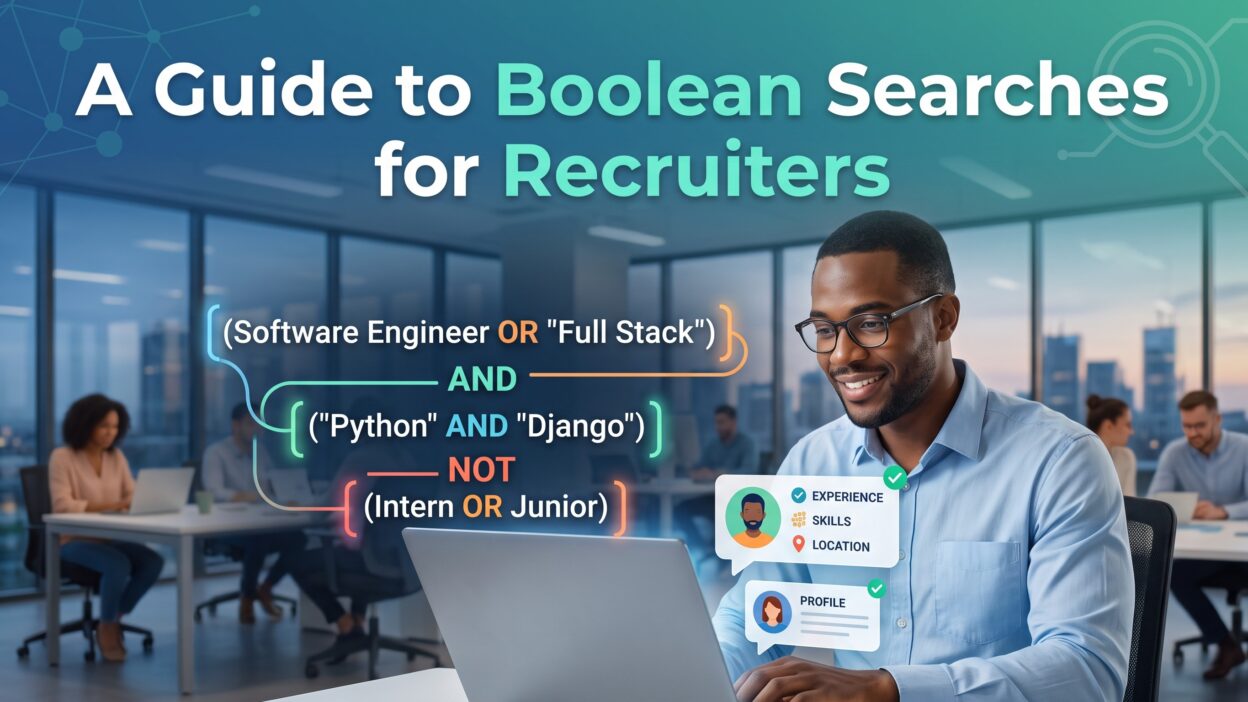
Parentheses group related terms together, similar to math equations. A search like (developer OR engineer) AND Python groups the job titles first, then requires the Python skill across either option.
Without parentheses, a search engine reads the string in a confusing order. Grouping keeps your logic clear and your results accurate.
Consider a search for marketing candidates skilled in either SEO or content strategy, who also know Google Analytics. Written correctly, this looks like (SEO OR “content strategy”) AND “Google Analytics.” Written without parentheses, the search engine might interpret the logic differently, potentially returning candidates who know Google Analytics but have no connection to SEO or content strategy at all.
Complex Boolean searches for recruiters almost always need at least one set of parentheses. Practice grouping related terms together before adding a broader AND or NOT condition around the whole group.
Building Effective Boolean Searches for Recruiters on LinkedIn
LinkedIn remains the most common platform for sourcing candidates. Boolean searches for recruiters work well here, with a few platform-specific quirks.
Sourcing Passive Candidates
Passive candidates aren’t actively job hunting, but they often make the strongest hires. A well-built Boolean string finds these people through their current job titles and skills, not job-seeking language.
A search like (“software engineer” OR “backend developer”) AND Python AND “machine learning” NOT recruiter targets exactly this group. It filters out recruiters who mention these terms in their own profiles, a common noise problem on LinkedIn.
Passive candidates rarely update their profile with job-seeking language like “open to work” or “actively looking.” Their profiles instead describe current responsibilities and accomplishments in detail. A strong Boolean string focuses on these descriptive terms rather than searching for signs of active job hunting, since passive candidates simply won’t use that language.
Reaching passive candidates also requires a thoughtful outreach message once the search returns results. A perfectly built Boolean string still needs a genuine, specific message to convert a passive profile into an actual conversation.
Using Location and Industry Filters
Combine Boolean strings with LinkedIn’s built-in location and industry filters for sharper results. A search string alone can only do so much. Layering platform filters on top narrows candidates down to a specific region or sector without lengthening the search string itself.
This combination works especially well for niche roles. A healthcare recruiter searching for a specialized nurse practitioner can pair a Boolean string with an industry filter to avoid generic healthcare noise.
Common LinkedIn Search Mistakes
Many recruiters overload their search strings with too many operators at once. A string with fifteen ANDs and ORs becomes nearly impossible to troubleshoot when it returns zero results. Start simple, then add complexity gradually.
Another common mistake involves ignoring plural forms. A search for “developer” won’t automatically catch “developers” on every platform. Testing both versions catches candidates the singular search alone would miss.
Boolean Searches for Recruiters Across Different Job Boards
LinkedIn isn’t the only place recruiters search. Boolean logic works across most major platforms, though syntax shifts slightly between them.
Indeed and Boolean Search Syntax
Indeed supports standard Boolean operators, but the platform reads some symbols differently than LinkedIn. Recruiters should test a search string on Indeed directly rather than assuming a LinkedIn string will transfer perfectly.
Indeed also indexes full resume text, not just profile summaries. This means Boolean searches for recruiters on Indeed often surface more detailed technical skills buried deep in a resume, skills that a shorter LinkedIn profile might not mention at all.
Indeed’s resume database works especially well for high-volume roles where candidates upload full documents rather than maintaining a polished profile. A recruiter filling warehouse or retail positions often finds better results on Indeed than on LinkedIn, simply because that candidate pool uses Indeed more actively.
Recruiters should also check Indeed’s resume freshness filter alongside their Boolean string. A technically perfect search string loses value if it surfaces resumes uploaded five years ago from candidates who already found new roles.
Google X-Ray Searches
Google X-ray search uses Boolean operators combined with the “site:” command to search a specific website through Google itself. A search like site:linkedin.com/in “product manager” AND “fintech” pulls LinkedIn profiles directly through Google’s search engine, bypassing some of LinkedIn’s own search limits.
This technique helps recruiters reach candidates when their LinkedIn account hits a search limit. Google indexes public LinkedIn profiles, so an X-ray search often surfaces the same candidates through a different route.
X-ray search extends beyond LinkedIn too. Recruiters can target GitHub for developer talent, personal portfolio sites for designers, or even conference speaker pages for subject matter experts. The “site:” command simply tells Google which domain to search within, while the rest of the Boolean string filters for the right skills and titles.
This method takes practice to master, since Google’s search behavior shifts slightly over time. Recruiters who rely heavily on X-ray searching should test their strings periodically, since a string that worked well last year might need small tweaks today.
Internal Applicant Tracking Systems
Company-owned applicant tracking systems store years of past applicants. Boolean searches for recruiters inside these systems help teams rediscover strong candidates who applied for a different role months or years earlier.
Most ATS platforms support at least basic AND and OR logic. Recruiters who search their own database before posting a new job often fill roles faster, since a qualified candidate may already sit in their existing talent pool.
Internal database searches deserve just as much attention as external sourcing. A candidate who applied eighteen months ago for a different role might now fit perfectly into a newly opened position. Without a solid Boolean search habit, that candidate stays buried under thousands of other old applications, never resurfacing when the right opportunity finally opens.
Some ATS platforms limit Boolean functionality more than external job boards do. Recruiters should test their specific system’s capabilities early, rather than assuming every operator works exactly the way it does on LinkedIn or Google.
Advanced Boolean Search Techniques for Recruiters
Once the basics feel comfortable, a few advanced techniques sharpen results even further.
Wildcard Searches
A wildcard symbol, usually an asterisk, catches variations of a root word. A search for “manag*” catches “manager,” “management,” and “managing” in a single string. This saves time compared to writing out every variation with OR operators.
Wildcards work particularly well for certification searches, where naming conventions vary slightly between organizations and regions.
Nested Boolean Strings
Nested strings combine multiple grouped clauses into one longer search. A string like (nurse OR “registered nurse”) AND (pediatric OR “neonatal care”) AND “certified” builds a highly specific search across three separate concepts at once.
This technique demands careful parentheses placement. A single misplaced parenthesis can break the entire logic and return either zero results or far too many.
Combining Boolean Searches for Recruiters With AI Sourcing Tools
Modern sourcing platforms now combine Boolean logic with AI-driven matching. Recruiters type a Boolean string, and the platform’s AI layer expands it automatically with related skills and synonyms the recruiter might not have thought to include.
This hybrid approach speeds up sourcing without losing the precision that Boolean logic provides. Recruiters still control the core search, while the AI layer catches edge cases a manual string might miss.
Common Mistakes Recruiters Make With Boolean Searches
Even experienced recruiters fall into predictable traps when building search strings.
Overcomplicating the Search String
A string packed with too many conditions often returns zero results. Recruiters sometimes add every possible skill and requirement into one massive string, forgetting that each added condition narrows the pool further.
Start with two or three core requirements. Add more only if the initial results feel too broad. This step-by-step approach avoids the frustration of a search returning nothing at all.
Recruiters new to Boolean logic often try to encode every single job requirement into one search string on their first attempt. This instinct makes sense, but it usually backfires. Real candidate profiles rarely match every listed requirement word for word, so an overly strict string filters out people who would actually succeed in the role.
A better approach builds the string in layers. Start with the job title and one critical skill. Review the results. Add a second skill only if the pool still feels too large. This gradual process keeps the search flexible and avoids the zero-result problem entirely.
Forgetting to Test Variations
Job titles vary wildly across companies and industries. A recruiter searching only for “HR manager” misses candidates listed as “human resources manager” or “people operations manager.” Testing multiple title variations catches candidates a single rigid search would skip entirely.
Ignoring Boolean Search Limits on Free Accounts
Many platforms cap the number of searches or results available on free accounts. Recruiters sometimes build a perfect Boolean string, only to hit a wall halfway through reviewing results. Understanding platform limits ahead of time avoids wasted effort mid-search.
Building a Boolean Search Strategy for Your Recruiting Team
Individual searches matter, but a repeatable strategy across a whole team matters more.
Creating a Search String Library
Save successful Boolean strings in a shared document for future use. A recruiting team that reuses proven strings for common roles saves time on every repeat search, instead of rebuilding logic from scratch each time a similar role opens.
Update this library regularly. Job titles and skill terminology shift over time, so a string that worked well two years ago may need small adjustments today.
Organize the library by role type or department, so any recruiter on the team can find a relevant starting string quickly. A software engineering search string won’t transfer well to a marketing search, but the underlying structure often stays similar enough to adapt in minutes rather than starting from a blank page.
Assign one team member to own this library’s upkeep. Without clear ownership, shared documents like this tend to go stale within a few months, filled with outdated strings nobody bothers to update.
Training New Recruiters on Boolean Logic
New recruiters often skip Boolean searches entirely, relying only on basic keyword searches instead. A short training session covering the five core operators gets new hires sourcing effectively within days, rather than months of trial and error.
Pair new recruiters with experienced sourcers during their first few searches. Watching someone build a string live teaches the logic faster than reading documentation alone.
Measuring Search Effectiveness
Track how many strong candidates each search string produces over time. A string that consistently returns weak matches needs revision, even if it once worked well for a similar role. Boolean searches for recruiters work best as a living practice, not a one-time setup.
Frequently Asked Questions
What is a Boolean search in recruiting? A Boolean search combines specific operators like AND, OR, and NOT to filter candidate profiles with precision. Recruiters use this method to find qualified candidates faster than a basic keyword search allows.
Which platforms support Boolean searches for recruiters? LinkedIn, Indeed, Google, and most applicant tracking systems support Boolean search logic, though exact syntax varies slightly between platforms.
Do Boolean searches work without LinkedIn Recruiter? Yes, basic Boolean searches work on LinkedIn’s free search bar, though LinkedIn Recruiter offers additional filters that pair well with Boolean strings for more precise results.
How long should a Boolean search string be? Shorter strings with two or three core requirements usually perform better than long strings. Add complexity gradually instead of building one massive string from the start.
Can Boolean searches replace AI sourcing tools? Not entirely. Boolean searches give recruiters precise control, while AI tools expand searches with related terms automatically. Many recruiting teams use both together for the best results.
Why do my Boolean searches return zero results? This usually happens from too many combined conditions or a misplaced parenthesis. Simplify the string, test each piece separately, then rebuild it gradually.
Read More:-Salesforce MCP: How AI Agents Connect to Your CRM Data
Conclusion

Boolean searches for recruiters turn a chaotic candidate pool into a focused shortlist. The core operators stay simple once you practice them, and the results speak for themselves through faster, more accurate sourcing.
Start small. Build a string with two requirements, test it, then expand from there. Save your best strings for future use, and train your team to think in Boolean logic from day one.
Recruiters who master Boolean searches for recruiters spend less time scrolling and more time talking to candidates who actually fit the role. That shift alone makes the learning curve worth the effort.