Introduction
TL;DR AI agents need real data to work well. They can’t guess your pipeline numbers or invent your customer history. This is where Salesforce MCP comes in. Salesforce MCP gives AI agents a direct, secure path into your CRM. It removes the guesswork. It replaces manual lookups with instant, structured access.
This guide breaks down what Salesforce MCP is. It explains how it works. It shows you why sales teams, support teams, and developers care about it. You will also find practical use cases, setup basics, risks to watch, and answers to common questions.
Table of Contents
What Is Salesforce MCP?
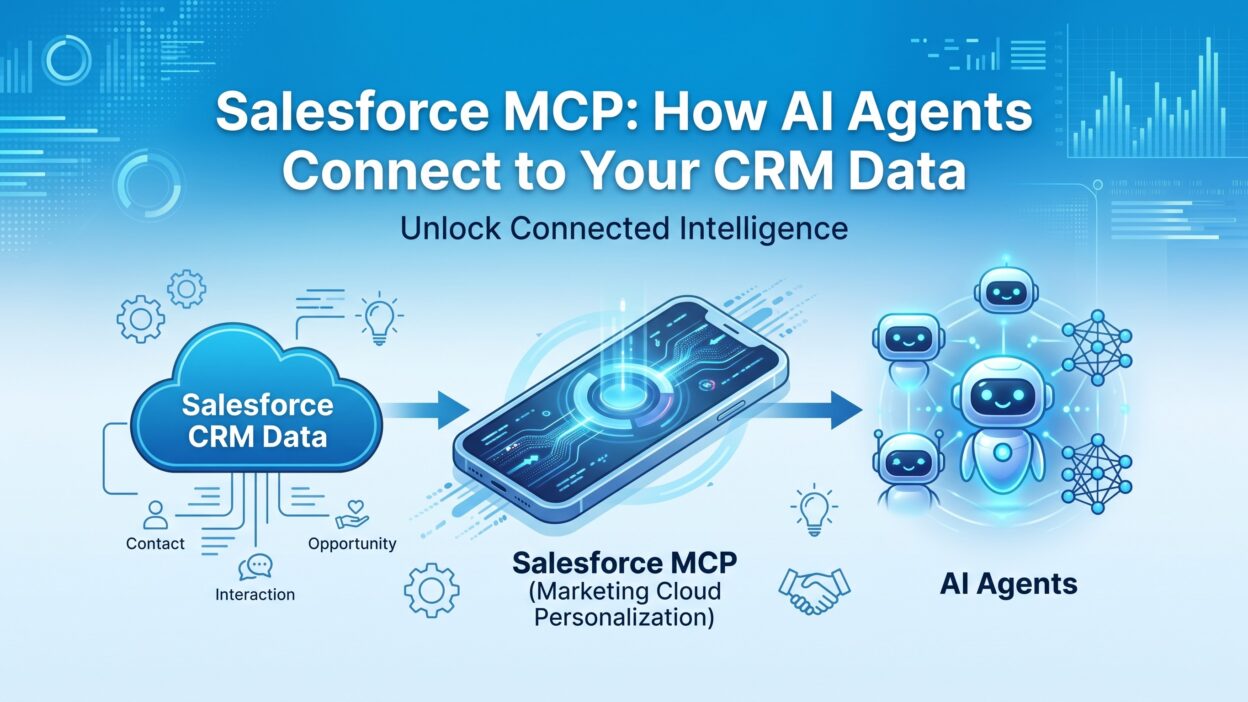
Salesforce MCP stands for Model Context Protocol applied to Salesforce. MCP is an open standard. It lets AI models talk to external tools and data sources in a consistent way. Salesforce MCP is the specific implementation that connects AI agents to Salesforce records, objects, and workflows.
Think of Salesforce MCP as a translator. Your AI agent speaks one language. Salesforce speaks another. Salesforce MCP sits between them. It converts a plain request like “show me open deals over $50,000” into a proper Salesforce query. Then it returns the answer in a format the AI agent understands.
Before Salesforce MCP, developers built custom integrations for every AI project. Each integration needed its own authentication logic, its own error handling, its own data mapping. Salesforce MCP standardizes this. One protocol works across many AI tools. This saves engineering time. It also reduces bugs.
Why the Protocol Matters Right Now
AI agents are moving from chatbots to real business tools. Companies want agents that can pull live CRM data, update records, and trigger workflows. Static AI models can’t do this alone. They need a bridge. Salesforce MCP is that bridge.
The timing matters too. Enterprises already store years of customer data in Salesforce. That data has real value for AI agents, but only if the agent can reach it safely. Salesforce MCP makes that access possible without exposing raw database credentials to every application.
Think about how much information sits inside a typical Salesforce org. Account history, deal notes, support tickets, campaign responses, and renewal dates all live there already. Most of it never gets used by AI tools because safe access stayed hard to build. Salesforce MCP changes that math. It turns a locked vault into a resource an AI agent can actually query on demand.
Business leaders also like the speed of adoption. A team doesn’t need to wait months for a custom integration project. Once a Salesforce MCP server is configured, new AI agents can plug into it quickly. This lowers the cost of testing new AI use cases across departments.
Suggested word count for this section: 350-400 words
How Salesforce MCP Works Under the Hood
Salesforce MCP follows a client-server model. The AI application acts as the client. Salesforce acts as the server, or it connects through an MCP server layer that speaks to Salesforce APIs. The client sends a request. The server checks permissions. Then it fetches or updates the requested data.
The Core Components
An MCP server exposes specific “tools” to the AI agent. In Salesforce MCP, these tools might include searching accounts, reading opportunity records, creating support cases, or updating contact fields. Each tool has a defined input and output structure. The AI agent doesn’t need to know Salesforce’s internal schema. It just calls the tool it needs.
Authentication runs through standard Salesforce mechanisms. This usually means OAuth tokens. The AI agent never sees raw passwords. Salesforce MCP respects the same permission sets and field-level security that apply to human users. If a sales rep can’t see a certain field, the AI agent can’t see it either.
Request and Response Flow
A typical Salesforce MCP interaction looks simple from the outside. A user asks the AI agent a question. The agent decides it needs CRM data. It sends a structured request through Salesforce MCP. Salesforce processes the request and returns results. The agent then turns those results into a natural answer for the user.
This flow happens in seconds. The user never sees the technical steps. They just get an accurate, current answer pulled straight from live Salesforce data.
Tool Definitions and Schemas
Every tool exposed through Salesforce MCP includes a schema. The schema tells the AI agent what input the tool expects and what output it returns. A “search accounts” tool might accept a company name and return account ID, owner, and industry. This structure keeps responses predictable. The AI agent doesn’t have to guess the shape of the data it receives.
Developers write these schemas once. After that, any AI application that speaks MCP can use the tool correctly. This is a big shift from older integration patterns, where every new AI tool needed its own custom parsing logic for Salesforce responses.
Handling Errors and Edge Cases
Real CRM data is messy. Fields go blank. Records get deleted. Permissions change. A well-built Salesforce MCP server handles these situations gracefully. Instead of crashing, it returns a clear error message the AI agent can pass along or work around. This keeps the user experience smooth even when the underlying data isn’t perfect.
Key Benefits of Using Salesforce MCP
Teams adopt Salesforce MCP for a few clear reasons. Each benefit solves a real pain point that existing integrations often miss.
Real-Time Data Access for AI Agents
Old chatbots relied on static training data. They gave outdated answers about pricing, deal status, or account history. Salesforce MCP fixes this. The AI agent queries live records every time. Sales reps get current pipeline numbers. Support agents see the latest case notes. Nothing is stale.
Reduced Development Overhead
Building a custom Salesforce integration from scratch takes weeks. Developers must handle authentication, rate limits, error states, and data formatting on their own. Salesforce MCP standardizes these pieces. Teams plug into an existing protocol instead of reinventing it. This cuts development time significantly.
Consistent Security Model
Security teams often block AI projects because of data exposure fears. Salesforce MCP inherits Salesforce’s native permission structure. Field-level security, object-level security, and sharing rules all still apply. This gives security teams confidence that AI agents won’t leak sensitive customer data.
Scalability Across Multiple AI Tools
Companies rarely use just one AI tool. They might run a customer support bot, an internal sales assistant, and a marketing automation agent. Salesforce MCP lets all these tools connect through the same standard. You don’t need a separate custom build for each one.
Better Accuracy in AI Responses
AI agents without live data access often hallucinate details. They might invent a deal amount or misstate a customer’s plan tier. Salesforce MCP grounds every response in real records. This cuts down on false answers and builds trust with the people using these tools every day.
Faster Onboarding for New AI Projects
New AI initiatives often stall because data access takes too long to set up. Security reviews, custom API work, and testing can eat up weeks. Salesforce MCP shortens this cycle. Once your first Salesforce MCP server exists, new projects reuse the same foundation instead of starting from zero.
Common Use Cases for Salesforce MCP
Understanding the theory helps, but real examples make Salesforce MCP click. Here are the situations where teams see the most value.
Sales Teams and Pipeline Visibility
A sales manager asks an AI agent for a summary of deals closing this quarter. The agent uses Salesforce MCP to pull opportunity records filtered by close date and stage. It returns a clean summary in seconds. No spreadsheet exports. No manual filtering in Salesforce reports.
Customer Support Automation
A support agent needs a customer’s full case history before a call. An AI tool connected through Salesforce MCP retrieves past cases, resolution notes, and open tickets instantly. The support agent walks into the call fully prepared.
Marketing Personalization
Marketing teams want to segment audiences based on real CRM behavior. Salesforce MCP lets an AI agent pull campaign responses, lead scores, and engagement history. The agent then builds a segment without a marketing ops person running a manual query.
Internal Knowledge Assistants
Employees often ask basic questions like “who owns this account” or “what’s the status of this renewal.” An internal AI assistant powered by Salesforce MCP answers these instantly. Employees stop pinging colleagues on Slack for information sitting right in the CRM.
Renewal and Retention Alerts
Customer success teams track dozens of renewal dates at once. An AI agent connected through Salesforce MCP can scan upcoming renewals, flag accounts with low engagement scores, and draft outreach suggestions. This gives customer success managers a head start instead of a last-minute scramble.
Executive Reporting Without the Wait
Executives often need quick answers before a board meeting or investor call. Instead of waiting on an analyst to build a report, an AI agent using Salesforce MCP can pull revenue trends, win rates, and regional performance in minutes. This turns a multi-day request into a same-day answer.
Setting Up Salesforce MCP: A Practical Overview
Getting started with Salesforce MCP doesn’t require rebuilding your entire tech stack. Most teams follow a similar path.
Choose an MCP-Compatible AI Tool
Not every AI application supports MCP yet, but adoption is growing fast. Popular AI development platforms and agent frameworks now include MCP client support. Confirm your chosen tool can act as an MCP client before moving forward.
Configure the Salesforce Connection
You’ll need a Salesforce connected app with proper OAuth settings. This connected app defines what scopes and permissions the AI agent receives. Keep these scopes narrow at first. Expand access only as trust grows.
Define the Tools Your Agent Needs
Salesforce MCP servers expose specific tools, not full database access. Decide which objects and actions your AI agent actually needs. A support bot might only need read access to cases and contacts. A sales assistant might need read and write access to opportunities.
Test in a Sandbox Environment
Never point a new AI agent directly at production data. Salesforce sandboxes let you test Salesforce MCP behavior safely. Watch how the agent handles edge cases, missing fields, and permission errors before going live.
Monitor and Refine
Launching Salesforce MCP isn’t the finish line. Watch how real users interact with the AI agent once it goes live. Look for questions the agent struggles to answer. Check whether it pulls the right records consistently. Refine the tool definitions and permission scopes based on what you observe in the first few weeks.
Train Your Team
Even the best Salesforce MCP setup fails if employees don’t trust it or know how to use it. Show sales reps and support agents what the AI tool can do. Walk them through a few real examples. Adoption grows faster when people see the time savings firsthand instead of reading about it in a memo.
Security and Governance Considerations
Connecting AI agents to CRM data raises real questions. Salesforce MCP handles many concerns well, but governance still requires active attention from your team.
Permission Scoping
Give AI agents the minimum access they need. This principle applies to Salesforce MCP just like it applies to human users. An agent that only answers questions doesn’t need write access. An agent that updates records needs carefully scoped write permissions, not blanket edit rights across every object.
Audit Trails
Salesforce already logs field changes and record access through its native tools. Salesforce MCP interactions should flow through these same logging mechanisms. This gives your compliance team a clear trail of what the AI agent read, changed, or created.
Data Residency and Compliance
Some industries face strict rules about where customer data lives and who can process it. Before rolling out Salesforce MCP broadly, confirm your AI vendor’s data handling practices align with your compliance requirements. This matters most in healthcare, finance, and government sectors.
Preventing Prompt Injection Risks
AI agents that read external text, like support tickets or emails, face prompt injection risks. A malicious actor could embed hidden instructions in a case description. Salesforce MCP implementations should sanitize inputs and limit what actions an agent can take based on retrieved content alone.
Human Approval for Sensitive Actions
Some actions carry real business risk. Deleting a record, changing a contract value, or closing a large deal shouldn’t happen without a human checking first. Build approval steps into your Salesforce MCP workflow for these high-stakes actions. The AI agent can prepare the change. A person can confirm it before it goes live.
Regular Access Reviews
Permissions granted today might not make sense six months from now. Review which AI agents connect through Salesforce MCP on a regular schedule. Remove access for retired projects. Tighten scopes that turned out broader than necessary. This keeps your security posture aligned with how the tools actually get used.
Salesforce MCP vs Traditional Salesforce APIs
Salesforce already offers REST APIs, SOAP APIs, and Bulk APIs. So why does Salesforce MCP matter separately?
Traditional APIs require custom code for every integration. A developer must write specific logic to call the API, parse the response, and hand it back to whatever application needs it. Salesforce MCP adds a standardized layer on top. AI agents interact with MCP tools using natural requests. The MCP server handles the actual API calls behind the scenes.
This distinction matters most for AI-specific workflows. Traditional APIs work fine for fixed, predictable integrations. Salesforce MCP shines when an AI agent needs flexible, conversational access to CRM data without a developer hardcoding every possible query in advance.
Challenges and Limitations to Know
Salesforce MCP solves many problems, but it isn’t perfect. Teams should go in with realistic expectations.
Adoption across AI platforms is still uneven. Some tools support MCP fully. Others offer partial support or none at all. Check compatibility before committing to a specific AI vendor.
Complex queries can still trip up AI agents. An agent might misinterpret a vague request and pull the wrong records. Human review remains important, especially for actions that write data back into Salesforce.
Latency can also become a factor. Each Salesforce MCP request travels through authentication, permission checks, and the Salesforce API itself. For high-volume use cases, this adds up. Teams running large-scale automation should test performance early.
Cost is another factor worth planning for. Salesforce API calls often count against org limits. Heavy Salesforce MCP usage across many AI agents can push you closer to those limits faster than expected. Monitor your API consumption as adoption grows, especially if multiple teams build agents on the same org.
Change management shouldn’t get overlooked either. Employees used to manual CRM lookups need time to trust an AI agent’s answers. Some will double-check the AI output against Salesforce directly at first. That’s normal. Trust builds as the agent proves itself accurate over repeated use.
The Future of Salesforce MCP
MCP adoption is accelerating across the AI industry. Major AI labs and enterprise software vendors are building support for it. Salesforce MCP sits at the center of this shift for any company running its business on Salesforce.
Expect deeper integrations over time. Future versions may support more granular permission controls, better handling of complex multi-object queries, and tighter integration with Salesforce’s own AI tools like Agentforce. As trust grows, more companies will move from read-only agents to agents that can safely take action inside the CRM.
Frequently Asked Questions
What is Salesforce MCP used for?
Salesforce MCP connects AI agents to live Salesforce data. Teams use it for sales summaries, support automation, marketing segmentation, and internal knowledge assistants. It replaces manual CRM lookups with instant, AI-driven answers.
Is Salesforce MCP secure?
Salesforce MCP inherits Salesforce’s native security model. This includes OAuth authentication, field-level security, and sharing rules. Proper permission scoping and audit logging still require active governance from your team.
Do I need coding skills to use Salesforce MCP?
Setting up Salesforce MCP does require some technical configuration, especially around connected apps and OAuth scopes. Business users typically interact with the finished AI agent, not the underlying protocol itself.
How is Salesforce MCP different from Salesforce APIs?
Traditional Salesforce APIs need custom code for each integration. Salesforce MCP standardizes how AI agents request and receive data, reducing the custom development work required for AI-specific use cases.
Can Salesforce MCP write data back into Salesforce?
Yes, depending on the permissions granted to the AI agent. Read-only setups are common for early deployments. Write access should stay narrowly scoped and tested thoroughly in a sandbox first.
Which AI tools support Salesforce MCP?
Support varies by platform and changes frequently as adoption grows. Check your specific AI tool’s documentation to confirm current MCP client compatibility before building a Salesforce MCP integration.
Read More:-Propensity Review: What You Need to Know [2026]
Conclusion

Salesforce MCP changes how AI agents work with CRM data. It replaces slow, manual lookups with fast, secure, real-time access. Sales teams get instant pipeline answers. Support teams get full case history in seconds. Developers spend less time building custom integrations from scratch.
The protocol still has gaps. Platform support varies. Complex queries need human oversight. Latency needs testing at scale. None of these gaps erase the core value Salesforce MCP brings to a business already running on Salesforce.
Companies that adopt Salesforce MCP early gain a real edge. Their AI agents give accurate answers instead of guesses. Their teams move faster because the CRM data they need shows up instantly, right when they ask for it. As MCP adoption spreads across the AI industry, Salesforce MCP will likely become a standard part of how businesses connect artificial intelligence to their most valuable customer data.
Start small. Test in a sandbox. Scope permissions tightly. Then expand Salesforce MCP access as your team builds trust in what these AI agents can safely do.