Introduction
TL;DR Sales and marketing automation connects two departments that used to work apart. A marketer used to hand off a lead through email or a spreadsheet. A sales rep used to chase that lead with no real context. Sales and marketing automation closes this gap through connected software and shared data. This guide explains what it means, how it works, and which tools lead the market today.
Every growing company eventually hits the same wall. Manual processes that worked fine for ten leads a month collapse once that number reaches a hundred. This guide walks through the exact moment that shift usually happens, along with the tools and habits that keep a revenue team running smoothly past that point.
Table of Contents
What Is Sales and Marketing Automation?
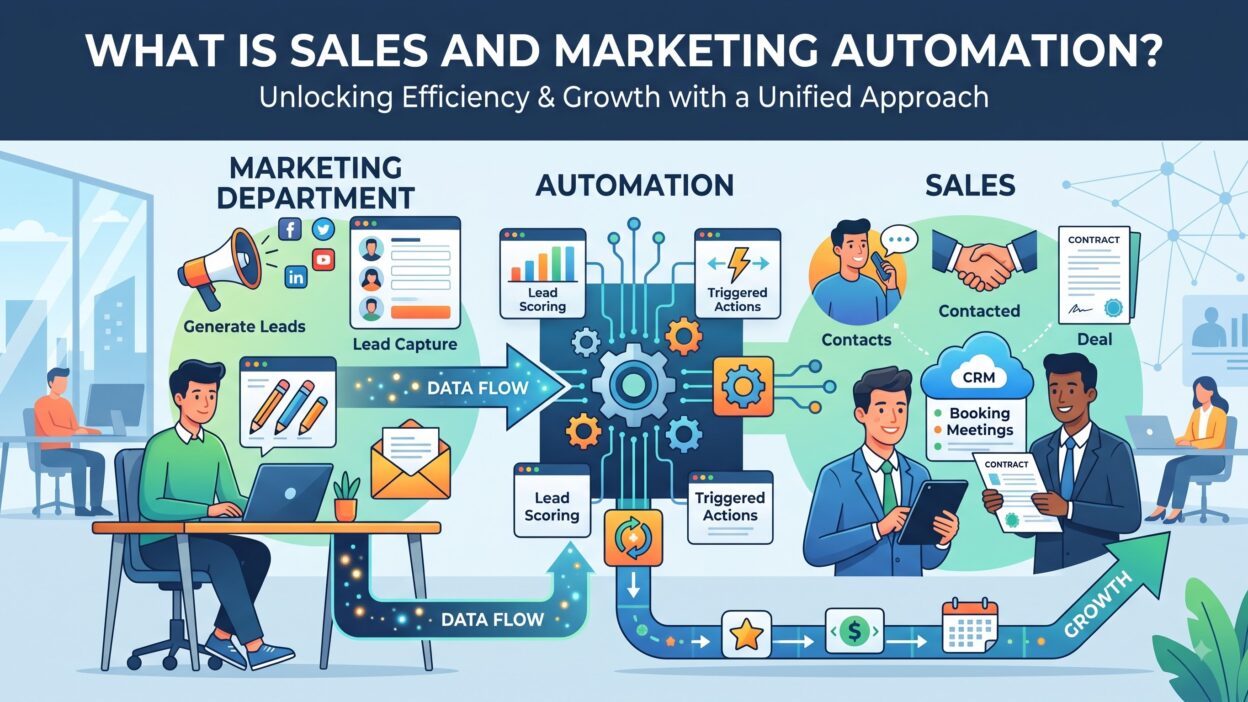
Sales and marketing automation means software that handles repetitive tasks across both departments. A marketer sets up an email sequence once, and the system sends it automatically based on a trigger. A sales rep gets notified the moment a lead opens three emails in a row. This connected system replaces manual follow-up with a structured, rule-based process.
Marketing automation alone handles tasks like email campaigns, landing pages, and social posting. Sales automation alone handles tasks like call logging, deal tracking, and follow-up reminders. Sales and marketing automation combines these two functions into a single flow. A lead moves from a marketing campaign straight into a sales pipeline without a manual handoff.
This category grew out of a simple problem. Marketing teams generated leads, but sales teams often ignored them due to poor context. A connected system gives sales visibility into every touchpoint a lead already had with a brand. This shared view builds trust between departments that used to blame each other for missed revenue.
Why Sales and Marketing Automation Matters Today
Buyers research on their own long before they ever talk to a sales rep. They read blog posts, compare pricing pages, and download guides quietly. Sales and marketing automation tracks this behavior and turns it into useful signals for a sales team.
Manual lead follow-up simply cannot scale past a small volume of leads. A team with five reps and five hundred monthly leads needs a system, not a spreadsheet. This software assigns leads, sends timely emails, and flags hot prospects without constant manual effort.
Revenue leaders care about pipeline speed more than almost any other metric. A connected system shortens the time between first contact and closed deal. Faster follow-up alone often lifts conversion rates by a noticeable margin, since interested leads cool off fast without a quick response.
Budget owners also like the reporting side of this software. A marketing team can finally show which campaigns actually turned into revenue, not just clicks. This visibility helps a company shift spend toward channels that work and away from ones that only look good on a vanity metric.
Careers in this space keep growing too. A marketing operations specialist who knows HubSpot or Marketo commands a strong salary today. Companies actively hire for this skill set as more teams adopt connected systems across their revenue process.
Signs Your Business Is Ready for This Software
A few clear signals point to the right timing for this kind of investment. Recognizing these signs early prevents wasted spend on a tool your team is not ready to use.
Leads sit untouched for more than a day without a reply from anyone. This delay usually means your current process relies too heavily on memory instead of a system. A connected workflow closes this gap by triggering follow-up the moment a lead takes action.
Your team spends more time on data entry than on actual conversations. Reps who copy information between a spreadsheet and an inbox waste hours every week on work a system could handle instantly. That time adds up fast across a full sales floor.
Marketing cannot prove which campaigns drive real revenue. Without shared tracking between departments, a marketing team only sees clicks and opens, never the deals those clicks eventually produced. A connected system closes this reporting gap completely.
Your lead volume has grown past what a small team can manually sort through. A spreadsheet works fine for twenty leads a month. It breaks down fast once that number climbs into the hundreds. This growth point usually marks the right moment to invest in dedicated software.
Core Components of Sales and Marketing Automation
This category breaks into clear functional pieces. Each piece solves a specific problem inside the broader revenue process.
Lead Scoring
Lead scoring assigns points to a prospect based on their behavior and profile. A visit to a pricing page might add ten points. A download of an unrelated guide might add only two points. Sales reps focus on leads that cross a set score threshold, which saves time on cold, unqualified names.
Email Automation
Email automation sends messages based on a trigger instead of a manual click. A new subscriber gets a welcome series automatically. A cart abandoner gets a reminder email a few hours later. This function ranks among the oldest and most widely used pieces of the entire category.
CRM Integration
CRM integration keeps marketing and sales data in sync across both systems. A lead’s full activity history follows them from a marketing platform straight into a sales dashboard. Without this sync, reps call prospects blind, with no idea what content they already viewed.
Workflow Triggers
Workflow triggers fire an action based on a specific event. A form submission might trigger an internal Slack alert to a rep. A pricing page visit might trigger a personalized follow-up email within the hour. These rules run in the background without any manual work from a team member.
Analytics and Reporting
Analytics and reporting tools measure campaign performance across the full funnel. A dashboard shows which email drove the most replies. Another view shows which landing page converted the highest percentage of visitors. Sales and marketing automation platforms usually bundle this reporting directly inside the same tool.
Chatbots and Conversational Tools
Chatbots capture and qualify leads directly on a website in real time. A visitor asks a question, and the bot answers or routes them to a rep. This tool works around the clock, even outside normal business hours, and it often captures leads that would otherwise leave the site unnoticed.
SMS and Multichannel Automation
SMS automation extends follow-up beyond email into text messages. A reminder about an abandoned cart often gets read within minutes on a phone, much faster than an email sitting in an inbox. Multichannel automation coordinates messaging across email, text, and even social ads, so a prospect sees consistent messaging no matter where they show up.
Top Sales and Marketing Automation Platforms
This section covers well-known platforms across different budgets and team sizes. Each one fits a slightly different use case, so match the tool to your actual gap.
HubSpot
HubSpot combines marketing, sales, and service tools inside one connected platform. Smaller teams often start here because of its simple setup and generous free tier. The platform scales into enterprise features as a company grows, which reduces the need to switch systems later.
Marketo
Marketo focuses heavily on complex, multi-step marketing campaigns for larger companies. It handles advanced lead scoring models and detailed segmentation rules. Adobe now owns Marketo, and many enterprise marketing teams treat it as an industry standard for B2B demand generation.
ActiveCampaign
ActiveCampaign blends email marketing with lightweight CRM features for growing teams. Its automation builder uses a visual, drag-and-drop interface that non-technical users pick up fast. Smaller companies often choose this platform when HubSpot feels like more than they actually need.
Salesforce Account Engagement
Salesforce Account Engagement, formerly known as Pardot, connects directly into the Salesforce CRM ecosystem. Companies already running Salesforce often add this tool for tighter native integration. It handles lead scoring, email nurturing, and detailed reporting inside one familiar interface.
Zapier
Zapier connects hundreds of apps without requiring custom code from a developer. A form submission in one tool can trigger an action in a completely different tool. Many teams use Zapier to fill small gaps between larger platforms that do not talk to each other natively.
Mailchimp
Mailchimp started as a simple email tool and expanded into a broader marketing platform. Small businesses often pick Mailchimp for its low cost and familiar interface. It lacks some of the deeper sales-side features found in more dedicated platforms built for larger revenue teams.
Klaviyo
Klaviyo focuses heavily on ecommerce brands that sell through platforms like Shopify. It tracks purchase behavior and triggers emails based on real buying signals, not just page visits. Online retailers often prefer Klaviyo over general-purpose tools because of its deep ecommerce data connections.
Sales and Marketing Automation for Small vs Enterprise Businesses
Company size changes which tools and workflows actually make sense for a budget. A five-person startup should not copy an enterprise stack built for hundreds of reps.
Small businesses benefit from simple, all-in-one platforms like HubSpot or Mailchimp. A single tool that covers email, basic CRM, and simple automation saves both money and setup time. Small teams rarely need advanced lead scoring, since a founder often knows every lead personally at that stage.
Mid-size companies start layering in more specific tools as their lead volume grows. A dedicated lead scoring model or a chatbot often enters the stack around this point. Budget still matters here, so most mid-size teams pick a focused set of tools instead of a sprawling suite nobody fully uses.
Enterprise companies need deep customization, tight security, and strict data governance. Marketo and Salesforce Account Engagement fit well at this scale because of their flexibility across large teams. A dedicated marketing operations team usually owns this stack full time, working closely with sales operations counterparts.
International businesses face extra layers of complexity around this software. Data privacy rules differ across regions, and email compliance laws vary by country. A platform built only for one market often struggles once a company expands overseas, so checking regional compliance early saves real trouble later.
Regulated industries like healthcare and finance add another layer of caution. Certain platforms offer compliance-ready templates that keep messaging within legal limits. A company in one of these industries should confirm compliance features before signing any contract, since a generic platform might not cover these specific requirements out of the box.
How to Choose the Right Sales and Marketing Automation Software
Picking the right platform starts with a clear list of problems, not a list of product names. Write down exactly what breaks in your current process before you start shopping.
Check integration compatibility with your existing CRM and website tools. A platform that does not connect cleanly creates more manual work, not less. Most vendors list their integrations directly on their pricing page, so this check takes only a few minutes.
Ask about onboarding time during any vendor call. Some sales and marketing automation platforms take weeks to configure properly with custom fields and workflows. Others work within a single day for simpler use cases. A long setup process delays the value you expected from the purchase.
Talk to the actual marketers and reps who will use the tool daily. A platform that looks impressive in a demo can still frustrate the people who touch it every day. Users notice clunky interfaces and slow load times faster than a manager does during a sales pitch.
Compare pricing models carefully across every vendor on your shortlist. Some platforms charge based on contact volume. Others charge per user seat. A contact-based model can get expensive fast once your list grows past a certain size.
Request a trial period whenever a vendor offers one. A short trial reveals real problems that a polished demo often hides. Testing with your own data always tells you more than any sales pitch.
Questions to Ask Every Vendor
Ask how the platform handles data privacy and consent tracking. Ask what support looks like after the contract gets signed, not just during the sales process. Ask for references from companies close to your own size. Ask about the data export process too, since exit terms vary widely between vendors. A vendor that hesitates on any of these questions deserves a second look before you commit.
Common Mistakes When Implementing Sales and Marketing Automation
Many companies buy this software without a clear rollout plan. A new platform sits half configured for months because nobody owns the setup process. This waste happens more often than most companies admit out loud.
Over-automation causes another common problem. A prospect who receives five automated emails in two days often unsubscribes out of pure annoyance. Automation should feel timely and relevant, not aggressive or robotic to the person receiving it.
Some teams chase every advanced feature instead of fixing their actual bottleneck first. A complex lead scoring model means little if sales reps never log into the CRM to check it. Sales and marketing automation should solve a real workflow gap, not just look impressive during a product demo.
Poor data hygiene undermines even the most advanced platform on the market. Duplicate contacts and outdated email addresses produce broken campaigns no matter how smart the software gets. Clean data always comes before advanced automation logic.
Skipping alignment between sales and marketing causes friction during rollout. A marketing team that sets lead scoring rules alone, without sales input, often hands off leads reps do not trust. Shared definitions of a qualified lead prevent this exact conflict from happening.
Ignoring mobile formatting trips up more campaigns than most teams expect. Many prospects open emails on a phone first, and a cluttered layout gets deleted within seconds. Testing every workflow on a small screen before launch catches this problem early.
Best Practices for Sales and Marketing Automation Success
Start with a single workflow instead of automating everything at once. A welcome email series or a simple lead-routing rule makes a good starting point. This approach catches setup mistakes early, before they spread across a larger, more complex system.
Document your lead definitions clearly before you build any scoring model. Sales and marketing teams should agree on what counts as a qualified lead before a single point gets assigned. Skipping this step causes disputes later, once real leads start flowing through the system.
Set clear success metrics before you launch a new workflow. Decide what “working well” actually looks like, whether that means faster response time or a higher reply rate. Without a target, you cannot tell if a new automation actually helped.
Review your workflows every quarter instead of setting them up once and forgetting them. Buyer behavior shifts, and an automation built a year ago might no longer match how people actually engage today. Regular reviews keep messaging relevant and prevent stale, robotic-sounding emails from going out.
Assign a clear owner for the platform inside your company. Without an owner, small technical issues pile up and nobody fixes them. This person also handles vendor renewals and keeps workflows aligned with current sales goals.
Test messaging before you scale any workflow to your entire list. A small test group reveals weak subject lines or confusing calls to action before they reach every prospect. This habit protects your sender reputation and keeps engagement rates healthy over time.
Frequently Asked Questions
What is sales and marketing automation?
Sales and marketing automation is software that connects marketing campaigns and sales follow-up into one system. It automates repetitive tasks like emails, lead scoring, and CRM updates across both teams.
How is marketing automation different from sales and marketing automation?
Marketing automation covers only marketing tasks, like email campaigns and landing pages. This broader category adds sales-side functions, like deal tracking and lead handoff, connecting both teams into one workflow.
Which platform works best for a small business?
Small businesses often start with HubSpot or Mailchimp because of their simple setup and lower cost. These platforms scale as a company grows into more advanced needs.
How much does sales and marketing automation typically cost?
Pricing depends heavily on contact volume and feature depth. Small businesses might pay a modest monthly fee, while enterprise companies can spend well into six figures annually.
Can a small team really benefit from this software?
Even a small team benefits once lead volume grows past what a spreadsheet can track cleanly. Early adoption prevents messy handoffs and missed follow-ups later on.
How long does implementation usually take?
Simple setups often launch within days. Complex enterprise deployments, especially ones tied to custom scoring models, can take several weeks to configure fully.
Does automation replace human sales reps?
No, this software supports reps rather than replacing them. It handles repetitive tasks so reps can spend more time on real conversations with qualified prospects.
What is the biggest risk of skipping this software entirely?
Teams without a connected system rely on memory and scattered spreadsheets for follow-up. Leads slip through the cracks, response times slow down, and marketing struggles to prove which campaigns actually drove revenue.
Who should own sales and marketing automation inside a company?
A dedicated marketing operations or revenue operations person usually owns this platform in larger companies. In smaller companies, a marketing lead or a founder often manages it alongside other daily responsibilities.
Read More:-7 Best Creatio Alternatives [2026]
Conclusion

Sales and marketing automation gives revenue teams a shared, connected way to turn interest into closed deals. This guide covered the core components, the leading platforms, and the exact steps to pick software that fits your actual needs. Strong sales and marketing automation removes manual busywork and replaces guesswork with real behavioral data.
Start small if your team feels unsure where to begin. Fix one clear bottleneck first, then expand your automation only once that workflow proves its value. A focused setup always beats a bloated one filled with rules nobody remembers building.
Revisit your systems often, since buyer behavior and available tools keep shifting every year. A thoughtful approach to sales and marketing automation today saves your team real time, real budget, and real revenue down the road.