Introduction
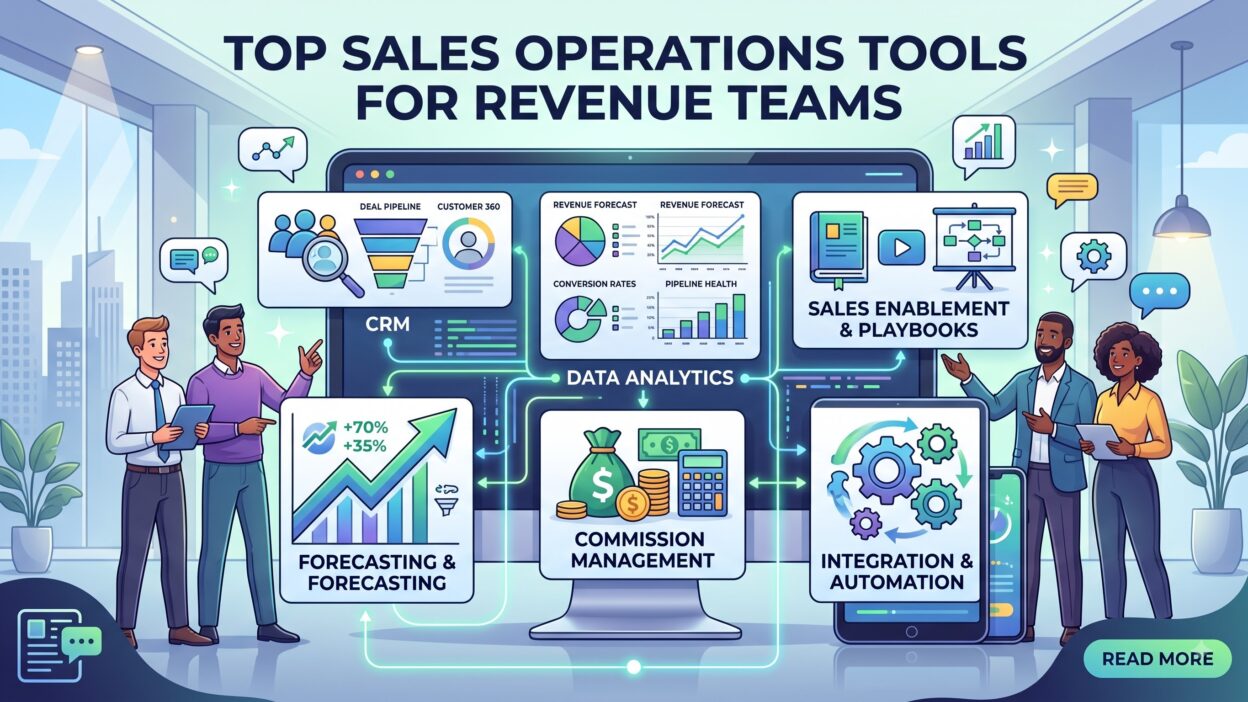
TL;DR Sales operations tools sit at the center of every strong revenue team today. A sales rep needs a clear pipeline. A manager needs accurate forecasts. A finance team needs clean reporting. This software connects these needs into one working system. This guide walks through every major category, the top platforms inside each one, and the exact way to pick tools that fit your team.
Revenue leaders now treat this category as a core budget line, not an optional extra. A well-built stack shortens sales cycles and sharpens reporting across every level of a company. The right mix of software turns scattered spreadsheets into one clear source of truth.
Table of Contents
What Are Sales Operations Tools?
Sales operations tools support the people who plan, run, and measure a sales process. They differ from tools a sales rep uses on the front line. A rep sends emails and books meetings. A sales operations team builds the systems behind those actions. This category covers software for pipeline tracking, forecasting, territory planning, and commission management.
A CRM platform counts as a core example. It stores customer records and tracks deal stages. A forecasting tool counts too, since it predicts revenue based on pipeline data. The category also includes simpler software, like a spreadsheet template for quota tracking. It spans both simple and complex solutions.
Territory planning software deserves its own mention here. This software divides accounts fairly across a sales team based on region, industry, or account size. Fair territory splits reduce internal conflict and keep quota targets realistic for every rep.
Revenue operations differs slightly from sales operations, though people mix up the two terms often. Revenue operations covers sales, marketing, and customer success together. Sales operations focuses mainly on the sales function itself. Many platforms in this space now stretch across both areas as departments align their data.
A strong sales operations stack removes manual work from a rep’s day. Reps spend less time on data entry and more time on actual selling. This shift alone justifies the cost of most sales operations tools for a growing team.
Why Revenue Teams Need Sales Operations Tools
Manual sales tracking breaks down fast once a team grows past a few reps. Spreadsheets get outdated within hours. Deal information sits in scattered inboxes and sticky notes. Sales operations tools fix this problem by centralizing every piece of deal data in one place.
Forecasting accuracy matters a lot to leadership and investors. A CEO cannot plan hiring or spending around a guess. Sales operations tools pull real pipeline data into a forecast model, which removes much of the guesswork. Finance teams trust these numbers far more than a manager’s gut feeling.
Sales operations tools also protect a company during a leadership change. A new sales manager can open a dashboard and see the full pipeline instantly. Without these systems, that same manager needs weeks just to understand deal status across the team.
Commission disputes waste time and hurt morale across a sales floor. This software calculates payouts automatically based on closed deals. This accuracy builds trust between reps and leadership, and it cuts down on messy end-of-quarter arguments.
Cross-team alignment improves once everyone works from the same dashboard. Marketing can see which leads actually convert into revenue. Customer success can see which accounts closed with specific terms attached. Sales operations tools give every department a shared, reliable view of the deal lifecycle.
Hiring managers now look for candidates who know these platforms well. A sales operations analyst who knows Salesforce and Clari stands out during an interview. This skill set keeps growing in demand as more companies invest in structured revenue processes.
Core Categories of Sales Operations Tools
Sales operations tools split into clear categories based on the job each one handles. Understanding these categories helps you avoid buying overlapping software. Most revenue teams end up combining several categories rather than relying on one single platform.
CRM Platforms
A CRM platform stores every customer and deal record a team touches. Reps log calls, emails, and meeting notes inside this system. Managers pull reports directly from the same data. A CRM sits at the foundation of almost every sales operations stack in use today.
Sales Enablement Software
Sales enablement software gives reps the content and training they need to close deals. This includes pitch decks, case studies, and battle cards against competitors. A strong enablement platform tracks which content actually helps close a deal. Sales operations teams often own this software alongside marketing.
Forecasting Tools
Forecasting tools predict future revenue based on current pipeline data. These platforms use deal stage, deal age, and rep history to build a prediction model. Leadership relies on these numbers during board meetings and budget planning. Accurate forecasting ranks among the top reasons companies invest in this software category at all.
CPQ Software
CPQ stands for configure, price, quote. This software helps reps build accurate quotes for complex products with many pricing options. A sales rep avoids pricing errors that could cost a company real revenue. CPQ software fits companies with bundled products or tiered pricing structures especially well.
Sales Intelligence Tools
Sales intelligence tools gather signals about buyer intent and account activity. A rep sees when a prospect visits pricing pages or reads a competitor comparison. This insight helps reps time their outreach around real buying signals instead of a cold guess.
Quota and Territory Management Tools
Quota management software sets and tracks individual rep targets across a quarter or a year. Managers adjust quotas as headcount or market conditions shift mid-cycle. This software reduces spreadsheet errors that used to cause pay disputes at quarter end. Paired with territory tools, it keeps targets fair across an entire sales floor.
Pipeline Management Tools
Pipeline management tools track every open deal from first contact to close. Reps update deal stages as a prospect moves through the buying process. Managers spot stalled deals quickly through visual pipeline views. This category overlaps with CRM software but often adds sharper visualization on top.
Data Enrichment Tools
Data enrichment tools add missing details to contact and company records. A rep might have a name and email but nothing else. Enrichment tools fill in job title, company size, and industry automatically. Clean data improves targeting and shortens research time for every rep on the team.
Workflow Automation Tools
Workflow automation tools remove repetitive manual tasks from a sales process. These platforms trigger emails, update fields, and assign leads without human input. A rep saves hours each week once these systems run in the background. This category often connects directly to a CRM through native integrations.
Top Sales Operations Tools by Category
This section highlights well-known platforms inside each major category. Each tool serves a slightly different need, so match the platform to your actual gap.
Salesforce
Salesforce remains one of the most widely used CRM platforms across large enterprises. It offers deep customization through custom fields and workflow rules. Many other platforms in this space build native integrations just for Salesforce users. Smaller teams sometimes find the platform complex without a dedicated administrator.
HubSpot
HubSpot combines CRM, marketing, and sales tools inside one connected platform. Smaller teams often start here because of its simpler setup process. The free tier gives new companies a real CRM without upfront cost. HubSpot scales well as a company grows into a more advanced software stack later.
Gong
Gong records and analyzes sales calls using conversation intelligence technology. Managers use Gong to coach reps based on real call data instead of guesswork. The platform flags competitor mentions and pricing objections automatically during a call. Many revenue teams treat Gong as a core piece of their overall stack today.
Salesloft
Salesloft manages outbound cadences and rep activity tracking in one platform. It resembles Outreach in function, and teams often compare the two directly during evaluation. Salesloft also tracks rep activity metrics, which helps a manager coach based on real behavior instead of assumptions.
Clari
Clari focuses heavily on forecasting and pipeline visibility for larger sales teams. It pulls data from a CRM and flags deals at risk of slipping. Finance and sales leadership both rely on Clari during quarterly planning cycles. This platform ranks among the top forecasting-focused options on the market.
Outreach
Outreach automates outbound sales sequences across email, phone, and social channels. Reps set up a cadence once, and the platform handles the follow-up timing. Sales operations teams use Outreach data to measure which messaging actually converts. This tool fits teams with a heavy outbound motion especially well.
ZoomInfo
ZoomInfo provides contact and company data for prospecting and enrichment. Reps pull verified emails and phone numbers directly inside their CRM. Sales operations teams use ZoomInfo to keep contact records fresh and accurate. Data quality tools like this one directly affect how well the rest of a revenue stack performs.
Xactly
Xactly handles commission calculation and incentive compensation planning. It removes manual spreadsheet work from a finance team’s plate each month. Reps can check their own commission progress through a live dashboard. Compensation accuracy builds trust, and that trust keeps reps focused on selling instead of disputing payouts.
Sales Operations Tools for Small vs Enterprise Teams
Team size changes which sales operations tools actually make sense for a budget. A five-person startup does not need the same stack as a five-hundred-person sales floor.
Small teams benefit from simple, connected platforms like HubSpot. A single tool that covers CRM, email tracking, and basic reporting saves money and setup time. Small teams rarely need dedicated forecasting software, since a manager can track ten deals by hand.
Mid-size teams start layering in specialized software as the pipeline grows harder to track manually. A dedicated pipeline tool or a call intelligence platform often enters the stack around this stage. Budget still matters, so most mid-size teams pick two or three focused tools instead of an entire suite.
Enterprise teams need deep customization and strict data governance. Salesforce fits well here because of its flexibility across departments. Enterprise teams also invest heavily in forecasting platforms like Clari, since inaccurate predictions carry real financial risk at scale. A dedicated sales operations department usually manages this stack full time.
Nonprofit and government sales teams follow a slightly different path. Procurement rules often limit which vendors a team can even consider. Security reviews add extra time before any new platform goes live. These teams should budget extra weeks for approval before they expect a working system.
Remote and international teams face their own set of challenges. Currency support, language settings, and regional compliance rules all factor into a buying decision. A platform built only for a single country often struggles once a company expands overseas. Checking these details early saves a painful migration later.
Budget planning should match actual team pain points, not industry hype. A team without a forecasting problem does not need an expensive forecasting platform. Sales operations tools should solve a real gap, not add complexity for its own sake.
How to Choose the Right Sales Operations Tools
Picking the right sales operations tools starts with a clear list of problems, not a list of product names. Write down what breaks most often in your current process before you shop for software.
Check integration compatibility before you commit to any platform. A tool that does not connect to your CRM creates more manual work, not less. Most vendors list their integrations directly on their website, so this check takes only a few minutes.
Ask about onboarding time during any sales call with a vendor. Some platforms take weeks to configure properly. Others work within a single afternoon. A long setup process delays the value you expected from the purchase.
Talk to actual reps before you finalize a purchase decision. A tool that looks great in a demo can still frustrate the people who use it daily. Reps notice clunky interfaces and slow load times faster than a manager does during a sales pitch.
Compare pricing models carefully across vendors. Some vendors charge per seat. Others charge based on usage or contact volume. A per-seat model can get expensive fast as your team grows past a certain size.
Request a trial period whenever a vendor offers one. A short trial reveals problems that a demo often hides. Real data inside your own CRM tells you more than any polished sales pitch ever will.
Questions to Ask Every Vendor
Ask how the platform handles data security and access permissions. Ask what support looks like after the contract gets signed, not just during the sales process. Ask for references from customers with a team size close to yours. Ask about the exit process too, since data export rules vary widely between vendors. A vendor that hesitates on any of these questions deserves a second look before you sign anything.
Common Mistakes When Adopting Sales Operations Tools
Many teams buy sales operations tools without a clear rollout plan. A new platform sits unused for months because nobody trains the team properly. This waste happens more often than most companies admit publicly.
Overlapping tools create another common problem. Two platforms that do the same job waste budget and confuse reps about which one to use. A quick audit before a new purchase avoids this issue entirely.
Some teams chase every new feature instead of fixing their actual bottleneck. A flashy dashboard means nothing if reps still enter data by hand every day. Any new purchase should solve a real workflow gap, not just look impressive during a demo.
Poor data hygiene undermines even the best sales operations tools on the market. A CRM full of duplicate records and outdated contacts produces bad forecasts no matter how advanced the software gets. Clean data always comes before advanced tooling.
Skipping stakeholder input causes resistance during rollout. A sales operations team that picks software alone, without rep feedback, often faces pushback later. Early input from actual users reduces this friction significantly.
Ignoring ongoing costs trips up many budgets too. A platform’s sticker price rarely covers add-on modules, extra seats, or premium support tiers. Ask for a full cost breakdown before you sign, not just the base subscription number.
Best Practices for Implementing Sales Operations Tools
Start with a pilot group instead of a full company rollout. A small group of reps tests the tool and reports real feedback within a few weeks. This approach catches problems early, before a costly company-wide launch.
Document your process clearly before training begins. Reps adopt new software faster when they understand exactly how each step fits their daily routine. A short video walkthrough often works better than a long written manual.
Set clear success metrics before launch day. Decide what “working well” actually looks like, whether that means faster deal updates or better forecast accuracy. Without a metric, you cannot tell if the new tool actually helped.
Review adoption data after the first month. Check who logs in daily and who ignores the platform completely. Low adoption usually points to a training gap, not a bad tool choice.
Assign a clear owner for each platform in your stack. Without an owner, small issues pile up and nobody fixes them. This person also handles vendor renewals and pushes for better pricing at contract time.
Revisit your full stack every year. Sales operations tools evolve fast, and a platform that fit your team two years ago might lag behind newer options today. Regular reviews keep your stack sharp and your budget efficient.
Frequently Asked Questions
What are sales operations tools?
Sales operations tools are software platforms that support pipeline tracking, forecasting, commission management, and reporting for a sales team. They help revenue teams run a structured, data-driven process.
What is the difference between a CRM and sales operations tools?
A CRM stores customer and deal records. This broader category includes the CRM plus additional software for forecasting, enablement, and workflow automation across the entire revenue process.
Which sales operations tools work best for small teams?
Small teams often start with an all-in-one platform like HubSpot. This approach covers CRM, basic automation, and reporting without a large upfront cost.
How much do sales operations tools typically cost?
Pricing varies widely based on team size and feature set. Small teams might pay a modest monthly fee, while enterprise stacks can run into six figures annually across multiple platforms.
Do small businesses really need sales operations tools?
Even a small team benefits from basic software once deal volume grows past what a spreadsheet can track cleanly. Early adoption prevents messy data problems later.
How long does it take to implement new sales operations tools?
Simple platforms often launch within days. Complex enterprise systems, especially ones tied to compensation or deep CRM customization, can take several weeks to configure properly.
Can sales operations tools improve forecast accuracy?
Yes, dedicated forecasting platforms pull real pipeline data instead of relying on a manager’s estimate. This shift usually improves accuracy within the first full sales cycle.
Who owns sales operations tools inside a company?
A dedicated sales operations team usually owns this stack in larger companies. In smaller companies, a sales manager or a founder often handles this role alongside other duties.
What is the biggest risk of skipping sales operations tools entirely?
Teams without this software rely on memory and scattered spreadsheets for deal tracking. Deals slip through the cracks, forecasts miss badly, and onboarding new reps takes far longer than it should.
Read More:-MillionVerifier vs. ZeroBounce: How Do They Compare in 2026?
Conclusion

Sales operations tools give revenue teams the structure they need to sell with confidence. This guide covered the core categories, the top platforms inside each one, and the exact steps to pick software that fits your actual needs. Strong sales operations tools remove manual busywork and replace guesswork with real data.
Start small if your team feels unsure where to begin. Fix your biggest bottleneck first, then add new software only when a real gap appears. A focused stack always beats a crowded one filled with tools nobody actually opens.
Revisit your stack often, since the market for these platforms keeps shifting. A thoughtful approach to sales operations tools today saves your team real time, real budget, and real frustration down the road.