Introduction
TL;DR Marketing teams juggle too many tasks. They send emails, track leads, update spreadsheets, and report to sales. Every task eats time. Every delay costs money.
Automation fixes that problem. The right B2B marketing automation platforms handle repeat work for you. They send the right message at the right time. They tell sales which leads deserve a call. They show you what works and what wastes budget.
The market is crowded. Dozens of vendors promise big results. Each one claims to be the best. You need a clear way to sort them.
Buying software feels risky. A poor choice locks you into months of frustration. A good choice pays back for years. Read on and make the good choice..
Table of Contents
What Are B2B Marketing Automation Platforms?
B2B marketing automation platforms are software systems that run marketing tasks without manual effort. They connect your email, website, forms, ads, and CRM in one place. They watch how prospects behave. They react to those actions in real time.
Picture a visitor who downloads a whitepaper. The system records the download. It adds a tag to the contact. It sends a follow-up email two days later. It alerts a sales rep when the visitor returns to your pricing page. You did none of that by hand.
That is the core promise. The software does the routine work. Your team does the creative and strategic work.
How Marketing Automation Software Works
The software collects data from every touchpoint. A form fill, an email click, and a webinar signup all create records. The system stores them in one profile per contact.
Rules and triggers drive the action. You set a rule such as “if a lead visits the demo page three times, notify sales.” The system follows that rule every time. It never forgets and never sleeps.
Reports close the loop. You see which campaigns bring leads and which bring revenue. You cut what fails and grow what wins.
How B2B Tools Differ From B2C Tools
B2B buying takes longer. Deals often last months. Several people join each decision. A finance lead, an IT manager, and a CEO may all weigh in.
B2C tools focus on fast purchases and single buyers. B2B tools track whole accounts. They handle long nurture paths. They score leads by company size, job title, and engagement. They pass qualified leads to a sales team through a CRM.
Why Your Business Needs Marketing Automation
Growth creates more leads than a team can handle by hand. Manual follow-up breaks down fast. Leads go cold. Reps chase the wrong contacts. Marketing and sales blame each other.
Automation solves these problems in several ways. Speed comes first. A lead who fills out a form gets a reply in seconds. Studies across the industry show that fast replies raise conversion rates. Buyers pick the vendor who answers first.
Focus improves too. Lead scoring ranks every contact by fit and interest. Sales sees a short list of hot prospects. Reps stop wasting hours on tire-kickers.
Consistency grows. Every lead gets the same quality of follow-up. No one slips through a crack. Your brand feels reliable.
Alignment gets easier. Marketing and sales look at the same data. Both teams agree on what a good lead looks like. Handoffs become smooth.
Costs drop. B2B marketing automation platforms cut hours of manual work each week. One marketer can run campaigns that once needed three people. You spend less on labor and more on strategy.
Proof gets clear. You link campaigns to pipeline and revenue. You defend your budget with real numbers. Marketing ROI stops being a guess.
Small teams gain the most. A five-person department can act like a twenty-person department. Large teams gain scale. They run thousands of personalized journeys at once.
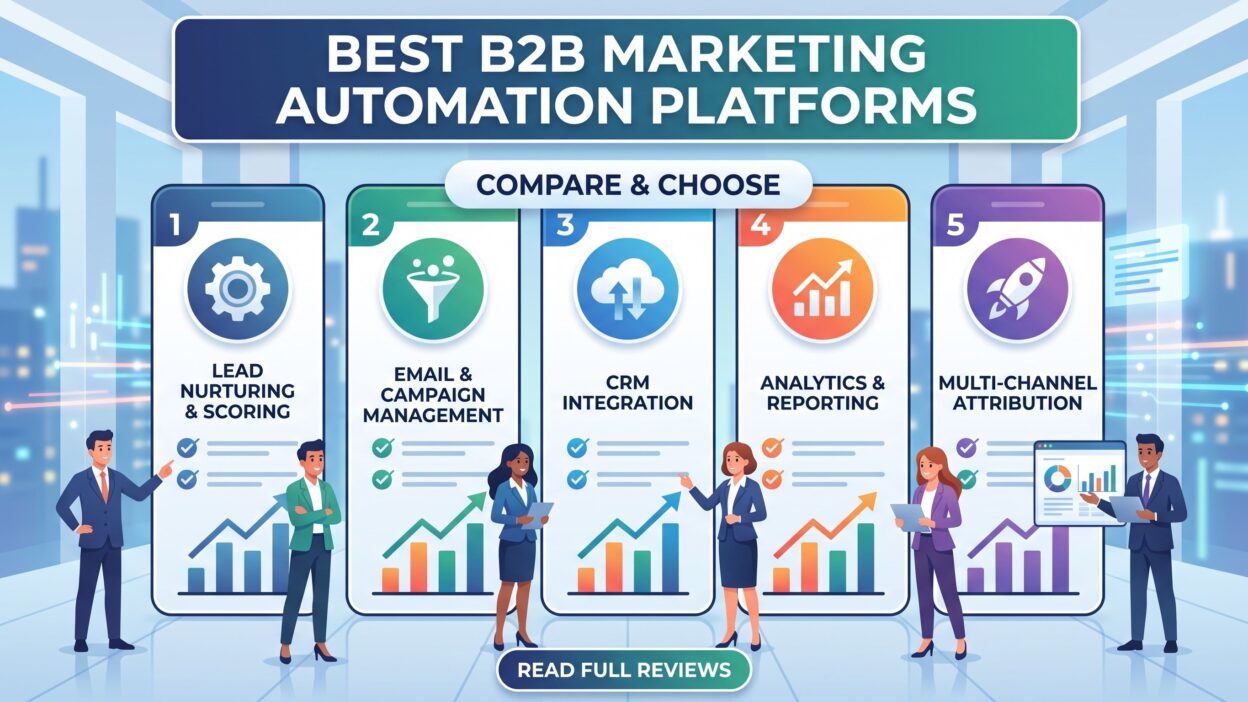
Key Features to Look For in B2B Marketing Automation Platforms
Vendors list hundreds of features. Most buyers use a fraction of them. Focus on the features that drive results.
Lead Scoring and Grading
Lead scoring assigns points for actions. A demo request earns many points. A blog visit earns few. Grading rates fit. A director at a mid-size firm grades higher than a student.
Look for flexible models. You should adjust points as you learn. Some tools use AI to suggest scores from past wins.
Email Marketing Automation
Email remains the workhorse of B2B. Strong email marketing automation includes drag-and-drop editors, dynamic content, and A/B testing. You should send triggered emails based on behavior. Deliverability tools matter too. A great email that lands in spam earns nothing.
Lead Nurturing Workflows
Lead nurturing moves prospects toward a decision. Visual workflow builders let you map each path. You add delays, branches, and conditions. A good builder feels like drawing a flowchart. A poor builder feels like writing code.
CRM Integration
Your CRM holds sales data. Your automation tool holds marketing data. They must share information without friction. Native CRM integration beats custom connectors. Check that syncing runs in both directions and updates fast.
Account-Based Marketing Tools
Account-based marketing targets whole companies. You pick high-value accounts and tailor campaigns to them. Look for account-level scoring, ad syncing, and buying-group views. These tools help you reach every decision maker.
Analytics and Reporting
Dashboards should show pipeline, revenue, and campaign performance. Multi-touch attribution reveals which channels deserve credit. Custom reports save hours each month.
Landing Pages, Forms, and Web Tracking
You need to capture leads. Built-in landing pages and forms speed that work. Web tracking shows which pages each contact views. Progressive profiling asks new questions on each visit and builds a fuller profile over time.
Ease of Use and Support
Power means little if no one can use it. Test the interface during a trial. Ask about training, documentation, and support hours. Good support saves projects.
Best B2B Marketing Automation Platforms in 2026
Six vendors lead the field. Each serves a different type of buyer. Read the profiles and match them to your needs. Features and pricing change often, so confirm current details on each vendor’s website before you buy.
HubSpot Marketing Hub
HubSpot wins praise for usability. The interface feels clean. New users start building campaigns within days. The platform sits on a free CRM, which gives small teams an easy on-ramp.
Marketing Hub covers email, landing pages, forms, social posting, ads, and reporting. Workflows are visual and flexible. The content tools support blogs, SEO, and video. Sales, service, and content tools share one database.
Growing companies love the platform. Costs rise as your contact list grows and as you add advanced features. Enterprise teams with complex needs may find some limits. Mid-market teams rarely do.
Choose HubSpot when you want speed, simplicity, and an all-in-one system. Expect to pay more as you scale.
Adobe Marketo Engage
Marketo Engage serves complex, high-volume marketing. Large B2B companies rely on it. It handles intricate lead lifecycles, multi-region campaigns, and deep segmentation.
The platform shines at lead scoring and nurturing. You build detailed programs with tokens and reusable assets. Analytics and attribution options run deep. The Adobe ecosystem adds power for teams that already use Adobe tools.
The learning curve is steep. Many teams hire a specialist or an agency. Setup takes longer than with lighter tools. The price reflects the power.
Choose Marketo Engage when your program is large and your team is skilled. Skip it when you need a quick launch or a small budget.
Salesforce Marketing Cloud Account Engagement
Account Engagement, formerly known as Pardot, fits Salesforce customers. Its CRM integration is the tightest in the market. Sales reps see marketing activity right inside their Salesforce records.
The tool supports lead scoring, grading, email automation, and campaign reporting. Engagement Studio lets you build nurture paths. Account-based marketing features help you target key accounts. Einstein AI adds scoring suggestions.
The platform works best when your team lives in Salesforce. Outside that world, the value drops. The interface feels less modern than some rivals. Customization often needs admin skills.
Choose Account Engagement when Salesforce runs your sales team. The unified data makes alignment easy.
Oracle Eloqua
Eloqua targets large enterprises. It handles massive databases and complex, multi-step campaigns. Global brands with strict governance needs favor it.
The platform offers strong segmentation, dynamic content, and detailed campaign canvases. Integration with Oracle’s wider stack helps big organizations. Reporting depth meets enterprise standards.
Complexity is the trade-off. Eloqua demands training and dedicated staff. Small teams will feel overwhelmed. Costs run high.
Choose Eloqua when you manage large-scale programs across many regions and business units. Pass on it when you lack a technical team.
ActiveCampaign
ActiveCampaign offers strong value for small and mid-size teams. Its automation builder is powerful for the price. You create branching paths, conditional content, and behavior-based triggers with ease.
The tool combines email marketing automation, a built-in CRM, site tracking, and messaging. Lead scoring works well for basic needs. Prebuilt automation recipes speed up your setup. Support gets good reviews.
Enterprise features are lighter. Account-based marketing tools are limited. Reporting and attribution do not match the big platforms.
Choose ActiveCampaign when budget matters and your needs are moderate. It suits startups, agencies, and growing service firms.
Zoho Marketing Automation
Zoho gives budget-conscious buyers a capable option. It sits inside the wider Zoho suite, which includes CRM, analytics, and finance tools. Teams that already use Zoho enjoy smooth integration.
You get email campaigns, lead scoring, web tracking, social tools, and multi-channel journeys. The visual builder handles most common workflows. Pricing stays low compared with major rivals.
Polish lags behind the market leaders. Some advanced features feel basic. Third-party integrations take more effort.
Choose Zoho when you want solid features at a low cost, especially if Zoho tools already run your business.
How to Choose the Right Platform for Your Business
Selecting a vendor takes more than a feature checklist. Follow a clear process. It protects you from costly mistakes.
Define Your Goals
Start with outcomes. Do you want more qualified leads? Shorter sales cycles? Better reporting? Write three to five goals. Attach numbers to them. A goal such as “raise marketing-sourced pipeline by 30 percent” guides your choice better than “improve marketing.”
Map Your Current Tools
List every system you use today. Include your CRM, CMS, webinar tool, and ad accounts. Check how well each candidate connects to them. Poor integration creates data gaps and manual work.
Set a Realistic Budget
Look beyond the license fee. Add costs for onboarding, training, consultants, and extra contacts. Ask each vendor about pricing tiers. Contact-based pricing can rise fast as your database grows. Get quotes in writing.
Judge Your Team’s Skills
An advanced tool needs advanced users. Be honest about your team’s ability. A simpler tool that your team uses fully beats a complex tool that sits idle.
Request Demos and Trials
Never buy from a slide deck. Ask for a live demo tailored to your use case. Bring real scenarios. Ask the vendor to build one of your workflows on screen. Run a trial with your own data when possible.
Check References and Reviews
Talk to current customers in your industry. Read reviews on independent sites. Ask about support quality, hidden costs, and contract terms. Past buyers tell you what sales reps will not.
Plan for Growth
Think about where your company will stand in three years. Will your database double? Will you add regions or products? Pick software that scales without a painful migration.
Score each vendor against your goals and record the results in a simple table. Involve sales and IT in the decision. Their buy-in speeds adoption.
Implementation Best Practices for B2B Marketing Automation Platforms
Buying the tool is step one. Success depends on how you launch it. Many teams stumble here.
Start small. Pick one or two high-impact workflows. A welcome series and a lead scoring model make great starting points. Prove the value. Then expand.
Clean your data before you import it. Remove duplicates. Fix bad emails. Standardize job titles and company names. Dirty data ruins scoring and segmentation. It also harms email deliverability.
Align with sales early. Meet with the sales team to define a qualified lead. Agree on scoring thresholds and handoff rules. Write a service-level agreement that sets response times. Shared definitions prevent conflict later.
Train your team. Schedule hands-on sessions. Use vendor training and internal documentation. Name a platform owner who answers questions and guards quality.
Build content for every stage. Automation only moves messages. It cannot create interest. Prepare educational content for early buyers, comparison content for mid-stage buyers, and proof for late-stage buyers. Case studies and demos close deals.
Test everything. Send test emails. Check every branch of every workflow. Verify that data syncs with your CRM. One broken trigger can email the wrong message to thousands of contacts.
Measure and refine. Review results monthly. Track open rates, click rates, lead conversion, and pipeline influenced. Adjust subject lines, timing, and scoring. Small changes compound into big gains.
Common Mistakes to Avoid
Teams repeat the same errors. You can dodge them.
Many buyers chase features they never use. They pay for advanced modules and run basic email blasts. Match the tool to your actual needs.
Some teams automate a bad process. Automation speeds up whatever exists. A weak nurture strategy simply fails faster. Fix the strategy before you build the workflow.
Others over-email. Frequent messages annoy prospects and raise unsubscribe rates. Respect your audience’s inbox. Segment your lists and send relevant content only.
Ignoring compliance creates legal risk. Privacy laws such as GDPR and CAN-SPAM set rules for consent and unsubscribes. Use clear opt-in forms. Honor opt-outs quickly. Keep records of consent.
Many companies neglect reporting. They launch campaigns and never look at the numbers. Set a reporting schedule. Share results with leadership.
Some teams never revisit lead scoring. Buyer behavior changes. Your model should change too. Review scores every quarter against closed deals.
Finally, some businesses skip change management. Staff resist new tools when no one explains the benefits. Share early wins. Celebrate progress. Adoption follows.
Trends Shaping the Future of Marketing Automation
The industry keeps moving. Watch these shifts.
AI now drafts email copy, predicts lead quality, and suggests send times. Vendors add assistants that build workflows from plain-language prompts. Teams save hours on routine tasks. Human review still matters for brand voice and accuracy.
Personalization goes deeper. Buyers expect content that fits their role and industry. Platforms pull data from intent signals and third-party sources to tailor messages.
Account-based approaches keep growing. Revenue teams treat accounts as the unit of success. Vendors add account scoring, buying-group tracking, and ad orchestration.
Privacy rules tighten. Cookies fade. First-party data gains value. Smart teams collect consent openly and build direct relationships through content and communities.
Sales and marketing tools merge. Vendors bundle CRM, service, and marketing in unified suites. A single view of the customer becomes the standard.
Frequently Asked Questions
What are the best B2B marketing automation platforms for small businesses?
HubSpot, ActiveCampaign, and Zoho suit small teams. They offer lower entry costs, easy setup, and solid core features. Pick the one that fits your CRM and your budget.
How much do marketing automation tools cost?
Prices vary widely. Entry plans start at modest monthly fees. Enterprise platforms cost thousands per month. Contact volume, feature tiers, and add-ons drive the final price. Ask vendors for a full quote that includes onboarding.
What is the difference between marketing automation and a CRM?
A CRM manages sales relationships and deals. Marketing automation manages campaigns and lead engagement before the sale. They work best together. The automation tool feeds qualified leads into the CRM.
How long does implementation take?
Simple tools launch in a few weeks. Enterprise platforms need three to six months. Data cleanup, integrations, and content creation set the pace.
Can marketing automation improve sales results?
Yes. It ranks leads, speeds follow-up, and gives sales context on each prospect. Reps talk to better-qualified buyers. Many companies report shorter sales cycles and higher win rates after adoption.
Do I need a dedicated specialist to run the platform?
Small tools need a trained marketer. Large platforms often need a dedicated administrator. Budget for skills as well as software.
Read More:-7 Best Loxo Integrations for Recruiters [2026]
Conclusion

Marketing automation turns scattered efforts into a steady revenue engine. It saves time. It sharpens targeting. It brings sales and marketing together around shared data.
The right choice depends on your situation. HubSpot delivers ease and breadth. Marketo Engage delivers depth for large teams. Account Engagement fits Salesforce shops. Eloqua serves global enterprises. ActiveCampaign and Zoho give strong value for lean budgets.
Start with your goals. Map your tools. Test with real scenarios. Launch small and grow with proof. Clean data and clear sales alignment matter more than any single feature.
Take action this week. Write your goals. Shortlist three vendors. Book demos. Compare what you see against the criteria in this guide.
The best platform is the one your team uses well. Choose with care, launch with focus, and measure with discipline. Your pipeline will show the difference.