Introduction
TL;DR Sales teams lose deals over bad data. A missing email or a wrong phone number kills momentum fast. This is where Waterfall Enrichment Tools step in. They pull contact and company data from multiple sources in one sequence. If one source fails, the next one tries. This method boosts match rates far beyond a single database.
In this guide, you get a full breakdown of the best Waterfall Enrichment Tools on the market today. You learn how they work, what makes them different, and which one fits your team size and budget. We also cover key features, common mistakes, and answers to real questions people ask about this approach. By the end, you pick the right platform with confidence.
Table of Contents
What Are Waterfall Enrichment Tools
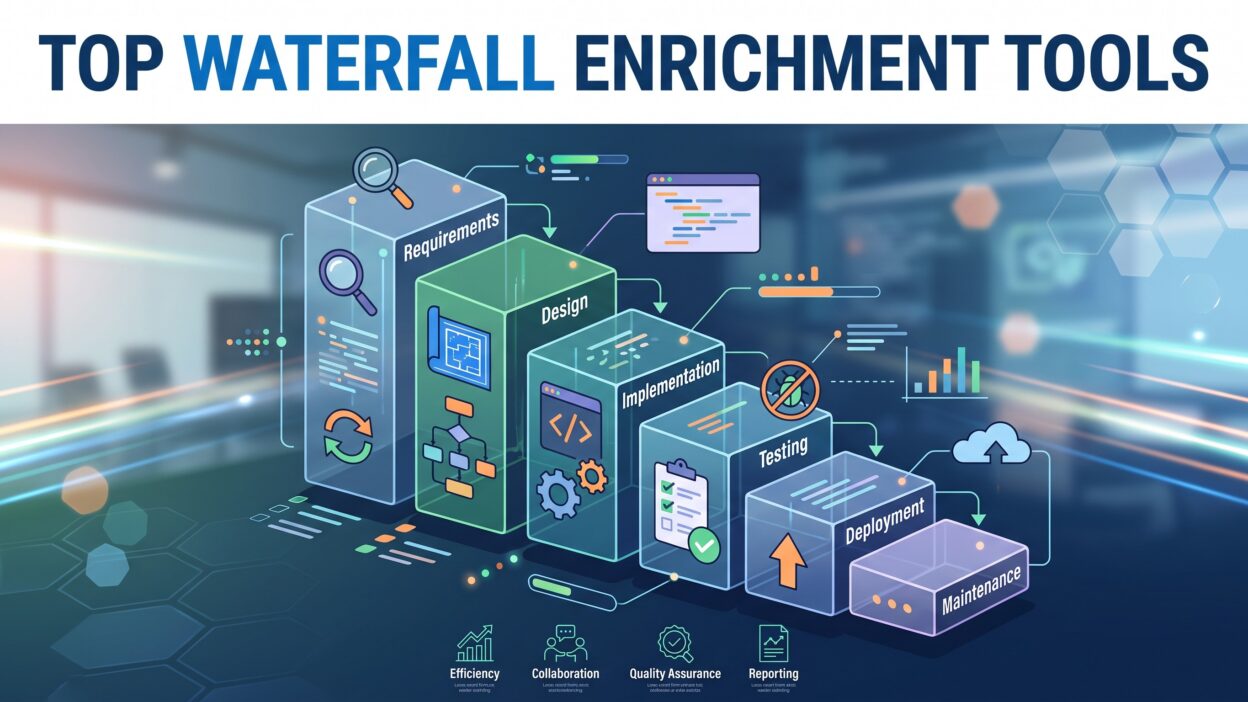
Waterfall Enrichment Tools connect several data providers in a chain. The system checks the first provider for a contact match. If the data comes back weak or missing, the tool moves to the next provider. This keeps going until the tool finds accurate information or runs out of sources.
Think of it like a funnel. Raw data enters at the top. Clean, verified data exits at the bottom. Each layer in the funnel adds a new chance at a match. A single database might give you a 40% hit rate. A waterfall setup with five providers can push that number past 90%.
Sales and marketing teams use these tools to fill gaps in their CRM. A lead list often has broken emails or outdated job titles. This approach fixes these gaps without manual research. The process runs automatically once you set the provider order.
Revenue operations teams also rely on Waterfall Enrichment Tools for lead scoring. Clean firmographic data helps sales reps prioritize the right accounts. Marketing teams use the same enriched data for better segmentation. This makes the method valuable across the whole revenue funnel, not just sales.
The core idea stays simple. Stack providers. Check each one in order. Keep the best result. This small shift in workflow design saves hours of manual data cleanup every week.
Every provider in the stack acts like a safety net. One database might know a person’s old job title. Another might have their new company. The waterfall pulls the freshest piece from wherever it lives, and the final record ends up more complete than any single source could offer on its own.
Why Your Business Needs Waterfall Enrichment Tools
Bad data costs real money. Studies show that poor data quality drains revenue every year across sales organizations. Reps waste time chasing dead leads. Marketing sends emails that bounce. Waterfall Enrichment Tools solve this problem at the source.
A single enrichment provider rarely covers every contact. Data coverage varies by industry, region, and company size. This layered approach removes that limitation. It combines strengths from multiple providers into one clean output.
Speed matters too. Manual research takes minutes per contact. A rep cannot scale outreach this way. The system automates the entire lookup process. This frees reps to focus on selling instead of searching.
Accuracy also improves customer experience. Nobody likes a cold email with the wrong name or title. A good waterfall reduces these errors by cross-checking data across sources. This builds trust with prospects from the first touchpoint.
Cost efficiency plays a big role as well. Buying five separate enrichment subscriptions gets expensive fast. A waterfall setup often costs less per verified contact. You pay only when the tool finds a real match, not for every failed lookup.
Growing companies need scalable systems. This kind of setup grows with your pipeline. Add new providers as your needs change. Remove weak sources that no longer perform well. This flexibility keeps your data stack lean and effective over time.
Team morale improves too, in a quiet way most people overlook. Reps who spend their day on real conversations feel more productive than reps stuck on manual lookups. Clean data removes a source of daily frustration that builds up over weeks and months.
How Waterfall Enrichment Tools Work
The mechanics behind Waterfall Enrichment Tools follow a clear pattern. Each step builds on the last one.
Data Input
You start with a raw list. This might include a name, a domain, or a LinkedIn URL. The tool takes this minimal input and searches for a match. Even partial data works here. Most platforms need only one identifier to begin the search.
Provider Sequence
The tool queries the first provider in your chosen order. Teams usually rank providers by accuracy and cost. Cheaper or faster providers go first. Premium providers sit lower in the sequence. If provider one returns a confident match, the process stops. If not, the tool moves to provider two, then three, and so on.
Data Merge and Validation
Once a match appears, the tool validates the result. Some platforms cross-check the email against a verification service. This step confirms the address is live and not a bounce risk. The final record merges into your CRM or spreadsheet with clean fields for name, email, phone, and company data.
This three-step flow repeats for every contact in your list. These platforms handle thousands of records in minutes. Compare that to manual research, which might take a full workday for the same volume.
Some advanced platforms let you customize logic further. You can set rules like “skip provider three if company size is under 50.” This level of control makes the whole system adaptable to unique business needs. Teams in different industries build different provider chains based on where their prospects show up most often.
Ongoing Sync
Many teams treat enrichment as a one-time task. A smarter setup keeps running in the background. New leads enter your CRM daily, and a live waterfall connection enriches each one the moment it arrives. This keeps your database fresh instead of stale within a few weeks. Teams that automate this last step spend far less time on manual list cleanup later in the quarter.
Top Waterfall Enrichment Tools in 2026
Here is a detailed look at the leading Waterfall Enrichment Tools available today. Each platform brings its own strengths to the table.
Clay
Clay leads the conversation around Waterfall Enrichment Tools right now. The platform lets you build custom workflows that pull from dozens of data sources. You control the exact order of providers in your waterfall. Clay also connects with AI models for extra research steps, like finding a prospect’s recent company news.
Sales teams like Clay because it feels flexible. You are not locked into one vendor’s database. Instead, you build your own stack using whichever providers perform best for your niche. Pricing runs on credits, so you pay based on usage rather than a flat seat fee. This makes Clay a strong pick among Waterfall Enrichment Tools for teams that want full control.
Clearbit
Clearbit built its name on company and contact enrichment. The tool pulls firmographic data like employee count, funding stage, and tech stack. Many teams pair Clearbit with a secondary provider inside a waterfall setup because Clearbit sometimes lacks direct dial numbers.
Clearbit works well for marketing teams that need account-level insights. Its API integrates smoothly into most CRMs. When used as one layer among several Waterfall Enrichment Tools, Clearbit often serves as the first pass for firmographic accuracy.
ZoomInfo
ZoomInfo remains one of the largest databases in the space. The platform covers millions of contacts across industries. Its depth makes it a common anchor point in many waterfall stacks.
The downside is cost. ZoomInfo pricing sits higher than most competitors. Teams often place ZoomInfo later in their provider sequence, using cheaper sources first to cut spend. This way, ZoomInfo only gets queried when other sources fail.
Apollo.io
Apollo combines a contact database with outreach tools in one platform. Many startups choose Apollo because it bundles enrichment with email sequencing. This lowers the total number of tools a small team needs to manage.
Apollo’s data quality varies by region, which is exactly why teams add it into a broader waterfall chain rather than relying on it alone. As one piece within this stack, Apollo adds solid coverage for tech and SaaS companies specifically.
Cognism
Cognism focuses heavily on phone number accuracy, especially for European markets. Sales teams doing outbound calls value this strength. The platform also holds strong compliance standards around data privacy, which matters for companies selling into regulated regions.
Cognism often sits early in a waterfall sequence when phone verification is the priority. Teams building phone-first outreach programs frequently start here before falling back to broader databases.
Lusha
Lusha offers a simple browser extension alongside its core database. Reps use it to pull contact details directly from LinkedIn profiles. The tool works fast for individual lookups, though bulk enrichment through its API also fits well into automated workflows.
Because Lusha pricing stays affordable, many teams place it as an early layer in their enrichment stack. This keeps costs down before escalating to pricier providers.
RocketReach
RocketReach specializes in email discovery across a huge range of professional profiles. Recruiters and sales reps both use this tool for direct contact information. Its search interface allows quick manual lookups, and its API supports automated waterfall flows too.
RocketReach fits well as a mid-tier layer in the sequence. It catches contacts that earlier providers miss, without the premium price tag of top-tier databases.
FullContact
FullContact takes a slightly different approach by focusing on identity resolution. The platform links fragmented data points into one unified profile. This helps teams merge duplicate records across different systems.
Within a waterfall setup, FullContact often runs as a cleanup layer. After other providers pull raw data, FullContact consolidates everything into a single, accurate profile.
People Data Labs
People Data Labs runs as a developer-first platform. Companies with technical teams use its API to build custom enrichment pipelines from scratch. The data coverage spans both B2B and B2C use cases.
Because it requires more setup work, People Data Labs suits teams building a custom enrichment pipeline rather than an off-the-shelf solution. Larger companies with dedicated data engineers often choose this route for maximum flexibility.
LeadMagic
LeadMagic focuses specifically on waterfall-style enrichment for outbound sales teams. The platform was built around the exact concept discussed in this guide. It lets you stack multiple providers and pay only for verified results.
LeadMagic markets itself directly as one of the go-to platforms for growth teams. Its pricing model rewards efficient provider sequencing, making it a natural fit for teams new to the waterfall approach.
Waterfall Enrichment Tools vs Single-Source Enrichment
A single-source provider feels simple at first glance. You pick one vendor, pay one bill, and pull data from one place. This setup works fine for small lists, but it breaks down as your pipeline grows.
Coverage gaps show up fast with single-source tools. A provider strong in North American data might miss half your European contacts. A layered stack closes that gap by pulling from providers with different regional strengths.
Cost also shifts with scale. A single expensive database charges the same price whether it finds a match or not. A waterfall setup only escalates to pricier providers when cheaper ones fail. Over thousands of contacts, this difference adds up to real savings.
Accuracy tells a similar story. One provider might hold an outdated job title from two years ago. Another might have the current one. Cross-checking through several sources catches these mismatches before they reach your outreach list.
The tradeoff is setup time. A single-source tool takes minutes to connect. A waterfall stack takes longer to configure correctly. Once built, though, the ongoing results usually justify the extra effort for any team serious about data quality.
Key Features to Look for in Waterfall Enrichment Tools
Not every platform offers the same depth. A few features separate strong Waterfall Enrichment Tools from weak ones.
Provider flexibility matters most. You want the freedom to add or remove data sources without rebuilding your entire workflow. Locked-in systems limit your options as your needs change.
Email verification should run automatically. A tool that finds an email but never checks if it bounces adds little value. Look for built-in validation steps inside the waterfall sequence.
Pricing transparency also counts. Some vendors charge per lookup, even for failed matches. Others charge only for successful results. The second model saves money at scale.
Integration options decide how smoothly the tool fits your stack. Check for native CRM connections, plus API access for custom builds. A tool without solid integrations creates extra manual work.
Data freshness deserves attention as well. Job titles and phone numbers change often. Ask any vendor how frequently they refresh their records. Stale data defeats the purpose of building a waterfall in the first place.
Compliance features round out the list. GDPR and CCPA rules apply to contact data across many regions. A trustworthy vendor shows clear documentation on how they source and store information.
Benefits of Using Waterfall Enrichment Tools
Higher match rates stand out as the clearest benefit. Combining multiple providers catches contacts that a single source would miss. This directly increases the size of your usable lead list.
Time savings follow close behind. Reps no longer search LinkedIn or Google for missing details. The automated stack handles this work in the background while reps focus on conversations that close deals.
Cost control improves too. Instead of paying for one expensive database that covers everything, you mix cheaper and premium sources based on actual need. This keeps your enrichment budget flexible.
Data accuracy rises across the board. Cross-referencing multiple sources catches errors that a single provider might miss. Wrong job titles or outdated companies get filtered out during the validation step.
Sales and marketing alignment gets easier as well. Both teams pull from the same clean dataset. This removes the friction that happens when departments work off different contact lists.
Scalability also improves with this method. As your prospect list grows, the system handles higher volume without extra manual effort. You add providers as needed rather than hiring more researchers.
How to Choose the Right Waterfall Enrichment Tool for Your Team
Start with your ideal customer profile. A tool strong in tech industry data might struggle with healthcare or manufacturing contacts. Match the provider strengths to your actual market.
Check your budget next. Some vendors charge monthly seats. Others use credit-based pricing tied to successful matches only. Pick the model that fits your usage pattern and avoids waste.
Test data accuracy before committing. Run a sample list of fifty contacts through the tool. Compare the match rate and accuracy against your current process. Real numbers beat marketing claims every time.
Look at integration requirements too. If your team lives inside a specific CRM, confirm the tool connects natively. A clunky export-import process slows down your entire workflow.
Consider your technical resources as well. Developer-first platforms like People Data Labs need engineering support to set up properly. Simpler tools like Lusha or Apollo work fine without technical help.
Finally, think about long-term flexibility. Your provider needs today might change in six months. Choose a platform that lets you swap providers easily instead of locking you into one vendor forever.
Common Mistakes Teams Make with Waterfall Enrichment Tools
Many teams place providers in the wrong order. Running an expensive database first wastes money on contacts a cheaper source could have found. Always sequence from low cost to high cost.
Skipping validation causes another common issue. A found email means nothing if it bounces on send. Always verify before pushing data into outreach sequences.
Some teams also ignore compliance checks. Using data from unverified sources creates legal risk in regulated regions. Confirm every provider in your stack follows proper data collection standards.
Overloading the waterfall with too many providers slows down results and adds unnecessary cost. Three to five well-chosen sources usually beat ten random ones.
Lastly, teams forget to review performance regularly. A provider that worked well last year might underperform today. Revisit your enrichment setup every quarter to keep results sharp.
FAQs About Waterfall Enrichment Tools
What makes Waterfall Enrichment Tools different from a single database? A single database only checks one source for data. Waterfall Enrichment Tools check multiple sources in sequence, which increases your chances of finding accurate contact information.
Do Waterfall Enrichment Tools verify email addresses automatically? Many platforms include built-in verification. This step confirms an email is active before it moves into your outreach list. Always check if this feature comes standard or requires a separate tool.
How many providers should a waterfall sequence include? Most teams find three to five providers gives strong results without excessive cost. Adding too many sources slows the process and adds diminishing returns.
Are these platforms expensive to run? Pricing varies widely. Credit-based models charge only for successful matches, which often costs less than flat subscription fees for a single large database.
Can small teams use this approach without technical help? Yes. Platforms like Lusha, Apollo, and RocketReach work well without developer support. More custom setups, like People Data Labs, need technical resources to configure properly.
Do these tools work for both B2B and B2C contacts? Most platforms in this space focus on B2B data, covering job titles, company details, and work emails. A few, like People Data Labs, also support B2C use cases.
How often should a team review its enrichment stack? A quarterly review works well for most teams. Provider performance shifts over time, so checking match rates regularly keeps your setup effective.
Read More:-Cold Calling 101: Advice for Global Sales Teams
Conclusion

Clean data drives every successful sales motion. Waterfall Enrichment Tools give teams a reliable way to close data gaps without manual research. The concept stays simple: stack providers, check each one in order, and keep the best result.
Every tool on this list brings something different to the table. Clay offers full customization. ZoomInfo brings scale. Cognism handles phone accuracy. LeadMagic builds the entire product around the waterfall concept itself. Your choice depends on budget, technical resources, and target market.
Start small if you are new to this approach. Pick three providers, sequence them by cost, and test results on a sample list. Expand your stack once you see real match rate improvements.
Waterfall Enrichment Tools are not a passing trend. They solve a real problem that single-source databases cannot fix alone. Teams that adopt this method today build a stronger, cleaner pipeline for the long run.