Introduction
TL;DR Social data moves fast. Your dashboard cannot keep up with every question your team asks. You need raw data in your own tools. An API gives you that power.
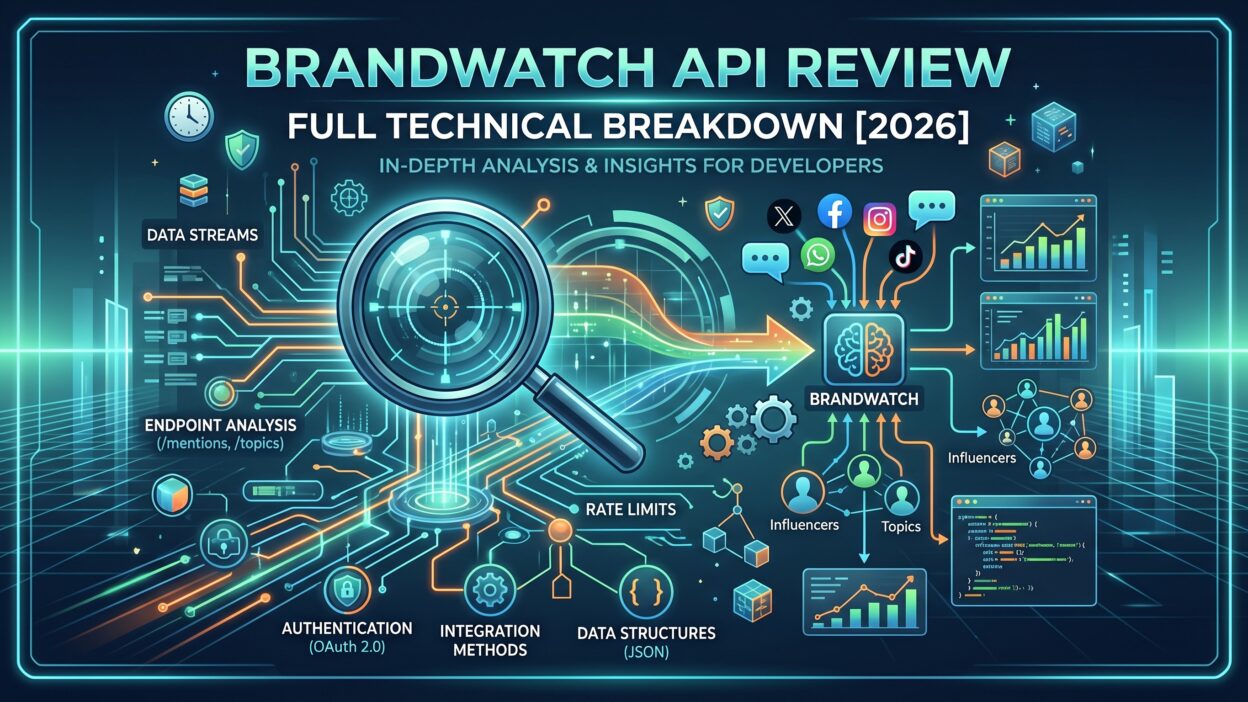
Brandwatch sells one of the biggest social listening platforms on the market. Its API lets developers pull mentions, build custom reports, and upload private data. This Brandwatch API Review shows what the tools do in practice. You will see how access works, where the limits sit, and who gains the most.
Table of Contents
What Is the Brandwatch API?
Brandwatch is a consumer intelligence platform. It collects public conversations from social networks, news sites, blogs, forums, and review pages. Teams search that data to learn what people think about brands, products, and trends.
The Brandwatch API opens that data to code. You send an HTTP request. The server sends back structured results. You feed those results into dashboards, data warehouses, or custom apps.
Six APIs Under One Brand
Brandwatch does not offer a single API. It offers a family of them. An outside profile of the company lists six: Analysis, Data Upload, Consumer Research, Measure, Publish, and Engage. Each one serves a different job. Consumer Research and Data Upload attract the most attention from analysts. Publish and Engage serve social media managers who schedule posts and reply to people.
Two Separate Environments
This point trips up many new users. Brandwatch runs separate environments for Consumer Research and for social media management. They use different authentication models. They use different documentation portals. A token from one world does not work in the other. Check which product you own before you write a line of code.
This Brandwatch API Review focuses on the Consumer Research side. That product handles listening queries, mentions, and analysis. It matches what most data teams want.
Brandwatch API Authentication and Getting Started
Access begins with a paid account. The Consumer Research API requires an active subscription. You cannot try it with a free sign-up. Ask your account manager to confirm API access before you plan a project.
How Authentication Works
The Consumer Research API uses OAuth 2.0 bearer tokens. You send your credentials to the token endpoint. The server returns an access token. You attach that token to every later request. A third-party review reports that tokens last a full year. That length saves developers from constant re-authentication. Check the current lifespan in the official docs, since policies change.
Every request must use HTTPS. Brandwatch requires TLS 1.2 or newer. Older versions no longer work. Modern libraries handle this without extra effort.
Your First Call
Start with the “me” call. It returns details about the current user and client. Success there proves your token works. Next, request your projects. Each project holds queries. Each query holds the mentions you care about.
A Quick Win
Brandwatch’s Professional Services team maintains a Python utility library for experiments. It speeds up early testing. Analysts who write simple scripts will enjoy it. Production teams should still write their own clients for control and testing.
Authentication earns a positive grade in this Brandwatch API Review. The flow follows a standard pattern. Developers who know OAuth feel at home within an hour. Newcomers need a bit longer.
Core Endpoints and Capabilities
The documentation groups endpoints by resource. The structure mirrors the Brandwatch web app. Users of the app learn the API quickly.
Users, Clients, and Projects
These endpoints describe who you are and what you can see. You retrieve the current user, the current client, and a list of projects. Think of them as the map of your account. Scripts begin here to find the IDs they need later.
Queries and Query Groups
Queries sit at the heart of the product. A query holds the Boolean search logic that captures mentions. You can retrieve, create, edit, and delete queries through the API. Teams that manage dozens of brands love this control. They create queries in bulk instead of clicking through the interface.
Query groups let you bundle related queries. Retrieving and deleting them works through the API too.
Tags, Categories, and Rules
Tags and categories organize mentions. Rules apply labels automatically. The API lets you read these structures and create or delete tags and categories. You keep your taxonomy consistent across many projects. A global brand can mirror one structure in every market.
Lists
Lists filter data by author, location, or site. You can create and retrieve each type. A PR team might build an author list of journalists and track their coverage. A retailer might build a location list for key stores.
Workflow and Custom Alerts
Workflow endpoints expose the status of mentions that teams have assigned or handled. Custom alert endpoints let you create, update, and delete alerts. You can trigger notifications when volume spikes. Crisis teams find this useful.
Mentions and Data Retrieval
The API returns mentions that match a query. You filter by date, source, sentiment, and more. Results arrive as JSON. Pagination keeps responses manageable. Plan your page sizes with the rate limit in mind. The next section explains why.
Rate Limits and Performance
Rate limits decide whether an integration works in production. Many teams discover this late. Learn the rules early.
The Default Limit
Brandwatch applies the limit per client, not per user. The default allows 30 requests in a rolling 10-minute window. Requests beyond that threshold fail with an HTTP 429 error. Every response carries two headers. The first shows your limit. The second shows how many calls you have used. Read those headers in your code and slow down before you hit the wall.
Thirty calls in ten minutes feels tight. A single analyst running a script can burn through the allowance fast. Several developers on one client share the same pool. Coordinate usage across your team.
Planning Around the Limit
Use larger page sizes to pull more mentions per call. Cache results that rarely change. Query metadata, tags, and project lists change slowly. Store them locally and refresh once a day.
Brandwatch also advises you to choose polling times with care. A live mention stream needs frequent checks. A weekly report needs one check a week. Match the schedule to the use case.
No Push Delivery
The Consumer Research API relies on polling. It does not push events to your server through webhooks. Brandwatch publishes a tutorial on polling for new mentions. Expect to build a scheduler and a queue.
Asking for More
If your use case needs higher limits, talk to your account manager. Brandwatch invites that conversation in its documentation. Come prepared with numbers. Show your expected call volume and your business case.
Rate limits form the biggest friction point in this Brandwatch API Review. Teams with light needs rarely notice them. Teams with heavy needs must negotiate and design carefully.
Data Upload and Analysis APIs
Public social data tells only part of the story. Your own data adds depth. Brandwatch recognizes that.
Data Upload API
The Data Upload API lets you import unstructured data from any source. You can send survey responses, support tickets, call transcripts, and app reviews. Brandwatch analyzes your private content next to public conversations. You see how customers talk in public and in private on one screen.
A telecom company might upload support chats. It compares complaints in chat with complaints on social media. The gap between the two reveals hidden problems. That insight takes minutes with a unified dataset and weeks without one.
Analysis API
The Analysis API serves aggregated results. It returns volume over time, sentiment breakdowns, top authors, and similar metrics. You skip raw mentions and ask for numbers directly. Dashboards and reports run faster with this approach. It also reduces the number of calls you make, which helps with rate limits.
Exporting Results
Many teams push analysis results into BI tools. Tableau, Power BI, and Looker fit well. A nightly job pulls the latest numbers and refreshes your charts. Executives see current data without logging into another platform.
Data quality still depends on your queries. A sloppy Boolean string returns noisy results. Spend time on query design before you automate anything.
Publish, Engage, and Measure APIs
Social media managers use a different branch of the family. These tools belong to the social media management side of the business.
Publish API
Publish lets you schedule and manage posts across networks. Content teams connect it to editorial calendars. Posts flow from an internal approval tool straight into the queue.
Engage API
Engage handles conversations with audiences. Support teams route messages and replies. Developers connect it to ticketing systems.
Measure API
Measure serves performance metrics for owned channels. Teams pull follower growth, reach, and engagement. Reporting tools combine it with listening data.
Remember the separation from earlier. These APIs follow their own authentication and documentation. Plan for two integration tracks if you need both worlds. Budget extra development time. Treat them as sibling products, not one system.
Documentation and Developer Experience
Good docs save weeks. Weak docs cost them.
Structure and Clarity
The developer portal groups content in a clear tree. Getting Started covers best practices, terminology, authentication, and rate limiting. Resource sections follow. Each page explains one task. Examples show real requests and responses. Readers find answers fast.
The portal also offers machine-readable files for AI agents and a markdown version of every page. Developers who use coding assistants appreciate that touch.
Supported Endpoints Only
Brandwatch makes one warning very clear. It supports only the endpoints in its documentation. Other endpoints may change without notice. Do not build on undocumented calls you find in the browser. They will break one day.
Tutorials and Support
Tutorials walk through common jobs such as polling for mentions. Support channels exist through the portal and through your account team. Response speed depends on your contract level. Enterprise customers get the best service.
Gaps
The documentation covers the basics well. Advanced scenarios need more depth. Examples in multiple languages would help. Community resources remain thin compared with big developer platforms. Expect to ask your account team for guidance on complex designs.
Documentation quality supports a positive verdict in this Brandwatch API Review. It does not dazzle, but it works. Developers rarely get stuck for long.
Brandwatch API Pricing
Brandwatch does not publish prices. Sales teams quote custom contracts. The cost depends on data volume, number of users, product modules, and contract length. Treat any number you see online as a rough guide.
What Drives Cost
Query volume matters. More mentions mean higher fees. Historical data access adds cost. Extra seats add cost. API access usually comes bundled with a subscription or as an add-on. Confirm the exact terms in writing.
Budget Reality
Mid-size and large companies fit best. Small businesses may find the price steep. Many startups choose lighter tools instead. Agencies spread the cost across clients and often see strong returns.
Negotiation Tips
Ask for a pilot period. Request higher rate limits in the contract. Clarify data retention and export rights. Compare quotes from two rivals. Vendors move on price when they see real competition.
Hidden costs exist outside the contract. Developers need time to build and maintain integrations. Analysts need training. Infrastructure for polling and storage adds a small monthly bill. Add those items to your total.
Strengths and Weaknesses
Every tool has trade-offs. Weigh them against your own goals.
Where the Brandwatch API Shines
The data coverage runs wide. Brandwatch indexes a huge volume of conversations. Query control through the API saves hours of manual work. Data upload creates a rare blend of public and private insight. Authentication follows a familiar standard. Documentation stays clear and well organized. Enterprise support helps big teams succeed.
Where It Struggles
Rate limits restrict heavy use. Polling replaces push delivery, which adds engineering work. Two separate environments confuse new buyers. Pricing lacks transparency. Small teams may find the entry cost too high. Some advanced workflows require help from Brandwatch staff.
The Fair Verdict
The API suits organizations that already live inside Brandwatch. It rewards teams with clear data goals and engineers who respect limits. It frustrates teams that expect unlimited real-time firehose access.
Real-World Use Cases
Theory helps less than examples. Here is how teams put the API to work.
Brand Health Dashboards
A consumer goods company pulls daily mention counts and sentiment scores. It pushes the data to a BI tool. Executives check one dashboard each morning. The team spots dips within hours.
Crisis Detection
A bank sets custom alerts for spikes in negative mentions. A script checks volume every few minutes inside the rate limit. When numbers jump, it notifies the communications team in Slack. Response time drops from hours to minutes.
Competitive Intelligence
A software firm builds queries for five rivals. It tracks share of voice weekly. Product managers read the trends before roadmap meetings.
Customer Voice Programs
A retailer uploads survey comments and store reviews. It analyzes them next to social chatter. The merged view shows which complaints appear everywhere.
Academic and Market Research
Researchers export large datasets for modeling. They study topics such as public health or politics. Data agreements and ethics reviews apply, so check your terms.
How the Brandwatch API Compares With Alternatives
Several rivals compete in social listening. Compare before you commit.
Sprinklr, Meltwater, and Talkwalker
These platforms offer broad listening suites and APIs. Each has strengths. Sprinklr emphasizes enterprise workflows. Meltwater leans toward media monitoring. Talkwalker highlights visual and image recognition. Pricing for all three runs high.
Lighter Options
Brand24, Mention, and Awario cost less. Their APIs and data depth differ. Small teams often prefer them. Data volume and historical coverage trail the large vendors.
Native Platform APIs
You can call the APIs of X, Reddit, YouTube, and others directly. This route costs less. You must handle each network separately, manage changing terms, and clean the data yourself. Brandwatch removes that burden.
A final comparison belongs in any Brandwatch API Review. Ask which vendor covers the sources you care about. Ask which one lets you export the volume you need. Run a trial query on each platform and measure the results.
Best Practices for Developers
Follow these habits and your integration will last.
Respect the Limits
Read the rate limit headers. Add a queue with back-off logic. Retry after a 429 error with growing delays. Share one client across your team to track usage.
Cache Smartly
Store slow-changing data locally. Refresh on a schedule. Save calls for mention retrieval.
Secure Your Tokens
Keep tokens in a secrets manager. Never commit them to a repository. Rotate credentials when staff leave.
Log Everything
Record requests, responses, and errors. Logs shorten debugging time. They also prove your usage when you discuss limits with Brandwatch.
Stay on Documented Paths
Use only supported endpoints. Watch the updates page for changes. Test in a staging environment before each release.
Frequently Asked Questions
Is the Brandwatch API free?
No. You need an active paid subscription. Contact the sales team for a quote.
What are the Brandwatch API rate limits?
The Consumer Research API allows 30 requests in a rolling 10-minute window per client. Extra requests return an HTTP 429 error. Ask your account manager about higher limits.
How does Brandwatch API authentication work?
The Consumer Research API uses OAuth 2.0 bearer tokens. You request a token with your credentials and attach it to each call. All traffic must use HTTPS with TLS 1.2 or newer.
Does the Brandwatch API support webhooks?
The Consumer Research API relies on polling. Brandwatch provides a tutorial for polling new mentions.
Can I upload my own data?
Yes. The Data Upload API accepts unstructured data from any source. You analyze it alongside public conversations.
Is there a Python library?
Yes. Brandwatch’s Professional Services team maintains a Python utility library. It suits experiments and quick scripts.
Can one token work across all Brandwatch products?
No. Consumer Research and social media management use separate authentication. Tokens from one do not work in the other.
Does Brandwatch support undocumented endpoints?
No. Only documented endpoints receive official support. Others may change without notice.
Who should buy the Brandwatch API?
Mid-size and large organizations gain the most. Agencies, enterprise brands, and research teams fit well. Small teams may prefer cheaper tools.
Where can I find the official documentation?
Visit the Brandwatch developer portal. It lists guides, endpoints, and tutorials.
Read More:-7 Best SugarCRM Integrations for B2B Sales Teams [2026]
Conclusion

Brandwatch gives data teams strong access to social conversations. The Consumer Research API handles queries, tags, lists, alerts, and mention retrieval. The Data Upload API blends your own content with public data. Authentication follows a standard OAuth pattern. Documentation guides you through the basics.
Limits matter. The rate cap of 30 calls per 10 minutes demands careful design. Polling replaces push delivery. Two separate environments add confusion. Pricing stays private and leans toward large budgets.
My verdict in this Brandwatch API Review is simple. Choose the Brandwatch API if you already use the platform, need deep listening data, and have engineers who plan around limits. Look at lighter tools if you want cheap, unlimited access.
Take action this week. Ask your account manager for sandbox access. Write one query. Pull one day of mentions. Measure the speed, the quality, and the effort. Real tests beat any guide, including this one.