Introduction
TL;DR Most visitors leave your site without a trace. They read a page. They click away. You never see them again. That loss hurts every business that depends on traffic.
OptinMonster fights that loss. It shows the right message to the right visitor at the right moment. Visitors join your list, claim an offer, or finish a purchase. This guide covers all the OptinMonster Features you can use in 2026. You will see what each tool does, how it works, and what it costs.
Table of Contents
What Is OptinMonster?
OptinMonster is a lead generation and conversion optimization tool. It builds popups, floating bars, and other on-site campaigns. You place them on your pages. Visitors see them at moments you choose.
What It Does for a Website
A visitor lands on your blog. The tool detects that the person is about to leave. A popup offers a free guide. The visitor enters an email address. You grow your list without a single ad dollar.
How It Connects to Your Site
OptinMonster works with major website and eCommerce platforms. A WordPress plugin makes setup simple. Shopify, WooCommerce, and BigCommerce stores connect too. Other sites paste a short code snippet. Setup takes minutes.
Who Uses It
Bloggers use it to grow email lists. Online stores use it to recover lost sales. Agencies use it for client sites. Software companies use it to promote demos and trials. The tool serves any site that wants more leads or sales.
Paid Only
OptinMonster has no free plan. Reviewers note this point often. You must pay from day one. Budget-conscious buyers should read the pricing section carefully. A summary of the OptinMonster Features list follows in the next sections, starting with campaign types.
Campaign Types
Campaign types define how your message looks and where it appears. OptinMonster offers a wide range. You mix them to fit your goals.
Popups
Lightbox popups appear in the center of the screen. They dim the page behind them. They grab attention fast. Use them for lead magnets, discounts, and event signups. Keep copy short. Offer clear value.
Fullscreen Welcome Mats
A welcome mat covers the entire screen. Visitors see it before the page loads. It works well for big announcements and strong offers. Use it sparingly. Overuse annoys readers.
Floating Bars
Floating bars stick to the top or bottom of the page. They stay visible as visitors scroll. They suit shipping notices, sales banners, and newsletter prompts. They take little space.
Slide-Ins
A slide-in glides from a corner of the screen. It feels gentle. Visitors who dislike popups tolerate it well. Slide-ins fit content sites that value reader experience.
Inline and Sidebar Forms
Inline forms sit inside your content. Sidebar forms live beside it. These campaigns blend into the page. They convert slowly but steadily. Blog posts benefit most.
Countdown Timers
Countdown timers add urgency. A sale ends in two hours. A timer ticks down. Visitors act faster. Store owners love this format.
Gamified Campaigns
Spin-to-win wheels turn signups into a game. Visitors spin for a discount. They enter an email to play. Engagement rises. Playful brands fit this format best.
Click-Triggered Forms
A two-step opt-in shows a button or link first. A visitor clicks and a form opens. Clicking shows interest, so conversion rates often climb. Place these links in articles, menus, and buttons.
The Drag-and-Drop Campaign Builder
A good builder saves hours. OptinMonster uses a visual editor. You see changes as you make them. You need no code.
Templates
The library holds dozens of ready-made templates. Each template targets a goal such as list growth, sales, or announcements. Pick one and change the text. You launch a campaign in ten minutes.
Design Controls
Drag blocks into place. Change fonts, colors, images, and buttons. Add videos and countdown timers. Adjust the layout for desktop and mobile separately. A mobile preview shows how the campaign looks on a phone.
Brand Consistency
Save your brand colors and fonts. Reuse them on every campaign. Agencies value this trick. Clients see consistent branding across their site.
AI-Assisted Copy
A 2026 review notes that OptinMonster added AI-assisted suggestions for headlines and calls to action. These suggestions speed up testing. You do not need a copywriter for every idea. Review each suggestion before you publish. Your own voice matters.
Custom CSS and Code
Advanced users add custom CSS. Developers match any site design. Beginners can ignore this layer.
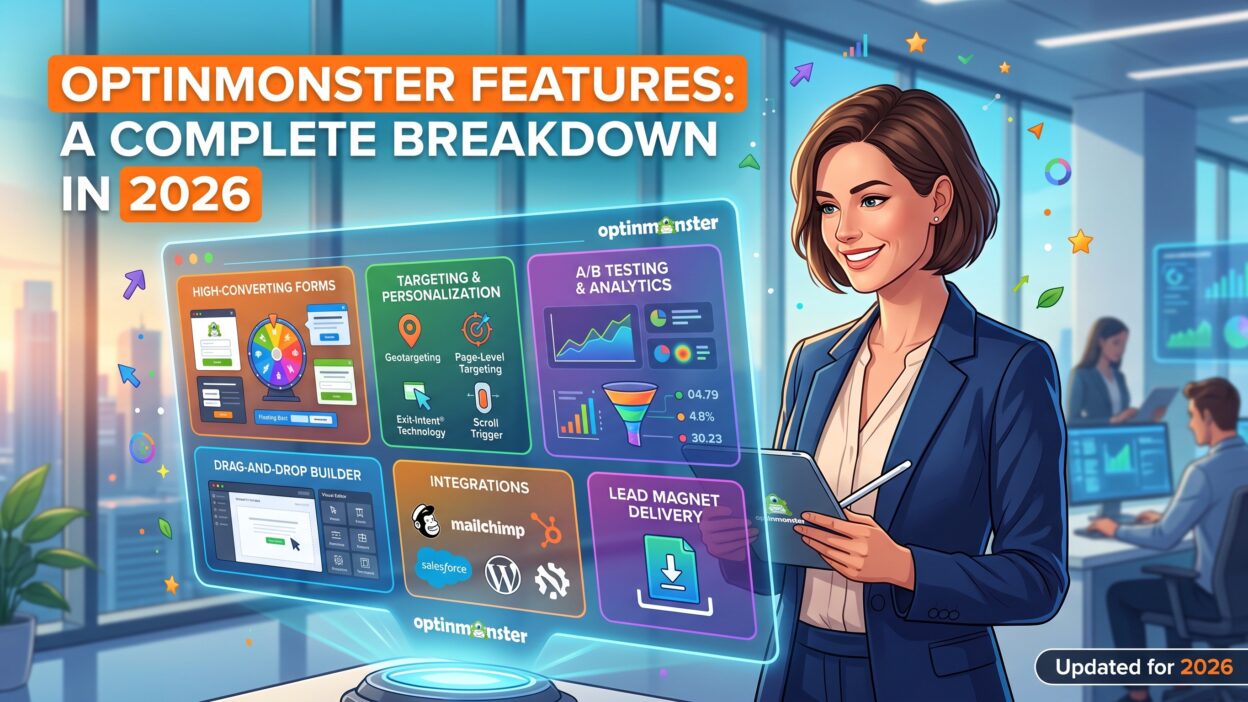
The builder shows why OptinMonster Features appeal to non-technical users. You design, preview, and publish without waiting for a developer. That freedom keeps campaigns fresh.
Targeting and Behavioral Triggers
Targeting makes OptinMonster stand out. Many tools show popups. Few control the timing so well. Reviewers say the platform offers more display-rule combinations than most tools at its price.
Exit-Intent Technology
Exit-intent detects when a visitor moves to leave. On desktop, the tool tracks mouse movement toward the browser bar. On mobile, it reads scroll behavior. A last-chance offer appears. Many users recover a share of lost visitors. This tool made the company famous.
Page-Level Targeting
Show a campaign on one page, a group of pages, or a category. A cooking blog shows a recipe ebook on dessert posts. A software company shows a demo offer on pricing pages. Relevant offers convert better.
Time and Scroll Triggers
Trigger a campaign after a visitor spends thirty seconds on a page. Trigger another after readers scroll seventy percent of an article. Engaged readers see your offer at the right moment.
Inactivity Detection
An inactivity sensor spots visitors who stop interacting. A message wakes them up. Shoppers who stall at checkout often respond.
Geolocation
Show different offers by country or region. A store offers free shipping to one country and a discount to another. Local relevance builds trust.
Device and Referrer Targeting
Target mobile users with mobile-friendly campaigns. Target visitors who arrive from Google, Facebook, or a partner site. Match the message to the source. A visitor from a newsletter sees a different offer than a visitor from search.
Onsite Retargeting
Show a new message to returning visitors. Someone who ignored your first offer may respond to a second. You also hide campaigns from people who already subscribed. Nobody wants to see the same popup twice.
Cookie and Visitor Rules
New visitors see a welcome offer. Returning visitors see a loyalty offer. Rules based on cookies make this possible.
eCommerce Cart Triggers
Store owners display messages based on cart value or abandoned carts. A shopper with a high cart sees a free shipping reminder. This tool lifts average order size.
Targeting rules form the strongest part of the OptinMonster Features list. Smart rules turn annoying popups into helpful messages. Use them with care. Too many campaigns still overwhelm visitors.
Personalization and Smart Tools
Generic messages get ignored. Personal messages get clicks.
Dynamic Text
Insert a visitor’s name, city, or referral source into your copy. A reader from Chicago sees a message about Chicago events. Small touches raise trust.
Smart Success Messages
After a signup, the campaign shows a thank-you screen. Smart success views can change by visitor type. A new subscriber sees a welcome offer. A returning customer sees a product tip.
Playbooks and Recommendations
OptinMonster provides playbooks that suggest campaign ideas. A playbook might recommend a cart recovery popup for a store. Beginners follow these guides. Experts skip them.
Campaign Scheduling
Schedule campaigns by date and time. Launch a holiday sale at midnight. Shut it off when the sale ends. Time zones matter, so check your settings.
Evergreen and Seasonal Offers
Reuse campaigns each year. Update copy and dates. Save time during busy seasons.
Personalization tools help small teams act like big ones. A single marketer can run many targeted offers with little effort.
A/B Testing and Analytics
Guessing wastes money. Testing replaces guesses with facts.
Split Testing
OptinMonster lets you test two or more versions of a campaign. Change a headline, an image, or a button. The system splits traffic evenly. After enough visitors, one version wins. You keep the winner.
Test one change at a time. A single change teaches a clear lesson. Many changes at once hide the cause.
Conversion Reports
Reports show views, signups, and conversion rates for each campaign. You see which pages and traffic sources perform best. Dashboards stay simple. You do not need analytics training.
Google Analytics Integration
Connect Google Analytics to track campaign events. You see how popups affect bounce rate, time on site, and sales. Marketers tie results to business goals.
Monitoring Impressions
Impressions drive the pricing model. Watch your count each month. A viral post can burn through impressions quickly. Set alerts so you avoid surprises.
Reading the Numbers
A good popup converts between two and five percent of visitors, depending on the industry. Treat that range as a rough guide. Your audience and offer change the result. Test and improve month after month.
Testing tools make OptinMonster Features valuable for growth teams. Every campaign becomes an experiment. Small gains stack up over time.
Integrations
A lead capture tool must connect to your email list. OptinMonster plays well with others.
Email Marketing Platforms
Send new subscribers straight to Mailchimp, Constant Contact, HubSpot, ActiveCampaign, Klaviyo, and many more. Mapping fields takes a few clicks. Subscribers arrive in the right list or segment.
Website and eCommerce Platforms
WordPress users install a plugin. Shopify, WooCommerce, and BigCommerce stores connect through apps and plugins. Other platforms use a snippet. Compatibility rarely causes trouble.
CRM and Sales Tools
Connect leads to a CRM. Sales teams follow up fast. A form that books a demo can notify a rep in seconds.
Zapier and Automation
Zapier extends the list to thousands of apps. Send leads to a spreadsheet, a Slack channel, or a text alert. Automation fans build custom flows with ease.
Webinar and Course Tools
Link campaigns to webinar and course platforms. A popup invites visitors to register. Attendees land in the right system.
Checking Compatibility
Confirm that your email provider appears on the current list. Integration details change. Check the documentation before you buy.
Strong integrations make OptinMonster Features practical on day one. You rarely need a developer to move data.
Compliance, Speed, and Support
Features matter little if they break the law or slow your site.
Privacy and Consent
Privacy rules such as GDPR and CCPA shape how you collect data. OptinMonster offers consent checkboxes and settings that help you comply. Rules vary by region. Ask a lawyer about your own duties. Add clear privacy links to every form.
Site Speed
Heavy scripts slow pages. OptinMonster loads campaigns from its own servers and aims to keep impact low. Test your site speed before and after installation. Tools such as PageSpeed Insights show the effect.
Mobile Experience
Google penalizes intrusive popups on mobile. Use slide-ins and bars on small screens. Avoid full-screen popups that block content.
Support and Learning
The company provides documentation, tutorials, and email support. Higher plans may include priority help. Many users solve problems with the knowledge base. Agencies appreciate onboarding resources.
Reliability
Hosted tools depend on uptime. Check the status page before you plan a big launch. Test campaigns on a staging copy of your site.
OptinMonster Pricing and Plans in 2026
Pricing follows impressions, not traffic. An impression counts each time a visitor sees a campaign. Heavy campaigns burn through impressions faster than light ones.
Plan Structure
OptinMonster offers four main tiers plus custom enterprise plans. Sources report introductory annual prices from about $7 to $9 per month for the Basic plan. That plan includes around 2,500 impressions. The Growth plan reaches around $49 per month with about 100,000 impressions, according to one review. All plans include unlimited campaigns and unlimited subscribers. Prices change often, so confirm the numbers on the official pricing page.
What Each Tier Unlocks
Lower plans give core campaign types and basic targeting. Higher plans unlock advanced features. Examples include more sites, deeper targeting rules, A/B testing, and extra integrations. One competitor review warns that many features depend on the plan. Read the comparison table before you buy.
Introductory Versus Renewal Pricing
Annual billing brings the lowest price. Introductory rates may rise at renewal. Ask what you will pay in year two. Record the date in your calendar.
No Free Plan
The platform offers no free tier. A refund policy may apply to new customers. Check current terms. Test the tool during that window.
Hidden Costs
Extra sites, higher traffic, and agency use can push you to a higher tier. Impressions matter most. Estimate your monthly pageviews and the share that sees a campaign. Plan for growth.
Value Check
A single recovered sale or a few hundred subscribers often cover the cost. Run the math. Compare the price to your average customer value.
The pricing structure demands attention in any look at OptinMonster Features. A cheap plan helps small sites. A busy site needs a higher tier.
Pros and Cons
Every tool trades strengths for weaknesses. Weigh both.
What OptinMonster Does Well
Targeting rules lead the pack. Exit-intent technology works. The builder suits beginners. The template library saves time. Testing tools support steady growth. Integrations cover major email platforms. Unlimited subscribers and campaigns remove common limits.
Where It Struggles
No free plan exists. Lower tiers restrict important features. Impression limits require monitoring. The large feature set creates a learning curve. Popups can hurt user experience when you overuse them. Some competitors offer better price-to-feature ratios.
The Fair Verdict
OptinMonster fits teams that treat lead capture as a serious growth channel. It rewards careful targeting and testing. It frustrates users who want free software or a one-click solution.
OptinMonster Alternatives
Competitors offer different trade-offs. Test more than one.
OptiMonk
OptiMonk offers a free plan and strong popup tools. Small stores like its pricing. Advanced targeting varies by tier.
Sumo and Poptin
Poptin and similar tools offer budget-friendly popups with core targeting. Features may trail OptinMonster on advanced rules.
Getsitecontrol and Popup Maker
Getsitecontrol targets Shopify stores with simple setup. Popup Maker serves WordPress users with a low-cost license. Both cost less than OptinMonster.
Leadpages and Landing Page Tools
Leadpages wins on landing pages. It adds popups as a secondary feature. Choose it when pages matter more than overlays.
Email Platform Forms
Mailchimp, Klaviyo, and other platforms include basic popups. You may need nothing more. Check your current tools first.
Run the same offer on two tools. Compare conversion rates and ease of use. Real data beats marketing claims.
Who Should Use OptinMonster?
Fit decides satisfaction.
Bloggers and Publishers
Content sites grow email lists with targeted offers. Page-level rules match lead magnets to topics. The tool pays for itself with a healthy list.
eCommerce Stores
Store owners recover carts and boost order size. Countdown timers and spin-to-win wheels lift sales. Shopify and WooCommerce connections help.
Agencies and Freelancers
Agencies manage many sites. Reusable templates and brand settings save time. Client reports show clear results.
SaaS and Service Businesses
Software firms promote trials and demos. Service providers capture consultation requests. Page targeting directs visitors to the right offer.
Weak Fits
Sites with tiny traffic may not need a paid tool. Teams that want an all-in-one marketing suite should consider bigger platforms. Beginners who want free software should start with a lighter option.
Think about your top goal before you decide. Many readers ask which OptinMonster Features matter most for their situation. Exit-intent and page targeting rank high for content sites. Cart rules and timers rank high for stores.
Tips to Get the Most From OptinMonster
Smart habits boost results.
Start With One Clear Offer
Pick one lead magnet. A checklist, template, or discount works well. Build one campaign. Learn from the results before you add more.
Respect the Visitor
Do not show a popup within seconds of arrival. Delay it or use exit-intent. Hide it from existing subscribers. Visitors reward good manners.
Test Constantly
Run one test each month. Change a headline. Change a button. Record the results in a simple log.
Keep Mobile in Mind
Preview every campaign on a phone. Make buttons easy to tap. Keep text short.
Watch Your Impressions
Check usage each week. Pause low-value campaigns. Save impressions for pages that convert.
Frequently Asked Questions
What is OptinMonster used for?
People use it to build email lists, promote offers, and recover lost sales. It creates popups, bars, and other on-site campaigns.
Does OptinMonster have a free plan?
No. The tool is paid only. Check the official site for current refund terms.
How much does OptinMonster cost?
Entry plans start around $7 to $9 per month on annual billing, according to recent reviews. Higher tiers cost more. Pricing depends on impressions and features.
What is exit-intent technology?
It detects when a visitor is about to leave. A campaign appears at that moment. It gives you a last chance to capture the lead.
Does OptinMonster work with WordPress and Shopify?
Yes. A WordPress plugin and Shopify connections exist. Other platforms use a code snippet.
Which email platforms does it support?
Mailchimp, Constant Contact, HubSpot, ActiveCampaign, Klaviyo, and many more. Zapier extends the list.
Can I run A/B tests?
Yes. Split testing lets you compare campaign versions. Plan limits may apply.
Will popups hurt my SEO?
Poorly designed popups can hurt mobile experience. Google penalizes intrusive interstitials. Use slide-ins, bars, and delayed triggers.
Is OptinMonster GDPR friendly?
The tool offers consent options. You remain responsible for compliance. Ask a lawyer to review your setup.
What are the best OptinMonster alternatives?
OptiMonk, Poptin, Getsitecontrol, Popup Maker, and Leadpages are common choices. Each fits a different budget and goal.
Read More:-Identify Prospects Through Website Visitor Insights
Conclusion

OptinMonster gives site owners a complete toolkit for lead capture. The campaign types cover popups, bars, slide-ins, timers, and games. The builder lets beginners design without code. Targeting rules decide who sees what and when. Testing and analytics turn each campaign into a learning tool. Integrations move leads into your email platform fast.
Limits exist. The platform has no free plan. Lower tiers hold back useful tools. Impression caps need attention. The depth of options takes time to learn.
My verdict is simple. Choose OptinMonster if lead capture drives your growth. Pick a plan that matches your impressions. Start with one offer and a few smart rules. Test every month. Choose a cheaper tool if you only need basic popups.
Take action this week. Review the current OptinMonster Features on the official site. Build one exit-intent campaign. Measure the first month of results. Small steps create a bigger list.