Introduction
Tl;DR Your CRM holds your customer relationships. Every deal, contact, and note lives there. Now software can act on that data without a human touching it.
That power creates a hard question. How much freedom should the software get? Give it too little, and you waste the investment. Give it too much, and one bad action can reach thousands of customers.
AI Agents for CRM sit at the center of this debate. They update records, draft emails, route leads, and book meetings. Some even negotiate renewals. They save hours every week. They also make mistakes.
Table of Contents
What Are AI Agents for CRM?
An AI agent is software that pursues a goal on its own. It reads information, decides on a step, and takes action. It checks the result and tries again. A basic chatbot only answers questions. An agent does work.
In a CRM, that work covers many jobs. An agent can read an inbound email and create a lead. It can enrich the record with company data. It can score the lead, assign a rep, and send a first reply. Each step happens without a person clicking a button.
How Agents Differ From Basic Automation
Classic CRM automation follows fixed rules. If a form arrives, then create a contact. The rule never changes. It never reads context.
Agents handle messy input. They read free text, weigh options, and pick a path. They adapt when a situation looks new. That flexibility makes them useful. It also makes them less predictable.
Common Agent Jobs
Sales teams use agents for lead research, meeting prep, and follow-up drafts. Service teams use them to triage tickets and suggest answers. Marketing teams use them to segment audiences and clean records. Operations teams use them to fix duplicates and enforce field rules.
What They Need to Work
Agents need access. They need permission to read and write records. They need clean customer data. They need clear instructions. Weak inputs produce weak actions. Agents also need limits, which the rest of this guide covers.
Why Teams Adopt Agents Now
Reps lose a huge share of their week to admin work. They log calls, update fields, and hunt for context. Managers beg for clean data. Reps want to sell. Agents promise to close that gap.
Speed and Scale
An agent works at all hours. It answers a lead in seconds. It prepares a brief for every meeting. A human team cannot match that pace across thousands of accounts.
Cost Pressure
Leaders face flat budgets and rising targets. Sales automation lets teams do more without new hires. Executives like that math.
Market Momentum
Major CRM vendors now ship agent features inside their platforms. Adoption of AI Agents for CRM grows each quarter. Rivals test these tools today. Teams that wait fall behind on learning, even when they stay careful.
Speed brings risk. The faster an agent moves, the faster an error spreads. That tension drives the whole autonomy debate.
How Much Autonomy Should AI Agents for CRM Get?
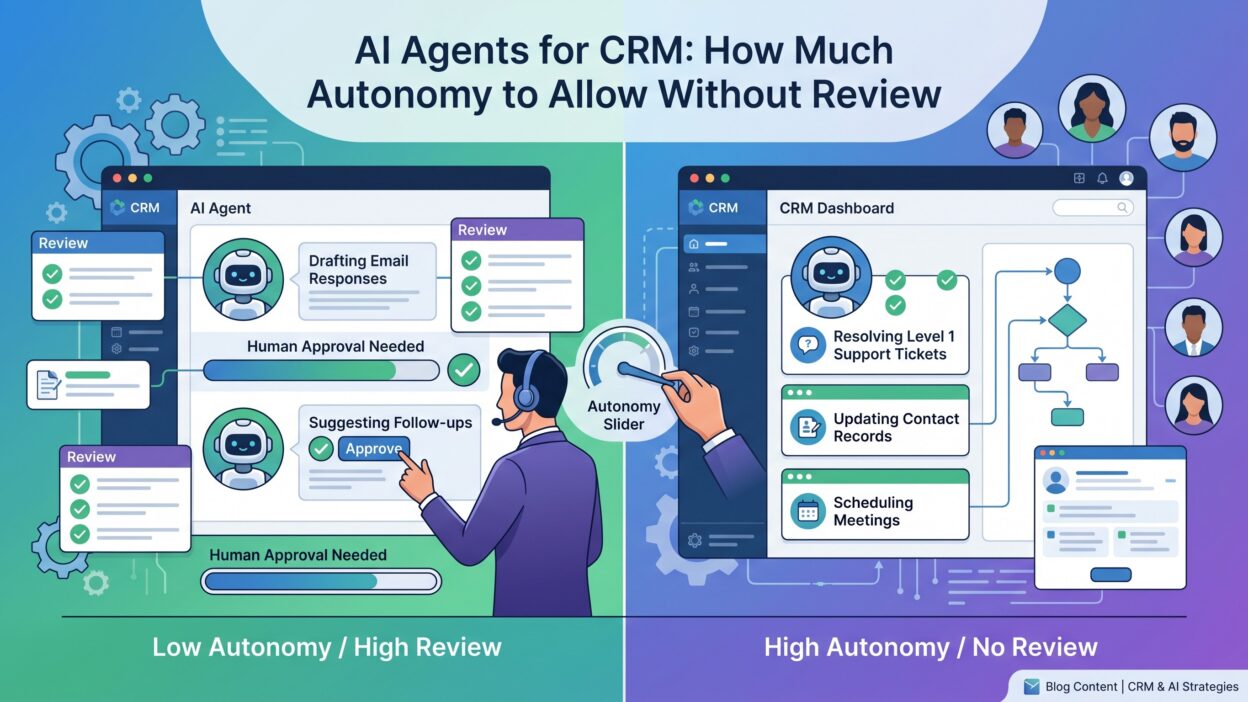
No single answer fits every team. The right level depends on the task, the data, and the cost of a mistake. A simple scale helps you decide.
Level One: Suggest Only
The agent recommends an action. A human reads the suggestion and decides. Nothing changes until a person approves. This level carries almost no risk. It also delivers the smallest gain.
Level Two: Act With Approval
The agent prepares the full action. It drafts the email, fills the fields, and queues the update. A human clicks approve. Approval workflows sit at the heart of this level. The human checks each item before it goes live.
Level Three: Act, Then Report
The agent acts alone and logs every step. A human reviews a summary later. The team can undo mistakes after the fact. This level fits low-risk, reversible work.
Level Four: Full Autonomy
The agent acts alone and no one reviews routine output. Humans only inspect samples and exceptions. Reserve this level for narrow tasks with clear rules and low stakes.
Start Low and Climb
Begin every task at level one or two. Track accuracy for several weeks. Move a task up one level only after the data supports it. Move it back down when quality slips. Autonomy works like a dial. You turn it task by task.
The Factors That Set the Right Level
Four questions decide where a task belongs on the scale. Ask them for every new use case.
Impact of a Mistake
Imagine the worst outcome. A wrong field on an internal record costs minutes. A wrong email to a key customer costs trust. A wrong discount costs margin. Higher impact demands more review.
Reversibility
Ask whether you can undo the action. A changed field rolls back with one click. A sent email never returns. A deleted record may vanish for good. Irreversible actions need a human gate.
Data Sensitivity
Customer data carries legal duties. Health details, payment data, and personal identifiers need extra care. Data governance rules often limit what software may touch. Respect those rules before you grant any freedom.
Agent Track Record
Evidence beats hope. Measure how often the agent gets it right on a given task. Review a sample every week. A strong record earns more freedom. A weak record loses it.
Weighing the Whole Picture
Teams that deploy AI Agents for CRM should score each task on all four factors. Low impact, easy reversal, safe data, and strong accuracy point to high autonomy. Any red flag pulls the task down a level. Write the score in a shared document. Everyone then sees the logic behind each decision.
Tasks AI Agents for CRM Can Handle Without Review
Some jobs carry little risk. They follow clear rules and touch internal data only. These tasks suit levels three and four.
Data Cleanup
Agents can merge exact duplicates, fix capitalization, and standardize phone formats. They can fill blank fields from trusted sources. Errors stay small and fixes come easy. Keep a log so you can reverse any batch.
Activity Logging
Agents can record calls, emails, and meetings in the right record. They can attach transcripts and summaries. Reps save hours each week. A wrong log entry rarely hurts a customer.
Meeting Prep and Summaries
Agents can pull account history before a call. They can write a short brief for the rep. Summaries after the call can flow into the notes field. A human reads these before use, and mistakes stay inside the team.
Lead Enrichment and Scoring
Agents can add company size, industry, and tech stack to new leads. They can score leads by fit. Reps still decide who to call. The agent only sorts the list.
Internal Reminders and Task Creation
Agents can create follow-up tasks and nudge reps about stale deals. These actions guide staff and never touch the customer directly. The downside stays tiny.
Routine Routing
Agents can assign leads by territory or product line when the rules stay clear. Check routing accuracy each week. Escalate edge cases to a manager.
Tasks That Still Need a Human Check
Some work should never run alone. A wrong move costs money, trust, or legal standing. Keep a person in the loop here.
Customer-Facing Messages
An agent can draft an email. A human should read it before sending, especially for key accounts. Tone errors and false claims damage relationships. Low-risk templates may earn looser rules later.
Pricing, Discounts, and Contracts
Agents should never set final prices or change terms alone. Margin and legal risk run high. Let the agent suggest numbers. Let a manager approve them.
Deleting or Overwriting Records
Mass deletes and bulk overwrites can destroy years of history. Require approval for any destructive action. Require a backup before every large batch.
Sensitive Segments
Treat regulated industries, strategic accounts, and customers in dispute with care. A small error there can trigger a large problem. Route these accounts to a human by default.
Escalations and Complaints
Angry customers need empathy. Agents miss emotional cues. Send unhappy contacts to a person quickly.
Anything Legal or Financial
Refunds, credits, compliance statements, and consent changes all need review. The law does not accept “the software did it” as an excuse.
Guardrails That Make Autonomy Safe
Limits let you grant more freedom with less fear. Build guardrails before you raise any dial.
Permission Boundaries
Give each agent the least access it needs. A scoring agent does not need delete rights. Use role-based access in your CRM. Review permissions every quarter.
Spending and Volume Caps
Set hard limits on actions per hour and per day. Cap the number of emails an agent can send. Cap the size of any bulk update. A cap turns a disaster into a small incident.
Audit Trails
Log every action, with the input, the decision, and the result. A strong audit trail lets you trace any error. It also helps with legal requests and customer questions. Store logs where the agent cannot edit them.
Human in the Loop Triggers
Define rules that pull a human in. Trigger a review when confidence runs low. Trigger it when the account value runs high. Trigger it when the agent sees an unusual request. These triggers catch problems the agent cannot see.
Kill Switches
Every agent needs an off button. Anyone on the team should know how to pause it. Test the switch before launch.
Governance for AI Agents for CRM
Write a short policy for AI Agents for CRM. Name an owner. List approved tasks and approved data. State the review rules. Update the policy each quarter as tools and laws change.
A Step-by-Step Rollout Plan
A phased plan protects your data and builds trust. Follow these stages in order.
Weeks One to Two: Map and Choose
List the tasks your team repeats. Score each one on impact, reversibility, data sensitivity, and rule clarity. Pick one low-risk task for the pilot. Data cleanup or activity logging works well.
Weeks Three to Six: Pilot at Low Autonomy
Run the agent in suggest-only or approval mode. Have humans review every action. Track how often they accept, edit, or reject the output. Collect feedback from the reps who use it.
Weeks Seven to Ten: Raise the Dial
Review the numbers. If accuracy holds above your target, move the task to act-then-report. Sample the output each week. Keep the rollback plan ready.
Weeks Eleven and Beyond: Expand Carefully
Add a second task and repeat the cycle. Teams adopting AI Agents for CRM should move one task at a time. Share results with leadership. Publish wins and misses openly. Honest reporting keeps trust high.
Prepare Your People
Staff worry about job loss and surveillance. Explain the goal early. Show how agents remove dull work. Train reps to check output and to flag errors. People who trust the system use it well.
How to Measure Whether the Autonomy Level Fits
Numbers tell you when to push and when to pull back. Track a short list of metrics for every task.
Measure accuracy first. Sample outputs each week and grade them against a standard. Measure the human edit rate. A falling edit rate signals growing quality. A rising rate signals trouble.
Measure time saved. Compare hours spent before and after the agent. Convert the hours into dollars. Leaders understand that language.
Measure incidents. Count errors that reached a customer. Track the cost of each one. A single serious incident should trigger a review of the whole program.
Measure customer impact. Watch response times, satisfaction scores, and complaint rates. Healthy numbers show that the agent helps and does not harm.
Review the full set each month. Adjust autonomy up or down based on the evidence.
Common Mistakes to Avoid
Teams repeat the same errors. Learn from them early.
Some teams grant full access on day one. They want fast gains. A single bad batch erases the benefit. Start small and earn trust.
Some teams skip the data cleanup. Agents learn from messy records and repeat the mess. Fix the data before launch.
Some teams forget logging. An error appears and no one can trace the cause. Turn on audit trails first.
Some teams treat every task the same. They either lock everything down or open everything up. Match the review level to the risk of each task.
Some teams ignore change management. Reps resist tools they do not understand. Many projects with AI Agents for CRM fail because of people, not technology.
Some teams never revisit their rules. Models change. Vendors update features. Review your limits every quarter.
Frequently Asked Questions
Should an agent send customer emails without review?
Not at first. Start with approval mode. Move to auto-send only for narrow, low-risk templates after weeks of strong results.
How do I know when an agent has earned more autonomy?
Look at the data. Track accuracy, edit rate, and incidents for at least four weeks. Raise the level when results stay strong and stable.
What is the biggest risk of too much autonomy?
Scale. One bad rule can touch thousands of records or contacts in minutes. Caps, logs, and kill switches limit that damage.
Do I need a human in the loop forever?
For high-risk tasks, yes. Pricing, legal terms, and sensitive accounts need a person. Low-risk tasks may run alone with sampling and monitoring.
Are AI Agents for CRM safe for customer data?
They can be safe with the right controls. Choose vendors with strong security credentials. Limit access. Sign data agreements. Confirm that the vendor does not train public models on your records.
Who should own the program?
Name one leader, often in revenue operations. This person sets rules, tracks results, and answers to leadership. Shared ownership without a named lead causes drift.
How much does it cost to start?
Many CRM platforms include agent features in current plans. Specialist tools charge monthly or annual fees. A small pilot keeps early costs low.
Read More:-lemlist Features: A Complete Breakdown in 2026
Conclusion

Autonomy is a dial and not a switch. You decide the setting for each task. Low-risk, reversible work can run alone. High-risk work needs a human in the loop.
Start every task at a low level. Score it on impact, reversibility, data sensitivity, and track record. Build guardrails first. Set permissions, caps, audit trails, and a kill switch. Measure results every month and move the dial based on evidence.
AI Agents for CRM can give your team hours back each week. They can clean your data, prepare your meetings, and speed up every lead. They earn that trust one task at a time.
Pick one low-risk task today. Run it in approval mode for a month. Review the numbers and decide your next step.