Introduction
TL;DR Salesforce holds more customer data than almost any platform on the market. It still cannot do everything alone. A CRM only knows what happens inside it, so a stale phone number, a missed buying signal, or a disconnected invoice slips right past it. Salesforce integrations close those exact gaps. This guide covers the seven strongest Salesforce integrations worth adding to your stack in 2026, why each one matters, and how to pick the right fit for your team. Whether you run sales, marketing, or finance, the right Salesforce integrations turn a good CRM into the center of your whole revenue operation.
Table of Contents
What Are Salesforce Integrations?
A Salesforce integration connects your CRM to another platform, so data moves between the two without manual work. A lead captured on a landing page flows straight into Salesforce. A signed contract updates a deal stage automatically. A verified phone number lands on a contact record without anyone typing it in by hand.
Some Salesforce integrations run through the AppExchange, Salesforce’s own marketplace with thousands of listed apps. Others connect through native APIs, built and maintained by the third-party vendor itself. A smaller number run through middleware tools like Zapier or MuleSoft, which link Salesforce to platforms that lack a direct connector.
Most teams do not need dozens of these. A handful of well-chosen Salesforce integrations, set up correctly, do more for a revenue team than a long list of half-used apps ever will.
Why Your CRM Needs Salesforce Integrations in 2026
Closing Data Gaps Salesforce Cannot Fill Alone
Salesforce tracks what happens inside your pipeline. It cannot verify whether a contact’s email still works. It cannot tell you which accounts are researching your category this week. It cannot flag a company that just raised funding or hired a new VP of Sales. Salesforce integrations built for data enrichment fill that exact blind spot, feeding verified, current information straight into records your reps already work from.
Without this layer, reps chase stale leads without realizing it. A contact who changed jobs eight months ago still shows up as a live opportunity. Salesforce integrations that specialize in data quality catch these gaps automatically, on a schedule, instead of waiting for a rep to notice during a call that goes nowhere.
Connecting Sales, Marketing, and Finance in One View
Most companies run marketing, sales, and finance through separate tools that rarely talk to each other. Marketing sends emails through one platform. Finance tracks invoices in another. Sales lives entirely in Salesforce, disconnected from both. Salesforce integrations bridge these silos, so a closed deal in Salesforce triggers an invoice in your accounting system without anyone re-entering the same data twice.
This connected view saves real time across every team involved. A support agent sees a customer’s full purchase history without switching screens. A finance lead sees which deals actually converted to paid revenue, matched against what sales recorded weeks earlier. Salesforce integrations turn separate tools into one shared source of truth.
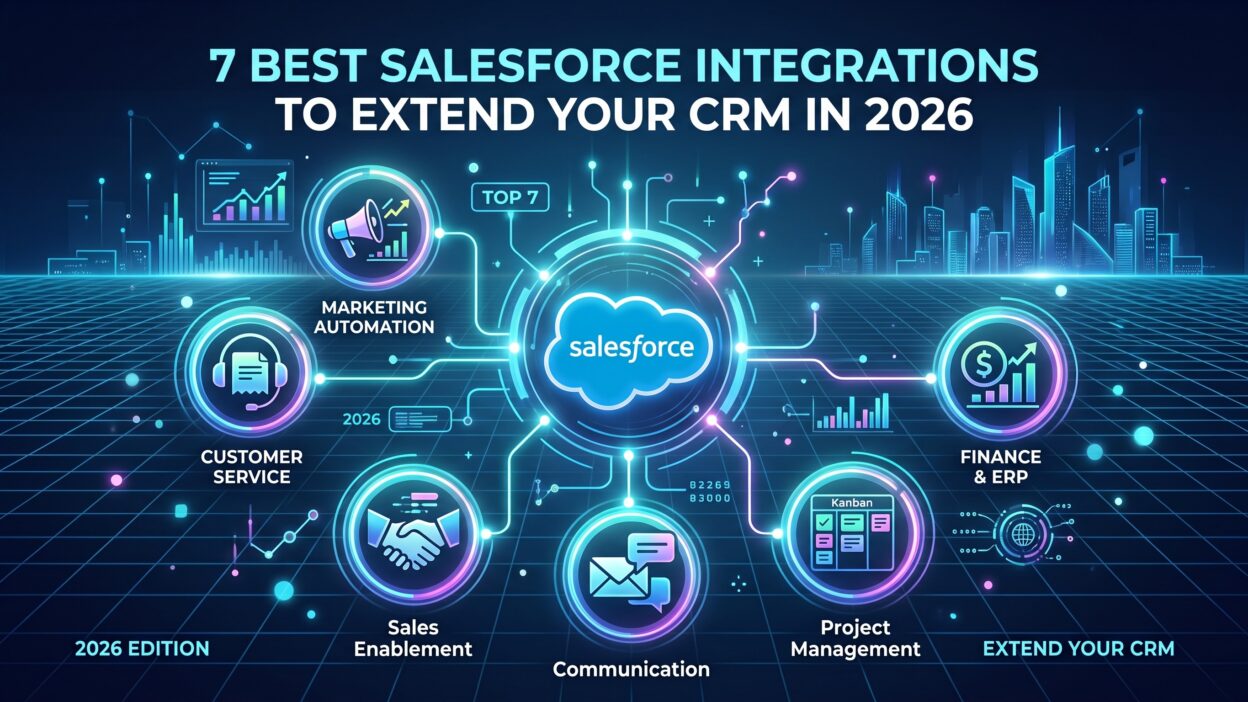
7 Best Salesforce Integrations to Extend Your CRM
Each integration below solves a different problem, from data quality to contracts to accounting. Pick based on the gap your team feels most, not on which tool has the loudest marketing.
1. ZoomInfo for Data Enrichment and Buyer Intent
ZoomInfo ranks among the most widely used Salesforce integrations for B2B data quality. It enriches existing Salesforce records with verified contact details, company firmographics, and buying signals pulled from across the web. A stale lead record gets a current job title, a working phone number, and fresh intent data automatically.
Buyer intent sets this integration apart from basic enrichment tools. ZoomInfo flags accounts actively researching your product category, even before they fill out a form. That signal lands directly inside Salesforce, so reps prioritize the right accounts instead of working a list in random order.
Setup runs through a native Salesforce connector, syncing on a schedule your admin controls. Teams running high lead volume see the biggest return here, since manual data cleanup at scale eats hours every single week without a tool like this running in the background.
2. Slack for Real-Time Deal Collaboration
Slack turns a static Salesforce record into a live conversation. Deal updates, stage changes, and new notes can post directly into a Slack channel the moment they happen inside Salesforce. A rep no longer needs to check the CRM manually to know a deal just moved forward.
Teams use this integration to build deal-specific channels, where sales, marketing, and leadership discuss a single account in real time. Comments made in Slack can sync back into the Salesforce record too, so context never gets lost between the two tools.
This integration fits fast-moving sales teams best, especially ones managing several deals in parallel. Salesforce integrations built for collaboration like this reduce the constant tab-switching that slows reps down during a busy week.
3. Mailchimp for Email and SMS Campaigns
Mailchimp connects Salesforce segments directly to email and SMS campaigns. A list built inside Salesforce, filtered by industry or deal stage, syncs straight into Mailchimp without a manual export. Campaign performance data then flows back into Salesforce, so marketing and sales see the same engagement numbers.
This two-way sync matters most for teams running frequent, targeted campaigns. A segment of contacts who attended a recent webinar can trigger a follow-up sequence automatically, based entirely on data already sitting inside Salesforce.
Smaller marketing teams benefit the most here, since Mailchimp requires less setup than a full marketing cloud platform. Salesforce integrations like this one suit teams that want campaign activation without a heavy technical lift.
4. Tableau for Pipeline Analytics and Dashboards
Tableau turns raw Salesforce data into visual, interactive dashboards. Pipeline trends, win rates, and rep performance become charts a sales leader can actually read at a glance, instead of scrolling through endless list views inside Salesforce itself.
Because Salesforce owns Tableau, the integration runs deep. Dashboards update in near real time as records change inside the CRM, with no manual data refresh required. Teams can blend Salesforce data with numbers from other systems too, giving leadership a fuller picture than Salesforce reports alone provide.
This integration fits sales operations and leadership teams best. Salesforce integrations focused on analytics like Tableau matter most once your data volume grows too large for standard CRM reports to explain clearly.
5. Zapier for No-Code Workflow Automation
Zapier connects Salesforce to thousands of apps without requiring a developer. A new Salesforce lead can trigger a task in a project management tool. A closed deal can post an update to a spreadsheet your finance team already tracks. None of this needs custom code.
This flexibility makes Zapier a strong fit for smaller teams without dedicated technical resources. Workflows build through a simple visual editor, connecting a trigger inside Salesforce to an action in another app within minutes.
Zapier will not replace a deep native integration for high-volume, complex data needs. For everyday automation between smaller tools though, it remains one of the most practical Salesforce integrations available, especially for teams just starting to automate their stack.
6. DocuSign for Contracts and E-Signatures
DocuSign lets reps send, track, and complete contracts without leaving Salesforce. A quote built inside an opportunity record can generate a document, route it for signature, and update the deal stage automatically once signed.
This integration removes a common bottleneck in the sales process. Deals used to stall waiting on a signed PDF buried in someone’s inbox. With DocuSign connected, a rep sees signature status right inside the Salesforce record, without chasing an email thread to check progress.
Legal and sales operations teams see the biggest benefit here. Salesforce integrations built around contracts like this one shorten the final stretch of a sales cycle, right when deals are most likely to slip.
7. QuickBooks for Accounting and Revenue Sync
QuickBooks connects Salesforce to your accounting records, so a closed deal automatically becomes an invoice. Payment status flows back into Salesforce too, giving sales visibility into whether a customer actually paid, not just whether a deal closed on paper.
This integration matters most for finance teams tired of reconciling two separate systems by hand. A deal marked closed-won in Salesforce used to require someone manually creating a matching invoice in QuickBooks. This connection removes that extra step entirely.
Growing companies benefit the most from this sync, especially once deal volume makes manual reconciliation unrealistic. Among Salesforce integrations built for finance, this one closes one of the widest gaps between what sales records and what actually gets paid.
How to Choose the Right Salesforce Integrations for Your Team
Start with the problem costing your team the most time today. A sales team drowning in stale data should prioritize enrichment tools first, before anything else. A finance team manually matching invoices to closed deals should look at accounting sync before adding another collaboration tool nobody asked for.
Check native support before assuming you need custom development. Most major platforms already offer a direct Salesforce connector, listed clearly on the AppExchange. Middleware tools like Zapier only become necessary once you need to connect something without a built-in option.
Think about data direction too. Some Salesforce integrations only push data one way, from Salesforce out to another tool. Others sync bidirectionally, updating both systems as records change. Confirm which direction you actually need before committing to a setup, since a one-way sync often disappoints a team expecting full two-way visibility.
Start small rather than connecting everything at once. Add one integration, confirm it works cleanly with real data, then move to the next. Salesforce integrations stacked too quickly, without proper testing, tend to create messier data than the manual process they were meant to replace.
Common Mistakes Teams Make With Salesforce Integrations
Teams often connect a tool without mapping fields carefully first. A field named differently in each system creates duplicate or blank data almost immediately. Take the time to build a simple mapping plan before turning any sync on.
Permission issues cause quiet failures too. A connected app without full access to the right Salesforce objects syncs some records and silently drops others. Check permissions directly after setup, not weeks later once someone notices missing data.
Some teams add too many Salesforce integrations at once, chasing every tool that looks useful. This usually backfires. A stack of ten loosely connected apps often creates more confusion than a focused set of three or four tools, each solving a real, specific problem your team actually has.
Skipping regular audits is another frequent gap. An integration that worked fine a year ago can break quietly after a Salesforce update or a change on the vendor’s side. Review your active integrations every few months to confirm data still flows the way it should.
Frequently Asked Questions
What are Salesforce integrations?
Salesforce integrations connect your CRM to other software, so data moves between systems automatically. This removes manual exports and keeps records updated across every connected tool without extra work from your team.
How many Salesforce integrations does a typical company use?
Most companies run somewhere between eight and twelve active integrations, even though thousands of options exist on the AppExchange. A focused set that solves real problems beats a long list of tools nobody fully uses.
Do Salesforce integrations require coding knowledge?
Not always. Tools like Zapier use a visual, no-code editor built for non-technical users. Deeper native integrations, like ZoomInfo or DocuSign, usually install through guided setup steps that do not require a developer either.
Which Salesforce integrations help with data quality the most?
Enrichment platforms like ZoomInfo address data quality most directly, verifying contact details and flagging buyer intent signals Salesforce cannot generate on its own. This matters most for teams working large volumes of leads that age out of accuracy fast.
Are Salesforce integrations free to use?
Some are, especially basic automation tools with limited free tiers. Most enterprise-grade Salesforce integrations, particularly ones handling data enrichment, analytics, or accounting sync, run on paid plans tied to usage or seat count.
Can small businesses benefit from Salesforce integrations too?
Yes, often more than larger teams relative to their size. A small team without dedicated admin staff gains the most from automation, since Salesforce integrations remove manual work that would otherwise fall on someone already stretched thin.
Read More:-Workable API Review 2026: Can You Build Recruiting Workflows on It?
Conclusion

Salesforce covers a lot on its own, but no CRM does everything a modern revenue team needs. Data enrichment, collaboration, campaign activation, analytics, automation, contracts, and accounting sync each solve a different piece of the puzzle. The seven Salesforce integrations in this guide cover that full range, from ZoomInfo’s data quality work to QuickBooks closing the loop on revenue.
Pick based on your biggest gap today, not on what looks impressive on a features page. Test one integration fully before adding the next. Map your fields carefully, check permissions right after setup, and revisit your stack every few months to catch anything quietly broken.
Done right, Salesforce integrations turn your CRM from a static record-keeping tool into the true center of your revenue operation. Start with the one gap costing your team the most time, connect it properly, and build outward from there.