Introduction
TL;DR MCP Intent Data brings real buyer signals directly into your AI workflow. Sales teams no longer need to jump between five different dashboards. Model Context Protocol connects these signals straight into the tools your team already uses every day.
MCP Intent Data changes how reps spot warm accounts. It pulls research activity, content engagement, and search behavior into one clean stream. Your AI assistant reads this stream and flags the accounts worth a call today.
This guide breaks down everything about MCP Intent Data. You get clear explanations, real setup steps, and honest answers to common questions. Read through each section and build a smarter, faster buyer-signal system.
Table of Contents
What Is MCP Intent Data
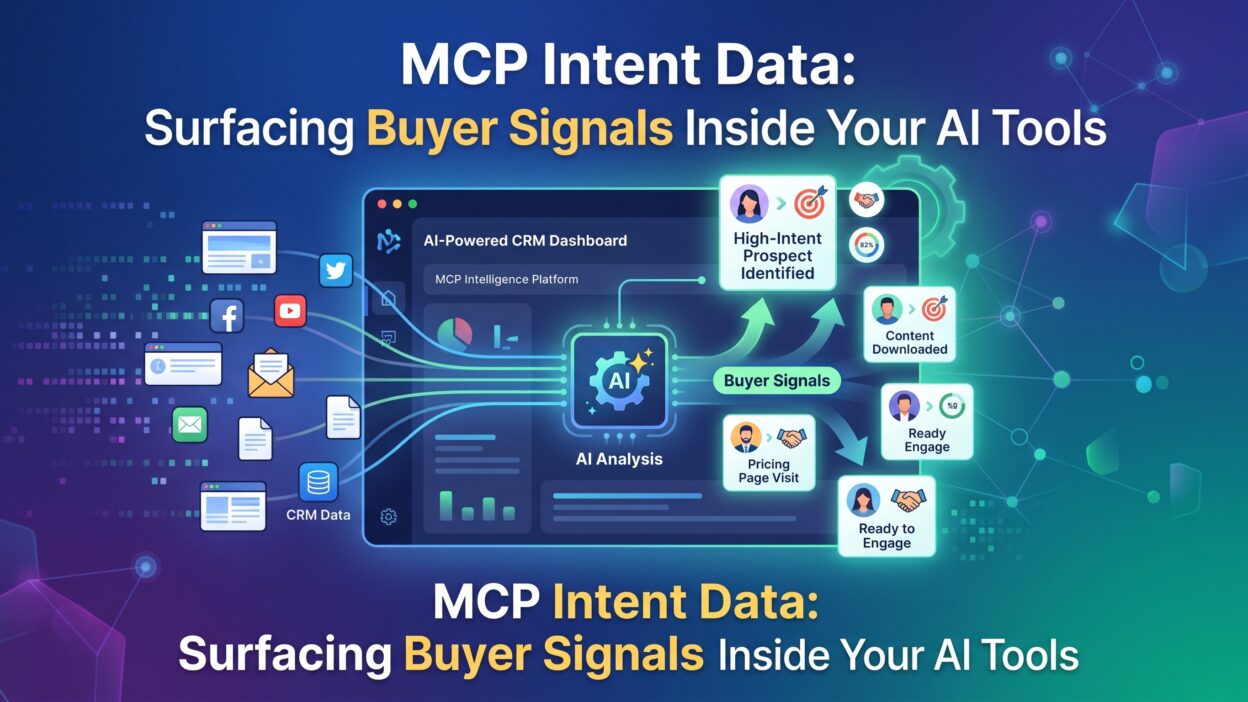
MCP Intent Data means buyer intent signals delivered through the Model Context Protocol directly into AI tools. Model Context Protocol acts as a bridge between data sources and AI assistants. It lets an AI tool pull live information without a custom integration for every single source.
Buyer intent signals show which companies research a topic related to your product. A visitor reads a comparison article. A team downloads a pricing guide. A prospect searches for a specific solution category online. These actions create signals that point toward buying intent.
MCP Intent Data packages these signals in a format any connected AI tool can read instantly. Your sales assistant, your CRM copilot, and your marketing tool all pull from the same live feed. This shared access removes duplicate data entry and stale spreadsheets.
The protocol itself stays lightweight. It defines a simple structure for requests and responses. Any AI application that supports Model Context Protocol can plug into an intent data source within minutes. MCP Intent Data turns a slow, manual research process into a fast, automatic one.
How Model Context Protocol Connects Intent Data to AI Tools
Model Context Protocol works like a universal translator between data and AI. MCP Intent Data flows through this translator without custom code for each new tool.
The Role of Context Servers
A context server holds the actual intent data behind the scenes. This server exposes a clean interface that any AI client can call. Your sales assistant sends a request through this interface. The server returns fresh buyer signals within seconds. MCP Intent Data relies on these servers to stay current and accurate.
The Role of AI Clients
An AI client sits inside your everyday tools like a CRM or a chat assistant. This client requests intent data whenever a rep opens an account record. The client then displays those signals right inside the existing workflow. Reps never leave their current screen to check buyer activity.
Real-Time Data Flow
Data moves through this system in near real time. A prospect visits your pricing page. That action reaches the context server within moments. The AI client then surfaces this fresh signal during the next rep interaction. MCP Intent Data keeps every conversation grounded in current buyer behavior rather than stale reports.
Why MCP Intent Data Matters for Modern Sales Teams
Sales teams waste hours guessing which accounts deserve attention. MCP Intent Data removes that guesswork completely. It hands reps a ranked list built from actual buyer behavior.
Faster Lead Prioritization
Reps open their day with a clear list of active accounts. MCP Intent Data ranks these accounts by real engagement level. A rep spends less time searching and more time selling. This shift alone can change quota attainment across an entire team.
Sharper Personalization
Generic outreach rarely earns a reply today. MCP Intent Data shows exactly what a prospect researched last week. A rep references that specific topic inside their first message. This small detail makes outreach feel personal rather than automated.
Tighter Sales and Marketing Alignment
Marketing teams generate content based on real search behavior. Sales teams act on that same behavior through MCP Intent Data. Both teams work from one shared signal source instead of separate reports. This alignment closes the usual gap between content strategy and sales execution.
Core Buyer Signals Captured Through MCP Intent Data
MCP Intent Data pulls from several distinct signal categories. Each category adds a different layer of buyer context.
Content Engagement Signals
These signals track which articles, guides, and videos a prospect consumes. A long read time suggests genuine interest in the topic. Repeated visits to the same page suggest active research. MCP Intent Data weighs these actions differently based on depth and frequency.
Search and Keyword Signals
Third-party search data shows which terms a company researches across the web. A sudden spike in category-specific searches often signals an active buying cycle. MCP Intent Data surfaces this spike directly inside your sales tool without manual lookup.
Firmographic and Technographic Signals
Company size, industry, and current tech stack shape buying readiness. A prospect using a competing tool may show different intent patterns than a first-time buyer. MCP Intent Data blends these details with behavioral signals for a fuller picture.
Website and Product Activity Signals
Visits to a pricing page, a demo request form, or a feature comparison page carry strong buying weight. MCP Intent Data flags these high-value pages separately from general blog traffic. Reps see these flagged actions the moment they open an account.
How to Set Up MCP Intent Data Inside Your AI Stack
Setting up MCP Intent Data takes fewer steps than most teams expect. Follow this order for a smooth rollout.
Choose a Compatible Data Source
Start with an intent data provider that already supports Model Context Protocol. Check their documentation for a listed context server. This step saves your team from building a custom connector from scratch.
Connect Your AI Client
Link your CRM assistant or chat tool to the chosen context server. Most modern AI platforms include a simple settings panel for this connection. MCP Intent Data begins flowing the moment this link goes live.
Define Signal Thresholds
Decide which signals matter most for your specific product. A high-value signal for one company might mean little for another. Set clear thresholds so your AI tool surfaces only meaningful activity.
Train Your Team on the New Workflow
Reps need a short walkthrough on reading these new signals inside their tools. A brief session prevents confusion during the first few weeks. Teams that skip training often ignore the very data meant to help them.
MCP Intent Data vs Traditional Intent Data Tools
Traditional intent data tools usually live inside a separate dashboard. A rep must log in, search an account, and manually copy findings into their CRM. This extra step slows down an already busy day.
MCP Intent Data skips that separate login entirely. The signals appear directly inside the tool a rep already uses. This difference sounds small but saves real time across hundreds of daily interactions.
Traditional tools also update on a scheduled basis, often once per day. MCP Intent Data updates continuously through its live connection. A rep sees activity from an hour ago rather than activity from yesterday’s batch report.
Cost structures differ as well. Traditional platforms often charge per seat for dashboard access. MCP Intent Data setups often charge based on data volume through the protocol itself, which can lower costs for smaller teams.
Common Mistakes Teams Make with MCP Intent Data
Many teams roll out MCP Intent Data without a clear plan. Some connect every available signal source at once, creating noisy, cluttered alerts. Reps quickly learn to ignore a tool that buries useful signals under irrelevant ones.
Other teams skip the threshold-setting step entirely. Every minor website visit then triggers a notification. This flood of low-value alerts trains reps to tune out the entire system.
Some teams never train staff on the new interface changes. Reps continue their old manual research habits out of pure comfort. The investment in MCP Intent Data then sits unused inside the tool.
A few teams also forget to review signal accuracy over time. Buyer behavior shifts across seasons and industries. MCP Intent Data needs regular tuning to stay relevant and useful for every sales cycle.
Tools and Platforms Supporting MCP Intent Data
Several platforms now support Model Context Protocol connections for intent data. Anthropic’s own ecosystem supports MCP servers that plug directly into Claude-based workflows. Sales platforms increasingly list MCP compatibility as a core feature inside their integration pages.
CRM providers have started building native MCP clients. This native support means fewer plugins and fewer points of failure for your team. Marketing automation platforms also explore MCP Intent Data to align campaign triggers with real buyer behavior.
Smaller intent data vendors now build MCP servers to stay competitive against larger players. This growing support network makes MCP Intent Data easier to adopt than it was even a year ago.
Measuring ROI from MCP Intent Data
Numbers reveal whether your MCP Intent Data setup earns its cost. Track response rates on outreach tied to flagged signals. A higher response rate on signal-based outreach proves the data adds real value.
Watch your sales cycle length across accounts flagged through MCP Intent Data. Shorter cycles on flagged accounts suggest the signals catch genuine buying momentum. Compare this length against accounts without any flagged activity.
Pipeline velocity offers another useful measure. Deals that start from a strong intent signal often move faster through each stage. MCP Intent Data should show a clear pattern here within a few months of use.
Rep adoption rate matters just as much as any revenue number. A tool ignored by reps generates zero return regardless of its data quality. Track daily usage logs to confirm your team actually engages with the signals provided.
Frequently Asked Questions
What does MCP stand for in MCP Intent Data? MCP stands for Model Context Protocol. It defines how AI tools request and receive live data from outside sources.
Is MCP Intent Data only useful for large sales teams? No. Small teams benefit just as much since the setup reduces manual research time regardless of team size.
Does MCP Intent Data replace a CRM? No. MCP Intent Data feeds signals into your existing CRM or AI assistant rather than replacing that system.
How fresh is the data inside an MCP Intent Data feed? Most setups update in near real time, often within minutes of the actual buyer action.
Can marketing teams use MCP Intent Data too? Yes. Marketing teams use the same signals to time campaigns and personalize content around active research topics.
What skills does my team need to set up MCP Intent Data? Basic technical comfort helps, but most modern platforms offer guided setup without deep coding knowledge.
Does MCP Intent Data work across every industry? Coverage varies by provider. Check your chosen vendor for industry-specific signal strength before full rollout.
Read More:-5 Best Motion Integrations: Top Picks for 2026
Conclusion

MCP Intent Data brings buyer signals directly into the tools your team already trusts. Reps stop guessing and start acting on real behavior instead. Content engagement, search activity, and website visits combine into one clear picture.
Setup takes a few careful steps, and training makes the difference between adoption and neglect. Teams that tune thresholds and review data regularly see the strongest results over time.
MCP Intent Data rewards teams that treat it as an ongoing system rather than a one-time install. Start small, measure results, and expand the connection across your full AI toolstack.