Introduction
TL;DR Picking an applicant tracking system takes real time. Every vendor lists dozens of tools. Few explain what the tools do day to day. This guide fixes that.
Jobvite features cover the full hiring path. Recruiters post jobs, screen candidates, send texts, schedule interviews, and onboard new hires. Leaders read reports and plan headcount. Employees refer friends and apply for internal roles.
You will see each module in plain words. You will learn who uses it and what to check before you buy. Talent acquisition leaders, HR managers, and recruiters can use every section. Let us start.
Table of Contents
What Is Jobvite?
Jobvite is an enterprise talent acquisition suite. It sits inside Employ Inc., a company that also owns JazzHR and Lever. One third-party summary places Jobvite in the enterprise and mid-market tier. It places JazzHR in the small business tier and Lever in the growth-stage tier.
The suite covers recruiting from first touch to first day. Teams use it to attract talent, track applicants, talk to candidates, and welcome new hires. Reports show what works and what wastes time.
The same summary names Schneider Electric, Lenovo, Santander, and PayPal as customers. It says the combined Employ platform serves more than 23,000 customers across its three brands. Confirm any customer claim with the vendor before you rely on it.
Where Jobvite Sits in the Employ Family
Employ sells three applicant tracking systems. Each one fits a different company size. Small teams look at JazzHR. Growing companies look at Lever. Larger organizations with complex hiring look at Jobvite.
The split matters for your choice. A company with 50 employees will find an enterprise suite heavy. A company with 5,000 employees will find a small business tool thin. Match the tool to your hiring volume, your number of recruiters, and your reporting needs. Ask the vendor which brand fits your plans for the next three years.
Jobvite Features at a Glance
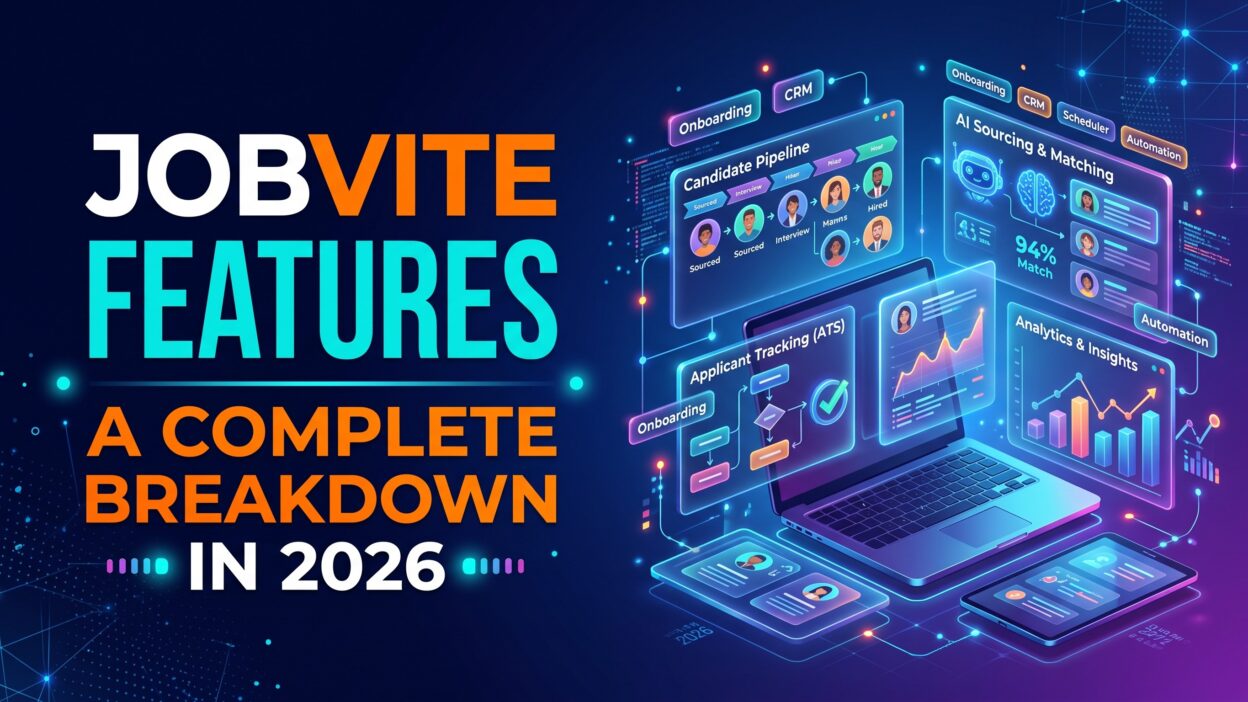
Third-party sources list a long set of tools. Jobvite features include applicant tracking, recruitment marketing, career sites, sourcing and CRM, candidate messaging, onboarding, analytics, employee referrals, internal mobility, and job broadcast. AI tools run across the suite.
One summary says buyers can start with the core applicant tracking system and add modules as needed. That model lets a team begin small. It also lets a team grow without a new vendor. Ask the vendor which modules sit in each package. Ask what costs extra.
Think of the suite as a hiring pipeline. Marketing tools bring in candidates. The ATS tracks them. Messaging keeps them warm. Onboarding finishes the job. Analytics tells you where the pipeline leaks. Each module feeds the next.
Core Jobvite Features: Applicant Tracking
Applicant tracking is the engine. Every other module feeds it or reads from it. These Jobvite features shape your daily work more than any others.
Candidate Management
Recruiters see every candidate in one place. Profiles hold resumes, notes, messages, and history. Drag-and-drop moves candidates between stages. Dashboards show pipeline status at a glance.
Reviewers describe the interface as full of options yet approachable for new users. Capterra says the platform handles candidate management well for structured recruiting teams. It lists workflows, status tracking, referrals, and communication tools.
Search matters here. A recruiter should find a past candidate in seconds. Test search during your demo. Ask the rep to find a silver medalist from last year for a new role.
Workflows and Scheduling
Teams build custom workflows for each role type. A retail job needs fast steps. An engineering job needs more stages. Automation moves candidates and sends messages at set triggers.
Interview scheduling cuts back-and-forth emails. Candidates pick a time. Calendars update. Recruiters save hours each week.
Reviews note a trade-off. Capterra says admins typically need more time for advanced features, customization, reporting, and integrations. Plan for that setup time. Name an admin who owns the configuration. Budget a few weeks for a full build before launch.
Team Collaboration and Feedback
Hiring managers log feedback inside the system. Scorecards structure opinions. Recruiters see ratings in one view. Fewer email chains mean fewer lost notes.
Capterra lists video screening among top features. Candidates record answers on their own time. Reviewers watch when they have a free moment. Teams screen more people without more calls.
Set clear rules for feedback. Ask managers to submit scores within 48 hours. Slow feedback loses good candidates. A fast process wins offers.
Recruitment Marketing, Career Sites, and Job Distribution
Candidates form opinions before they apply. A strong career site shapes that view. Jobvite features for recruitment marketing help teams reach talent before they apply.
Jobvite says its career sites convert three times more applicants than standard approaches. One summary cites an 83 percent application completion rate in customer results. Treat vendor claims as targets, not guarantees. Ask for results from a company in your industry.
The same summary says the AI layer uses first-party cookie tracking to serve personalized job recommendations. A visitor who reads about nursing roles sees more nursing roles. That approach comes from e-commerce. It can lift engagement. Review your privacy policy and cookie rules before you switch it on.
Job broadcast posts openings to many boards at once. Recruiters write one listing and publish it everywhere. Track which boards bring real hires. Cut the rest.
Branded pages matter too. Add team stories, benefits, and clear salary ranges. Candidates reward honesty.
Sourcing and Candidate CRM
Not every hire starts with an application. Many start with a conversation. Source and CRM tools help recruiters build talent pools. They store prospects, track contact history, and send campaigns.
Imagine a recruiter who meets a strong engineer at an event. She adds the person to a pool. Six months later a role opens. She sends a short note. The engineer replies the same day. A CRM turns a chance meeting into a hire.
Ask the vendor how sourcing tools find and import candidates. Ask how the CRM handles consent and unsubscribe rules. Privacy laws such as GDPR and CCPA apply to outreach. Your legal team should review the setup.
Keep pools fresh. Old data wastes time. Review each pool every quarter.
Candidate Messaging: Text and Chatbot
Candidates ignore long email chains. They read texts within minutes. Jobvite features for messaging include text and chatbot tools, according to summaries. Recruiters send reminders, confirm interviews, and answer questions fast.
A chatbot works around the clock. It answers common questions at night. It collects basic details. It books a time slot. Recruiters wake up to a full calendar.
Set guardrails. Write friendly scripts. Tell candidates when they talk to a bot. Offer a path to a human. Check consent rules for text messages in every region you hire. Opt-out options must work every time.
Hourly hiring teams benefit most. They fill shifts fast. A same-day reply often decides who gets the worker.
AI Features
AI now touches most hiring tools. Summaries list AI-powered interviews, personalized recommendations, and an AI Companion module among the Jobvite offerings. Ask the vendor for a current list. AI products change quickly.
Employ describes a “People-First AI” framework. One summary says it uses IBM watsonx.governance for independent bias auditing and explainability. Those terms matter. Hiring decisions affect careers and carry legal risk. Ask the vendor how audits work. Ask for documentation. Ask who sees the results.
Review the AI items among Jobvite features with your legal team. Rules vary by region. Some cities require bias audits for automated hiring tools. A vendor can help. Your company still carries the duty.
Keep humans in charge. Let AI draft messages, summarize interviews, and suggest matches. Let people make the final call. Test the tools on past hires. Compare AI suggestions with real outcomes. Trust grows from evidence.
Onboarding and Compliance
A hire does not end at the offer. New employees need forms, policies, and training. Onboarding tools collect that work in one place. Summaries mention compliance tools as part of the package.
Capterra reviewers praise the platform for hiring and tracking candidates during onboarding after the offer. New hires complete forms before day one. Managers see who has finished and who has not. HR avoids paper piles.
Jobvite features for onboarding cut early churn. A smooth first week builds loyalty. A messy one builds doubt. Add a welcome message from the manager. Add a short checklist for the first thirty days.
Check compliance coverage for your region. Tax forms, work eligibility rules, and data retention laws differ by country. Ask which forms the tool supports. Ask who updates them when laws change.
Analytics and Benchmarking
Recruiting teams need numbers. How long does a role stay open? Which source brings the best hires? Where do candidates drop out? Analytics answers these questions.
A summary says the suite offers analytics with industry benchmarking. Benchmarks show how your time to hire compares with similar companies. That context helps you set goals and defend budgets.
Reporting takes setup. Capterra notes that admins need time for reports and customization. Decide your five core metrics before you build dashboards. Time to fill, cost per hire, source quality, offer acceptance rate, and candidate satisfaction make a strong start.
Share reports with hiring managers each month. Numbers change behavior. A manager who sees slow feedback in a chart speeds up. Keep dashboards simple and honest.
Employee Referrals and Internal Mobility
Employees know good people. Referral tools make sharing easy. A staff member forwards a job link. The system tracks the referral and the bonus. Referred hires often stay longer and ramp faster.
Internal mobility keeps talent in house. Employees see open roles and apply with a few clicks. Managers see internal candidates next to external ones. Companies that promote from within save recruiting costs.
Jobvite features for referrals and mobility need a clear program. Set bonus rules. Pay on time. Thank referrers in public. Tell employees about every open role. Silence kills programs.
Protect fairness. Review referral data for patterns. A referral program that favors one group can narrow your talent pool. Audit results each quarter.
Jobvite Features: Integrations and Open API
A recruiting tool must work with the rest of your stack. A review from People Managing People lists integrations with LinkedIn, Microsoft Teams, DocuSign, Workday, ADP, Sterling, Glassdoor, Indeed, HireRight, and SkillSurvey. It says Jobvite offers an open API and connects with third-party integration tools.
Those links save time. Background checks flow into candidate records. Offers go out for e-signature. New hires move into your HR system without retyping.
Check each integration with your own tools. Ask how deep the sync goes. Ask whether data moves in one direction or two. Ask who maintains the link when a partner updates its product.
Capterra warns that integrations take admin time to set up. Add integration work to your project plan. A strong tool with weak connections frustrates teams.
Jobvite Pricing and Plans
Capterra and other review sites say you must contact Jobvite for pricing. One review notes a free demo. The vendor does not publish list prices.
Price depends on modules, employee count, and hiring volume. A team that needs only the ATS pays less than a team that adds marketing, messaging, and onboarding. Enterprise buyers often negotiate custom terms.
Ask the vendor what Jobvite features sit in each package. Ask what costs extra. Ask about implementation fees, training, and support tiers. Ask what happens to your price when you add recruiters.
Get a written quote. Compare the total with the cost of your current process. Count recruiter hours, agency fees, and job board spend. Many teams find savings in fewer agency placements.
Who Should Use Jobvite
Jobvite fits organizations with structured hiring. Large employers with many open roles gain the most. So do companies with several recruiters, multiple locations, and strict reporting needs.
Review sites say the platform suits flexible, scalable hiring programs. Retail, healthcare, financial services, and manufacturing teams often run high-volume hiring. They need speed, messaging, and compliance tools.
Jobvite features may feel heavy for a small team. A business with ten employees and two hires a year does not need an enterprise suite. JazzHR or a simple tool may fit better. Lever may fit a growing startup.
Look at your own process before you decide. How many hires do you plan this year? How many recruiters do you have? What reports does leadership demand? Honest answers narrow the choice fast.
Pros and Cons of Jobvite Features
Every platform has strengths and weak spots. Read both sides before you sign.
Strengths
Breadth stands out. One suite covers marketing, tracking, messaging, onboarding, and analytics. Reviewers praise automation, workflow tools, and the number of integrations. Drag-and-drop pipelines and automated scheduling earn strong usability marks. Benchmarking gives leaders context. An open API gives technical teams freedom.
The enterprise focus helps large employers. Compliance and AI governance claims suit regulated industries. A single vendor simplifies contracts and support.
Weak Spots
Customization takes effort. Capterra says admins need time for advanced features, reports, and integrations. One review says the mobile app offers fewer tools than the desktop version.
Opinions vary. Capterra shows a five-star review and a two-star review side by side. One GetApp reviewer says Jobvite gets the job done yet offers fewer features than better-known systems such as Greenhouse. Read recent reviews from companies your size. Ask for references. Call two customers and ask what they would change.
How to Evaluate Jobvite in a Demo
Run a demo that tests Jobvite features with your own roles. Skip the generic script. Send the rep three real job descriptions and a sample workflow ahead of time.
Ask the rep to build one workflow live. Watch how many clicks it takes. Ask for a candidate search across old records. Ask to see the text messaging flow from the recruiter’s view and the candidate’s view.
Bring your admin, a recruiter, and a hiring manager. Each person sees different gaps. Score the demo with a simple sheet. Rate ease of use, fit, reporting, and support from one to five.
Ask for a sandbox or trial. Test real tasks for two weeks. Collect feedback from every user. A tool that your team enjoys will earn adoption.
A Real-World Example
Picture a retail chain with 120 stores. Store managers hired through email and spreadsheets. Time to fill ran 45 days. Candidates dropped out before the first call.
The HR director studied Jobvite features for three weeks. She asked for a demo with three store roles. She tested text messaging and interview scheduling. She called two reference customers in retail.
The chain started with the ATS, career site, and messaging. Managers used text to confirm interviews. Candidates booked slots on their phones. The chain added onboarding six months later.
Time to fill fell by a third in the first year. Managers spent less time on admin. The HR team used reports to cut weak job boards.
The lesson is simple. Start with the pain. Add modules as the team grows. This example is a hypothetical scenario for illustration.
Frequently Asked Questions
What are the key Jobvite features?
The suite includes applicant tracking, recruitment marketing, career sites, sourcing and CRM, candidate messaging, onboarding, analytics, employee referrals, internal mobility, and job broadcast. AI tools support interviews and recommendations. Teams can start with the core ATS and add modules later. Ask the vendor for a current module list because products change.
Who owns Jobvite?
Employ Inc. owns Jobvite. The company also owns JazzHR and Lever. Each product serves a different company size. Jobvite targets enterprise and mid-market employers. Confirm current ownership and product plans with the vendor.
Are Jobvite features right for small businesses?
Usually not. Jobvite features suit larger employers with structured hiring and several recruiters. Small teams often fit better with JazzHR or a simpler tool. Compare your hiring volume, budget, and reporting needs. Ask the vendor which Employ product matches your size. A lighter tool saves money and setup time.
Does Jobvite use AI?
Yes. Summaries list AI-powered interviews, personalized job recommendations, and an AI Companion module. One summary says Employ uses a People-First AI framework with IBM watsonx.governance for bias auditing. Ask the vendor how the tools work. Review local laws on automated hiring. Keep a human in every final decision.
What does Jobvite integrate with?
A People Managing People review lists LinkedIn, Microsoft Teams, DocuSign, Workday, ADP, Sterling, Glassdoor, Indeed, HireRight, and SkillSurvey. Jobvite also offers an open API. Test each link with your own systems. Ask how deep the sync goes and who maintains it.
How much does Jobvite cost?
The vendor does not publish list prices. Review sites tell buyers to contact Jobvite. Price depends on modules, headcount, and hiring volume. Ask for a written quote. Ask about implementation, training, and support fees. Compare the total with your current cost per hire.
Read More:-What Is Competitive Intelligence? Types & Tools
Conclusion

Jobvite gives large employers one suite for the full hiring path. Applicant tracking sits at the center. Marketing, sourcing, messaging, onboarding, analytics, referrals, and AI tools surround it. Integrations and an open API connect it to your stack.
Smart buyers weigh strengths against effort. The suite offers breadth and automation. It asks for admin time and careful setup. Reviews vary, so test it yourself.
Start with your pain points. Write down your top three hiring problems. Run a demo with real roles. Ask for references. Get a written quote. Review AI and privacy rules with your legal team.