Introduction
TL;DR Marketing ops teams carry a heavy load. They run the MarTech stack, clean the data, build the reports, and fix the broken workflows. Requests pile up each week. Headcount stays flat.
Leaders hear that artificial intelligence will fix everything. Vendors promise instant gains. Most teams buy a tool and see little change. The money disappears. The doubt grows.
A better path exists. AI for Marketing Operations works when you start small, pick the right problem, and measure the result. The wins come from boring tasks done faster and cleaner. They do not come from flashy demos.
This guide shows you where to start. You will learn what the approach means and why it matters now. You will see the best first use cases, the data you need, and the tools worth a look. You will get a 90-day plan, a way to prove ROI, and a list of mistakes to dodge.
Table of Contents
What Is AI for Marketing Operations?
AI for Marketing Operations means using machine learning and language models to run the back-end work of marketing. It covers data cleanup, workflow automation, reporting, lead handling, and campaign setup. It supports the people who keep the marketing engine running.
Marketing ops sits between strategy and execution. The team owns the systems, the processes, and the numbers. Creative teams design the message. Ops teams make sure the message reaches the right person at the right time and that someone measures the result.
How It Differs From AI for Content Creation
Most headlines focus on AI that writes copy and makes images. That work matters. It belongs to the content team. Ops work looks different. It touches records, rules, routing, and reports.
Ops AI answers questions such as these. Which leads deserve a call today? Which campaigns drive pipeline? Which records hold bad data? Which workflow broke last night? These questions need accuracy more than style.
The Core Technologies Behind It
Three types of technology power most ops use cases. Machine learning models find patterns in historical data. Large language models read and write text. Automation engines connect systems and move data between them.
Teams often combine all three. A model scores a lead. A language model writes a summary. An automation engine routes the lead and updates the CRM.
What It Does Not Do
AI does not fix a broken process. It speeds up whatever you feed it. Bad data produces bad output at higher speed. Strong foundations matter before any tool goes live.
Why Marketing Teams Need This Now
Pressure on marketing budgets keeps rising. Finance leaders ask for proof on every dollar. Ops teams sit at the center of that question. They own the numbers that justify spend.
Volume Keeps Growing
Channels multiply each year. Data arrives from ads, email, web, events, and sales tools. A small ops team cannot clean, merge, and report on all of it by hand. Manual work caps growth.
Buyers Expect Speed
Buyers expect a reply within minutes. They expect messages that fit their interests. Slow routing loses leads. Generic emails get ignored. Automation with smart scoring closes that gap.
Talent Is Scarce
Good ops professionals are hard to hire. Teams that automate routine work free their experts for higher-value projects. They stop hiring for tasks a machine handles well.
Leaders Want Proof
Executives no longer accept vanity metrics. They want pipeline, revenue, and payback periods. AI for Marketing Operations helps because it improves attribution, forecasting, and reporting. Better numbers earn trust and budget.
Competitors Already Move
Many rivals test these tools today. Early adopters learn what works. They build data advantages that late movers cannot copy quickly. Waiting carries a real cost.
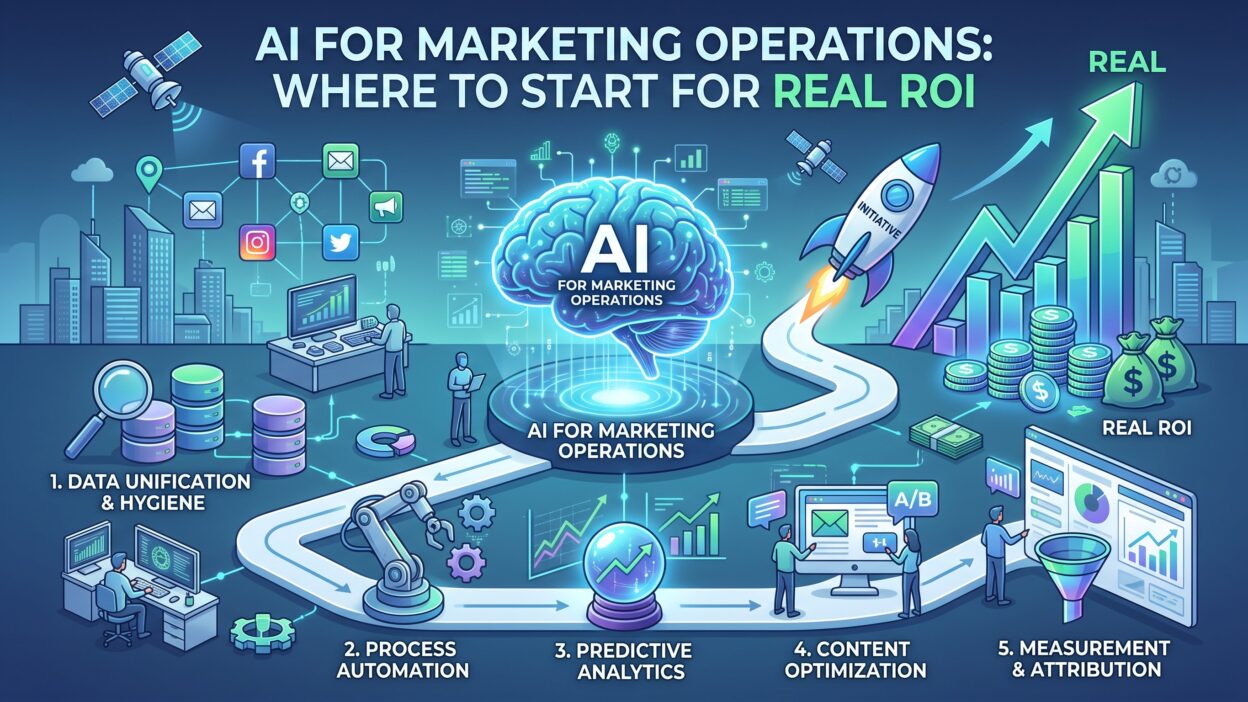
Where to Start With AI for Marketing Operations
Start with a problem, not a tool. Teams that chase technology end up with shelfware. Teams that chase pain end up with results.
Audit Your Time
Ask every ops team member to log their work for two weeks. Track the hours spent on each task. You will see patterns fast. Report building, list pulls, data fixes, and campaign QA often eat the most time.
Score Each Task
Rate each task on three factors. Rate how many hours it takes. Rate how often it repeats. Rate how clear the rules are. Tasks with high hours, high repetition, and clear rules make the best first projects.
Pick One Pilot
Choose one task. Define success in numbers. Aim for something like cutting weekly reporting time by half or lifting lead response speed to under five minutes. A narrow target keeps the pilot honest.
Check Your Data
Review the data the pilot needs. Look for gaps, duplicates, and wrong formats. A pilot built on messy data fails. Fix the worst problems before you launch.
Set a Time Limit
Give the pilot six to eight weeks. A short window forces focus. Review the results at the end. Scale what works and drop what does not.
The Best First Use Cases for Real ROI
Some projects pay back faster than others. The six below suit most teams. Each one uses proven methods and clear metrics.
Lead Scoring and Routing
Lead scoring ranks prospects by their chance to buy. Traditional models use fixed rules, such as points for a job title or a page visit. Predictive analytics goes further. It studies past wins and losses and finds the signals that matter.
Better scores help sales focus. Reps call the hot leads first. Marketing stops sending weak leads to the sales team. Trust between the two groups grows.
Routing rules matter just as much. A model can assign each lead to the right rep by region, product, or deal size. Speed to lead improves. Conversion rates follow.
Campaign Reporting and Analytics
Reporting eats ops hours. Analysts pull data from many tools and paste it into slides. AI tools can pull the data, build the charts, and write the summary. Leaders get a weekly report without a weekend of work.
Natural language queries add power. A manager types a question in plain English. The tool returns a chart. Analysts spend less time on requests and more time on insight.
Marketing analytics also gains from anomaly detection. The system flags a sudden drop in click rate or a spike in cost per lead. Teams react in hours instead of weeks.
Data Cleaning and Enrichment
Dirty data hurts every campaign. Duplicates inflate lists. Missing fields break segments. Typos ruin personalization.
AI can match duplicate records and merge them. It can standardize job titles and company names. It can fill missing fields from trusted sources. A clean database lifts every downstream metric.
Campaign Setup and Quality Checks
Building campaigns by hand invites errors. A wrong link or a missing tag costs money. Ops teams spend hours on checklists.
Automation can build campaign shells from templates. AI can scan emails for broken links, missing tags, and brand rule violations. Errors drop. Launch speed rises.
Content Operations
Content operations covers the workflow behind content, from briefs to approvals to publishing. AI can draft briefs, tag assets, and route reviews. It can pull the right asset for each campaign from the library.
Ops teams do not need to write the content. They need to move it faster through the system. Shorter cycles mean more campaigns on the calendar.
Attribution and Forecasting
Leaders ask which channels deserve more budget. Attribution models try to answer. AI models handle more signals than simple rules. They weigh touchpoints across long journeys.
Forecasting tools predict pipeline from current activity. Marketing can warn leaders about a gap early. That warning gives the team time to adjust spend.
Build the Data Foundation First
Every project depends on data. A weak foundation sinks even the best model. Spend time here before you scale.
Define a Single Source of Truth
Decide which system holds the final answer for each data type. Your CRM may own account records. Your marketing platform may own email engagement. Write the rules down. Share them with every team.
Standardize Fields and Naming
Pick consistent names for campaigns, sources, and stages. Messy naming breaks reports and confuses models. A simple naming guide saves hundreds of hours over time.
Set Data Quality Rules
Create rules for required fields, valid formats, and update cycles. Run weekly checks. Assign an owner to every rule. Clean data stays clean only when someone watches it.
Respect Privacy
Customer data carries legal duties. Follow GDPR, CCPA, and local laws. Collect consent. Limit who can see sensitive fields. Ask every vendor how it stores and uses your data. Confirm that the vendor does not train public models on your records.
Tools and Platforms Worth Considering
The market moves fast. Vendors launch new features each month. Judge tools by fit rather than hype.
Features Inside Your Existing Stack
Most major platforms now include built-in AI. Your CRM, email tool, and analytics suite likely offer scoring, send-time optimization, and text help. Test these features first. They cost less and connect with your data already.
Specialist Tools
Specialist vendors cover narrow jobs such as data enrichment, intent signals, and attribution. They often go deeper than suite features. Use them when a built-in option falls short.
General Assistants and Custom Workflows
Large language model assistants help ops teams draft documentation, write formulas, and summarize reports. Automation platforms connect those assistants to your systems. Teams with technical skill can build custom workflows at low cost.
How to Evaluate a Vendor
Ask hard questions. Request a demo with your own data. Ask how the model works and what accuracy to expect. Ask about security, support, and contract terms. Talk to current customers. Walk away from vendors that avoid specifics.
Roles, Skills, and Governance
Tools need people. A clear structure keeps projects safe and useful.
Assign an Owner
Name one leader for the program. This person sets priorities, tracks results, and removes blockers. Without an owner, projects drift.
Train the Team
Teach your ops staff how the tools work and where they fail. Show them how to write clear prompts and check output. Curiosity beats fear. Reward people who find better ways to work.
Write Usage Guidelines
Create a short policy. State which tools staff may use. State which data they may share. Require human review for any customer-facing output. Update the policy every quarter.
Keep Humans in the Loop
AI makes mistakes. It invents facts and misreads context. Reviewers must check anything that reaches a customer or a board report. Trust grows when the team catches errors early.
A 90-Day Plan to Get Started
A calendar turns intent into action. Use this timeline as a starting frame and adjust it to your team.
Days 1 to 30: Learn and Prepare
Run the time audit. Pick one pilot. Review the data and fix the worst gaps. Set baseline numbers for the metric you want to move. Get approval from leadership and legal.
Days 31 to 60: Build and Test
Select a tool and connect it to a small slice of data. Run the pilot with a small group. Collect feedback every week. Fix problems fast. Compare results against your baseline.
Days 61 to 90: Measure and Decide
Close the pilot. Calculate time saved, cost reduced, and revenue gained. Share the story with leadership. Choose whether to scale, adjust, or stop. Pick the next project from your scored task list.
Repeat the cycle. Each round builds skill and trust.
How to Measure ROI
Proof wins budget. Plan your measurement before the pilot starts. Collect baseline numbers while the old process still runs.
Time Savings
Track hours saved on each task. Multiply by the loaded cost of the people involved. A report that took ten hours and now takes two saves eight hours each week. Convert that to dollars.
Time savings only count when the team uses the freed hours well. Show what they did with the time.
Cost Reduction
Count the spend you cut. Lower agency fees, fewer contractors, and reduced software overlap all count. Compare the new tool cost against the old total.
Revenue Impact
Tie the project to pipeline and revenue. Better lead scoring should raise conversion rates. Faster routing should raise meeting rates. Cleaner data should lift email performance. Track each metric against your baseline.
Quality and Speed
Measure error rates and cycle times. Fewer broken campaigns and faster launches signal real gains. Leaders value these results even when revenue effects take months to show.
The Simple ROI Formula
Subtract total cost from total benefit. Divide the result by total cost. Include license fees, setup time, training, and ongoing maintenance in the cost side. Honest math builds credibility. Inflated claims destroy it.
Report Results Clearly
Tell a short story. State the problem, the action, and the result in numbers. Show a before and after chart. Executives remember simple stories.
Common Mistakes to Avoid
Many teams repeat the same errors. Learn from them.
Some teams start with a tool. They buy a platform and look for a use case later. Start with a pain point instead.
Some teams ignore data quality. They load messy records into a smart model and expect magic. The model learns the mess.
Some teams try too much at once. They launch five projects and finish none. One win beats five half-built efforts.
Some teams skip change management. Staff fear job loss and resist the tools. Explain the goal early. Show how the tools remove dull work and open better roles.
Some teams trust output blindly. Errors reach customers and damage the brand. Build review steps into every workflow.
Some teams never measure. Without a baseline, no one can prove value. Budgets vanish at the next review.
Frequently Asked Questions
What is the best first project for a small ops team?
Start with reporting or data cleanup. Both repeat often, follow clear rules, and save visible hours. Results show up in weeks.
How much does it cost to start?
Costs vary by tool and team size. Many platforms include basic features in current plans. Specialist tools charge monthly or annual fees. Start with a small pilot to limit risk.
Do I need a data scientist?
Not for most first projects. Built-in features and no-code tools handle many tasks. Complex models for attribution or forecasting may need technical help later.
Will it replace marketing ops jobs?
It replaces tasks and not roles. Ops professionals shift toward strategy, design, and analysis. Teams that adopt the tools gain capacity. They do not need to cut staff to see benefit.
How long until I see ROI?
Time savings show up in weeks. Revenue effects often take one to two quarters. Set expectations with leaders before you begin.
How do I keep customer data safe?
Choose vendors with strong security credentials. Limit the data you share. Sign data processing agreements. Check that the vendor does not use your data to train public models.
What metrics matter most?
Track hours saved, cost reduced, speed to lead, conversion rate, and campaign error rate. Pick two or three tied to your pilot goal.
Can AI for Marketing Operations work with my current MarTech stack?
Yes. Most tools connect through native integrations or APIs. Check compatibility with your CRM and marketing platform before you buy.
Read More:-IBISWorld Review [2026]: Full Platform Breakdown
Conclusion

Real ROI comes from focus. Teams that win with AI for Marketing Operations pick a clear problem, fix their data, and run a short pilot. They measure results in plain numbers. They share the story and scale what works.
Start with the work that drains your week. Report building, data cleanup, lead routing, and campaign checks offer fast gains. Choose one. Set a baseline. Test it for six to eight weeks.
Build the foundation as you go. Name an owner. Write simple rules. Keep people in charge of every customer-facing output. Trust grows with each safe win.