Introduction
TL;DR Recruiting teams have too many tools to choose from today. Picking the wrong one wastes time and money. Teamtailor sits high on most shortlists, and this guide breaks down every major Teamtailor feature you need to know before you commit.
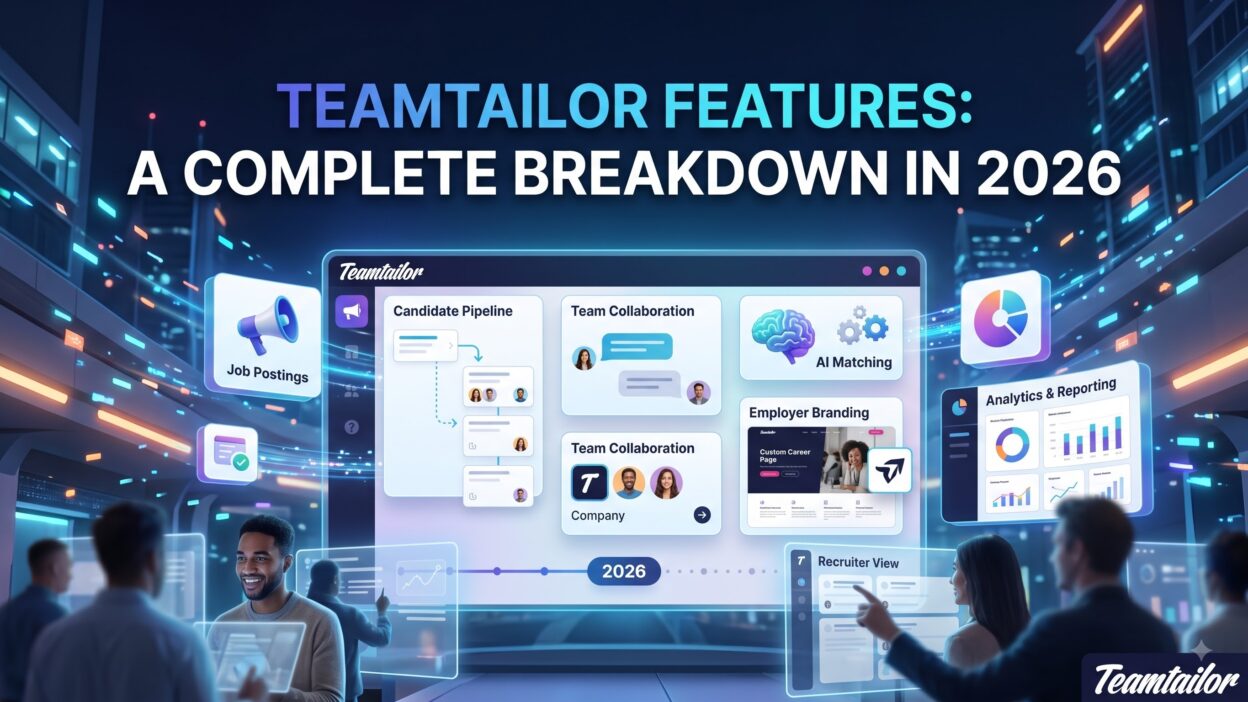
This article covers the full list of Teamtailor Features. You will see how each tool works. You will also see who benefits most from it. By the end, you will know if Teamtailor Features match your hiring needs.
What Is Teamtailor?
Teamtailor is a recruitment platform built for employer branding and candidate experience. It combines an applicant tracking system with a career site builder. Small startups use it. Large enterprises use it too.
The platform focuses on making hiring feel personal. Candidates get a smooth application process. Recruiters get a clean dashboard. Hiring managers get real-time updates without extra emails.
Teamtailor Features stand out because they connect branding, sourcing, and tracking in one place. Most competitors split these into separate tools. Teamtailor keeps them together.
Core Teamtailor Features Every Recruiter Should Know
Every recruitment platform needs core building blocks. Teamtailor Features cover four main pillars. These pillars are the career page builder, the applicant tracking system, sourcing tools, and the recruitment CRM.
Each pillar solves a specific hiring problem. Together, they create a full recruitment cycle. Let’s break down each one.
Careers Page Builder
Teamtailor gives you a drag-and-drop career site builder. You don’t need a developer. You don’t need code. You pick templates, add your logo, and publish pages in hours.
The builder supports custom domains. It supports multiple languages too. Global teams can run one page in English and another in German without extra software.
This feature ranks among the most popular Teamtailor Features. Recruiters love it because it replaces expensive web design work. Candidates love it because it feels like a real company site, not a generic job board listing.
Applicant Tracking System (ATS)
The ATS sits at the heart of Teamtailor Features. It tracks every candidate from application to offer. Recruiters move candidates through custom pipeline stages. Each stage can trigger automatic emails.
You can tag candidates. You can leave notes. You can rate applications with star ratings. The interface stays visual, so recruiters see pipeline health at a glance.
Teamtailor’s ATS also supports GDPR-friendly data handling. Candidate data gets anonymized after a set period. This keeps your hiring process compliant without manual cleanup.
Candidate Sourcing Tools
Sourcing tools help recruiters find passive candidates. Teamtailor includes a Chrome extension for this. Recruiters browse LinkedIn, click the extension, and add profiles straight into their pipeline.
The platform also builds talent pools. You save candidates who weren’t right for one role but might fit a future one. This turns rejected applicants into a future hiring pipeline instead of a dead end.
Sourcing remains one of the more underrated Teamtailor Features. Many recruiters only discover it after months of use.
Recruitment CRM
The CRM side of Teamtailor lets you nurture candidates over time. You send newsletters. You share job alerts. You build long-term relationships instead of one-off applications.
This feature works well for companies with high-volume hiring. Retail chains and hospitality groups often lean on the CRM tools the most. They need a steady pipeline, not just a single job posting.
Collaboration and Hiring Team Features
Hiring rarely happens alone. Teamtailor Features include tools built for teams, not just solo recruiters.
Interview Scheduling
Teamtailor connects with Google Calendar and Outlook. Recruiters send interview slots directly from the platform. Candidates pick a time that works. No back-and-forth emails.
The scheduling tool also supports panel interviews. Multiple interviewers get added to one event automatically. This saves coordination time for busy hiring managers.
Scorecards and Feedback
After each interview, team members fill out a scorecard. Scorecards use custom criteria set by the hiring manager. This keeps feedback structured instead of vague comments in a Slack thread.
Structured feedback reduces bias. It also speeds up decision-making. Teams compare scores side by side and reach a hiring decision faster.
Team Communication Tools
Teamtailor includes internal comments on every candidate profile. Hiring managers tag recruiters directly. Recruiters tag interviewers back. Everyone stays on the same page without switching apps.
This feature cuts down on email clutter. Teams keep hiring discussions inside the platform, tied to the actual candidate record.
Employer Branding Features
Employer branding sits at the core of what makes Teamtailor Features different from competitors like Greenhouse or Lever.
Custom Career Sites
Beyond the basic builder, Teamtailor lets you create fully branded career sites. You control fonts, colors, and layout blocks. You add employee testimonials. You add culture videos.
Companies use this to sell their culture, not just list open roles. A strong career site increases application rates significantly, based on data Teamtailor shares with customers.
Content Blocks and Video
Teamtailor supports video embeds on job posts. Recruiters add a short clip about the team or the role. Candidates watch before they apply, which improves application quality.
Content blocks also include team bios, office photos, and benefit lists. These blocks get reused across multiple job posts, saving time for busy recruiting teams.
Social Media Integration
Job posts push directly to LinkedIn, Facebook, and Instagram. Teamtailor formats each post automatically for the platform. Recruiters don’t need to resize images or rewrite copy for every channel.
This integration extends reach without extra manual work. Smaller teams especially benefit since they often lack a dedicated social media hire.
Automation and AI Features
Automation saves recruiters hours every week. Teamtailor Features in this category focus on removing repetitive tasks.
Workflow Automation
Teamtailor lets you build triggers. When a candidate moves to a new stage, an email fires automatically. When a candidate gets rejected, a polite decline message sends without manual input.
These workflows reduce response time. Candidates hear back faster, which improves the overall candidate experience and protects your employer brand.
AI-Powered Candidate Matching
Teamtailor added AI matching tools in recent updates. The system scans resumes and suggests the strongest candidates for a role. Recruiters still make the final call, but the AI narrows the list first.
This feature saves screening time on high-volume roles. A single job post can attract hundreds of applicants, and AI matching cuts through the noise quickly.
Chatbot and Screening Tools
A built-in chatbot answers basic candidate questions. It handles FAQs about the role, the company, and the hiring timeline. This reduces inbound emails to recruiters.
Screening questions also filter unqualified applicants early. Candidates answer a few quick questions before they submit a full application, which keeps the pipeline cleaner.
Analytics and Reporting Features
Data drives better hiring decisions. Teamtailor Features include dashboards built for recruiters, not just data analysts.
Recruitment Metrics Dashboard
The dashboard tracks time-to-hire, source of hire, and pipeline conversion rates. Recruiters spot bottlenecks fast. If one stage takes too long, the data shows it clearly.
Hiring managers use these reports in leadership meetings. Clean visuals make it easy to explain hiring progress without building a spreadsheet from scratch.
GDPR and Compliance Tracking
Teamtailor tracks consent for every candidate. It logs when data was collected and when it should get deleted. This matters for companies hiring across Europe.
Compliance tracking removes manual audit work. Legal teams appreciate this feature during data protection reviews.
Integrations and API
No platform works in isolation. Teamtailor Features connect with dozens of external tools.
Job Board Integrations
Teamtailor pushes job posts to Indeed, LinkedIn, Glassdoor, and niche job boards automatically. Recruiters post once and reach multiple channels instantly. This saves hours compared to manual posting on each site.
HRIS and Calendar Integrations
Once a candidate accepts an offer, data can flow into HR systems like BambooHR or Personio. This avoids double data entry between recruiting and onboarding teams.
Calendar integrations, covered earlier, also fall under this category. Together, they create a smoother handoff from hiring to onboarding.
Open API Access
Developers can build custom connections using Teamtailor’s open API. Larger companies with unique tech stacks often use this to link Teamtailor with internal tools.
This flexibility makes Teamtailor Features suitable for enterprise teams, not just small startups running out-of-the-box setups.
Mobile App and Candidate Experience
Candidates apply from their phones more than ever. Teamtailor Features address this shift directly.
Teamtailor Mobile App
Recruiters review candidates, leave feedback, and message applicants from the mobile app. This keeps hiring moving even when recruiters travel or work from different offices.
Hiring managers use the app too. They approve candidates between meetings without opening a laptop.
Candidate Communication Tools
Candidates get automatic updates on their application status. They don’t need to email and ask for updates. This transparency builds trust and reduces candidate drop-off during long hiring processes.
Teamtailor also supports SMS notifications in some regions, adding another channel beyond email.
Pricing and Plans Overview
Teamtailor doesn’t publish fixed public pricing. Costs depend on company size and feature needs. Smaller teams pay less. Enterprise teams with advanced automation and API access pay more.
Most companies request a custom quote directly from Teamtailor’s sales team. This makes it hard to compare costs without reaching out first.
Before you commit, request a demo. Ask specifically which Teamtailor Features are included in your quoted plan, since add-ons vary between packages.
Who Should Use Teamtailor?
Teamtailor fits companies that care about employer branding. It fits teams hiring across multiple countries too. Startups scaling fast benefit from the automation tools.
Large enterprises benefit from the API and advanced reporting. Small businesses with only a handful of hires per year might find the platform larger than they need.
Recruitment agencies generally look elsewhere, since Teamtailor targets in-house hiring teams, not staffing agencies managing multiple clients.
Teamtailor Pros and Cons
Teamtailor offers a clean interface and strong branding tools. The career site builder alone saves companies thousands compared to custom web development. Collaboration tools keep hiring teams aligned without extra software.
On the downside, pricing stays hidden until you talk to sales. Some smaller teams find the platform more advanced than they need. Reporting, while solid, works best for teams that already track hiring metrics closely.
Overall, the strengths outweigh the drawbacks for most mid-size and large hiring teams.
Frequently Asked Questions
What makes Teamtailor different from other ATS platforms? Teamtailor blends employer branding tools with a standard applicant tracking system. Most competitors treat these as separate products. Teamtailor Features combine both in a single dashboard.
Does Teamtailor support small businesses? Yes, but the platform shines brightest for companies hiring regularly across multiple roles or countries. Small businesses with rare hiring needs may find simpler tools sufficient.
Is Teamtailor GDPR compliant? Teamtailor includes built-in GDPR tracking. It logs consent and automates data deletion timelines, which helps companies hiring across the EU stay compliant.
Can Teamtailor integrate with job boards automatically? Yes. Teamtailor pushes job posts to major boards like Indeed and LinkedIn without manual reposting on each site.
Does Teamtailor offer a mobile app? Yes. Recruiters and hiring managers can review candidates, leave feedback, and message applicants directly from their phones.
How much does Teamtailor cost? Pricing isn’t public. Costs depend on team size, hiring volume, and which Teamtailor Features you need, such as API access or advanced automation.
Read More:-Proxycurl API Review (2026): Discontinued, What Remains, and the Best Alternative
Conclusion

Teamtailor packs a lot into one platform. Career site building, applicant tracking, sourcing, automation, and analytics all live under one roof. Recruiters save time. Candidates get a better experience. Hiring managers stay in the loop without extra tools.
If your team values employer branding as much as tracking applicants, Teamtailor Features deliver real value. Request a demo, compare the plan against your hiring volume, and decide from there.
Recruitment software choices shape your hiring speed for years. Teamtailor Features give growing teams a strong foundation to build on.