Introduction
TL;DR evelopers building AI applications face a real challenge today. There are too many tools in the LangChain ecosystem. Each tool has a different job. Each tool solves a different problem. You need to know which one fits your use case. This blog breaks down LangChain vs LangGraph vs LangSmith vs LangFlow in a clear and simple way. You will walk away knowing exactly what to use and when.
Table of Contents
Understanding the LangChain Ecosystem at a Glance
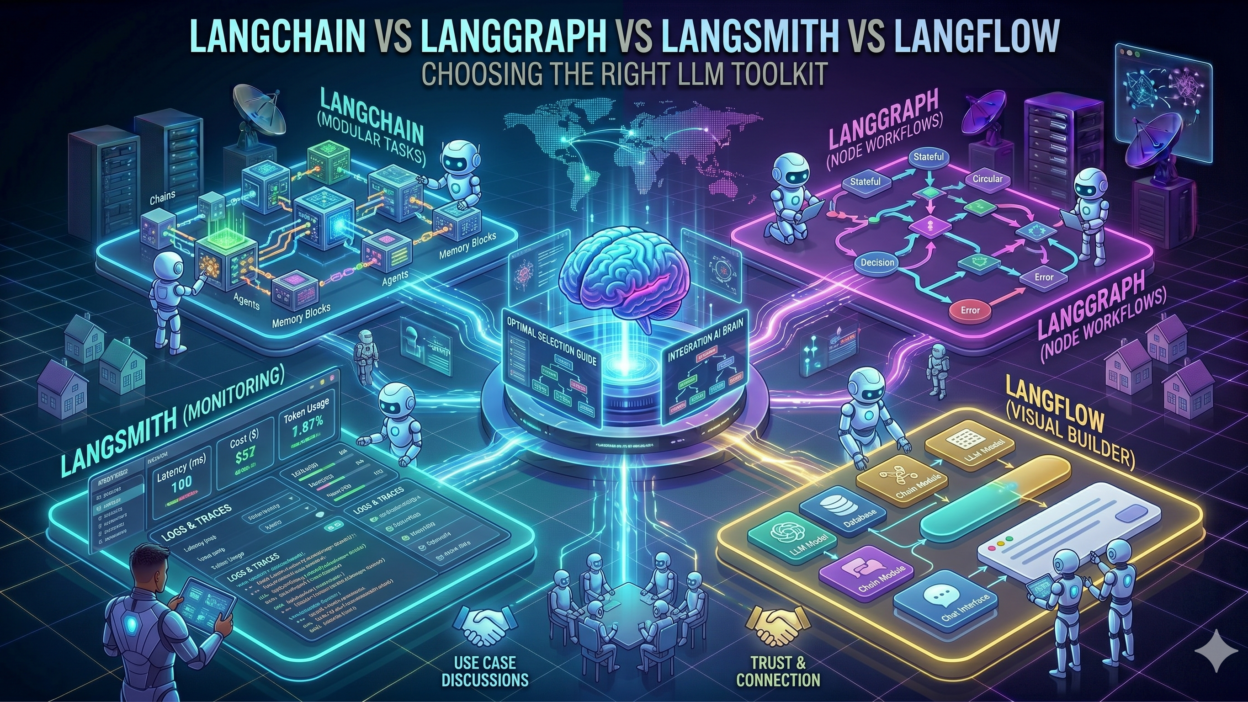
The LangChain ecosystem has four major tools. Each tool targets a specific stage of AI app development. LangChain handles the core building of LLM apps. LangGraph manages complex agent workflows. LangSmith helps you monitor and debug those workflows. LangFlow gives you a no-code visual interface. Comparing LangChain vs LangGraph vs LangSmith vs LangFlow helps you make smarter decisions. Let us explore each one in detail.
What Is LangChain and Why Does It Matter
LangChain is an open-source framework for building LLM-powered applications. It launched in late 2022. It became one of the fastest-growing developer tools in AI history. LangChain gives developers a structured way to build chains of LLM calls. You can connect prompts, models, memory, and tools in a modular way. It supports Python and JavaScript natively. Developers use LangChain to build chatbots, document QA systems, and AI agents.
Core Features of LangChain
LangChain provides several powerful building blocks for LLM development. It has a chain abstraction that links multiple steps together. It supports dozens of LLM providers including OpenAI, Anthropic, and Cohere. It has a memory module that stores conversation history. It has a retrieval module for RAG (Retrieval-Augmented Generation) pipelines. It also supports tool use and function calling. These features make LangChain the most popular starting point for AI developers. It has a massive community and rich documentation. New developers often start their AI journey here.
When Should You Use LangChain
You should use LangChain when you are building simple to moderate LLM workflows. It works great for chatbots with memory. It also fits well for document summarization pipelines. If you need RAG, LangChain handles that cleanly. It is also good for quick prototyping. You do not need complex orchestration at this stage. LangChain gives you enough structure to move fast without overcomplicating things.
What Is LangGraph and How It Differs from LangChain
LangGraph is a library built on top of LangChain. It helps you build stateful, multi-agent workflows using a graph-based model. Traditional LangChain chains run in a linear sequence. LangGraph introduces cycles, branches, and conditional logic. This makes it powerful for complex agentic systems. In the debate of LangChain vs LangGraph vs LangSmith vs LangFlow, LangGraph stands out for orchestration complexity.
Core Features of LangGraph
LangGraph uses a directed graph model to define workflows. Each node in the graph represents an action or agent. Edges define the flow between nodes. You can add conditional edges that change flow based on agent output. It supports persistent state across nodes. This is crucial for long-running agent tasks. LangGraph also supports human-in-the-loop workflows. An agent can pause and wait for human approval before continuing. This level of control is something basic LangChain chains cannot provide.
When Should You Use LangGraph
Use LangGraph when your AI system has multiple agents working together. Use it when your workflow has conditional logic or loops. If you need an agent that can reflect on its output and retry, LangGraph is the right choice. It is also the go-to tool for building autonomous research agents or coding assistants. Any workflow that does not follow a strict linear path belongs in LangGraph.
What Is LangSmith and Why Observability Matters
LangSmith is Anthropic’s observability and evaluation platform for LLM applications. Wait — correction. LangSmith is built by LangChain Inc. It is a paid platform. It gives you full visibility into every LLM call your application makes. Debugging LLM applications is notoriously hard. LangSmith solves that problem. In any LangChain vs LangGraph vs LangSmith vs LangFlow comparison, LangSmith fills a completely different role. It is not a framework. It is a monitoring and evaluation tool.
Core Features of LangSmith
LangSmith captures every trace of every LLM call in your app. You can see the exact prompt sent to the model. You can see the exact response received. You can track latency, token usage, and cost in real time. It has a dataset management feature. You can create evaluation datasets and run automated evals. It supports prompt versioning. Teams can collaborate on prompts and compare results across versions. LangSmith also integrates with LangChain and LangGraph natively. Setup takes only a few lines of code.
When Should You Use LangSmith
Use LangSmith when you move from prototyping to production. Every serious AI app in production needs observability. You need to know when your LLM is failing silently. You need to know which prompt version performs better. LangSmith answers those questions. If you are building a team-based product, LangSmith is non-negotiable. It saves hours of debugging and helps you improve model performance over time.
What Is LangFlow and Who Should Use It
LangFlow is a visual, open-source UI for building LangChain applications. It gives you a drag-and-drop interface. You can assemble LLM workflows without writing much code. LangFlow is built on top of LangChain. It generates the underlying LangChain code for you. In the LangChain vs LangGraph vs LangSmith vs LangFlow landscape, LangFlow is the most accessible tool. It lowers the barrier to entry for non-developers.
Core Features of LangFlow
LangFlow offers a React-based frontend with a node editor. Each LangChain component appears as a visual node. You drag and connect nodes to build workflows. It supports all major LangChain components including prompts, models, memory, and tools. You can export the flow as Python code. You can also run it as an API endpoint. LangFlow is actively maintained and updated regularly. It has a growing community of no-code AI builders.
When Should You Use LangFlow
Use LangFlow when you want to prototype without writing code. It is great for product managers exploring AI workflows. It is also useful for demos and rapid ideation. Educators use it to teach LLM concepts visually. If your team includes non-technical stakeholders who need to understand AI flows, LangFlow makes communication much easier. It is not ideal for complex production systems. But for fast visual prototyping, nothing beats it.
LangChain vs LangGraph vs LangSmith vs LangFlow: A Direct Comparison
Now let us put all four tools side by side. This comparison will make your decision much easier.
Purpose and Primary Use Case
LangChain is the foundation framework for building LLM apps. LangGraph extends it with graph-based agent orchestration. LangSmith adds observability and evaluation on top of both. LangFlow wraps LangChain in a visual no-code interface. Each tool serves a distinct purpose. None of them fully replaces the others.
Technical Depth and Learning Curve
LangChain has a moderate learning curve. You need Python or JavaScript skills. LangGraph requires deeper understanding of graph theory and state machines. It is more complex. LangSmith is easy to set up but requires a paid account for full features. LangFlow has the lowest barrier to entry. Anyone can drag and drop nodes without coding knowledge. In the LangChain vs LangGraph vs LangSmith vs LangFlow spectrum, complexity increases from LangFlow to LangGraph.
Open-Source vs Paid
LangChain is fully open-source and free. LangGraph is also open-source and free. LangFlow is open-source with a self-hosted option. LangSmith has a free tier but serious usage requires a paid plan. Cost matters at scale. Teams need to factor this into their decision.
Production Readiness
LangChain is production-ready for simple to moderate apps. LangGraph is production-ready for complex agentic systems. LangSmith is designed specifically for production observability. LangFlow works for prototyping but is less common in full production environments. Teams often combine two or three of these tools in one stack.
How to Choose the Right Tool for Your Project
Choosing the right tool depends on your use case, team skills, and project stage. Here is a simple decision framework. Ask yourself three questions. What complexity does my workflow have? Who on my team will build this? Am I in prototype or production mode? Your answers will guide you toward the right tool in the LangChain vs LangGraph vs LangSmith vs LangFlow decision.
For Beginners and Prototypers
Start with LangChain if you know Python. It gives you the most learning resources. Start with LangFlow if you prefer visual tools. Both are free and beginner-friendly. You can always upgrade to LangGraph later when your workflows become more complex.
For Teams Building Production AI Apps
Use LangChain or LangGraph as your core framework. Add LangSmith immediately for observability. You need to monitor every call in production. Teams that skip LangSmith often waste hours debugging issues that LangSmith would catch instantly. The investment in LangSmith pays off fast.
For Complex Multi-Agent Systems
LangGraph is your only real option here. It handles stateful multi-agent workflows better than anything else in the ecosystem. Combine it with LangSmith for full visibility. This stack handles enterprise-grade AI applications with confidence.
Real-World Use Cases for Each Tool
Understanding the tools through real examples makes the LangChain vs LangGraph vs LangSmith vs LangFlow comparison more practical.
LangChain Use Cases
A startup builds a customer support chatbot using LangChain. It connects OpenAI’s GPT-4 with a vector database for knowledge retrieval. The chain handles user queries, retrieves relevant documents, and returns accurate answers. This is a classic RAG application. LangChain handles it with minimal boilerplate.
LangGraph Use Cases
An enterprise builds a code review agent using LangGraph. The agent reads code, generates feedback, waits for human approval, applies fixes, and reruns tests. This cyclic workflow requires stateful tracking at every step. LangGraph manages this with its graph-based model. No other tool in this comparison handles this gracefully.
LangSmith Use Cases
A SaaS company ships an AI writing assistant. After launch, they notice response quality dropping. LangSmith traces every failed call. The team identifies a prompt that regresses on certain input types. They fix it, version it, and deploy within hours. Without LangSmith, this would take days to debug.
LangFlow Use Cases
A product manager at a consulting firm needs to demo an AI research tool. They open LangFlow, drag in a web search tool, a GPT-4 node, and a memory node. Within 30 minutes, the demo is ready. No engineering help needed. LangFlow made that possible.
Frequently Asked Questions About LangChain vs LangGraph vs LangSmith vs LangFlow
Can I Use All Four Tools Together
Yes, you can. Many teams use LangChain as the base, LangGraph for complex orchestration, LangSmith for monitoring, and LangFlow for quick prototyping. They all work well together inside the same ecosystem. Each tool solves a different layer of the problem.
Is LangGraph Replacing LangChain
No. LangGraph is built on top of LangChain. It does not replace it. LangGraph extends LangChain’s capabilities for graph-based workflows. Simple apps still use LangChain directly. LangGraph is for more complex agentic use cases.
Is LangSmith Free to Use
LangSmith has a free tier with limited trace storage and features. For production use with heavy traffic, you need a paid plan. Pricing is based on trace volume. Most serious production teams pay for it. The ROI is worth it in debugging time saved.
Is LangFlow Suitable for Production
LangFlow can run as a production API endpoint. However, most teams use it for prototyping and internal tools. For high-scale production systems, teams usually export the code and customize it. LangFlow is a great starting point. It is not always the final destination.
Which Tool Should a Solo Developer Start With
Start with LangChain. It has the best documentation, biggest community, and most tutorials. Once you understand the basics, explore LangGraph for agentic tasks. Add LangSmith when you ship your first production app. Use LangFlow for quick demos or when you want to visualize a workflow fast.
Read More:-45 Questions to Test a Data Scientist on Basics of Deep Learning (Along with Solutions)
Conclusion
The LangChain vs LangGraph vs LangSmith vs LangFlow question does not have one right answer. It depends entirely on what you are building and where you are in the development cycle. LangChain gives you the foundation. LangGraph gives you the power to build complex agents. LangSmith gives you the visibility to run things safely in production. LangFlow gives you speed and accessibility for quick prototypes.
Most successful AI teams use a combination of these tools. They do not pick just one. Start with what fits your current stage. Grow into the others as your needs evolve. The LangChain ecosystem is rich, well-supported, and constantly improving. No matter which tool you pick first, you are building on a strong foundation. Make your choice based on your use case, not on hype. That is the smartest move any AI developer can make.