Introduction
TL;DR Every team suffers from the same problem. Meetings happen. Notes get lost. Action items slip through the cracks. Building your own AI meeting summarizer with Claude Code and MCP changes all of that permanently.
Table of Contents
The Real Cost of Unprocessed Meetings
Meetings consume enormous amounts of time. The average knowledge worker attends roughly 21 meetings per week. That number grows each year. What shrinks is the time spent turning meeting content into useful output.
Most teams leave meetings with vague memory of what was discussed. Someone writes rough notes. Those notes sit in a document no one re-reads. Action items stay verbal. Deadlines get missed. Decisions made in Tuesday’s meeting get re-debated in Thursday’s follow-up.
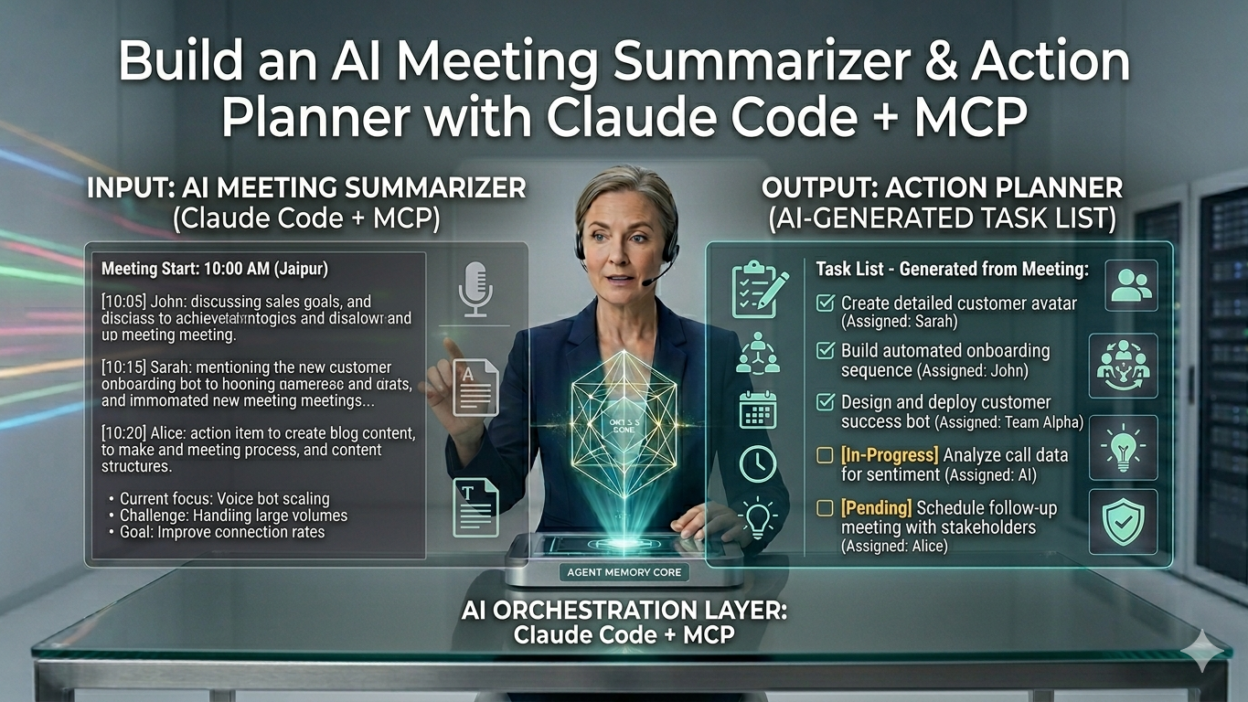
A proper AI meeting summarizer solves all of this. It turns raw meeting transcripts into clean summaries, clear action items, assigned owners, and concrete deadlines. It removes the cognitive load of manual note-taking. It creates a searchable record of every decision and commitment.
Building your own AI meeting summarizer gives you something off-the-shelf tools cannot: full control. Your data stays on your infrastructure. Your prompts match your team’s exact workflow. Your output format fits your project management tools perfectly. That customization gap is exactly where Claude Code and MCP shine.
This tutorial walks through the complete build. You will understand the architecture, write the core logic, integrate MCP servers for external tool connectivity, and deploy a working system your team can use immediately.
What You Are Actually Building
Before writing a single line of code, understand the system you are designing. This AI meeting summarizer has three core components working together.
The transcript ingestion layer
Raw meeting transcripts arrive in various formats. Zoom exports them as VTT files. Google Meet produces plain text. Otter.ai generates structured JSON. Your ingestion layer normalizes all of these into a clean, consistent text format that Claude can process reliably.
The ingestion layer also handles chunking. Long transcripts from multi-hour meetings exceed even generous context windows. A smart chunking strategy splits transcripts at natural break points — topic transitions, speaker changes, agenda items — rather than arbitrary character counts. That preserves semantic coherence across chunks.
The Claude reasoning core
Claude handles the intelligent processing. It reads the normalized transcript. It identifies key decisions, open questions, committed action items, and important context. It structures that information into a clean output format.
Your system prompt engineering determines how well this works. A well-crafted prompt extracts exactly what your team needs. A generic prompt produces generic summaries. The tutorial covers prompt design in detail because that investment pays the highest returns for your AI meeting summarizer.
The MCP action layer
MCP connects your summarizer to external tools. Extracted action items push directly to Asana, Linear, or Jira. Meeting summaries post to a Slack channel. Calendar follow-ups create automatically in Google Calendar. Notion pages generate with structured meeting notes.
This integration layer transforms your AI meeting summarizer from a text processor into a genuine workflow automation tool. The difference between a summarizer and an action planner lives entirely in this layer.
Transcript formats supported VTT, TXT, JSON
Claude model recommended Sonnet 4.5
MCP integrations covered Slack, Notion, Calendar
Avg. processing time 8–15 sec
Prerequisites and Environment Setup
Getting your environment right before writing code saves significant debugging time. This build requires a few specific tools and credentials.
Required tools and accounts
Node.js version 18 or higher must be installed. Claude Code runs as a command-line tool and requires Node.js to function. Install it from nodejs.org if you do not have it already. Confirm your version by running node --version in your terminal.
An Anthropic API key grants your system access to Claude. Sign up at console.anthropic.com. Add credits to your account. Store the API key securely — never hardcode it in source files. Use environment variables throughout this build.
Claude Code installs globally via npm. Run npm install -g @anthropic-ai/claude-code in your terminal. Confirm the installation with claude --version. Claude Code will serve as your development environment throughout this tutorial.
Project directory initialization
Create a dedicated project directory. Name it something clear like meeting-summarizer. Navigate into it. Initialize a Node.js project with npm init -y. Create a .env file for environment variables. Add it to your .gitignore immediately so API keys never reach version control.
Install your core dependencies with this command:
npm install @anthropic-ai/sdk dotenv fs-extra npm install -D typescript @types/node tsx
Building the Transcript Ingestion Layer
Your ingestion layer reads raw files and produces clean text. Clean text means better Claude output. Garbage in, garbage out applies here as much as anywhere in software.
Parsing VTT transcripts from Zoom
VTT files contain timestamps and speaker labels alongside the spoken content. Your parser needs to strip the timestamps, preserve speaker labels, and output clean dialogue text. Create a file called src/parsers/vtt.ts with this logic:
export function parseVTT(raw: string): string { const lines = raw.split(‘\n’); const dialogue: string[] = []; for (const line of lines) { if (line.includes(‘–>’)) continue; if (line.match(/^\d+$/)) continue; if (line.trim() === ”) continue; if (line === ‘WEBVTT’) continue; dialogue.push(line.trim()); } return dialogue.join(‘\n’); }
This parser removes timestamp lines, sequence numbers, and blank lines. What remains is clean speaker-attributed dialogue. That structure gives Claude the context it needs to identify who said what and follow conversational threads through your AI meeting summarizer.
Handling long transcripts with smart chunking
A two-hour meeting transcript can exceed 50,000 words. Even Claude’s 128K token context window cannot always hold an entire transcript alongside a detailed system prompt and structured output instructions. Chunking solves this.
Smart chunking splits at speaker boundaries rather than character limits. Each chunk starts at a speaker turn and ends at another. No sentence breaks mid-speaker. No topic breaks mid-thought. The chunks preserve conversational coherence for better Claude reasoning.
export function chunkTranscript
(text: string, maxChars = 8000): string[]
 { const lines = text.split('\n'); const chunks: string[] = [];
 let current = ''; for (const line of lines) { if (current.length + line.length > maxChars && current)
 { chunks.push(current.trim()); current = line + '\n'; }
else
{ current += line + '\n'; } } .
if
(current.trim()) chunks.push(current.trim());
return chunks;
}
Designing the Claude Reasoning Core
The Claude integration is where your AI meeting summarizer earns its value. Prompt engineering determines the quality of every output. Spend serious time here.
System prompt architecture
Your system prompt tells Claude exactly what role it plays and what output you expect. A strong system prompt for an AI meeting summarizer includes three sections: role definition, task instructions, and output format specification.
Role definition sets Claude’s expertise frame. Tell it explicitly that it is a professional meeting analyst. Give it context about your team’s work. That frame calibrates tone and depth appropriately for your output.
Task instructions specify exactly what to extract. List every element you want: key decisions, open questions, action items with owners and deadlines, important context, and risks. Being explicit here prevents Claude from guessing what matters to your team.
Output format specification requests structured JSON. Structured output makes downstream integration with MCP tools trivial. Parse the JSON. Map the fields to your task management tool’s API. Done. Your full system prompt should look like this:
The core summarization function
Your main summarization function calls the Anthropic API with the system prompt and the cleaned transcript text. It handles the response, parses the JSON, and returns structured data ready for downstream processing.
Handling multi-chunk transcripts
Long transcripts require a two-pass approach. Pass one summarizes each chunk independently. Pass two synthesizes all chunk summaries into a single coherent final output. This approach scales your AI meeting summarizer to meetings of any length without hitting context limits.
The synthesis prompt differs slightly from the chunk prompt. It receives a list of partial summaries and produces a unified final summary that de-duplicates action items, merges related decisions, and identifies the most critical open questions across the full meeting.
Connecting MCP Servers for Action Planning ~500 words
MCP transforms your AI meeting summarizer from a text processor into a genuine action planning system. This is where extracted action items become real tasks in real tools.
Understanding MCP in this context
MCP stands for Model Context Protocol. It defines a standard interface for connecting AI models to external tools and services. Your meeting summarizer uses MCP to push action items to task management tools, post summaries to communication channels, and create calendar events for follow-up meetings.
Claude Code has native MCP support. You configure MCP servers in a JSON file. Claude Code handles the authentication and communication protocol. Your code simply invokes the tools those servers expose.
Configuring your MCP server connections
Create a .claude/mcp.json file in your project root. This file defines which MCP servers your system connects to and how to authenticate with them:
{ “mcpServers”: { “slack”: { “command”: “npx”, “args”: [“-y”, “@modelcontextprotocol/server-slack”], “env”: { “SLACK_BOT_TOKEN”: “${SLACK_BOT_TOKEN}”, “SLACK_TEAM_ID”: “${SLACK_TEAM_ID}” } }, “google-calendar”: { “command”: “npx”, “args”: [“-y”, “@modelcontextprotocol/server-google-calendar”], “env”: { “GOOGLE_CLIENT_ID”: “${GOOGLE_CLIENT_ID}”, “GOOGLE_CLIENT_SECRET”: “${GOOGLE_CLIENT_SECRET}” } }, “notion”: { “command”: “npx”, “args”: [“-y”, “@modelcontextprotocol/server-notion”], “env”: { “NOTION_API_KEY”: “${NOTION_API_KEY}” } } } }
Posting summaries to Slack automatically
After summarization completes, your system formats the output for Slack and posts it to your designated meeting notes channel. The Slack MCP server handles the API call. Your code simply calls the tool with the right parameters.
Format the Slack message thoughtfully. Use Slack’s Block Kit format for visual structure. Bold the meeting title. Use a divider between sections. Put action items in a numbered list with owner names bolded. Good formatting makes your AI meeting summarizer output readable at a glance, not just technically correct.
Creating Notion pages for meeting records
Notion works perfectly as a meeting archive. Each processed meeting gets its own Notion page inside a designated database. The page includes the full summary, all action items with their metadata, open questions, and any flagged risks. Search across all past meetings becomes trivial with Notion’s full-text search.
The Notion MCP server exposes a create_page tool. Pass the database ID, the page title with today’s date, and the structured content blocks. Your AI meeting summarizer creates a complete, well-formatted Notion page in seconds.
Building the CLI Interface and Automation Pipeline ~350 words
A great tool needs a great interface. Your CLI makes the whole system usable without opening a code editor every time someone needs to process a meeting.
The main entry point
Create your CLI entry point at src/index.ts. Accept a file path argument. Detect the file format. Run the appropriate parser. Pass clean text to the summarizer. Send results to all configured MCP endpoints. Print a confirmation to the console.
Adding to your team’s workflow
Add a script to your package.json: "summarize": "tsx src/index.ts". Team members run npm run summarize meeting.vtt after any meeting. The entire pipeline runs automatically. The Slack post and Notion page appear within seconds. No copy-pasting. No formatting. No manual task creation.
Consider adding a file watcher that monitors a designated folder. Drop any transcript file into that folder. The watcher detects the new file and triggers the full pipeline automatically. That removes even the CLI step from the team’s workflow.
Prompt Tuning for Better Output Quality
Your first system prompt will produce decent output. Tuning it produces exceptional output. Invest time here. The payoff accumulates with every meeting processed by your AI meeting summarizer.
Calibrating action item extraction
Action items often hide in vague language. “We should probably look into that” is an action item. “Someone should follow up” is an action item. Instruct Claude explicitly to identify implicit commitments, not just explicit ones. Add this to your system prompt: “Flag any statement where a speaker implies a future commitment, even without using explicit action language.”
Owner inference is equally important. Meetings rarely assign tasks with complete formality. Claude reads conversational context to infer ownership. “John, can you handle the vendor outreach?” assigns the task to John even without a formal acknowledgment. Prompt Claude to use context inference for owner assignment.
Improving summary depth for your domain
Generic summaries miss domain-specific nuance. A product team needs different summary depth than a sales team. Add domain context to your system prompt. Tell Claude the team’s focus area, the types of decisions they typically make, and the level of technical detail appropriate for summaries.
Test your prompt with transcripts from three to five real past meetings. Compare Claude’s output against your team’s actual notes from those meetings. Identify gaps. Adjust the prompt. Repeat until the output consistently matches what your team would write manually.
“The best AI meeting summarizer is the one tuned to your team’s actual language, priorities, and workflow — not a generic template.”
Secondary Keywords and Related Topics
The broader search landscape around AI meeting summarizer tools covers several related topics worth knowing. Related search terms include meeting transcript summarizer, Claude Code tutorial, MCP integration guide, automated meeting notes, action item extractor from meetings, AI note taker, meeting summary generator, Claude API for productivity, Anthropic MCP server setup, and meeting automation workflow.
Comparison searches also drive significant traffic. Users search AI meeting summarizer vs Otter.ai, build vs buy meeting summarizer, self-hosted meeting AI, and Claude vs ChatGPT for meeting notes. Understanding this landscape helps teams position their custom-built solution against commercial alternatives.
Follow Anthropic’s developer documentation, the MCP specification repository on GitHub, and the Claude Code changelog for the latest updates. The tooling in this space evolves quickly. Features that require custom code today may appear as built-in capabilities in future Claude Code releases.
Frequently Asked Questions
What is an AI meeting summarizer and how does it work?
An AI meeting summarizer processes raw meeting transcripts and extracts structured information. It identifies key decisions, action items, open questions, and important context. The system uses a large language model like Claude to read conversational text and produce organized, actionable output. The build in this tutorial adds MCP integrations that push extracted items directly into task management and communication tools.
Why build your own instead of using Otter.ai or Fireflies?
Commercial tools work well for general use. Building your own gives you complete data control, custom output formats, specific integration targets, and no per-seat licensing costs at scale. Teams with privacy requirements, unique workflows, or integration needs that commercial tools do not support benefit most from a custom build. The Claude Code and MCP combination makes the build significantly faster than starting from scratch with raw API calls.
How accurate is Claude at extracting action items from meeting transcripts?
Claude performs very well on action item extraction with good prompt engineering. Accuracy improves significantly when you provide domain context, specify what implicit commitments to flag, and instruct the model on owner inference rules. Most teams find that Claude’s extraction matches or exceeds what a careful human note-taker would capture, particularly for implicit commitments that human note-takers often miss during live meetings.
What transcript formats does this system support?
The build covers VTT files from Zoom, plain text transcripts from Google Meet and similar tools, and JSON-structured output from services like Otter.ai. Adding new parsers for additional formats requires writing a parsing function that normalizes the format to clean speaker-attributed text. The core summarization and MCP integration layers work identically regardless of the source transcript format.
How does MCP connect Claude to external tools like Slack and Notion?
MCP defines a standard protocol for AI model and external tool communication. MCP servers expose tools through a consistent interface. Claude Code knows how to call those tools. You configure which MCP servers to connect in a JSON file. Your code invokes tools by name with the right parameters. The MCP layer handles authentication, request formatting, and error handling. You interact with external APIs without writing direct API integration code for each service.
Can this system handle very long meetings over two hours?
Yes. The chunking strategy in this build handles transcripts of any length. Long transcripts split into manageable chunks. Each chunk gets summarized independently. A second synthesis pass combines chunk summaries into a unified final output. The synthesis step de-duplicates action items, merges related decisions, and identifies the most important open questions across the full meeting without hitting context window limits.
What does this build cost to run per meeting?
Cost depends on transcript length and the Claude model you choose. A typical one-hour meeting transcript with Claude Sonnet 4.5 costs approximately $0.02 to $0.08 per meeting at current API pricing. That number covers both input token processing and output generation. For teams running dozens of meetings weekly, the total monthly API cost stays well below the per-seat pricing of most commercial AI note-taking tools.
Can I add a task management integration beyond Slack and Notion?
Yes. Any service with an available MCP server works as an integration target. Linear, Asana, Jira, GitHub Issues, and Trello all have MCP server implementations available on npm. Add the server configuration to your mcp.json file. Write an integration function that maps your structured JSON output to the tool’s required input format. The core summarization pipeline requires no changes for new integration targets.
Read More:-Rethinking Enterprise Search: How Cortex Search Turns Data into Business Impact
Conclusion:Your meetings deserve better than forgotten notes
Every meeting your team has represents real time and real money. That investment deserves better than a forgotten document in a shared folder. A well-built AI meeting summarizer turns every meeting into structured, actionable output that actually drives work forward.
This build covers the complete picture. The transcript ingestion layer normalizes messy real-world input into clean text. The Claude reasoning core extracts every decision, commitment, and open question with precision that improves through prompt tuning. The MCP action layer pushes results directly into the tools your team already uses every day.
The architecture scales. Add new transcript format parsers without touching the core logic. Add new MCP integrations without modifying the summarization pipeline. Adjust prompts to match evolving team needs without changing any infrastructure. That separation of concerns makes the system genuinely maintainable over time.
The cost story is compelling. Running your own AI meeting summarizer on Claude’s API costs a fraction of commercial alternatives at scale. You retain full data ownership. Your integrations match your exact workflow. Your output format matches your team’s actual needs rather than a vendor’s generic template.
Claude Code and MCP lower the barrier to building tools like this dramatically. What previously required weeks of API integration work now takes a skilled developer a few focused hours. That speed-to-value makes the custom build approach viable for far more teams than it was even a year ago.
Start with one meeting’s transcript. Run the pipeline. See what your AI meeting summarizer produces. That first output will show you exactly what to tune next — and exactly why you will never want to take manual meeting notes again.