Introduction
TL;DR The image generation space is crowded. New models appear every few months. Each one claims to be the best. So when OpenAI released GPT Image 2, the AI community paid close attention.
GPT Image 2 is not just another upgrade. It represents a serious leap in visual AI capability. It handles complex prompts with precision. It produces photorealistic images that rival professional photography.
But is GPT Image 2 truly the best image generation model available today? This blog answers that question directly. We look at features, benchmarks, real-world results, and competitor comparisons.
Table of Contents
What Is GPT Image 2?
GPT Image 2 is OpenAI’s latest image generation model. It builds on the foundation of DALL-E 3. OpenAI trained it with improved techniques for prompt understanding and visual fidelity.
The model generates high-resolution images from text prompts. It supports a wide range of artistic styles. It handles photorealism, illustration, sketch, and abstract art effectively.
GPT Image 2 integrates with ChatGPT and the OpenAI API. Developers and creators can access it through multiple channels. Enterprise teams can embed it into their own applications.
How GPT Image 2 Differs from DALL-E 3
DALL-E 3 was a strong model. GPT Image 2 surpasses it in key ways. Prompt adherence improved significantly. The model now handles detailed, multi-element prompts better.
Text rendering inside images is a major upgrade. DALL-E 3 struggled with text accuracy. GPT Image 2 renders readable, well-formed text directly within generated visuals. This matters for marketing, branding, and product design work.
Color accuracy and lighting consistency also improved. GPT Image 2 produces more coherent images with natural light sources. Shadows fall correctly. Reflections look realistic.
The Technology Behind GPT Image 2
GPT Image 2 uses a diffusion-based architecture. OpenAI combined this with advanced multimodal training. The model learned from a massive, curated dataset of images and text pairs.
The training process emphasized alignment between prompts and outputs. OpenAI used human feedback extensively. This alignment focus explains the strong prompt adherence users observe in real tests.
The model also incorporates safety filters built into generation. Harmful content requests get blocked at the model level, not just at the API gateway. This architecture decision reduces misuse risk significantly.
Key Features That Make GPT Image 2 Stand Out
GPT Image 2 brings several standout features. Each one addresses real pain points from earlier generation models. Let us break them down clearly.
Exceptional Prompt Understanding
GPT Image 2 reads complex prompts with impressive accuracy. You can describe intricate scenes with multiple subjects. The model places each element correctly in the composition.
Earlier models often missed details in long prompts. GPT Image 2 handles prompts with ten or more specific requirements. It prioritizes the most important elements visually.
This makes GPT Image 2 ideal for professional creative workflows. Art directors can write detailed briefs. The model delivers close-to-spec visuals on the first generation.
Native Text Rendering in Images
Text generation inside images was a known weakness for all major models. GPT Image 2 solves this problem effectively. It renders words, signs, logos, and labels with high accuracy.
Designers use this feature for mockups and prototypes. Marketing teams use it to generate ad copy layouts. GPT Image 2 handles both serif and sans-serif fonts in generated images.
The text stays legible even in complex backgrounds. This consistency was not present in DALL-E 3 or Midjourney v6. GPT Image 2 changed the standard here.
High-Resolution Output
GPT Image 2 generates images at 1024×1024 pixels by default. It also supports rectangular formats for banners and social media content. Portrait and landscape ratios are both available.
The resolution is sufficient for most digital use cases. Web content, social media posts, and presentation slides all work well. For print, additional upscaling tools may help.
The image quality at full resolution is sharp. Fine details like fabric textures, hair strands, and architectural elements render clearly. GPT Image 2 handles fine detail better than earlier OpenAI models.
Style Versatility
GPT Image 2 handles a wide range of visual styles. Photorealism is its strongest mode. But it also produces strong results in illustration, watercolor, oil painting, and digital art styles.
Users can specify art movements by name. Impressionist, surrealist, and minimalist styles all render convincingly. GPT Image 2 understands artistic context beyond simple style keywords.
This versatility makes it useful for diverse creative projects. A single account gives access to photography-grade visuals and stylized artwork alike.
Inpainting and Editing Capabilities
GPT Image 2 supports inpainting through the API. Users can select a region of an existing image and regenerate it. The new content blends seamlessly with the original.
This feature serves post-production workflows. Remove unwanted objects from photos. Add new elements to existing scenes. GPT Image 2 handles these edits with impressive context awareness.
The editing capability sets it apart from pure generation tools. GPT Image 2 functions as both a creation and post-production asset.
GPT Image 2 Benchmark and Quality Comparisons
Benchmark data gives objective insight into model performance. GPT Image 2 performs competitively across multiple evaluation dimensions.
Prompt Adherence Scores
Independent evaluators score prompt adherence using structured test sets. GPT Image 2 scores among the top models on these evaluations. It consistently places required elements in generated images.
Test prompts include spatial relationships, color specifications, and style requirements. GPT Image 2 handles all three categories well. Competitor models often fail on spatial or style requirements.
The improvement over DALL-E 3 on prompt adherence is measurable. Users report fewer regeneration cycles needed. This efficiency gain has real value in professional workflows.
Visual Quality Ratings
Human evaluators rate visual quality across several criteria. Sharpness, coherence, lighting, and composition all factor into the score. GPT Image 2 scores highly on all four dimensions.
Photorealistic images from GPT Image 2 fool casual observers regularly. The lighting physics are convincing. Skin tones and material textures look natural.
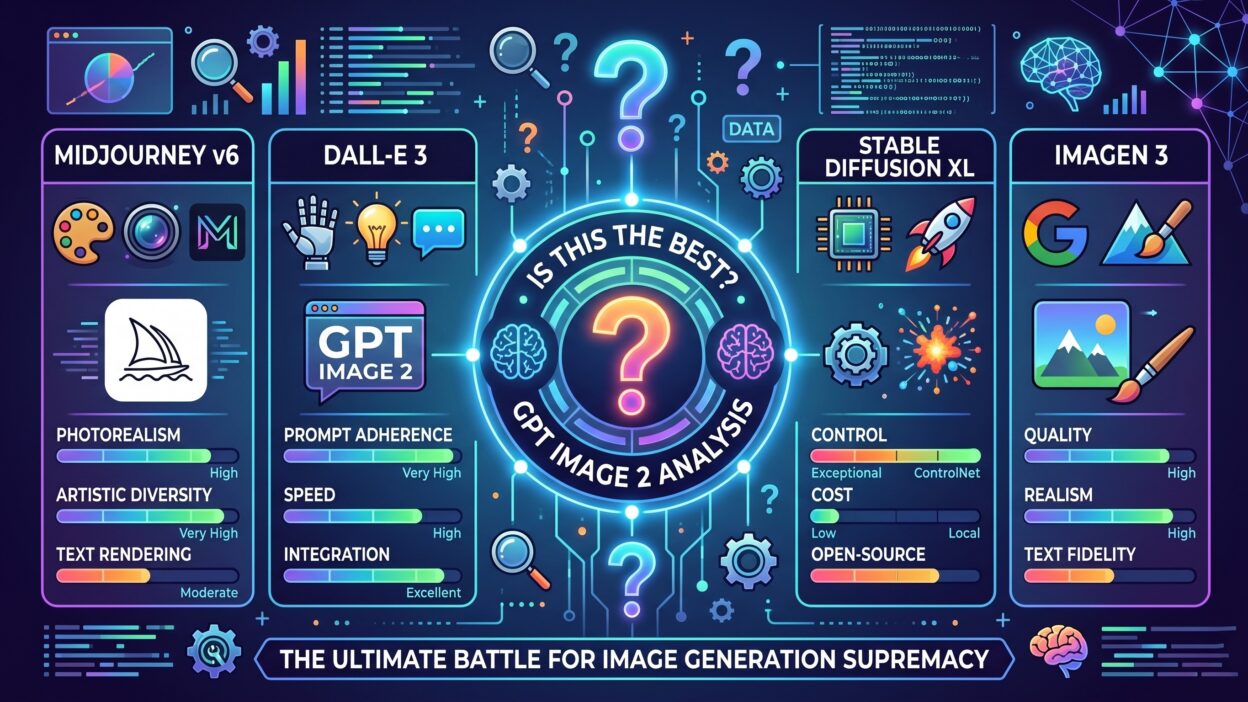
In blind comparisons, GPT Image 2 often matches or beats Midjourney v6 on photorealism tasks. For illustration and artistic styles, Midjourney remains a strong competitor.
Text Rendering Accuracy
Text in images gets evaluated separately because it was historically problematic. GPT Image 2 scores at the top of this category among current models. Readable, correctly spelled text renders reliably.
Midjourney and Stable Diffusion both struggle with text rendering. GPT Image 2’s accuracy here is a clear competitive advantage. For any use case involving text in visuals, GPT Image 2 is the obvious choice.
Real-World Use Cases for GPT Image 2
Benchmarks show potential. Real-world use cases show actual value. GPT Image 2 is already active in multiple professional contexts.
Marketing and Advertising
Marketing teams use GPT Image 2 to generate ad creative quickly. Campaign concepts go from brief to visual in minutes. Creative directors review options before committing to expensive production.
Social media content generation is a major use case. Brand guidelines go into the prompt. GPT Image 2 generates on-brand visuals at scale. Teams reduce stock photo spending significantly.
Product visualization is another strong application. E-commerce brands generate lifestyle images for products without photo shoots. GPT Image 2 handles product placement in realistic environments convincingly.
Product Design and Prototyping
Design teams use GPT Image 2 for concept visualization. A designer can describe a product idea and see it rendered immediately. This accelerates the ideation phase dramatically.
UI mockups with real text labels use the text rendering feature heavily. Designers generate screen layouts with accurate content placeholders. These visuals communicate concepts to stakeholders clearly.
Packaging design prototypes come to life with GPT Image 2. Teams test color schemes and label designs before committing to print production. The time and cost savings are measurable.
Publishing and Content Creation
Authors and publishers use GPT Image 2 for book cover concepts. Multiple cover options generate in seconds. Art directors select a direction and refine it further.
Blog and article illustrations happen at scale. Content teams generate custom header images for each post. This replaces repetitive stock image searches with bespoke visuals.
Educational content creators generate diagrams and explanatory visuals. GPT Image 2 handles instructional illustrations with clear, simple styling options.
Film and Entertainment Pre-Production
Storyboard artists use GPT Image 2 to sketch scene concepts rapidly. Directors review visual options before production begins. This speeds up pre-production planning.
Character concept art for games and animation benefits from GPT Image 2. Concept artists use it to explore visual directions quickly. Final art still requires human refinement, but the starting point arrives faster.
Location scouting visualizations help productions plan shooting environments. GPT Image 2 generates plausible versions of described environments. Decision-makers understand the visual goal before location scouts begin their work.
GPT Image 2 vs Competitors: An Honest Comparison
No model wins every category. GPT Image 2 has clear strengths. Understanding where it leads and where it falls short helps users make smart decisions.
GPT Image 2 vs Midjourney v6
Midjourney v6 is arguably the most popular image generation model among creatives. Its aesthetic quality is celebrated. Artists love its natural, slightly stylized output.
GPT Image 2 beats Midjourney v6 on prompt adherence. It also wins clearly on text rendering. Midjourney still edges ahead on artistic mood and aesthetic depth for purely creative work.
For practical commercial use, GPT Image 2 is often the better tool. For creative exploration and artistic output, Midjourney v6 still competes strongly.
GPT Image 2 vs Adobe Firefly
Adobe Firefly targets the enterprise design market. Its integration with Adobe Creative Cloud is a major advantage. Designers already inside Adobe workflows find it convenient.
GPT Image 2 outperforms Firefly on photorealism. Firefly’s strength is safe commercial licensing. All Firefly training data is legally cleared. GPT Image 2’s licensing situation is less transparent.
For teams needing commercial-safe imagery, Firefly has an edge. For pure image quality and versatility, GPT Image 2 leads.
GPT Image 2 vs Stable Diffusion 3
Stable Diffusion 3 is open-source. That is its biggest differentiator. Teams can run it locally with no API costs. Fine-tuning is fully available to developers.
GPT Image 2 wins on out-of-the-box quality. Stable Diffusion 3 requires expertise to match GPT Image 2’s default output quality. For teams with AI engineers, SD3 offers more customization.
For teams needing fast deployment with no model management overhead, GPT Image 2 is the simpler, higher-quality choice.
GPT Image 2 vs Imagen 3 by Google
Google’s Imagen 3 is a strong competitor. It excels at photorealistic output. Google trained it on a massive dataset with careful quality curation.
GPT Image 2 and Imagen 3 are genuinely competitive on photorealism. GPT Image 2 wins on API accessibility and ecosystem integration. Imagen 3 sits behind Google Cloud infrastructure, which limits accessibility for smaller teams.
Both models represent the top tier of current image generation. Choosing between them often depends on which cloud ecosystem you already use.
GPT Image 2 Pricing and Access Options
Cost is always a practical consideration. GPT Image 2 comes with pricing that fits multiple usage levels.
API Pricing Structure
GPT Image 2 is available through the OpenAI API. Pricing charges per image generated. Standard quality images cost less. High-quality images cost more. Volume discounts apply at higher usage tiers.
For most business applications, the cost per image is reasonable. Compared to stock photography subscriptions, the economics often favor GPT Image 2 for unique imagery needs.
Developers pay only for what they generate. There are no monthly minimums for standard API access. This makes GPT Image 2 accessible to independent developers and small teams.
ChatGPT Integration
ChatGPT Plus and Pro subscribers access GPT Image 2 directly in the chat interface. This gives non-technical users a simple path to high-quality image generation.
The conversational interface makes iteration easy. Users can describe an image, generate it, then refine with follow-up prompts. This workflow suits creative professionals who prefer natural language interaction.
Enterprise Access and Limits
Enterprise API customers get higher rate limits. They also get dedicated support and custom usage agreements. Large-scale deployments are well-supported by OpenAI’s enterprise tier.
Organizations building products on GPT Image 2 need to review OpenAI’s usage policies carefully. Content restrictions apply. Commercial use rights require reading the current terms of service.
Limitations of GPT Image 2 You Should Know
Honest reviews cover limitations. GPT Image 2 is impressive, but it has real constraints worth understanding before making it your primary tool.
Content Restrictions
GPT Image 2 has strict content safety filters. Explicit content, graphic violence, and certain political imagery are blocked. These restrictions protect against misuse but frustrate some legitimate creative projects.
Horror and mature-theme creative work hits content walls regularly. Artists working in those genres find the limits frustrating. Midjourney and open-source models offer more flexibility here.
Consistency Across Generations
Character consistency across multiple images remains a challenge. Generating the same person or character across different scenes is difficult. Each generation treats the subject slightly differently.
This limitation matters for storytelling and sequential content. Comic creators and storyboard artists find it limiting. OpenAI is working on improvements, but consistency is not fully solved yet.
Cost at Scale
For high-volume applications, API costs add up. Teams generating thousands of images daily face meaningful expenses. Open-source alternatives become more attractive at scale.
Budget-conscious teams should model their usage carefully before committing to GPT Image 2 at scale. The quality premium needs to justify the cost compared to cheaper alternatives.
No Local Deployment
GPT Image 2 runs only through OpenAI’s API. There is no local deployment option. Teams with strict data privacy requirements face a challenge here.
Sensitive industries like healthcare and finance may have regulations that prevent using cloud-based generation tools. For these use cases, open-source models are the only viable path.
Frequently Asked Questions About GPT Image 2
What makes GPT Image 2 better than DALL-E 3?
GPT Image 2 improves on DALL-E 3 in prompt adherence, text rendering accuracy, lighting realism, and overall image fidelity. The gap is noticeable in professional use cases. Most users who tested both models prefer GPT Image 2 outputs.
Can GPT Image 2 generate images with text in them?
Yes. GPT Image 2 handles text rendering inside images better than any previous OpenAI model. It produces readable, well-formed text in signs, labels, and UI elements. This is one of its standout capabilities.
Is GPT Image 2 available for free?
Limited access is available through ChatGPT’s free tier with usage caps. Full access requires a ChatGPT Plus subscription or OpenAI API account. Commercial usage requires a paid plan.
How does GPT Image 2 handle multiple subjects in one image?
GPT Image 2 handles multi-subject compositions well. It places subjects logically based on prompt descriptions. Spatial relationships like foreground, background, and proximity get respected in most generations.
Is GPT Image 2 suitable for commercial use?
Yes, subject to OpenAI’s terms of service. Images created with GPT Image 2 can be used commercially. Review the current usage policies on OpenAI’s website for full details on rights and restrictions.
How does GPT Image 2 compare to Midjourney for creative work?
Midjourney v6 still leads on pure artistic aesthetic for creative work. GPT Image 2 leads on prompt adherence, text rendering, and practical commercial applications. Many professionals use both tools depending on the project type.
What image formats does GPT Image 2 support?
GPT Image 2 outputs images in PNG format by default through the API. The standard resolution is 1024×1024 pixels. Additional size options support portrait and landscape aspect ratios.
Can GPT Image 2 edit existing photos?
Yes. The API supports inpainting, which allows editing specific regions of existing images. Users upload a base image, define the area to edit, and provide a prompt. GPT Image 2 regenerates that area with contextual awareness.
The Verdict: Is GPT Image 2 the Best Image Generation Model?
The short answer is yes, for most professional use cases. GPT Image 2 leads the field on several important dimensions. Prompt adherence, text rendering, photorealism, and API accessibility all rank at the top.
For creative and artistic work, Midjourney v6 remains a strong competitor. For commercial-safe imagery, Adobe Firefly has a licensing advantage. For privacy-first deployments, open-source models like Stable Diffusion 3 win.
But across the broadest set of real-world applications, GPT Image 2 comes out ahead. It balances quality, accessibility, and versatility better than any competing model.
The ecosystem integration matters too. GPT Image 2 connects natively with the OpenAI API stack. Teams already using GPT-4o or other OpenAI models get seamless integration. This reduces engineering overhead for multi-modal applications.
OpenAI has demonstrated a clear improvement trajectory. Each new model delivers meaningful gains. GPT Image 2 continues that pattern convincingly.
Read More:-I Built a Complete AI Resume with 90+ ATS Score
Conclusion
GPT Image 2 is a genuinely impressive model. It is not perfect. No model is. But it raises the bar for what image generation tools can deliver in professional settings.
The text rendering capability alone justifies serious attention. That feature unlocks use cases previously impossible with AI generation tools. Marketing, design, and publishing teams benefit immediately.
The prompt adherence improvements reduce friction in creative workflows. Fewer retries mean more time on actual creative work. That efficiency gain compounds across large teams and projects.
GPT Image 2 brings strong photorealism, versatile style support, and practical editing features into one well-maintained API. The pricing is competitive for business use. The documentation is clear.
For teams evaluating image generation tools today, GPT Image 2 belongs at the top of the list. Test it with your specific use case prompts. Compare the output quality to your current solution.
The results will likely speak clearly. GPT Image 2 is the benchmark that other models now chase.