Introduction
TL;DR The AI landscape evolves fast. New tools appear monthly. Choosing the right foundation matters more than ever. OpenAI API models sit at the center of the modern AI development stack.
Developers use these models to build chatbots, automate workflows, analyze documents, generate images, and transcribe audio. The API gives direct programmatic access to the same models that power ChatGPT.
Understanding which model to pick for which job separates efficient engineers from those who burn through budgets on tasks that a cheaper model handles just as well.
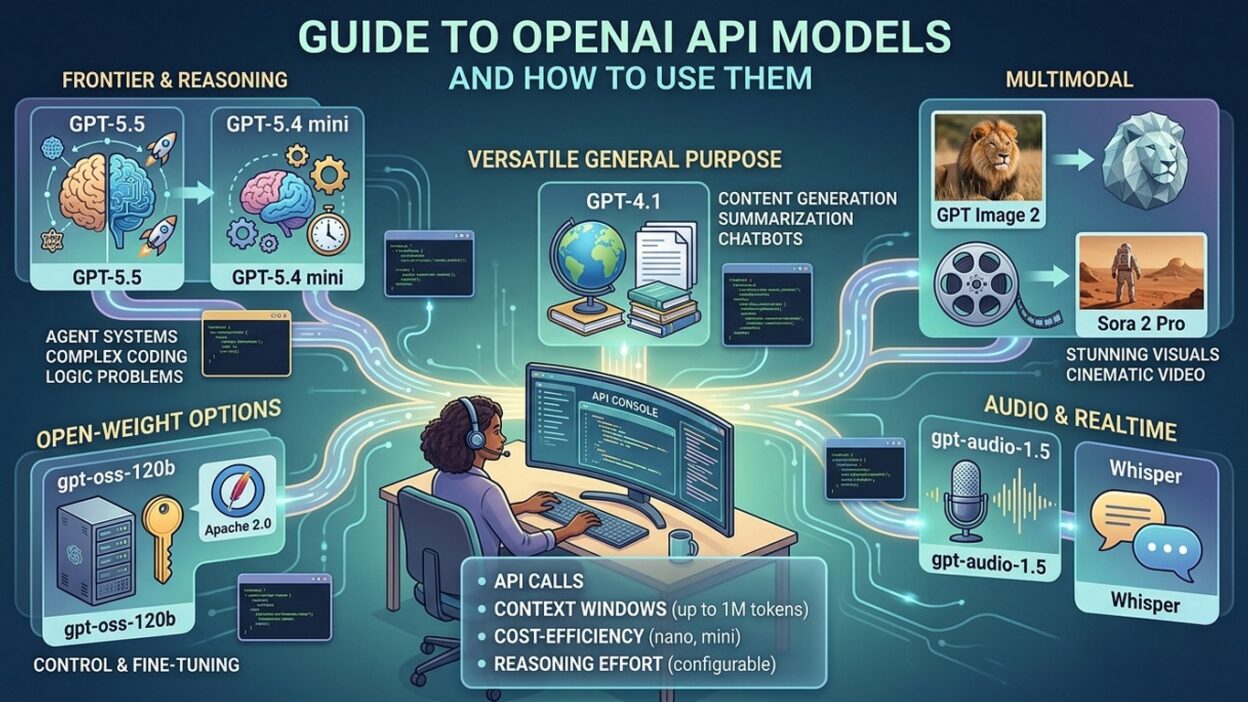
This guide breaks down the entire landscape of OpenAI API models. It covers what each model does, how to integrate the API into your code, which features unlock the most value, and how to manage cost at scale.
You do not need a machine learning background to use this guide. You need a clear problem to solve, an OpenAI account, and the willingness to write a few lines of code. Everything else follows naturally from there.
Table of Contents
Understanding OpenAI API Models: The Core Concept
OpenAI API models are large language models hosted and maintained by OpenAI. You access them through HTTP requests. Your application sends input. The model processes it and returns a structured output.
The API removes all infrastructure complexity. You do not manage servers. You do not configure GPU clusters. You do not handle model updates. OpenAI handles all of that. Your job is to write prompts and process responses.
Each model in the OpenAI API models family carries a specific set of capabilities. Some models handle text only. Some accept images alongside text. Others specialize in code generation or audio transcription. The right model for your task depends on what input you have and what output you need.
Pricing works on a per-token basis. A token is approximately four characters of text. Input tokens and output tokens carry separate prices. Knowing token pricing helps you estimate costs before scaling a feature to production.
The model identifier determines behavior. Pass the model name as a string in your API request. Change that string and your application immediately shifts to a different model. This flexibility lets you swap models during development without rewriting application logic.
OpenAI releases new versions regularly. Each release brings improvements in accuracy, speed, or cost efficiency. Staying informed about the OpenAI API models catalog ensures your application always runs on the most suitable option.
The Complete OpenAI API Models Lineup
GPT-4o: The Flagship Multimodal Model
GPT-4o stands as the most capable and versatile entry in the current OpenAI API models lineup. The “o” stands for omni. This model natively processes text, images, and audio in a single request without separate preprocessing steps.
Response speed improved significantly over GPT-4 Turbo. Cost dropped at the same time. GPT-4o delivers stronger reasoning, better instruction-following, and more nuanced writing than earlier GPT-4 versions.
Production applications that need high intelligence across diverse inputs default to GPT-4o. Customer service platforms, legal document analyzers, medical information assistants, and creative writing tools all run reliably on this model.
The vision capability of GPT-4o deserves special mention. Send an image URL or a base64-encoded image in your request. The model describes the image, answers questions about its content, extracts text from it, or performs reasoning based on what it sees.
GPT-4o Mini: Efficiency at Scale
GPT-4o Mini targets applications where request volume is high and task complexity is moderate. The model costs significantly less per token than full GPT-4o. Response speed is faster. The quality gap between the two models narrows on straightforward tasks.
Classification, simple Q&A, content summarization, and form validation all perform well on GPT-4o Mini. Any workflow processing thousands of requests per day benefits from switching to this model.
GPT-4o Mini also supports vision input. You get multimodal capability at a fraction of the flagship price. High-volume image classification pipelines use this combination frequently.
The o1 and o3 Series: Advanced Reasoning Models
OpenAI released the o-series models to address complex reasoning challenges. These models apply extended internal deliberation before generating output. They spend more processing time on each request and produce more accurate answers on hard analytical problems.
Mathematics, competitive programming, multi-step scientific reasoning, and complex logical analysis are the primary use cases. GPT-4o might rush to a plausible but wrong conclusion. An o-series model works through the problem systematically and arrives at a correct answer.
o1 delivers the highest reasoning quality. o3 pushes capability further with additional improvements in accuracy and breadth of domain knowledge. o1 Mini and o3 Mini provide most of the reasoning capability at meaningfully lower cost.
The o-series fits inside the broader OpenAI API models ecosystem. Access works through the same API endpoint. The model parameter controls which reasoning model your request uses.
GPT-3.5 Turbo: The Legacy Workhorse
GPT-3.5 Turbo still serves many production applications. It remains fast and affordable. Teams that built integrations around its behavior continue using it to avoid regressions from model changes.
New projects should evaluate GPT-4o Mini before defaulting to GPT-3.5 Turbo. The capability gap has widened. The cost gap has narrowed. GPT-4o Mini provides better output for most tasks at a comparable price point.
Embeddings Models
The text-embedding-3-small and text-embedding-3-large models convert text into numerical vectors. These vectors capture semantic meaning. Comparing vectors reveals similarity between pieces of text.
Search engines, recommendation systems, duplicate detection tools, and retrieval-augmented generation (RAG) systems all depend on embedding models. These OpenAI API models occupy a different part of the stack from chat models but they enable equally important functionality.
DALL-E 3 and Whisper
DALL-E 3 generates high-quality images from text prompts. Send a description. Receive an image. Marketing tools, design automation platforms, and educational content generators use DALL-E 3 through the same API infrastructure as the text models.
Whisper transcribes audio files into accurate text. It handles multiple languages, accents, and audio quality levels. Meeting transcription tools, podcast indexers, and voice interface preprocessors all rely on Whisper. Both models extend the OpenAI API models family beyond text into image and audio domains.
How to Set Up and Make Your First API Call
Create Your Account and Fund It
Navigate to platform.openai.com. Create an account using your email address. Verify your account. Add a payment method in the billing section. Load credit to your account. OpenAI uses prepaid credits. Usage deducts from your balance automatically. Monitor your balance to prevent service interruptions.
Generate and Secure Your API Key
Open the API keys section in your platform dashboard. Create a new key. Copy it the moment it appears. OpenAI will not show it again after you close the modal.
Store your key in an environment variable. Name it OPENAI_API_KEY following the standard convention. Never paste it directly into your code. Never commit it to a repository. Treat it with the same care as a database password.
Install the SDK and Write Your First Request
Install the official Python library using pip install openai. Install the Node.js library using npm install openai. Both SDKs handle authentication, retries, timeouts, and JSON parsing automatically.
Import the client. Initialize it using your environment variable. Create a chat completion request. Specify the model by name. Define your messages array with a role of “user” and your prompt as the content. Send the request. Extract the text from the response choices array.
Your first working integration takes under ten minutes from account creation to a response in the terminal. The complexity of what you build on top of that foundation grows at your own pace.
Advanced Features of OpenAI API Models
Function Calling
Function calling lets OpenAI API models trigger actions inside your application. You define a set of functions in your request, each with a name, description, and parameter schema. The model decides when to call a function and returns a structured JSON object with the function name and arguments.
Your application receives that JSON object, executes the corresponding function, and sends the result back to the model. The model incorporates the function result into its final response. This pattern enables AI agents that query databases, call external APIs, send emails, and manage files.
Structured Outputs and JSON Mode
JSON mode forces the model to return valid, parseable JSON every time. Set the response format parameter to json_object in your request. The model never returns malformed JSON. Your application parses the response without defensive error handling for format failures.
Structured outputs extend this further. You define an exact JSON schema. The model matches its output to that schema. Developers building data extraction pipelines and structured reporting tools rely on this feature heavily across all OpenAI API models that support it.
Streaming
Streaming delivers model output token by token as it generates. Set the stream parameter to true. Your application renders text progressively without waiting for the full response. Chat interfaces feel dramatically faster with streaming enabled.
Server-sent events power the streaming mechanism. The response arrives as a sequence of data chunks. Your client reads each chunk and appends its content to the display. Long-form generation tasks benefit most from streaming because users see output immediately.
Context Window Management
Context window refers to the total token capacity of a single request including both input and output. GPT-4o supports 128,000 tokens. This fits lengthy documents, extended conversation histories, and large codebases in a single request.
Larger context requests cost more. Use only the context your task requires. Summarize conversation history periodically in long sessions to manage token consumption. Efficient context management reduces costs without sacrificing response quality.
Cost Management for OpenAI API Models
Token costs accumulate quickly on high-volume applications. Understanding cost drivers allows you to engineer your integration efficiently from the start rather than optimizing reactively when your bill arrives.
Input tokens cost less than output tokens across all OpenAI API models. The model reads your entire prompt for every request. Long system prompts add to every request’s input cost. Write concise system prompts. Eliminate padding and redundancy from your instructions.
Use the batch API for non-real-time workloads. OpenAI processes batch requests within 24 hours and charges 50 percent less per token. Data analysis pipelines, content moderation queues, and bulk classification tasks fit this pattern.
Prompt caching reduces costs on repeated prefixes. OpenAI automatically caches frequently repeated prompt beginnings. Structure your prompts to keep stable content at the start. Repeated requests with the same system prompt benefit from caching discounts automatically.
Set spending limits in the platform dashboard. Configure alerts at threshold amounts. Hard limits stop billing when you reach a cap. Soft limits send a warning email. Both controls prevent unexpected overages during development spikes.
The tiktoken Python library counts tokens before you send a request. Estimate costs on your development dataset before launching a feature. Accurate cost forecasting helps you choose the right model and prompt length for your budget.
Best Practices for Working with OpenAI API Models
Write Precise System Prompts
The system message shapes model behavior for the entire conversation. Invest time in crafting it carefully. Specify the role, tone, output format, length constraints, and any topics the model should avoid. Clear system prompts reduce output variation and improve consistency across all OpenAI API models.
Control Output with Temperature
Temperature controls randomness. A value of zero produces deterministic, focused answers. A value near one produces creative, varied output. Set temperature to zero for factual extraction tasks. Set it between 0.7 and 1.0 for creative writing or brainstorming tasks.
Implement Retry Logic
API calls fail occasionally. Rate limits get hit. Networks experience timeouts. Implement exponential backoff for retries. Start with a one-second delay. Double the delay on each subsequent retry. Cap retries at three to five attempts. Log failures with enough context to debug patterns.
Validate Model Outputs
Models generate plausible text. Plausible text is not always accurate. Add validation layers for factual claims in production applications. Use structured outputs and JSON schemas to enforce format requirements. Human review workflows catch errors that automated validation misses on high-stakes outputs.
Stay Current with Model Releases
OpenAI updates its model catalog frequently. New releases deliver better performance at lower cost. Test your prompts on new model versions before migrating production traffic. Maintain a regression test suite that covers your core use cases. Version lock your model identifier in production until you validate the new version fully.
Frequently Asked Questions About OpenAI API Models
What are OpenAI API models?
OpenAI API models are large language models that developers access through a REST API. They process text, images, and audio inputs and return structured responses. OpenAI hosts and maintains these models. Developers pay per token consumed in each request. The models power applications ranging from customer chatbots to scientific research tools.
Which OpenAI API model is best for beginners?
GPT-4o Mini offers the best starting point for most beginners. It delivers strong performance on common tasks, responds quickly, and costs less than the flagship models. Beginners can experiment freely without accumulating large costs. Switch to GPT-4o when your use case demands stronger reasoning or multimodal input support.
How do OpenAI API models handle sensitive data?
OpenAI does not use API data for model training by default under its current terms of service. Review the data processing agreement before sending personally identifiable information or confidential business data. Enterprise contracts offer stronger data handling guarantees for organizations with strict compliance requirements.
What is the difference between GPT-4o and o1?
GPT-4o excels at fast, general-purpose language tasks including writing, summarization, and multimodal understanding. The o1 model applies extended reasoning before responding. It trades speed for accuracy on complex problems in mathematics, science, and programming. Use GPT-4o for speed-sensitive applications. Use o1 for accuracy-critical analytical tasks.
How do I reduce my costs when using OpenAI API models?
Switch to GPT-4o Mini for high-volume, moderate-complexity tasks. Use the batch API for non-real-time workloads to access 50 percent lower pricing. Write shorter, more focused prompts to reduce input tokens. Use the tiktoken library to estimate costs before launching features. Set spending limits in the platform dashboard.
Can I use OpenAI API models for commercial products?
Yes. OpenAI permits commercial use of its API under the terms of its usage policy. Review the current usage policy on the OpenAI website before launch. Some content categories and use cases require additional review. Most standard applications including SaaS products, enterprise tools, and consumer apps operate within permitted use categories.
Do OpenAI API models support languages other than English?
Yes. GPT-4o and GPT-4o Mini perform strongly across dozens of languages. Quality varies by language and task complexity. High-resource languages like Spanish, French, German, Chinese, and Japanese receive strong support. Lower-resource languages see reduced accuracy on complex tasks. Test your specific language and task combination before committing to a deployment.
Read More:-Llama-3.1-Storm-8B: The 8B LLM Powerhouse Surpassing Meta and Hermes Across Benchmarks
Conclusion

OpenAI API models put state-of-the-art artificial intelligence into the hands of every developer with an API key and a clear problem to solve. The infrastructure complexity disappears. The engineering focus shifts to building products that create real value.
The model selection decision matters more than most developers realize at the start. GPT-4o covers most production needs with excellent quality. GPT-4o Mini handles high-volume workloads at lower cost. The o-series tackles complex reasoning challenges. Embeddings power search and recommendations. DALL-E and Whisper extend capability into image and audio.
Features like function calling, structured outputs, streaming, and vision support expand what AI can do inside your application. Each feature solves a real engineering problem that would otherwise require significant custom development.
Cost management and error handling separate production-grade integrations from quick experiments. Set spending limits. Implement retry logic. Write concise prompts. Test new model versions before migrating.
OpenAI API models will keep improving. New releases will bring better performance and lower prices. Building on this foundation today gives your product a compounding advantage as the underlying models advance.