Introduction
TL;DR Picking a CRM feels harder than it should in 2026. The eWay-CRM vs HubSpot comparison comes up often for teams stuck between two very different products. One lives inside Outlook. The other replaces your entire marketing and sales stack.
eWay-CRM turns Microsoft 365 into a working CRM. HubSpot builds a standalone platform around six connected product hubs. The eWay-CRM vs HubSpot decision usually comes down to how deep your team already sits inside Microsoft tools, and how much growth you expect over the next few years.
This guide breaks down every major category in the eWay-CRM vs HubSpot comparison. You get pricing, feature depth, ease of use, integrations and AI capability side by side. We pulled current 2026 data from Capterra, Software Advice and both vendor pricing pages.
Read through each section before you commit to a trial. The right answer in the eWay-CRM vs HubSpot debate depends on your existing tools, not on brand recognition alone.
Table of Contents
eWay-CRM vs HubSpot: Quick Overview
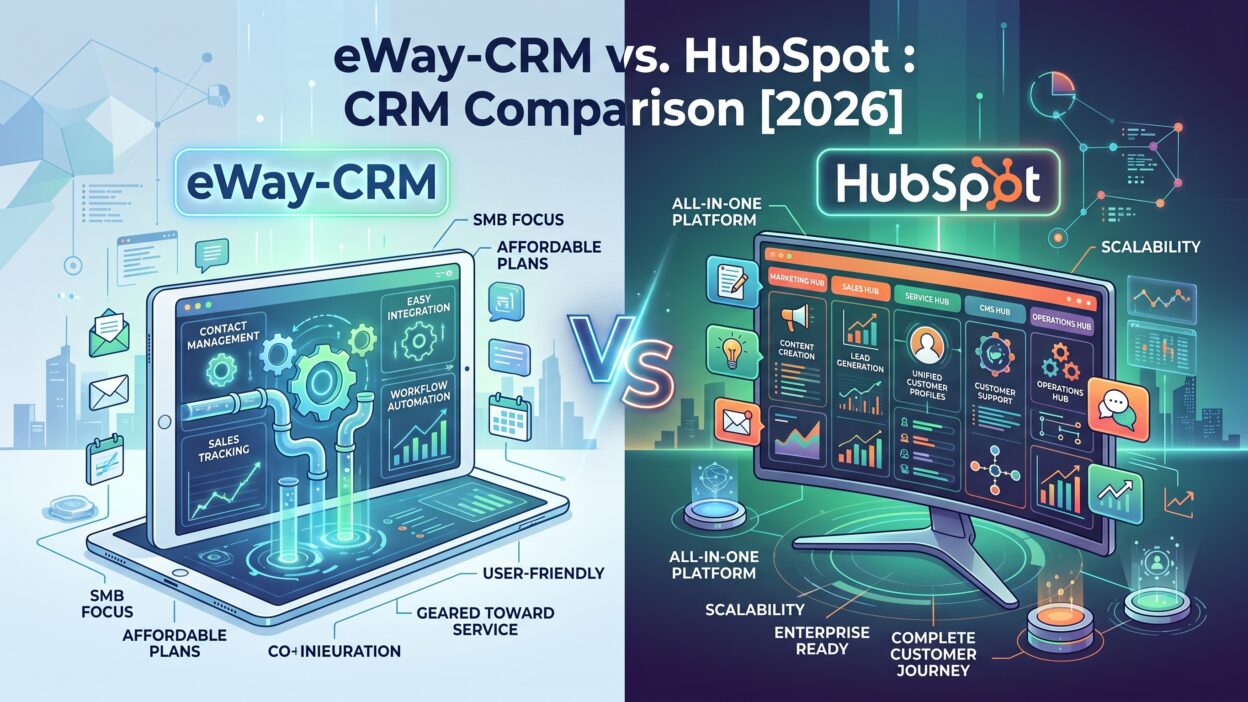
eWay-CRM installs as an add-in directly inside Outlook. Your inbox becomes a shared database of contacts, deals, projects and tasks. Teams that already run their entire workday through Outlook, Teams and SharePoint get a CRM without learning a new interface.
HubSpot takes the opposite approach. The platform builds a standalone system that connects marketing, sales, service, content and operations under one login. A Smart CRM sits at the center, feeding data across every connected hub automatically.
Both platforms hold a 4.5 out of 5 rating on Capterra in 2026. HubSpot carries far more reviews, with over four thousand compared to eWay-CRM’s roughly eight hundred. This gap reflects HubSpot’s larger market reach rather than a real quality difference between the two tools.
Pricing starts at the same point for both platforms. eWay-CRM and HubSpot each list an entry price near twenty dollars a month. The similarity ends there. HubSpot’s total cost climbs fast once you add hubs, seats and onboarding fees. eWay-CRM stays closer to a flat per-user rate as your team grows.
The eWay-CRM vs HubSpot choice really comes down to scope. eWay-CRM handles contact and project management well inside a familiar interface. HubSpot handles a full go-to-market motion across marketing, sales and service together.
How eWay-CRM Works Inside Microsoft 365
eWay-CRM does not ask your team to leave Outlook. The tool installs as a native add-in and adds CRM functionality directly inside the email client your team already opens every day. Contacts, deals, tasks and projects live right alongside your inbox.
This design removes the biggest barrier most CRM rollouts face. New employees see a familiar Outlook layout on day one, with a CRM sidebar added on top. Training time drops sharply compared to a standalone platform with its own login and navigation structure.
Project delivery sets eWay-CRM apart from most CRMs in this price range. The platform tracks work after a deal closes, covering timelines, tasks and deliverables tied to each client. Service-based businesses that sell projects, not just products, find real value in this feature.
Synchronization runs across Outlook calendar, contacts and email automatically. Shared views and workflows keep the whole team working from the same data, without manual exports or duplicate spreadsheets floating around the office.
eWay-CRM ships mobile apps for iOS and Android alongside a web application. Field teams and traveling sales reps get access to the same contact and deal data outside the office, without carrying a laptop everywhere.
Marketing automation stays limited inside eWay-CRM. The platform handles bulk email sending and basic lead capture well. Teams that need advanced nurture sequences or multi-channel campaigns often pair eWay-CRM with a separate marketing tool instead.
How HubSpot’s Smart CRM Works
HubSpot builds its entire product around one connected data layer called the Smart CRM. Six separate hubs sit on top of this layer, covering marketing, sales, service, content, operations and commerce. Every hub reads and writes to the same contact record.
This connected structure gives HubSpot a real advantage in the eWay-CRM vs HubSpot comparison for growing teams. A marketing email click, a sales call note and a support ticket all appear on one timeline for each contact, visible to every team without extra setup work.
Breeze, HubSpot’s AI layer, runs across the platform in 2026. The system drafts prospecting emails, summarizes customer calls and automates parts of customer support. This AI depth goes well beyond what eWay-CRM currently offers inside its own product.
Over two thousand app integrations connect HubSpot to nearly any tool a growing business already runs. Slack, Zoom, Stripe and hundreds of other platforms sync data into HubSpot without custom development work.
A free tier makes HubSpot accessible to very small teams and solo founders. This free plan covers basic CRM functionality, though most real business use cases push teams toward a paid Starter or Professional plan within the first few months.
HubSpot scales cleanly from a five-person startup to a large enterprise. Few other platforms in the eWay-CRM vs HubSpot conversation offer this same range, from a free starting point all the way up to enterprise-grade marketing operations tools.
Feature Comparison
Contact and Deal Management
Both platforms track contacts, companies and deals through a visual pipeline. eWay-CRM keeps this view close to the Outlook interface your team already knows. HubSpot builds a more customizable pipeline with automated deal scoring and AI-suggested next steps built directly into each record.
Marketing Automation
HubSpot wins clearly on marketing depth. Landing pages, email sequences, forms and multi-step workflows all run natively inside the platform. eWay-CRM covers bulk email and basic lead capture but stops well short of full marketing automation. Teams that need real campaign automation should weigh this gap heavily in the eWay-CRM vs HubSpot decision.
Reporting and Analytics
HubSpot ships built-in dashboards and custom reports across every connected hub. eWay-CRM requires a separate Power BI setup for deeper reporting needs, which adds real setup time for teams without existing Power BI experience. This difference matters most for data-driven sales leaders comparing eWay-CRM vs HubSpot on reporting alone.
Project Management
eWay-CRM wins here with native project delivery tracking built into the same interface as your contact data. HubSpot’s Operations Hub covers some workflow automation but does not match eWay-CRM’s dedicated project and task management depth for service businesses.
Pricing Compared
Both eWay-CRM and HubSpot list a starting price near twenty dollars a month in 2026. That similar entry point hides very different total cost structures once your team grows past a handful of users.
eWay-CRM charges per user, per month, with pricing tiers based on feature access rather than contact volume. The Plus plan runs around forty dollars per user monthly and unlocks unlimited shared views, unlimited workflows and unlimited custom fields. This flat, predictable structure appeals to budget-conscious teams planning multi-year costs.
HubSpot’s pricing grows more complex as you add hubs. Each hub, Marketing, Sales, Service, Content and Operations, carries its own pricing tier. Teams that need multiple hubs pay for each one separately, and costs climb fast at the Professional and Enterprise levels.
Onboarding fees add another layer to HubSpot’s total cost. Higher tiers often require a mandatory onboarding charge on top of the monthly subscription. A mixed-tier billing rule can also inflate costs when different departments run on different plan levels within the same account.
eWay-CRM avoids most of this complexity. One plan covers CRM, basic marketing and project management together, without separate hub fees stacking on top of each other.
| Factor | eWay-CRM | HubSpot |
|---|---|---|
| Starting price | ~$20/user/month | ~$20/month (Starter) |
| Pricing model | Per user, feature-based tiers | Per hub, per seat |
| Free plan | No | Yes, limited features |
| Onboarding fees | Rare | Common at higher tiers |
| Marketing automation | Basic | Full-featured |
Run your actual team size and hub needs through both pricing calculators before you commit. The eWay-CRM vs HubSpot cost gap widens fast once you need more than basic CRM functionality.
Ease of Use and Onboarding
eWay-CRM holds a real edge for teams already living inside Outlook every day. The add-in interface matches the Outlook layout your team already knows, which shortens training time from weeks to days in most cases. New hires need almost no separate CRM training beyond a short walkthrough.
HubSpot asks for a bigger upfront learning investment. The platform packs more features into its interface, which means more menus, more settings and more configuration decisions during setup. Capterra reviews rate both platforms similarly on ease of use, though HubSpot’s larger feature set naturally takes longer to fully learn.
Customer service ratings favor eWay-CRM slightly in recent review data, scoring 4.6 against HubSpot’s 4.4 on Capterra. Smaller support teams at eWay-CRM sometimes deliver a more personal support experience compared to a larger, more process-driven support system at HubSpot.
Setup time differs sharply between the two platforms too. eWay-CRM teams often go live within a day or two, since the tool works inside software your team already uses. HubSpot implementations, especially at the Professional and Enterprise tiers, often take several weeks to configure hubs, workflows and integrations correctly.
Choose based on your team’s tolerance for a longer setup process in exchange for deeper functionality once that setup finishes.
Which One Should You Choose?
Pick eWay-CRM if your team runs its entire day through Outlook, Teams and SharePoint already. The familiar interface, flat pricing and native project delivery tracking make it a strong fit for small and mid-sized service businesses that sell projects alongside products.
Pick HubSpot if your business needs marketing, sales and service connected under one platform. Growing companies that plan to scale past basic contact management benefit from HubSpot’s hub structure, AI features and massive integration library.
Consider your reporting needs carefully too. Teams that want built-in dashboards without extra setup should lean toward HubSpot. Teams comfortable pairing their CRM with an existing Power BI setup can get similar reporting value from eWay-CRM at a lower total cost.
Budget planning matters just as much as feature comparison in the eWay-CRM vs HubSpot decision. Map out your expected team size and hub needs for the next two years before you sign either contract. HubSpot’s per-hub pricing can surprise teams that start small and scale fast without planning ahead.
Neither platform wins this comparison outright. A Microsoft-native service business fits eWay-CRM well. A growing company building a full go-to-market motion across marketing and sales fits HubSpot better.
Frequently Asked Questions
Is eWay-CRM cheaper than HubSpot?
Both platforms start near twenty dollars a month. eWay-CRM stays closer to a flat per-user rate as your team grows. HubSpot’s total cost rises faster once you add multiple hubs, seats and onboarding fees at higher tiers.
Does eWay-CRM work outside of Microsoft Outlook?
Yes. eWay-CRM offers a web application and mobile apps for iOS and Android alongside its main Outlook add-in. The core experience still centers around Outlook, Teams and SharePoint for most daily use.
Which platform has stronger marketing automation, eWay-CRM or HubSpot?
HubSpot offers far deeper marketing automation, including landing pages, multi-step workflows and AI-generated campaigns through Breeze. eWay-CRM covers basic bulk email and lead capture but does not match HubSpot’s marketing depth.
Does HubSpot offer a free CRM plan?
Yes. HubSpot offers a free tier with basic CRM functionality. Most growing teams move to a paid Starter or Professional plan once they need marketing automation, custom reporting or additional hub access.
Which CRM is easier to learn, eWay-CRM or HubSpot?
eWay-CRM tends to onboard faster for teams already using Outlook daily, since the interface matches software they already know. HubSpot’s larger feature set takes longer to learn fully, though both platforms score similarly on general ease of use.
Can eWay-CRM handle project management after a sale closes?
Yes. eWay-CRM includes native project delivery tracking, covering timelines, tasks and deliverables tied to each closed deal. This feature goes beyond what most CRMs in this price range offer, including HubSpot’s Operations Hub.
Does HubSpot charge extra fees beyond the monthly subscription?
Often, yes. Higher HubSpot tiers commonly require a mandatory onboarding fee. A mixed-tier billing rule can also raise costs when different teams inside one account use different plan levels.
Which CRM fits a service-based business better?
eWay-CRM fits service businesses well through its native project tracking and Outlook-first workflow. Businesses that also need heavy marketing automation alongside project delivery may still prefer HubSpot despite the added cost.
Read More:-7 Best Hightouch Alternatives [2026]
Conclusion

The eWay-CRM vs HubSpot comparison comes down to scope and existing workflow. eWay-CRM delivers a familiar, low-friction CRM built right into Outlook, with strong project delivery tracking most competitors skip. HubSpot delivers a full go-to-market platform connecting marketing, sales and service under one Smart CRM, backed by deep AI features and a massive integration library.
Neither tool wins across every category. eWay-CRM wins on simplicity, onboarding speed and flat pricing for Microsoft-native teams. HubSpot wins on marketing depth, reporting and long-term scalability for growing companies.
Match your choice to your team’s actual daily workflow, not just a feature list. A service business already living inside Outlook fits eWay-CRM well. A company planning to scale marketing, sales and service together fits HubSpot better.
Start a free trial with both platforms before you commit either way. Load your real contacts, test the interface your team will use every day and check the pricing against your growth plan. That hands-on test answers the eWay-CRM vs HubSpot question better than any comparison page alone.