Introduction
What Is RAG and Why Does It Matter for Customer Support?
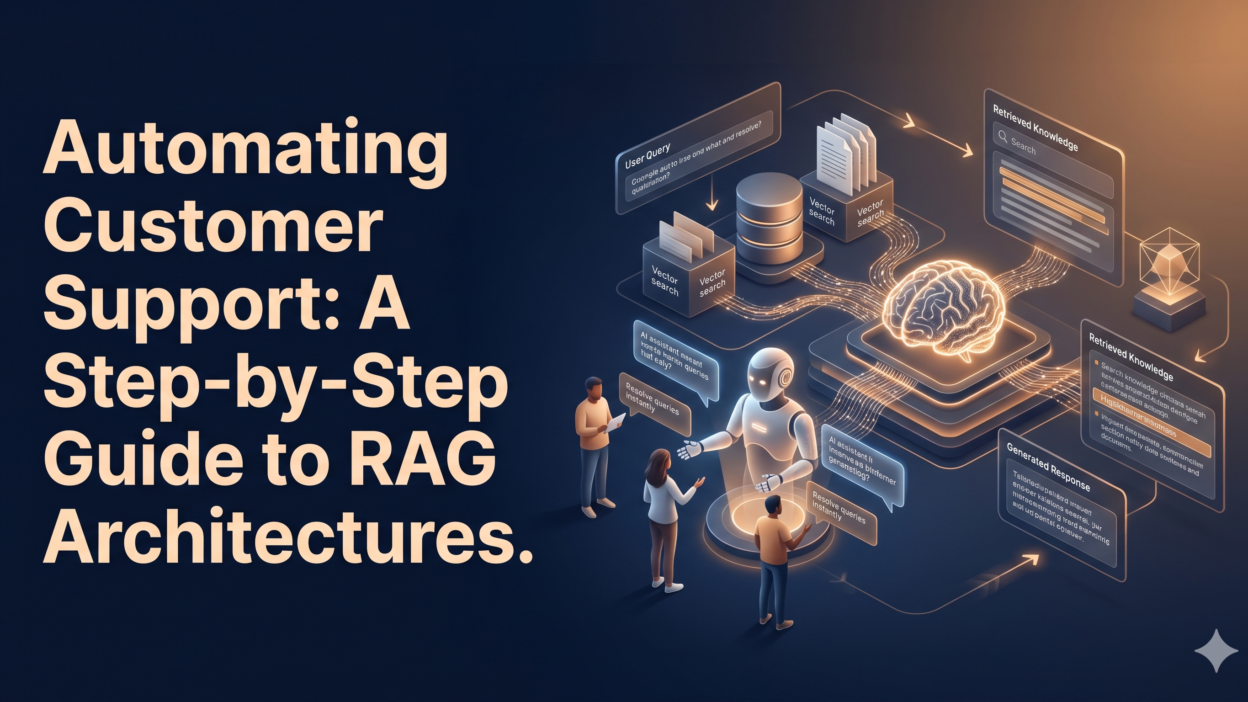
TL;DR RAG stands for Retrieval-Augmented Generation. It combines two powerful ideas. First, a retrieval system pulls relevant information from a knowledge base. Second, a language model uses that information to generate a helpful, accurate response.
Traditional AI chatbots rely only on what they learned during training. They get outdated fast. RAG architectures customer support automation solves this problem. The system fetches real-time information from your company documents, help articles, and product databases.
This means the AI never makes things up from memory alone. It reads from your actual content. Customers get answers that match your current policies, products, and processes.
Table of Contents
Connect inside a RAG pipeline.
Before building, understand the landscape. Key concepts include knowledge base retrieval, vector databases, semantic search, large language models (LLMs), embedding models, AI-powered helpdesk, conversational AI, and automated ticket resolution. These terms all connect inside a RAG pipeline.
Audit Your Existing Support Knowledge
RAG architectures customer support automation only works if the underlying knowledge is clean. Start with a full audit of your support materials.
Gather every help article, FAQ page, product manual, return policy, troubleshooting guide, and internal SOP document. Check for outdated content. Remove it or update it. Duplicate information creates confusion for both humans and AI systems.
Organize documents by category. Create clear labels. Group topics by product lines, issue types, or customer segments. This structure helps the retrieval system find the right content fast.
Pay special attention to high-volume tickets. Look at your last six months of resolved tickets. Find the top 50 questions customers ask most. Make sure your knowledge base answers every single one of them. If gaps exist, fill them now.
Formats That Work Best
Plain text files, PDFs, Markdown files, and HTML pages all work well. Avoid scanned image PDFs with no text layer. The retrieval system cannot read images unless you add an OCR layer. Clean structured text produces the best retrieval results.
Choose the Right Embedding Model
An embedding model converts text into numerical vectors. These vectors represent meaning. Similar meanings sit close together in vector space. This is the foundation of semantic search inside RAG architectures customer support automation.
You have several strong options. OpenAI’s text-embedding-3-small and text-embedding-3-large are popular and well-tested. Cohere’s embed-english-v3.0 performs well on support-style content. Open-source models like BAAI/bge-large-en work well for teams who want full control.
Match your embedding model to your content language. If your customers speak multiple languages, pick a multilingual embedding model. Mismatched models produce poor retrieval quality.
Test your chosen model before committing. Feed it 20 sample queries. Check whether it retrieves the right documents. Bad embedding choices cause everything downstream to fail.
Key Metrics for Embedding Quality
Evaluate embedding performance using precision at K (P@K), mean reciprocal rank (MRR), and NDCG scores. These metrics measure whether the right documents appear at the top of search results. Aim for P@5 scores above 0.75 before moving forward.
Build and Populate Your Vector Database
A vector database stores your document embeddings. When a customer asks a question, the system searches this database for vectors similar to the query vector. Speed and accuracy here are critical for RAG architectures customer support automation.
Popular vector database options include Pinecone, Weaviate, Qdrant, Milvus, and Chroma. Each has different strengths. Pinecone offers managed simplicity. Weaviate adds rich filtering options. Qdrant excels at performance. Choose based on your team’s technical capacity and budget.
Chunk your documents before storing them. Do not embed entire documents as one block. Break each document into smaller pieces of 200 to 500 tokens each. Smaller chunks give more precise retrieval results.
Add metadata to every chunk. Include the document title, category, last-updated date, and product tag. Metadata enables filtered searches. A customer asking about product X only gets results tagged to product X. This improves answer relevance dramatically.
Chunking Strategy Matters
Fixed-size chunking splits text every N tokens. Recursive chunking respects paragraph and sentence boundaries. Semantic chunking groups ideas together. For customer support content, recursive chunking often works best. It keeps related ideas in the same chunk, which improves context quality for the language model.
Design the Retrieval Pipeline
The retrieval pipeline is the engine of RAG architectures customer support automation. It takes a customer query, converts it to a vector, and fetches the most relevant chunks from the database.
Start with a basic similarity search. Use cosine similarity or dot product to rank chunks by relevance. Return the top 5 to 10 most relevant chunks. Feed these into the language model as context.
Consider adding a reranker. A reranker takes the top 10 retrieved chunks and scores them again with a more precise model. It pushes the most relevant chunks to the top. Rerankers from Cohere or cross-encoder models on Hugging Face work very well.
Hybrid search combines vector search with keyword search. This covers cases where exact product names or ticket numbers need precise matching. BM25 handles keyword matching well. Combine BM25 scores with vector similarity scores using a weighted average.
Query Expansion Improves Recall
Sometimes customers phrase questions oddly. Query expansion generates multiple versions of the original query before searching. The system retrieves results for all versions and merges them. This catches relevant documents that a single query might miss. LLMs work well for generating these query variations automatically.
Select and Configure Your Language Model
The language model reads retrieved chunks and generates the final answer. This is the generation step in RAG architectures customer support automation. Model choice shapes response quality, cost, and speed.
GPT-4o from OpenAI delivers high accuracy. Claude from Anthropic excels at following nuanced instructions. Mistral and LLaMA 3 models offer cost-effective open-source alternatives. For high-volume support, smaller fine-tuned models can reduce costs significantly.
Write a strong system prompt. Tell the model its role clearly. Instruct it to answer only from provided context. Tell it to admit uncertainty if the context does not contain the answer. Prohibit hallucination explicitly in the prompt.
Set temperature low. A temperature of 0 to 0.3 keeps responses factual and consistent. High temperatures produce creative but unreliable answers. Customer support demands reliability over creativity.
Prompt Engineering for Support Accuracy
Structure your prompt with three sections. First, define the AI persona. Second, provide the retrieved context chunks. Third, insert the customer query. This format keeps responses grounded in your actual knowledge base. Add instructions to cite the source document when possible. Customers trust answers with clear references.
Build the Orchestration Layer
Orchestration connects all the pieces. It manages the flow from customer input to final response. Frameworks like LangChain, LlamaIndex, and Haystack handle orchestration well for RAG architectures customer support automation.
LangChain offers pre-built retrieval chains and agent frameworks. LlamaIndex specializes in data ingestion and indexing. Haystack provides robust pipeline tooling for production deployments. All three have active communities and strong documentation.
Define clear fallback logic. When retrieval confidence is low, escalate to a human agent. Set a confidence threshold. Responses below that threshold get flagged automatically. Human agents review flagged conversations and refine the knowledge base over time.
Log every query and every response. Store them in a structured database. These logs become gold. They reveal knowledge gaps. They identify confusing questions. They help you improve retrieval quality and expand your knowledge base continuously.
Session Memory for Multi-Turn Conversations
Single-turn Q&A handles simple queries. Complex support issues need multi-turn conversation. Add session memory to your orchestration layer. Store the last three to five conversation turns as context. Include this conversation history in every new query. The AI maintains context across the full support interaction.
Integrate With Your Support Platform
RAG architectures customer support automation must connect to where your customers already are. Most companies use Zendesk, Freshdesk, Intercom, Salesforce Service Cloud, or HubSpot Service Hub.
Use native APIs to integrate. Zendesk’s API lets you intercept incoming tickets before assigning them to agents. Your RAG system attempts an automated response. High-confidence answers go directly to the customer. Low-confidence answers route to human agents with a suggested draft.
Build a widget for live chat. Connect the RAG pipeline to your chat interface. Responses appear in under two seconds with the right infrastructure. Customers see fast, accurate answers. Agents see fewer repetitive tickets.
Connect to your CRM. Pull customer account data at query time. Personalize responses using customer history. A returning customer asking about order status gets a response referencing their specific order. Generic answers feel cold. Personalized answers build trust.
Omnichannel Support Coverage
Deploy your RAG system across email, chat, SMS, and self-service portals. Use a single retrieval backend for all channels. This ensures consistent answers regardless of where customers reach out. Inconsistency destroys trust. One knowledge source prevents contradictions.
Test Before Going Live
Testing is non-negotiable. Skipping this step causes customer-facing failures. Run three types of tests before launching RAG architectures customer support automation in production.
Functional testing checks that the pipeline works end to end. Send 100 test queries through the full system. Verify that responses are accurate and grounded in retrieved content. Fix any errors in chunking, retrieval, or generation.
Adversarial testing pushes the system to fail. Ask off-topic questions. Ask ambiguous questions. Ask questions with wrong assumptions. Verify that the system handles each gracefully. It should admit uncertainty rather than guess incorrectly.
User acceptance testing (UAT) brings real support agents into the process. Show them AI-generated responses for real past tickets. Collect their feedback. Agents know your customers best. Their input shapes the final tuning of your system.
Golden Dataset Evaluation
Build a golden dataset of 200 to 500 question-answer pairs before launch. Use past resolved tickets as your source. Score every system response against the golden answers. Measure ROUGE scores for text overlap and semantic similarity scores for meaning alignment. Set a minimum passing threshold before approving the system for production.
Monitor, Measure, and Improve
Launching is not the finish line. Production monitoring keeps RAG architectures customer support automation healthy and improving over time.
Track key metrics weekly. Measure automated resolution rate, escalation rate, average response time, customer satisfaction score (CSAT), and first-contact resolution rate. Compare these metrics to your pre-automation baseline. Improvements validate your investment.
Watch for retrieval drift. As your products and policies change, old documents stay in the database. They produce outdated answers. Set a document review schedule. Update or remove stale content every 30 to 60 days.
Collect customer feedback signals. Thumbs up or thumbs down ratings on chat responses create a fast feedback loop. Negative ratings trigger automatic review. Patterns in negative feedback point directly to knowledge gaps.
Continuous Fine-Tuning
After three to six months of production data, consider fine-tuning your language model. Use high-quality resolved tickets as training examples. Fine-tuning adapts the model’s tone and knowledge to your specific brand voice. This produces more natural responses that feel like your company, not a generic AI assistant.
Common Challenges and How to Solve Them
RAG architectures customer support automation comes with real challenges. Knowing them in advance saves time.
Retrieval fails when documents are poorly structured. Fix this with better chunking and cleaner source content. Invest time in knowledge base quality. It always pays off.
Hallucination still happens even with RAG. Prevent it by keeping the system prompt strict. Instruct the model to say ‘I don’t know’ when context is insufficient. Monitor outputs regularly for accuracy.
Latency becomes a problem at scale. Optimize your vector database with approximate nearest neighbor (ANN) indexing. Use caching for frequently asked questions. Pre-compute embeddings for common query patterns. These optimizations keep response times under two seconds.
Cost grows with query volume. Use smaller, cheaper models for simple queries. Reserve large models for complex escalations. Implement query routing logic that assigns the right model based on query complexity. Smart routing reduces costs by 40 to 60 percent in many deployments.
FAQs About RAG Architectures Customer Support Automation
What is the difference between RAG and a traditional chatbot?
Traditional chatbots follow scripted decision trees. They break when questions fall outside the script. RAG architectures customer support automation uses semantic search and language models. It handles unexpected questions gracefully by finding relevant information and generating natural answers.
How long does it take to build a RAG system for customer support?
A basic RAG system takes two to four weeks to build with a small team. Full production deployment with monitoring, integrations, and testing takes two to three months. Start small. Deploy one use case. Expand after validating results.
Do I need a large knowledge base to start?
No. Start with your top 50 most-asked questions and their answers. Even a small but high-quality knowledge base produces strong results. Expand it incrementally as you identify gaps from production queries.
Is RAG better than fine-tuning for customer support?
RAG and fine-tuning solve different problems. RAG keeps knowledge current without retraining. Fine-tuning adapts the model’s behavior and tone. Many teams use both together. Use RAG for up-to-date factual retrieval. Use fine-tuning for consistent brand voice and response style.
How do I measure ROI from RAG architectures customer support automation?
Measure automated resolution rate first. Every ticket the AI resolves without human help saves money. Track cost per ticket before and after deployment. Track agent hours saved per month. Track CSAT scores to confirm quality did not drop. Most companies see full ROI within six to twelve months.
What vector database should a small team choose?
Chroma works well for small teams starting out. It runs locally, has no SaaS fees, and integrates easily with LangChain and LlamaIndex. As query volume grows, migrate to Pinecone or Qdrant for managed scalability.
Read More:-Top 10 AI Coding Agents Every Developer Should Use in 2026
Conclusion
RAG architectures customer support automation is not a future technology. Companies deploy it today and see real results. Faster responses. Happier customers. Lower costs. More time for human agents to handle complex, high-value interactions.
The path is clear. Audit your knowledge base. Choose strong embedding and retrieval tools. Configure a reliable language model. Integrate with your existing support platform. Test thoroughly. Monitor continuously. Improve relentlessly.
Every step in this guide builds toward one goal. A support system that scales without sacrificing quality. RAG makes that possible. Start with a small pilot. Prove the value. Expand across your full support operation.
The teams that build RAG architectures customer support automation today will outperform competitors who wait. Your customers deserve fast, accurate, personalized support. RAG delivers exactly that.