Introduction
TL;DR Nobody notices account data decay until it costs a deal. A field rep pulls up a company record from eight months ago and pitches a product the company already dropped. CLI company enrichment fixes this quietly, in the background, through scripts instead of spreadsheets. This article walks through how engineering and RevOps teams build enrichment into their daily habits, not just their toolset.
Table of Contents
The Problem CLI Company Enrichment Solves
Every company record starts accurate. It rarely stays that way.
Data Rot Happens Silently
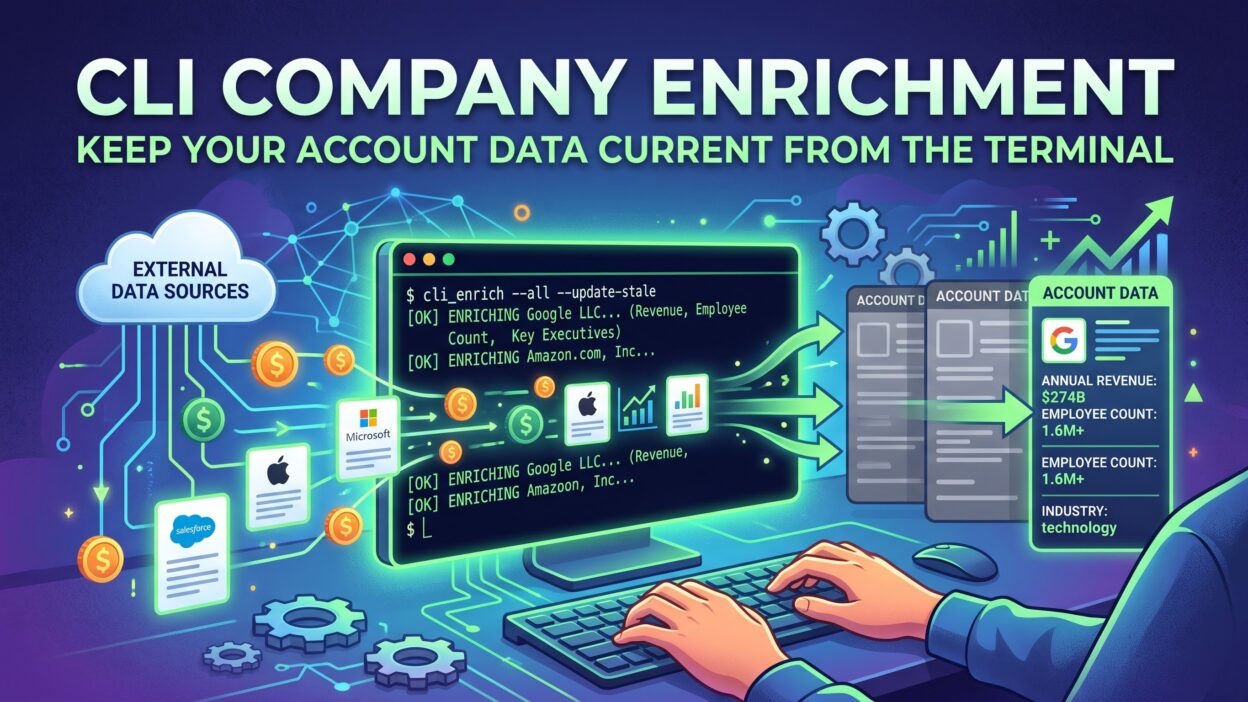
A company renames itself. A startup gets acquired. Headcount doubles after a funding round. None of these changes trigger a notification inside your CRM. Records sit untouched until someone manually checks, and most people never do. CLI company enrichment closes this gap by refreshing records automatically, without waiting for a human to notice something looks off.
Why the Terminal Fits This Job
A dashboard requires clicks, logins, and manual exports. A terminal command runs the same task in seconds and fits directly into existing scripts. Engineers already live in the terminal for deployments and debugging. CLI company enrichment meets them there instead of pulling them into a separate tool built for a different kind of user.
A Day in the Life of a CLI Company Enrichment Workflow
Seeing this in practice makes the concept concrete.
Morning Sync Before Standup
A scheduled script runs before the workday starts. It pulls yesterday’s new accounts, checks each one against an enrichment source, and updates the CRM with current firmographic details. By the time the sales team logs in, every new record already carries accurate context.
Enriching New Leads as They Arrive
A webhook triggers the moment a new lead fills out a form. That trigger calls a CLI company enrichment script directly, attaching industry, size, and location data before the lead even reaches a queue. A rep opens a fresh lead and sees a complete picture immediately, not a blank company field.
End-of-Day Cleanup Scripts
A second script runs after hours, scanning for records that failed enrichment earlier in the day. Failed matches often stem from a typo in a company name or a temporary API timeout. Retrying these records overnight catches gaps before the next morning’s sync begins.
The Technical Building Blocks Behind CLI Company Enrichment
Understanding the mechanics helps when something breaks at two in the morning.
Input Parsing and Domain Normalization
Company names arrive messy. Someone types “Acme Inc” while someone else types “Acme, Incorporated.” A solid CLI company enrichment script normalizes this input first, often by extracting a domain instead of relying on the company name alone. Domains stay far more consistent than free-text company names ever will.
Query Construction and API Calls
Once normalized, the script builds a request to the enrichment provider. This usually means a simple HTTP call with the domain or company identifier as a parameter. Good scripts batch these calls where possible, since a hundred individual requests run far slower than a handful of grouped ones.
Handling Partial Matches
Not every query returns a clean match. Some return multiple possible companies with similar names. A well-built CLI company enrichment script flags these cases for manual review instead of guessing and writing the wrong data into a live record.
Habits That Keep Account Data Reliable
Tools matter less than the habits built around them.
Version Control Your Enrichment Scripts
Treat enrichment scripts like production code. Store them in a repository. Track changes over time. A script that silently breaks after an API update becomes far easier to debug when you can see exactly what changed and when.
Log Every Enrichment Run
Every run of a CLI company enrichment script should leave a record behind. Log which accounts got updated, which failed, and why. Six months later, when someone asks why a specific record looks wrong, this log answers the question in seconds instead of hours.
Set Alerts for Match Rate Drops
A sudden drop in match rate usually signals a real problem, like an expired API key or a provider outage. Setting an alert for this metric catches issues fast, before hundreds of records go unenriched without anyone noticing.
CLI Company Enrichment Across Different Team Roles
Different roles interact with this workflow in different ways.
For the Backend Engineer
Engineers usually build and maintain the scripts themselves. Their focus stays on reliability, error handling, and keeping API calls efficient. A backend engineer treats CLI company enrichment as another service to monitor, not a one-time project to finish and forget.
For the RevOps Analyst
Analysts care more about output than implementation. They want accurate fields in the CRM and clear visibility into match rates. A RevOps analyst often works with an engineer to define which fields matter most, keeping the enrichment scope focused instead of pulling in every available data point.
For the Data Engineer
Data engineers fold enriched records into a broader pipeline, feeding a warehouse used for reporting and analysis. For this role, CLI company enrichment becomes one step among many, running alongside other extraction and transformation jobs on a shared schedule.
Building Your Own CLI Company Enrichment Script
Teams without an existing tool can build a basic version themselves.
Start With a Single Function
Write one function that takes a company domain and returns enriched data. Keep it simple at first. A single working function proves the concept before anyone invests time in batching, scheduling, or error handling around it.
Add Error Handling Early
APIs fail. Networks drop. Build error handling into the script from the start, not as an afterthought after the first crash. A script that fails loudly and logs the reason saves far more time than one that fails silently.
Wrap It Into a Reusable Command
Once the core function works, wrap it into a command line interface using a library suited to your language. This turns a one-off script into a tool anyone on the team can run with a single command, without reading the underlying code first.
Pitfalls That Undermine CLI Company Enrichment Over Time
A few recurring issues quietly reduce the value of this workflow.
Teams sometimes build a script once and never revisit it. APIs change their response format occasionally, and an unmonitored script keeps running while silently writing broken data into records. Scheduling a periodic review catches this before it spreads.
Another pitfall involves treating enrichment as a one-time cleanup project instead of an ongoing process. Running a single big batch job once a year still leaves data stale for the other eleven months. Regular, smaller runs keep records fresher than infrequent large ones.
A third pitfall comes from over-enriching. Pulling every possible data field for every account creates noise instead of value. Focusing on a handful of fields that actually drive decisions keeps the workflow lean and easier to maintain.
Frequently Asked Questions
How is CLI company enrichment different from a browser-based enrichment dashboard? A dashboard requires manual uploads and clicks through a web interface. CLI company enrichment runs through scripts and commands, which makes automation and scheduling far easier to build.
Do I need a dedicated data team to run CLI company enrichment? No. A single backend engineer can build and maintain a basic script. Larger organizations often involve a data engineer once enrichment feeds into a broader pipeline.
How often should enrichment scripts run? Daily or near-real-time runs work best for active sales pipelines. Less active databases might only need weekly or monthly runs, depending on how quickly your accounts change.
What happens when a CLI company enrichment script fails to match a company? A good script logs the failure and flags it for review rather than guessing. Some teams retry failed matches later in the day, since temporary issues sometimes resolve on their own.
Can CLI company enrichment scripts run without ongoing maintenance? Not indefinitely. APIs and data formats change over time, so periodic review keeps scripts working correctly. Treating them as a maintained tool, not a set-it-and-forget-it script, avoids silent failures.
Read More:-How to Build a Sales and Marketing Database from Scratch
Conclusion

Account data does not decay all at once. It slips a little every week until someone finally notices the damage. CLI company enrichment stops this slow decline by folding fresh data checks directly into daily engineering and sales workflows. The technical setup matters, but the habits around it matter just as much: logging runs, watching match rates, and treating scripts as living tools instead of finished projects. Teams that build these habits early keep their account data trustworthy long after the initial setup work is done.