Introduction
TL;DR AI development moves fast. New frameworks appear every few months. Most of them promise to simplify complex workflows. Few actually deliver on that promise. LangGraph does.
This LangGraph Tutorial exists because beginners deserve a clear, honest starting point. LangGraph is a library built on top of LangChain. It brings stateful, graph-based control to AI agent workflows. That combination unlocks a new class of applications that simple chain-based approaches cannot handle.
Most introductory resources skip the foundational reasoning. They throw code at you before explaining the mental model. This blog takes a different approach. You will understand why LangGraph works the way it does before writing your first node.
This LangGraph Tutorial covers the core concepts, the setup process, the key components, and a working example built step by step. It also covers common mistakes beginners make and answers the questions developers ask most often when starting with this framework.
You do not need to be an expert LangChain user to follow along. You need a working knowledge of Python and a basic familiarity with language model APIs. Everything else builds from scratch here.
Table of Contents
What Is LangGraph and Why Does It Matter
The Problem with Linear AI Chains
Early LangChain applications used linear chains. One step runs. The output feeds into the next step. The next step runs. The process continues until the final output appears.
Linear chains work well for simple tasks. Summarization pipelines, basic Q&A systems, and single-step classification tasks fit this model cleanly. Real-world AI applications rarely stay simple for long.
Complex tasks require branching logic. They require loops. They require the ability to revisit earlier steps based on new information. They require state that persists and updates throughout the workflow. Linear chains break down under these requirements.
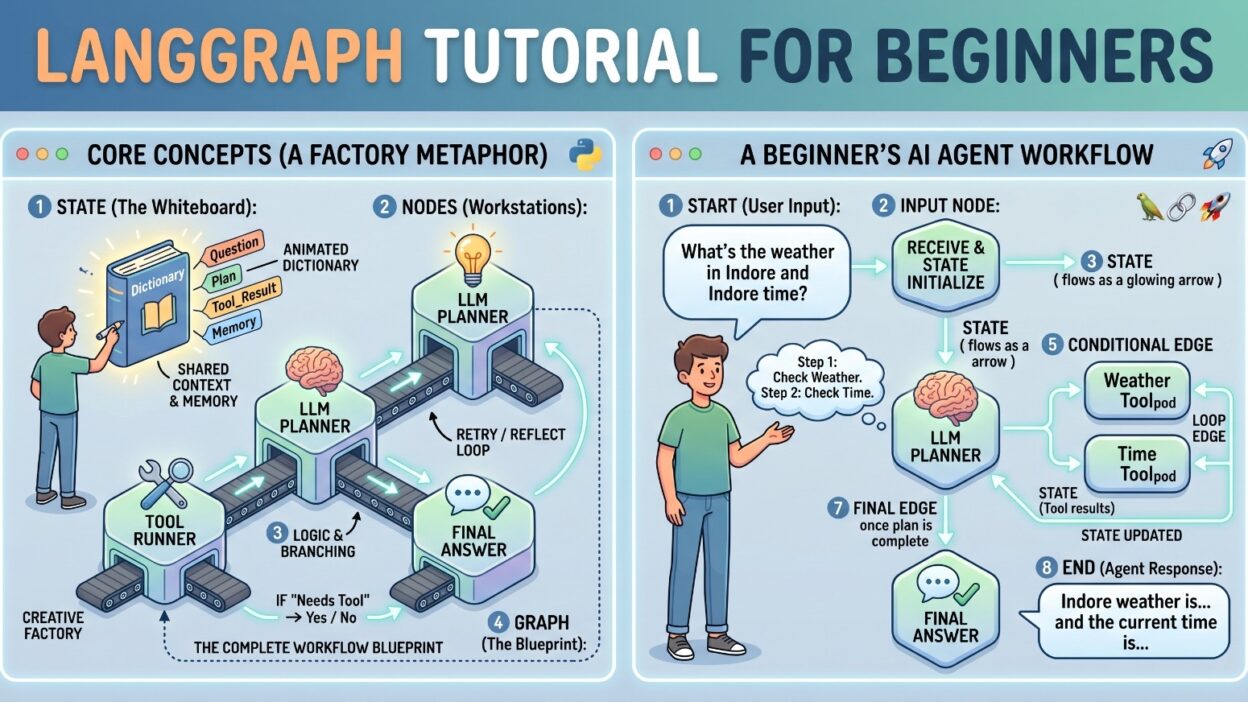
LangGraph solves this structural problem. It models AI workflows as graphs. Nodes represent processing steps. Edges represent transitions between steps. State flows through the graph and updates at each node. The graph can loop, branch, and converge based on runtime conditions.
What LangGraph Actually Does
LangGraph gives developers a framework for building stateful, multi-step AI agents. The key word here is stateful. Traditional chain-based systems process inputs and forget them. LangGraph maintains a state object that every node in the graph can read and modify.
This state persistence changes what becomes possible. An agent can check a result, decide it needs more information, loop back to a search step, retrieve new data, and continue processing — all within a single graph execution. That kind of workflow is impossible in a linear chain.
Where LangGraph Fits in the AI Ecosystem
LangGraph sits between raw LangChain usage and full custom agent infrastructure. It adds structure without adding excessive abstraction. Developers retain control over each processing step while gaining the orchestration capabilities that complex workflows demand.
Understanding this position in the ecosystem is the starting point for any serious LangGraph Tutorial. The framework is not a replacement for LangChain. It is an extension that handles the orchestration layer LangChain was never designed to manage alone.
Core Concepts Every Beginner Must Know
Nodes — The Processing Units
A node is any callable Python function or object. It receives the current state as input. It returns an updated version of that state as output. Nodes do the actual work in a LangGraph workflow.
A node might call a language model. It might run a search query. It might validate data, format output, or apply a business rule check. The node itself does not care about the graph structure. It simply reads state, does its job, and writes updated state.
This simplicity is intentional. Keeping nodes as plain Python callables makes them easy to test in isolation. You can run a node function independently with a mock state object and verify its behavior without running the full graph. That testability is a significant practical advantage.
Edges — The Connection Logic
Edges connect nodes. They define which node runs after the current one completes. A basic edge is static — node A always leads to node B. A conditional edge is dynamic — the next node depends on some condition evaluated at runtime.
Conditional edges are where LangGraph’s power becomes visible. You define a routing function that examines the current state and returns the name of the next node to run. The graph follows that decision at runtime. This mechanism enables branching, looping, and all the non-linear flow patterns that complex agents require.
A well-designed LangGraph Tutorial always emphasizes edges early. Beginners often focus on nodes because nodes contain the interesting logic. But edges are where the graph’s intelligence lives. Getting edge logic right is the difference between a rigid pipeline and a truly adaptive agent.
State — The Shared Memory
State is a typed dictionary that flows through the entire graph. Every node receives the full state. Every node can read any value in the state. Every node can add or update values in the state. The graph maintains this state object across all node executions.
LangGraph uses Python’s TypedDict for state definition. This gives you type hints and structure without the overhead of a full class definition. You define the state schema once at the graph level. Every node works with that shared schema.
State management separates LangGraph from simpler orchestration approaches. The state is not just the input and output of individual nodes. It is a living document that captures the complete progress and context of the entire workflow execution.
The StateGraph Class
StateGraph is the central class in LangGraph. You create a StateGraph instance with your state type. You add nodes to it. You add edges to it. You compile it into a runnable graph. The compiled graph accepts initial state as input and returns final state as output.
Every LangGraph Tutorial builds around the StateGraph class. Understanding it means understanding the framework.
Setting Up Your LangGraph Development Environment
Python Version and Dependencies
Use Python 3.9 or higher. LangGraph depends on modern Python type annotation features. Earlier Python versions create compatibility issues with the TypedDict-based state system.
Create a virtual environment for your project. Virtual environments keep LangGraph’s dependencies isolated from other projects. Run python -m venv langgraph_env to create it. Activate it with source langgraph_env/bin/activate on Mac or Linux. Use langgraph_env\Scripts\activate on Windows.
Installing LangGraph and Related Packages
Install LangGraph with pip install langgraph. Install LangChain alongside it with pip install langchain. Install the OpenAI integration package with pip install langchain-openai if you plan to use OpenAI’s models.
You also need an API key from your chosen language model provider. Set it as an environment variable. Use export OPENAI_API_KEY=your_key_here on Mac or Linux. Use set OPENAI_API_KEY=your_key_here on Windows. Never hardcode API keys in your scripts.
Verifying Your Installation
Open a Python interpreter. Run import langgraph. If no import error appears, your installation succeeded. Run from langgraph.graph import StateGraph to confirm the core class imports correctly.
Check your LangGraph version with pip show langgraph. The version number matters for API compatibility. This LangGraph Tutorial uses the patterns from version 0.1 and above. Earlier pre-release versions had different APIs that no longer apply.
Building Your First LangGraph Application
Defining the State Schema
Start every LangGraph project by defining the state. The state captures everything the graph needs to track across its execution.
For this example, build a simple research agent. The agent takes a question, searches for relevant information, evaluates the search results, and produces a final answer. The state needs to track the original question, the search results, the evaluation decision, and the final answer.
Write the state as a TypedDict. Import TypedDict from the typing module. Define keys for each piece of information the graph tracks. Use clear, descriptive key names. The state schema is a contract that every node in the graph honors.
A good state definition reveals the workflow structure before you write a single node. Reading a well-designed state schema tells you exactly what the graph collects, transforms, and produces.
Writing the Node Functions
Build the first node as a search function. It receives the state. It reads the question from the state. It runs a search using that question. It writes the search results back into the state. It returns the updated state.
Keep each node function focused on a single responsibility. The search node searches. It does nothing else. The evaluation node evaluates. The answer node produces the answer. Single-responsibility nodes are easier to debug, test, and replace when requirements change.
The second node evaluates the search results. It calls a language model with the question and the search results. It asks the model whether the results contain enough information to answer the question. It writes the evaluation decision — “sufficient” or “insufficient” — into the state.
The third node generates the final answer. It calls the language model with the full context. It writes the generated answer into the state. It returns the updated state.
A clean and clear LangGraph Tutorial always shows how these nodes stay simple individually but combine to create sophisticated behavior collectively.
Wiring the Graph Together
Create a StateGraph instance with your state type as the argument. Add each node to the graph using the add_node method. Pass a string name and the node function as arguments.
Set the entry point. The entry point is the first node the graph runs when execution begins. Use set_entry_point with the name of your first node.
Add edges between nodes. Use add_edge for static connections. Use add_conditional_edges for routing decisions. The conditional edge for this example routes from the evaluation node. If the evaluation returns “sufficient,” the graph moves to the answer node. If it returns “insufficient,” the graph loops back to the search node to try again.
Add the finish point using add_edge to END. Import END from langgraph.graph. The END constant signals that graph execution is complete.
Compile the graph with the compile method. The compiled graph is a runnable object. Call invoke on it with an initial state dictionary. The graph runs, processes each node in sequence based on the edge routing, and returns the final state.
Running and Inspecting the Output
Call the compiled graph with an initial state. For this research agent example, the initial state contains only the question. All other state values start as None or empty.
The graph populates the state as it runs. After invocation completes, the returned state contains the search results, the evaluation decision, and the final answer — a complete record of everything that happened during execution.
Inspect the full returned state. This inspection habit is important. LangGraph’s state persistence gives you full visibility into the agent’s decision process. Use that visibility for debugging, logging, and understanding exactly why the agent produced its output.
Working with Conditional Edges and Loops
Writing a Router Function
A router function examines the current state and returns a string. That string tells the graph which node to run next. Router functions are plain Python functions — no special class or interface required.
Write the router for the research agent’s evaluation step. The function checks the evaluation key in the state. If the value equals “sufficient,” the function returns the string name of the answer node. If the value equals “insufficient,” the function returns the string name of the search node.
Keep router functions simple. They should contain minimal logic. Complex decisions belong in the node functions themselves. The router simply reads a decision already made during node execution and translates it into a node name.
Adding Loops to Your Graph
A loop appears automatically when a conditional edge routes back to an earlier node. The research agent example loops when the evaluation marks results as insufficient. The graph routes back to the search node, which runs again with the current state and produces new search results.
Infinite loops are a real risk in graph-based agents. Always build a loop escape mechanism. Add a retry count field to your state. Increment it in the looping node. Add a maximum retry check to the router function. When the retry count exceeds the limit, the router directs the graph to a fallback node instead of looping again.
Loop control is one of the most important practical lessons in any LangGraph Tutorial. Beginners who skip it build agents that run indefinitely on difficult inputs.
Testing Conditional Logic Thoroughly
Test every branch of every conditional edge. Create test state dictionaries that trigger each possible routing outcome. Verify that the graph takes the expected path for each test case. Do not assume that correct node logic guarantees correct routing behavior. Test them independently.
LangGraph vs LangChain Agents
When to Use Standard LangChain Agents
LangChain’s standard agent framework works well for single-task agent problems. A tool-using agent that picks from a list of tools and executes one tool per reasoning step fits the standard agent model well. The agent runs, picks a tool, gets a result, picks another tool, and repeats until done.
Standard agents are simpler to set up. They require less upfront design work. For many real-world use cases, they are entirely sufficient. Do not reach for LangGraph when a standard agent solves the problem cleanly.
When LangGraph Becomes Necessary
LangGraph becomes necessary when the workflow requires parallel execution paths, human-in-the-loop approval steps, persistent checkpoint state across sessions, or complex conditional routing that standard agents cannot express.
Multi-agent workflows — where multiple specialized agents collaborate and hand off tasks — also benefit strongly from LangGraph’s graph model. Representing agent handoffs as graph edges makes the collaboration structure explicit, inspectable, and modifiable.
A thorough LangGraph Tutorial always draws this distinction clearly. Using LangGraph for simple tasks adds unnecessary complexity. Using standard agents for complex multi-step workflows creates spaghetti logic that breaks under edge cases.
Checkpointing and State Persistence
LangGraph supports checkpointing through memory savers. A checkpointed graph saves state after each node execution. If the graph fails partway through a long workflow, execution can resume from the last checkpoint rather than starting over.
This capability matters enormously for production applications. Long-running workflows that call expensive APIs benefit from checkpointing. Human-in-the-loop workflows that pause for approval and resume after human action require checkpointing. Standard LangChain agents offer no equivalent mechanism.
Common Mistakes Beginners Make in LangGraph
Mutating State Directly
LangGraph nodes must return updated state. They must not mutate the input state object in place. Returning a partial dictionary with only the updated keys is correct. Python’s dictionary merge behavior in LangGraph handles the rest automatically.
Beginners often try to mutate the state directly and return nothing. This pattern produces no error in some Python contexts but causes incorrect behavior in LangGraph. The graph receives no update from the node and continues with stale state values.
Always return a dictionary from every node function. Include only the keys your node actually changes. LangGraph merges the returned dictionary into the existing state. This pattern keeps nodes focused and prevents unintended state changes.
Missing the Entry Point
Forgetting to call set_entry_point before compiling the graph produces a runtime error. The error message is clear, but beginners who skip this step burn time looking for more complex causes.
Set the entry point immediately after adding your first node. Make it a habit. Every graph needs exactly one entry point. Setting it early eliminates an entire category of setup errors.
Overcomplicating State Schemas
Beginners often add too many fields to the state schema upfront. They anticipate future needs and pre-populate the schema with fields they might want later. Overloaded state schemas create confusion about what each field represents and which nodes use it.
Start with the minimum viable state. Add fields only when a specific node requires them. A lean state schema is easier to reason about, easier to debug, and easier to extend when requirements actually change.
Frequently Asked Questions About LangGraph
What is the difference between LangGraph and LangChain?
LangChain provides the building blocks — language model interfaces, prompt templates, output parsers, and tool integrations. LangGraph provides the orchestration layer — the graph structure, state management, and conditional routing that complex multi-step agents require. They work together. LangGraph does not replace LangChain. It extends LangChain’s capabilities into stateful, graph-based workflow territory. Every serious LangGraph Tutorial makes this relationship clear from the beginning.
Do I need to know LangChain before learning LangGraph?
Basic LangChain knowledge helps significantly. You should know how to create a chat model instance, how to use prompt templates, and how to invoke a chain. You do not need deep LangChain expertise. Most LangGraph code interacts with LangChain objects in straightforward ways that beginners can learn alongside LangGraph itself.
Can LangGraph handle human-in-the-loop workflows?
Yes. LangGraph supports interrupt mechanisms that pause graph execution at designated nodes and wait for external input. This capability makes LangGraph suitable for approval workflows, content review pipelines, and any application where human judgment must occur between automated steps.
Is LangGraph suitable for production applications?
LangGraph suits production use with appropriate engineering practices. Implement checkpointing for long-running workflows. Add retry logic for external API calls. Test all conditional routing paths thoroughly. Monitor state size — very large state objects can affect performance in high-volume production environments.
How does LangGraph handle errors within nodes?
Unhandled exceptions in node functions propagate up and terminate graph execution. Wrap external API calls in try-except blocks within node functions. Catch errors, write error information to the state, and let the router function direct the graph to an error handling node rather than crashing the entire workflow.
Read More:-Feature Engineering with LLMs: Techniques & Python Examples
Conclusion

LangGraph fills a genuine gap in AI application development. Linear chains handle simple tasks well. Complex, real-world AI agents need something more structured, more flexible, and more stateful. LangGraph delivers exactly that.
This LangGraph Tutorial walked you through the complete foundational picture. You understand the core problem LangGraph solves. You know the key components — nodes, edges, and state — and how they relate to each other. You have a working mental model of how graphs execute, how conditional routing works, and how loops behave at runtime.
The practical sections showed you how to structure state schemas cleanly, how to write focused node functions, how to wire graphs together with static and conditional edges, and how to run and inspect graph outputs. These patterns apply to every LangGraph project you build going forward.
The mistake patterns matter as much as the correct patterns. Knowing not to mutate state in place, not to skip the entry point, and not to over-engineer state schemas saves real debugging time on real projects.
LangGraph is actively developed. The API evolves with each release. Check the official LangGraph documentation regularly. The patterns in this LangGraph Tutorial represent stable, well-established usage, but specific method signatures and class names can change between major versions.
Start small. Build the research agent from this tutorial. Get it running end to end. Add a loop escape mechanism. Add a human approval step. Extend the state schema with a new field. Each small addition builds your intuition for how the framework thinks.
The best way to learn LangGraph is to build something real with it. Pick a workflow you genuinely want to automate. Apply the patterns from this LangGraph Tutorial to it. The learning that happens through real application building sticks far better than reading alone.