Introduction
TL;DR Google Email Changes have sent ripples across the B2B world. Every sales team, marketer, and founder who relies on email should pay close attention. Google announced major shifts in how it handles email senders. These changes affect who gets into the inbox and who lands in spam. B2B companies depend on email for outreach, nurturing, and client communication. A single policy update can destroy months of pipeline work. Understanding these changes is not optional. It is survival.
This blog breaks down every critical detail. You will learn what changed, why it matters, and exactly how to respond. The goal is simple: keep your emails landing where they belong.
Table of Contents
The Big Picture: What Are the Google Email Changes?
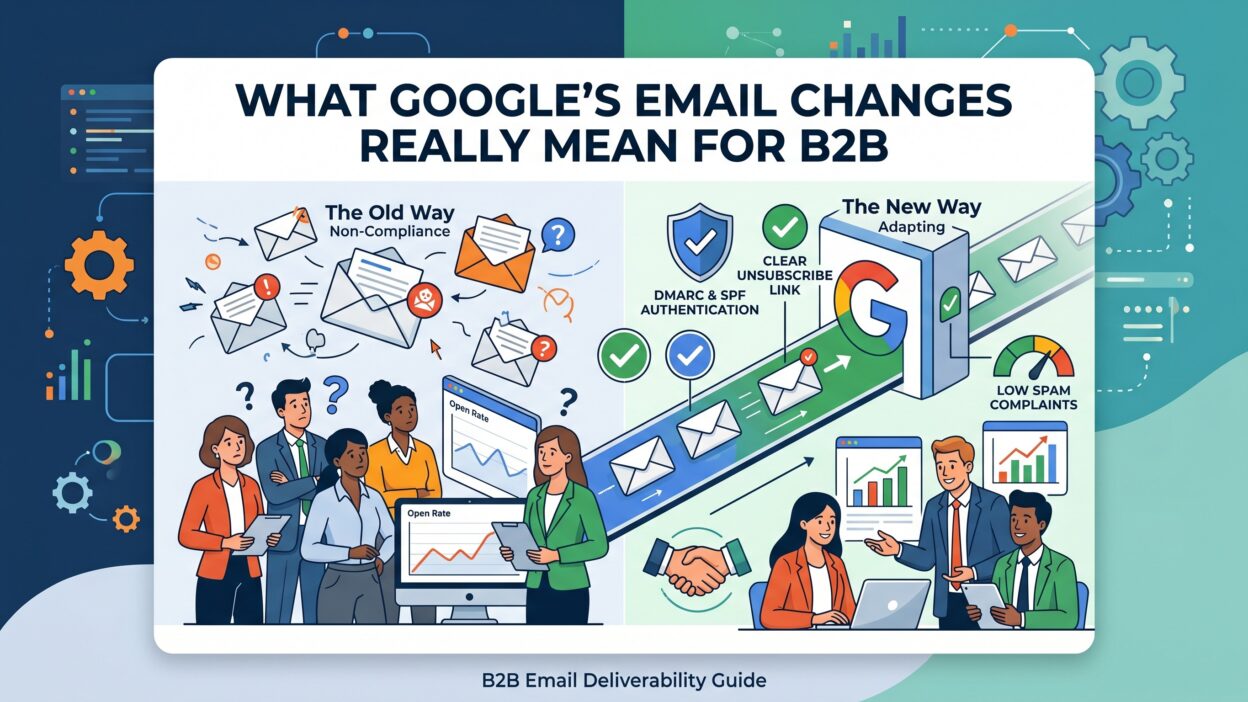
Google rolled out strict new requirements for email senders starting in 2024. The Google Email Changes primarily target senders who send high volumes of messages. Google defines high volume as 5,000 or more emails per day to Gmail accounts. However, even smaller senders face new scrutiny. Google wants to clean up its inbox ecosystem. It is cracking down on spam, spoofing, and deceptive email practices.
These rules require senders to authenticate their emails properly. Google now mandates SPF, DKIM, and DMARC records for all senders. SPF tells Gmail which servers can send on your behalf. DKIM adds a digital signature to verify message integrity. DMARC ties both together and tells Gmail what to do with unauthenticated mail.
Beyond authentication, Google now monitors spam complaint rates. If your spam rate exceeds 0.10 percent, Gmail starts throttling your mail. If it hits 0.30 percent, you face serious delivery problems. These thresholds are tight. Most B2B senders never tracked this metric before.
Google also demands that bulk senders provide a one-click unsubscribe option. Recipients must be able to opt out easily. This seems basic, but many B2B email sequences lacked this feature. Non-compliance now means deliverability issues, not just poor user experience.
The Google Email Changes represent the most significant overhaul to Gmail’s sender policies in years. Every B2B company should treat this as a top-priority technical and strategic update.
Why B2B Companies Are More Affected Than B2C
B2C brands have had email marketing compliance on their radar for years. They manage large lists, use ESPs, and follow CAN-SPAM rules closely. B2B companies operate differently. Their email practices are often less structured. Sales reps send cold outreach from personal domains. Marketing teams blast newsletters from tools that skip authentication setup. This gap makes B2B companies uniquely vulnerable to the Google Email Changes.
B2B emails rely heavily on cold outreach. A sales rep may send 200 emails per day. Across a team of 10, that is 2,000 emails daily. This volume matters under the new rules. Google watches patterns across domains and IP ranges. A domain with no DMARC record and a rising spam rate will suffer.
B2B companies also buy email lists. List quality in B2B is often poor. Old contacts, wrong job titles, and inactive emails inflate bounce rates. High bounce rates signal a poor sender reputation to Gmail. This reputation score affects every email your domain sends.
B2B sales cycles are long. A missed email means a missed follow-up. A missed follow-up can cost a deal worth tens of thousands of dollars. The stakes are higher per email compared to B2C. That is why the Google Email Changes hit B2B operations harder in terms of revenue impact.
B2B marketing teams must now rethink their entire email infrastructure. Compliance is no longer a nice-to-have. It is a revenue protection strategy.
Breaking Down the Technical Requirements
SPF: Sender Policy Framework
SPF is the foundation of email authentication. It is a DNS record that lists which mail servers can send email from your domain. Google now requires all senders to have a valid SPF record. Without it, your emails appear suspicious to Gmail filters. Setting up SPF is a technical task. You publish a TXT record in your domain’s DNS settings. Your IT team or email administrator can handle this setup in under an hour.
Many B2B companies already have SPF configured. The problem is that they add third-party tools without updating their SPF record. A CRM, an outreach tool, and a newsletter platform each need to be listed. Missing any one of them creates authentication gaps. These gaps can trigger spam filters even for legitimate emails.
DKIM: DomainKeys Identified Mail
DKIM adds a cryptographic signature to every email you send. Gmail uses this signature to confirm the message was not tampered with in transit. The Google Email Changes now require DKIM authentication for all senders. Your email service provider can generate the DKIM keys. You add the public key to your DNS records. The process takes technical knowledge but is well-documented by most email platforms.
DKIM failures are often invisible. Your emails appear to send normally. But Gmail quietly routes them to spam. Checking your DKIM status using a tool like MXToolbox or Google Postmaster Tools is essential. Do this immediately if you have not verified your setup.
DMARC: Domain-based Message Authentication
DMARC is the policy layer on top of SPF and DKIM. It tells Gmail what to do when an email fails authentication. You can instruct Gmail to do nothing, quarantine the email, or reject it outright. The Google Email Changes require bulk senders to have a DMARC policy in place. A basic policy at the monitoring level is the minimum starting point.
DMARC also provides reporting. You receive aggregate data about who is sending mail on behalf of your domain. This helps you catch unauthorized use of your domain for phishing. For B2B companies, protecting your domain reputation is critical. One phishing campaign using your domain can destroy years of sender trust.
One-Click Unsubscribe
Google now mandates that bulk senders support RFC 8058 one-click unsubscribe. This means a single click removes the recipient from your list. No confirmation pages, no email reply required. Marketing automation platforms like HubSpot, Marketo, and Mailchimp support this natively. Custom-built email systems need a technical update to comply. Ignoring this requirement leads to spam complaints, which directly impact deliverability under the Google Email Changes.
How Google Email Changes Impact Your Email Deliverability
Deliverability is whether your email reaches the inbox. Many B2B teams assume high open rates mean good deliverability. That assumption is wrong. An email can be delivered to a spam folder and still count as delivered. Open rates only reflect engaged recipients. Gmail’s new enforcement of the Google Email Changes makes deliverability a technical discipline, not a guessing game.
Google Postmaster Tools is a free resource that shows your domain reputation. It displays spam rates, authentication failures, and delivery errors. B2B companies that set up this dashboard gain immediate visibility into their email health. Most teams have never logged into this tool. Start there. The data is eye-opening.
Spam complaint rates are now a hard metric. Previously, Gmail tracked complaints but did not enforce strict limits. Under the new Google Email Changes, exceeding 0.10 percent complaints triggers throttling. Exceeding 0.30 percent triggers blocking. For a sender sending 5,000 emails daily, that means just 15 spam reports per day can cause deliverability problems. This is a very low threshold. B2B senders who use aggressive cold outreach tactics will feel this pressure immediately.
IP reputation also matters. If you send from a shared IP through an email service provider, your reputation depends partly on other senders on that IP. Moving to a dedicated IP and warming it properly gives you more control. For high-volume B2B senders, a dedicated IP is not optional under the new rules.
List hygiene becomes a revenue activity. Cleaning your list removes invalid emails and reduces bounce rates. Lower bounce rates protect your sender reputation. Under the Google Email Changes, sender reputation directly determines inbox placement. Schedule a list cleaning every 90 days at minimum.
What B2B Sales Teams Must Change Right Now
Sales teams are the biggest source of email compliance risk in B2B organizations. They operate fast, send high volumes, and rarely think about DNS records. The Google Email Changes demand that sales leadership get involved in email infrastructure decisions.
Cold email sequences need a compliance audit. Review every sequence in your sales engagement platform. Check for one-click unsubscribe links. Verify the sending domain is authenticated. Look at bounce rates by campaign. Remove any sequence that targets unverified email lists. These actions protect your domain from reputation damage.
Sending limits need recalibration. Google watches daily send volume patterns. A new domain sending 1,000 emails on day one triggers red flags. Domain warming is now a formal requirement. Increase your send volume gradually over 4 to 6 weeks. Start at 50 emails per day and scale up methodically. Sales ops teams should build this into their outreach playbook.
Segment your outreach domains. Many smart B2B companies now use separate subdomains for cold outreach. They protect their primary domain reputation by isolating risky sending to a subdomain. If a subdomain gets flagged, the primary domain stays clean. This tactic is a direct response to the Google Email Changes and their enforcement model.
Train your sales reps on spam triggers. Phrases like free, guaranteed, limited time, and urgent increase spam filter scores. Personalization reduces spam likelihood. A generic blast email to 500 contacts is far more likely to get flagged than a personalized message to 20. Quality beats quantity under the new rules.
B2B Marketing Compliance Under the New Rules
Marketing teams face a different set of challenges from the Google Email Changes. They manage newsletters, drip campaigns, product announcements, and event invitations. The volume is high. The audience is mixed. Some recipients are engaged. Many are not.
Segmentation is the most powerful tool a B2B marketing team can use right now. Stop sending every email to every contact. Segment by engagement level. Send high-frequency emails only to recently active contacts. Re-engagement campaigns can win back dormant subscribers. Contacts who do not respond after a re-engagement series should be removed from active lists.
Email marketing platforms must be configured correctly. Many marketing teams set up their ESP years ago and never revisited the authentication settings. The Google Email Changes require a fresh audit. Check SPF, DKIM, and DMARC settings inside your ESP. Confirm that your ESP is sending from your authenticated domain, not a shared platform domain. This detail alone causes significant deliverability issues for B2B marketers.
Content also matters to Gmail’s spam filters. Emails with too many images, too few words, or deceptive subject lines score poorly. Keep your email content clean. Use plain text sections. Balance images with meaningful copy. Avoid misleading preview text. These small adjustments improve both user experience and deliverability scores.
Set up email performance monitoring monthly. Track open rates, click rates, spam complaints, and unsubscribes together. A sudden drop in open rates often signals a deliverability problem. Catching this early limits the damage. The Google Email Changes make proactive monitoring a business requirement, not a marketing preference.
Secondary Keyword Deep Dive: DMARC, SPF, and DKIM for B2B
Most B2B companies understand that SPF, DKIM, and DMARC exist. Few have fully implemented all three correctly. The Google Email Changes exposed this gap fast. Proper implementation is not a one-time task. It requires ongoing management.
SPF records have a 10 DNS lookup limit. Many B2B companies exceed this limit by including too many third-party senders. Exceeding the limit breaks SPF authentication silently. Use SPF flattening tools to optimize your record. Check it after every new tool you add to your email stack.
DKIM key rotation is a best practice that most B2B teams skip. Rotating your DKIM keys every 6 to 12 months reduces the risk from compromised keys. Some ESPs handle this automatically. Others require manual updates. Know which category your platform falls into.
DMARC reporting should be reviewed weekly. Third-party tools like Dmarcian, Valimail, and EasyDMARC aggregate DMARC reports into readable dashboards. These tools show unauthorized senders using your domain. They help you tighten your policy from monitoring to enforcement. Under the Google Email Changes, moving to a reject policy is the gold standard for domain protection.
Frequently Asked Questions About Google Email Changes
Do the Google Email Changes apply to small B2B companies?
Yes. Google’s core authentication requirements apply to all senders, not just bulk mailers. Small B2B companies sending fewer than 5,000 emails per day still need SPF, DKIM, and DMARC in place. The spam complaint thresholds and unsubscribe requirements scale based on volume but the authentication rules are universal. A startup sending 100 cold emails a day is not exempt from the Google Email Changes.
How do I check if my domain is compliant?
Use Google Postmaster Tools to check your domain reputation and authentication status. Run your domain through MXToolbox to verify SPF, DKIM, and DMARC records. Send a test email using mail-tester.com to get a compliance score. These three tools together give you a complete picture of your email health. Address any failures immediately.
What happens if I ignore the Google Email Changes?
Your emails land in spam or get rejected entirely. Gmail accounts make up a significant portion of most B2B prospect lists. Losing access to Gmail inboxes means losing a major outreach channel. Revenue impact is direct and measurable. Non-compliant senders risk permanent domain reputation damage that takes months to repair. Ignoring the Google Email Changes is not a viable strategy for any B2B company.
Can cold email still work under the new rules?
Yes, but it must be done right. Cold email works when it is targeted, personalized, authenticated, and respectful of unsubscribe requests. Spray-and-pray tactics are now punished by Gmail’s spam filters. B2B companies that invest in quality outreach with proper authentication will see strong deliverability. Those who rely on volume over quality will face the full force of the Google Email Changes enforcement.
How often should I review my email authentication settings?
Review your SPF, DKIM, and DMARC settings every time you add a new email tool. Review your DMARC reports monthly. Check your Google Postmaster Tools dashboard weekly. Schedule a full email compliance audit every quarter. The Google Email Changes created a new standard of email hygiene. Treat it like a recurring business process, not a one-time fix.
Building a Future-Proof B2B Email Strategy
The Google Email Changes signal a permanent shift. Gmail will only get stricter over time. B2B companies that build compliant email infrastructure today will have a competitive advantage tomorrow. Those who delay will face rising costs and shrinking deliverability.
Build an email governance framework. Assign ownership of email compliance to a specific person or team. Create documentation for authentication records, tool approvals, and list hygiene protocols. Require approval before adding new email sending tools. This governance structure prevents the authentication gaps that the Google Email Changes are designed to catch.
Invest in your email list quality, not just your list size. A list of 5,000 engaged contacts outperforms a list of 50,000 stale ones. Engagement signals like opens, clicks, and replies tell Gmail that your emails are wanted. Wanted emails reach the inbox. Unwanted emails face the consequences of the Google Email Changes.
Diversify your outreach channels. Email is powerful but not your only option. LinkedIn outreach, phone calls, and direct mail can complement your email strategy. Relying entirely on email creates single-channel risk. A well-rounded B2B outreach strategy is more resilient to policy changes from any platform.
Partner with an email deliverability expert. Many B2B companies lack in-house expertise to manage technical email compliance. Deliverability consultants and specialized agencies can audit your setup, implement best practices, and monitor ongoing performance. The cost of expert help is far lower than the cost of a domain reputation crisis.
Read More:-How to Build a Martech Budget That Proves Its Value
Conclusion

The Google Email Changes are not a temporary disruption. They represent a new baseline for professional email communication. Gmail holds enormous power over B2B communication channels. Every company that relies on email must now meet Google’s standards or accept the consequences.
The path forward is clear. Authenticate your domain with SPF, DKIM, and DMARC. Monitor your spam complaint rates. Clean your lists regularly. Train your sales team on compliant outreach. Update your marketing platform settings. Implement one-click unsubscribe across all campaigns.
These actions are not complex. They require attention, time, and internal alignment. The companies that execute on these steps quickly will protect their pipeline. They will continue reaching decision-makers at target accounts. Their emails will land in inboxes while competitors fade into spam folders.
The Google Email Changes reward senders who respect their audience. They punish those who treat email as a numbers game. B2B success in the inbox era requires quality, compliance, and consistency. Make the shift now. Your revenue depends on it.