Introduction
TL;DR Sales teams face enormous pressure every day. They chase leads, qualify prospects, write follow-ups, and manage CRM updates — all at once. Most of it is repetitive. Most of it can be automated.
A Custom AI Sales Agent using CrewAI and Python changes that equation completely. It handles outreach, qualification, objection handling, and pipeline management without human hand-holding. It works around the clock and never misses a follow-up.
This guide walks you through the full process. You will understand what CrewAI is, why Python is the right language for this build, and how to architect an AI sales agent that actually closes deals. No fluff. Just a clear, technical, and practical walkthrough.
Table of Contents
What Is CrewAI and Why Does It Matter for Sales Automation?
CrewAI is an open-source Python framework for building multi-agent AI systems. It lets developers create agents that each have a specific role, a set of tools, and a defined goal. These agents collaborate to complete complex tasks.
In a sales context, you might have one agent that researches prospects, another that writes personalized outreach emails, and a third that qualifies leads based on responses. Each agent works independently. CrewAI coordinates them into a unified workflow.
The framework is built on top of LangChain. It uses large language models as the reasoning backbone. You can plug in OpenAI, Anthropic Claude, or any compatible model. This flexibility makes CrewAI powerful for enterprise-grade automation.
Python is the natural language for this work. The AI and data science ecosystem lives in Python. Libraries like LangChain, Pydantic, and FastAPI integrate seamlessly with CrewAI. Developers who know Python can build a Custom AI Sales Agent using CrewAI and Python without learning a new stack.
Sales teams that deploy CrewAI-powered agents reduce manual workload dramatically. Agents handle the first 80 percent of the sales cycle automatically. Human reps focus on high-value conversations and closing. The result is a faster, leaner, more productive sales operation.
Core Components of a Custom AI Sales Agent
Agents
An agent in CrewAI is an autonomous unit with a role, a goal, and a backstory. The role defines what the agent does. The goal tells it what outcome to pursue. The backstory gives the LLM context to generate relevant outputs.
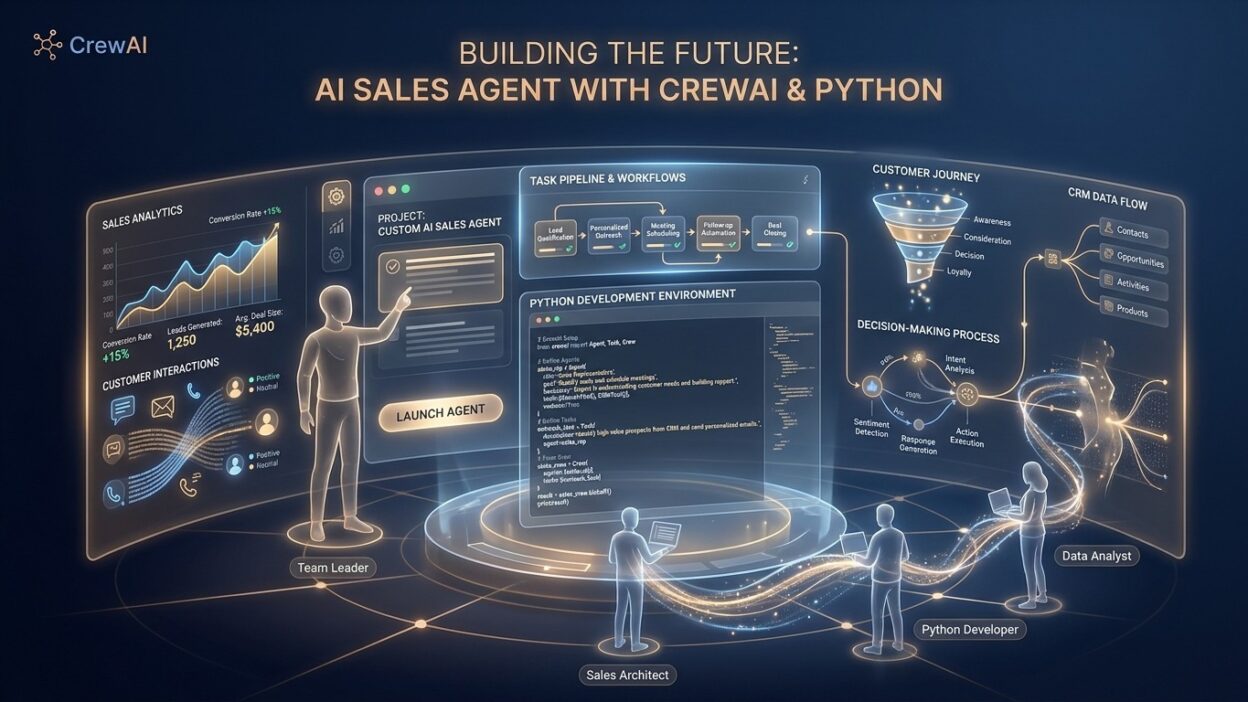
For a sales system, you define agents like a Prospect Researcher, an Outreach Specialist, a Lead Qualifier, and a Follow-Up Manager. Each agent operates within its scope. It does not bleed into another agent’s responsibility.
This separation keeps the system clean. Each agent is easy to debug, update, or replace. The modular design also lets you scale the crew by adding new agents as your sales process evolves.
Tasks
Tasks are the specific jobs assigned to agents. A task has a description, an expected output, and an agent assignment. CrewAI passes task outputs between agents when needed. One agent’s output becomes another agent’s input.
For example, the Prospect Researcher produces a structured prospect profile. The Outreach Specialist receives that profile and generates a personalized email. The Lead Qualifier receives the response and scores the lead. This chaining creates a complete sales workflow.
Tools
Tools give agents the ability to interact with the outside world. A web search tool lets the Prospect Researcher pull company data from the internet. An email tool lets the Outreach Specialist send messages directly. A CRM tool lets the system log activities automatically.
CrewAI supports custom tools built with Python. You write a simple function, decorate it, and attach it to an agent. This extensibility is what makes a Custom AI Sales Agent using CrewAI and Python so adaptable to real business needs.
Crew
The Crew is the orchestration layer. It holds all agents, tasks, and configuration settings. You define the process type — sequential or hierarchical. Sequential means tasks run in order. Hierarchical means a manager agent coordinates other agents dynamically.
Most sales automation workflows use sequential processing. The prospect research feeds the outreach. The outreach feeds the qualification. The qualification feeds the follow-up. It flows naturally from one stage to the next.
Setting Up Your Python Environment for CrewAI
Start with a clean Python environment. Use Python 3.10 or higher. Create a virtual environment to isolate your project dependencies. This prevents version conflicts and keeps your build reproducible.
Run this command to create your environment: python -m venv crewai-sales-env. Activate it with source crewai-sales-env/bin/activate on Mac or Linux. Use crewai-sales-env\Scripts\activate on Windows.
Install the required packages next. The core dependencies for a Custom AI Sales Agent using CrewAI and Python are crewai, langchain, langchain-openai, and python-dotenv. Install them with pip install crewai langchain langchain-openai python-dotenv.
Create a .env file in your project root. Store your API keys there. You need an OpenAI API key at minimum. If you use external tools like Serper for web search or SendGrid for email, add those keys as well. Never hardcode credentials in your source files.
Your project directory should have a clean structure. Create separate files for agents, tasks, tools, and the main crew configuration. This separation makes the codebase maintainable as the system grows. A well-organized project is easier to debug and extend.
Building the Prospect Research Agent
Defining the Agent
The Prospect Research Agent gathers intelligence on potential customers. It looks up company size, industry, recent news, pain points, and key decision-makers. This data forms the foundation of every personalized outreach message.
Define this agent in your agents.py file. Give it a clear role: Senior B2B Prospect Researcher. Set its goal: find detailed, actionable intelligence on each target company. Write a backstory that frames it as a veteran sales researcher who knows how to find signal in noise.
Set allow_delegation to False. This agent works independently. It does not need to hand off subtasks to other agents. Set verbose to True during development so you can see its reasoning in the terminal.
Attaching Search Tools
The research agent needs a web search tool. Use the SerperDevTool from crewai_tools. Initialize it and pass it to the agent’s tools parameter as a list. The agent can now search the internet for prospect data automatically.
You can also attach a website scraper tool. This lets the agent visit a prospect’s website directly and extract relevant details. Combined with web search, the agent builds a rich, multi-source intelligence profile for each prospect.
Custom tools are straightforward to build. Write a Python function that calls an external API or performs a local computation. Decorate it with the @tool decorator from crewai. Attach it to the agent. Your Custom AI Sales Agent using CrewAI and Python gains new capabilities with every tool you add.
Defining the Research Task
Create a Task object for this agent. The description should instruct the agent clearly. Tell it what company it is researching, what information to find, and what format to use for output. Be specific. Vague task descriptions produce vague outputs.
The expected output should be a structured prospect profile. Include company name, industry, size, recent news, identified pain points, and key contacts. This structured output feeds cleanly into the next agent in the pipeline.
Building the Outreach Specialist Agent
Agent Configuration
The Outreach Specialist writes personalized sales emails. It receives the prospect profile from the Research Agent and crafts a message that speaks directly to the prospect’s situation. Generic templates do not work. This agent writes specifically.
Define it with a role of Expert B2B Sales Copywriter. Set its goal to write compelling, personalized outreach emails that generate replies. Give it a backstory as a sales copywriter who understands buyer psychology and business pain points deeply.
This agent does not need web search tools. It works entirely from the context provided in the task. The prospect profile contains all the information it needs to write a strong first email.
Email Writing Task
The task description should give this agent the prospect profile as input. Tell it to write a subject line, an opening line referencing something specific about the prospect, a value proposition, and a clear call to action. Limit the email to under 150 words.
Short emails perform better in cold outreach. The agent should know this. Include it in the task description. Tell the agent to write like a human, not a marketer. Avoid buzzwords. Use plain language. Be direct about the ask.
This is one of the most valuable parts of a Custom AI Sales Agent using CrewAI and Python. Personalization at scale is impossible for human reps. The AI agent does it for every single prospect automatically.
Building the Lead Qualifier Agent
Qualification Logic
Lead qualification determines whether a prospect is worth pursuing further. It evaluates fit based on company size, budget signals, decision-making authority, timeline, and expressed interest. Manual qualification is slow and inconsistent. The AI agent does it faster and more objectively.
Define this agent as a Sales Qualification Specialist. Its goal is to evaluate each lead against your ideal customer profile and assign a qualification score. The backstory frames it as a sales operations expert who has built qualification frameworks for high-growth B2B companies.
Attach a CRM tool if you want the qualification result logged automatically. Custom CRM tools connect to HubSpot, Salesforce, or Pipedrive via their APIs. The agent writes the qualification result directly to the deal record.
Scoring Framework
Define a clear scoring rubric in the task description. Use a BANT framework — Budget, Authority, Need, Timeline. Assign scores for each dimension. The agent evaluates the available data against each criterion and produces a composite score.
High-scoring leads go to a fast-track pipeline. Low-scoring leads enter a nurture sequence. The system routes each lead automatically based on the score. Human reps only touch the high-priority opportunities. This is the core efficiency gain from building a Custom AI Sales Agent using CrewAI and Python.
Assembling and Running the Full Crew
Crew Configuration
Import all your agents and tasks into a main crew.py file. Initialize each agent object. Initialize each task object and assign it to the correct agent. Create the Crew object and pass it the agents list, the tasks list, and the process type.
Use Process.sequential for a straightforward pipeline. The research task runs first. The outreach task runs second using the research output. The qualification task runs third using the outreach response data. The flow is clean and predictable.
Set verbose to True on the Crew object during development. You will see each agent’s thought process, tool calls, and output in the terminal. This transparency is invaluable for debugging and improving your Custom AI Sales Agent using CrewAI and Python.
Running the Crew
Call crew.kickoff() to start execution. Pass an inputs dictionary containing the prospect data you want to process. The crew will run through all tasks, coordinate between agents, and return the final output.
Wrap the kickoff call in a loop to process multiple prospects. Feed each prospect from a CSV file or a database query. The crew processes them sequentially. You can also run multiple crews in parallel using Python’s multiprocessing library for higher throughput.
Integrating External Tools and APIs
CRM Integration
A sales agent without CRM integration is incomplete. Build a custom CRM tool using the requests library in Python. Write a function that posts lead data to your CRM’s API endpoint. Decorate it and attach it to the Lead Qualifier agent.
HubSpot, Salesforce, and Pipedrive all offer REST APIs. Authentication uses OAuth or API keys. The Python function handles the request, parses the response, and returns a confirmation. The agent logs every qualified lead automatically.
Email Sending Integration
Connect the Outreach Specialist to an email sending service. SendGrid and Mailgun both have clean Python SDKs. Build a tool that takes the agent’s email draft, the prospect’s email address, and a subject line, then sends the message via API.
Add tracking capabilities. Configure the email service to track opens and clicks. Feed that engagement data back into the qualification agent. A prospect who opens your email three times scores higher than one who never opens it. This feedback loop makes the Custom AI Sales Agent using CrewAI and Python progressively smarter.
Calendar and Meeting Booking
Add a meeting booking tool using Calendly’s API. When the Lead Qualifier identifies a high-score prospect who responds positively, the Follow-Up agent can send a meeting booking link automatically. The prospect books directly. The CRM gets updated. The rep gets a calendar notification.
This end-to-end automation covers prospect research all the way through meeting booking. Human reps step in at the call. Everything before that runs automatically.
Optimizing Agent Performance and Prompt Engineering
-Writing Effective Agent Backstories
The backstory is not decorative. It shapes how the LLM approaches its role. A well-written backstory produces more relevant, higher-quality outputs. Be specific about the agent’s expertise, methodology, and standards.
Avoid generic backstories like ‘experienced sales professional.’ Write something like: ‘You spent 12 years as a senior enterprise sales executive at a SaaS company with a 90-day sales cycle. You know how to identify budget holders, surface urgency, and write emails that executives actually reply to.’
Specificity improves output quality noticeably. Test different backstory versions. Evaluate which one produces the best outreach emails or the most accurate lead scores. Treat prompt engineering as an ongoing optimization process.
Temperature and Model Selection
Use a low temperature setting for qualification and research tasks. These require factual, consistent outputs. Use a slightly higher temperature for the outreach specialist. Creativity improves email quality and reduces repetitive phrasing.
GPT-4o works well for all three agent types. Claude 3.5 Sonnet is an excellent alternative, especially for writing tasks. Test both models across your use cases. The best model for your Custom AI Sales Agent using CrewAI and Python depends on your specific tasks and budget.
Deploying Your AI Sales Agent in Production
Productionizing the Code
Development and production environments differ. Production code needs error handling, logging, and retry logic. Wrap API calls in try-except blocks. Log errors to a centralized logging service. Implement exponential backoff for rate-limited API calls.
Use a job scheduler like Celery or APScheduler to trigger the crew on a schedule. Run prospect research every morning. Send outreach emails at optimal times. Run qualification scoring after business hours. Scheduling automates the entire operation.
Containerization with Docker
Package your Custom AI Sales Agent using CrewAI and Python in a Docker container. This makes deployment consistent across environments. Write a Dockerfile that installs Python, copies your code, and installs dependencies. Build the image and push it to a container registry.
Deploy the container to a cloud provider. AWS ECS, Google Cloud Run, and Azure Container Apps all work well. Set environment variables for API keys using the platform’s secrets manager. Your agent runs in the cloud with no local machine dependency.
Monitoring and Observability
Production AI agents need monitoring. Track task completion rates, API call counts, email open rates, and lead qualification scores. Use a dashboard tool like Grafana or a simple database with a reporting layer.
Set up alerts for failures. If the research agent fails five times in a row, send a Slack notification. If email delivery rates drop below a threshold, trigger an investigation. Observability keeps your production system reliable.
Real-World Use Cases for CrewAI Sales Agents
SaaS Company Outbound Sales
A SaaS company targets mid-market companies in the logistics sector. The research agent scrapes LinkedIn and company websites every morning. It builds profiles for 50 new prospects daily. The outreach agent writes personalized cold emails referencing each company’s specific logistics challenges.
The qualification agent scores replies based on expressed interest, company size, and budget signals. High-score leads go directly into the sales rep’s priority queue. Reps start their day with warm, pre-qualified conversations. Sales cycle shortens. Close rates improve.
B2B Consulting Firm Lead Generation
A consulting firm wants to grow its pipeline without adding headcount. A Custom AI Sales Agent using CrewAI and Python handles all prospecting activity. It identifies companies that recently raised funding, a signal of readiness to invest in consulting services.
The agent reaches out with messaging tailored to post-funding growth challenges. Response rates exceed industry averages because the outreach is timely and relevant. The firm books more discovery calls. Consultants focus on delivery rather than prospecting.
Real Estate Investment Outreach
A real estate investment firm uses a CrewAI sales agent to identify off-market property owners. The research agent pulls property records and ownership data. The outreach agent writes letters to owners of properties that match the firm’s acquisition criteria.
The qualification agent processes responses and flags motivated sellers. The firm acquires more off-market deals because the outreach volume and personalization exceed what a human team could achieve manually.
FAQs: Building a Custom AI Sales Agent Using CrewAI and Python
What is CrewAI and how does it work for sales automation?
CrewAI is an open-source Python framework that lets developers build multi-agent AI systems. Each agent has a defined role, tools, and goal. Agents collaborate to complete complex workflows. In sales, agents handle research, outreach, qualification, and follow-up automatically. A Custom AI Sales Agent using CrewAI and Python orchestrates all of these functions in a coordinated pipeline.
Do I need advanced Python skills to build a CrewAI sales agent?
Intermediate Python skills are sufficient. You need to understand classes, functions, environment variables, and package management. CrewAI’s documentation is clear and well-maintained. Developers with six months of Python experience can build a working sales agent in a weekend.
Which LLM works best for a CrewAI sales agent?
GPT-4o and Claude 3.5 Sonnet are both excellent choices. GPT-4o delivers strong all-around performance. Claude 3.5 Sonnet excels at writing tasks, making it ideal for the outreach specialist agent. Test both models in your specific context. Choose based on output quality and cost per task.
Can I connect CrewAI to my existing CRM?
Yes. Build a custom tool in Python that calls your CRM’s REST API. Attach it to the relevant agent. HubSpot, Salesforce, and Pipedrive all have well-documented APIs. The Custom AI Sales Agent using CrewAI and Python logs leads, updates deal stages, and creates contact records automatically.
How do I prevent the AI agent from sending bad outreach emails?
Add a human review step before the email tool fires. Build a review queue where a human approves emails above a confidence threshold before they send. Use a staging environment to test email quality before deploying to production. Refine agent backstories and task descriptions iteratively.
Is CrewAI suitable for enterprise sales automation?
CrewAI scales well for enterprise use cases. It supports hierarchical processing, custom tools, and integration with enterprise APIs. Security and compliance requirements are addressable through proper secrets management and data handling practices. Many enterprise teams build production systems on CrewAI because of its flexibility and the maturity of the Python AI ecosystem.
What are the main costs of running a CrewAI sales agent?
The main costs are LLM API calls, web search API calls, and cloud infrastructure for hosting. GPT-4o costs roughly $0.015 per 1,000 output tokens. A full research and outreach cycle for one prospect might cost $0.05–$0.15 total. Processing 500 prospects per day costs under $75 in API fees. Cloud hosting adds a fixed monthly cost depending on your setup.
The Future of AI Sales Agents Built with CrewAI and Python
AI sales agents are still in early stages. Current systems handle research, outreach, and qualification well. Future systems will handle negotiations, objection responses, and multi-channel follow-up sequences dynamically.
CrewAI is evolving rapidly. New features like memory persistence, long-running agent sessions, and richer tool ecosystems are in active development. The framework will support more sophisticated sales workflows as it matures.
The Python AI ecosystem continues to grow. New libraries for voice communication, video personalization, and real-time data enrichment will integrate with CrewAI agents. Sales agents will move beyond email into phone, LinkedIn, and video outreach.
Sales teams that invest in building a Custom AI Sales Agent using CrewAI and Python today develop a genuine competitive advantage. They learn the architecture, refine the prompts, and build institutional knowledge around AI-driven sales operations. That knowledge compounds over time.
The firms that automate sales intelligently will outgrow those that do not. The technology is accessible. The Python skills are learnable. The only barrier is the decision to start building.
Read More:-How to Reduce LLM Latency: Tips for Snappy, Real-Time AI Applications
Conclusion

Building a Custom AI Sales Agent using CrewAI and Python is one of the highest-leverage investments a sales-driven business can make. The setup requires focused effort. The payoff is a tireless, consistent, and intelligent sales engine that operates at scale.
CrewAI gives developers a clean framework for agent architecture. Python provides the tools and libraries needed to connect every component. Together, they enable a sales automation system that would have required a full engineering team five years ago.
Start small. Build the research agent first. Test its output against your ideal customer profile. Add the outreach agent next. Evaluate email quality before you connect a live sending tool. Add qualification logic once outreach is stable. Expand from there.
Each iteration makes the system smarter. Each refinement improves output quality. The Custom AI Sales Agent using CrewAI and Python grows more effective as you invest in it.
Your sales reps deserve better use of their time. Let the AI agent handle prospecting, research, and first-touch outreach. Let your reps focus on relationships, discovery, and closing. That is where human skill creates irreplaceable value.
The tools are available. The documentation is clear. The Python community is large and supportive. There is no better time to build your first Custom AI Sales Agent using CrewAI and Python than right now.