Introduction
TL;DR Google’s Gemma 4 model changes what open-source AI can do. Developers worldwide are building serious, production-ready applications with it. The model brings capabilities that previously required expensive proprietary APIs.
Gemma 4 Tool Calling is the feature that makes it genuinely agent-capable. It lets the model decide when to call external functions, what arguments to pass, and how to use the returned data to complete a task.
This is not a simple chatbot upgrade. Tool calling turns Gemma 4 into an autonomous reasoning system. It can check the weather, query a database, send emails, execute code, or call any API you connect to it — all driven by natural language instructions from the user.
This step-by-step guide explains everything. You will understand what Gemma 4 Tool Calling is, why it matters for AI agent development, how the function calling mechanism works under the hood, and how to implement it in your own Python projects.
Every section is practical. Every explanation is clear. By the end of this guide, you will have a working mental model and a concrete implementation path for building AI agents powered by Gemma 4 Tool Calling.
Table of Contents
What Is Gemma 4 Tool Calling?
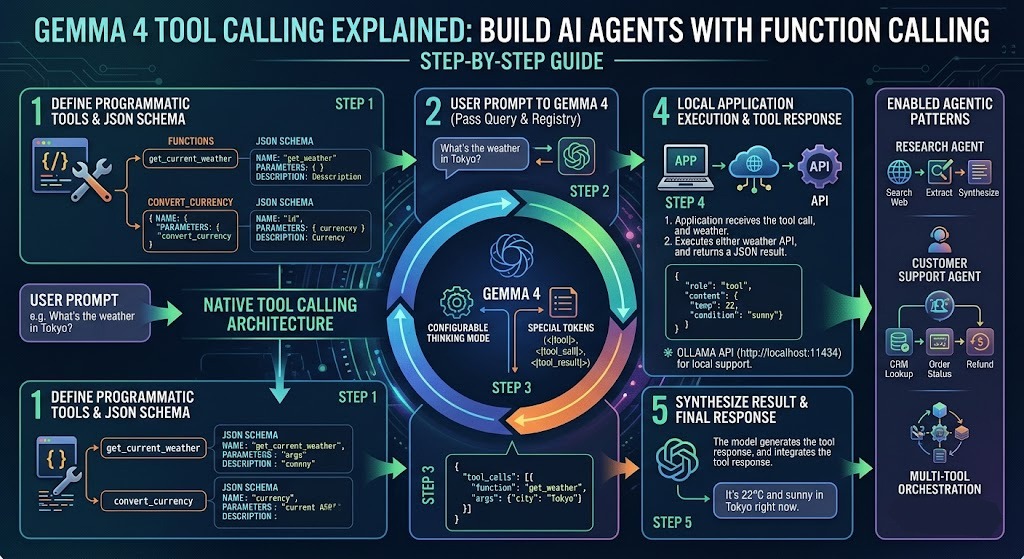
Tool calling is a structured mechanism that allows language models to interact with external systems. The model does not execute code itself. It generates a structured output that specifies which function to call and what arguments to pass. Your application executes that function and feeds the result back to the model.
Gemma 4 Tool Calling builds this capability directly into the model’s architecture. Google trained Gemma 4 to recognize when a user’s request requires external data or action. The model formats a function call request in a predictable, parseable structure. Your code intercepts that request, runs the actual function, and returns the result to the model for final response generation.
This loop — user input, model reasoning, function call, result ingestion, final response — is the foundation of every AI agent built on Gemma 4 Tool Calling.
The Difference Between Tool Calling and Plain Text Generation
Standard text generation produces unstructured output. The model writes sentences. Those sentences may describe an action, but they cannot trigger one. A plain text model saying “I would check the weather for you” does nothing useful. It generates words.
Gemma 4 Tool Calling produces structured, actionable output. The model generates a function call specification rather than descriptive text. Your application reads that specification and executes the real function. The result comes back as structured data. The model interprets that data and produces a final, grounded response.
That difference changes everything. Text generation describes. Tool calling acts. That distinction is why developers are building real-world applications — weather assistants, data analysis tools, customer support agents, and autonomous research systems — on Gemma 4 Tool Calling rather than on plain generative models.
Why Gemma 4 Specifically?
Gemma 4 is open-source. You run it locally or deploy it on your own infrastructure. You pay no per-token API fees beyond your compute costs. You keep your data private. You control the model’s behavior completely.
These properties make Gemma 4 Tool Calling the most compelling option for teams that need agent capabilities without dependency on closed commercial APIs. The model delivers frontier-level reasoning in an open, deployable package.
How Function Calling Works Under the Hood
Understanding the mechanics prevents confusion when debugging real implementations. Gemma 4 Tool Calling follows a clear, consistent protocol. Every step in the loop has a defined input format and output format.
Tool Schema Definition
You define your tools as structured schemas before the model ever sees a user message. Each schema describes one function. It includes the function name, a plain-language description of what the function does, and a list of parameters with their names, types, and descriptions.
The schema uses a JSON-like format. Here is an example for a weather lookup function:
{
  "name": "get_current_weather",
  "description": "Retrieve the current weather for a specific city.",
  "parameters": {
    "type": "object",
    "properties": {
      "city": {
        "type": "string",
        "description": "The name of the city to check weather for."
      },
      "units": {
        "type": "string",
        "enum": ["celsius", "fahrenheit"],
        "description": "Temperature unit for the response."
      }
    },
    "required": ["city"]
  }
}
The description field matters more than most developers initially realize. Gemma 4 uses that description to decide whether the function is relevant to the user’s request. A vague description produces unreliable function selection. A precise description produces consistent, accurate tool use.
Model Reasoning and Function Selection
The model receives the user’s message alongside the full set of tool schemas. It reasons about what the user wants. It determines whether any available tool can help fulfill that request.
When a tool is relevant, Gemma 4 Tool Calling generates a structured function call response rather than a natural language answer. That response specifies the function name and the argument values the model extracted from the user’s message.
When no tool is relevant, the model generates a plain text response. This conditional behavior is important. The model does not call functions indiscriminately. It exercises judgment about when tools are genuinely needed.
Function Execution and Result Return
Your application parses the model’s function call response. It identifies the function name and argument values. It executes the corresponding Python function with those arguments. It captures the return value.
The return value goes back to the model as a new message in the conversation. The model reads the function result and generates a final natural language response that incorporates the real data.
This three-step loop is the complete cycle of Gemma 4 Tool Calling. Every agent behavior you build on top of this mechanism is a variation of this fundamental pattern.
Setting Up Your Development Environment
A clean setup prevents hours of debugging later. Gemma 4 Tool Calling requires a few core dependencies and careful attention to model access requirements.
Python Environment and Dependencies
Create a fresh virtual environment before installing anything. Python 3.10 or higher is required. Gemma 4 uses features from modern Python that older versions cannot support cleanly.
Install your core dependencies with pip:
pip install transformers torch accelerate bitsandbytes sentencepiece
pip install huggingface_hub python-dotenv requests
The transformers library from Hugging Face provides the primary interface to Gemma 4. The accelerate library handles device placement and mixed-precision inference efficiently. The bitsandbytes library enables 4-bit and 8-bit quantization for running larger model variants on consumer hardware.
Accessing Gemma 4 on Hugging Face
Gemma 4 requires accepting Google’s usage terms on Hugging Face. Visit the model page at huggingface.co and accept the license agreement. Generate a Hugging Face access token with read permissions. Store it in a .env file.
from huggingface_hub import login
import os
from dotenv import load_dotenv

load_dotenv()
login(token=os.getenv("HF_TOKEN"))
Log in before loading the model. Hugging Face caches the authentication credentials locally. Subsequent runs skip the login step automatically.
Choosing the Right Model Variant
Gemma 4 comes in multiple parameter sizes. The 2B variant runs comfortably on 8GB VRAM. The 9B variant needs 16GB or more for full-precision inference. Use 4-bit quantization with bitsandbytes to run the 9B variant on 10–12GB VRAM with minimal quality degradation. Gemma 4 Tool Calling performs best on the 9B variant. Choose based on your available hardware.
Loading Gemma 4 and Defining Tools
With your environment ready, load the model and define your first set of tools. This section builds the foundation layer that every subsequent agent capability rests on.
Loading the Model and Tokenizer
from transformers import AutoTokenizer, AutoModelForCausalLM, BitsAndBytesConfig
import torch

model_id = "google/gemma-4-9b-it"

quantization_config = BitsAndBytesConfig(
    load_in_4bit=True,
    bnb_4bit_compute_dtype=torch.bfloat16
)

tokenizer = AutoTokenizer.from_pretrained(model_id)
model = AutoModelForCausalLM.from_pretrained(
    model_id,
    quantization_config=quantization_config,
    device_map="auto"
)
The device_map="auto" argument tells the transformers library to place model layers across available devices automatically. On a single GPU machine, this places the full model on GPU. On multi-GPU setups, it distributes layers optimally.
The instruction-tuned variant — identified by the -it suffix — is mandatory for tool calling. The base model variant does not follow structured function call formats reliably. Always use the instruction-tuned version for Gemma 4 Tool Calling implementations.
Defining Your Tool Schemas in Python
Store tool schemas as Python dictionaries. Group them in a list called tools. Pass this list to the model with every user message.
tools = [
    {
        "name": "get_current_weather",
        "description": "Get the current weather conditions for a specific city.",
        "parameters": {
            "type": "object",
            "properties": {
                "city": {"type": "string", "description": "City name"},
                "units": {
                    "type": "string",
                    "enum": ["celsius", "fahrenheit"],
                    "description": "Temperature unit"
                }
            },
            "required": ["city"]
        }
    },
    {
        "name": "search_database",
        "description": "Search a product database and return matching items.",
        "parameters": {
            "type": "object",
            "properties": {
                "query": {"type": "string", "description": "Search term"},
                "max_results": {"type": "integer", "description": "Maximum number of results"}
            },
            "required": ["query"]
        }
    }
]
Write descriptions with care. Each description should answer one question: what does this function do, and when should the model call it? A well-written description dramatically improves the reliability of Gemma 4 Tool Calling in production.
Implementing the Tool Calling Loop
The tool calling loop is the operational heart of any agent built on Gemma 4 Tool Calling. This loop handles the full cycle from user input to grounded response.
Formatting the Initial Prompt
Gemma 4’s instruction-tuned chat template structures messages as a conversation. Use the tokenizer’s apply_chat_template method to format messages correctly. Pass your tools alongside the messages.
import json

def run_agent(user_message: str, tools: list) -> str:
    messages = [
        {"role": "user", "content": user_message}
    ]

    # Format prompt with tool definitions
    prompt = tokenizer.apply_chat_template(
        messages,
        tools=tools,
        tokenize=False,
        add_generation_prompt=True
    )

    inputs = tokenizer(prompt, return_tensors="pt").to(model.device)

    outputs = model.generate(
        **inputs,
        max_new_tokens=512,
        do_sample=False,
        temperature=None,
        top_p=None
    )

    response = tokenizer.decode(
        outputs[0][inputs["input_ids"].shape[1]:],
        skip_special_tokens=True
    )

    return response
Set do_sample=False for tool calling tasks. Deterministic generation produces more consistent function call formatting. Sampling introduces variability that occasionally breaks structured output parsing.
Parsing the Function Call Response
The model’s response for a tool call contains a structured block rather than natural language. Parse this block to extract the function name and arguments.
def parse_tool_call(response: str) -> dict | None:
    try:
        # Gemma 4 wraps tool calls in a specific format
        if "<tool_call>" in response:
            start = response.index("<tool_call>") + len("<tool_call>")
            end = response.index("</tool_call>")
            tool_call_str = response[start:end].strip()
            return json.loads(tool_call_str)
    except (ValueError, json.JSONDecodeError):
        return None
    return None
A return value of None from this function means the model produced a plain text response. Your application handles that as a final answer. A returned dictionary means the model wants to call a function.
Executing Functions and Returning Results
Map function names to actual Python callables. Execute the function with the extracted arguments. Return the result to the model.
def execute_tool(tool_call: dict, function_map: dict) -> str:
    function_name = tool_call.get("name")
    arguments = tool_call.get("arguments", {})

    if function_name not in function_map:
        return json.dumps({"error": f"Unknown function: {function_name}"})

    try:
        result = function_map[function_name](**arguments)
        return json.dumps(result)
    except Exception as e:
        return json.dumps({"error": str(e)})
Feed the function result back into the conversation as a new message with the role tool. The model reads this result and generates a final natural language response that incorporates the real data.
This complete loop — prompt, generate, parse, execute, return, respond — defines the working implementation of Gemma 4 Tool Calling in a Python agent application.
Building a Complete Weather Agent
A weather agent is the clearest practical demonstration of Gemma 4 Tool Calling working end-to-end. It requires one external API, one tool definition, and the standard tool calling loop.
The Weather Lookup Function
Use the Open-Meteo API. It is free, requires no API key, and returns structured JSON weather data.
import requests
def get_current_weather(city: str, units: str = "celsius") -> dict:
# Geocode the city name to coordinates
geo_url = f"https://geocoding-api.open-meteo.com/v1/search?name={city}&count=1"
geo_response = requests.get(geo_url).json()
if not geo_response.get("results"):
return {"error": f"City '{city}' not found."}
location = geo_response["results"][0]
lat, lon = location["latitude"], location["longitude"]
city_name = location["name"]
# Fetch current weather
temp_unit = "celsius" if units == "celsius" else "fahrenheit"
weather_url = (
f"https://api.open-meteo.com/v1/forecast?"
f"latitude={lat}&longitude={lon}"
f"¤t_weather=true&temperature_unit={temp_unit}"
)
weather_data = requests.get(weather_url).json()
current = weather_data.get("current_weather", {})
return {
"city": city_name,
"temperature": current.get("temperature"),
"units": units,
"wind_speed_kmh": current.get("windspeed"),
"weather_code": current.get("weathercode")
}
Wiring the Full Agent
function_map = {"get_current_weather": get_current_weather}

user_input = "What is the weather like in Tokyo right now? Use Celsius."
raw_response = run_agent(user_input, tools)
tool_call = parse_tool_call(raw_response)

if tool_call:
    tool_result = execute_tool(tool_call, function_map)

    # Feed result back to model
    messages = [
        {"role": "user", "content": user_input},
        {"role": "assistant", "content": raw_response},
        {"role": "tool", "content": tool_result}
    ]

    final_prompt = tokenizer.apply_chat_template(
        messages, tokenize=False, add_generation_prompt=True
    )
    final_inputs = tokenizer(final_prompt, return_tensors="pt").to(model.device)
    final_outputs = model.generate(**final_inputs, max_new_tokens=256, do_sample=False)
    final_response = tokenizer.decode(
        final_outputs[0][final_inputs["input_ids"].shape[1]:],
        skip_special_tokens=True
    )
    print(final_response)
else:
    print(raw_response)
Run this agent with any city name. Gemma 4 Tool Calling selects the correct function, extracts the city and units from the user’s message, executes the real API call, and generates a natural, grounded weather report.
Handling Multi-Turn Tool Calling
Real agents handle conversations that span multiple turns and require multiple sequential tool calls. A user might ask a follow-up question that needs fresh data. The agent must call the same or a different tool again to answer it.
Multi-turn Gemma 4 Tool Calling requires maintaining the full conversation history across turns. Every turn appends new messages to the history. The model sees the complete context with each new generation.
Conversation State Management
class AgentSession:
    def __init__(self, tools: list, function_map: dict):
        self.tools = tools
        self.function_map = function_map
        self.history = []

    def chat(self, user_message: str) -> str:
        self.history.append({"role": "user", "content": user_message})

        prompt = tokenizer.apply_chat_template(
            self.history, tools=self.tools,
            tokenize=False, add_generation_prompt=True
        )
        inputs = tokenizer(prompt, return_tensors="pt").to(model.device)
        outputs = model.generate(**inputs, max_new_tokens=512, do_sample=False)
        response = tokenizer.decode(
            outputs[0][inputs["input_ids"].shape[1]:], skip_special_tokens=True
        )

        tool_call = parse_tool_call(response)

        if tool_call:
            self.history.append({"role": "assistant", "content": response})
            tool_result = execute_tool(tool_call, self.function_map)
            self.history.append({"role": "tool", "content": tool_result})
            return self.chat("")  # Recurse for final response
        else:
            self.history.append({"role": "assistant", "content": response})
            return response
This session class persists conversation history across turns. The recursive call after a tool execution handles chained tool calls cleanly. The model can call multiple tools in sequence before producing its final answer — a key capability that makes Gemma 4 Tool Calling viable for complex, multi-step agent tasks.
Best Practices for Production Deployments
Moving from a working prototype to a production deployment requires attention to reliability, cost, and safety. These best practices apply to any serious Gemma 4 Tool Calling implementation.
Write Precise Tool Descriptions
Vague descriptions cause tool selection errors. Every description should specify the exact conditions under which the model should call the function. Include the type of data the function returns. Mention the scenarios where the function is not appropriate. Precise descriptions produce consistent, reliable Gemma 4 Tool Calling behavior across diverse user inputs.
Validate Function Arguments Before Execution
The model extracts argument values from natural language. This extraction is accurate but not infallible. Validate every argument against expected types and ranges before passing it to the actual function. Return clear error messages when validation fails. Feed those error messages back to the model so it can correct its approach.
Implement Execution Timeouts
External API calls can hang. Database queries on large datasets can run long. Set execution timeouts on every tool function. Return a structured timeout error to the model when a function exceeds its allowed time. The model incorporates that error gracefully and informs the user appropriately.
Log Every Tool Call
Log the function name, arguments, result, and execution time for every tool call in production. These logs are your primary debugging resource when agent behavior becomes unexpected. They also provide the data you need to improve tool descriptions and expand the function map over time.
Applying these practices consistently makes your Gemma 4 Tool Calling implementation robust enough for real users and real workloads.
Frequently Asked Questions
Q: What makes Gemma 4 Tool Calling different from earlier Gemma model versions?
Gemma 4 received explicit training on function calling tasks. The model understands structured tool schemas natively and produces well-formatted function call output reliably. Earlier Gemma versions required significant prompt engineering workarounds to achieve similar behavior. Gemma 4 handles it cleanly out of the box through the instruction-tuned chat template system.
Q: Can I use Gemma 4 Tool Calling with locally hosted models?
Yes. This guide uses the Hugging Face transformers library which runs the model entirely locally. You need sufficient GPU VRAM or a system with enough RAM for CPU inference. The 4-bit quantized 9B variant is the practical starting point for most developers building local Gemma 4 Tool Calling applications.
Q: How many tools can I define at once?
There is no hard limit. However, more tools increase the length of the system prompt and consume more context window tokens. Practical implementations typically define between 5 and 20 tools per agent session. Group related functions and use clear, distinctive descriptions to help the model navigate a larger tool set accurately.
Q: Does Gemma 4 Tool Calling support parallel tool execution?
The base model generates one function call specification at a time. Parallel tool execution requires your application layer to detect when multiple independent tool calls are possible and execute them concurrently before returning all results to the model simultaneously. This is an application-level optimization rather than a model-level capability.
Q: How do I handle tool call failures gracefully?
Return structured error messages as tool results rather than raising exceptions. Include the error type and a plain-language description of what went wrong. Gemma 4 reads these error messages and typically responds by explaining the issue to the user or attempting an alternative approach automatically.
Q: Is Gemma 4 suitable for production AI agent applications?
Gemma 4 reaches near frontier-model quality on reasoning and instruction-following benchmarks. The 9B variant handles complex, multi-step tool calling tasks reliably. Teams already run Gemma 4 Tool Calling in production for customer support, data analysis, and internal automation use cases. Evaluate it against your specific task requirements before committing to a production deployment.
Read More:-10 NotebookLM Super Prompts For Pro-Level Productivity
Conclusion

Gemma 4 Tool Calling represents a genuine turning point for open-source AI agent development. Google built a model that reasons accurately, formats function calls reliably, and integrates real-world data sources through a clean, well-documented protocol.
This guide walked you through the complete picture. You understand what Gemma 4 Tool Calling is and why it matters. You know how the three-step function calling loop works. You have working Python code for loading the model, defining tools, parsing function calls, executing real functions, and managing multi-turn conversations.
The weather agent example demonstrated the full pattern end-to-end. The production best practices section gave you the guidance to take that pattern into real deployments.
Gemma 4 Tool Calling unlocks AI agent capabilities that previously required expensive commercial API access. You control the model. You own the infrastructure. You keep your data private. You pay only for compute.
Start with one tool and one use case. Get that working reliably. Add tools incrementally. Build your function map as your agent’s responsibilities grow. The architecture scales cleanly from a single-tool prototype to a complex multi-tool autonomous agent.
Build your first Gemma 4 Tool Calling agent today. The code is here. The model is accessible. The only remaining step is yours.