Introduction
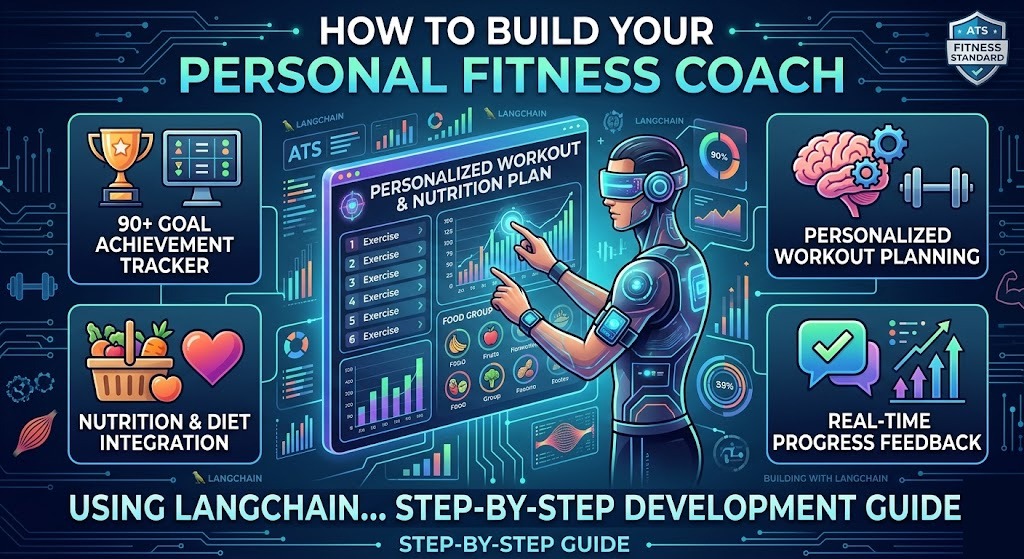
TL;DR Most fitness apps give you the same generic workout plan. They never learn from you. They never adjust when your goals shift. That is the real problem. A Personal Fitness Coach using LangChain solves this completely. LangChain is an open-source framework that lets developers build AI-powered apps with real memory, logic, and reasoning. When you combine it with a large language model, you get a fitness assistant that actually thinks. It responds to your inputs. It remembers your history. It gives advice that makes sense for your body and your goals. This blog walks you through the entire build process. You will understand what LangChain does, why it works for fitness coaching, and how to set up a system that behaves like a real coach.
Table of Contents
What Is LangChain and Why Use It for Fitness Coaching?
LangChain is a framework built for developers who want to create intelligent applications with language models. It connects your AI model to tools, data sources, memory systems, and APIs. Without LangChain, a language model just answers questions. With LangChain, it follows a chain of logic, remembers what you said before, and calls external services when needed. This makes it perfect for building a Personal Fitness Coach using LangChain.
A fitness coach needs more than just answers. It needs context. It needs to know your age, weight, fitness level, past injuries, and weekly schedule. It needs to remember what workout it gave you last Tuesday. It needs to adjust your plan when you report fatigue or soreness. LangChain gives you all the building blocks to make that happen. You do not need to build memory systems or tool integrations from scratch. LangChain handles that infrastructure so you can focus on the coaching logic.
Developers across the world use LangChain to build customer service bots, legal assistants, research tools, and educational tutors. Applying the same framework to fitness coaching is a natural fit. The domain is conversational. The data is personal. The logic is sequential. LangChain excels in all three areas.
Core Concepts in LangChain You Need to Know First
Before you write a single line of code, you need to understand four core concepts in LangChain. The first is Chains. A chain connects multiple AI steps into one logical sequence. You feed the first step input, and the result moves to the next step automatically. The second concept is Memory. LangChain stores conversation history so your coach remembers past interactions. The third concept is Agents. Agents let your AI decide which tool to use based on the user’s input. The fourth concept is Tools. Tools are external functions your agent can call, like a calorie calculator or a workout database. Your Personal Fitness Coach using LangChain will rely on all four of these concepts working together. Learning them individually first saves you hours of debugging later.
Setting Up Your Development Environment for LangChain
Start with a clean Python environment. Python 3.10 or higher works best with LangChain. Create a virtual environment before installing anything. This keeps your project dependencies isolated and avoids version conflicts with other projects on your machine.
Install the required packages using pip. You need langchain, openai, python-dotenv, and chromadb for vector storage. Run pip install langchain openai python-dotenv chromadb in your terminal. Store your API keys in a .env file. Never hardcode them directly into your scripts. Use the dotenv library to load them at runtime. This is a basic security practice that protects your credentials.
Choose your language model next. OpenAI’s GPT-4 is the most capable option for a Personal Fitness Coach using LangChain. It handles nuanced instructions well and produces detailed, structured fitness plans. If cost is a concern, GPT-3.5-turbo offers solid performance at a lower price point. You can also use open-source models through Hugging Face if you want full control over the model layer. Set up your LLM connection in a configuration file that you import across your project. This makes it easy to swap models later without changing multiple files.
Structuring Your Project Folder for Clean Development
Good folder structure saves you time as the project grows. Create a root folder named fitness-coach. Inside it, create four subfolders: chains, agents, memory, and tools. Keep your main application file in the root. Store your prompt templates in a prompts folder. Put your environment variables in a .env file at the root level. This structure mirrors how LangChain itself organizes its logic. When you need to update the memory module, you go directly to the memory folder. When you need to add a new tool, you add it to the tools folder. Clear structure makes collaboration easier too. Another developer can understand your project layout within minutes of opening it.
Building the Core Coaching Chain in LangChain
The coaching chain is the heart of your Personal Fitness Coach using LangChain. It takes user input, processes it through a prompt template, and returns a structured fitness recommendation. Start by writing your system prompt. This prompt defines the coach’s personality, expertise, and boundaries. Be specific. Tell the model it is an experienced certified personal trainer. Tell it to ask clarifying questions before giving advice. Tell it to always consider the user’s fitness level before suggesting intensity.
Create a PromptTemplate object in LangChain. Pass in your system prompt and define the input variables your chain will expect. Common input variables for a fitness coach include user_name, fitness_goal, current_fitness_level, available_equipment, and days_per_week. These variables get injected into the prompt at runtime with the actual values the user provides.
Build an LLMChain by combining your prompt template with your chosen language model. When a user submits a query, the chain fills in the template variables, sends the complete prompt to the model, and returns the response. Test this chain with several different user profiles before moving on. A beginner wanting to lose weight needs a very different plan than an advanced athlete training for a marathon. Your prompt template must be flexible enough to handle both cases well.
Writing Effective Prompt Templates for Fitness Advice
Your prompt template determines the quality of every coaching response. A weak prompt produces generic, unhelpful advice. A strong prompt produces specific, actionable plans. Start your template with a clear role definition. Tell the model it is a certified personal trainer with ten years of experience. Add context about the user’s profile immediately after the role definition. Include their goal, current level, available equipment, and any physical limitations.
Add explicit instructions about response format. Tell the model to provide a weekly workout schedule broken into days. Tell it to include sets, reps, rest periods, and exercise descriptions. Tell it to end every response with a motivational note. Format instructions make responses consistent and predictable. Your Personal Fitness Coach using LangChain needs consistency to feel professional. Users notice when responses look completely different from session to session. Template discipline solves that problem directly.
Adding Memory So Your Fitness Coach Remembers You
Memory is what separates a real coach from a simple chatbot. Your Personal Fitness Coach using LangChain needs to remember your previous conversations. Without memory, the user has to re-explain their goals every single session. That is frustrating and defeats the purpose of a personalized experience.
LangChain offers several memory types. ConversationBufferMemory stores the full conversation history. It works well for short sessions but grows large over time. ConversationSummaryMemory stores a compressed summary of past conversations instead of the raw text. This is more efficient for long-term coaching relationships. ConversationBufferWindowMemory keeps only the last N messages. This balances context preservation with token efficiency.
For a fitness coaching app, ConversationSummaryMemory is the best choice. The coach needs to remember key facts like the user’s goals, injuries, and recent performance, not every word of every session. Set up the memory module to summarize each session at the end. Store the summary in a persistent database. SQLite works well for local development. PostgreSQL works better for production. Load the stored summary at the start of each new session. Inject it into the prompt as additional context. This gives your Personal Fitness Coach using LangChain the ability to build a real relationship with the user over weeks and months.
Using Vector Stores to Store User Fitness History
Vector stores let you store and retrieve information based on semantic similarity. This goes beyond simple keyword search. ChromaDB is a popular open-source vector database that works seamlessly with LangChain. Use it to store your user’s fitness logs, workout completions, and progress notes.
When a user reports completing a workout, convert that report into an embedding and store it in ChromaDB. When the coach needs to plan next week’s session, retrieve relevant past entries using a similarity search. The coach gets context about what the user has done recently without needing to read every single log entry. This approach scales well as the user’s history grows. Your Personal Fitness Coach using LangChain becomes smarter and more relevant the longer someone uses it. That is the hallmark of a genuinely intelligent coaching system.
Building Agents That Make Smart Fitness Decisions
Agents in LangChain make autonomous decisions about which tools to use. A fitness coaching agent can decide whether to calculate calories, look up an exercise, check the user’s schedule, or pull recent progress data. The agent reads the user’s message, determines what action to take, and executes the right tool. This makes your Personal Fitness Coach using LangChain far more capable than a simple question-answer system.
Define your agent’s available tools clearly. Each tool needs a name, a description, and a function. The description is critical because the agent reads it to decide when to use the tool. Write descriptions that are specific and unambiguous. A tool named CalorieCalculator should have a description like: Use this tool when the user asks about calorie intake, calorie burning, or daily nutrition targets.
Use LangChain’s initialize_agent function to set up your agent. Pass in your list of tools, your language model, and the agent type. ZERO_SHOT_REACT_DESCRIPTION is a reliable agent type for fitness coaching. It lets the agent reason through its decisions step by step before taking action. Test your agent with complex queries. Ask it to create a meal plan and a workout plan together. Watch how it calls multiple tools in sequence to build a complete response.
Essential Tools to Include in Your Fitness Coaching Agent
Your agent needs practical tools to deliver real coaching value. Build a workout recommendation tool that takes fitness level and goal as inputs and returns an appropriate exercise list. Build a calorie calculator tool that takes weight, height, age, and activity level and returns daily calorie targets. Build a progress tracker tool that logs workout completions and computes weekly stats.
Add an exercise database lookup tool that fetches descriptions, muscle groups, and video links for any given exercise. Add a recovery advisor tool that recommends rest periods based on workout intensity and duration. Each of these tools makes your Personal Fitness Coach using LangChain more useful in practice. Real users ask real questions. A rich toolset means the agent can answer most of them without falling back on generic responses.
Connecting External APIs to Enhance Your Fitness Coach
External APIs expand what your fitness coach can do. The Nutritionix API gives your coach access to a massive food nutrition database. When a user asks about the macros in a chicken breast, the agent queries Nutritionix and returns accurate data. The Wger API provides a comprehensive exercise library with muscle group data. Connect your workout recommendation tool to this API for verified exercise information.
Fitness wearable APIs like Fitbit or Garmin let your coach pull real activity data. The coach knows how many steps the user took yesterday, how well they slept, and what their resting heart rate looks like. This data makes coaching advice far more accurate. A coach that tells you to push hard on a day you slept four hours is not a good coach. A Personal Fitness Coach using LangChain connected to wearable data avoids that mistake entirely.
Wrap each API integration as a LangChain Tool. Define the input schema clearly. Handle API errors gracefully so the agent does not crash when an external service is unavailable. Log all API calls for debugging. External dependencies introduce failure points, and good error handling keeps your coach reliable even when third-party services have issues.
Testing and Iterating Your Personal Fitness Coach Using LangChain
Testing a conversational AI system requires a different mindset than testing traditional software. You cannot write unit tests for every possible user message. Focus your testing on the most common user journeys. A beginner starting their first workout program. An intermediate athlete switching from weight loss to muscle gain. An advanced user recovering from an injury. Run your Personal Fitness Coach using LangChain through each of these scenarios manually.
Evaluate responses on four dimensions: accuracy, relevance, safety, and tone. Accuracy means the fitness advice is scientifically sound. Relevance means the advice matches the user’s specific profile. Safety means the coach never recommends anything that could cause injury. Tone means the coach sounds encouraging and professional, not robotic or dismissive.
Collect real user feedback as soon as possible. Even five beta users will surface problems you never anticipated in solo testing. Build a simple feedback mechanism into your app. Let users rate each coaching response. Store low-rated responses for manual review. Iterate on your prompt templates and tool logic based on what you learn. A Personal Fitness Coach using LangChain only gets better through continuous refinement.
Frequently Asked Questions About Personal Fitness Coach Using LangChain
Do I need machine learning expertise to build this?
No. LangChain abstracts away the complexity of working directly with machine learning models. You need solid Python skills and familiarity with APIs. Understanding how language models work conceptually helps, but you do not need to train models or understand neural network architecture. The LangChain documentation is thorough and beginner-friendly. Most developers build their first working chain within a day.
What does it cost to run a Personal Fitness Coach using LangChain?
The cost depends on which language model you use and how many users interact with the system. GPT-4 charges per token. A typical coaching session of ten exchanges costs approximately two to four cents. For a personal project with light usage, monthly costs stay well under ten dollars. For a commercial product with thousands of users, you need to optimize prompt length and choose cost-efficient models strategically. Use ConversationSummaryMemory to reduce token usage per session.
Can I deploy this as a mobile app?
Yes. Build your LangChain backend as a FastAPI or Flask REST API. Your mobile app sends user messages to the API endpoint and displays the coaching responses. This architecture separates your AI logic from your frontend completely. You can build the mobile app in React Native, Flutter, or any other framework you prefer. The backend handles all the LangChain complexity independently.
How do I handle user data privacy with a fitness coach app?
User fitness data is sensitive personal information. Store all user data in encrypted databases. Never send raw personal data to the language model API. Use anonymized identifiers instead of real names in your API calls. Give users full control over their data. Let them export or delete their history at any time. Follow GDPR and relevant local data protection regulations for your market. Consult a legal professional if you plan to launch commercially.
Is LangChain the best framework for this type of project?
LangChain is one of the most mature and well-documented frameworks for building AI agents with memory and tools. Alternatives include LlamaIndex, Haystack, and AutoGen. LangChain’s strength is its large community and extensive integration library. For a Personal Fitness Coach using LangChain specifically, the conversational memory modules and agent framework are a natural match. Other frameworks may outperform LangChain in specific use cases like document retrieval, but for dialogue-based coaching, LangChain leads the space.
Secondary Topics That Make Your Fitness Coach More Powerful
Building a great coaching experience means thinking beyond the core LangChain setup. RAG, or Retrieval Augmented Generation, lets your coach pull information from external documents. Load research-backed fitness guides, nutrition textbooks, and training programs into a vector database. When a user asks a detailed question, the coach retrieves relevant passages and incorporates them into the response. This grounds your coach’s advice in verified knowledge rather than pure model memory.
Multi-modal inputs will define the next generation of fitness coaching apps. Future versions of your Personal Fitness Coach using LangChain could analyze a photo of a user’s meal and estimate its macros. They could watch a video of a user performing an exercise and flag form errors. GPT-4 Vision and similar models make this possible today. Plan your architecture to accommodate multi-modal inputs in future iterations.
Gamification keeps users engaged over the long term. Add a streak tracker that rewards consecutive workout completions. Build milestone alerts that the coach delivers with enthusiasm when a user hits a new personal record. Design weekly check-in prompts that help users reflect on their progress. Engagement mechanics transform a useful tool into a habit-forming coaching relationship.
Read More:-11 ChatGPT Image-1.5 Prompts that You Must Try!
Conclusion
Building a Personal Fitness Coach using LangChain is one of the most practical and rewarding AI projects you can take on. The framework gives you memory, tools, and agent reasoning right out of the box. You combine those capabilities with smart prompt engineering and external API integrations to create something genuinely useful. Start small. Build the core coaching chain first. Get it producing solid workout recommendations. Add memory next. Then layer in agents and tools. Test with real users as early as possible and refine based on what you learn. The fitness coaching market is enormous and underserved by truly intelligent AI tools. A Personal Fitness Coach using LangChain that remembers you, adapts to your progress, and connects to real data fills a real gap. You have all the technical building blocks described in this guide. Pick a start date. Open your terminal. Build something that helps people get healthier every single day.