Introduction
TL;DR Every company collects data every single day. Some of that data holds real value. Some of it causes real damage. Dirty Data hides inside CRMs, spreadsheets and databases without anyone noticing right away. This guide explains what Dirty Data means, where it comes from and how teams clean it before it wrecks a decision.
Table of Contents
What Is Dirty Data
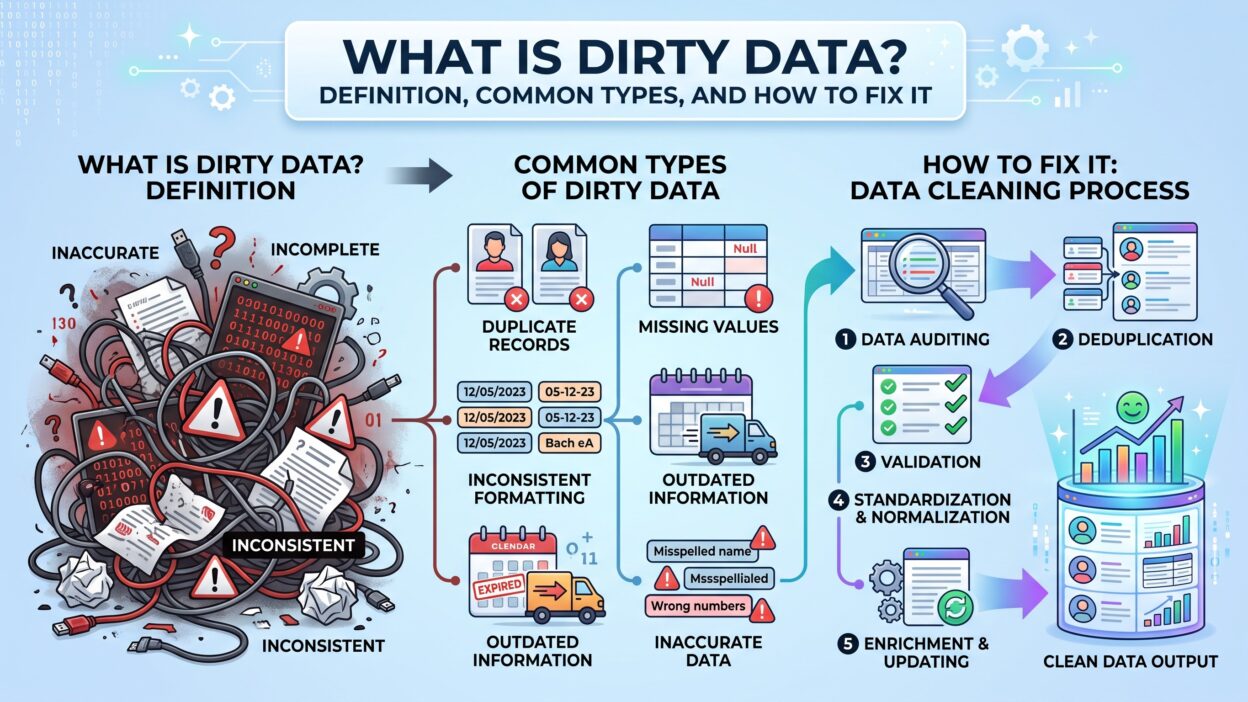
Dirty Data means information that contains errors, gaps or inconsistencies. A phone number with missing digits counts as Dirty Data. A customer record listed twice under different spellings counts too. This data looks fine on the surface but breaks reports the moment someone relies on it.
Companies rarely notice Dirty Data right away. A sales team pulls a report and trusts the numbers without question. Later, someone finds duplicate entries or outdated addresses buried inside that same report. By then, decisions already happened based on flawed information.
Dirty Data grows over time without regular cleanup. Systems age. Employees leave. Manual entry mistakes pile up year after year. A database that looked clean five years ago often turns messy today without anyone touching it directly.
Dirty Data vs Clean Data
Clean data stays accurate, complete and consistent across every system. Dirty Data breaks one or more of these rules. A single missing field doesn’t ruin a dataset, but thousands of missing fields absolutely do.
Why Dirty Data Matters for Every Business
Every department touches data daily, from sales to finance to marketing. Dirty Data spreads quietly across all these teams. A marketing list with wrong emails wastes budget. A finance report with duplicate transactions creates confusion during audits.
Common Causes of Dirty Data
Dirty Data doesn’t appear by accident most of the time. Specific habits and systems create it consistently across companies.
Manual Data Entry Errors
Humans make typing mistakes constantly. A rep types a phone number wrong during a rushed call. A support agent misspells a customer name under pressure. These small errors build into Dirty Data across thousands of records over time.
Duplicate Records Across Systems
Companies often run multiple systems that don’t talk to each other well. A customer signs up through a website form and later calls support directly. Two separate records get created for the same person. This duplication counts as one of the most common forms of Dirty Data.
Outdated Information Over Time
People change jobs, move addresses and switch phone numbers regularly. Data that looked accurate last year often turns stale today. Companies that skip regular updates end up with Dirty Data sitting untouched inside their systems for years.
Poor Data Integration Between Tools
Different tools store data in different formats. A CRM might store dates one way while a marketing tool stores them another way. This mismatch creates Dirty Data the moment teams try to merge these systems together.
Common Types of Dirty Data
Dirty Data comes in several recognizable forms. Teams need to know these types before they can fix any of them properly.
Duplicate Data
Duplicate records waste storage and confuse reporting. A customer appears three times under slightly different name spellings. Sales teams call the same person multiple times without realizing it. This creates a frustrating experience and wastes valuable time.
Incomplete Data
Missing fields count as one of the most frequent types of Dirty Data. A customer record without an email address limits marketing efforts. A sales lead without a phone number slows down outreach considerably.
Inaccurate Data
Wrong information causes real damage fast. A shipping address typed incorrectly sends a package to the wrong location. Inaccurate data inside financial systems creates serious compliance risks that companies can’t ignore.
Inconsistent Data Formats
Inconsistent formatting confuses systems and people equally. One system stores a date as MM/DD/YYYY. Another stores it as DD/MM/YYYY. This inconsistency turns into Dirty Data the moment someone tries to compare records across both systems.
Outdated Data
Old information stays technically true at one point but becomes false later. A customer’s old job title no longer matches their current role. Outdated Dirty Data misleads sales and marketing teams into targeting the wrong audience.
How Dirty Data Impacts Business Decisions
Dirty Data doesn’t just sit quietly in a database. It actively damages decisions made across every department.
Impact on Sales and Marketing
Sales teams waste hours chasing leads built on Dirty Data. A marketing campaign targets the wrong audience because the underlying list contains outdated job titles. These mistakes cost real money and real time that teams never get back.
Impact on Financial Reporting
Finance teams depend on accurate numbers for every report they build. Dirty Data inside financial systems creates errors that ripple through budgets and forecasts. A single duplicate transaction can throw off an entire quarterly report.
Impact on Customer Experience
Customers notice when companies get their information wrong. A support agent calls a customer by the wrong name pulled from Dirty Data. This small mistake damages trust fast, even when the product itself works perfectly fine.
How to Identify Dirty Data in Your Systems
Companies need a clear process to spot Dirty Data before it spreads further into daily operations.
Data Audits and Quality Checks
Regular audits catch Dirty Data early before it causes real damage. A quarterly review compares records across systems and flags inconsistencies. Teams that skip these audits often discover Dirty Data only after a major reporting failure.
Using Software to Detect Dirty Data
Modern tools scan databases automatically and flag duplicates, missing fields and formatting errors. These tools save time compared to manual review and catch patterns humans often miss during a quick scan.
How to Fix Dirty Data
Fixing Dirty Data takes a clear process, not a one-time cleanup effort.
Data Cleansing Best Practices
Data cleansing starts with removing duplicates and filling gaps. Teams standardize formats across every system next. This process takes time, but it prevents Dirty Data from spreading further into new records.
Setting Data Entry Standards
Clear entry rules stop new Dirty Data before it starts. A required field for phone numbers reduces missing data significantly. Standard formats for dates and addresses keep every new record consistent from day one.
Automating Data Validation
Automation catches errors the moment someone enters new data. A form that rejects invalid email formats prevents Dirty Data at the source. This approach works better than fixing problems after they already exist inside a database.
Regular Data Maintenance Routines
Cleanup can’t happen once and stop there. Companies need scheduled maintenance routines that check for Dirty Data every few months. This ongoing habit keeps databases accurate long after the first major cleanup project ends.
Tools That Help Manage Dirty Data
Several tools exist specifically to catch and fix Dirty Data before it damages reports or decisions.
CRM-Based Cleaning Tools
Most CRMs offer built-in features that flag duplicate records and missing fields. Sales teams use these tools to keep customer data accurate without extra manual work every week.
Third-Party Data Quality Platforms
Dedicated platforms specialize in finding Dirty Data across multiple systems at once. These tools connect to CRMs, spreadsheets and databases together, then generate a single report showing every issue found.
FAQs
What exactly counts as Dirty Data?
Dirty Data includes any information that contains errors, duplicates, missing fields or outdated details. It looks usable at first glance but causes problems once teams rely on it.
How does Dirty Data affect a business?
It wastes time, damages customer trust and skews financial reports. Teams make poor decisions when they trust numbers built on Dirty Data.
What’s the fastest way to fix Dirty Data?
Start with an audit to find the biggest issues first. Remove duplicates, fill critical gaps and standardize formats before moving to full automation.
Can software fully prevent Dirty Data?
Software reduces Dirty Data significantly, but it can’t stop every human error. Combining automated tools with clear entry standards works best.
How often should companies check for Dirty Data?
Most companies benefit from a quarterly review. High-growth companies with heavy data entry should check monthly instead.
Does Dirty Data affect small businesses too?
Yes. Small businesses often feel the impact faster since they rely on smaller datasets where every error has stronger weight.
Read More:-Best MCP Servers for Sales Teams: Tools, Costs, and Limits
Conclusion
Dirty Data hides in plain sight until it breaks a report or damages a customer relationship. Every business collects some level of Dirty Data over time, but few take the steps needed to clean it properly. Regular audits, clear entry standards and the right tools keep this problem under control long term. Companies that treat data quality as an ongoing habit avoid the costly mistakes that Dirty Data creates. Clean data leads to better decisions, and better decisions build stronger businesses over time.