Introduction
TL;DR Every engineering team has faced the same nightmare. An alert fires at 2 AM. Logs flood the terminal. Nobody knows where to start. A DevOps agent to monitor logs and suggest fixes changes that experience completely.
This idea is not science fiction anymore. Modern AI tools make it possible to build an autonomous agent that watches your logs, spots anomalies, and recommends targeted fixes — all without human intervention at the first triage layer.
Engineering leaders care about this because on-call fatigue is real and expensive. The average incident response costs organizations thousands of dollars per hour. An intelligent agent that cuts mean time to resolution by even 30% delivers massive ROI fast.
This blog walks through everything. You will learn what a DevOps agent to monitor logs and suggest fixes actually looks like, how to architect one, which tools you need, and how teams are deploying these agents in production today. Every section is practical and grounded in real engineering decisions.
Table of Contents
What Is a DevOps Agent?
A DevOps agent is an autonomous software program. It observes your infrastructure, makes decisions, and takes actions without waiting for a human to intervene. The term “agent” comes from AI research. An agent perceives its environment, reasons about what it sees, and acts on that reasoning.
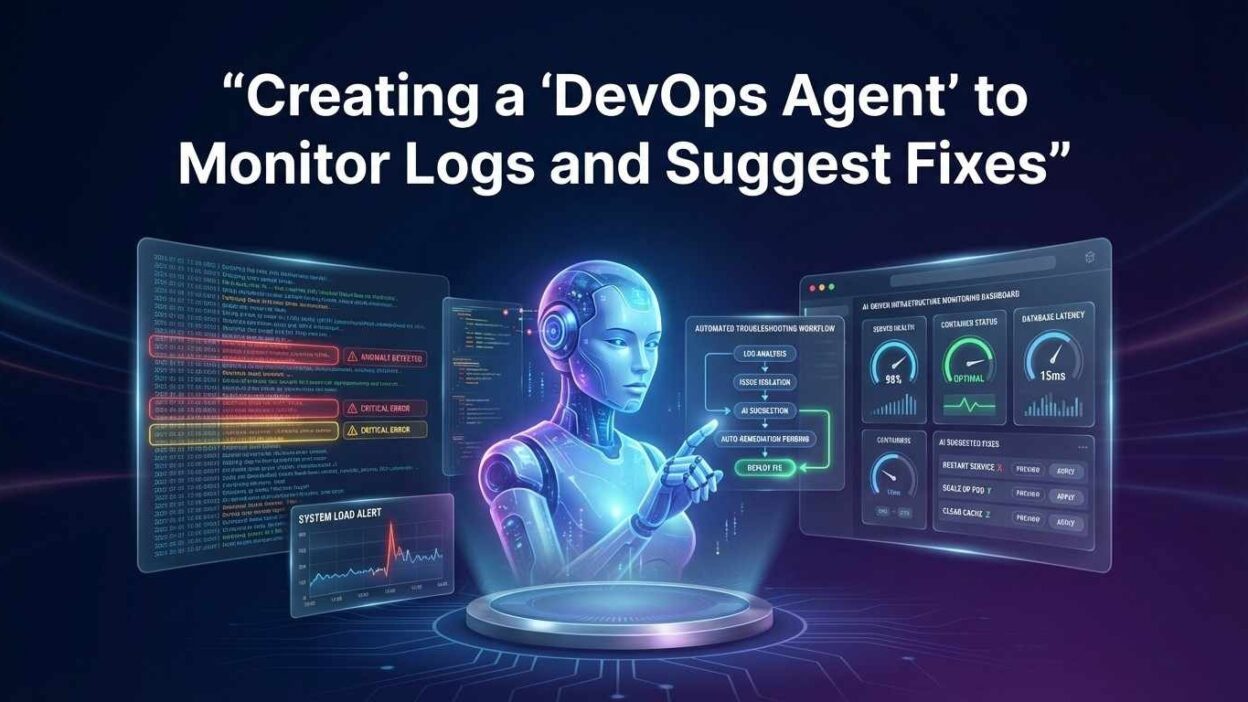
A DevOps agent to monitor logs and suggest fixes sits at the intersection of observability and AI. It replaces the first hour of manual incident investigation. It reads logs faster than any human. It cross-references error patterns against known failure modes. It surfaces a fix recommendation before your on-call engineer finishes their first coffee.
Traditional monitoring tools alert you when something breaks. A DevOps agent does more. It tells you what broke, why it likely broke, and what to do about it. That shift from alert to answer is the core value proposition.
Reactive Monitoring vs. Agentic Monitoring
Reactive monitoring fires an alert when a threshold crosses. Agentic monitoring continuously reasons about system state. Reactive tools ask “is this metric above X?” Agentic tools ask “what does this pattern mean and what should happen next?”
The difference shows up during incidents. A reactive monitor tells you CPU is at 95%. A DevOps agent to monitor logs and suggest fixes tells you CPU is at 95% because a memory leak in your payment service causes excessive garbage collection, and it recommends a pod restart plus a ticket for the engineering team.
That specificity is what makes agentic monitoring worth building. The diagnosis arrives with the alert, not two hours after it.
Why Teams Build a DevOps Agent to Monitor Logs and Suggest Fixes
The business case is strong and specific. On-call engineers spend 60–70% of incident time on log investigation before they even attempt a fix. A DevOps agent to monitor logs and suggest fixes collapses that investigation time dramatically.
Alert fatigue is the second major driver. Teams that operate large Kubernetes clusters often receive hundreds of alerts per day. Most are noise. Engineers learn to ignore alerts, which creates blind spots. An agent that filters noise and prioritizes real issues restores trust in the alerting system.
Knowledge silos are another problem agents solve. Senior engineers carry institutional knowledge about failure patterns. When that person is on vacation, the team struggles. An agent encodes that knowledge permanently. It applies senior-engineer-level pattern recognition on every shift, every day.
The Cost of Ignoring Log Intelligence
Unanalyzed logs are a liability. Critical errors sit in log streams for hours before anyone notices. Slow degradation cascades into full outages because no system connected the dots early enough. The absence of a DevOps agent to monitor logs and suggest fixes means your team starts every incident from zero.
Industry data from DORA research shows that elite-performing engineering teams have mean time to restore service under one hour. Teams without intelligent log analysis average four to eight hours per major incident. That gap represents real business impact in lost revenue, customer churn, and engineer burnout.
Building or adopting a DevOps agent to monitor logs and suggest fixes is not a luxury for large enterprises only. Small teams with limited on-call rotations benefit the most. Every hour of sleep saved is an engineer who arrives sharp the next morning.
Core Architecture of a Log-Monitoring DevOps Agent
Building a DevOps agent to monitor logs and suggest fixes requires four core components working together. Each component has a specific job. Missing any one of them breaks the agent’s ability to reason and act.
Log Sources
CloudWatch · Loki · ELK
Ingestion Layer
Collector · Parser
AI Reasoning Core
LLM · Vector Store
Action Layer
Slack · Jira · Auto-fix
High-level architecture: logs flow left to right, actions surface on the right
Component 1: Log Ingestion and Parsing
The agent needs a reliable stream of structured log data. Raw log lines are too noisy for direct LLM processing. A parsing layer converts unstructured text into structured JSON. Tools like Fluentd, Vector, or Logstash handle this well at scale.
Structured logs carry service name, timestamp, severity, and message fields. The agent uses those fields to filter, group, and prioritize before analysis begins. Parsing quality directly determines analysis quality. Garbage in, garbage out applies here as much as anywhere in engineering.
Component 2: The AI Reasoning Core
This component is where the intelligence lives. An LLM receives a batch of structured log events. A system prompt explains the agent’s role, the known failure patterns, and the expected output format. The model reasons about the log batch and produces a diagnosis plus fix recommendation.
A vector store sits alongside the LLM. It holds historical incident reports, runbooks, and postmortem summaries. When the agent analyzes a log batch, it retrieves the most relevant past incidents as context. This retrieval-augmented generation approach grounds the agent’s recommendations in your organization’s actual history.
Component 3: Action and Notification Layer
Analysis without action has limited value. The action layer routes the agent’s output to the right destination. A Slack message reaches the on-call engineer immediately. A Jira ticket creates a trackable work item. An auto-remediation script restarts a failing pod or clears a stuck queue.
Action scope requires careful design. Automated actions should start conservative. Notification-only mode in week one. Auto-restart for known safe actions in week two. Wider remediation authority grows as the agent proves its accuracy.
Building the Agent: Step-by-Step Technical Guide
Here is a practical path to build your first DevOps agent to monitor logs and suggest fixes. This guide uses Python, the Anthropic Claude API, and a simple vector store. Adapt the specifics to your stack.
Set Up Log Collection
Configure your log shipper to forward logs to a central location. For AWS environments, CloudWatch Logs works well as the source. For Kubernetes, Loki or a managed ELK stack collects pod logs reliably. The agent needs a consistent API to query recent log events on a schedule.
Build the Reasoning Prompt
The system prompt defines how the agent thinks. It should tell the model its role, the structure of the logs it receives, and the format it must return. A structured output format makes downstream processing reliable.
Add Vector Memory for Historical Context
Historical incident context improves diagnosis accuracy significantly. Store past postmortems and runbooks as embeddings in a vector database like Pinecone, Chroma, or pgvector. Before calling the LLM, retrieve the top three most similar past incidents and include them as additional context.
This step separates a basic log parser from a genuine DevOps agent to monitor logs and suggest fixes. The agent learns from your organization’s history, not just general training data. Its recommendations become more specific and accurate over time as you add more incidents to the store.
Build the Action Dispatcher
The dispatcher receives the agent’s structured output and routes it. High-severity findings go to PagerDuty and Slack simultaneously. Medium-severity findings create a Jira ticket and post to a monitoring channel. Low-severity findings log to a dashboard only.
Define auto-remediation actions with extreme care. A pod restart is safe to automate. A database schema change is not. Document every automated action. Review that list monthly as the agent matures and your team’s trust in its accuracy grows.
Engineering tip: Run the agent in shadow mode for two weeks before enabling any automated actions. Shadow mode means the agent analyzes and recommends but does not act. Review its recommendations daily. Measure accuracy. Only enable actions after you trust the recommendations match what a senior engineer would do.
Choosing the Right Tools and Stack
The DevOps agent to monitor logs and suggest fixes you build will reflect the tools you choose. No single stack fits every organization. Here is how to think through the major decisions.
| Layer | Options | Best For |
|---|---|---|
| Log Source | CloudWatch, Loki, Elasticsearch | AWS, Kubernetes, any stack |
| Log Shipper | Fluentd, Vector, Logstash | High volume, multi-source |
| LLM Provider | Anthropic Claude, OpenAI GPT-4o | Reasoning quality, context length |
| Vector Store | Pinecone, Chroma, pgvector | SaaS ease, self-hosted, Postgres-native |
| Orchestration | LangChain, LlamaIndex, custom | Rapid prototyping, production control |
| Actions | Slack API, PagerDuty, Jira, k8s API | Notification, alerting, ticketing, remediation |
| Scheduling | Airflow, Prefect, cron | Managed orchestration, simplicity |
Claude from Anthropic handles long log batches particularly well. Its 200K token context window lets you feed large chunks of log data without chunking logic. That simplifies the pipeline significantly. OpenAI GPT-4o performs similarly well but costs more per token at high log volumes.
Start with a simple stack. One log source, one LLM, one notification channel. Add complexity only when the simple version proves its value. Over-engineering the first version of a DevOps agent to monitor logs and suggest fixes delays the benefit and adds maintenance burden.
Handling Common Log Patterns and Error Types
A well-built DevOps agent to monitor logs and suggest fixes must handle the error patterns your infrastructure actually produces. Each pattern type requires slightly different reasoning.
Out-of-Memory Errors
OOM errors appear in logs as Java heap space exceptions, Python MemoryErrors, or kernel OOM killer entries. The agent should recognize these patterns and respond with memory profiling recommendations. It should check whether recent deployments changed memory limits. It should suggest increasing pod memory limits as an immediate mitigation.
Database Connection Pool Exhaustion
Connection pool errors cascade quickly. One slow query holds a connection. Other requests queue up. The pool fills. Services start failing with “too many connections” errors. The agent should detect this pattern, identify which service owns the problem, and suggest connection pool size increases and query optimization as parallel fixes.
HTTP 5xx Error Spikes
A sudden spike in 5xx responses usually signals a downstream dependency failure or a bad deployment. The agent correlates 5xx spike timestamps with recent deployment events in your CI/CD system. If timestamps match, the agent recommends a rollback as the immediate fix and opens a postmortem ticket automatically.
Key principle: Train your agent on your actual error history. Generic error knowledge helps, but organization-specific runbooks make the difference between a good suggestion and an exact fix. Feed every postmortem into the vector store after each incident.
Latency Degradation Without Errors
Slow degradation is harder to catch than hard failures. The agent needs percentile-aware log analysis. P99 latency climbing without error rate increase often signals resource saturation or a long GC pause. The agent flags this pattern early, before customers notice, because it watches every log batch, not just error logs.
Security and Compliance Considerations
Logs contain sensitive data. Passing raw logs to an external LLM API creates a data governance question. Every organization building a DevOps agent to monitor logs and suggest fixes must answer this question deliberately.
The first option is log scrubbing before LLM submission. A preprocessing step strips PII, credentials, and customer data from log lines before they reach the model. Libraries like Microsoft Presidio make this straightforward. The scrubbed log retains enough context for analysis while removing sensitive content.
The second option is a self-hosted model. Running an open-source model like Llama 3 or Mistral on private infrastructure keeps all data inside your network boundary. Inference performance lags behind frontier models, but the privacy guarantee is absolute. Regulated industries often choose this path.
Access control matters too. The agent needs read access to logs and write access to notification systems. It should not have broad write access to production infrastructure unless specific auto-remediation actions are explicitly approved. Follow least-privilege principles for every service account the agent uses.
Audit every automated action the agent takes. Log the action, the triggering log event, the agent’s reasoning, and the outcome. This audit trail is essential for compliance reviews and for debugging cases where the agent acts incorrectly.
Measuring Agent Performance and Accuracy
You cannot improve what you do not measure. A DevOps agent to monitor logs and suggest fixes needs its own performance metrics alongside the infrastructure metrics it watches.
Track recommendation accuracy weekly. After each incident, compare the agent’s suggested fix to the fix the team actually applied. Score them as correct, partially correct, or incorrect. A healthy agent should score above 75% correct on common error types within the first month of production use.
Track false positive rate. An agent that fires too many low-quality recommendations trains engineers to ignore it. That is the same problem as alert fatigue, just in a new form. Set a target false positive rate below 15% and tune the agent’s confidence threshold until you hit it.
Track mean time to resolution before and after deployment. This is the business metric that justifies the investment. Most teams see MTTR drop by 25–40% in the first quarter of production operation. Document and share that number with leadership to secure continued investment.
Track coverage rate. What percentage of incidents did the agent engage with versus the total incident count? Low coverage means the agent misses too many log patterns. High coverage with low accuracy means its pattern detection is too broad. Balance both metrics together.
Real-World Deployment Patterns
Teams deploy the DevOps agent to monitor logs and suggest fixes in several proven patterns. Each pattern suits a different organizational maturity level.
Slack-First Notification Agent
The simplest deployment sends agent analysis to a dedicated Slack channel. Engineers on call review every recommendation. They apply fixes manually. This pattern adds zero automation risk. It delivers immediate value by replacing manual log triage with a structured AI diagnosis. Most teams start here.
Tiered Automation Agent
This pattern automates safe, well-understood fixes while routing complex issues to humans. Pod restarts, cache flushes, and queue resets run automatically. Anything touching databases or configuration goes to the on-call engineer for approval. Teams with six months of agent operation typically reach this pattern.
Full SRE Copilot
Mature organizations integrate the agent deeply into their incident workflow. The agent opens incidents, suggests fixes, tracks remediation progress, and writes draft postmortems. Engineers focus on decisions and judgment. The agent handles all information gathering and documentation. This pattern requires months of trust-building and a large historical incident corpus in the vector store.
Each pattern is a stepping stone. Do not jump to Pattern 3 immediately. The agent earns expanded authority by demonstrating accuracy at each previous level. Teams that rush automation create incidents instead of preventing them.
Frequently Asked Questions
These are the questions engineering leaders ask most during evaluations of a DevOps agent to monitor logs and suggest fixes. Every answer is direct and actionable.
How long does it take to build a working DevOps agent to monitor logs and suggest fixes?
A basic notification-only agent takes two to three days for an engineer familiar with Python and the LLM API. A production-grade agent with vector memory, action dispatch, and accuracy tracking takes two to four weeks. Start simple and iterate. The first version does not need to be perfect to deliver value.
Which LLM works best for log analysis in a DevOps agent?
Claude by Anthropic and GPT-4o both perform well. Claude’s long context window handles large log batches without chunking. For organizations with strict data residency requirements, a self-hosted Llama 3 70B model is a strong alternative. Model choice matters less than prompt quality and historical context richness.
Is a DevOps agent to monitor logs and suggest fixes safe for production environments?
Yes, when deployed carefully. Run in notification-only mode first. Automate only actions that your team considers trivially safe. Review every automated action in an audit log. Expand automation scope gradually based on measured accuracy. Never automate actions on stateful services without explicit human approval in the first six months.
What log volume can the agent handle before it becomes expensive to run?
Cost depends on how you batch logs before sending them to the LLM. Sending every log line individually is expensive. Batch by time window (every five minutes) and filter to error-severity logs only. A mid-sized Kubernetes cluster typically sends 2,000–5,000 error events per day to the agent. At that volume, Claude API costs stay under $50 per month.
How does the agent improve over time?
The vector store grows with every incident postmortem you add. Richer historical context produces more accurate recommendations. You can also fine-tune the system prompt monthly based on patterns where the agent performed poorly. Teams that actively curate the vector store see accuracy improve 15–20% in the first quarter of operation.
Can small teams with limited engineering capacity build this?
Yes. A two-person DevOps team can build and operate a basic version. Managed services like AWS Bedrock, Google Vertex AI, and Anthropic’s API remove model hosting complexity entirely. The agent code itself is lightweight. The ongoing maintenance load after initial setup is under two hours per week for a basic deployment.
Read More:-Managing AI hallucinations: Best practices for high-stakes business data
Conclusion

The era of purely reactive DevOps is ending. Teams that build a DevOps agent to monitor logs and suggest fixes gain a permanent operational advantage over teams that do not.
The technology is mature and accessible. LLM APIs handle complex log reasoning. Vector stores give the agent organizational memory. Action dispatchers connect analysis to real-world remediation. None of this requires a dedicated AI team to build or maintain.
Start small. Pick one service with noisy logs. Build a notification-only agent over a long weekend. Measure its recommendation accuracy for two weeks. Then expand. That measured, iterative approach is how every successful DevOps agent to monitor logs and suggest fixes deployment begins.
The engineers who build these agents stop spending their nights staring at log streams. They start spending that time on meaningful engineering work instead. That shift in how engineering time flows is the real return on investment — far beyond any MTTR metric on a dashboard.
Your logs already contain every answer your team needs. A DevOps agent to monitor logs and suggest fixes simply reads them faster, remembers more, and never goes to sleep. Build one, and your entire on-call culture changes for the better.