Introduction
TL;DR Picking a content platform shapes your next three years. The wrong choice costs money. It also costs time and patience. Many teams reach the same fork in the road. One path leads to a flexible, developer-friendly system. The other leads to an all-in-one marketing suite.
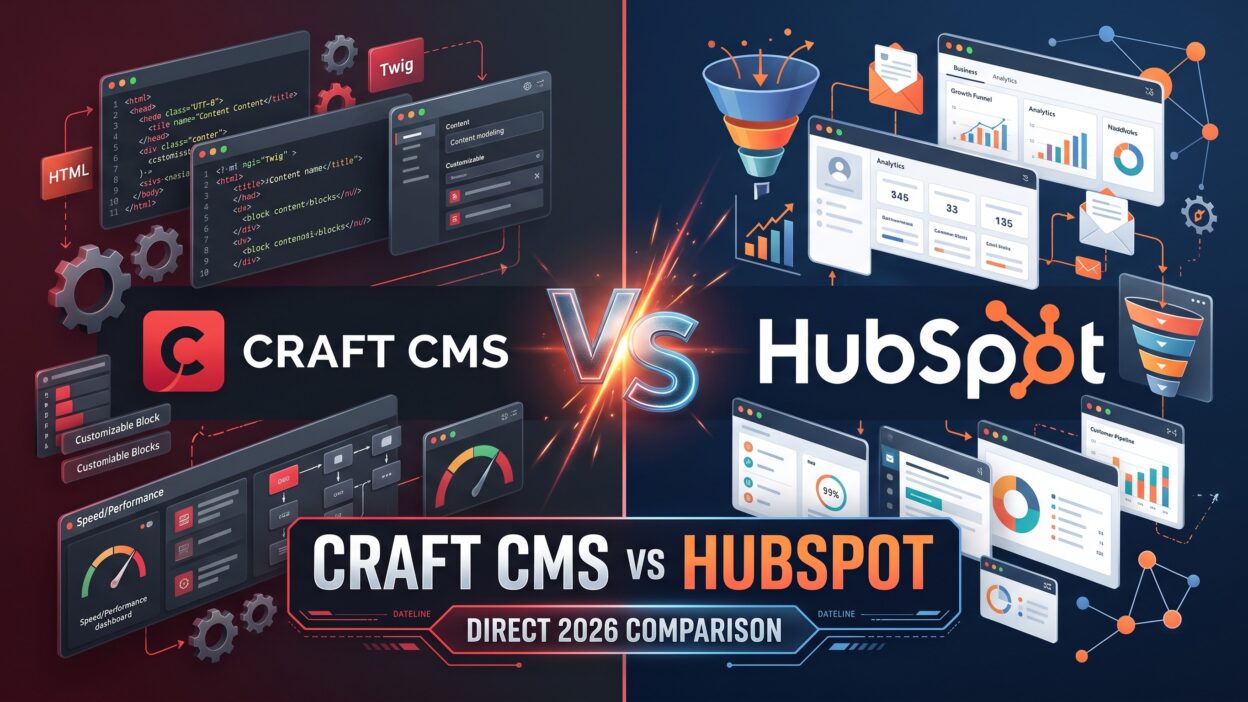
Craft CMS sits on the first path. HubSpot sits on the second. This guide covers Craft CMS vs. HubSpot in plain language. You will learn what each tool does well. You will see where each one struggles. You will also get a clear way to decide.
Table of Contents
What Is Craft CMS?
Craft CMS is a content management system. Pixel & Tonic built it. The company released the first version in 2013. Developers love it for one reason. It stays out of your way.
Craft runs on PHP and uses the Yii framework. It uses Twig for templates. Twig reads like simple HTML with a few extra tags. Front-end developers learn it fast. The system stores content in a MySQL or PostgreSQL database.
How Craft Handles Content
Craft starts with a blank slate. You build the content structure yourself. You create sections, fields, and entry types. A blog, a product catalog, and an event calendar can all live side by side. Each one gets its own fields and rules.
Editors see a clean control panel. They fill in the fields you created. They never touch code. This setup keeps the editing experience tidy and focused.
Craft Editions and Hosting
Craft offers a free Solo edition for small personal sites. The Team and Pro editions add users, permissions, and more control. Craft Cloud now offers managed hosting from the makers. You can also host Craft on your own server or with a third-party provider. That choice gives you freedom.
What Makes Craft Different
Craft ships without a built-in design. You decide how your site looks. No theme limits you. No page builder boxes you in. Designers enjoy this freedom. Agencies enjoy it too.
Craft also supports headless setups. You can deliver content through GraphQL or the element API. A React or Vue app can then pull that content. This option matters for teams that serve apps, kiosks, or multiple websites from one source.
What Is HubSpot CMS Hub?
HubSpot began as a marketing automation company. It grew into a full customer platform. The company now sells tools for marketing, sales, service, and content. Its website product carries the name CMS Hub. HubSpot also pushes Content Hub, which adds AI-assisted content tools and asset management.
HubSpot hosts everything for you. You do not manage servers. You do not install updates. You log in and build.
How HubSpot Handles Content
HubSpot leans on templates and modules. You drag modules onto a page. You edit text in place. Marketers can launch a landing page in an afternoon. No developer needs to join the call.
Developers can still go deep. HubSpot supports custom modules and a templating language called HubL. The platform also offers serverless functions and a CLI for local work. Teams can build custom themes with real code.
The CRM Advantage
HubSpot’s biggest strength is its CRM. Every page view, form fill, and email click lands in one contact record. Sales teams see which pages a lead read. Marketers see which pages drive revenue. This tight link is hard to copy.
Where HubSpot Falls Short
HubSpot trades flexibility for convenience. You work inside its rules. Complex content models take effort. Large sites can feel boxed in. Costs also climb as your contact list grows. We cover those points in later sections.
Craft CMS vs. HubSpot: The Core Differences
The real split between these tools is philosophy. Craft CMS vs. HubSpot is a choice between a toolkit and a suite. A toolkit gives you parts. A suite gives you a finished product.
Philosophy and Approach
Craft says, “Build what you want.” It gives you clean building blocks. You shape the site around your content. Nothing forces a layout on you.
HubSpot says, “Launch fast and measure.” It gives you ready-made pages, forms, and reports. You shape your content around the tools. The platform guides your steps.
Who Each Tool Serves
Craft serves teams with developer support. Agencies, in-house engineers, and technical founders get the most value. These teams want custom builds and clean code.
HubSpot serves marketing-led teams. Small marketing departments, sales-driven companies, and startups with no engineers get the most value. These teams want results without a long build.
Ownership and Control
Craft gives you ownership. You hold your code and your data. You can move hosts any time. HubSpot hosts your site inside its platform. Moving away takes more work. Your pages, modules, and tracking all live inside HubSpot’s system.
Think about your five-year plan. Control matters if you expect big changes. Convenience matters if speed drives your growth. Both goals are valid. They point to different tools.
Content Modeling and Editing Experience
Content modeling means shaping how your content fits together. A good model keeps a site tidy as it grows. A weak model creates mess.
Content Modeling in Craft
Craft shines here. Many developers call it the best in class. You build fields from a long list of types. You group them into field layouts. You attach those layouts to sections.
Matrix fields stand out. They let editors stack flexible blocks inside one entry. An editor can add a quote, then an image, then a table. The developer controls which blocks exist. Craft 5 improved this with nested entries. Editors now build rich pages with order and safety.
Relationships also work well. You can link products to categories, authors to articles, and events to venues. The system treats these links as first-class features.
Content Modeling in HubSpot
HubSpot approaches modeling differently. Blog posts, pages, and HubDB tables cover the basics. Custom objects reach further. HubDB works like a lightweight database for dynamic pages. These tools handle simple to medium needs well.
Complex structures take more effort. A multi-layer catalog or a deep knowledge base pushes the limits. Teams often build workarounds. Some move that content into a separate system.
Editor Experience
Craft gives editors a calm control panel. Live preview shows changes before publishing. Drafts and revisions protect their work. Permissions limit who sees what.
HubSpot gives editors a visual page editor. They click a block and type. Marketers love this speed. Non-technical staff need little training. Craft editors need a developer to set up a good layout first. After that, editing feels simple.
Design and Front-End Freedom
Design freedom separates these two tools more than any other feature.
Design With Craft
Craft starts without a theme. Your designer hands over a mockup. Your developer builds it pixel by pixel. Twig templates render the final pages. You choose any front-end tool. Tailwind, Vue, React, and plain CSS all work.
This freedom produces unique sites. Brand-driven companies value that. A museum, a design studio, or a media company can build something unlike any template.
Craft also fits headless projects. A Next.js front end can pull content over GraphQL. Mobile apps can read the same content. One content hub can feed many channels.
Design With HubSpot
HubSpot offers themes and a drag-and-drop editor. You pick a theme and tweak it. The result looks clean and professional. Launch time drops from months to weeks.
Custom design takes more work. Developers can build custom themes with HubL and modules. The process is real development. The platform has guardrails. You follow its file structure and its rules.
Marketers value the page editor for another reason. They can build new landing pages without waiting for a developer. This speed helps campaigns. A team can test five page variations in a single week.
Which Gives Better Results?
Neither wins on looks alone. A skilled developer can build a stunning HubSpot site. A rushed team can build an ugly Craft site. Craft raises the ceiling. HubSpot raises the floor. Pick based on your talent and timeline.
Marketing, CRM, and Automation Tools
This section decides many purchases. Craft CMS vs. HubSpot looks very different through a marketing lens.
What HubSpot Includes
HubSpot bundles an impressive list of tools. You get forms, email marketing, landing pages, and live chat. You get lead scoring, workflows, and A/B testing. Analytics tie every action to a contact. Reports show which content brings revenue.
Sales teams benefit too. They see a lead’s full page history. They know what the lead cares about. Follow-up calls become sharper. This loop between content and sales is the platform’s biggest selling point.
Personalization also lives inside the system. Smart content shows different text to different visitors. A returning customer sees one message. A new visitor sees another.
What Craft Offers
Craft does not include marketing automation. It stays focused on content. You add other tools to fill the gaps. Many teams connect Craft to HubSpot itself. A form on a Craft site can send data straight into a HubSpot CRM. Plugins and APIs make this simple.
Others pair Craft with Mailchimp, ActiveCampaign, Salesforce, or Klaviyo. This approach gives you the best tool for each job. It also adds more vendors, more logins, and more cost.
The Hybrid Option
Smart teams often combine both tools. Craft runs the website. HubSpot runs the CRM and email. Tracking code connects them. You keep design freedom and still capture leads. This path needs a developer, though. Plan for setup time.
Bottom Line for Marketers
Choose HubSpot if you want marketing and content in one login. Choose Craft if you already own a marketing stack. Your existing tools matter. Do not pay twice for the same features.
SEO Capabilities
Search traffic drives growth for most sites. Both tools support strong SEO. They get there in different ways.
SEO in Craft
Craft gives developers total control over markup. Clean URLs come standard. You decide every title tag, heading, and schema block. Page speed stays in your hands. A lean template loads fast.
The SEOmatic plugin adds a full toolkit. It handles meta tags, sitemaps, structured data, and social cards. Editors fill in simple fields. The plugin does the technical work. Many agencies call it the best SEO tool in any CMS.
Redirects, multi-language setups, and custom sitemaps also work well. Large publishers use these features at scale.
SEO in HubSpot
HubSpot builds SEO guidance into the editor. A recommendations panel flags missing meta descriptions and weak titles. Topic clusters and a pillar-page tool help plan content. Reports show rankings and traffic by page.
Marketers like these hints. They fix problems before publishing. HubSpot also handles SSL, a CDN, and sitemaps for you. Basic technical SEO needs little effort.
Advanced technical work feels tighter. You have less control over server settings and URL structure. Some limits frustrate SEO specialists.
SEO Verdict
Craft CMS vs. HubSpot for SEO depends on skill. Technical SEO experts prefer Craft. Content-focused marketers prefer HubSpot’s guidance. Both can rank. Content quality matters more than the platform in the end.
Performance, Security, and Hosting
Speed and safety protect your brand. Visitors leave slow sites. Hackers target weak ones.
Hosting With Craft
You choose your host. Craft Cloud, Servd, Fortrabbit, and plain cloud servers all work. A good host and smart caching produce fast sites. Static caching tools can push speed even higher.
You also take on duties. Someone must apply updates. Someone must monitor the server. Craft ships frequent security releases. A careful team applies them quickly. A managed host reduces this burden.
Craft has a solid security record. The team responds fast to issues. Good habits keep your site safe. Strong passwords, two-factor login, and regular updates all help.
Hosting With HubSpot
HubSpot manages everything. The platform includes hosting, a CDN, SSL, and uptime monitoring. A dedicated team handles patches. You never touch a server.
This hands-off approach saves stress. Small teams love it. Downtime stays rare. Traffic spikes rarely cause trouble.
The tradeoff is limited control. You cannot tune the server. You cannot install your own software. Performance depends on the modules and scripts you add. Heavy themes still load slowly.
Reliability and Compliance
Both tools support GDPR and privacy features. HubSpot includes cookie banners and consent tools. Craft needs plugins or custom work for the same goals. Review your legal needs before you choose.
Pricing and Total Cost of Ownership
Price tags only tell part of the story. Total cost includes people, time, and tools.
Craft CMS Pricing
Craft charges a one-time license for the Pro edition. The price sits around four hundred dollars per project. An optional yearly fee covers updates and support. Solo stays free for simple sites. Enterprise pricing is custom.
Hosting adds a monthly bill. Prices range from small managed plans to larger cloud setups. Plugins cost extra. Some are free. Premium plugins carry one-time fees.
The biggest cost is development. A custom Craft build needs skilled people. Agency rates vary widely. Expect a larger upfront investment. Running costs stay lower over time.
HubSpot Pricing
HubSpot uses tiered subscriptions. CMS Hub offers Starter, Professional, and Enterprise plans. Starter costs little. Professional and Enterprise cost much more. Content Hub adds its own tiers. Marketing Hub and Sales Hub bills stack on top.
Prices grow with contacts, seats, and features. A small team might start cheap. A growing team can face a large bill. Annual contracts often apply. Add-ons increase the total.
Setup costs run lower. A marketer can launch a site without an agency. That saving matters for young companies.
Comparing the Real Cost
Craft CMS vs. HubSpot looks different over three years. Craft costs more at the start and less later. HubSpot costs less at the start and more later. Add up every tool you need. Include salaries, agency fees, and software. Run the math for your own case.
Developer Experience and Integrations
Developers influence this choice more than most buyers expect.
Working With Craft
Craft earns praise for clean code. The documentation reads clearly. The community is friendly and active. Plugins extend nearly every feature. Developers can write their own with PHP. The Craft Plugin Store lists hundreds of options.
Version control works smoothly. Project config stores settings in files. Teams can move changes between local, staging, and live servers. This workflow fits professional development habits.
GraphQL support comes built in. REST options exist through plugins and the element API. Developers connect Craft to almost any service.
Working With HubSpot
HubSpot provides a strong API. The platform connects to thousands of apps through its marketplace. Zapier and native integrations cover common needs. Developers can build apps and custom modules.
Local development works through the HubSpot CLI. Teams can use Git and a code editor. The workflow feels less free than a standard framework. Rules about file structure and module formats apply.
Integration Summary
Craft offers deeper code freedom. HubSpot offers wider ready-made connections. Pick the style your team enjoys. Happy developers build better sites.
Scalability and Multisite Management
Growth tests every platform.
Scaling With Craft
Craft handles large content libraries well. Publishers and universities run huge sites on it. Multisite support stands out. One Craft install can run many sites. Each site can have its own language, domain, and design. Shared content saves editors time.
Performance scales with your infrastructure. Add servers, caching, and a CDN as traffic grows. A skilled team can serve millions of visits.
Scaling With HubSpot
HubSpot scales through higher plans. The platform serves large traffic without extra work. Enterprise plans add features like content partitioning and advanced permissions. Multi-language support exists across tiers.
Large sites meet limits sooner. Page and module limits apply on some plans. Complex multi-brand setups cost more and take planning. Many enterprise teams still thrive on HubSpot. They stay inside its structure.
Team Growth
Think about people too. Craft permissions let you control exactly who edits what. HubSpot permissions also work well. Both support large teams. Craft gives finer control over content structure. HubSpot gives finer control over marketing assets.
Who Should Choose Which Tool?
Time to decide. This section on Craft CMS vs. HubSpot gives you clear guidance.
Choose Craft CMS If
Your team includes developers or a trusted agency. Your site needs a custom design. Your content has a complex structure. You want to own your code. You plan to serve content to apps or many sites. You already use separate marketing tools.
Publishers, universities, agencies, ecommerce brands, and design-led companies often fit here. These groups need flexibility more than bundled features.
Choose HubSpot If
Your marketers lead the project. Your team has no developers. You want one login for content, email, and sales. You need to launch fast. Lead tracking and reporting rank high on your list. You prefer predictable hosting and support.
B2B companies, SaaS startups, service firms, and sales-driven teams often fit here. These groups need results and speed more than custom code.
Choose Both If
Some teams get the best of both. Craft powers the site. HubSpot powers the CRM. Setup takes planning. The result delivers freedom and insight together.
A Quick Self-Test
Ask three questions. Who will build the site? Who will manage it daily? What matters most in year one? Honest answers point to the right tool. Choose the platform that fits your people, not the one with the loudest marketing.
Frequently Asked Questions
Is Craft CMS better than HubSpot?
Neither tool wins every time. Craft is better for custom builds and complex content. HubSpot is better for marketing-led teams that want speed and built-in tools. Your needs decide.
Which is cheaper in the long run, Craft CMS vs. HubSpot?
Craft usually costs less over several years. You pay a license and hosting. HubSpot charges monthly fees that grow with your contacts and features. Development costs make Craft expensive at the start.
Can I use HubSpot with Craft CMS?
Yes. Many teams run a Craft site and connect it to HubSpot. Forms, tracking code, and the API link the two. This setup gives you design freedom and a full CRM.
Is Craft CMS good for SEO?
Yes. Craft gives you full control over markup, URLs, and speed. The SEOmatic plugin adds advanced features. Good content and clean code produce strong rankings.
Does HubSpot need a developer?
Not always. Marketers can build pages with themes and the drag-and-drop editor. Custom designs and advanced features need a developer with HubL skills.
Can Craft CMS run a headless website?
Yes. Craft supports GraphQL and an element API. You can pair it with React, Vue, Next.js, or a mobile app.
Which tool is easier for beginners?
HubSpot is easier to start with. You sign up and build. Craft needs a developer to set up the structure first. Editors find Craft simple after setup.
Can I move from HubSpot to Craft later?
Yes. The move takes planning. You export content and rebuild templates. Redirects protect your search rankings. Hire help if the site is large.
Does Craft CMS include a CRM?
No. Craft focuses on content. You connect it to a CRM such as HubSpot or Salesforce.
Read More:-How to Improve Forecast Accuracy: 6 Proven Tactics
Conclusion

You now have a clear picture. Craft gives you control, clean code, and deep content modeling. HubSpot gives you speed, built-in marketing tools, and a powerful CRM. Each tool solves a different problem.
Craft CMS vs. HubSpot does not have one universal winner. A design-led publisher needs Craft. A sales-led startup needs HubSpot. A growing company with a developer might use both.