Introduction
TL;DR People Data Labs holds a huge amount of person and company data. Raw data does nothing alone. You need a way to move it into the tools your team uses every day.
That is where integrations matter. A strong connection puts fresh contact data inside your CRM, warehouse, or workflow tool. A weak one leaves you with CSV files and manual work.
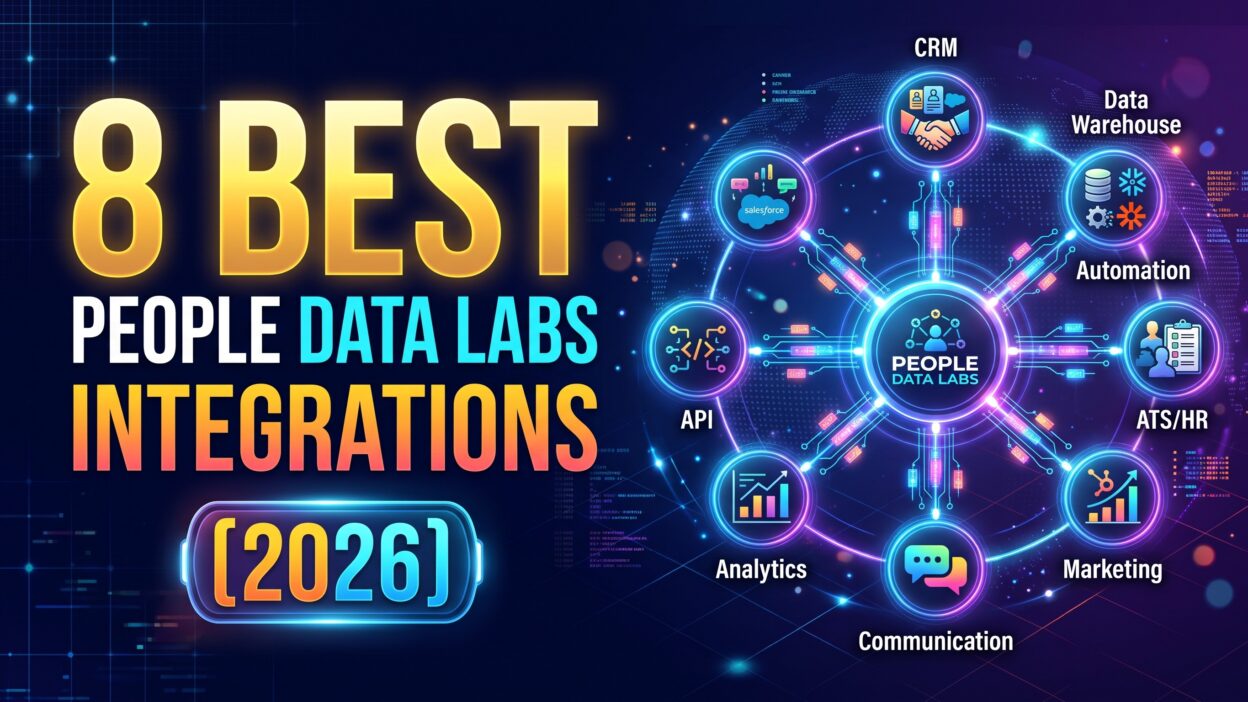
This guide covers the best People Data Labs integrations for 2026. We picked eight tools. They cover CRM enrichment, data warehousing, and workflow automation. Each section explains what the tool does, how the data moves, and who gets the most value.
Table of Contents
What Is People Data Labs?
People Data Labs, often shortened to PDL, sells data about people and companies. You send it a record. It sends back more details. This process is called data enrichment.
What the People Data Labs API Returns
The People Data Labs API accepts small bits of information. You can send an email address, a name, or a LinkedIn URL. The API returns employment history, job titles, company details, social profiles, and demographic fields. Teams use this data to fill gaps in their records.
Why Integrations Matter for PDL
PDL works as a data layer. It does not give you a full sales app. Your team still needs a place to use the data. Integrations carry PDL data into that place.
Think of PDL as the engine. The integration is the road. Without a road, the engine goes nowhere.
Good integrations save hours of work. They cut copy and paste errors. They keep records fresh. They also let non-technical staff use the data without writing code.
How We Chose the Best People Data Labs Integrations
We judged each tool on five questions. We wanted clear answers before we ranked anything.
Our Selection Criteria
First, we checked how well the tool connects to PDL. Native connections scored higher than workarounds. Second, we looked at ease of setup. A tool that needs weeks of engineering time lost points.
Third, we measured data flow. Does enriched data land where the team works? Fourth, we looked at scale. Can the tool handle ten records and ten million records? Fifth, we weighed cost against value.
We also read vendor documentation from PDL, Zapier, Clay, and ZoomInfo. These sources show what each connection supports today. Features change fast, so confirm details with each vendor before you buy.
The best People Data Labs integrations share one trait. They remove friction between the data and the person who needs it. Every tool on this list meets that standard in its own way.
Best People Data Labs Integrations at a Glance
Here is the short version. Clay fits growth teams that want enrichment inside a spreadsheet-style table. Snowflake and Databricks fit data teams that want PDL datasets next to internal tables. Salesforce fits enterprise sales teams that want CRM enrichment without code.
HubSpot fits marketing teams that want richer contact properties. Zapier and Make fit teams that want no-code automation. ZoomInfo fits go-to-market teams that want enriched audiences inside an orchestration platform.
The best People Data Labs integrations fall into three groups. CRM tools handle contact records. Data platforms handle bulk datasets. Automation tools connect everything else. Pick one from each group and you cover most use cases.
1. Clay: Best for Waterfall Enrichment and Outbound Teams
How Clay Works with People Data Labs
Clay is a data enrichment and prospecting platform. It lists PDL among its data providers. You add a People Data Labs column to a Clay table. Clay calls the PDL API for each row. The results fill new columns.
You can chain providers in one table. If PDL misses a record, Clay can try another source. Teams call this waterfall enrichment. It raises match rates without extra manual work.
Clay also connects to Salesforce and HubSpot. You can push enriched rows back into your CRM. That makes Clay a strong bridge between PDL and your sales stack.
Who Should Use Clay
Outbound sales teams love Clay. So do growth marketers and agency owners. The table view feels like a spreadsheet. Most people learn it in an afternoon.
Clay charges through plans and credits. PDL calls use credits. Review current pricing on Clay’s site before you commit. Costs rise with volume.
Clay earns a spot among the best People Data Labs integrations for one reason. It gives non-engineers direct access to the PDL API. Your team builds lists, enriches them, and sends them to the CRM without a developer.
2. Snowflake: Best for Warehouse-Native Enrichment
How Snowflake Works with People Data Labs
People Data Labs lists its person and company datasets on the Snowflake Marketplace. You subscribe to the data. It appears inside your Snowflake account. You query it with standard SQL.
This setup skips the ingestion pipeline. You do not build jobs to load files. You do not maintain scripts that break at night. The data sits next to your internal tables, so joins take a few lines of code.
Vendor materials describe automatic refreshes on a regular schedule. Confirm the current refresh rate with PDL before you plan around it.
Who Should Use Snowflake
Data engineers and analysts get the most value here. Teams that already run their analytics in Snowflake gain a lot. They can enrich millions of customer records in one query.
This route fits large-scale B2B data enrichment. It also fits teams with strict data rules. Your records never leave your warehouse for a third-party tool.
The People Data Labs Snowflake option costs more than a simple API plan. Dataset licenses carry enterprise pricing. Talk to PDL sales for a quote.
Snowflake ranks high among the best People Data Labs integrations for data teams. It trades convenience for control. You manage the data like any other table.
3. Salesforce: Best for Native CRM Enrichment
How Salesforce Works with People Data Labs
PDL offers a native Salesforce integration for Enterprise customers. It enriches leads, contacts, and accounts inside the CRM. You do not write code. An admin sets up the connection and maps fields.
The enrichment fills in titles, company data, and contact details. Reps see better records without leaving Salesforce. Managers get cleaner reports.
Zapier also connects Salesforce to PDL. Its template library includes flows that enrich new records and add them to Salesforce. That path helps teams outside the Enterprise tier.
Who Should Use Salesforce Enrichment
Sales operations teams benefit most. Duplicate and incomplete records slow every sales process. Enrichment fixes missing fields at scale.
Large sales teams with Salesforce as their system of record get the clearest return. A native tool keeps the data inside one platform. It also lowers the risk of sync errors.
Small teams may find the Enterprise requirement too tight. Those teams can use Clay or Zapier as a bridge.
Salesforce earns its place on the list of best People Data Labs integrations for one reason. It puts PDL data where reps already work. Adoption stays high because nobody learns a new tool.
4. HubSpot: Best for Marketing and Lead Routing
How HubSpot Works with People Data Labs
PDL does not list a native HubSpot connector. Teams connect the two through middleware. Clay, Zapier, and Make all work for this job.
The flow looks simple. A visitor fills out a form. The tool sends the email to the People Data Labs API. PDL returns seniority, employment history, and company attributes. The tool writes those values into HubSpot contact properties.
Marketers use those properties for segmentation. Sales leaders use them for lead routing. A contact with a senior title can go straight to an account executive. A student email can go to a nurture list.
Who Should Use HubSpot Enrichment
Marketing teams on HubSpot gain the most. Short forms convert better than long ones. Enrichment lets you ask for an email and nothing else. PDL fills in the rest.
Zapier templates already exist for this flow. One template enriches new form submissions and creates HubSpot contacts. That saves setup time.
HubSpot offers its own enrichment tools too. Compare those with PDL on data coverage and cost. PDL often wins on depth for professional profiles.
HubSpot belongs among the best People Data Labs integrations for marketing teams. It turns anonymous leads into clear segments. Your campaigns get sharper without extra form fields.
5. Zapier: Best for No-Code Automation
How Zapier Works with People Data Labs
Zapier connects thousands of apps. PDL has its own Zapier app. You can run enrichment actions such as enriching a person or a company. A trigger starts the flow. An action calls PDL. A second action stores the result.
Zapier’s People Data Labs page lists popular pairings. These include HubSpot, Salesforce, Airtable, Gmail, Microsoft Excel, Typeform, Google Forms, and Marketo. The template library shows ready flows. One template enriches new Intercom leads. Another enriches new Stripe customers and adds them to Salesforce.
You build each flow in a visual editor. No code is needed. A setup takes minutes.
Who Should Use Zapier
Small teams and solo operators love Zapier. Operations staff use it to patch gaps between tools. It works well for low and medium volume.
The People Data Labs Zapier app does not carry a premium label, so it should work on every Zapier plan. You still pay for PDL credits and Zapier task usage. Both costs grow with volume.
Zapier suits lead enrichment at a modest scale. Large batches can strain task limits. Heavy jobs belong in Snowflake or a custom pipeline.
Zapier stays on the best People Data Labs integrations list because it opens PDL to anyone. You need an idea and an hour.
6. Make: Best for Complex Visual Workflows
How Make Works with People Data Labs
Make is a visual automation platform. It offers a documented People Data Labs integration. You drag modules onto a canvas and link them. Each module does one job.
Make handles branching well. You can enrich a lead, check the job title, and send the record down one of three paths. Each path can write to a different tool. That level of control is harder in simpler tools.
Make also handles iterators and aggregators. These features let you process lists of records in one run. They give you strong control over data shape.
Who Should Use Make
Operations teams with complex rules favor Make. So do agencies that build workflows for clients. Pricing often runs lower than Zapier for high operation counts. Compare current plans on both sites.
The learning curve is steeper. A new user needs more time to feel comfortable. The reward is flexibility.
Use Make when your enrichment flow has many steps. Examples include scoring leads, filtering by region, and updating several systems at once.
Make rounds out the best People Data Labs integrations for automation. It gives power users room to build without code.
7. Databricks: Best for Large-Scale Data and AI Work
How Databricks Works with People Data Labs
PDL lists Databricks as a delivery destination for its datasets. Databricks also runs a marketplace. You can access PDL data inside your lakehouse. Your notebooks and jobs read it directly.
This setup suits teams that build models. A data scientist can train a churn model on enriched customer data. An analyst can build an audience in a notebook. An engineer can feed the output to downstream systems.
PDL also supports delivery to cloud storage such as S3, Google Cloud Storage, and Azure. Databricks users can read from those locations too.
Who Should Use Databricks
Machine learning teams and large data groups benefit most. The setup needs technical skill. Business users will not touch it.
Cost follows the dataset license. Expect enterprise pricing. Ask PDL for current terms.
Pick Databricks if your company already runs on it. Pick Snowflake if your stack lives there. Both give you the same core value. You own the data in your own environment.
Databricks earns its slot among the best People Data Labs integrations for advanced teams. It supports AI projects that need deep person and company data. Few other options match that scale.
8. ZoomInfo: Best for AI-Driven Go-to-Market Execution
How ZoomInfo Works with People Data Labs
ZoomInfo offers GTM Studio. It is an AI-driven canvas for building audiences, plays, and campaigns. Users type requests in plain language. The platform handles the setup.
ZoomInfo describes a connector that queries PDL’s dataset. The connector appends person-level attributes to audience records. The enriched data then flows into ZoomInfo’s orchestration and execution layers.
That means one platform handles enrichment and action. A marketer builds an audience, adds PDL attributes, and launches a campaign. No engineering ticket is needed.
Who Should Use ZoomInfo
Marketing teams, RevOps staff, and GTM engineers fit this tool. It works best for companies that already pay for ZoomInfo. Adding PDL data raises coverage for hard-to-find contacts.
ZoomInfo carries a higher price than most tools on this list. Confirm plan details and connector access with ZoomInfo before you buy.
ZoomInfo closes our list of best People Data Labs integrations. It suits teams that want enrichment and campaign launch in one place.
How to Choose Among the Best People Data Labs Integrations
Match the Tool to Your Team
Start with your team’s skills. Non-technical teams should look at Clay, Zapier, or the CRM options. Data teams should look at Snowflake or Databricks. Mixed teams can use both.
Next, consider volume. A few hundred records a week fit Zapier well. Millions of records fit a warehouse.
Match the Tool to Your Stack
Look at where your data lives today. A Salesforce shop should test the native option first. A HubSpot shop should test Clay or Zapier. A Snowflake shop should test the marketplace listing.
Budget matters too. Calculate PDL credit costs and tool fees together. Run a small pilot before you scale.
The best People Data Labs integrations are the ones your team will use daily. A powerful tool that sits idle wastes money. A simple tool that runs every day pays off fast.
Most teams combine two or three tools. A common mix is Clay for list building, a CRM sync for sales, and a warehouse for analytics.
Common Mistakes to Avoid with People Data Labs Integrations
Many teams rush setup. They map fields badly. They overwrite good data with weak data. Review your field rules before you launch.
Others skip match thresholds. PDL returns a likelihood score with matches. Set a minimum score. Low-confidence matches can pollute your CRM.
Some teams ignore privacy rules. Contact data carries legal duties. Learn the rules that apply to your region and industry, such as GDPR and CCPA. Ask your legal team to review your use case.
Watch your credits. A loop in a workflow can burn through your balance in minutes. Add limits and alerts.
Test on a small batch first. Check twenty records by hand. Confirm the fields land in the right place.
Keep your records fresh. People change jobs often. Re-enrich key accounts on a schedule.
Teams that avoid these errors get more from the best People Data Labs integrations. Good habits protect data quality.
Frequently Asked Questions
What are the best People Data Labs integrations for beginners?
Zapier and Clay suit beginners. Both use visual tools. Neither needs code. Start with a simple flow that enriches new form leads.
Does People Data Labs integrate with Salesforce?
Yes. PDL offers a native Salesforce integration for Enterprise customers. Zapier also connects the two for other teams.
Does People Data Labs integrate with HubSpot?
Teams usually connect HubSpot through middleware. Clay, Zapier, and Make all handle this job.
Can I load People Data Labs data into a data warehouse?
Yes. PDL delivers datasets to Snowflake and Databricks. It also supports cloud storage destinations such as S3, Google Cloud Storage, and Azure.
Is the People Data Labs Zapier app free?
Zapier does not mark the app as premium. You still pay for PDL credits and any Zapier plan limits.
Which of the best People Data Labs integrations has the lowest setup time?
Zapier usually wins on speed. You can build a basic flow in under an hour.
Do I need a developer to use the People Data Labs API?
Not always. No-code tools call the API for you. A developer helps with custom pipelines and large jobs.
How accurate is PDL enrichment?
Accuracy varies by field and by record. Test on your own data. Use match scores to filter weak results.
Read More:-When2meet vs. Doodle: How Do They Compare in 2026?
Conclusion

People Data Labs gives you strong data. Integrations give that data a job. Without them, the data sits idle.
This guide covered eight tools. Clay helps growth teams build and enrich lists. Snowflake and Databricks serve data teams that want datasets in their own environment. Salesforce brings native enrichment to enterprise sales. HubSpot, through middleware, helps marketers segment and route leads. Zapier and Make automate the gaps. ZoomInfo ties enrichment to campaign execution.
No single option wins for everyone. Your team size, stack, and volume decide the right fit. Start small. Pilot one flow. Measure match rates and time saved.
The best People Data Labs integrations make data useful without extra effort. Choose one that fits your daily work. Build a simple flow this week. Add more tools as your needs grow.