Introduction
TL;DR Recruiters test new tools every month. Most vendors sell the best AI sourcing tools as prompt machines. They promise smart search boxes and clever filters. Few vendors talk about data.
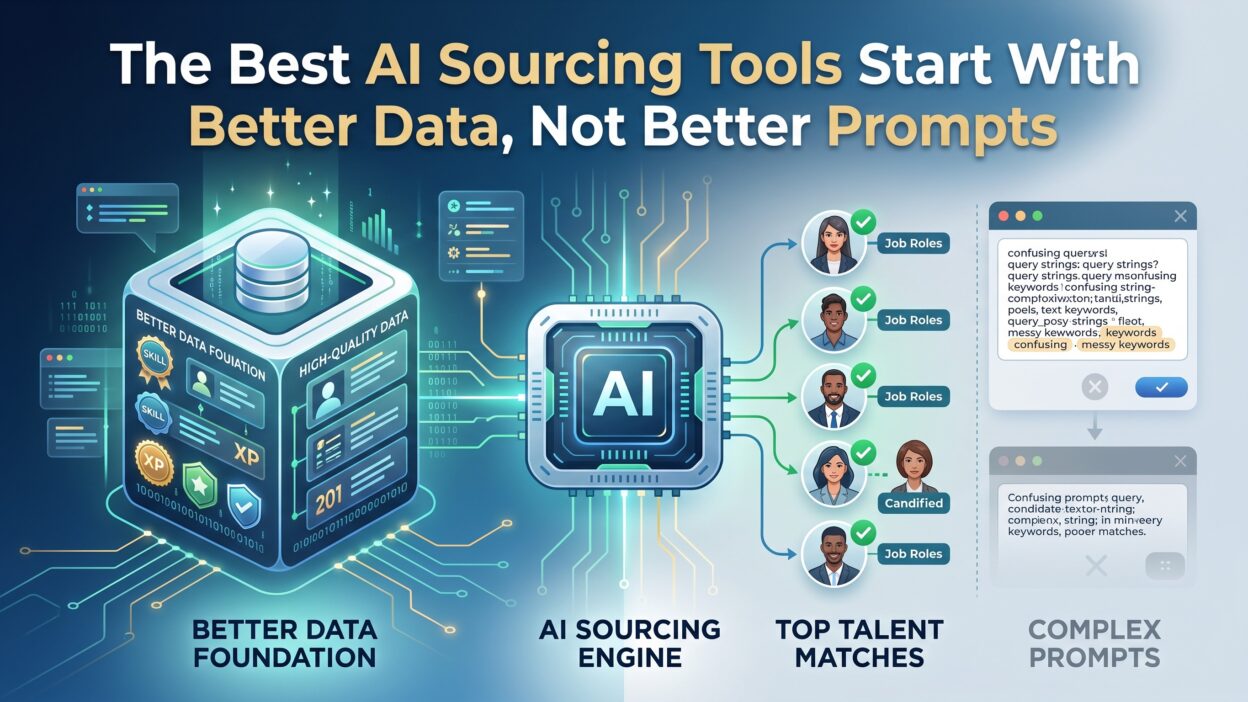
Data decides everything in candidate search. A tool built on stale records gives weak results. No prompt fixes a broken database. You can write the sharpest search query in the world. It still returns junk if the underlying profiles are outdated or incomplete.
This article breaks down why the best AI sourcing tools rely on clean, current data first. You will learn what separates a strong tool from a flashy one. You will see how data quality shapes speed, accuracy, and hiring outcomes.
Recruiting teams waste hours chasing dead leads. Contact details go stale. Job titles change without notice. Candidates move companies and never update their profiles. A sourcing tool that ignores these shifts sends recruiters down dead ends.
This guide walks through the real evaluation criteria. It skips the marketing language. It focuses on what actually predicts a good hire.
Table of Contents
What Makes AI Sourcing Tools Actually Work
Data Quality Beats Prompt Engineering
Prompts guide a tool. Data feeds it. A recruiter can write the perfect prompt. The output still depends on what sits behind the search bar.
Old resumes, duplicate profiles, and missing contact details ruin results. A search built on weak data returns candidates who left the industry years ago. It returns duplicate entries for the same person under two job titles. It misses strong candidates entirely because their profile never got updated.
The best AI sourcing tools invest in data pipelines first. They clean records before they build flashy search features. This order matters. Skip it, and every search returns noise dressed up as intelligence.
Where Sourcing Data Comes From
Good tools pull data from many places. They scan job boards, professional networks, company career pages, and public records. Some license data from third-party providers. Others build their own web crawlers from scratch.
The source matters less than the refresh rate. Data sitting unused for months goes stale fast. Candidates change jobs. Skills change. Contact details change. A tool must update its records often to stay useful for daily recruiting work.
Ask any vendor a simple question. How often does your data refresh? A vague answer signals a weak foundation.
Clean Data Versus Messy Data
Messy data hides in plain sight. Duplicate candidate profiles waste recruiter time and clutter dashboards. Missing fields break filters and searches. Wrong job titles confuse matching logic and produce irrelevant results.
Clean data removes these problems early. It standardizes titles across sources. It merges duplicate records into one accurate profile. It fills gaps where public information allows.
Recruiters using clean data find candidates faster. They trust the results more. They spend less time double-checking basic facts before they reach out.
Common Myths About AI Sourcing Tools
The Myth of the Magic Prompt
Many buyers believe a clever prompt unlocks better candidates. This idea sounds appealing on a sales call. It rarely holds up in daily use.
A prompt only tells a tool what to look for. It cannot invent data that does not exist. If the database lacks senior engineers in a specific region, no prompt creates them out of thin air. Buyers should test data coverage before they judge prompt features on a demo screen.
The Myth of One Tool Fits Every Role
Some vendors claim their tool works for every role and industry. Real hiring needs differ sharply by team and function.
A technical recruiter needs deep code repository data and open-source signals. A sales recruiter needs different indicators, like quota history or CRM activity patterns. A single generic tool rarely covers both well.
The best AI sourcing tools either specialize in a domain or offer genuinely strong coverage across multiple role types. Buyers should check this fit directly against their own hiring mix before they sign any contract.
The Myth That More Filters Mean Better Results
Some platforms pack in dozens of filters and call it innovation. Filters only work well when the underlying data supports them. A location filter means nothing if location data is outdated. A skills filter means nothing if skill tags come from a resume parsed five years ago.
More filters without strong data just create more ways to miss good candidates.
Key Features to Look for in the Best AI Sourcing Tools
Data Enrichment Capabilities
Enrichment adds missing details to a candidate profile. It fills in emails, phone numbers, and current job titles automatically. Strong enrichment reduces manual research time significantly.
Recruiters spend less time confirming basic facts about a candidate. They spend more time on actual outreach and relationship building. Ask vendors how they enrich data and how often they refresh those enriched fields.
Integration With Existing ATS Systems
A sourcing tool works best when it connects directly to your applicant tracking system. Manual exports waste time and create data entry errors. Good integrations sync candidate records in real time between platforms.
This keeps your pipeline accurate across every tool your team touches daily. Check integration options and setup timelines before you commit to any sourcing platform.
Candidate Matching Accuracy
Matching accuracy depends on data depth, not algorithm design alone. A tool with shallow data returns generic, surface-level matches. A tool with rich, verified data returns sharper, more relevant results.
Ask vendors for real match accuracy benchmarks from actual customers. Request a trial period using your own open job requisitions. Real testing beats a polished sales pitch every time.
Compliance and Data Privacy
Sourcing tools handle personal data at scale. Compliance matters as much as any search feature. Check how a vendor handles GDPR, CCPA, and other regional privacy laws.
Ask where they store candidate data and how long they retain it. Ask what happens to data when a candidate requests deletion. A tool without strong compliance practices creates real legal risk for your company down the line.
Search Speed and User Experience
A powerful backend means little if the interface slows recruiters down. Search results should load fast. Filters should apply without long delays. A clunky interface pushes recruiters back toward manual LinkedIn searches out of habit.
Test the actual daily workflow during any trial period, not just the headline features shown in a demo.
How Data Quality Impacts Candidate Matching
Source Diversity Improves Coverage
Tools pulling from many sources find candidates others miss entirely. A single-source tool limits your talent pool from the start. Diverse sources catch passive candidates, niche skill sets, and underrepresented groups that narrow tools overlook.
This diversity strengthens every search a recruiter runs, especially for hard-to-fill roles.
Deduplication Saves Recruiter Time
Duplicate profiles clutter search results and waste attention. A recruiter might contact the same candidate twice under two different job titles. Strong deduplication logic merges records correctly into one clean profile per person.
This small feature saves real hours across a busy hiring season, especially at scale.
Real-Time Updates Keep Data Fresh
Static databases decay fast without regular maintenance. Candidates switch roles constantly. Skills evolve as industries shift. Contact details change often as people move between companies.
Real-time updates catch these shifts as they happen. They keep search results current instead of outdated and misleading. Ask vendors exactly how often their data refreshes and how they verify accuracy behind the scenes.
Best AI Sourcing Tools Compared by Use Case
Tools for Small Recruiting Teams
Small teams need simple setup and fast results from day one. They rarely have time for complex configuration or lengthy training sessions.
Look for tools with quick onboarding and strong default search settings out of the box. Pricing matters more here given smaller budgets. The best AI sourcing tools for small teams balance simplicity with solid data coverage, without demanding a dedicated administrator.
Tools for Enterprise Hiring
Enterprise teams hire at scale across many regions and departments. They need deep data coverage and strong compliance controls built in from the start.
Integration with multiple existing systems matters heavily at this scale. Enterprise buyers should test data depth across every region they hire in, not just headquarters locations. A tool that performs well in one country can fall short elsewhere.
Tools for Technical and Engineering Roles
Technical hiring needs specific, specialized signals. Code repository activity, open-source contributions, and technical certifications matter far more here than a generic resume keyword match.
A general sourcing tool may miss these signals entirely. Specialized tools built for technical hiring often outperform broad platforms for this specific use case. They pull data directly from developer communities and coding platforms.
Tools for High-Volume Hourly Hiring
High-volume roles need speed above depth. Retail, hospitality, and warehouse hiring move fast and require quick candidate turnaround. Tools built for this use case prioritize application speed and mobile-friendly candidate experiences over deep profile enrichment.
Matching the tool to the hiring volume matters just as much as matching it to the role type.
How to Evaluate Sourcing Tools Before You Buy
Run a Data Coverage Test
Before you sign a contract, test data coverage yourself directly. Search for roles you already struggle to fill internally. Check how many genuinely relevant candidates the tool returns.
Compare results across two or three different vendors side by side. This test reveals real strengths and weaknesses far faster than any sales presentation.
Ask Vendors About Their Data Sources
Vendors should explain clearly where their data originates. They should explain refresh rates and verification methods in plain language. A vendor who avoids these questions or gives vague answers raises a real red flag.
Transparency here signals a trustworthy, confident vendor. Evasiveness usually signals weak underlying data.
Check Integration and Support Options
Ask about integration timelines and support levels during setup. A tool taking months to integrate slows down your entire hiring plan for the quarter. Strong vendors offer clear timelines and dedicated support throughout rollout.
Ask current customers directly about their onboarding experience whenever possible.
Review Pricing Against Actual Usage
Some tools price by seat. Others price by search volume or data credits. Match the pricing model to how your team actually works day to day. A mismatch here creates budget surprises within the first few months of use.
The Future of AI Sourcing Tools
Data quality will matter more, not less, as these tools keep advancing. Vendors will increasingly compete on data depth and freshness rather than flashy interfaces. Prompt features will become table stakes, not real differentiators, within a few short years.
Buyers who understand this shift will choose sharper tools. They will ask harder questions during vendor calls. They will demand real proof of data quality instead of accepting polished demos at face value.
The best AI sourcing tools of the next few years will win through data, not marketing budgets. Teams that grasp this early will build stronger pipelines while competitors chase the next shiny feature release.
Frequently Asked Questions
What are the best AI sourcing tools for small businesses?
Small businesses need tools with fast setup and clear, predictable pricing. Look for platforms offering strong default data coverage and simple onboarding steps that do not require a dedicated administrator.
How do AI sourcing tools find passive candidates?
They scan multiple data sources beyond standard job boards. Professional networks, public profiles, and enriched databases surface candidates who are not actively job hunting but open to the right opportunity.
Do AI sourcing tools replace recruiters?
No. They speed up search and cut down manual research time significantly. Recruiters still handle outreach, screening conversations, and relationship building, which no tool can fully replicate.
How often should sourcing data refresh?
Strong tools refresh data weekly or more often depending on the source. Data left stale past a few months often returns outdated contact details and incorrect job titles.
What makes one AI sourcing tool better than another?
Data depth and freshness matter most in the long run. Features and prompts help around the edges, but clean, verified data drives accurate matches every single time.
Can small teams afford enterprise-grade sourcing tools?
Some vendors offer tiered pricing built for smaller teams. Others price strictly by seat count or search volume, which can favor smaller teams. Always compare total cost against actual expected usage before committing.
Read More:-10 Best Parallel Dialers for Sales Teams in 2026
Conclusion

The best AI sourcing tools do not win through clever prompts. They win through clean, current, and diverse data sitting underneath the search bar. Buyers should test data coverage directly before they judge any feature list on a sales call.
They should ask vendors hard questions about data sources and refresh rates. A tool built on strong data saves real time and improves hiring outcomes across every open role.
Choose the best AI sourcing tools by checking their data foundation first. Everything else — the interface, the filters, the prompts — follows from that one decision. Get the data right, and the rest of the tool earns your trust naturally.