Introduction
TL;DR You have thousands of documents. You need to understand what they talk about. You do not want to read every single one manually.
Topic modeling solves that problem. BERTopic solves it better than most methods out there today.
This blog walks you through exactly what BERTopic is, how it works under the hood, and how you can apply it to your own text data. No fluff. No unnecessary jargon. Just clear, practical knowledge you can act on.
Table of Contents
What Is BERTopic and Why Does It Matter?
BERTopic is a topic modeling library built for modern NLP workflows. Maarten Grootendorst created it in 2020. It combines transformer-based embeddings with clustering algorithms to group documents into coherent topics.
Traditional topic models like LDA treat words as independent. They ignore word context entirely. BERTopic takes a different path. It uses sentence-level embeddings to capture meaning, not just frequency.
The result is clear. BERTopic produces topics that actually make sense to humans. The labels it generates map to recognizable themes. That is rare in unsupervised NLP work.
Data scientists use BERTopic for customer feedback analysis, research paper classification, news categorization, and social media monitoring. The range of real-world applications is wide.
BERTopic also gives you flexibility. You can swap out any component in its pipeline. Want a different embedding model? Fine. Want a different clustering algorithm? No problem. That modularity is a major strength.
Secondary Keywords: Topic Modeling, Text Clustering, Sentence Transformers
Topic modeling is the broader field that BERTopic belongs to. It covers any method that finds themes across a document collection without manual labeling.
Text clustering groups documents by similarity. BERTopic uses clustering at its core. But it wraps that clustering with smarter embedding and smarter labeling logic.
Sentence Transformers power the embedding step inside BERTopic. Models like all-MiniLM-L6-v2 convert each document into a dense vector. Those vectors carry semantic meaning. Similar documents land close together in vector space.
How BERTopic Works: The Full Pipeline Explained
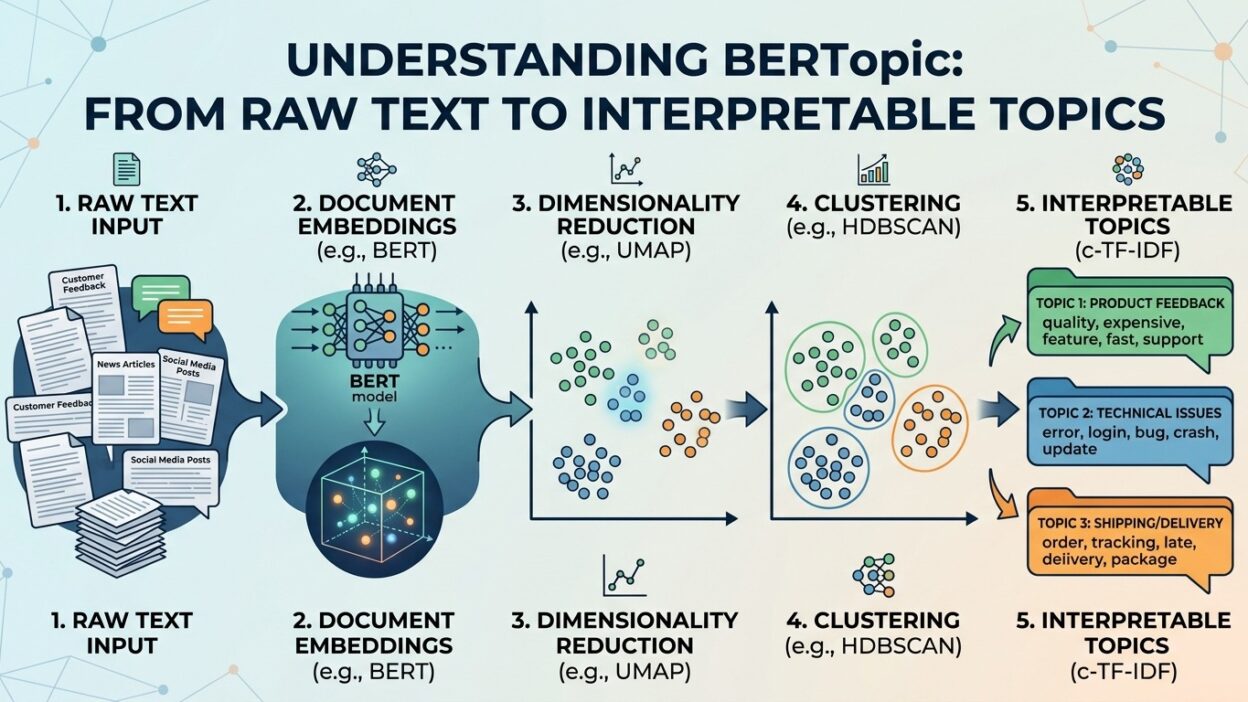
BERTopic breaks topic modeling into four clear stages. Each stage handles one specific job. Understanding each stage helps you debug problems and tune performance.
Stage one is embedding. BERTopic takes every document and converts it into a vector using a Sentence Transformer model. The default model works well for most English text. You can swap it for a multilingual model when your data spans multiple languages.
Stage two is dimensionality reduction. High-dimensional vectors are expensive to cluster. BERTopic uses UMAP to reduce dimensions from hundreds down to two or five. UMAP preserves local structure better than PCA. That matters for clustering quality.
Stage three is clustering. BERTopic runs HDBSCAN on the reduced vectors. HDBSCAN finds dense clusters automatically. You do not set the number of topics in advance. BERTopic discovers that number from your data. Outlier documents land in a noise cluster labeled -1.
Stage four is topic representation. BERTopic uses a modified version of TF-IDF called c-TF-IDF. It calculates word importance per cluster rather than per document. The top words from each cluster become the topic label. Those labels are human-readable and specific.
Secondary Keywords: UMAP, HDBSCAN, c-TF-IDF
UMAP stands for Uniform Manifold Approximation and Projection. It reduces high-dimensional data while keeping similar points close. It runs faster than t-SNE on large datasets and handles noise better.
HDBSCAN stands for Hierarchical Density-Based Spatial Clustering of Applications with Noise. It finds clusters of varying density. It also marks low-confidence points as outliers. That honesty makes your topics cleaner.
c-TF-IDF is the class-based version of TF-IDF. It treats each cluster as one big document. Words that appear often in one cluster but rarely elsewhere score high. Those high-scoring words define the topic clearly.
Installing and Setting Up BERTopic in Your Project
Getting started with BERTopic is straightforward. Python 3.8 or higher works fine. The package installs from PyPI with a single pip command.
Run pip install bertopic in your environment. That pulls in the core dependencies. You also want sentence-transformers, umap-learn, and hdbscan installed. Most installs handle these automatically.
If you work with large document sets, consider adding cuML for GPU-accelerated UMAP and HDBSCAN. The speed difference on datasets above 100,000 documents is significant.
Import BERTopic into your script with one line. Instantiate the model with default settings first. Default settings work surprisingly well out of the box. Tune later once you understand your data.
Colab users get BERTopic running in minutes. The Colab environment already has many dependencies. Just run the pip install and import. Your first topic model can run in under ten minutes on a sample dataset.
Secondary Keywords: pip install bertopic, Python NLP, Virtual Environment
Always install BERTopic inside a virtual environment. Conda and venv both work well. Mixing BERTopic with other heavy NLP libraries in the same global environment causes dependency conflicts.
Python NLP workflows benefit from clean environment management. BERTopic is one of the heavier libraries. It pulls in PyTorch through the Sentence Transformers dependency. Allocate disk space accordingly.
Check your CUDA version before installing GPU dependencies. cuML requires a specific CUDA toolkit version. Mismatched versions cause silent failures during runtime.
Running Your First BERTopic Model on Real Data
You need a list of strings to get started. Each string represents one document. That document can be a tweet, a review, a research abstract, or a news article paragraph.
Create a BERTopic object. Call the fit_transform method on your list of documents. BERTopic returns two things. First, it gives you topic assignments for each document. Second, it gives you probability scores for each assignment.
After fitting, call get_topic_info to see a summary of all topics. This table shows topic ID, topic size, and the top representative words. Scan it quickly to check if your topics make sense.
Use get_topic to inspect any individual topic. Pass the topic ID as the argument. BERTopic returns the top ten words and their c-TF-IDF scores. High-scoring words are the most defining for that cluster.
Call visualize_topics to create an interactive scatter plot. Topics appear as circles. Similar topics cluster together visually. This gives you an instant map of your document collection.
Save your BERTopic model after training with the save method. Load it later without retraining. This matters when your dataset is large and training takes hours.
Tuning BERTopic for Better Topic Quality
Default settings give decent results. Tuned settings give great results. The difference matters when you present findings to stakeholders.
Adjust the min_topic_size parameter first. This controls the minimum number of documents a cluster needs to qualify as a topic. Lower values create more granular topics. Higher values create broader ones. Start at 10 for small datasets. Start at 50 for large ones.
Control the nr_topics parameter to merge similar topics after fitting. Set it to a specific number to force consolidation. BERTopic merges the most similar topics until it reaches your target count.
Change the embedding model to improve quality for specialized text. Medical text benefits from BioBERT. Legal text benefits from legal-bert. Domain-specific embeddings capture terminology that general models miss.
Experiment with different UMAP parameters. Reduce n_neighbors for finer granularity. Increase it for broader structure. The n_components parameter controls how many dimensions UMAP reduces to. Five dimensions often gives cleaner clusters than two.
Pass a custom CountVectorizer to BERTopic to control vocabulary. Remove stop words. Set n-gram ranges. Filter out rare terms. The vocabulary you feed into c-TF-IDF directly shapes your topic labels.
Advanced BERTopic Features Worth Knowing
BERTopic goes well beyond basic topic discovery. The library includes several advanced features that unlock deeper analysis.
Guided topic modeling lets you define seed words for certain topics. You tell BERTopic what you expect to find. It tries to surface those themes while still discovering others organically. This is helpful when you already know some key topics in your data.
Dynamic topic modeling tracks how topics shift over time. You split your dataset by time period. BERTopic fits one model per period. Then it aligns topics across periods using cosine similarity. You see how the language around a topic changes month by month.
Hierarchical topic modeling builds a tree of topics. Broad topics split into subtopics. Subtopics split further. You can explore your data at multiple levels of granularity from one model.
Online BERTopic supports incremental learning. You fit the model on batches of new documents. Existing topics update. New topics emerge when enough new content appears. This is critical for streaming data applications.
BERTopic integrates with large language models for richer topic labels. You can use GPT-style models to generate natural language descriptions for each topic. Those descriptions replace the raw keyword lists with readable summaries.
Dynamic Topic Modeling, Guided Topics, LLM Integration
Dynamic topic modeling inside BERTopic requires a timestamps list. Each document gets a timestamp. BERTopic groups documents by time window. Each window produces its own topic representation. The resulting time series shows topic evolution clearly.
Guided topic models work well for structured research. You define a seed topic list. BERTopic uses cosine similarity to assign documents near your seeds to those topics first. The remaining documents cluster freely.
LLM integration in BERTopic uses the OpenAI or Cohere API out of the box. You pass an LLM representation model to BERTopic at initialization. Each cluster gets a natural language summary instead of a keyword list. Those summaries communicate better to non-technical stakeholders.
Real-World Use Cases for BERTopic Across Industries
BERTopic solves real problems across many sectors. The technology is mature enough for production deployment.
E-commerce teams use BERTopic to analyze customer reviews. Thousands of product reviews cluster into themes like delivery speed, packaging quality, and product durability. The support team identifies recurring pain points without reading every review manually.
Research institutions use BERTopic on scientific literature. Thousands of abstracts map to research themes. Scientists track which topics gain momentum year over year. They spot gaps in the literature that need more work.
Media companies run BERTopic on news archives. They map editorial coverage patterns across topics and time periods. Editors use those maps to identify underreported areas.
HR teams use BERTopic on employee survey responses. Open-ended answers cluster into concern themes. Leadership reads a topic summary instead of thousands of individual responses.
Social media analysts run BERTopic on Twitter data. They map public discourse around events. Brand managers track topic shifts before they become reputation risks.
Customer Feedback Analysis, Text Mining, Document Classification
Customer feedback analysis with BERTopic gives you speed and scale. Manual tagging of five thousand reviews takes weeks. BERTopic processes them in minutes. The accuracy matches human categorization on well-formed text.
Text mining with BERTopic goes beyond simple keyword search. It finds latent themes that keywords miss. An analyst searching for the word delay will miss complaints about slow shipping phrased differently. BERTopic catches both.
Document classification becomes semi-supervised with BERTopic. You discover topics first. You then use those topics as labels for a supervised classifier. That two-step approach reduces the labeling burden significantly.
FAQs: What People Ask About BERTopic
What is the difference between BERTopic and LDA?
LDA uses bag-of-words representations. It ignores word order and context completely. BERTopic uses transformer embeddings that capture context and semantics. BERTopic topics are more coherent. LDA is faster on CPU but produces lower-quality topics on short or noisy text.
How many documents does BERTopic need to work well?
BERTopic works best with at least a few hundred documents. Below 100, the clustering gets unstable. Above 1,000, the topics sharpen noticeably. Datasets above 50,000 documents often produce the most interesting topic structures.
Can BERTopic handle multilingual text?
Yes. BERTopic supports multilingual text when you swap the default embedding model for a multilingual Sentence Transformer. The paraphrase-multilingual-MiniLM-L12-v2 model covers 50 languages. All other pipeline steps work identically.
How do I reduce noise topics in BERTopic?
Increase the min_topic_size parameter. That forces smaller clusters into the outlier group. You can also reduce outliers by using the reduce_outliers method after fitting. It reassigns borderline outlier documents to the nearest topic.
Is BERTopic suitable for production deployment?
Yes. BERTopic models are serializable. You save the model once and load it for inference later. Inference on new documents is fast once the model is trained. Large teams use BERTopic inside batch processing pipelines and REST APIs.
Common Mistakes People Make With BERTopic
The first mistake is skipping data cleaning. BERTopic handles noisy text poorly. HTML tags, special characters, and duplicate documents distort the clusters. Clean your text before passing it to BERTopic.
The second mistake is using the wrong embedding model. General English models underperform on domain-specific jargon. Medical, legal, or financial text needs a matching embedding model. Match the model to your domain.
The third mistake is ignoring outlier documents. BERTopic assigns outliers to topic -1. Many users discard this group. It often contains meaningful edge-case content. Investigate it before ignoring it.
The fourth mistake is setting nr_topics too aggressively. Forcing twenty topics from a dataset that naturally clusters into fifty loses nuance. Set nr_topics after reviewing the natural topic count first.
The fifth mistake is not visualizing the results. BERTopic ships with powerful visualization tools. Skipping them means missing obvious quality problems. Always run visualize_topics and visualize_barchart before presenting results.
BERTopic Versus Other Topic Modeling Tools
The topic modeling landscape includes several strong tools. Each has a place. BERTopic occupies a specific niche.
LDA from Gensim or scikit-learn remains popular for its speed and simplicity. It works well on large corpora where GPU access is limited. But the topic quality on short texts is weak. BERTopic beats LDA clearly on tweet-length or review-length text.
NMF, or Non-Negative Matrix Factorization, produces clean topics on medium-sized datasets. It runs faster than BERTopic. But it lacks the semantic richness of transformer embeddings. Use NMF as a quick baseline before investing in BERTopic.
Top2Vec is the closest competitor to BERTopic. Both use embeddings and clustering. BERTopic adds more customization options and active development. The BERTopic community is larger. Documentation is more extensive.
CorEx topic modeling works well when you have prior knowledge to encode. It uses correlation explanation as its objective function. BERTopic handles the no-prior-knowledge case better. Use CorEx when you want to inject domain expertise directly.
LDA vs BERTopic, Top2Vec, NMF Topic Modeling
The LDA vs BERTopic comparison comes down to quality versus speed. LDA wins on inference speed for massive datasets without GPU. BERTopic wins on topic coherence and human interpretability for most practical applications.
Top2Vec and BERTopic share a similar philosophy. Both reject the fixed-topic-count assumption of LDA. BERTopic gives you more knobs to turn. Top2Vec is simpler to get started with. Your complexity needs determine the better choice.
NMF topic modeling fits well into scikit-learn pipelines. Data scientists comfortable with sklearn find NMF easier to integrate. BERTopic requires more setup but delivers richer results on semantic tasks.
Read More:-Top 28 Claude Shortcuts That Will 10X Your Speed
Conclusion

Topic modeling used to require statistical expertise and a high tolerance for cryptic results. BERTopic changed that picture entirely.
BERTopic brings together the best of modern NLP. Transformer embeddings capture meaning. UMAP preserves structure during reduction. HDBSCAN finds clusters without requiring a preset count. c-TF-IDF turns those clusters into readable labels.
The library covers beginner workflows and expert-level customization in one package. You start with three lines of code. You graduate to dynamic modeling, guided topics, and LLM-powered labels as your needs grow.
Every data scientist working with unstructured text should have BERTopic in their toolkit. It handles customer reviews, research papers, news articles, and social media with equal competence.
Pick a dataset you have been meaning to analyze. Install BERTopic today. Run your first model this week. The topics you discover will tell you something about your data that you could not see before.
That is the real value of BERTopic. It turns thousands of raw documents into a clear, interpretable map of ideas. And it does it faster than you think.