Introduction
Building RAG Has Never Been This Accessible
TL;DR Developers who build AI applications know the pain of retrieval-augmented generation. The promise is clear. Give a language model access to your documents. Watch it answer questions accurately. The reality involves weeks of plumbing work before the first useful response appears.
Vector databases need configuration. Embedding models need selection and benchmarking. Chunking strategies need testing. Retrieval pipelines need tuning. Every component interacts with every other component in ways that are hard to predict before you run actual experiments.
AutoRAG changes this experience fundamentally. It automates the evaluation and optimization of RAG pipelines. Developers stop guessing which components work best for their data. AutoRAG runs the experiments and tells you.
This blog covers everything you need to know about AutoRAG. You will learn what it is, how it works architecturally, and how to build a production-ready RAG application using it from the ground up.
Table of Contents
What Is AutoRAG?
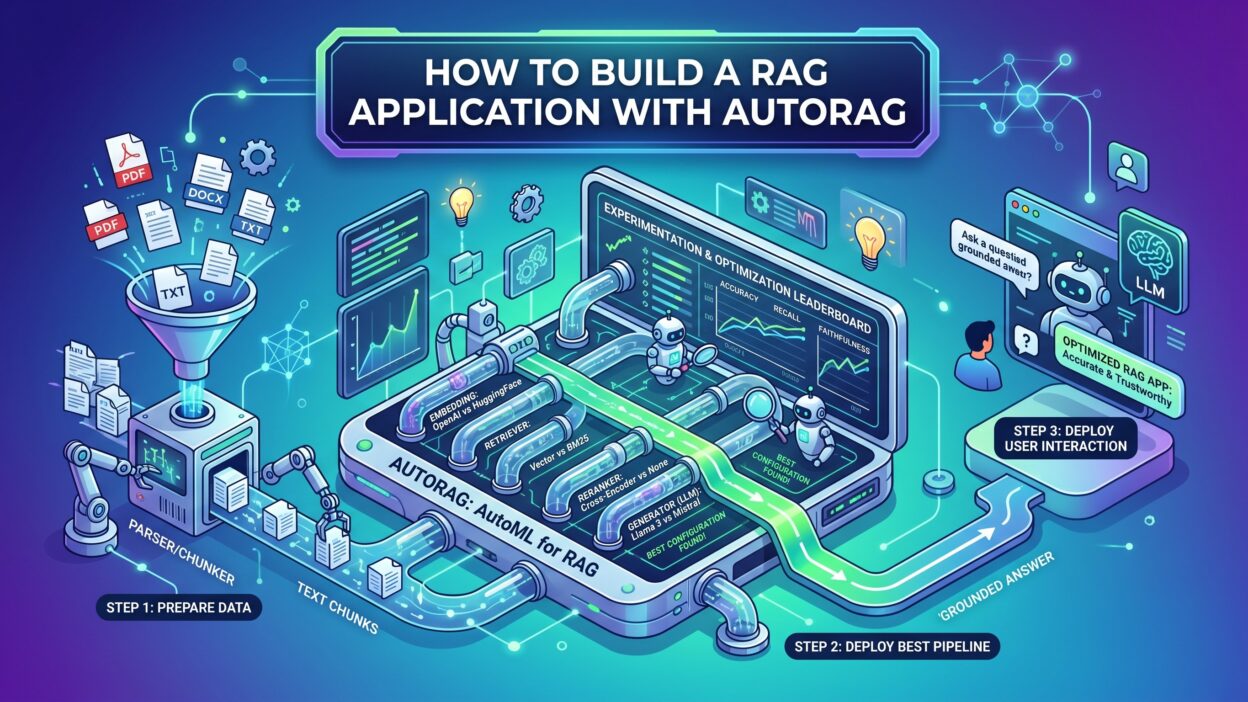
AutoRAG is an open-source framework that automates the process of finding the optimal RAG pipeline configuration for your specific data and use case.
Traditional RAG development requires manual experimentation. A developer tries one embedding model. They test one chunking strategy. They pick one retrieval method. They evaluate the results subjectively. Then they try another combination. This process is slow, inconsistent, and often misses better configurations entirely.
AutoRAG treats RAG optimization as a search problem. It defines a search space of possible pipeline components. It runs systematic experiments across that search space. It evaluates every combination against your actual data using rigorous metrics. The best configuration emerges from evidence rather than intuition.
The framework draws inspiration from AutoML, the field of automated machine learning. AutoML showed the world that systematic search outperforms manual tuning for model selection. AutoRAG applies the same insight to RAG pipeline design.
AutoRAG supports a wide range of pipeline components. Embedding models, chunking strategies, retrieval methods, rerankers, and generation configurations all participate in the optimization search. Developers define which components to include in the search space. AutoRAG handles the rest.
The framework integrates with popular tools in the LLM ecosystem. LlamaIndex and LangChain both work as execution backends. Major embedding model providers connect through standard interfaces. Vector store options include both local and cloud-hosted solutions.
Teams that use AutoRAG report dramatically shorter development cycles. The manual experimentation phase that once took weeks compresses into hours of automated search. Engineers spend their time on application logic rather than pipeline archaeology.
Why RAG Optimization Is Harder Than It Looks
Understanding the difficulty of RAG optimization makes the value of AutoRAG concrete.
A RAG pipeline has many moving parts. Each part has multiple configuration options. Those options interact in complex ways. A chunking strategy that works brilliantly with one embedding model might degrade performance with another. A retrieval method optimized for short queries might fail on long, complex questions.
The number of possible combinations grows explosively. Five embedding models, four chunking strategies, three retrieval methods, and two rerankers produce 120 distinct pipeline configurations. Testing each configuration properly requires generating evaluation datasets, running queries, scoring results, and comparing across metrics. Doing that manually for 120 combinations is not realistic for most teams.
Evaluation itself is non-trivial. How do you measure whether one RAG pipeline is better than another? Subjective review does not scale. Human evaluation is expensive. Automated metrics need careful selection to correlate with real user satisfaction.
AutoRAG addresses all three challenges. It makes systematic search tractable by automating the execution. It provides a structured evaluation framework with battle-tested metrics. It surfaces results in a format that makes comparison straightforward.
The teams who ignore RAG optimization ship pipelines that work adequately but not optimally. AutoRAG gives teams a path to optimal performance without the engineering cost that optimization usually demands.
The Architecture of AutoRAG
Understanding how AutoRAG works internally makes you a more effective user of the framework.
The Trial System
AutoRAG organizes experiments as trials. Each trial represents one complete pipeline configuration. A trial specifies one choice for every configurable component in the pipeline. Running a trial means executing that complete configuration against your evaluation dataset and computing performance metrics.
AutoRAG manages trial execution automatically. You define the search space. AutoRAG generates trial configurations, executes them, collects metrics, and stores results. The trial management system handles parallelization where possible to keep total runtime reasonable.
Trial results persist in a structured database. You can inspect individual trial results, compare configurations, and trace how component choices affect metrics. That audit trail is valuable beyond finding the best configuration. It teaches you how your data responds to different pipeline choices.
The Evaluation Framework
AutoRAG’s evaluation framework sits at the heart of the system. It answers the question that makes optimization possible: how do you measure RAG pipeline quality objectively?
The framework uses several complementary metrics. Retrieval metrics measure how well the pipeline finds relevant documents. Answer quality metrics measure how well the generated answer addresses the question. End-to-end metrics measure the full system from query to response.
AutoRAG supports standard metrics including MRR, NDCG, precision, recall, and faithfulness scores. You select which metrics matter for your use case. The framework computes all selected metrics for every trial automatically.
Evaluation requires a QA dataset specific to your domain. AutoRAG includes tools for generating evaluation datasets from your documents. You can also provide manually curated QA pairs for higher evaluation quality. The investment in a good evaluation dataset pays dividends across every experiment AutoRAG runs.
The Optimization Engine
AutoRAG’s optimization engine selects which configurations to try next based on results from completed trials. Simple grid search tries every combination systematically. More advanced search strategies use past results to guide future trials toward promising configurations.
The optimization engine makes AutoRAG efficient even for large search spaces. It does not need to run every possible combination to find excellent configurations. Smart search strategies converge on high-performing configurations faster than exhaustive search.
Developers configure the optimization strategy based on their time and compute budget. A quick exploratory run uses fewer trials with broader coverage. A thorough optimization run uses more trials with finer-grained search around the most promising regions.
The Pipeline Execution Layer
AutoRAG executes trials through a pipeline execution layer that abstracts component interfaces. Swapping one embedding model for another requires only a configuration change. The execution layer handles the implementation differences between components transparently.
This abstraction is what makes the search space tractable to define. You do not need custom integration code for every combination you want to test. AutoRAG’s execution layer standardizes the interfaces so any supported component works with any other supported component.
Building a RAG Application with AutoRAG: Step by Step
This section walks through a complete AutoRAG implementation from start to finish.
Install AutoRAG and Dependencies
AutoRAG installs through pip. The core package brings in the optimization and evaluation framework. Additional dependencies vary based on which components you want to include in your search space.
pip install autorag
For local embedding models, install the relevant model libraries. For cloud-based embedding APIs, install the provider SDK. For vector store backends, install the appropriate client library. AutoRAG’s documentation lists the exact dependency combinations for every supported component.
Create a virtual environment before installation to keep dependencies isolated. AutoRAG pulls in a significant number of dependencies. A clean virtual environment prevents conflicts with other projects.
Prepare Your Document Corpus
AutoRAG optimizes pipelines for your specific data. The quality of that optimization depends directly on having representative documents in your corpus.
Gather the documents your RAG application needs to serve. AutoRAG supports plain text, PDF, and other common document formats through its ingestion utilities. Organize documents into a directory structure that reflects your domain’s natural organization.
Document quality matters as much as quantity. AutoRAG can optimize retrieval from a clean, well-structured corpus far more effectively than from a noisy, poorly formatted one. Invest time in document preprocessing before running optimization. Clean documents produce better optimization results and better application performance.
AutoRAG’s ingestion utilities handle text extraction, basic cleaning, and format normalization. Run your documents through the ingestion pipeline to produce the standardized input format that AutoRAG’s optimization system expects.
Create Your Evaluation Dataset
The evaluation dataset is the most important input to AutoRAG optimization. It tells the framework what good performance looks like for your specific use case.
An evaluation dataset consists of question-answer pairs grounded in your documents. Each pair includes a question a real user might ask, the correct answer based on your documents, and ideally the specific document passages that support that answer.
AutoRAG provides a dataset generation utility that uses a language model to create QA pairs from your documents automatically. Generated datasets work well for initial optimization. Manually curated datasets produce higher quality evaluation and should be the target for production optimization.
Aim for at least 100 QA pairs for meaningful optimization results. More pairs produce more reliable metric estimates. Diverse questions that cover different document types, question styles, and difficulty levels give AutoRAG better signal for distinguishing pipeline configurations.
Define Your Search Space
The search space configuration tells AutoRAG which components and component options to include in its optimization search.
AutoRAG uses a YAML configuration file for search space definition. You specify which embedding models to test, which chunking strategies to evaluate, which retrieval methods to compare, and which rerankers to consider.
A moderate search space for initial optimization might include two or three embedding models, three chunking strategies with varying chunk sizes, two retrieval methods, and one or two reranker options. That produces a manageable number of trial combinations for a first optimization run.
modules:
  - module_type: llama_index_llm
    llm: openai
    model: [gpt-4o, gpt-4o-mini]
  - module_type: query_expansion
    query_expansion_module: [pass_query_expansion, multi_query_expansion]
  - module_type: retrieval
    top_k: [3, 5, 10]
    retrieval_module_type: [bm25, vector, hybrid_rrf]
  - module_type: reranking
    reranking_module_type: [pass_reranker, cohere_reranker]
Start with a broader search space in your first run to understand which component types have the most impact on your specific data. Narrow the search space in subsequent runs to explore the most promising component combinations in greater depth.
Run the AutoRAG Optimization
With your corpus, evaluation dataset, and search space configured, you are ready to run AutoRAG optimization.
from autorag.evaluator import Evaluator

evaluator = Evaluator(
    qa_data_path="qa_dataset.csv",
    corpus_data_path="corpus.csv"
)

evaluator.start_trial("config.yaml")
AutoRAG begins executing trials immediately. Each trial runs your evaluation dataset through a complete pipeline configuration and computes all configured metrics. Trial execution time depends on dataset size, the number of trials in your search space, and the computational cost of the components being tested.
Monitor trial progress through AutoRAG’s logging output. The framework reports completion percentage, individual trial metrics, and current best-performing configurations as the optimization run proceeds.
Analyze Optimization Results
AutoRAG stores complete results for every trial in a structured output directory. The framework provides analysis utilities that make result exploration straightforward.
from autorag.evaluator import Evaluator

evaluator.evaluate_best_trial()
Review the best-performing configurations by your primary metric. Examine which component choices consistently appear in high-performing trials. Those patterns reveal which components matter most for your specific data and use case.
AutoRAG generates comparison reports that visualize performance differences across configurations. Study those visualizations carefully. A configuration that leads on one metric might lag on another. Choose the configuration that best balances all metrics relevant to your application requirements.
Deploy the Optimal Pipeline
Once you identify the best pipeline configuration, AutoRAG generates deployment-ready code for that configuration. You do not need to manually reconstruct the winning configuration from experiment parameters.
from autorag.deploy import Runner

runner = Runner.from_trial_folder("results/0")
response = runner.run("What are the main features of our product?")
The deployed pipeline uses the exact component versions and parameter settings identified during optimization. Performance in deployment matches performance during evaluation when your production query distribution resembles your evaluation dataset.
Build an API layer around the deployed AutoRAG pipeline for production use. FastAPI works well for this purpose. Add authentication, rate limiting, and monitoring appropriate for your deployment context.
AutoRAG in Production: What to Expect
Moving from optimization to production requires understanding how AutoRAG pipelines behave under real conditions.
Performance Consistency
AutoRAG optimizes for performance on your evaluation dataset. Production performance stays consistent with evaluation performance when your production queries resemble the evaluation queries. Distribution shift between evaluation and production queries reduces the reliability of optimization results.
Build your evaluation dataset to reflect the full range of queries your users will actually ask. If your evaluation dataset covers only easy, well-formed questions but production users ask complex, ambiguous queries, optimization results will not fully transfer to production.
Latency Considerations
Trial optimization focuses on answer quality metrics. Latency does not directly factor into the optimization objective by default. The highest quality configuration might use expensive rerankers or large embedding models that introduce latency your application cannot tolerate.
Evaluate latency of top configurations explicitly before final selection. AutoRAG provides timing data for each trial. Filter your candidate configurations by both quality metrics and latency requirements before choosing your production pipeline.
Ongoing Optimization
Your document corpus changes over time. New documents add new information. User query patterns evolve. The pipeline that works best today might not remain optimal as your data and users change.
Schedule periodic re-optimization runs using AutoRAG. Update your evaluation dataset to reflect current query patterns before each optimization run. Treat RAG pipeline optimization as an ongoing process rather than a one-time effort.
AutoRAG vs. Manual RAG Development
Understanding this comparison helps teams make better build versus optimize decisions.
Development Speed
Manual RAG development requires sequential experimentation. A developer forms a hypothesis, implements it, evaluates results, and moves to the next hypothesis. A thorough evaluation of twenty configurations through manual development might take two to three weeks.
AutoRAG compresses that timeline dramatically. The same twenty configurations run as AutoRAG trials in hours rather than weeks. Teams reach confident pipeline selection far faster and with more rigorous evidence.
Evaluation Rigor
Manual evaluation often relies on subjective judgment or small sample testing. A developer reads twenty example responses and decides one configuration seems better than another. That evaluation is impressionistic and does not scale to nuanced performance differences.
AutoRAG applies systematic metrics across your full evaluation dataset for every trial. Statistical comparison across dozens of metrics and hundreds of examples produces far more reliable performance estimates than manual review.
Knowledge Capture
Manual experimentation generates tribal knowledge. The developer who ran the experiments knows which configurations failed and why. That knowledge rarely survives team changes or time gaps.
AutoRAG’s trial database captures results from every experiment systematically. Anyone can review what was tested, what metrics each configuration achieved, and why the winning configuration won. That knowledge persists independent of who ran the original experiments.
Common Mistakes When Using AutoRAG
Learning from others’ mistakes saves significant time in your own AutoRAG implementations.
Weak Evaluation Datasets
The most common mistake teams make with AutoRAG is investing insufficient effort in evaluation dataset quality. A weak dataset produces optimization results that do not generalize to real user queries. The winning configuration under a weak dataset might be mediocre in production.
Treat evaluation dataset creation as a serious investment. Curate questions that reflect real user intent. Include difficult questions that require genuine document understanding. Add questions where the answer requires synthesizing information across multiple documents. That diversity gives AutoRAG better signal for finding truly robust configurations.
Over-Fitting the Search Space to Current Needs
Teams sometimes define search spaces too narrowly based on existing assumptions. If you already believe one embedding model is best, you might exclude competitors from the search space. AutoRAG cannot challenge that assumption if the alternatives are absent from the search.
Start with broader search spaces that include options you are less confident about. AutoRAG provides the evidence to validate or challenge your assumptions. Trust the metrics over intuition, especially for early optimization runs.
Skipping Latency Evaluation
Quality metrics dominate optimization discussions. Teams select winning configurations based on answer quality scores and skip latency evaluation. Deployment reveals that the best-quality configuration takes several seconds per query, which users find unacceptable.
Always evaluate latency alongside quality metrics. AutoRAG stores timing data for every trial. Use that data to identify configurations that achieve strong quality within your latency budget before making final pipeline selections.
Treating Optimization as One-Time Work
Data changes. User behavior changes. A pipeline optimized on last quarter’s documents and query patterns might underperform today. Teams that treat AutoRAG optimization as a one-time activity accumulate performance debt over time.
Build periodic re-optimization into your development calendar. Update evaluation datasets regularly to reflect current conditions. Re-run AutoRAG when you add significant new documents, change your document corpus structure, or observe production performance metrics declining.
Frequently Asked Questions About AutoRAG
What is AutoRAG used for?
AutoRAG automates the process of finding the optimal RAG pipeline configuration for your specific data and use case. Developers use AutoRAG to evaluate many possible pipeline configurations systematically and identify the best combination of embedding models, chunking strategies, retrieval methods, and rerankers.
Is AutoRAG free to use?
AutoRAG is open-source and freely available. You pay for the compute resources used during optimization trials and the costs of any paid API services, such as embedding model APIs or LLM generation APIs, that your search space includes.
How long does an AutoRAG optimization run take?
Runtime depends on your search space size, evaluation dataset size, and the computational cost of the components being tested. A moderate search space with 100 evaluation pairs typically completes in two to four hours. Larger search spaces and datasets require proportionally more time.
What kind of evaluation dataset does AutoRAG need?
AutoRAG needs a dataset of question-answer pairs grounded in your documents. Each pair should include a question, the correct answer, and ideally the source document passages supporting that answer. AutoRAG includes utilities for generating evaluation datasets automatically from your documents.
Can AutoRAG work with private or on-premises data?
Yes. AutoRAG processes your documents and evaluation dataset locally. Data does not leave your infrastructure unless you configure components that call external APIs, such as cloud-based embedding models or hosted LLMs. On-premises deployments can use local embedding models and local vector stores entirely.
Does AutoRAG support all major embedding models?
AutoRAG supports a wide range of embedding models including OpenAI embeddings, Cohere embeddings, HuggingFace sentence transformers, and other popular options. The framework adds new integrations regularly. Check the AutoRAG documentation for the current list of supported embedding models.
How does AutoRAG decide which pipeline configuration is best?
AutoRAG computes multiple retrieval and generation quality metrics for every trial. You specify which metrics matter for your use case and how to weight them. AutoRAG ranks configurations based on performance across those weighted metrics. The top-ranked configuration becomes the recommended pipeline.
Can I use AutoRAG with my existing LangChain or LlamaIndex code?
AutoRAG integrates with both LangChain and LlamaIndex as execution backends. Your existing component preferences and integrations carry forward into AutoRAG’s optimization search. The framework wraps those components in its standardized interface for trial execution.
Read More:-Top 5 GitHub Repositories to Get Free Claude Code Skills (1000+ Skills)
Conclusion

RAG applications have enormous potential. They ground language model responses in your actual data. They reduce hallucination. They make AI genuinely useful for domain-specific knowledge work.
That potential only delivers when the pipeline configuration is right. Wrong component choices produce retrieval failures, irrelevant context, and poor answers. Finding the right configuration through manual experimentation takes too long and misses too many possibilities.
AutoRAG solves the RAG optimization problem systematically. It searches the configuration space efficiently. It evaluates results rigorously. It surfaces winning configurations with evidence rather than intuition. The development time savings are real and significant for every team that uses it.
The path to building a production RAG application with AutoRAG is clear. Prepare clean documents. Build a quality evaluation dataset. Define a thoughtful search space. Run the optimization. Analyze results carefully. Deploy the winning configuration. Schedule periodic re-optimization as your data and users evolve.
Every component of that path has been covered in this blog. You have the foundation to start building immediately. AutoRAG provides the tools. Your domain data provides the signal. Rigorous evaluation provides the confidence.
The teams shipping the best RAG applications in 2025 use systematic optimization rather than manual guesswork. AutoRAG is how they get there. Start your first optimization run today and discover what the right configuration can do for your specific use case.