Introduction
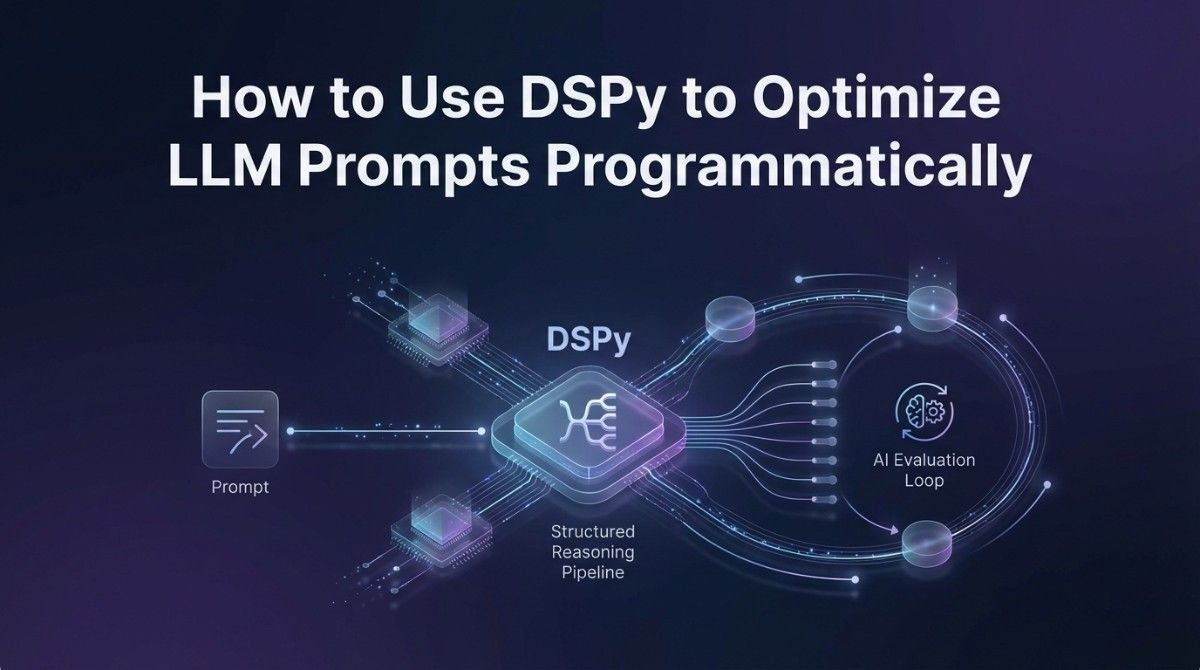
TL;DR Prompt engineering used to feel like guesswork. You tweak a sentence. You rerun the model. You hope for better output. That cycle is slow, inconsistent, and nearly impossible to scale. DSPy changes this entirely. When you use DSPy to optimize LLM prompts programmatically, you replace manual trial-and-error with a structured, data-driven optimization system. This blog walks you through exactly how DSPy works, why it matters, and how to implement it in your own AI projects.
Table of Contents
What Is DSPy and Why Does It Exist?
DSPy is an open-source framework created at Stanford University. It stands for Declarative Self-improving Language Programs in Python. The framework treats prompts and pipelines as programs that can be compiled and optimized. It does not ask you to write prompt text manually. Instead, it asks you to declare what you want the model to do. DSPy handles the optimization work behind the scenes.
The problem DSPy solves is real. Most teams spend enormous amounts of time handcrafting prompts. They find something that works on one set of examples. The prompt breaks on a slightly different dataset. They patch it. It breaks again somewhere else. This fragile process kills productivity. It also creates prompts that are brittle and hard to maintain.
DSPy treats the language model as a learnable component inside a larger program. You write the logic. DSPy optimizes the communication between your logic and the model. That is the fundamental shift when you use DSPy to optimize LLM prompts programmatically. You stop writing prompts and start writing programs.
Core Concepts in DSPy You Must Understand First
Before you write a single line of code, you need to understand DSPy’s core building blocks. These concepts are not difficult. They do require a mental shift from traditional prompt engineering.
Signatures: Declaring What You Want
A signature in DSPy is a simple declaration of inputs and outputs. It tells the framework what information goes in and what you expect to come out. You do not write a prompt. You describe the task. For example, a question-answering signature might declare that the input is a question and the output is an answer. DSPy takes that declaration and builds a functional prompt around it automatically.
Signatures are powerful because they are reusable. You write a signature once. DSPy can optimize it for different models, different datasets, and different performance targets without you rewriting anything. This modularity is a core reason teams use DSPy to optimize LLM prompts programmatically instead of maintaining stacks of handwritten prompt files.
Modules: Building Composable AI Logic
Modules in DSPy are the equivalent of functions in traditional programming. They take a signature and wrap it in a callable component. DSPy provides several built-in modules. Predict is the simplest. It calls the model once with the given signature. ChainOfThought adds step-by-step reasoning to the output. ReAct enables the model to use tools and take actions before producing a final answer.
You can stack modules together to build complex pipelines. A retrieval-augmented generation system, for instance, might chain a retrieval module with a generation module and then a verification module. Each module handles one part of the logic. DSPy optimizes the prompts inside each module to work together as a coherent system.
Optimizers: The Engine That Makes DSPy Special
Optimizers are what separate DSPy from every other prompting framework. They take your declared modules and a set of training examples. They run experiments. They measure which prompt formulations produce the best outputs according to your defined metric. Then they update the prompt automatically.
DSPy includes several optimizers. BootstrapFewShot automatically selects and formats high-quality few-shot examples. MIPRO uses meta-learning to generate instruction variants and test them against your data. BayesianSignatureOptimizer applies probabilistic methods to search the prompt space more efficiently. Each optimizer is suited to different task types and dataset sizes.
This optimization layer is the heart of why developers use DSPy to optimize LLM prompts programmatically. The optimizer does the work that previously required dozens of manual experiments.
Setting Up DSPy: Your First Implementation
Getting started with DSPy requires Python 3.8 or higher. The installation is straightforward. You install the package, configure your language model, and start declaring your first signature. The learning curve is gentle for anyone with Python experience.
Installation and Environment Setup
Run pip install dspy-ai in your terminal to install the framework. DSPy supports multiple language model providers including OpenAI, Anthropic, Cohere, and locally hosted models through Ollama and LM Studio. You configure your chosen model at the start of your program using dspy.configure. This single configuration call sets the default model for all modules in your pipeline.
Once you configure the model, every module you create will use it automatically. You can also override the model for specific modules if your pipeline needs different models for different tasks. This flexibility makes DSPy practical for production environments where cost and latency tradeoffs matter.
Writing Your First Signature and Module
Start with a simple task. Sentiment classification is a good first example. You create a class that inherits from dspy.Signature. Inside the class, you add a docstring describing the task and declare your input and output fields using dspy.InputField and dspy.OutputField. The field names and descriptions matter. They become part of the generated prompt.
Next, create a module using dspy.Predict and pass your signature to it. Call the module with your input data. DSPy formats the prompt, calls the model, parses the response, and returns a structured output object. You access your declared output field directly on that object. The whole workflow feels more like programming than prompting.
This clean separation between logic and prompt text is exactly why teams use DSPy to optimize LLM prompts programmatically. The code is readable. The behavior is testable. The prompts are not hidden inside long strings scattered across your codebase.
Running the Optimizer: Where the Magic Happens
Writing modules is only half the work. The real power of DSPy comes from running an optimizer against your pipeline. This process requires training examples and a metric function. Once you have both, the optimizer takes over.
Preparing Your Training Data
DSPy does not require massive datasets. Even 20 to 50 high-quality examples can produce meaningful optimization results with BootstrapFewShot. For more powerful optimizers like MIPRO, 100 to 300 examples produce stronger results. Each training example is a dspy.Example object with your input fields and the expected output.
Data quality matters more than data quantity in DSPy. Examples should be diverse and representative of the real inputs your system will encounter. If your training data is narrow, the optimizer will tune for that narrow distribution. Your pipeline will underperform on inputs outside that range.
Defining Your Metric Function
Your metric function tells the optimizer what good output looks like. It takes an example and a prediction as inputs. It returns a score. For classification tasks, exact match accuracy is a natural metric. For generation tasks, you might use semantic similarity, ROUGE scores, or a custom scoring function that calls another model to evaluate quality.
The metric function is where your domain expertise directly shapes the optimization. A thoughtful metric produces prompts that perform well on what you actually care about. A lazy metric produces prompts that game the scoring system without improving real-world usefulness. Invest time in getting your metric right before you use DSPy to optimize LLM prompts programmatically.
Running BootstrapFewShot on Your Pipeline
BootstrapFewShot is the most widely used DSPy optimizer for getting started. You create an instance of it and pass your metric function. Then you call the compile method on your optimizer, passing your module and training data. The optimizer runs your pipeline on the training examples. It identifies which examples produce high-quality outputs. It formats those examples as few-shot demonstrations and inserts them into your prompt automatically.
The compiled module replaces your original module. You use it exactly the same way. But now every call includes carefully selected few-shot examples that guide the model toward better outputs. The difference in output quality is often dramatic, especially for complex tasks where the model needed examples to understand the expected format and reasoning style.
Advanced Techniques: Getting More From DSPy
Once you are comfortable with the basics, DSPy offers several advanced capabilities that further improve pipeline performance. These techniques are where experienced practitioners extract significant gains beyond standard optimization.
Chaining Modules for Multi-Step Reasoning
Complex tasks benefit from breaking the work into sequential steps. A research assistant pipeline might chain a query-expansion module, a retrieval module, a synthesis module, and a citation module. Each module handles one responsibility. DSPy optimizes the prompts inside each module with awareness of the overall pipeline goal.
When you chain modules, you build the pipeline as a Python class that inherits from dspy.Module. You instantiate your sub-modules in the constructor. You implement the forward method to define the data flow between modules. This structure is familiar to anyone who has worked with PyTorch or other neural network frameworks. That familiarity is intentional.
Using ChainOfThought for Reasoning Tasks
Some tasks require the model to reason step by step before producing a final answer. DSPy’s ChainOfThought module adds a rationale field to your signature automatically. The model generates its reasoning process before committing to the final output. This intermediate reasoning dramatically improves accuracy on math problems, logical inference tasks, and multi-hop question answering.
You swap dspy.Predict for dspy.ChainOfThought in your module definition. No other changes are necessary. DSPy handles the formatting, the rationale field, and the optimization of both the reasoning and the final answer. This is one of the cleanest examples of why developers use DSPy to optimize LLM prompts programmatically. One-line changes produce fundamentally different model behaviors.
Saving and Loading Optimized Programs
After optimization, you want to save your compiled program so you do not have to re-run the optimizer every time you deploy. DSPy provides a save method on compiled modules. You pass a file path and DSPy serializes the optimized program to JSON. When you load the saved program later, it restores the optimized prompts and few-shot examples exactly as they were.
This save-and-load workflow is essential for production deployments. You run the optimizer in a development environment with full training data access. You save the compiled program. You deploy it to production where it runs inference without needing to re-optimize. Optimization costs stay in development. Inference costs stay lean in production.
DSPy vs. Traditional Prompt Engineering: A Real Comparison
Teams often ask whether they should invest time learning DSPy or stick with their current prompting approach. The answer depends on your use case. For one-off tasks, traditional prompting is fine. For production pipelines that need consistent performance across varying inputs, DSPy wins decisively.
Maintainability Over Time
Traditional prompts live inside strings in your code. When requirements change, you hunt through files to find and update every affected prompt. With DSPy, you update the signature or the metric. The optimizer re-generates the optimal prompt for you. Maintenance effort drops substantially. Your pipeline adapts to new requirements without a manual prompt rewrite.
Performance Consistency Across Model Updates
Model providers update their models regularly. A prompt that worked perfectly on GPT-4-turbo may behave differently on the next version. When you use DSPy to optimize LLM prompts programmatically, you simply re-run the optimizer against the new model. DSPy finds the optimal prompt formulation for the updated model automatically. You do not start from scratch. You point the optimizer at the new model and let it run.
Switching Between Models
Cost optimization often pushes teams to evaluate cheaper models for specific tasks. A task running on GPT-4 might work just as well on a smaller model with the right prompts. DSPy makes this evaluation fast. You change the model in your configuration. You run the optimizer. You compare performance metrics. If the cheaper model meets your quality threshold, you switch and save money. This model-agnostic portability is one of the strongest practical arguments to use DSPy to optimize LLM prompts programmatically.
Real-World Use Cases Where DSPy Delivers Strong Results
DSPy is not a research-only tool. Teams ship DSPy-powered systems in production across multiple industries. Understanding where it performs best helps you decide whether it fits your specific needs.
Retrieval-Augmented Generation Systems
RAG systems retrieve relevant documents and use them to answer questions. The quality of the answer depends heavily on how well the retrieval query matches the document content and how well the generation prompt synthesizes retrieved information. DSPy optimizes both steps together. It selects few-shot examples that demonstrate effective query formulation and high-quality synthesis. RAG systems built with DSPy consistently outperform those built with static prompts on benchmarks like HotPotQA and MultiHop datasets.
Structured Data Extraction
Extracting structured information from unstructured text is a common enterprise need. Legal contract analysis, medical record parsing, and financial document processing all require consistent, accurate extraction. DSPy’s output field declarations make it natural to define the exact schema you expect. The optimizer then finds the prompt formulation that produces the most reliable extraction against your schema. When you use DSPy to optimize LLM prompts programmatically for extraction tasks, error rates drop and output consistency improves measurably.
Automated Evaluation and Grading
Educational technology and assessment platforms need reliable automated grading. A DSPy pipeline can evaluate student responses against rubrics, provide structured feedback, and assign scores with high consistency. The optimizer tunes the evaluation prompt to align with human grader judgments from your training examples. The system learns what good grading looks like from real examples rather than from hand-tuned rules.
Frequently Asked Questions About DSPy
Do I need machine learning expertise to use DSPy?
No. DSPy is designed for developers with Python skills, not ML researchers. You do not train neural networks. You do not manage gradient updates. You write Python classes, define inputs and outputs, and run an optimizer. If you can write a Python function and define a simple scoring metric, you can use DSPy to optimize LLM prompts programmatically in your own projects.
How many training examples does DSPy need?
DSPy works with small datasets. The BootstrapFewShot optimizer produces useful results with as few as 20 examples. MIPRO and other advanced optimizers perform better with 100 to 300 examples. The quality of your examples matters more than the quantity. Diverse, representative, high-quality examples always outperform a large set of noisy or redundant ones.
Can DSPy work with open-source models?
Yes. DSPy supports locally hosted open-source models through Ollama, vLLM, and Hugging Face’s text generation inference server. You configure DSPy to point at your local model endpoint instead of a cloud API. The rest of the framework behaves identically. This makes DSPy an excellent tool for organizations that want to use DSPy to optimize LLM prompts programmatically without sending sensitive data to third-party APIs.
How does DSPy compare to LangChain?
LangChain focuses on composability and tool integration. It gives you building blocks for connecting models, tools, and data sources. DSPy focuses on optimization. It takes those building blocks and systematically improves the prompts inside them. The tools are complementary rather than competitive. Some teams use LangChain for orchestration and DSPy for optimization within specific pipeline components.
Is DSPy production-ready?
DSPy is actively maintained and used in production by companies and research teams worldwide. The framework receives regular updates. The community is growing quickly. That said, it is still maturing compared to more established frameworks. Expect some rough edges in documentation and occasional API changes between versions. Test your compiled programs thoroughly before deploying. Monitor output quality in production just as you would with any AI-powered system.
What is the cost of running DSPy optimization?
Running the optimizer costs more than running inference. The optimizer makes multiple API calls per training example to evaluate different prompt formulations. For a dataset of 100 examples and a mid-complexity optimizer like MIPRO, expect to spend two to five dollars on API calls with GPT-4-class models. BootstrapFewShot is cheaper because it uses successful runs from your training data rather than generating new variants. Run optimization in development once. Deploy the compiled result. Inference costs remain the same as without DSPy.
Common Mistakes When Starting With DSPy
New users make predictable mistakes with DSPy. Knowing them in advance saves significant debugging time.
Mistake 1: Poor Field Descriptions in Signatures
DSPy uses your field names and descriptions to generate the initial prompt structure. Vague field names produce vague prompts. Name your fields precisely. Write clear descriptions for each field. The optimizer can refine a good starting prompt much more efficiently than it can rescue a bad one. Treat your signature like an API contract. Every field should have an unambiguous definition.
Mistake 2: Using a Metric That Does Not Reflect Real Quality
If your metric only checks for exact string matches but your task requires nuanced generation, the optimizer will produce prompts that game the metric without generating genuinely useful outputs. Build your metric to reflect what you actually care about. For complex generation tasks, consider using a separate evaluator model as part of your metric function. This LLM-as-judge approach produces metrics that align much better with human quality judgments.
Mistake 3: Skipping Evaluation After Optimization
Optimization improves performance on your training distribution. It may not generalize perfectly to all real-world inputs. Always evaluate your compiled program on a held-out test set before deploying. Compare the optimized program’s performance to your baseline. Quantify the improvement. This evaluation step gives you confidence in the deployment and a benchmark for monitoring ongoing performance. This discipline is part of what it means to use DSPy to optimize LLM prompts programmatically in a professional, rigorous way.
Read More:-Devin AI vs OpenDevin vs Goose: Evaluating the Best Autonomous Coders
Conclusion

Manual prompt engineering made sense when language models were novelties. It does not make sense for production systems that need to perform consistently across thousands of diverse inputs. The gap between what you can achieve with handwritten prompts and what you can achieve when you use DSPy to optimize LLM prompts programmatically is significant. It grows larger as your pipeline complexity increases.
DSPy gives you a systematic alternative. You declare your intent through signatures. You build composable logic through modules. You define quality through a metric function. The optimizer finds the prompts that best satisfy your quality requirements across your training data. You save the result and deploy a high-performing, maintainable AI pipeline.
The learning curve is real but short. Most developers get a working pipeline running within a day. The productivity gains compound over time as you reuse signatures, share optimized programs across projects, and re-optimize quickly when requirements change.
Start with one pipeline. Pick your most time-consuming prompt engineering task. Implement it in DSPy. Run BootstrapFewShot with your best training examples. Compare the output quality to your current prompt. The results will make the decision for you. Use DSPy to optimize LLM prompts programmatically and build AI systems that actually earn their place in your production stack.