Introduction
TL;DR Hiring at scale is brutal. Your job post goes live. Ten thousand resumes flood your inbox within 48 hours. Every recruiter on your team drowns in PDF files. Qualified candidates slip through the cracks. Bad hires cost the company money and time.
A custom AI recruiter for resume filtering changes this reality completely. You stop reading resumes manually. The AI reads them all, scores each one, and hands you a ranked shortlist. Your recruiters focus on interviews instead of inbox management.
This guide covers everything. You will learn how to design the system, choose the right tools, write the scoring logic, and deploy a pipeline that processes thousands of resumes in minutes. No fluff. Just a clear, step-by-step breakdown for technical teams and HR leaders alike.
Table of Contents
Why Manual Resume Screening Fails at Scale
Most companies still rely on manual resume review. A recruiter opens each file, skims it for 7–10 seconds, and decides yes or no. This approach works for 50 applications. It completely falls apart at 10,000.
Human reviewers get fatigued. After the first hundred resumes, attention drops. Patterns blur together. Biases creep in without anyone noticing. The best candidate might sit at position 4,200 in the queue — and never get seen.
Speed is the other killer problem. A senior engineering role needs to be filled in three weeks. Manual screening alone can eat 10 of those days. The best candidates accept other offers while your team is still sorting files.
Inconsistency also hurts quality. Two recruiters screening the same 500 resumes will disagree on hundreds of them. There is no shared rubric. Personal preferences override job requirements. Some companies lose top talent this way every single month.
A custom AI recruiter for resume filtering removes all these problems at once. The system reads every resume with the same criteria, at the same speed, every single time. No fatigue. No bias drift. No missed candidates hiding deep in the pile.
This is why engineering and HR teams across industries are building their own AI screening pipelines. Off-the-shelf ATS tools offer basic keyword matching. A custom-built system offers real intelligence — semantic understanding, contextual scoring, and full adaptability to your specific job requirements.
Core Components of a Custom AI Recruiter for Resume Filtering
Every strong custom AI recruiter for resume filtering shares five foundational components. Understanding each one helps you build a system that works reliably at scale.
1. Resume Parser
The parser extracts raw text from uploaded resumes. Most resumes arrive as PDFs or Word files. Tools like PyMuPDF, pdfplumber, and Apache Tika handle extraction well. The parser must handle messy formatting — two-column layouts, tables, graphics, and inconsistent fonts all appear in real resume files.
Clean text extraction is critical. Downstream AI models only perform well when the input text is clean and structured. Invest time in the parser. A weak parser corrupts every analysis that follows.
2. NLP Processing Layer
Once you have clean text, the NLP layer identifies key entities. It extracts names, skills, job titles, companies, education details, and years of experience. Named Entity Recognition (NER) models handle this well. SpaCy and Hugging Face Transformers both offer pre-trained NER models that work on resume text.
Sentence-level embeddings add another layer of understanding. Models like BERT or sentence-transformers convert resume text into numerical vectors. These vectors capture meaning, not just keywords. This allows semantic matching between the resume content and the job description.
3. Scoring and Ranking Engine
The scoring engine is the brain of your custom AI recruiter for resume filtering. It takes parsed resume data and compares it against a structured job profile. Skills match, experience relevance, education fit, and career trajectory all contribute to a final score.
Weights for each dimension come from the job requirements. A senior data scientist role weights Python skills and ML experience heavily. A project manager role weights leadership history and certification data more. The engine should support configurable weights so hiring managers can adjust priorities without touching code.
Choosing the Right Tech Stack for AI Resume Screening
Tech stack choices shape the performance and scalability of your system. A wrong choice early means rebuilding later. Choose carefully based on your team’s expertise, budget, and volume requirements.
Language and Framework
Python is the best language for this project. Its ecosystem dominates NLP, ML, and data processing. Libraries like SpaCy, Transformers, Pandas, and FastAPI all integrate smoothly. Your team will find Python tutorials and community support for every challenge they hit.
Use FastAPI for your backend API layer. It is fast, asynchronous, and easy to document. Recruiters and HR systems send resumes to your API endpoint. The API returns ranked results in JSON format. Frontend teams connect to this endpoint with a simple dashboard or integrate it into an existing ATS.
Vector Database for Semantic Search
A vector database stores resume embeddings for fast similarity search. Pinecone, Weaviate, and Qdrant all work well here. When a new job description arrives, you convert it to a vector. Then you query the vector database for the closest matching resume vectors.
This approach handles semantic matching brilliantly. A resume that mentions “forecasting revenue trends” matches a job requiring “financial projection skills” — even without exact keyword overlap. Traditional ATS tools miss this completely. Semantic search finds it every time.
LLM Integration for Contextual Analysis
Large Language Models add deep contextual reasoning to your pipeline. GPT-4o and Claude 3.5 Sonnet both handle resume analysis well. You send a structured prompt containing the resume text and job description. The model returns a detailed reasoning summary plus a compatibility score.
Use LLM analysis for top candidates only. Running GPT-4o on 10,000 resumes is expensive and slow. Use your NLP layer to filter down to the top 500. Then run LLM analysis on that shortlist. This keeps costs low while preserving quality at the final stage.
Step-by-Step Pipeline Architecture for Bulk Resume Processing
Building a robust custom AI recruiter for resume filtering requires a clear pipeline design. Each step feeds the next. Failures at any step damage the entire output. Design the pipeline with error handling and observability from day one.
Intake and Storage
Candidates upload resumes through a web form or email parser. Your system saves each file to cloud storage — AWS S3 or Google Cloud Storage both work well. A unique ID is assigned to each resume. This ID tracks the file through every processing stage.
Send an intake event to a message queue after saving. RabbitMQ and Kafka are both excellent choices here. The queue decouples intake from processing. High upload volumes do not crash your processing workers.
Text Extraction and Cleaning
A worker picks up each intake event from the queue. It downloads the resume file and passes it to the parser. PyMuPDF extracts text from PDFs. Python-docx handles Word files. The worker cleans the extracted text — removing extra whitespace, fixing encoding errors, and stripping irrelevant metadata.
Store the cleaned text in your primary database alongside the resume ID. Add a status flag that marks the record as “parsed.” This allows you to track pipeline progress and reprocess failed records without re-uploading files.
Entity Extraction and Embedding
The NLP worker picks up parsed records. SpaCy’s NER model identifies skills, job titles, companies, and education details. A custom skills taxonomy improves accuracy here — map “JS” to “JavaScript,” “ML” to “Machine Learning,” and so on. Domain-specific normalization matters enormously for resume data.
After entity extraction, generate sentence embeddings for the full resume text. Use the sentence-transformers library with the all-MiniLM-L6-v2 model. Store the embedding vector in your vector database alongside the resume ID. This step enables semantic search for all future job openings — you never re-process old resumes.
Scoring Against Job Profile
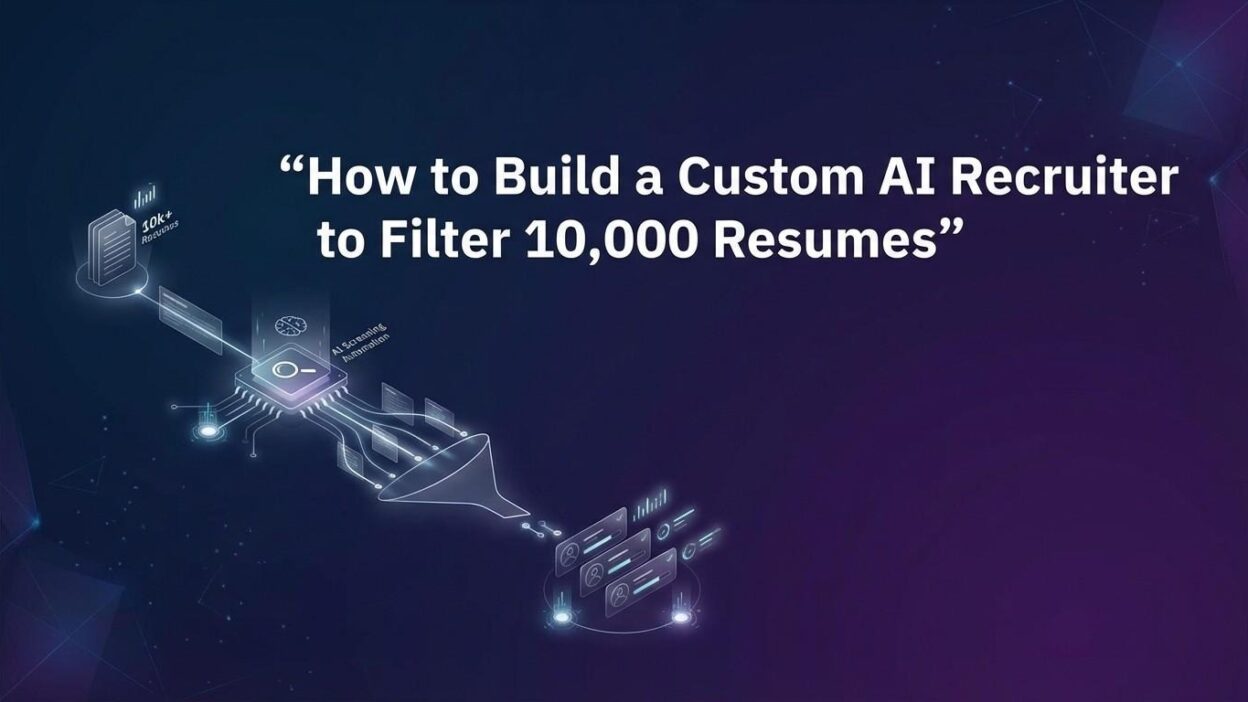
When a recruiter creates a new job posting, the system converts the job description to an embedding vector. It queries the vector database for the top 500 nearest resume vectors. This semantic search takes under two seconds even across 10,000 resumes.
The scoring engine then evaluates those 500 candidates against detailed job criteria. Skills overlap scores account for 35% of the total. Experience relevance scores account for 30%. Education fit adds 15%. Career trajectory adds 20%. The engine returns a ranked list with individual score breakdowns for every candidate.
LLM Review for Top Candidates
Take the top 50 candidates from the scoring engine. Send each one to your LLM API with a structured analysis prompt. Ask the model to summarize strengths, flag concerns, and provide a final recommendation. Store the LLM output alongside the candidate record.
Recruiters see a clean dashboard. Each candidate shows their total score, a skills match breakdown, and the LLM-generated summary. Recruiters spend 5 minutes reviewing the top 50 instead of 10 days reviewing 10,000. This is the core value of a custom AI recruiter for resume filtering.
Training and Customizing Your Resume Scoring Model
Off-the-shelf models give you a starting point. A truly effective custom AI recruiter for resume filtering requires tuning based on your company’s real hiring data.
Using Historical Hiring Data
Collect past resume data from candidates your company hired and rejected. Label each record with the hiring outcome. Hired candidates are positive examples. Rejected candidates are negative examples. You need at least 200–500 labeled examples per role type to train a meaningful model.
Fine-tune a classification model on this dataset. Scikit-learn’s gradient boosting classifier works well for structured feature data. Hugging Face’s Trainer API handles fine-tuning for transformer-based models. Test accuracy on a held-out validation set before deploying to production.
Building a Feedback Loop
Human feedback improves the model over time. When a recruiter overrides the AI score — promoting a candidate the AI ranked low or rejecting a high-ranked one — capture that signal. Store it as a labeled correction in your training database.
Retrain the model monthly using accumulated feedback. Track accuracy metrics before and after each retraining cycle. The model should improve with each iteration. A feedback loop transforms your custom AI recruiter for resume filtering from a static tool into a continuously learning system.
Bias Auditing and Fairness Checks
AI resume screening systems can learn and amplify historical hiring biases. Audit your model regularly. Check score distributions across gender, ethnicity, and age indicators. If patterns emerge that correlate with protected characteristics rather than actual job performance, investigate immediately.
Use counterfactual testing — change a candidate’s name or gender marker while keeping all skills identical. The score should not change. If it does, your model has learned a biased pattern. Retrain with debiased data and stricter feature engineering. Fair, explainable scoring is not optional. It protects candidates and protects your company legally.
Integrating the AI Recruiter with Your Existing ATS
Most companies already use an ATS like Greenhouse, Lever, Workday, or BambooHR. Your custom AI recruiter for resume filtering does not replace these systems. It enhances them through API integration.
Greenhouse offers a robust API that supports webhook events for new applications. Configure a webhook that fires every time a candidate applies. Your AI pipeline receives the trigger, fetches the resume from the Greenhouse API, and processes it automatically. Scores and summaries post back to the candidate’s Greenhouse profile within minutes.
Lever provides similar webhook capabilities. The integration pattern is identical — listen for application events, process resumes asynchronously, push results back through the Lever API. Recruiters never leave their ATS. The AI insights appear directly in the workflow they already use every day.
For companies using custom-built ATS systems, direct database integration is simpler. Your pipeline polls a new_applications table every few minutes. It fetches unprocessed records, runs them through the scoring system, and writes results back to a scores table. Recruiters query this table through a simple dashboard built in Retool or Streamlit.
Standardize your output schema before integration. Every ATS integration should receive the same JSON structure: candidate ID, overall score, dimension scores, skills matched, skills missing, and LLM summary text. This consistency allows you to support multiple ATS platforms without rewriting your core logic.
Performance Benchmarks and Scaling the System to 10,000 Resumes
A well-architected custom AI recruiter for resume filtering handles 10,000 resumes efficiently. Here is what realistic performance looks like at each pipeline stage.
Text extraction runs at roughly 100–200 resumes per minute per worker. Deploy 4–8 parallel workers. You can process 10,000 resumes in under 15 minutes at this rate. Cloud auto-scaling lets you spin up more workers during peak hiring periods without manual intervention.
NLP processing — entity extraction plus embedding generation — runs at 50–100 resumes per minute per worker. With 8 workers running in parallel, 10,000 resumes complete in 12–20 minutes. Batch processing with sentence-transformers speeds this up significantly. Process embeddings in batches of 64 rather than one at a time.
Vector search across 10,000 stored embeddings returns results in under 500 milliseconds. Pinecone and Qdrant handle this easily. Latency stays stable as you scale to 100,000 or 1,000,000 stored resumes. The vector search approach scales gracefully without expensive re-architecture.
LLM analysis of the top 50 candidates takes 3–8 seconds per resume, depending on the model and prompt length. Running 50 analyses sequentially takes 4–7 minutes. Parallelize these calls using asyncio in Python. You can cut this to under 2 minutes with 20 concurrent API calls.
Total end-to-end processing time for 10,000 resumes with full LLM analysis of the top 50: approximately 30–45 minutes. This compares favorably to 10 days of manual screening. Your team gets the shortlist the same day the job posts.
Cost Estimation for Running a Custom AI Recruiter
Cost is a real concern for teams evaluating custom AI recruiter for resume filtering solutions. Let us break down a realistic estimate for processing 10,000 resumes.
Cloud compute for parsing and NLP workers costs approximately $15–25 for a 10,000-resume batch. This assumes standard EC2 or Google Cloud instances running for 30–45 minutes. Spot instances cut this cost by 60–70%. Most teams run batch processing overnight using spot pricing and pay very little.
Vector database costs scale with stored records. Pinecone’s free tier handles up to 100,000 vectors. At scale, Pinecone charges approximately $0.095 per 1,000 vectors per month. Storing 100,000 resume vectors costs around $9.50 per month. This cost is negligible compared to recruiter salary costs.
LLM API costs are the largest variable. GPT-4o charges roughly $0.005 per 1,000 input tokens. A typical resume analysis prompt runs 1,500–2,000 tokens. Analyzing 50 top candidates per job opening costs approximately $0.40–0.60. Running 100 job openings per month costs $40–60 in LLM fees. Very manageable.
Total monthly operating cost for a high-volume hiring team processing 50,000 resumes across 100 job openings: approximately $200–400. Compare that to one recruiter salary at $60,000–80,000 annually. The ROI is obvious. This is why companies build rather than buy when it comes to AI resume screening.
Frequently Asked Questions About AI Resume Filtering
Q1. What is a custom AI recruiter for resume filtering?
A custom AI recruiter for resume filtering is a software pipeline that automatically reads, parses, scores, and ranks job applications using artificial intelligence. Unlike generic ATS keyword matching, a custom system uses NLP, semantic embeddings, and LLMs to understand resume content deeply and compare it intelligently against job requirements.
Q2. How accurate is AI resume screening compared to human reviewers?
Well-trained AI screening systems match or exceed human accuracy on structured criteria like skills matching and experience relevance. Studies show human reviewers agree with each other only 40–60% of the time on borderline candidates. A calibrated AI system applies the same criteria consistently to every resume. Accuracy improves further when you incorporate historical hiring outcome data into training.
Q3. Can a custom AI recruiter handle different resume formats?
Yes. A properly built system handles PDFs, Word documents, plain text files, and HTML resumes. Robust parsers like PyMuPDF and Apache Tika manage complex layouts including multi-column formats, tables, and graphics. Edge cases always exist — extremely unusual formats may require manual review. Most production systems report a 95–99% successful parse rate across real candidate submissions.
Q4. How do you prevent bias in AI resume screening?
Bias prevention requires deliberate design choices. Remove protected characteristics (name, gender, age, address) before scoring. Use diverse training datasets. Audit score distributions across demographic groups regularly. Apply counterfactual testing to verify that changing protected characteristics does not change scores. A custom AI recruiter for resume filtering can actually reduce bias compared to human screening when built and monitored carefully.
Q5. How long does it take to build this system from scratch?
A small engineering team of 2–3 developers can build a working MVP in 4–8 weeks. A production-grade system with ATS integration, dashboard, and monitoring requires 3–6 months. Teams with strong Python and ML experience move faster. Pre-built libraries for parsing, NLP, and vector search cut development time significantly. Starting with an MVP and iterating is always faster than trying to build a perfect system upfront.
Q6. What is the best LLM to use for resume analysis?
GPT-4o and Claude 3.5 Sonnet both perform excellently on resume analysis tasks. GPT-4o handles complex reasoning and structured output well. Claude 3.5 Sonnet produces cleaner, more readable summaries for recruiter-facing output. Test both models on a sample of your actual resumes. Pick the one that produces output your recruiting team finds most useful. Both deliver strong results for a custom AI recruiter for resume filtering workflow.
Read More:-How AI Agents Are Transforming Personalized Learning in EdTech
Conclusion

Hiring at scale does not have to be overwhelming. A custom AI recruiter for resume filtering turns a 10-day manual process into a 30-minute automated one. You get consistent scoring, semantic matching, LLM-powered summaries, and a ranked shortlist — all before your recruiters open a single file.
The technology stack for this system is mature and accessible. Python, SpaCy, Hugging Face Transformers, Pinecone, and FastAPI give you everything you need. Cloud infrastructure makes scaling straightforward. LLM APIs add deep contextual reasoning at a cost that makes strong business sense.
Building this system takes real effort. The parser, NLP layer, scoring engine, and ATS integration all require careful design. Bias auditing is not optional. Feedback loops are essential for long-term accuracy. But every week of development pays back months of recruiter time.
Your competitors are already exploring AI-powered hiring tools. Building a custom AI recruiter for resume filtering gives you a system tuned exactly to your job requirements, your hiring culture, and your candidate data. No generic SaaS product matches that level of precision.
Start with a small pilot. Pick one high-volume role. Build the MVP. Measure the time saved and the quality of shortlists. The results will make the case for expanding the system across your entire hiring operation.