Introduction
TL;DR Generic chatbots frustrate customers with irrelevant responses. Your business needs solutions that understand your specific products, policies, and processes. A custom AI customer support chatbot using proprietary data solves this problem completely.
Traditional chatbots rely on pre-programmed responses. They fail when customers ask unique questions about your offerings. Your support team still handles the same repetitive inquiries. The promised automation never materializes.
Training chatbots on your actual company data changes everything. The AI learns your product catalog inside out. It understands your return policies precisely. Customer inquiries get accurate answers instantly.
This guide walks you through building a truly custom solution. You’ll learn data preparation methods. Implementation strategies get covered in practical detail. Your support operations will transform dramatically.
Table of Contents
Why Generic Chatbots Fail Your Customers
Off-the-shelf chatbots disappoint businesses repeatedly. They answer general questions adequately. Specific queries about your products receive vague responses.
Customer frustration increases with each unhelpful interaction. People repeat questions multiple ways hoping for clarity. The chatbot keeps providing generic information. Your support tickets actually increase instead of decreasing.
Brand perception suffers from poor chatbot experiences. Customers remember terrible automated interactions. They avoid using your chat feature entirely. Phone lines and email queues grow longer.
Generic solutions lack context about your industry. Medical device companies need different responses than fashion retailers. Manufacturing businesses require technical accuracy. One-size-fits-all approaches serve nobody well.
Your proprietary knowledge represents competitive advantage. Product specifications matter enormously. Internal processes affect customer experience. Generic chatbots cannot access this critical information.
Understanding Custom AI Chatbot Architecture
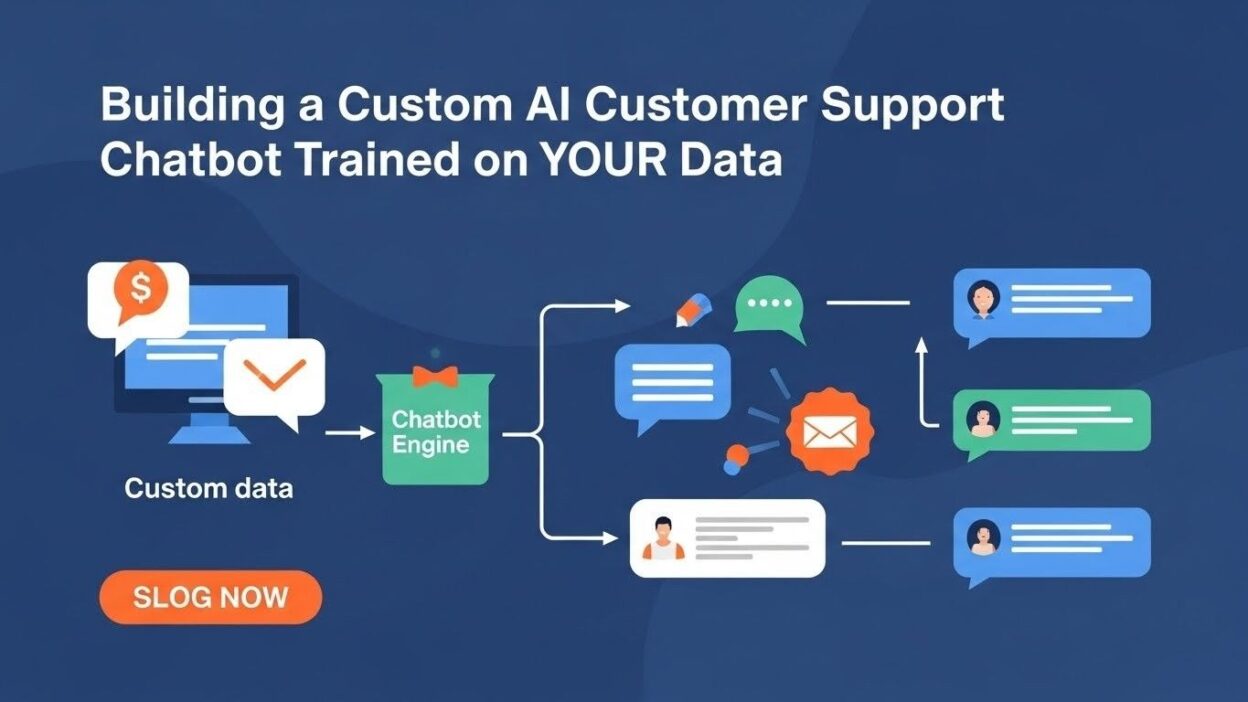
A custom AI customer support chatbot using proprietary data requires specific technical components. The foundation starts with language models. These models process and generate human-like text.
Vector databases store your company knowledge efficiently. Documents get converted into mathematical representations. The system retrieves relevant information based on query similarity. This architecture enables accurate responses.
The retrieval mechanism connects user questions to your data. Semantic search finds contextually relevant information. Simple keyword matching fails for complex queries. Modern systems understand meaning and intent.
Response generation combines retrieved data with language capabilities. The AI synthesizes information from multiple sources. It formulates coherent answers in natural language. Context from previous messages influences responses.
Integration layers connect the chatbot to existing systems. CRM data provides customer history. Inventory systems show product availability. Order management platforms track shipment status. Your chatbot becomes genuinely helpful.
Preparing Your Proprietary Data
Data quality determines chatbot effectiveness. Garbage input produces garbage output. Your preparation process deserves serious attention.
Identifying Valuable Data Sources
Customer support tickets contain goldmines of information. Real questions from actual customers matter most. Review tickets from the past six months. Identify recurring themes and common issues.
Product documentation provides essential technical details. User manuals explain features clearly. Specification sheets list important attributes. Installation guides walk through setup procedures.
Internal knowledge bases hold accumulated expertise. Support agents document solutions over years. Best practices emerge from repeated problem-solving. This institutional knowledge needs integration.
Policy documents define operational boundaries. Return policies affect customer satisfaction. Warranty information addresses product issues. Shipping guidelines set delivery expectations.
FAQ pages already answer common questions. These represent validated customer concerns. The content already works for your audience. Integration becomes straightforward.
Data Cleaning and Formatting
Raw data needs substantial cleaning before training. Remove duplicate content across sources. Delete outdated information that no longer applies. Verify accuracy of remaining content.
Inconsistent formatting creates training problems. Standardize document structures throughout your dataset. Use consistent terminology across all materials. Abbreviations should match everywhere.
Sensitive information requires careful handling. Remove customer names and contact details. Strip out employee identification data. Financial information needs redaction. Privacy compliance matters enormously.
Metadata enriches your training data. Tag documents by category or department. Add timestamps to time-sensitive information. Include source attribution for traceability. Better organization improves retrieval accuracy.
Break lengthy documents into logical sections. Chatbots work better with focused chunks. Each section should cover one topic thoroughly. Connection between sections matters less than individual clarity.
Structuring Knowledge for AI Consumption
Question-answer pairs train models effectively. Extract existing Q&A content from various sources. Create new pairs for important topics lacking coverage. Each answer should be complete and self-contained.
Context windows limit how much text AI processes simultaneously. Keep individual content chunks under 1000 words. Larger documents need splitting into manageable pieces. The system retrieves relevant sections rather than entire documents.
Hierarchical organization helps complex queries. Product categories nest within broader classifications. Troubleshooting steps follow logical progressions. The AI navigates your knowledge structure intelligently.
Cross-references connect related information. Link warranty terms to return policies. Connect product features to usage instructions. Troubleshooting guides reference specification details. Comprehensive answers pull from multiple sources.
Version control prevents confusion. Maintain clear timestamps on all content. Archive outdated materials rather than deleting them. Track changes to important documents. Your chatbot always references current information.
Choosing Your AI Model Foundation
Language model selection impacts everything downstream. Different models offer distinct advantages. Your requirements guide this critical decision.
Pre-trained Language Models
GPT-4 from OpenAI provides excellent general capabilities. The model understands complex queries naturally. Response quality remains consistently high. API costs scale with usage volume.
Claude from Anthropic excels at nuanced conversations. The model handles context exceptionally well. Safety features prevent inappropriate responses. Processing longer documents works smoothly.
Open-source models like Llama 2 offer cost advantages. You control deployment completely. Fine-tuning becomes more flexible. Technical expertise requirements increase substantially.
Gemini from Google integrates well with Google Cloud. The model handles multimodal inputs effectively. Pricing remains competitive for high volumes. Enterprise support provides peace of mind.
Model size affects both quality and cost. Larger models generate better responses. They also consume more computing resources. Balance capability against operational expenses carefully.
Fine-tuning vs. Retrieval Augmented Generation
Fine-tuning modifies model weights permanently. Your proprietary data becomes part of the model itself. Responses reflect your specific knowledge deeply. This approach requires substantial computational resources.
Training datasets need thousands of examples. Quality matters more than quantity. Each example teaches specific behaviors. The process takes hours or days depending on scale.
Retrieval Augmented Generation (RAG) offers practical advantages. Your data stays separate from the base model. Updates happen by changing the knowledge base. No retraining occurs when information changes.
RAG systems fetch relevant documents during queries. The language model reads retrieved content. Responses incorporate fetched information naturally. This architecture suits most business applications.
Hybrid approaches combine both techniques. Fine-tune for tone and style consistency. Use RAG for factual knowledge retrieval. The custom AI customer support chatbot using proprietary data gains both depth and flexibility.
Embedding Models for Semantic Search
Embeddings convert text into numerical vectors. Similar concepts cluster together mathematically. Search finds relevant content through vector similarity.
OpenAI’s text-embedding models work well for English content. They understand semantic relationships effectively. API calls cost fractions of a cent. Integration proves straightforward.
Sentence transformers offer open-source alternatives. Multiple models target different languages. You control hosting and deployment. Performance remains competitive with commercial options.
Domain-specific embeddings improve niche applications. Medical terminology needs specialized understanding. Legal language requires particular attention. Consider training custom embeddings for specialized industries.
Embedding dimensions affect storage requirements. Larger vectors capture more nuance. They also consume more database space. Standard 1536-dimensional embeddings work well for most applications.
Building Your Vector Database
Vector databases enable efficient similarity search. They store embeddings alongside original content. Query speed matters for good user experience.
Database Options and Selection
Pinecone provides fully managed vector search. Setup takes minutes rather than weeks. Scalability happens automatically. Costs increase with data volume.
Weaviate offers flexible deployment options. Self-hosting reduces ongoing expenses. Cloud services provide convenience. The hybrid approach suits growing businesses.
Qdrant delivers high-performance search capabilities. Open-source licensing eliminates vendor lock-in. Docker deployment simplifies development. Production scaling requires infrastructure expertise.
Chroma works excellently for prototyping. Lightweight installation speeds development. Local storage suits small datasets. Migration to production databases happens smoothly.
PostgreSQL with pgvector extension leverages existing infrastructure. Your team already knows PostgreSQL. Vector search adds onto familiar tools. Performance suits moderate-scale applications.
Data Ingestion Pipeline
Document parsing extracts text from various formats. PDFs need special handling for layouts. Word documents contain formatting metadata. HTML requires cleaning and structure preservation.
Chunking strategies break content intelligently. Paragraph boundaries make natural splits. Heading structures guide logical divisions. Overlap between chunks maintains context.
Embedding generation processes each chunk. Batch processing handles large datasets efficiently. Rate limiting prevents API throttling. Progress tracking enables resumption after interruptions.
Metadata storage enriches search capabilities. Document titles aid relevance ranking. Timestamps enable filtering recent content. Category tags support filtered searches.
Index optimization improves query performance. Vector databases support various index types. HNSW algorithms balance speed and accuracy. Configuration tuning matters for production deployments.
Managing Updates and Versioning
Content freshness affects response accuracy. Outdated information misleads customers. Regular updates maintain relevance. Your pipeline should handle changes smoothly.
Change detection identifies modified documents. Hash comparisons reveal content differences. Timestamps track update frequency. Automated systems refresh changed content.
Incremental updates avoid full rebuilds. Add new chunks without regenerating everything. Update modified sections selectively. Delete removed content from the index.
Version control prevents confusion. Maintain historical versions for comparison. Rollback capabilities handle problematic updates. Audit trails document all changes.
Implementing the Chat Interface
User interface design affects chatbot adoption. Clunky interfaces discourage usage. Smooth experiences encourage repeat interactions.
Front-end Design Considerations
Widget positioning matters significantly. Bottom-right corner meets user expectations. Easy access encourages engagement. The icon should clearly indicate chat functionality.
Opening animations create smooth transitions. The chat window expands gracefully. Conversation history remains visible. Minimize buttons should work intuitively.
Message bubbles distinguish speakers clearly. User messages align to one side. Bot responses appear opposite. Timestamps help track conversation flow.
Input fields need obvious presence. Placeholder text guides initial usage. Send buttons should be prominent. Keyboard shortcuts accelerate power users.
Mobile responsiveness cannot be optional. Most users browse on phones. Touch targets need adequate sizing. Scrolling should feel natural.
Conversation Flow Management
Greeting messages set appropriate tone. Welcome users warmth. Explain chatbot capabilities briefly. Offer common starting points.
Context preservation improves multi-turn conversations. Remember previous questions in the session. Reference earlier discussion naturally. Customers shouldn’t repeat information.
Clarification requests handle ambiguity gracefully. Ask focused follow-up questions. Offer multiple-choice options when appropriate. Guide users toward resolution.
Escalation triggers recognize limitations. Some situations require human agents. Detect frustration in user messages. Transfer smoothly to live support.
Session management maintains conversation state. Store history during active sessions. Allow users to return to previous conversations. Clear history when customers prefer fresh starts.
Integration with Existing Support Channels
Omnichannel consistency maintains brand experience. Chatbot tone should match other support channels. Information accuracy must stay identical. Customers switching channels notice discrepancies.
Ticket system integration enables seamless escalation. Create support tickets directly from chat. Pre-fill ticket fields with conversation history. Agents see full context immediately.
CRM synchronization provides personalized experiences. Recognize returning customers automatically. Reference previous interactions appropriately. Update customer records with new information.
Analytics platforms track performance metrics. Conversation logs feed reporting systems. User satisfaction scores measure effectiveness. Continuous improvement requires data visibility.
Training and Fine-tuning Your Chatbot
Your custom AI customer support chatbot using proprietary data needs refinement over time. Initial deployments require iteration. Performance improves through deliberate optimization.
Creating Quality Training Examples
Real conversations provide authentic training data. Export actual customer interactions. Anonymize personal information thoroughly. These examples teach realistic patterns.
Annotate conversations with quality labels. Mark excellent responses clearly. Flag problematic interactions. The model learns from both examples.
Edge cases deserve special attention. Unusual questions test chatbot limits. Create specific examples addressing these scenarios. Coverage expands systematically.
Negative examples teach important boundaries. Show what not to say. Demonstrate inappropriate responses. The model learns restraint and professionalism.
Balance training data across topics. Some subjects get more customer questions. Ensure adequate coverage everywhere. Underrepresented areas need supplementation.
Prompt Engineering Techniques
System prompts establish chatbot personality. Define tone and communication style. Set boundaries for appropriate responses. Establish rules for uncertain situations.
Few-shot examples guide response formatting. Show desired answer structures. Demonstrate appropriate detail levels. Consistency improves dramatically.
Chain-of-thought prompting improves reasoning. Ask the model to explain its thinking. Complex problems benefit from step-by-step approaches. Accuracy increases for technical queries.
Instruction hierarchy manages conflicting guidance. Primary instructions override secondary suggestions. Clear priorities prevent confusion. The chatbot behaves predictably.
Dynamic prompts adapt to context. Include relevant policy snippets. Insert customer-specific information. Responses become more personalized.
Evaluation and Testing Strategies
Test suites cover common scenarios systematically. Create questions spanning all product categories. Include variations of popular queries. Verify consistent responses.
Human evaluation provides quality assessment. Support agents review chatbot responses. Rate accuracy on defined scales. Identify patterns in failures.
A/B testing compares different approaches. Deploy variations to user segments. Measure satisfaction and resolution rates. Data drives optimization decisions.
Regression testing prevents backsliding. Maintain test cases from previous issues. Verify fixes remain effective. New updates shouldn’t break working functionality.
Production monitoring catches emerging problems. Track response quality in real-time. Alert teams to sudden quality drops. Proactive intervention prevents customer frustration.
Ensuring Accuracy and Reliability
Incorrect information damages customer trust permanently. Your custom AI customer support chatbot using proprietary data must prioritize accuracy. Reliability determines business impact.
Fact-checking Mechanisms
Source attribution builds confidence. Show where information originated. Link to authoritative documents. Customers verify claims independently.
Confidence scoring assesses response quality. The system evaluates certainty levels. Low-confidence responses trigger escalation. Agents handle ambiguous situations.
Multi-source verification cross-checks facts. Retrieve information from multiple documents. Confirm consistency across sources. Flag contradictions for review.
Regular audits validate accuracy. Random sample conversations monthly. Verify factual correctness systematically. Update knowledge base as needed.
Human-in-the-loop for critical decisions. Some queries require agent approval. Financial commitments need verification. Legal matters demand expert oversight.
Handling Uncertainty Gracefully
Confidence thresholds determine response behavior. Set minimum certainty levels. Below thresholds, admit uncertainty. Honesty builds customer trust.
Fallback responses maintain helpfulness. Offer to escalate to agents. Provide related information instead. Suggest alternative resources.
Partial answers beat complete silence. Share what the chatbot knows confidently. Acknowledge information gaps honestly. Customers appreciate transparency.
Learning from unknowns improves coverage. Track questions without good answers. Prioritize knowledge base expansion. Your chatbot grows more capable continuously.
Managing Sensitive Topics
Legal disclaimers protect your business. Clarify chatbot limitations upfront. Avoid providing definitive legal advice. Direct customers to proper resources.
Medical information requires extreme caution. Never diagnose conditions. Refer to qualified professionals. Liability concerns demand conservative approaches.
Financial advice follows similar principles. Provide factual information only. Avoid specific recommendations. Compliance requirements vary by jurisdiction.
Privacy boundaries deserve clear definition. Never request unnecessary personal data. Explain data usage transparently. Respect customer information scrupulously.
Measuring Success and ROI
Metrics prove chatbot value to stakeholders. Your custom AI customer support chatbot using proprietary data needs quantifiable benefits. Track performance systematically.
Key Performance Indicators
Resolution rate shows problem-solving effectiveness. What percentage of queries resolve without escalation? Higher rates indicate better training. Aim for 70% autonomous resolution.
Response time measures speed. Customers expect instant answers. Track average response latency. Faster responses improve satisfaction.
Customer satisfaction scores reveal experience quality. Post-conversation surveys gather feedback. Net Promoter Scores indicate loyalty. Track trends over time.
Cost per interaction calculates efficiency. Compare chatbot costs to agent costs. Include development and maintenance expenses. ROI becomes clear quickly.
Escalation rate indicates limitations. How often do conversations transfer to agents? Lower rates suggest comprehensive training. Monitor which topics trigger escalations.
Cost Savings Analysis
Support ticket reduction quantifies impact. Count tickets before and after deployment. Calculate cost per ticket. Multiply saved tickets by average cost.
Agent productivity improvements matter significantly. Agents handle more complex cases. Simple queries stop consuming time. Measure increased case resolution rates.
After-hours support becomes affordable. Chatbots work 24/7 without overtime pay. International customers get instant help. Market expansion becomes feasible.
Training costs decrease over time. New agents reference chatbot knowledge bases. Onboarding speeds up substantially. Consistency improves across the team.
Customer Experience Improvements
Wait time elimination drives satisfaction. No hold music or queue positions. Instant engagement feels respectful. Customers accomplish goals faster.
Self-service empowerment appeals to many. Some people prefer avoiding phone calls. Chatbots enable independent problem-solving. Customer autonomy increases significantly.
Consistency across interactions builds trust. Every customer receives identical accurate information. Human agents have varying knowledge levels. Chatbots democratize access to expertise.
Proactive support prevents problems. Chatbots can initiate helpful conversations. Offer assistance before customers ask. Anticipate needs based on behavior.
Security and Compliance Considerations
Data security cannot be an afterthought. Your custom AI customer support chatbot using proprietary data handles sensitive information. Protection measures need serious implementation.
Data Privacy Requirements
GDPR compliance affects European customers. Obtain explicit consent for data processing. Provide clear privacy notices. Enable data deletion requests.
CCPA regulations govern California residents. Disclosure requirements need fulfillment. Opt-out mechanisms must exist. Compliance penalties are severe.
Industry-specific regulations apply broadly. HIPAA governs healthcare data. PCI DSS covers payment information. Financial services follow numerous requirements.
Data minimization reduces risk. Collect only necessary information. Avoid storing sensitive details unnecessarily. Retention policies should enforce deletion.
Encryption protects data in transit and storage. TLS secures network communications. Database encryption prevents unauthorized access. Key management requires careful attention.
Access Control and Authentication
User authentication verifies customer identity. Integration with existing login systems. Single sign-on improves experience. Security and convenience balance carefully.
Role-based access limits data exposure. Support agents see relevant information only. Administrators access configuration settings. Principle of least privilege applies strictly.
Audit logging tracks system usage. Record all data access attempts. Monitor for suspicious patterns. Compliance requirements often mandate logging.
API security prevents unauthorized access. Authentication tokens expire appropriately. Rate limiting prevents abuse. Input validation blocks injection attacks.
Model Security and Prompt Injection
Prompt injection attacks manipulate AI behavior. Malicious users craft tricky inputs. The system must reject manipulation attempts. Input sanitization provides first defense.
Output filtering prevents sensitive leakage. Never expose system prompts. Avoid revealing training data. Responses should contain only appropriate information.
Jailbreak attempts require countermeasures. Users try making models ignore instructions. Robust system prompts resist manipulation. Regular testing identifies vulnerabilities.
Adversarial testing strengthens defenses. Red team exercises probe weaknesses. Ethical hackers identify potential exploits. Fix vulnerabilities before bad actors find them.
Scaling Your Chatbot Operations
Growth brings new challenges. Your successful chatbot needs infrastructure to scale. Planning prevents performance degradation.
Infrastructure Considerations
Load balancing distributes traffic evenly. Multiple backend instances handle requests. Geographic distribution reduces latency. Users experience consistent performance.
Caching strategies improve response times. Store frequent query results temporarily. Reduce redundant processing significantly. Cache invalidation maintains freshness.
Database optimization handles growth. Index tuning accelerates queries. Connection pooling manages resources efficiently. Sharding distributes data across servers.
Cost optimization controls expenses. Reserved capacity reduces cloud costs. Spot instances handle variable loads. Right-sizing prevents waste.
Expanding Language Support
Multilingual capabilities reach broader audiences. Translation layers enable global deployment. Native language support improves experience dramatically.
Language model selection matters per language. English models don’t translate well. Language-specific training improves quality. Cultural nuances require attention.
Translation quality affects customer perception. Machine translation works for simple queries. Complex topics benefit from human translation. Hybrid approaches balance cost and quality.
Regional variations within languages need consideration. Spanish differs across countries. French Canadian diverges from European French. Localization goes beyond simple translation.
Adding New Features
Voice integration expands accessibility. Speech-to-text enables verbal queries. Text-to-speech reads responses aloud. Accessibility compliance improves.
Visual search helps product identification. Customers upload photos of items. Image recognition identifies products. Relevant information gets provided automatically.
Proactive recommendations increase engagement. Suggest related products naturally. Offer preventive maintenance tips. Cross-selling happens organically.
Sentiment analysis guides responses. Detect customer frustration early. Adjust tone appropriately. Escalate before situations deteriorate.
Common Implementation Challenges
Building a custom AI customer support chatbot using proprietary data involves obstacles. Anticipating problems enables better planning. Learn from others’ experiences.
Data Quality Issues
Incomplete documentation frustrates training efforts. Gaps in knowledge bases create blind spots. Systematic audits identify missing content. Fill gaps before deployment.
Contradictory information confuses the AI. Different documents state conflicting facts. Reconciliation requires manual review. Establish single source of truth.
Outdated content provides wrong answers. Product specifications change regularly. Update processes need automation. Version control prevents confusion.
Unstructured data resists processing. Scanned PDFs lack searchable text. Handwritten notes require transcription. Digital-first documentation simplifies everything.
Technical Integration Difficulties
Legacy systems lack modern APIs. Older platforms need custom integration. Middleware solutions bridge technology gaps. Budget adequate development time.
Authentication complexity slows implementation. Multiple systems use different protocols. Unified identity management simplifies architecture. Single sign-on benefits users too.
Data synchronization requires careful design. Real-time updates versus batch processing. Consistency versus performance tradeoffs. Requirements drive architectural decisions.
Error handling prevents customer frustration. Graceful degradation maintains functionality. Fallback mechanisms provide alternatives. Never show technical errors to users.
Organizational Resistance
Support teams fear job displacement. Communicate chatbot role clearly. Position as augmentation not replacement. Involve agents in development.
Knowledge hoarding limits data access. Some employees resist documentation. Leadership must drive culture change. Incentivize information sharing.
Stakeholder skepticism challenges budgets. Demonstrate value through pilots. Quick wins build momentum. Measure results rigorously.
Change management determines adoption. Training ensures proper usage. Clear communication sets expectations. Celebrate successes publicly.
Future-Proofing Your Investment
Technology evolves rapidly. Your custom AI customer support chatbot using proprietary data needs adaptability. Smart architecture choices enable evolution.
Modular Architecture Benefits
Component isolation enables independent updates. Swap language models without rebuilding everything. Update vector databases separately. Frontend changes don’t affect backend.
API-first design supports multiple interfaces. Web chat, mobile apps, and voice all use same backend. Consistent behavior across channels. New interfaces add easily.
Abstraction layers protect against vendor changes. Don’t couple tightly to specific providers. Migration becomes feasible when needed. Negotiation leverage improves significantly.
Microservices architecture scales components independently. Heavy-use elements get more resources. Development teams work in parallel. Deployment risks decrease substantially.
Emerging Technologies to Watch
Large language models improve constantly. New versions offer better capabilities. Stay informed about releases. Migration paths should be straightforward.
Multimodal AI combines text, images, and audio. Visual product support becomes possible. Voice interactions feel more natural. Richer experiences drive satisfaction.
Federated learning trains on distributed data. Privacy-preserving techniques enable collaboration. Industry-wide knowledge pools emerge. Competitive advantages come from unique applications.
Edge computing reduces latency and costs. Process simple queries locally. Complex requests go to cloud. User experience improves measurably.
Continuous Improvement Processes
Regular performance reviews identify optimization opportunities. Monthly analysis reveals trends. Quarterly roadmap planning prioritizes improvements. Annual strategy sessions guide major changes.
User feedback drives feature development. Listen to customer requests carefully. Support team insights prove invaluable. Data validates intuition.
Competitive analysis prevents stagnation. Monitor industry developments actively. Adopt proven innovations quickly. Differentiation comes from execution quality.
Technology assessment maintains relevance. Evaluate new tools systematically. Proof of concepts test viability. Measured adoption manages risk.
Read more :-Forget Chatbots: Why “Action Models” Are the Future of SaaS
Conclusion
Building a custom AI customer support chatbot using proprietary data transforms customer service operations. Generic solutions fail where custom implementations excel. Your unique business knowledge becomes a powerful automation asset.
Data preparation requires substantial effort upfront. Clean, organized information drives chatbot accuracy. The investment pays dividends through better customer experiences.
Technology choices affect long-term success significantly. Select platforms matching your technical capabilities. Balance features against complexity honestly. Start simple and expand deliberately.
Implementation challenges demand persistence. Technical integration takes longer than expected. Organizational change management proves equally important. Patient, systematic execution wins.
Measurement proves value to stakeholders. Track cost savings rigorously. Monitor customer satisfaction continuously. ROI calculations justify continued investment.
Security and compliance cannot be optional. Privacy regulations carry serious penalties. Data protection builds customer trust. Engineer protection into the foundation.
Scaling requires thoughtful architecture. Plan for growth from the beginning. Modular design enables evolution. Your chatbot adapts as needs change.
The custom AI customer support chatbot using proprietary data represents competitive advantage. Customers receive better service instantly. Support teams focus on complex challenges. Operational costs decrease while satisfaction increases.
Start building your custom solution today. Begin with data inventory and cleaning. Prototype quickly to prove concepts. Iterate based on real usage feedback.
Your customers deserve accurate, instant support. Generic chatbots can’t deliver this experience. Custom training on your data makes the difference. The technology exists and works reliably.
Success comes from execution quality rather than technology selection. Careful planning prevents costly mistakes. Systematic testing ensures reliability. Continuous improvement maintains relevance.
Investment in custom AI chatbots pays for itself rapidly. Support ticket volumes decrease immediately. Agent productivity increases noticeably. Customer satisfaction scores improve measurably.
The future of customer support involves intelligent automation. Companies embracing custom solutions gain significant advantages. Early adopters establish strong market positions. Your competitors are already exploring these capabilities.
Take the first step toward transformation. Audit your existing documentation today. Identify gaps in your knowledge base. Build the foundation for your custom AI customer support chatbot using proprietary data.