Introduction
TL;DR Every team has a knowledge problem. Answers live in old Slack threads. Onboarding docs sit buried in Google Drive. Company policies hide in inboxes nobody checks. A new hire asks a basic question. Three people scramble to remember where the answer lives.
This problem costs real time every single week. Studies show knowledge workers spend nearly 20% of their workday searching for information. That is roughly one full day per person, per week, wasted on retrieval.
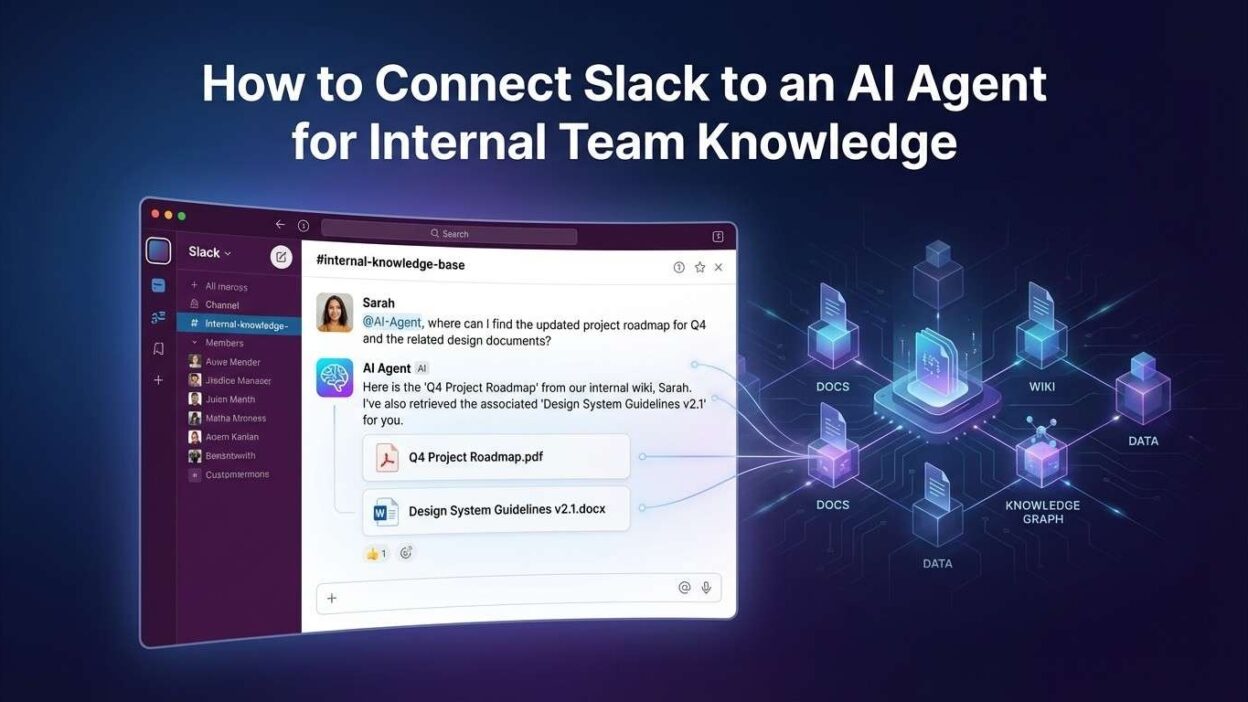
The smartest fix available right now is to connect Slack to AI agent for team knowledge. You build an AI assistant that lives inside Slack. Team members ask questions in plain language. The agent retrieves accurate answers from your actual internal documents in seconds.
This guide walks you through the full setup. You will learn the architecture, the tools, the step-by-step integration process, and the best practices that make the system reliable. Whether you run a 10-person startup or a 500-person company, this approach works.
Table of Contents
Why Teams Lose Knowledge Inside Slack
Slack creates a paradox. It makes communication fast. It makes knowledge retrieval slow. Messages flow in real time. Institutional knowledge drowns in an endless scroll.
Slack’s search function helps only if you know exactly what to search for. New employees do not know the right keywords. Experienced employees forget which channel held a specific conversation six months ago. Nobody pins every important message.
Channels multiply fast. Engineering has five channels. Product has three. Marketing has four. Customer success has two. Each channel carries its own thread of organizational memory. Connecting all of it manually is impossible.
Wikis and Notion pages help but require discipline. Someone must decide to write things down. Someone must keep pages updated. In fast-moving teams, documentation always falls behind reality. The Notion page says one thing. The actual process evolved three months ago.
The decision to connect Slack to AI agent for team knowledge solves this structurally. The agent reads your existing documentation. It monitors relevant Slack channels. It indexes everything into a searchable knowledge base. Team members stop hunting for information and start getting answers.
This shift changes team culture too. Junior employees ask questions confidently. Senior employees stop getting interrupted with repetitive questions. Onboarding becomes faster. Decisions happen with better information. The AI agent becomes the team’s institutional memory, always available and always current.
What You Need Before You Start the Integration
Building this system requires the right foundations. Gather these before writing a single line of code or configuring any platform.
Slack Workspace Admin Access
You need workspace admin or owner access to create a Slack app. This gives you permission to configure OAuth scopes, install the app, and add it to channels. If you lack admin access, work with your IT team to set up the app credentials under an admin account.
Create a dedicated Slack app for the AI agent in the Slack API console at api.slack.com. Name it clearly — something like “TeamBot” or “KnowledgeAssistant” signals its purpose to team members. Configure the app with bot token scopes appropriate for your use case.
Knowledge Source Documents
Identify every document your agent needs to know. Company handbooks, HR policies, engineering runbooks, onboarding guides, product FAQs, sales playbooks, and support documentation all qualify. Gather them in one location — Google Drive, Confluence, Notion, or a local directory.
Document quality matters enormously. Outdated, contradictory, or poorly organized documents produce a confused agent. Audit your knowledge sources before indexing them. Remove outdated files. Consolidate duplicate information. Clear, well-structured documents make the agent dramatically more accurate.
AI and Infrastructure Tools
Choose an LLM provider for the agent’s reasoning layer. OpenAI’s GPT-4o, Anthropic’s Claude 3.5 Sonnet, and Google’s Gemini Pro all work well for knowledge retrieval tasks. Choose based on your team’s existing contracts, privacy requirements, and budget.
Select a vector database for semantic search. Pinecone, Weaviate, Qdrant, and Chroma all handle document embeddings reliably. You also need an embedding model to convert document text into vectors. OpenAI’s text-embedding-3-small delivers excellent performance at low cost.
Architecture Overview: How the System Works
Understanding the full system architecture helps you build it right the first time. The setup to connect Slack to AI agent for team knowledge involves four interconnected layers.
Document Ingestion Pipeline
The ingestion pipeline reads your source documents and converts them into searchable vectors. A document loader fetches files from Google Drive, Confluence, Notion, or your local file system. A text splitter breaks long documents into smaller chunks — typically 500 to 1,000 tokens each.
An embedding model converts each chunk into a numerical vector that captures semantic meaning. These vectors store in your vector database alongside the original text chunk. This process runs once initially and repeats on a schedule to capture new or updated documents.
Slack Event Listener
A backend server listens for events from the Slack Events API. When a team member sends a message mentioning the bot or asking a question in a designated channel, Slack sends a POST request to your server with the message payload.
The server validates the Slack signature to confirm the request is authentic. It extracts the message text and the user information. It then passes the question to the retrieval and reasoning layer for processing.
Retrieval and Reasoning Engine
This layer is the core intelligence of the system. The user’s question gets converted into an embedding vector using the same embedding model used during ingestion. The system queries the vector database for the most semantically similar document chunks.
The top matching chunks feed into a prompt along with the original question. The LLM reads both the question and the retrieved context. It generates a focused, accurate answer grounded in your actual documentation. This retrieval-augmented generation (RAG) pattern prevents the AI from hallucinating answers not found in your knowledge base.
Slack Response Delivery
The generated answer posts back to Slack through the Slack Web API. The response appears in the same thread as the original question. The bot can include source references — document titles and section names — so users know exactly where the information came from.
This four-layer architecture makes the system to connect Slack to AI agent for team knowledge reliable, transparent, and easy to debug when something goes wrong.
Step-by-Step Guide to Connect Slack to AI Agent for Team Knowledge
Follow these steps in order. Each step builds on the previous one. Skipping steps creates integration gaps that are hard to debug later.
Create Your Slack App
Visit api.slack.com and click Create New App. Choose From Scratch. Give the app a clear name and select your target workspace. Slack generates an App ID and credentials for your new app.
Navigate to OAuth and Permissions in the left sidebar. Add these bot token scopes: app_mentions:read to receive mentions, channels:history to read channel messages, chat:write to post responses, and im:history to handle direct messages. Install the app to your workspace and copy the Bot User OAuth Token. Store this token securely as an environment variable.
Enable the Events API
Go to Event Subscriptions in your Slack app dashboard. Toggle Enable Events to On. Enter your server’s public URL as the Request URL. Slack sends a challenge request to verify your endpoint. Your server must respond with the challenge value to pass verification.
Subscribe to the bot events app_mention and message.im. These two events cover mentions in channels and direct messages to the bot. Save your settings. Slack now forwards relevant message events to your server in real time.
Build the Document Ingestion Pipeline
Write a Python script to load your knowledge source documents. Use LangChain’s document loaders for Google Drive, Confluence, Notion, or local files depending on your storage system. The GoogleDriveLoader class handles Google Drive files with OAuth authentication. The ConfluenceLoader handles Atlassian documentation with API key authentication.
After loading, run documents through the RecursiveCharacterTextSplitter with a chunk size of 800 and an overlap of 100 tokens. Overlap ensures context does not get cut off at chunk boundaries. Generate embeddings for each chunk using OpenAI’s text-embedding-3-small model.
Store the embeddings in your vector database. For Pinecone, create an index with 1536 dimensions to match the embedding model output. Upsert all document chunks with their embeddings and metadata — source document name, section title, and last modified date. Run this script on a schedule using a cron job or GitHub Actions to keep knowledge current.
Build the Retrieval and Response Logic
Create a FastAPI or Flask application to handle incoming Slack events. When the app receives a message event, extract the user’s question from the event payload. Convert the question to an embedding vector using the same embedding model.
Query your vector database for the top five most similar chunks. Use cosine similarity as the distance metric. Retrieve the text of each matching chunk. Build a prompt that includes the retrieved context and the original question. Send the prompt to your LLM API and capture the response text.
Structure your system prompt carefully. Tell the LLM to answer only from the provided context. Tell it to say “I do not have information on that topic” when context does not cover the question. This prevents hallucinations and builds user trust in the agent’s answers.
Post the Response to Slack
Use the Slack SDK for Python to post the response back to the correct channel and thread. The chat.postMessage method handles this. Always reply in thread_ts to keep conversations organized and avoid cluttering the main channel feed.
Include source citations in your response. After the main answer, add a small section listing the document names the agent used. This transparency helps users verify answers and builds confidence in the system. Teams that see where answers come from trust the agent more quickly.
Test Thoroughly Before Launch
Test the full flow end to end before announcing the bot to the team. Ask questions with clear answers in your documentation. Ask questions on topics not covered in your documents. Ask ambiguous questions that could match multiple documents. Verify the agent handles all three scenarios appropriately.
Check response latency. A good target is under 5 seconds for most questions. Optimize chunk size, reduce the number of retrieved chunks, or switch to a faster embedding model if responses feel slow. Team members lose patience quickly with a slow assistant.
Choosing the Right AI Framework for Your Slack Agent
Several frameworks accelerate the process to connect Slack to AI agent for team knowledge. Each suits a different team profile and complexity level.
LangChain for Maximum Flexibility
LangChain is the most widely used framework for RAG-based AI agents. It provides document loaders, text splitters, embedding integrations, vector store connectors, and chain builders all in one package. Teams with Python experience build sophisticated agents quickly using LangChain’s composable architecture.
LangChain’s agent capabilities extend beyond simple Q&A. You add tools to the agent — a calculator, a database query tool, a web search function. The agent decides which tool to use based on the question. This flexibility makes LangChain the right choice for teams who want to expand agent capabilities over time.
LlamaIndex for Document-Heavy Use Cases
LlamaIndex specializes in indexing and retrieving from large document collections. If your team maintains thousands of pages of documentation, LlamaIndex handles the indexing complexity better than LangChain. Its query engine supports sophisticated retrieval patterns including hierarchical summaries, metadata filtering, and hybrid search.
LlamaIndex integrates cleanly with Slack through its callback system. Retrieval events, LLM calls, and response generation all emit events you can log, monitor, and debug. This observability makes LlamaIndex a strong choice for teams that need full transparency into how the agent arrives at its answers.
n8n or Make.com for No-Code Teams
Teams without Python developers can still connect Slack to AI agent for team knowledge using no-code platforms. n8n has a native Slack node and supports HTTP Request nodes for any AI API. Make.com offers both Slack modules and OpenAI modules that combine into a working knowledge bot without writing code.
No-code solutions sacrifice some flexibility but deliver working systems faster. For teams whose primary goal is answering common questions and reducing inbox noise, n8n or Make.com provides a strong starting point. Technical teams can migrate to a custom Python solution later when requirements grow more complex.
Keeping the Knowledge Base Current and Accurate
A stale knowledge base produces wrong answers. Wrong answers destroy team trust in the agent faster than anything else. Keeping the knowledge base current requires both automated pipelines and a human governance process.
Automated Sync Pipelines
Schedule your ingestion script to run daily or every few hours for fast-changing documentation. Most document platforms expose webhooks or change event APIs. Google Drive sends change notifications through the Drive Activity API. Confluence sends space activity events through webhooks. Use these events to trigger incremental re-indexing immediately when documents change.
Implement document versioning in your vector database metadata. Tag each chunk with the document’s last modified timestamp. When a document updates, delete old chunks by document ID and insert the new version. This pattern prevents outdated chunks from surfacing in search results alongside current ones.
Human Governance Process
Assign a knowledge owner for each major documentation area. Engineering documentation has an owner. HR policies have an owner. Sales playbooks have an owner. These owners review the agent’s answers periodically and flag inaccuracies back to the source documents.
Add a feedback mechanism to the Slack bot. After each response, include reaction emoji buttons — a checkmark for accurate and an X for inaccurate. Log every feedback signal. Review the flagged responses weekly. Use them to identify knowledge gaps, improve document quality, and refine the agent’s system prompt.
Teams that build governance processes alongside the technical setup to connect Slack to AI agent for team knowledge maintain reliable systems long term. The technology handles retrieval. Humans handle truth.
Security and Privacy Considerations for Slack AI Integration
Security is non-negotiable when you connect Slack to AI agent for team knowledge. Your agent touches sensitive company information. Mishandled data creates legal and reputational risks.
Data Handling and LLM Privacy
Understand your LLM provider’s data retention policies before sending company documents to their API. OpenAI’s API does not train models on API data by default. Anthropic’s Claude API has similar protections. Read the current terms carefully and verify these protections apply to your account tier.
For organizations with strict data residency requirements, consider self-hosted LLMs. Ollama runs models like Llama 3, Mistral, and Mixtral entirely on your own infrastructure. No document text leaves your network. This approach sacrifices some model capability but satisfies the most stringent compliance requirements.
Slack Permission Scoping
Request only the Slack permission scopes your agent genuinely needs. Avoid broad scopes like channels:read for all channels if the agent only needs access to specific channels. Limit channel access through channel membership rather than broad permissions.
Store all API keys, bot tokens, and database credentials in a secrets manager. AWS Secrets Manager, HashiCorp Vault, and Doppler all prevent credentials from appearing in code repositories. Rotate credentials on a schedule. Revoke tokens immediately if a team member with access to them leaves the organization.
Log all agent interactions with timestamps, user IDs, and query content. These logs support security audits and help detect misuse. Store logs in a system separate from your main application infrastructure for tamper resistance.
Real-World Use Cases for Slack AI Knowledge Agents
The decision to connect Slack to AI agent for team knowledge unlocks practical value across every department. These are the use cases teams implement most frequently.
Engineering Runbook Assistant
Engineering teams maintain runbooks for incident response, deployment procedures, and system configurations. During an incident, engineers have no time to search Confluence for the right runbook. An AI agent connected to runbook documentation answers questions instantly. “What is the rollback procedure for the payments service?” returns the exact steps in seconds.
This use case reduces mean time to resolution for incidents. Engineers stay focused on the problem rather than the documentation search. Runbook coverage gaps surface quickly when the agent cannot answer a question — a natural incentive for better documentation.
HR Policy and Benefits Assistant
HR teams field the same questions constantly. How many vacation days do I have? What is the parental leave policy? How do I submit an expense report? An agent trained on HR documentation answers every one of these questions accurately without HR staff involvement.
New hires benefit most. The agent accelerates onboarding by making company policies immediately accessible. New employees ask questions freely without worrying about bothering a colleague with something they feel they should already know.
Sales Enablement Knowledge Bot
Sales reps need quick access to competitive intelligence, product specifications, pricing guidelines, and objection handling scripts. An AI agent trained on sales enablement content delivers these answers inside Slack during live customer conversations. Reps get accurate, current information without leaving the workflow.
Frequently Asked Questions
Q1. What does it mean to connect Slack to AI agent for team knowledge?
To connect Slack to AI agent for team knowledge means building an AI-powered assistant that lives inside your Slack workspace. The agent reads your internal documentation — policies, runbooks, onboarding guides, playbooks — and answers team questions in plain language. Team members ask questions directly in Slack channels or via direct message and receive accurate answers sourced from your actual company documents within seconds.
Q2. Do I need coding experience to set this up?
A basic setup requires Python knowledge, familiarity with REST APIs, and comfort working with cloud services. Developers with intermediate Python experience can build a working system in one to two weeks. Teams without developers can use no-code platforms like n8n or Make.com to connect Slack to AI agent for team knowledge without writing code. These no-code solutions work well for simpler knowledge retrieval needs.
Q3. How do I keep the AI agent’s knowledge up to date?
Set up a scheduled ingestion pipeline that re-indexes your documentation source daily or weekly. Use webhook events from your document platform to trigger incremental updates when specific documents change. Assign human knowledge owners who review agent responses and flag inaccuracies back to source documents. A combination of automated pipelines and human governance keeps the agent accurate over time.
Q4. Is my company data safe when using an LLM for Slack knowledge retrieval?
Safety depends on your LLM provider’s data policies and your implementation choices. OpenAI and Anthropic API services do not train models on API data by default. For stricter requirements, deploy a self-hosted LLM using Ollama or a private cloud model. Store all credentials in a secrets manager. Limit the Slack bot’s permission scopes to only what it needs. Log all interactions for security audit purposes.
Q5. What happens when the agent does not know the answer?
A well-configured agent responds with a clear acknowledgment when it cannot find relevant information in its knowledge base. The system prompt should instruct the LLM to say something like “I do not have documentation on this topic. Please check with your team or request a document update.” This prevents hallucination and directs users to appropriate human resources.
Q6. How many documents can the knowledge base handle?
Vector databases scale to millions of document chunks without performance degradation at query time. A team with 500 documents of average length produces roughly 50,000 to 100,000 text chunks. Modern vector databases handle this volume with sub-second query times. Very large knowledge bases — hundreds of thousands of documents — benefit from metadata filtering to narrow search scope before running vector similarity queries.
Q7. Which Slack plan do I need to connect Slack to AI agent for team knowledge?
A free Slack workspace supports basic app installation and bot token creation. The Events API and bot message capabilities work on all Slack plans. Message history access is limited to 90 days on the free plan. Paid plans — Pro, Business+, and Enterprise Grid — provide full message history access, which improves the agent’s ability to reference past conversations. Most teams build the full system on a paid plan to ensure complete knowledge coverage.
Read More:-Building an Autonomous SEO Agent to Track Rankings and Update Content
Conclusion
Team knowledge should be easy to access. Right now, for most organizations, it is not. Information hides in threads, documents, and wikis that nobody has time to search properly. That friction slows onboarding, delays decisions, and frustrates every person on the team.
The move to connect Slack to AI agent for team knowledge eliminates that friction directly. The agent reads your documentation. It understands questions in natural language. It delivers precise answers in the tool your team already uses every single day.
The technical setup is approachable. A Slack app, a RAG pipeline, a vector database, and an LLM API form the complete system. Developers with Python experience build a working MVP in one to two weeks. No-code teams reach the same goal with n8n or Make.com in less time.
The real investment is documentation quality and ongoing governance. Clean, current documentation produces an accurate, trustworthy agent. Stale documentation produces a frustrating one. Fix the knowledge source first. Then build the system on top of it.
Every team that implements this setup reports the same outcome. Repetitive questions drop sharply. Onboarding time shrinks. Senior employees reclaim hours previously spent answering questions. The decision to connect Slack to AI agent for team knowledge pays back the setup investment within weeks, not months.