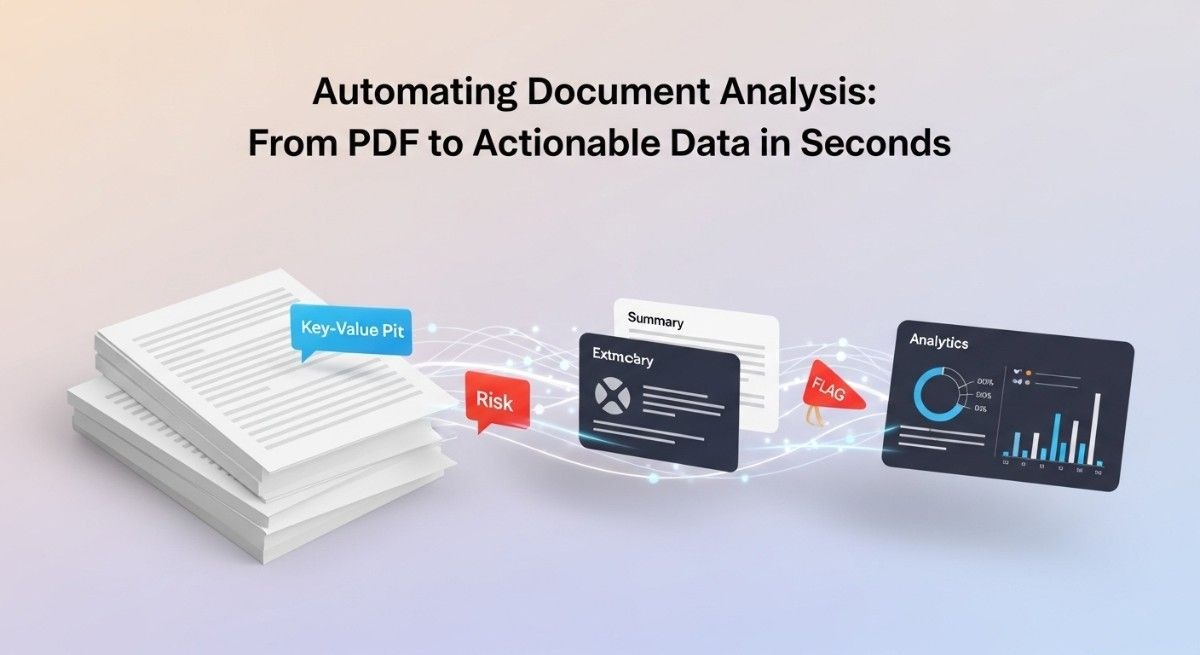
Business documents pile up faster than teams can process them. Manual data extraction consumes countless hours of productive time. Automating document analysis transforms this tedious workflow into an efficient, scalable operation.
Organizations handle thousands of PDFs daily. Invoice processing, contract review, and compliance checking demand immediate attention. Modern automation technology converts these static files into structured, usable information instantly.
Table of Contents
Understanding the Document Analysis Challenge
The Manual Processing Bottleneck
Data entry teams spend 40% of their workday copying information from PDFs. Human error rates hover around 4% even with experienced processors. The cost of maintaining large document processing teams drains operational budgets.
Invoice processing exemplifies this challenge perfectly. Accounts payable departments receive hundreds of supplier invoices weekly. Each document requires manual verification of vendor names, amounts, dates, and line items. A single invoice takes approximately 15 minutes to process completely.
Contract analysis presents even greater complexity. Legal teams review multi-page agreements searching for specific clauses. Important dates, renewal terms, and liability limitations hide within dense paragraphs. Missing critical information leads to compliance risks and financial exposure.
Healthcare organizations struggle with patient records and insurance claims. Medical billing specialists manually extract diagnosis codes and treatment information. The process creates significant delays in reimbursement cycles.
Common Document Types Requiring Automation
Financial statements arrive in various formats and layouts. Balance sheets, profit and loss reports, and cash flow statements need rapid analysis. Automating document analysis for financial data enables faster decision-making.
Purchase orders contain structured data across multiple vendors. Each supplier uses different template designs. Extracting item numbers, quantities, and pricing requires intelligent pattern recognition.
Tax forms demand perfect accuracy during processing. W-2s, 1099s, and other IRS documents contain sensitive information. Manual transcription errors create compliance headaches.
Shipping manifests and bills of lading track inventory movement. Warehouse operations depend on accurate data extraction. Real-time processing prevents supply chain disruptions.
Employee resumes flood HR departments during recruitment campaigns. Candidate qualifications, experience details, and contact information need systematic organization. Manual screening limits hiring velocity.
Core Technologies Powering Document Automation
Optical Character Recognition Fundamentals
OCR technology converts image-based text into machine-readable characters. Traditional OCR systems scan documents at pixel level. The software identifies character shapes and patterns.
Modern OCR engines achieve 99%+ accuracy on clean documents. Handwritten text recognition has improved dramatically. Cursive writing and signatures now convert reliably.
Multi-language support extends OCR capabilities globally. Systems recognize over 100 languages accurately. Right-to-left scripts like Arabic process correctly.
Table detection algorithms identify structured data within documents. Rows and columns get preserved during extraction. Complex multi-column layouts maintain proper reading order.
Image preprocessing enhances OCR performance significantly. Noise reduction, deskewing, and contrast adjustment improve results. Low-quality scans become readable through intelligent enhancement.
Machine Learning and Pattern Recognition
Neural networks learn document structures through training examples. Deep learning models identify fields without explicit programming. The systems adapt to new document formats automatically.
Named entity recognition extracts specific data types. Dates, monetary amounts, addresses, and phone numbers get identified. Context-aware extraction understands field relationships.
Classification algorithms categorize documents by type. Invoices, receipts, contracts, and forms get sorted automatically. Routing to appropriate workflows happens instantly.
Confidence scoring indicates extraction reliability. Low-confidence fields get flagged for human review. Quality control mechanisms prevent downstream errors.
Transfer learning accelerates model training. Pre-trained models adapt to specific business documents quickly. Organizations deploy automating document analysis solutions faster.
Natural Language Processing Integration
NLP algorithms understand document context and meaning. Sentiment analysis evaluates contract favorability. Key phrase extraction identifies critical clauses.
Question-answering systems retrieve specific information on demand. Users ask natural language queries about document contents. Relevant answers appear with source references.
Summarization technology condenses lengthy documents. Multi-page contracts become digestible executive summaries. Important terms and conditions get highlighted.
Entity relationship mapping connects information across documents. Customer names link to related invoices and contracts. Comprehensive visibility emerges from isolated data points.
Language translation enables cross-border document processing. International contracts get analyzed in any language. Global operations scale without language barriers.
Building an Effective Automation Workflow
Document Ingestion and Preprocessing
Digital intake channels accept documents from multiple sources. Email attachments, web uploads, and API integrations feed the system. Cloud storage synchronization ensures continuous processing.
File format conversion standardizes diverse inputs. Word documents, Excel spreadsheets, and images become uniform PDFs. Consistent formatting simplifies downstream processing.
Quality assessment filters unusable documents. Blurry scans, corrupted files, and blank pages get rejected. Clean data enters the extraction pipeline.
Metadata extraction captures document properties. Creation dates, file sizes, and source information get recorded. Audit trails support compliance requirements.
Batch processing handles high-volume scenarios efficiently. Thousands of documents process simultaneously. Parallel computing resources maximize throughput.
Data Extraction and Validation
Template matching identifies known document formats. Pre-configured rules extract fields from standard forms. Common invoice layouts process with minimal setup.
Intelligent extraction handles variable formats. Machine learning models adapt to unfamiliar layouts. New vendor invoice designs get processed successfully.
Field-level validation ensures data quality. Format checks verify dates, numbers, and codes. Business rules flag suspicious values.
Cross-field validation catches logical inconsistencies. Invoice totals must match line item sums. Shipping addresses should correspond to customer records.
External database lookups enrich extracted data. Vendor master files provide additional context. Customer relationship management systems supply account details.
Output Formatting and Integration
Structured data exports support multiple formats. JSON, XML, CSV, and Excel files accommodate different systems. API responses enable real-time integrations.
Database insertion populates enterprise systems directly. ERP platforms, accounting software, and CRM tools receive clean data. Manual data entry becomes unnecessary.
Webhook notifications trigger downstream processes. Extracted invoice data initiates payment workflows. Contract expiration dates create calendar reminders.
Dashboard visualization presents processing metrics. Document volumes, accuracy rates, and processing times appear graphically. Management gains operational visibility.
Exception handling manages edge cases gracefully. Unprocessable documents route to manual review queues. Human-in-the-loop workflows maintain quality standards.
Industry-Specific Applications
Financial Services Document Automation
Bank statement analysis extracts transaction details automatically. Account balances, deposits, and withdrawals become structured data. Automating document analysis for banking accelerates reconciliation processes.
Loan applications contain extensive supporting documentation. Pay stubs, tax returns, and credit reports need verification. Automated extraction speeds approval decisions.
Regulatory compliance documents require meticulous review. Annual reports, disclosure statements, and audit findings get analyzed. Risk management teams identify concerns faster.
Investment prospectuses contain dense financial information. Performance metrics, fee structures, and risk disclosures get extracted. Advisors make informed recommendations quickly.
Insurance claims processing depends on accurate document interpretation. Police reports, medical records, and damage assessments need review. Faster processing improves customer satisfaction.
Healthcare and Medical Records Management
Patient intake forms capture demographics and medical history. Automated extraction populates electronic health records. Registration bottlenecks disappear.
Lab results arrive as PDF reports from external facilities. Test values, reference ranges, and interpretation notes get structured. Clinical decision support systems access complete data.
Prescription forms require precise data capture. Medication names, dosages, and instructions must be perfect. Automating document analysis eliminates transcription errors.
Insurance verification documents confirm coverage details. Policy numbers, coverage periods, and copay amounts get validated. Billing accuracy improves dramatically.
Clinical trial documentation generates massive paper volumes. Consent forms, protocol amendments, and adverse event reports need tracking. Research operations scale efficiently.
Legal and Contract Intelligence
Non-disclosure agreements contain critical confidentiality terms. Effective dates, covered information, and exclusions get identified. Legal teams review provisions systematically.
Master service agreements establish business relationship frameworks. Payment terms, liability caps, and termination rights need analysis. Contract negotiation becomes data-driven.
Lease agreements specify rental obligations and restrictions. Rent amounts, escalation clauses, and renewal options get extracted. Property management operations streamline.
Employment contracts define compensation and responsibilities. Salary figures, bonus structures, and non-compete terms get cataloged. HR compliance checks happen automatically.
Intellectual property assignments transfer ownership rights. Patent numbers, invention descriptions, and inventor names get recorded. IP portfolio management gains clarity.
Supply Chain and Logistics Optimization
Bills of lading document shipment contents and destinations. Container numbers, weight specifications, and carrier details get captured. Tracking visibility improves across the supply chain.
Customs declarations require accurate product classifications. HS codes, country of origin, and declared values need verification. Import/export compliance becomes manageable.
Warehouse receiving documents confirm delivery accuracy. Packing slips, purchase orders, and quality inspections get matched. Inventory systems update in real-time.
Supplier certifications prove quality standards compliance. ISO certificates, material test reports, and inspection results get validated. Procurement risk decreases.
Freight invoices contain complex pricing calculations. Base rates, fuel surcharges, and accessorial fees need reconciliation. Payment disputes reduce significantly.
Key Benefits of Document Automation
Time and Cost Savings Analysis
Processing speed increases by 90% compared to manual methods. Documents that took 15 minutes now complete in 90 seconds. Staff productivity multiplies dramatically.
Labor cost reduction reaches 70% for high-volume operations. Teams refocus on value-added activities. Automating document analysis transforms cost structures fundamentally.
Error reduction saves money through fewer corrections. Invoice payment mistakes drop by 95%. Customer satisfaction improves with accurate processing.
Faster processing cycles accelerate business operations. Invoice approval times shrink from days to hours. Cash flow management becomes more predictable.
Scalability eliminates hiring constraints. Document volumes double without proportional staff increases. Growth happens without operational bottlenecks.
Accuracy and Compliance Improvements
Consistent extraction rules eliminate human variability. Every document follows identical processing logic. Quality standards become enforceable.
Audit trails document every processing step. Who extracted what data and when gets recorded. Regulatory examinations become straightforward.
Compliance checking happens automatically during processing. Required fields must be present and valid. Incomplete documents get rejected immediately.
Version control tracks document changes over time. Historical snapshots preserve original content. Legal defensibility strengthens.
Security controls protect sensitive information. Encryption, access logging, and data masking prevent breaches. Privacy regulations get satisfied.
Scalability and Business Growth
Cloud infrastructure handles unlimited document volumes. Processing capacity expands elastically with demand. Peak periods cause no delays.
Geographic expansion requires no additional processing staff. International offices use centralized automation platforms. Operational consistency spans locations.
New document types integrate quickly. Template configuration takes hours instead of months. Business agility increases.
Multi-tenant architectures serve diverse business units. Each department maintains separate configurations. Enterprise-wide efficiency emerges.
API connectivity enables partner ecosystem integration. Suppliers submit documents directly to processing systems. Supply chain collaboration deepens.
Selecting the Right Automation Tools
Open-Source Solutions Comparison
Apache PDFBox provides robust PDF manipulation capabilities. Text extraction and form field reading work reliably. Java developers integrate easily.
Tesseract OCR offers free character recognition. Google maintains active development. Accuracy suits many business applications.
OpenCV handles image preprocessing effectively. Python integration simplifies workflow development. Computer vision capabilities extend functionality.
Tabula extracts tables from PDF files. Data scientists appreciate CSV output format. Financial report analysis becomes manageable.
Camelot improves table extraction accuracy. Stream and lattice parsing modes handle different layouts. Python ecosystem compatibility helps adoption.
Commercial Platform Evaluation
ABBYY FlexiCapture delivers enterprise-grade extraction. Complex document types process accurately. Multi-language support covers global operations.
Kofax TotalAgility combines automation with workflow management. End-to-end process orchestration happens seamlessly. Large organizations deploy successfully.
UiPath Document Understanding integrates with robotic process automation. AI models train on custom documents. Automating document analysis connects to broader automation strategies.
Amazon Textract provides cloud-based extraction services. Pay-per-use pricing suits variable workloads. AWS ecosystem integration simplifies architecture.
Google Document AI leverages advanced machine learning. Pre-trained processors handle common documents immediately. Custom model training addresses unique requirements.
Custom Development Considerations
In-house development provides maximum control. Proprietary document formats get supported perfectly. Intellectual property remains internal.
Development timeline affects time-to-value realization. Custom solutions may require 6-12 months. Commercial platforms deploy in weeks.
Maintenance responsibilities rest with internal teams. Software updates and bug fixes demand resources. Opportunity costs merit consideration.
Integration flexibility favors custom approaches. Existing system architectures get respected completely. Technical debt avoidance becomes possible.
Total cost of ownership calculations inform decisions. Licensing fees versus development salaries need comparison. Long-term strategic value matters most.
Implementation Best Practices
Data Security and Privacy Measures
Encryption protects documents in transit and at rest. TLS 1.3 secures network communications. AES-256 encrypts stored files.
Access controls limit system usage to authorized personnel. Role-based permissions enforce least privilege principles. Activity monitoring detects anomalies.
Data retention policies comply with regulatory requirements. Automatic deletion prevents unnecessary exposure. Legal holds preserve relevant documents.
Anonymization techniques protect personal information. Names and identifiers get masked during processing. Privacy regulations get satisfied.
Third-party audits verify security controls. SOC 2 Type II reports demonstrate compliance. Customer confidence grows.
Training and Change Management
User training ensures successful adoption. Hands-on workshops demonstrate system capabilities. Documentation supports ongoing learning.
Change champions promote benefits across organizations. Early success stories build momentum. Resistance decreases through demonstrated value.
Phased rollouts minimize disruption risks. Pilot departments prove concepts before expansion. Lessons learned improve subsequent deployments.
Performance metrics track adoption progress. Usage statistics reveal engagement levels. Targeted support addresses lagging areas.
Continuous improvement processes refine configurations. User feedback drives enhancement priorities. Automating document analysis capabilities evolve with needs.
Performance Monitoring and Optimization
Processing speed metrics identify bottlenecks. Document throughput rates indicate capacity constraints. Infrastructure scaling happens proactively.
Accuracy measurements ensure quality standards. Field-level precision gets tracked continuously. Model retraining addresses declining performance.
Exception rates reveal process weaknesses. High rejection percentages suggest configuration problems. Root cause analysis drives improvements.
Cost per document calculations inform ROI assessments. Processing expenses get compared to manual alternatives. Business case validation happens regularly.
System uptime monitoring maintains service availability. Redundancy prevents single points of failure. Business continuity planning includes automation systems.
Advanced Capabilities and Future Trends
Intelligent Classification Systems
Multi-model architectures combine specialized algorithms. Document type classifiers route to appropriate extractors. Processing efficiency maximizes.
Hierarchical classification handles complex taxonomies. Main categories subdivide into specific document types. Granular routing precision improves.
Confidence thresholds determine automation versus review. High-confidence documents process straight through. Uncertain cases get human verification.
Active learning improves classifiers continuously. Reviewed documents retrain models automatically. Accuracy increases over time.
Explainable AI reveals classification reasoning. Users understand why documents got categorized. Trust in automation grows.
Cognitive Automation Advances
Reasoning engines make intelligent decisions. Contract terms get evaluated against company policies. Approval recommendations appear automatically.
Predictive analytics forecast document volumes. Staffing levels adjust proactively. Resource optimization happens systematically.
Anomaly detection flags unusual patterns. Fraudulent invoices get identified before payment. Risk management capabilities strengthen.
Knowledge graphs connect related documents. Customer interactions get mapped across touchpoints. Relationship intelligence emerges.
Conversational interfaces enable natural interactions. Users chat with documents to find information. Automating document analysis becomes intuitive.
Blockchain Integration Possibilities
Immutable audit trails prevent document tampering. Cryptographic hashes prove authenticity. Trust in digital documents increases.
Smart contracts execute based on extracted data. Invoice approval triggers automatic payments. Business process automation accelerates.
Distributed processing networks share computational loads. Blockchain nodes contribute processing capacity. Decentralized architectures emerge.
Token economics incentivize accurate extraction. Validators stake reputation on data quality. Crowdsourced verification becomes viable.
Supply chain transparency tracks document provenance. Origin certifications get verified cryptographically. Counterfeit prevention improves.
Measuring Return on Investment
Quantitative Metrics to Track
Processing time reduction measures efficiency gains. Hours saved per document get calculated. Labor reallocation opportunities appear.
Error rate improvement quantifies quality benefits. Rework costs decrease proportionally. Customer satisfaction scores rise.
Cost per transaction shows economic impact. Total processing expenses divide by document volume. Unit economics improve continuously.
Employee productivity increases free capacity. Staff handle more documents in same time. Revenue per employee grows.
Revenue cycle acceleration improves cash flow. Faster invoice processing means quicker payment. Working capital requirements decrease.
Qualitative Benefits Assessment
Employee satisfaction improves with tedious task elimination. Job enrichment comes from higher-value work. Retention rates increase.
Customer experience enhances through faster service. Quote turnaround times shrink dramatically. Competitive advantage emerges.
Compliance confidence reduces regulatory anxiety. Audit preparation becomes straightforward. Legal risk exposure decreases.
Business agility enables market responsiveness. New product launches happen faster. Strategic flexibility increases.
Innovation capacity grows as resources free up. Teams focus on transformation initiatives. Automating document analysis enables broader digital evolution.
Frequently Asked Questions
What accuracy rates can document automation achieve?
Modern systems reach 95-99% accuracy on standard documents. Clean, well-formatted files process nearly perfectly. Handwritten or degraded documents perform lower.
Accuracy depends heavily on document quality. High-resolution scans extract better than photos. Consistent formatting helps significantly.
How long does implementation typically take?
Cloud-based commercial solutions deploy in 2-4 weeks. Custom development projects require 3-6 months. Complexity and integration needs drive timelines.
Pilot programs prove concepts quickly. Production rollouts follow successful tests. Phased approaches spread implementation effort.
Can automation handle handwritten documents?
Advanced OCR engines recognize cursive writing. Accuracy ranges from 70-85% typically. Print handwriting performs better than cursive.
Signatures get captured as images. Handwriting verification confirms authenticity. Complete automation may require review.
What happens to documents after processing?
Extracted data flows to business systems. Original files get archived securely. Retention policies govern storage duration.
Some industries require original preservation. Healthcare and legal sectors maintain document images. Audit requirements determine retention.
Does automation work with scanned documents?
OCR technology specifically handles scanned images. PDF files containing image layers process correctly. Text-based PDFs extract fastest.
Scan quality affects extraction success. 300 DPI resolution recommended minimum. Color versus grayscale makes little difference.
How does automation handle multiple languages?
Modern platforms support 100+ languages. Unicode handling ensures proper character rendering. Right-to-left scripts work correctly.
Language detection happens automatically. Mixed-language documents get processed. Translation integrations enable cross-language analysis.
What security certifications should vendors have?
SOC 2 Type II demonstrates operational security. ISO 27001 proves information security management. HIPAA compliance matters for healthcare.
GDPR readiness protects European data. PCI-DSS applies to payment information. Industry-specific certifications vary.
Can existing staff manage automated systems?
Minimal technical skills suffice for operation. Training programs last 1-2 days typically. Business users manage configurations.
IT support handles infrastructure maintenance. Vendors provide ongoing technical assistance. Managed services options exist.
Read More:-The AI-Powered Law Firm: Automating Contract Reviews and Research
Conclusion

Automating document analysis represents a fundamental shift in information management. Organizations transform static PDFs into dynamic, actionable intelligence. The technology delivers measurable improvements across speed, accuracy, and cost.
Implementation success requires thoughtful planning. Technology selection must align with specific business needs. Security and compliance considerations demand attention from the start.
Document automation continues evolving rapidly. Machine learning capabilities improve monthly. New use cases emerge as technology matures.
Early adopters gain significant competitive advantages. Processing efficiency enables faster customer service. Operational costs decrease while quality improves.
The barriers to entry have never been lower. Cloud platforms eliminate infrastructure investments. Pre-trained models reduce customization requirements.
Organizations of all sizes benefit from automation. Small businesses gain enterprise capabilities. Large corporations achieve unprecedented scale.
Automating document analysis goes beyond simple digitization. The technology creates intelligent workflows. Business processes transform fundamentally.
Human workers focus on judgment and strategy. Machines handle repetitive extraction tasks. Productivity multiplies through effective collaboration.
Data quality improvements ripple through organizations. Better information drives superior decisions. Analytics capabilities strengthen with clean inputs.
Compliance burdens lighten through systematic processing. Audit trails document every action. Regulatory confidence grows continuously.
Customer satisfaction increases with faster service. Response times shrink dramatically. Competitive positioning strengthens.
The future promises even greater capabilities. Cognitive automation will make autonomous decisions. Automating document analysis becomes truly intelligent.
Investment in document automation pays long-term dividends. Technology foundations support ongoing innovation. Digital transformation accelerates across industries.
Organizations delaying adoption risk falling behind. Manual processes cannot compete indefinitely. The time to automate is now.
Starting small proves concept value. Pilot projects demonstrate ROI quickly. Success breeds expansion across departments.
Automating document analysis transforms how businesses operate. Information flows faster and more accurately. The competitive landscape shifts permanently.