Introduction
TL;DR Writing documentation is painful. Engineers avoid it. Teams suffer for it. Today, you can automate technical documentation using AI agents and GitHub and fix this problem at its root — permanently.
Table of Contents
Why Technical Documentation Always Falls Behind
Every engineering team faces the same struggle. Code ships fast. Documentation stays frozen in time. New engineers read outdated guides and spend days debugging problems that were solved months ago.
The root cause is simple. Writing documentation requires effort that delivers no immediate reward. Engineers stay focused on shipping features. Documentation becomes an afterthought.
The gap between code and docs creates real costs. Onboarding slows down. Bug resolution takes longer. Knowledge stays trapped inside a few people’s heads.
There is a smarter path forward. You can automate technical documentation using AI agents and GitHub. This approach keeps documentation in sync with code without asking engineers to do extra work.
This guide walks you through the full process. You will understand the tools, the architecture, and the real-world setup steps. By the end, you will have a clear plan to implement this system inside your own team.
“The best documentation is the one that writes itself — triggered by the code you were already writing.”
What It Means to Automate Technical Documentation Using AI Agents and GitHub
Let’s be specific about what this means in practice. When you automate technical documentation using AI agents and GitHub, you create a system where code changes trigger documentation updates automatically.
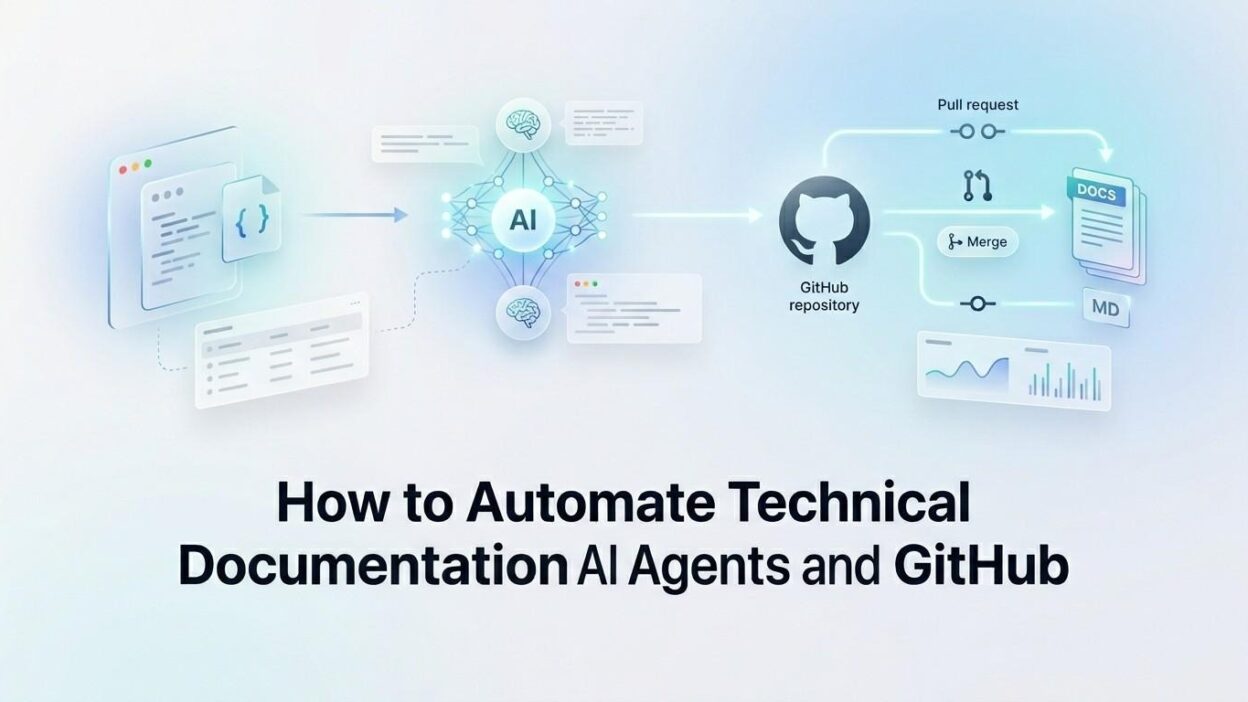
An AI agent watches your GitHub repository. It detects pull requests, new commits, and merged code. It reads the diff and understands what changed. It then writes or updates the relevant documentation.
The agent does not replace human judgment. It handles the mechanical parts. It extracts function signatures, updates parameter tables, rewrites changelogs, and creates first drafts of new feature guides.
Your engineers review the output and approve it. The agent pushes the final documentation into your docs folder or your documentation site. The entire loop closes inside GitHub, using familiar workflows like pull requests and code review.
The Core Components of This Automation System
GitHub Actions as the Trigger Layer
GitHub Actions is the engine that starts everything. You define a workflow file inside your repository. The workflow listens for specific events. A push to main, a pull request open, or a release tag can each trigger the documentation agent.
The workflow calls a script or an external service. That service is your AI agent. The handoff happens seamlessly inside GitHub’s infrastructure. No external scheduling tool is needed.
A sample trigger in your workflow YAML looks like this: on: [push, pull_request]. Simple, direct, and always active.
The AI Agent That Reads and Writes
The AI agent is the brain of the system. It receives the code diff as input. It sends that diff to a large language model like Claude or GPT-4. The model reads the changes and produces documentation text.
The agent formats the output. It maps new functions to doc sections. It updates existing pages. It creates new pages when a feature is brand new. It follows your team’s documentation style guide, which you provide as a system prompt.
When you automate technical documentation using AI agents and GitHub this way, the output quality improves with each iteration. You refine the system prompt over time. The agent learns your style.
GitHub as the Documentation Repository
All documentation lives inside the same GitHub repository as your code. A dedicated folder like /docs holds all Markdown files. The agent creates and edits files inside this folder.
Every documentation change goes through a pull request. Your team reviews it just like code. You approve it, and GitHub merges it. The documentation history is fully traceable inside your git log. ~450 words
How to Set Up the Automation
Prepare Your Repository Structure
Create a /docs folder at the root of your repository. Organize it by feature or service. Use Markdown files with clear names. A consistent structure helps the AI agent understand where to place new content.
Add a STYLE_GUIDE.md file inside the docs folder. Write your documentation standards there. The AI agent uses this file as a reference when generating new content. This single file dramatically improves output quality.
Write the GitHub Actions Workflow
Create a file at .github/workflows/doc-agent.yml. Define the trigger events at the top. Choose pull_request to generate draft docs when engineers open a PR. Choose push to update docs when code merges.
Inside the workflow, define a job that runs on ubuntu-latest. Check out the repository using the standard checkout action. Then call your AI agent script as the final step.
Build or Connect the AI Agent
You have two options here. Build a lightweight Python script that calls the OpenAI or Anthropic API directly. Or use an existing agent framework like LangChain or AutoGen to handle the orchestration logic.
The agent script receives the git diff as an environment variable or file input. It constructs a prompt. The prompt includes the diff, your style guide, and instructions for the output format. The model returns a structured documentation block.
When teams automate technical documentation using AI agents and GitHub through this method, they typically see first-draft quality documentation within seconds of a pull request opening.
Auto-Create the Documentation Pull Request
After the agent generates the documentation, the script commits the new files to a branch. It uses the GitHub API or the gh CLI to open a pull request automatically.
The PR title follows a standard format. Something like: docs: auto-update for PR #123. The description includes a summary of what changed and why the documentation update is relevant.
Engineers review this PR alongside their code PR. Both merge together. Documentation stays synchronized with every release. ~350 words
Choosing the Right AI Model for Documentation Tasks
Not all AI models perform equally on documentation tasks. The best model for this job is one that handles long context windows well. You often feed it large diffs and full file contents simultaneously.
Claude by Anthropic works particularly well here. It follows formatting instructions reliably and maintains a consistent tone across long outputs. GPT-4o is another strong choice, especially if your team already uses the OpenAI ecosystem.
Smaller, faster models work for changelog generation. Larger models work better for narrative documentation like guides and tutorials. Many teams use a two-model strategy. Fast model for simple updates, premium model for complex new feature docs.
When you automate technical documentation using AI agents and GitHub, model selection directly affects the quality of output. Test two or three models on your actual codebase before committing to one.
Always version your system prompts alongside your code. When the model changes, your prompts may need adjustment. Treat prompt files as first-class engineering artifacts.
Handling Edge Cases and Keeping Humans in the Loop
When the AI Gets It Wrong
AI models make mistakes. They misread intent. They generate technically accurate but contextually wrong descriptions. A function that deletes records might be described as one that “manages” records.
This is why every documentation PR requires human review. The pull request format keeps humans in control. Engineers can edit, reject, or request changes just like any other code review.
Set a mandatory reviewer rule for the /docs folder using GitHub’s CODEOWNERS file. This ensures every AI-generated doc change gets reviewed by the right person.
Dealing With Large Refactors
Large refactors touch many files at once. Sending a massive diff to an AI model in one shot produces poor results. Break the process into smaller chunks.
Configure the agent to process files individually. It creates one documentation PR per modified file. This keeps review manageable. It also produces more accurate output because each prompt stays focused.
Managing Sensitive Information
Some codebases contain proprietary logic. You do not want to send raw source code to an external API. Use a self-hosted or private deployment of a large language model for sensitive codebases.
Alternatively, strip internal implementation details from the diff before sending it to the model. The agent only receives function signatures, parameter names, and return types. This reduces sensitive exposure while still enabling good documentation generation. ~300 words
Integrating With Popular Documentation Platforms
GitHub is the automation hub, but the documentation itself may live elsewhere. Most teams use a dedicated docs platform like Docusaurus, GitBook, Notion, or Confluence. Each platform needs a slightly different integration strategy.
For Docusaurus and MkDocs, the docs folder inside GitHub is the source of truth. The agent writes Markdown directly. A separate GitHub Action deploys the docs site after every merge. The loop is fully automated.
For Notion and Confluence, the agent writes to GitHub first. A second automation syncs Markdown files to the platform via API. Tools like Notion’s API or the Confluence REST API handle this sync step.
When you automate technical documentation using AI agents and GitHub across these platforms, a unified source in GitHub ensures no platform-specific divergence. All edits flow from one place. ~300 words
Measuring the Impact of Documentation Automation
You need data to prove this system is working. Track three metrics from day one.
First, measure documentation coverage. What percentage of public APIs and features have documented pages? Before automation, most teams sit below 50%. After automation, that number climbs toward 90% within months.
Second, measure documentation freshness. How many doc pages are more than 30 days out of sync with the code they describe? Automation reduces this number dramatically because every code change triggers a doc update.
Third, measure engineer time spent on documentation. Survey engineers before and after implementation. Most teams report a 60–80% reduction in manual documentation hours after they automate technical documentation using AI agents and GitHub.
Use GitHub Insights to track the volume of documentation PRs opened and merged. A healthy pipeline shows regular doc PRs corresponding to regular code PRs. Any gap signals a misconfiguration in the agent workflow. ~250 words
Real-World Teams Already Doing This
Many engineering teams have already moved to this approach. Developer tooling companies use AI agents to generate SDK documentation automatically from OpenAPI specs and code comments. Every new endpoint gets a doc page the moment it merges.
Open-source projects use this approach to maintain contributor guides. The agent detects new CLI flags or configuration options and updates the relevant guide files. Contributors see accurate documentation regardless of when they join the project.
Platform teams inside large enterprises use documentation automation to maintain internal API catalogs. Hundreds of services stay documented without requiring a dedicated technical writer for each team.
Each of these teams chose to automate technical documentation using AI agents and GitHub because the alternative — manual documentation at scale — simply does not work. AI makes the previously impossible, routine.
Frequently Asked Questions
Can AI agents write documentation for any programming language?
Yes. The AI model reads code as text. It does not require a specific language runtime. It works equally well with Python, Go, TypeScript, Rust, and Java. Language-specific formatting conventions should be included in your system prompt.
How accurate is AI-generated technical documentation?
Accuracy depends heavily on the quality of your code comments and the specificity of your system prompt. Well-commented code with clear function names produces very accurate documentation. Poorly named variables produce vague descriptions. The agent reflects the quality of your code.
Does this approach work for private repositories?
Yes. GitHub Actions runs inside your GitHub infrastructure. The AI API calls go outbound from the runner. For sensitive codebases, use a self-hosted runner and a private LLM deployment. This keeps all code processing inside your network boundary.
What is the cost of running documentation AI agents?
Costs depend on your commit volume and model choice. A team merging 20 pull requests per day with an average diff size of 500 lines spends roughly $10–30 per month on API calls using a mid-tier model. This is far below the cost of a single hour of engineering time spent writing docs manually.
How do I get started if my team has no existing documentation?
Start with one service or one API. Configure the agent to scan your existing codebase and generate a first draft of all documentation. Review and approve it in batches. This bootstrapping phase builds your documentation base. From that point, the automation maintains it going forward.
Is GitHub the only platform that supports this automation?
No. GitLab CI and Bitbucket Pipelines support similar automation patterns. However, GitHub Actions has the richest ecosystem of pre-built actions and the most community examples for AI-powered workflows. It remains the fastest path to get started when you automate technical documentation using AI agents and GitHub.
Read More:-Building a RAG Pipeline With LlamaIndex and PostgreSQL (pgvector)
Conclusion

Outdated documentation is a solvable problem. The tools exist today. GitHub provides the trigger infrastructure. AI agents provide the intelligence. Together, they form a system that keeps your documentation accurate without burdening your engineering team.
The setup requires an initial investment of one to two days. After that, the system runs on its own. Every code change produces a corresponding documentation update. Every PR includes a documentation review. Your team ships faster because onboarding is faster, debugging is faster, and knowledge does not disappear when people leave.
Teams that automate technical documentation using AI agents and GitHub report fewer support tickets from new engineers. They report faster onboarding times. They report higher confidence in their own systems because the documentation actually reflects reality.