Introduction
TL;DR Legacy codebases haunt every established software company. That critical banking system runs on 20-year-old Java code nobody fully understands. The inventory management platform uses outdated PHP patterns without proper documentation. Your team inherited a monolithic application with zero comments and mysterious business logic. Sound familiar?
The documentation gap creates massive problems. New developers take months to become productive. Bug fixes introduce unexpected side effects. System migrations fail because nobody knows how components interact. Technical debt compounds while knowledge walks out the door with retiring engineers.
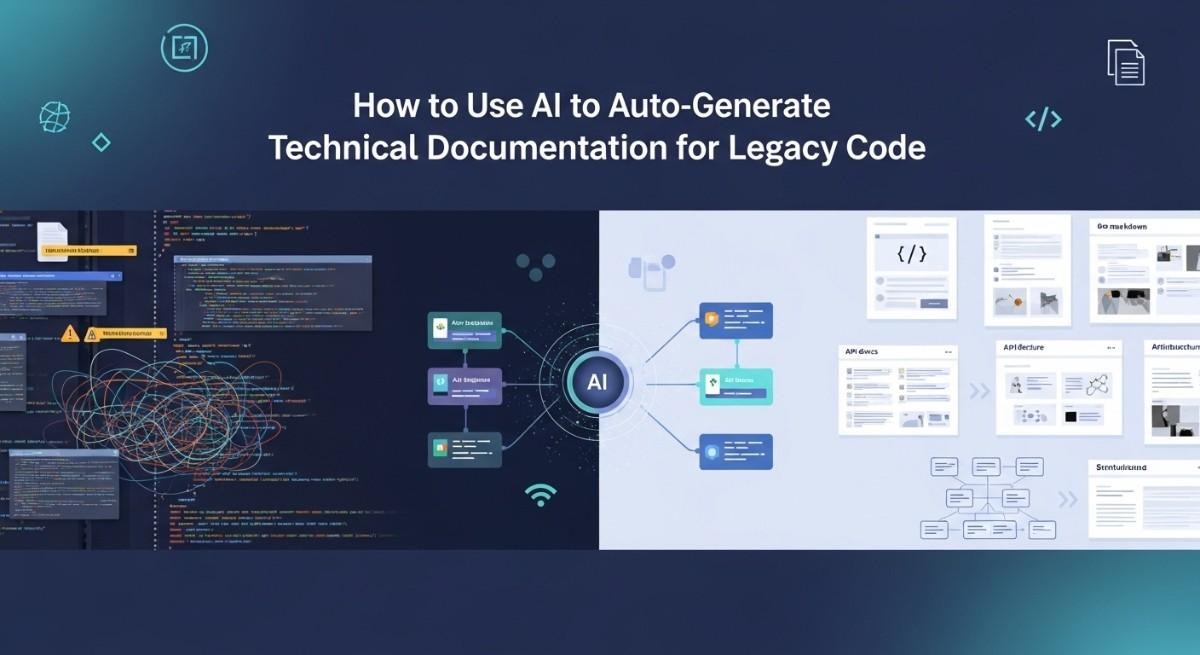
AI language models offer a breakthrough solution. Modern tools can analyze source code and auto-generate technical documentation automatically. They understand programming patterns, infer relationships, and explain complex logic. The technology transforms undocumented nightmares into comprehensible systems. Your team can finally understand what the code actually does.
This guide teaches you how to leverage AI for legacy documentation. You’ll learn which tools work best for different languages. You’ll discover proven workflows that produce quality results. You’ll see real examples of AI-generated documentation that teams actually use. By the end, you’ll have a complete strategy for documenting your legacy systems.
Table of Contents
Understanding the Legacy Code Documentation Challenge
Most legacy systems lack adequate documentation. The original developers moved on years ago. Business requirements changed through dozens of undocumented modifications. Comments became outdated or disappeared entirely. The code runs production systems but nobody really knows how.
Documentation debt accumulates silently over time. Small shortcuts seem reasonable during crunch periods. Emergency patches skip the documentation step. Refactors change behavior without updating comments. Years of these decisions create impossible situations. Teams spend more time deciphering code than writing new features.
Why Traditional Documentation Methods Fail
Manual documentation takes enormous time. Engineers must read code, understand logic, and write explanations. This work feels less important than feature development. Management rarely prioritizes documentation sprints. The backlog of undocumented code grows faster than documentation efforts.
Knowledge silos make the problem worse. One engineer might understand the payment system deeply. Another knows the authentication module inside out. Neither understands the full application. Documentation requires collaboration that rarely happens. Tribal knowledge stays trapped in individual minds.
Maintenance overhead kills documentation initiatives. Teams write beautiful docs that become outdated within months. Code changes constantly while documentation stays static. Engineers lose trust in docs after finding multiple inaccuracies. The documentation becomes worse than useless because it misleads. Teams abandon documentation efforts after repeated failures.
The Cost of Undocumented Legacy Systems
Developer onboarding suffers dramatically without proper documentation. New hires spend weeks or months understanding basic workflows. Senior developers become bottlenecks answering constant questions. The learning curve prevents teams from scaling. Hiring slows because training capacity is limited.
Bug resolution times explode in undocumented systems. Engineers must trace through thousands of lines to understand failures. Simple fixes require days of investigation. Production incidents last longer because debugging takes forever. Customer satisfaction drops while resolution costs skyrocket.
System modernization becomes nearly impossible. Migration planning requires understanding current behavior. Nobody knows all the edge cases and business rules. Teams fear breaking critical functionality. Legacy systems persist for decades because replacement risk is too high. Technical debt prevents innovation and growth.
How AI Changes the Documentation Game
AI models trained on millions of code examples understand programming patterns deeply. They recognize common architectures and design patterns. They infer relationships between components and modules. This knowledge allows them to explain code that human developers find impenetrable. The AI sees through complexity that confuses people.
Language models generate documentation at scales humans cannot match. Analyzing 100,000 lines of code takes minutes instead of months. The AI maintains consistent style and terminology across massive codebases. Documentation updates happen automatically when code changes. The speed advantage is transformative for large systems.
AI tools don’t suffer from knowledge silos or bias. They analyze the code objectively based on patterns and structure. Personal preferences don’t color the explanations. The output remains consistent regardless of which engineer runs the tool. This objectivity creates more reliable documentation foundations.
Essential AI Tools for Auto-Generate Technical Documentation
Multiple AI platforms now offer code documentation capabilities. Each tool brings different strengths and focuses. Understanding the options helps you pick the right solution for your legacy codebase.
GitHub Copilot Docs and Documentation Features
GitHub Copilot evolved beyond code completion into documentation territory. The tool now generates docstrings and comments directly in your IDE. You select a function and request documentation. Copilot analyzes the code and writes explanatory comments. The integration feels natural during development work.
The AI understands context from surrounding code. It sees how functions interact with the broader application. Generated documentation reflects actual usage patterns. Parameter descriptions match the implementation details. Return value explanations account for edge cases in the logic.
Copilot works across dozens of programming languages. Python, JavaScript, Java, C++, and Go all receive quality documentation. Legacy languages like COBOL and Fortran work but with less accuracy. The model trained on modern language examples more than legacy systems. Still, the tool provides value even for older codebases.
ChatGPT and GPT-4 for Code Analysis
ChatGPT offers flexible documentation generation through conversational prompts. You paste code snippets and request specific documentation types. The model generates markdown, HTML, or plain text explanations. Custom prompts let you control style and detail level. This flexibility suits various documentation needs.
GPT-4’s large context window handles bigger code sections. You can submit entire classes or small modules at once. The model understands relationships between methods. Generated documentation describes how components work together. The broader context creates more accurate explanations.
API access allows automated documentation workflows. Scripts can process entire repositories systematically. The OpenAI API charges based on tokens processed. Large codebases might cost hundreds of dollars to document. Calculate costs before automating full repository analysis. The investment usually justifies itself through time savings.
Claude and Anthropic’s Documentation Capabilities
Claude from Anthropic offers strong code understanding abilities. The model excels at analyzing complex logic and control flows. It generates detailed explanations of algorithmic behavior. Legacy code with intricate business rules benefits particularly. Claude often outperforms competitors on logical reasoning tasks.
The 200,000 token context window accommodates substantial code sections. You can submit multiple related files simultaneously. Claude understands cross-file dependencies and relationships. Documentation reflects the broader system architecture. This holistic view creates better explanations than isolated analysis.
Claude emphasizes accuracy and truthfulness in responses. The model admits uncertainty rather than hallucinating explanations. This reliability matters for technical documentation where errors cause problems. Teams trust Claude’s output more than tools that guess confidently. The documentation requires less fact-checking and validation.
Specialized Documentation Generation Tools
Mintlify builds documentation platforms with AI assistance. The tool generates API documentation from code annotations. It creates interactive documentation websites automatically. The platform handles hosting and updates. Teams get professional documentation without manual website building.
Swimm focuses on documentation for internal code understanding. The AI generates code walkthroughs explaining functionality. Documentation stays synchronized with code through continuous analysis. The tool integrates with GitHub and GitLab workflows. Pull requests automatically update relevant documentation sections.
Codeium offers free AI coding assistance including documentation features. The tool works in multiple IDEs like VS Code and JetBrains. Docstring generation happens with keyboard shortcuts. The free tier makes it accessible for individual developers. Teams can upgrade for collaboration features and priority support.
Preparing Your Legacy Codebase for AI Analysis
AI tools work better when you prepare code properly. A little cleanup dramatically improves documentation quality. These preparation steps maximize the value you extract from AI analysis.
Organizing and Structuring Code Files
File organization affects how AI understands relationships. Group related modules into logical directories. Separate concerns into distinct folders. The structure helps AI infer architectural patterns. Clear organization produces better contextual documentation.
Remove duplicate code before documentation generation. Duplicates confuse AI about which version is authoritative. Consolidate repeated logic into shared functions. This cleanup benefits both AI analysis and code maintainability. The investment pays dividends beyond documentation.
Split monolithic files into manageable components. Files with 5,000+ lines overwhelm some AI tools. Break large files into focused modules. Each module should have a single responsibility. Smaller, focused files generate clearer documentation. The AI can explain each piece thoroughly.
Identifying Critical Components to Document First
Not all legacy code needs documentation simultaneously. Start with the most critical or confusing modules. Payment processing, authentication, and core business logic deserve priority. These high-value areas deliver the biggest impact when documented well.
Identify code that changes frequently. Areas with active development need accurate documentation. New features integrate more safely with proper context. Bug fixes happen faster when logic is explained. Prioritize dynamic code over stable utility functions.
Document integration points and APIs before internal details. External interfaces define how systems communicate. These boundaries carry high risk during modifications. Clear API documentation prevents breaking changes. Internal implementation details can wait for later documentation passes.
Cleaning Up Code for Better AI Understanding
Add basic type hints where missing in dynamic languages. Python type annotations help AI understand data flows. JavaScript JSDoc comments provide similar benefits. The type information guides AI toward accurate explanations. This minimal annotation dramatically improves output quality.
Fix obvious syntax errors and linting issues before AI analysis. Broken code confuses language models. The AI might generate documentation for invalid implementations. Run static analysis tools to catch basic problems. Clean code produces cleaner documentation.
Preserve existing comments even if incomplete or outdated. AI models use comments as additional context clues. Partial documentation helps the AI understand developer intent. Don’t delete comments before running AI analysis. The AI can synthesize old comments into comprehensive documentation.
Setting Up Your Development Environment
Install AI tool extensions in your IDE. VS Code supports GitHub Copilot, Codeium, and others. JetBrains IDEs offer similar plugin ecosystems. Having tools integrated reduces friction. Documentation generation becomes part of your normal workflow.
Configure API access for cloud-based AI services. Store credentials securely in environment variables. Test authentication before processing large codebases. Rate limits and quotas might affect automation scripts. Understand service restrictions before starting bulk operations.
Create dedicated branches for documentation updates. Generate docs in isolation from production code. Review and refine AI output before merging. Version control lets you track documentation improvements. Teams can collaborate on refining AI-generated content systematically.
Step-by-Step Process to Auto-Generate Technical Documentation
Following a structured approach produces the best results. This workflow balances automation with human oversight. You’ll create documentation that teams actually trust and use.
Running Initial Code Analysis
Start by feeding representative code samples to your chosen AI tool. Test documentation generation on 5-10 functions or classes. Evaluate the quality and accuracy of output. This pilot reveals whether the tool suits your codebase. Different AI models perform better on different code styles.
Adjust prompts based on initial results. Generic requests like “document this code” produce generic output. Specific prompts like “explain this function’s business logic and edge cases” generate better documentation. Experiment with prompt variations to find what works. Build a library of effective prompts for your team.
Process code in logical chunks rather than random selections. Document one module completely before moving to the next. This focused approach maintains context and consistency. The AI generates better explanations when analyzing related code together. Jumping between unrelated modules produces fragmented documentation.
Crafting Effective Documentation Prompts
Specify the documentation format explicitly in prompts. Request markdown for web documentation or docstrings for code comments. The AI adapts output to match your requirements. Format specifications prevent confusion and reformatting work. Clear requirements save time in post-processing.
Ask for specific documentation elements you need. Request parameter descriptions, return value explanations, and exception documentation. Include usage examples if helpful. Be explicit about what information matters. The AI cannot read your mind about documentation standards.
Provide context about your system’s domain. Mention that code handles financial transactions, medical records, or inventory management. Domain context helps AI generate relevant explanations. The documentation uses appropriate terminology and emphasizes domain-specific concerns. Generic documentation becomes specialized through contextual prompts.
Reviewing and Refining AI Output
Never trust AI-generated documentation without verification. Read through explanations carefully. Check that described behavior matches actual code logic. The AI sometimes hallucinates features that don’t exist. Human review catches inaccuracies before they cause problems.
Test code examples provided in documentation. Run example usage snippets to verify correctness. Update examples that produce errors or unexpected results. Working examples build trust in documentation. Broken examples destroy credibility immediately.
Refine language for clarity and consistency. AI sometimes uses overly technical or unnecessarily complex phrasing. Simplify explanations where possible. Match your team’s documentation style guidelines. Consistency across documentation improves usability. Think of AI output as a first draft requiring editing.
Integrating Documentation into Your Codebase
Add generated docstrings directly into source files. Place documentation adjacent to the code it describes. This proximity keeps docs synchronized with implementation. Inline documentation helps developers immediately when reading code. The context stays available without switching tools.
Generate separate documentation files for high-level overviews. Create markdown files explaining module architecture. Document system design decisions and tradeoffs. These narrative documents complement inline code documentation. Both types serve different needs effectively.
Build automated documentation websites from inline comments. Tools like Sphinx for Python or JSDoc for JavaScript extract docstrings. They generate browsable documentation sites automatically. Your team gets searchable documentation without manual website creation. The automation ensures documentation stays current.
Advanced Strategies for Complex Legacy Systems
Large legacy systems require sophisticated approaches beyond basic AI analysis. These advanced techniques handle the scale and complexity of real-world codebases.
Handling Large Codebases Systematically
Break massive repositories into documentable segments. Create a prioritized list of modules needing documentation. Assign segments to team members or automation scripts. Parallel processing speeds up documentation for large systems. Coordination prevents duplicate work on overlapping sections.
Use version control to track documentation progress. Create issues for each module requiring documentation. Mark issues complete as documentation merges. This tracking maintains accountability and visibility. Management sees concrete progress toward documentation goals.
Automate repetitive documentation tasks through scripting. Write scripts that iterate through files calling AI APIs. Generate documentation for entire directories systematically. Review output in batches rather than individually. Automation makes documenting 100,000+ line codebases feasible. Manual approaches simply don’t scale.
Documenting Database Schemas and Queries
AI can explain database schema designs effectively. Feed table definitions and relationships to the model. Request explanations of each table’s purpose. The AI infers business concepts from column names and types. Generated documentation explains what data the system stores and why.
Document complex SQL queries using AI analysis. Paste queries and request plain English explanations. The AI describes what data the query retrieves. It explains joins, filters, and aggregations. This documentation helps developers understand data flows. Query documentation is especially valuable for business intelligence systems.
Generate entity-relationship diagrams from schema descriptions. Some AI tools can create Mermaid or PlantUML diagram code. The diagrams visualize database structure. Visual documentation helps new developers understand data architecture quickly. Combine diagrams with textual explanations for comprehensive database documentation.
Creating System Architecture Documentation
AI models can analyze multiple files to infer system architecture. Submit related modules and ask for architectural overview. The model identifies patterns like MVC, microservices, or layered architecture. Generated documentation describes how components interact. This high-level view helps developers understand the big picture.
Document API contracts and interface definitions thoroughly. AI excels at generating API documentation from code. Request OpenAPI specifications from API implementations. The AI extracts endpoints, parameters, and response formats. API documentation unblocks integration work and third-party development.
Explain design patterns used throughout the codebase. Ask AI to identify patterns like Singleton, Factory, or Observer. Document why specific patterns appear in certain contexts. This meta-documentation teaches developers the system’s design philosophy. Pattern documentation accelerates understanding of unfamiliar code sections.
Maintaining Documentation Currency
Set up continuous documentation generation in CI/CD pipelines. Run documentation tools on every commit or pull request. Automatically update docs when code changes. This automation prevents documentation drift. Current documentation maintains its value and trustworthiness.
Implement documentation quality checks in code review. Require documentation updates for any significant code changes. Reviewers verify that generated docs remain accurate. This policy prevents new documentation debt. Quality gates keep documentation synchronized with code.
Schedule periodic documentation audits using AI tools. Re-run documentation generation monthly or quarterly. Compare new output against existing documentation. Identify sections that drifted from current implementation. Update outdated documentation proactively. Regular audits catch problems before they become critical.
Best Practices for AI-Generated Documentation Quality
Quality documentation requires more than running AI tools. These practices ensure your documentation actually helps developers understand and modify code.
Balancing Automation with Human Expertise
Use AI for initial documentation drafts, not final versions. The AI provides structure and basic explanations quickly. Humans refine those drafts into polished documentation. This division of labor maximizes both efficiency and quality. Automation handles grunt work while expertise adds nuance.
Domain experts should review AI documentation for accuracy. An AI might misunderstand business logic or industry terminology. Expert review catches these mistakes. The expert adds context the AI couldn’t infer from code alone. Collaboration between AI and experts produces the best results.
Maintain style guides for consistent documentation. AI output varies in tone and structure. Style guides enforce consistency across generated documentation. Automated linting can check documentation against standards. Consistency makes documentation more professional and easier to navigate.
Handling AI Limitations and Errors
AI models sometimes hallucinate features or behaviors. The generated documentation might describe code that doesn’t exist. Critical thinking during review catches these fabrications. Never trust AI output blindly. Verification remains essential for documentation accuracy.
Legacy code with obscure patterns confuses AI models. The training data might not include similar examples. Documentation quality drops for unusual implementations. Recognize when AI struggles with your code. These sections need more human attention during documentation creation.
Proprietary business logic challenges AI understanding. The model lacks domain knowledge specific to your company. Generated documentation might miss important nuances. Supplement AI output with business context documentation. Explain the why behind code decisions that AI cannot infer.
Creating Different Documentation Types
Function-level documentation explains individual methods and their usage. AI generates excellent inline docstrings for this purpose. Each function gets parameter descriptions and return value documentation. This granular documentation helps during code reading and debugging.
Module-level documentation describes broader components. Generate README files for each major module. Explain the module’s purpose and how it fits into the system. Document key classes and their relationships. Module documentation provides context for detailed function docs.
System-level documentation covers architecture and design decisions. Use AI to help draft architecture decision records. Document major technical choices and their rationales. Explain system boundaries and integration points. High-level documentation guides strategic decisions about system evolution.
Making Documentation Discoverable and Usable
Publish documentation in formats developers actually access. Web-based documentation sites work well for many teams. Others prefer inline docs accessible through IDEs. Some teams use wiki systems for collaborative documentation. Choose formats that match your team’s workflow.
Implement search functionality for large documentation sets. Developers need to find relevant information quickly. Full-text search across all documentation improves usability dramatically. Many documentation platforms include search built-in. Searchability transforms documentation from reference to tool.
Link documentation to related resources. Connect API docs to implementation code. Link architecture diagrams to detailed component documentation. Cross-references help developers navigate documentation efficiently. Well-linked documentation acts like a knowledge graph for your system.
Measuring Documentation Success and ROI
Investing time in documentation should produce measurable benefits. Track metrics that demonstrate documentation value to stakeholders.
Tracking Developer Productivity Metrics
Measure time-to-first-commit for new team members. How long until new developers make their first contribution? Good documentation should reduce onboarding time significantly. Track this metric before and after documentation improvements. The difference proves documentation impact.
Monitor bug resolution times in documented versus undocumented code. Bugs should resolve faster in well-documented modules. Compare resolution times across different system areas. Documentation impact becomes quantifiable through these comparisons. Data convinces skeptics about documentation value.
Count questions about specific modules over time. Internal Slack or email questions indicate confusion. Well-documented code should generate fewer questions. Track question volume before and after generating documentation. Decreased interruptions prove documentation effectiveness.
Assessing Documentation Coverage
Calculate documentation coverage percentages. What percentage of functions have docstrings? How many modules have README files? Coverage metrics show progress toward documentation goals. They identify gaps requiring attention. Teams can set targets like 80% function documentation coverage.
Measure documentation freshness through timestamps. Track when documentation was last updated relative to code changes. Stale documentation loses value. Fresh documentation maintains trust and utility. Freshness metrics identify documentation needing review.
Evaluate documentation depth beyond simple presence. Count documentation lines relative to code lines. More complex code should have proportionally more documentation. This metric reveals whether documentation provides adequate detail. Superficial documentation barely helps developers.
Gathering Qualitative Feedback
Survey developers about documentation usefulness regularly. Ask specific questions about recent documentation usage. Did the docs help solve problems? Were explanations accurate and clear? Regular feedback guides documentation improvements. Developer satisfaction with docs should increase over time.
Collect feedback during code review processes. Reviewers interact with documentation while evaluating changes. Their perspective reveals documentation strengths and weaknesses. Encourage reviewers to note documentation issues. This feedback loop catches problems early.
Interview new team members about documentation quality. Their fresh perspective identifies gaps veterans overlook. New developers struggle most with documentation deficiencies. Their input prioritizes documentation improvements effectively. Exit interviews also reveal documentation pain points.
Common Challenges and Solutions
Every team encounters obstacles when implementing AI documentation strategies. These solutions help overcome typical roadblocks.
Dealing with Skeptical Team Members
Some developers distrust AI-generated documentation initially. They’ve seen too many inaccurate AI outputs. Address concerns by demonstrating quality through pilot projects. Show real examples of helpful AI documentation. Let skeptics review outputs before broader implementation.
Emphasize human review in the documentation process. AI generates drafts that humans refine. This collaborative approach addresses quality concerns. Skeptics often accept AI as a tool rather than replacement. Frame documentation generation as AI-assisted rather than AI-created.
Start with documentation types that benefit most from automation. Low-risk documentation like parameter descriptions works well initially. Success with simple docs builds confidence. Graduate to more complex documentation as team trust grows. Quick wins convert skeptics into advocates.
Managing Documentation Maintenance
Documentation maintenance overwhelms teams without automation. Manual updates become impossible at scale. Automate documentation regeneration in your development pipeline. CI/CD integration keeps docs synchronized with code. Automation removes the maintenance burden from developers.
Flag documentation that drifts from code automatically. Compare current code against existing documentation. Alert when significant divergence occurs. Automated detection catches staleness before it causes problems. Developers can prioritize updates based on automated alerts.
Assign documentation ownership to code owners. The developer responsible for module maintenance also owns its documentation. This accountability prevents documentation orphans. Documentation becomes part of regular code maintenance. Owners ensure their module documentation stays current.
Balancing Cost and Coverage
AI API usage costs money at scale. OpenAI charges per token processed. Documenting large codebases might cost hundreds or thousands of dollars. Budget for these expenses when planning documentation initiatives. The cost usually justifies itself through time savings.
Prioritize expensive AI analysis for high-value code. Not every function needs AI-generated documentation. Focus AI tools on complex or critical systems. Simple utility functions might not warrant AI analysis costs. Strategic prioritization controls expenses while maximizing value.
Consider open-source or local AI models for cost reduction. Models like Code Llama run on your infrastructure. No per-use charges apply after initial setup. Quality might lag behind commercial models. The cost savings could justify quality tradeoffs for some teams.
Read More:-Claude 3.5 Sonnet vs GPT-5 for Coding: Benchmarking Real-World Performance
Conclusion

Legacy code documentation no longer requires months of manual work. AI tools can auto-generate technical documentation at scales humans cannot match. The technology transforms undocumented nightmares into understandable systems. Your team can finally comprehend critical legacy applications.
Success requires choosing appropriate AI tools for your codebase. GitHub Copilot works well for gradual inline documentation. ChatGPT and Claude handle larger analysis tasks. Specialized tools like Mintlify create polished documentation websites. Match tools to your specific needs and workflows.
Preparation dramatically improves AI documentation quality. Organize code logically before analysis. Clean up obvious issues and add basic type hints. Prioritize critical modules for initial documentation efforts. These preparation steps maximize the value you extract from AI analysis.
Follow structured workflows when generating documentation. Start with pilot projects to refine your approach. Craft effective prompts that specify format and content requirements. Always review and refine AI output before publishing. Integrate documentation directly into your codebase for maximum utility.
Advanced strategies handle complex legacy systems effectively. Break large codebases into manageable segments. Document database schemas and system architectures comprehensively. Automate documentation generation in CI/CD pipelines. Periodic audits keep documentation current over time.
Quality requires balancing automation with human expertise. AI generates excellent first drafts quickly. Domain experts refine those drafts into accurate documentation. Style guides maintain consistency across generated content. Different documentation types serve different developer needs.
Measure documentation success through concrete metrics. Track onboarding times and bug resolution speeds. Calculate documentation coverage percentages. Gather qualitative feedback from team members regularly. Data proves documentation value to skeptical stakeholders.
Common challenges have proven solutions. Address skepticism through pilot projects and quick wins. Automate maintenance to prevent documentation drift. Control costs through strategic prioritization. Every obstacle has a practical approach that teams have validated.
Start your AI documentation journey today rather than delaying further. Choose one critical legacy module as a pilot. Select an AI tool and generate initial documentation. Review the output and refine your approach. Small wins build momentum toward comprehensive documentation.
The ability to auto-generate technical documentation changes everything about legacy code management. You can finally tackle documentation debt that accumulated over decades. New developers onboard faster. Bug fixes happen more efficiently. System modernization becomes feasible. The benefits compound across your organization.
Your legacy codebase doesn’t have to remain a mystery. AI tools provide the key to understanding complex systems. The technology is mature enough for production use. Thousands of teams already generate documentation with AI. Join them in making legacy code comprehensible.
Take action now to document your critical legacy systems. The longer you wait, the more documentation debt accumulates. Every day without documentation costs developer productivity. AI makes the solution accessible and affordable. Transform your undocumented legacy code into an understood asset. Your future self will thank you for starting today.