Introduction
TL;DR Every developer knows the frustration. You finish a sprint standup. You spot three bugs. You have two feature ideas. Then you sit down to log Jira tickets — and your momentum dies instantly.
Manual ticket creation kills flow state. It pulls you out of problem-solving mode. It turns sharp technical observations into tedious form-filling. Most teams accept this as normal. It does not have to be.
AI voice-to-text Jira ticket automation changes this completely. You speak your observations out loud. The AI transcribes your words, extracts structure, and creates a fully formed ticket inside Jira. No typing. No template hunting. No context switching.
This guide covers everything a developer needs to implement this workflow. You will understand how the technology works, which tools enable it, and how to set it up for your team. You will also learn what separates a basic voice transcription from a genuinely intelligent automation pipeline.
Developer productivity is not about working harder. It is about removing friction from the right places. Ticket creation is one of the highest-friction, lowest-value tasks in a developer’s day. Automating it frees you for the work that actually requires your brain. Read on to learn exactly how.
Table of Contents
The Real Cost of Manual Jira Ticket Creation
Most engineering managers underestimate ticket overhead. A single developer logs between five and fifteen tickets per week. Each ticket takes three to eight minutes to write properly. That adds up to over an hour of pure administrative work every week per developer.
For a ten-person engineering team, that is ten-plus hours per week spent on ticket logging. That is the equivalent of one full developer day, gone forever, every single week. The cost is not just time — it is cognitive load.
Context Switching Damages Deep Work
Research on developer productivity consistently shows that context switching is destructive. Moving from a debugging session to a Jira form breaks concentration. Your brain needs fifteen to twenty minutes to return to deep focus after an administrative interruption.
Developers often delay ticket creation to protect their flow. This creates backlogs. Important bugs get forgotten. Feature ideas vanish before anyone documents them. The team works with incomplete information because the overhead of capturing it feels too high.
Incomplete Tickets Create Downstream Problems
When developers rush through ticket creation, quality suffers. Titles become vague. Descriptions miss reproduction steps. Acceptance criteria disappear. The ticket reaches a product manager or another developer with no useful context.
This creates rework. The assignee asks clarifying questions. The original developer reconstructs context from memory. Sometimes the context is simply lost. The sprint slows down because tickets were poorly formed at the start.
AI voice-to-text Jira ticket automation solves both problems at once. Voice input is fast and natural. AI parsing makes tickets detailed and structured. You capture ideas the moment they occur, without breaking your workflow.
💡
The best time to capture a bug or idea is the exact moment you notice it. Voice automation makes that instant capture realistic for the first time.
How AI Voice-to-Text Jira Automation Works
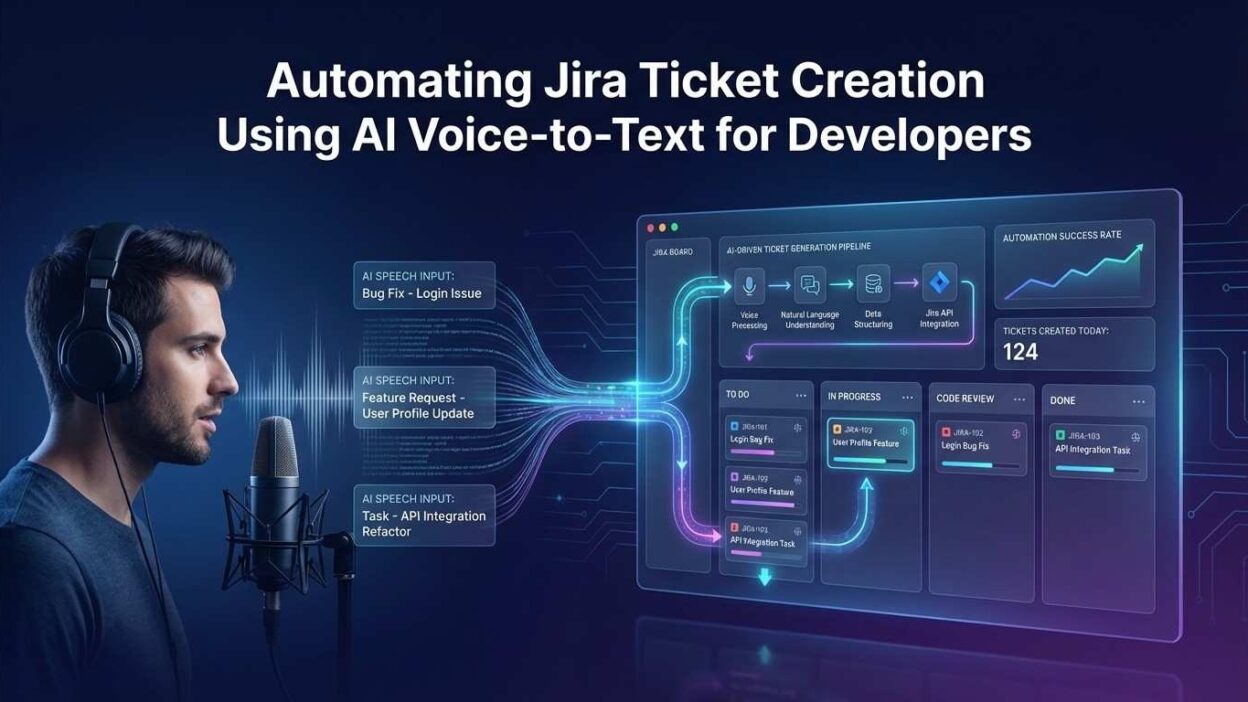
The pipeline behind this automation has three distinct layers. Understanding each layer helps you build a reliable system and troubleshoot problems when they arise.
Layer One — Voice Capture and Transcription
The first layer records your voice and converts speech to text. Modern speech recognition models handle this with remarkable accuracy. Tools like OpenAI Whisper, Google Speech-to-Text, and AssemblyAI transcribe speech at near-human accuracy rates even with technical jargon, acronyms, and product-specific terminology.
Quality voice capture requires a decent microphone and a relatively quiet environment. Most modern laptops perform adequately. A USB headset improves accuracy significantly. The transcription layer does not need to understand context — it only needs to produce accurate text from your spoken words.
Layer Two — AI Parsing and Structuring
Raw transcription text is unstructured. You might say: “There is a bug on the checkout page where the coupon field throws a null pointer error when the cart is empty, should be P1 and assigned to the frontend team.” That is useful information — but it is not a Jira ticket yet.
The second layer sends your transcript to a language model. The model extracts structure. It identifies the issue type, summary, description, priority, and assignee from your spoken words. It formats this data into a JSON payload ready for the Jira API.
This is where AI voice-to-text Jira ticket automation becomes genuinely powerful. The AI does not just transcribe — it thinks. It interprets your intent. It fills in reasonable defaults. It generates acceptance criteria from a brief feature description. It turns a ten-second voice note into a two-hundred-word, fully structured ticket.
Layer Three — Jira API Integration
The third layer posts the structured data to Jira using the REST API. Jira’s API is well-documented and supports all standard ticket fields. Your automation sends a POST request with the parsed fields. Jira creates the ticket and returns a ticket ID. The whole process takes under ten seconds from the moment you finish speaking.
⚙️ Three layers. One workflow. Voice in — structured Jira ticket out. No forms, no tabs, no interruptions.
Tools and Technologies That Power This Workflow
Building this pipeline does not require a large engineering effort. Several mature tools cover each layer. Here is what developers actually use in production setups today.
Speech Recognition Options
OpenAI Whisper is the most popular open-source choice. It runs locally or via API. It handles technical vocabulary, multiple accents, and noisy audio better than most alternatives. The whisper-1 model through OpenAI’s API costs fractions of a cent per minute of audio. Local deployment is free and keeps your audio data on-premises.
AssemblyAI offers real-time transcription with speaker detection and custom vocabulary support. It is slightly more accurate than Whisper on technical speech when you configure a custom word list with your team’s product terms. Pricing is competitive for teams transcribing under a few hours per day.
Google Speech-to-Text integrates naturally into Google Cloud environments. Teams already running GCP infrastructure often choose it for ease of setup. It handles streaming audio natively, which enables real-time rather than batch transcription.
AI Parsing and Structuring Tools
Most developers use OpenAI’s GPT-4o or Anthropic’s Claude for the parsing layer. You send a system prompt that defines the Jira ticket schema. You send the transcript as the user message. The model returns structured JSON. This approach is fast, flexible, and easy to modify as your ticket schema evolves.
For teams that prefer local models, Ollama with a Llama 3.1 or Mistral model works well. Accuracy drops slightly compared to frontier models, but response times improve and data privacy is maintained completely.
Jira Integration Methods
Jira’s REST API handles ticket creation reliably. You call the /rest/api/3/issue endpoint with your structured payload. Authentication uses an API token tied to a service account. Most teams wrap this in a small Python or Node.js script. Some use n8n or Zapier as a no-code bridge between the AI and Jira.
AI voice-to-text Jira ticket automation fits naturally into these existing workflow automation platforms. You do not need to build infrastructure from scratch. You connect the pieces and deploy.
Step-by-Step: Building Your First Automation Pipeline
Here is how to build a working pipeline from scratch. This walkthrough assumes you have a Jira Cloud account, an OpenAI API key, and basic Python familiarity. The whole setup takes under two hours.
Set Up Voice Recording
Create a simple script that records audio from your microphone. Python’s sounddevice library handles this cleanly. Record for a fixed duration (ten to thirty seconds works for most ticket descriptions) or use push-to-talk logic with a keyboard shortcut. Save the recording as a WAV file. This file is the input for the transcription step.
Add a global keyboard shortcut to trigger the recording script. On macOS, use Automator or BetterTouchTool. On Linux, use xbindkeys. On Windows, use AutoHotkey. Press the shortcut, speak your ticket, release, and the pipeline starts automatically.
Transcribe the Audio
Send the WAV file to OpenAI’s Whisper API. The call is a simple multipart POST request. The API returns a JSON object with a text field containing the full transcript. Store this text as a variable. The transcription usually completes in one to three seconds for a ten-second clip.
Parse the Transcript with AI
Send the transcript to your chosen language model with a structured system prompt. Your prompt should define every field you want to extract: summary, description, issue_type, priority, labels, and assignee. Instruct the model to return valid JSON only. Parse the response and validate the required fields before the next step.
This is the intelligence layer of AI voice-to-text Jira ticket automation. The model interprets your intent, not just your words. A vague phrase like “it breaks on mobile” becomes a properly formatted description with device context and reproduction notes, inferred from the surrounding spoken context.
Create the Ticket in Jira
Authenticate with the Jira REST API using your email and API token via Basic Auth. Construct the request payload using the parsed JSON from the previous step. Map your AI-extracted fields to Jira’s expected field names. POST to your project’s issue endpoint. Log the returned ticket key for confirmation.
Confirm and Notify
Send yourself a desktop notification with the new ticket’s key and summary. On macOS, use osascript. On Linux, use notify-send. This closes the loop. You spoke for ten seconds. Your Jira board now has a complete, structured ticket. You never left your editor.
⚡ Total time from speaking to ticket created: under fifteen seconds. Total developer effort: one keyboard shortcut and ten words.
Prompt Engineering for Accurate Ticket Parsing
The quality of your parsed tickets depends almost entirely on your system prompt. A weak prompt produces generic, inconsistent output. A well-crafted prompt produces tickets indistinguishable from those a senior developer wrote manually.
Define the Output Schema Explicitly
Tell the model exactly what fields to extract and what each field means in your team’s context. Include examples of high-quality tickets directly in the prompt. The model learns your team’s vocabulary, priority scale, and ticket format from these examples.
Specify your priority scale. If your team uses P0 through P4, define each level. If you use Jira’s default Critical, High, Medium, and Low, map each to concrete criteria. The model applies this mapping consistently to every ticket it parses.
Handle Ambiguity Gracefully
Developers speak imprecisely. Your prompt should instruct the model to make intelligent inferences rather than fail on ambiguity. Tell it to use “Bug” as the default issue type when none is specified. Tell it to default priority to “Medium” when no urgency indicator appears in the transcript. Tell it to leave assignee blank rather than guess wrong.
Include Your Team’s Product Vocabulary
Add a glossary section to your system prompt. List your product’s feature names, internal tool names, and team identifiers. This prevents the model from misinterpreting domain-specific language. A phrase like “the CMS pipeline is throwing on stage” should map clearly to your Staging environment and your content management system.
Strong prompt engineering is what separates adequate AI voice-to-text Jira ticket automation from excellent automation. Spend an hour on your prompt. Test it with twenty representative voice samples. Refine it. Your tickets will stay consistently high quality for months without further adjustment.
No-Code and Low-Code Approaches
Not every developer wants to build a custom Python pipeline. Several no-code and low-code platforms now support this workflow out of the box. Here are the best options for teams that prefer configuration over code.
Using n8n for the Full Pipeline
n8n is an open-source workflow automation platform. It has native nodes for Whisper, OpenAI, and Jira. You connect these nodes visually. A webhook triggers the workflow when a new audio file appears in a specified folder or is sent via an HTTP request. n8n handles the full pipeline without a single line of custom code.
Self-hosting n8n keeps your audio and transcript data private. Cloud-hosted n8n is available for teams that prefer a managed service. Either way, the workflow runs reliably and restarts automatically on failures.
Zapier and Make Alternatives
Zapier and Make both support OpenAI and Jira integrations. The audio transcription step is slightly more cumbersome since neither has a native Whisper node. Workarounds include sending audio to AssemblyAI via webhook or using a custom code step for the API call. For teams already using Zapier for other automations, adding this workflow is straightforward.
Raycast and Alfred Extensions
Power users on macOS often use Raycast or Alfred as the trigger layer. Custom extensions for these launchers can record audio, call Whisper, parse with GPT-4o, and post to Jira — all triggered by a single keyboard shortcut. The extension model keeps everything lightweight and always-available.
No-code AI voice-to-text Jira ticket automation is a realistic option for teams without dedicated DevOps resources. The tools exist. The integrations are mature. You configure, test, and deploy in an afternoon.
Team Adoption: Getting Developers to Actually Use It
The best automation pipeline fails if developers ignore it. Adoption is the real challenge in any workflow change. Here is how to make this one stick.
Start with the Pain-Aware Developers
Find the two or three developers on your team who complain loudest about Jira overhead. Show them the workflow. Let them run it themselves. When they see a fully formed ticket appear in fifteen seconds, the reaction is immediate. These early adopters become your internal champions.
Peer influence drives developer tool adoption faster than management mandates. Get the respected senior developers using the tool first. Others follow naturally.
Make the Trigger Invisible
The keyboard shortcut approach is critical. Any workflow that requires opening a browser tab, navigating to a tool, or clicking more than twice will lose to the habit of opening Jira directly. The voice trigger must feel like a reflex. One shortcut. Speak. Done.
Show Ticket Quality Comparisons
Run the pipeline for two weeks. Then compare the average word count and completeness score of voice-generated tickets versus manually created tickets. Almost always, the voice-generated tickets are longer, more detailed, and better structured. This data makes the business case visible and concrete.
Teams that successfully implement AI voice-to-text Jira ticket automation report a measurable improvement in sprint planning efficiency. Product managers notice the difference immediately. Tickets that arrive complete require fewer clarification rounds and move through the workflow faster.
Security, Privacy, and Data Governance
Any tool that processes developer speech and sends data to external APIs requires careful security consideration. Here is how to handle this responsibly.
Audio Data Sensitivity
Voice recordings can contain sensitive information. A developer describing a security vulnerability out loud produces an audio file with proprietary details. Define clear policies about what is appropriate to speak into the pipeline. Sensitive architectural decisions and unreleased product information should stay out of cloud-based transcription services.
For high-security environments, run Whisper locally. OpenAI’s Whisper model runs on a standard developer laptop. Local deployment keeps all audio data on-premises. Nothing leaves your network. Transcription quality remains excellent.
Jira API Token Management
Store your Jira API token in environment variables, never in code. Use a dedicated service account for automation rather than a personal developer account. Scope the service account’s permissions to issue creation only. Rotate the token every ninety days or after any team member departure.
AI Model Data Policies
Review your AI provider’s data retention policy before using cloud-based parsing. OpenAI’s API does not use API inputs for model training by default. Anthropic’s API has similar protections. For teams with strict compliance requirements, on-premises language models eliminate this concern entirely.
Well-implemented AI voice-to-text Jira ticket automation is as secure as any other API-based developer tool. The key is treating it with the same discipline you apply to any production integration: least privilege, encrypted credentials, and documented data flows.
Measuring ROI and Productivity Gains
Every engineering leader wants to justify new tooling with data. Here is how to measure the impact of this automation concretely and honestly.
Track Time Saved Per Ticket
Before deploying the automation, ask each developer to time themselves creating five tickets manually. Record the average. After two weeks of using the voice pipeline, measure the same metric. The reduction is typically sixty to eighty percent. For a developer who creates ten tickets per week, this saves forty to sixty minutes weekly.
Measure Ticket Completeness
Define a completeness score for your tickets. A complete ticket has a clear summary, reproduction steps or acceptance criteria, a priority label, and at least one component tag. Score a random sample of manually created tickets and voice-generated tickets. The completeness gap is usually significant and visible within the first two weeks.
Count Clarification Requests
Track how often product managers or other developers comment on tickets asking for clarification. This metric captures the downstream cost of poor ticket quality. Voice-generated tickets with AI parsing consistently produce fewer clarification requests. Fewer questions mean faster ticket movement and smoother sprints.
Teams that measure AI voice-to-text Jira ticket automation outcomes carefully find the ROI compelling. The tooling cost is low. The time saved compounds weekly. The quality improvement has measurable effects on sprint velocity and planning confidence. For any team logging more than fifty tickets per month, the investment pays back within days.
Frequently Asked Questions
What is AI voice-to-text Jira ticket automation?
AI voice-to-text Jira ticket automation is a workflow that converts spoken words into structured Jira tickets. You speak a description of a bug, feature, or task. AI transcribes and parses your words. The system creates a complete ticket in Jira automatically. No manual form-filling is required.
Which speech recognition model works best for technical vocabulary?
OpenAI Whisper performs best on technical speech. It handles acronyms, camelCase names, and developer jargon reliably. AssemblyAI with a custom vocabulary list is a strong alternative. Both outperform general-purpose dictation tools on technical content. For completely offline setups, the local Whisper model is the clear choice.
Do I need coding skills to set up this automation?
No. Tools like n8n, Zapier, and Make support this workflow with visual configuration. You connect pre-built nodes for Whisper, GPT-4o, and Jira without writing code. Basic familiarity with API authentication helps during setup. A non-developer can complete the full configuration in a few hours using these platforms.
Can this automation handle multiple issue types like bugs, stories, and epics?
Yes. Your AI parsing prompt defines how to detect and assign issue types from spoken context. Words like “it crashes” or “error” map to Bug. Phrases like “users should be able to” map to Story. “Quarter-long initiative” maps to Epic. The model applies these rules consistently across every voice input.
Is this approach secure enough for enterprise teams?
Yes, with the right configuration. Use local Whisper for audio transcription to keep voice data on-premises. Use a dedicated Jira service account with minimal permissions. Store all credentials in a secrets manager. For the AI parsing layer, self-hosted models eliminate external data exposure entirely. Enterprise-grade security is achievable without sacrificing functionality.
How accurate is the ticket content generated from voice input?
Accuracy depends on transcription quality and prompt quality. Well-configured pipelines produce tickets that need edits on fewer than fifteen percent of inputs. Most voice-generated tickets require zero manual correction. Transcription errors decrease as you add product-specific vocabulary to your speech recognition configuration.
Can this workflow integrate with GitHub Issues or Linear instead of Jira?
Yes. The voice capture and AI parsing layers work identically regardless of your project management tool. Only the API integration layer changes. GitHub Issues, Linear, Asana, and Notion all have REST APIs that accept similar structured payloads. You swap the final API call. Everything else stays the same.
Does speaking faster or using incomplete sentences affect ticket quality?
Modern transcription models handle natural, conversational speech well. You do not need to speak slowly or use complete sentences. The AI parsing layer compensates for fragmented speech by inferring structure from context. Speaking clearly at a normal pace is sufficient. Background noise above a moderate level does reduce accuracy.
The Future of Voice-Driven Developer Workflows
Voice automation for developer tools is still early. The current generation of workflows focuses on discrete tasks like ticket creation. The next generation will handle continuous, context-aware interactions throughout the development day.
Real-Time Meeting-to-Tickets
Meeting transcription tools already capture standup and planning sessions. The next step connects these transcripts directly to AI voice-to-text Jira ticket automation pipelines. Every action item spoken in a meeting becomes a ticket automatically. No one writes notes. The backlog updates in real time during the call.
IDE-Integrated Voice Commands
Editors like Cursor and VS Code are beginning to support voice-triggered AI commands. The natural extension is voice-triggered ticket creation from within the IDE itself. You highlight a piece of broken code, speak “create a bug ticket for this,” and the ticket appears with the code snippet, file path, and line number already attached.
Multimodal Ticket Creation
Future pipelines combine voice with screen context. You speak your description while the system captures a screenshot of the relevant UI or error state. The AI combines your voice description with the visual context to create a richer ticket than either input could produce alone. This is not experimental. Early versions exist today in tools like Jam.dev and Loom.
The trajectory is clear. AI voice-to-text Jira ticket automation is not a novelty feature. It is the early stage of a fundamental shift in how developers interact with project management tools.
Read More:-The Best Open-Source Alternatives to GitHub Copilot for Teams
Conclusion
Manual ticket creation is a productivity tax. Every developer pays it. Most accept it as unavoidable overhead. It is not unavoidable — it is automatable right now with tools that already exist and cost almost nothing to deploy.
AI voice-to-text Jira ticket automation delivers three compounding benefits. Speed: tickets appear in under fifteen seconds. Quality: AI-structured tickets are more complete and consistent than manually written ones. Flow: you stay in your creative problem-solving state because you never open a browser tab or fill a form.
The technology stack is mature. Whisper handles transcription accurately. GPT-4o and Claude handle parsing intelligently. Jira’s API handles creation reliably. You can connect all three with a Python script in an afternoon, or use n8n without writing any code at all.
Security and privacy are manageable with standard engineering discipline. Local models keep your data on-premises. Scoped API tokens limit blast radius. Defined usage policies protect sensitive information from entering cloud pipelines.
The ROI is measurable and fast. Time saved per week is real and recurring. Ticket quality improvements reduce sprint planning friction. Clarification requests drop. Sprints move faster.
Start small. Build a single-developer pipeline this week. Run it for two weeks. Measure the results. Then share what you built with your team. AI voice-to-text Jira ticket automation earns its place in your workflow the moment you use it. The best time to start is today.